Release Notes for UCC SMI, Release 2026.01.1.08
Available Languages
Bias-Free Language
The documentation set for this product strives to use bias-free language. For the purposes of this documentation set, bias-free is defined as language that does not imply discrimination based on age, disability, gender, racial identity, ethnic identity, sexual orientation, socioeconomic status, and intersectionality. Exceptions may be present in the documentation due to language that is hardcoded in the user interfaces of the product software, language used based on RFP documentation, or language that is used by a referenced third-party product. Learn more about how Cisco is using Inclusive Language.
- US/Canada 800-553-2447
- Worldwide Support Phone Numbers
- All Tools
 Feedback
 Feedback
Ultra Cloud Core - Subscriber Microservices Infrastructure, Release 2026.01.1.08
Ultra Cloud Core - Subscriber Microservices Infrastructure, Release 2026.01.1.08
This Release Notes identifies changes and issues related to the release of Ultra Cloud Clore (UCC) Subscriber Management Infrastructure (SMI).
The key highlights of this release include:
· Easier operations: Consistent time-zone support improves monitoring and troubleshooting.
· Smoother upgrades: CDL migrations are now simpler and safer, preparing for future updates.
· Flexible setup: More installation options for Inception, including qcow2 images.
· Better storage control: Enhanced storage configuration for UCS servers allows for improved performance and reliability.
· Stronger security: Data at REST is now encrypted, with options for secure password management.
For more information on SMI, see the Related resources section.
Release lifecycle milestones
This table provides EoL milestones for Cisco UCC SMI software:
Table 1. EoL milestone information for UCC SMI, Release 2026.01.1.08
| Milestone |
Date |
| First Customer Ship (FCS) |
30-Jan-2026 |
| End of Life (EoL) |
30-Jan-2026 |
| End of Software Maintenance (EoSM) |
31-July-2027 |
| End of Vulnerability and Security Support (EoVSS) |
31-July-2027 |
| Last Date of Support (LDoS) |
31-July-2028 |
These milestones and the intervals between them are defined in the Cisco Ultra Cloud Core (UCC) Software Release Lifecycle Product Bulletin available on cisco.com.
This section provides a brief description of the new software features introduced in this release.
Table 2. New software features for UCC SMI, Release 2026.01.1.08
| Product impact |
Feature |
Description |
| Ease of Use |
System local time-zone support |
SMI supports configuring a consistent system local time zone across the Inception deployer, Cluster Manager, Kubernetes nodes, Cisco Integrated Management Controller (CIMC), and network function pods. Native support ensures log timestamps, dashboards, and troubleshooting data reflect the customer’s local time, which improves traceability and audit accuracy for operators. |
| Upgrade |
CDL v1.12 to v2.1 migration to KRaft mode |
CDL v2.1 introduces Kafka Raft (KRaft) mode to remove the legacy ZooKeeper dependency ahead of Kafka 4.0. This feature guides customers running CDL v1.12 through this release so they can migrate metadata from ZooKeeper to the new controller quorum without data loss, maintain service availability, and prepare for the upcoming release. |
| Ease of Setup |
Support qcow2 image for Inception installation |
SMI additionally provides a qcow2 disk image to support deployment of Inception server. Operators can choose either ISO or qcow2 artifacts during release consumption, aligning with native hypervisor requirements. |
| Hardware Reliability |
Multiple volumes and RAID type configuration for UCS servers |
You can now provision multiple virtual drives (VDs) with specific RAID policies when deploying SMI Cluster Deployer on Cisco UCS bare-metal servers, instead of being limited to a single, auto-selected boot disk. The enhanced storage adapter model gives you detailed control over controllers, physical drives, and policies, so you can balance performance, resiliency, and workload separation according to your needs. |
| Ease of Use |
ZIP file format support |
The CNDP now supports ZIP file format for UPF and VPC-DI software artifact downloads, eliminating the need for manual conversion of CCO-provided ZIP packages. This feature extends the CNDP software download framework to directly download, validate, and extract ZIP files. The system uses the same qcow2 processing workflow as with TGZ files, leveraging ansible.builtin.unarchive for automatic format detection and extraction. This ensures backward compatibility while simplifying image deployment. |
| Upgrade |
Kubernetes version upgrade |
With this release, you can upgrade the Kubernetes version from 1.34 to 1.34.3. |
| Software Reliability |
Application data encryption |
SMI stores NF application data under /var/log, /data or /mnt/stateful_partition/, historically without encryption. This feature integrates Linux Unified Key Setup (LUKS) disk encryption so clusters can protect data at rest, optionally bind credentials to Trusted Platform Module (TPM) hardware. |
| Upgrade |
Updated version for third-party software |
In this release, SMI supports an upgraded version of Containerd, from 1.7.28 to 2.1.4. |
There are no behavior changes introduced in this release.
This table lists the resolved issues in this specific software release.
Note: This software release may contain bug fixes first introduced in other releases. To see additional information, click the bug ID to access the Cisco Bug Search Tool. To search for a documented Cisco product issue, type in the browser: <bug_number> site:cisco.com
Table 3. Resolved issues for UCC SMI, Release 2026.01.1.08
| Bug ID |
Description |
| CM cluster sync is failing when triggered from Inception Server |
|
| SCSMFI21 internal_atac_epc_cs user unable to login to SCSMFI21/22 and SCSMFD21/22 |
|
| SMI deployer not able to validate SPA (signed) images |
This table lists the open issues in this specific software release.
Note: This software release may contain open bugs first identified in other releases. To see additional information, click the bug ID to access the Cisco Bug Search Tool. To search for a documented Cisco product issue, type in the browser: <bug_number> site:cisco.com
Table 4. Open issues for UCC SMI, Release 2026.01.1.08
| Bug ID |
Description |
| CM-HA upgrade from i03 to i05, postgres pod in reload loop |
|
| SMI build 2026.01.1.05 to 2026.01.1.08 upgrade failed on NF Clusters |
This section provides the important guidelines in this specific software release.
· For dual stack cluster deployments, it is strongly recommended to explicitly configure both node-ipv6 and ssh-ipv6. If you enable node-ipv6 on an existing deployment where it was not previously set up, be sure to redeploy the clusters to apply the changes.
· To install the inception server in Ubuntu 22, the prerequisite is to add the following highlighted part in /etc/docker/daemon.json file.
ubuntu@pyats-inception:~$ cat /etc/docker/daemon.json
{
"default-address-pools": [{
"base": "172.50.0.0/16",
"size": 24
},
{
"base": "fd01::/80",
"size": 96
}],
"log-driver": "journald",
"live-restore": true,
"userland-proxy": false,
"icc": false,
"ipv6": true,
"fixed-cidr-v6": "fd00::/80"
}
When installing the Inception server on Red Hat Enterprise Linux (RHEL), ensure that the Jinja2 Python package is installed as a prerequisite. You can do this by running the following command:
python3 -m pip install Jinja2
NOTE: Secure boot remains disabled in this release due to an update of the signing key in Cisco secured Linux.
This section lists compatibility information of the Cisco UCC software products that are verified to work with this version of the UCC SMI software.
Table 5. Compatibility information for UCC SMI, Release 2026.01.1.08
| Product |
Supported Release |
| Cisco UCS M8 |
4.3(6.250053) 6.0(1.250130) |
| Cisco UCS C220 M7 |
4.3(3.240022) 4.3(5.250001) |
| Cisco UCS C220 M6 |
4.3(3.240022) 4.3(5.250001) |
| Cisco UCS C220 M5 |
4.3(2.250016) |
This section provides information about the release packages associated with SMI.
Table 6. Software packages for UCC SMI, Release 2026.01.1.08
| Software Package |
Description |
Release |
| smi-install-disk.24.04.0-20260120.iso.SPA.tgz |
The application-level POD ISO image signature package for use with bare metal deployments. This package contains the base ISO image as well as the release signature, certificate, and verification information. |
24.04.0-20260120 |
| smi-install-disk.24.04.0-20260120.qcow2.SPA.tgz |
The application-level POD QCOW image signature package for use with bare metal deployments. This package contains the QCOW image as well as the release signature, certificate, and verification information. |
24.04.0-20260120 |
| cee-2026.01.1.08.SPA.tgz |
The SMI Common Execution Environment (CEE) offline release signature package. This package contains the CEE deployment package as well as the release signature, certificate, and verification information. |
2026.01.1.08 |
| cluster-deployer-2026.01.1.08.SPA.tgz |
The SMI Deployer image signature package for use with bare metal deployments. This package contains the Deployer image as well as the release signature, certificate, and verification information. |
2026.01.1.08 |
| NED package |
The NETCONF NED package. This package includes all the yang files that are used for configuration. |
ncs-6.4.8.2-cisco-cee-nc-1.1. 2026.01.1.08.tar.gz ncs-6.4.8.2-cisco-smi-nc-1.1. 2026.01.1.08.tar.gz ncs-6.1.14-cisco-cee-nc-1.1.2026.01.1.08.tar.gz ncs-6.1.14-cisco-smi-nc-1.1.2026.01.1.08.tar.gz |
| NSO |
|
6.4.8.2 6.1.14 |
Cloud native product version numbering system
The show helm list command displays detailed information about the version of the cloud native product currently deployed.
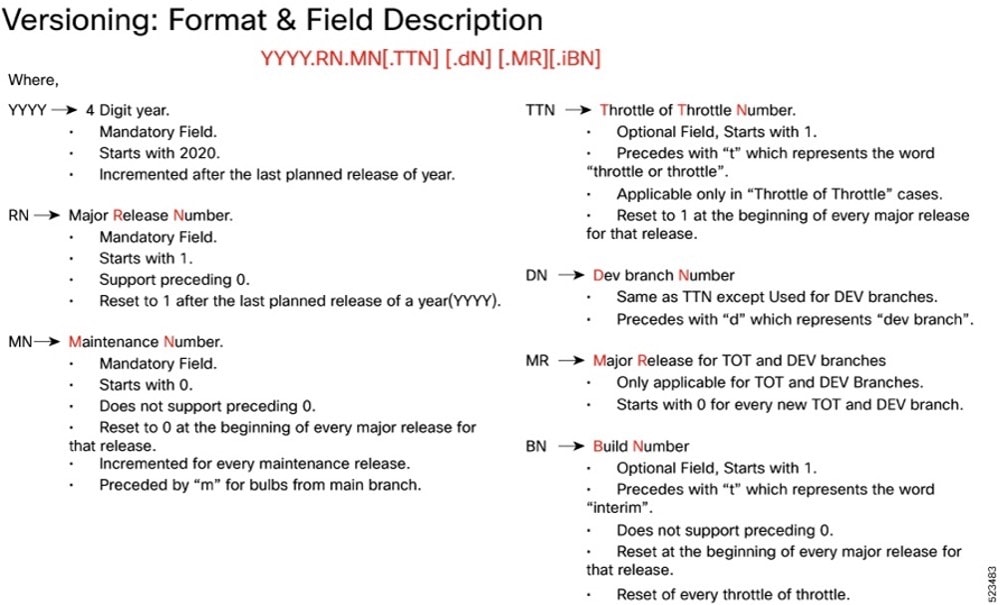
The appropriate version number field increments after a version has been released. The new version numbering format is a contiguous sequential number that represents incremental changes between releases. This format facilitates identifying the changes between releases when using Bug Search Tool to research software releases.
Software integrity version
To verify the integrity of the software image you have from Cisco, you can validate the SHA512 checksum information against the checksum identified by Cisco for the software.
Image checksum information is available through Cisco.com Software Download Details. To find the checksum, hover the mouse pointer over the software image you have downloaded.
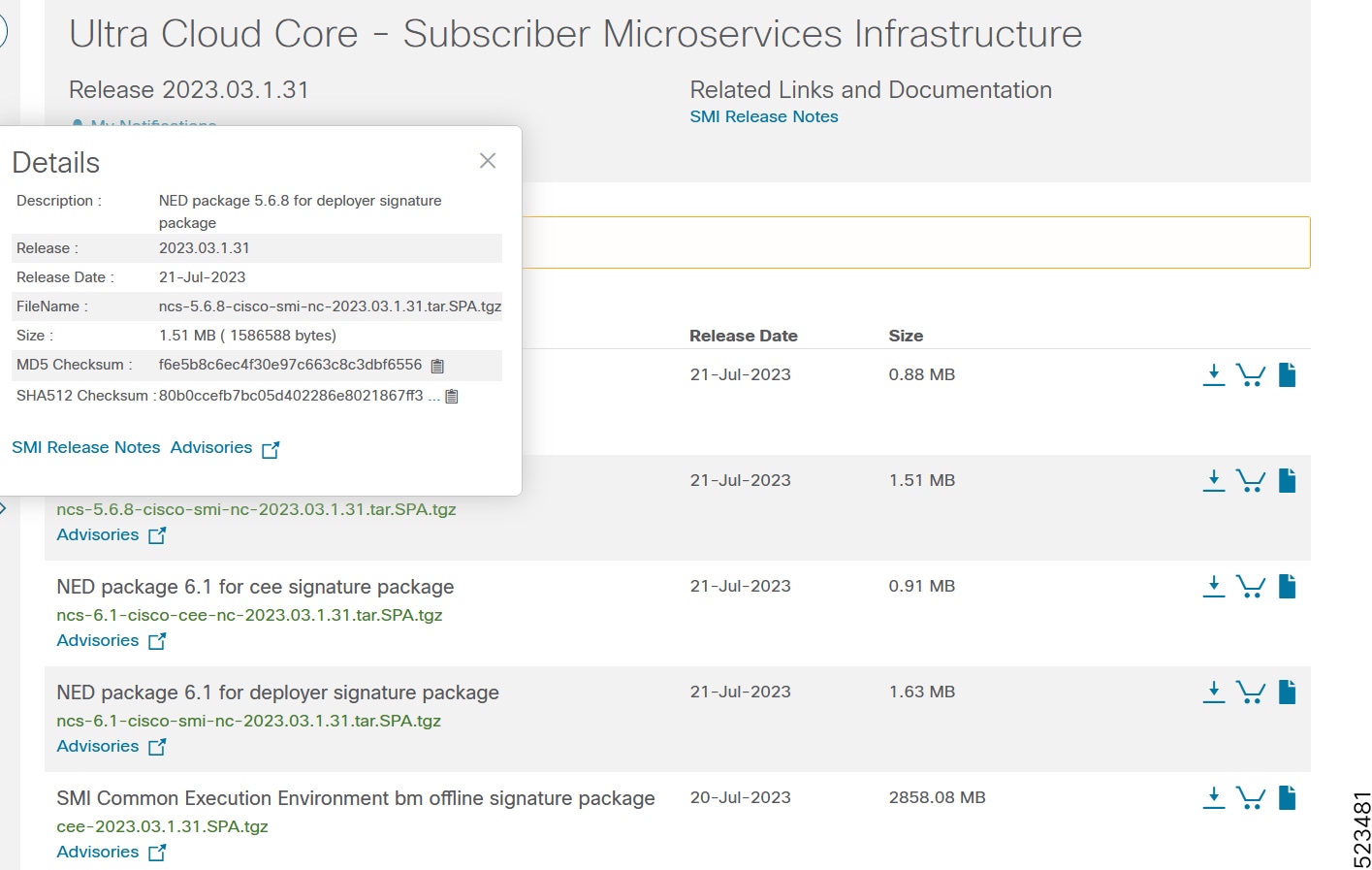
At the bottom you find the SHA512 checksum, if you do not see the whole checksum you can expand it by pressing the "..." at the end.
To validate the information, calculate a SHA512 checksum using the information in the following table and verify that it matches the one provided on the software download page.
To calculate a SHA512 checksum on your local desktop, see this table.
Table 7. Checksum calculations per operating system
| Operating System |
SHA512 checksum calculation command examples |
| Microsoft Windows |
Open a command line window and type the following command: > certutil.exe -hashfile <filename.extension> SHA512 |
| Apple MAC |
Open a terminal window and type the following command: $ shasum -a 512 <filename.extension> |
| Linux |
Open a terminal window and type the following command: $ sha512sum <filename.extension> OR $ shasum -a 512 <filename.extension> |
| Note: <filename> is the name of the file. <extension> is the file type extension (for example, .zip or .tgz). |
|
If the SHA512 checksum matches, you can be sure that no one has tampered with the software image or the image has not been corrupted during download.
If the SHA512 checksum does not match, we advise you to not attempt upgrading any systems with the corrupted software image. Download the software again and verify the SHA512 checksum again. If there is a constant mismatch, please open a case with the Cisco Technical Assistance Center.
Certificate validation
SMI software images are signed via x509 certificates. Please view the .README file packaged with the software for information and instructions on how to validate the certificates.
This table provides key resources and links to the support information and essential documentation for SMI.
Table 8. Related resources and additional information
| Resource |
Link |
| SMI documentation |
|
| Service request and additional information |
Cisco and the Cisco logo are trademarks or registered trademarks of Cisco and/or its affiliates in the U.S. and other countries. To view a list of Cisco trademarks, go to this URL: www.cisco.com/go/trademarks. Third-party trademarks mentioned are the property of their respective owners. The use of the word partner does not imply a partnership relationship between Cisco and any other company. (1110R)
Any Internet Protocol (IP) addresses and phone numbers used in this document are not intended to be actual addresses and phone numbers. Any examples, command display output, network topology diagrams, and other figures in the document are shown for illustrative purposes only. Any use of actual IP addresses or phone numbers in illustrative content is unintentional and coincidental.
© 2026 Cisco Systems, Inc. All rights reserved.