Release Notes for UCC SMF and cnSGWc, Release 2026.03.2
Available Languages
Bias-Free Language
The documentation set for this product strives to use bias-free language. For the purposes of this documentation set, bias-free is defined as language that does not imply discrimination based on age, disability, gender, racial identity, ethnic identity, sexual orientation, socioeconomic status, and intersectionality. Exceptions may be present in the documentation due to language that is hardcoded in the user interfaces of the product software, language used based on RFP documentation, or language that is used by a referenced third-party product. Learn more about how Cisco is using Inclusive Language.
- US/Canada 800-553-2447
- Worldwide Support Phone Numbers
- All Tools
 Feedback
 Feedback
Ultra Cloud Core - Session Management and Serving Gateway Function, Release 2026.03.2
Ultra Cloud Core - Session Management and Serving Gateway Function, Release 2026.03.2
This Release Notes identifies changes and issues related to the software release of 5G Converged Core Session Management Function (SMF) and Serving Gateway Control Plane Function (cnSGWc).
For more information about Ultra Cloud Core - Session Management Function and Serving Gateway Control Plane Function, see the Related resources section.
Release lifecycle milestones
The following table provides EoL milestones for Cisco UCC SMF and UCC cnSGWc software:
Table 1. EoL milestone information for UCC SMF and cnSGWc, Release 2026.03.2
| Milestone |
Date |
| First Customer Ship (FCS) |
23-July-2026 |
| End of Life (EoL) |
23-July-2026 |
| End of Software Maintenance (EoSM) |
22-Jan-2028 |
| End of Vulnerability and Security Support (EoVSS) |
31-Jan-2028 |
| Last Date of Support (LDoS) |
31-Jan-2029 |
These milestones and the intervals between them are defined in the Cisco Ultra Cloud Core (UCC) Software Release Lifecycle Product Bulletin available on cisco.com.
There are no new software features in this specific software release.
This section provides a brief description of the behavior changes introduced in this release.
Table 2. Behavior changes for UCC SMF and cnSGWc, Release 2026.03.2
| Description |
Behavior changes |
| Optimized service request handling during DLDR collisions |
Previous Behavior: When a Service Request was queued while a Downlink Data Report (DLDR) was already activating the N3 interface, the SMF triggered a N3 deactivation and reactivation cycle (if the reactivation CLI was enabled). If N2 Setup Complete is not received during this process, the session could remain in an incomplete state with the N3 interface deactivated. New Behavior: The SMF now manages collisions between Service Requests and DLDR activations. If a Service Request is received before a DLDR-initiated N3 activation is finished, the SMF considers the request already fulfilled. It skips the unnecessary N3 deactivation/reactivation and N2 Setup steps, maintains the active N3 state. Customer Impact: This change prevents PDU sessions from becoming unresponsive or entering a stalled state during these specific race conditions, thereby eliminating associated downlink packet loss. |
| Enhanced SBI message priority handling for WPS sessions |
Previous Behavior: For transactions involving PFCP message interactions, the transaction priority sometimes overrides the SBI message priority based on the PFCP message priority. As a result, priority-subscriber signaling messages (such as paging/N1N2, N7) were sometimes sent with an incorrect priority. New Behavior: SMF now preserves the SBI priority for SBI interface messages and no longer allows the PFCP priority to override or be applied to SBI interface messages. Customer Impact: SBI priority and PFCP message priority are applied separately, ensuring clear and correct SBI message prioritization for Wireless Priority Services (WPS) sessions. This prevents incorrect priority assignment in subscriber signaling and improves priority handling consistency for WPS traffic. |
| Handover collision handling during voice bearer creation |
Previous Behavior: When a higher-priority handover arrived while the SMF was waiting for the first N4 Session Modification Response, the SMF immediately terminated the voice dedicated-bearer procedure and switched to handover processing without waiting for the UPF response. New Behavior: SMF defers terminating the dedicated-bearer procedure until it receives the first N4 Session Modification Response from the UPF. After processing this response, the SMF then terminates the dedicated-bearer procedure and switches to the higher-priority handover. Customer Impact: Handover processing may experience a brief wait for the pending UPF response instead of starting immediately. This change ensures graceful cleanup of the PFCP leg and prevents stale forwarding rules, which could otherwise cause downlink voice packet loss after handover. |
This table lists the resolved issues in this specific software release.
Note: This software release may contain bug fixes first introduced in other releases. To see additional information, click the bug ID to access the Cisco Bug Search Tool. To search for a documented Cisco product issue, type in the browser: <bug_number> site:cisco.com
Table 3. Resolved issues for UCC SMF and cnSGWc, Release 2026.03.2
| Bug ID |
Description |
| WPS MP of PFCF need not be reflected at SBI. |
|
| VoWiFi CBR–LTE HO collision: only UL PDR removed on abort, stale DL PDR |
|
| DLDR Collision Causes Missing N2 Trigger after Queued Service Request Handling. |
|
| GTPV2 Peer restart observed in SGWc of Converged Core Gateway. |
There are no open bugs in this specific software release.
This section lists compatibility information of the Cisco UCC software products that are verified to work with this version of the UCC SMF and and cnSGWc software.
Table 4. Compatibility information for UCC SMF and cnSGWc, Release 2026.03.2
| Product |
Supported Release |
| Ultra Cloud Core SMI |
2026.03.1.08 |
| Ultra Cloud CDL |
2.3.0 |
| Ultra Cloud Core UPF |
2026.03.0 |
| Ultra Cloud cnSGWc |
2026.03.2 |
This section provides information about the release packages associated with UCC SMF and cnSGWc software.
Table 5. Software packages for UCC SMF and cnSGWc, Release 2026.03.2
| Software Package |
Description |
Release |
| ccg-2026.03.2.SPA.tgz |
The SMF and cnSGWc offline release signature package. This package contains the SMF deployment software, NED package, as well as the release signature, certificate, and verification information. |
2026.03.2 |
| ncs-6.4.8.3-ccg-nc-1.1.2026.03.2.tar.gz |
The NETCONF NED package. This package includes all the yang files that are used for NF configuration. Note that NSO is used for the NED file creation. |
6.4.8.3 |
| ncs-6.1.14-ccg-nc-1.1. 2026.03.2.tar.SPA.tgz |
6.1.14 |
Cloud native product version numbering system
The show helm list command displays detailed information about the version of the cloud native product currently deployed.
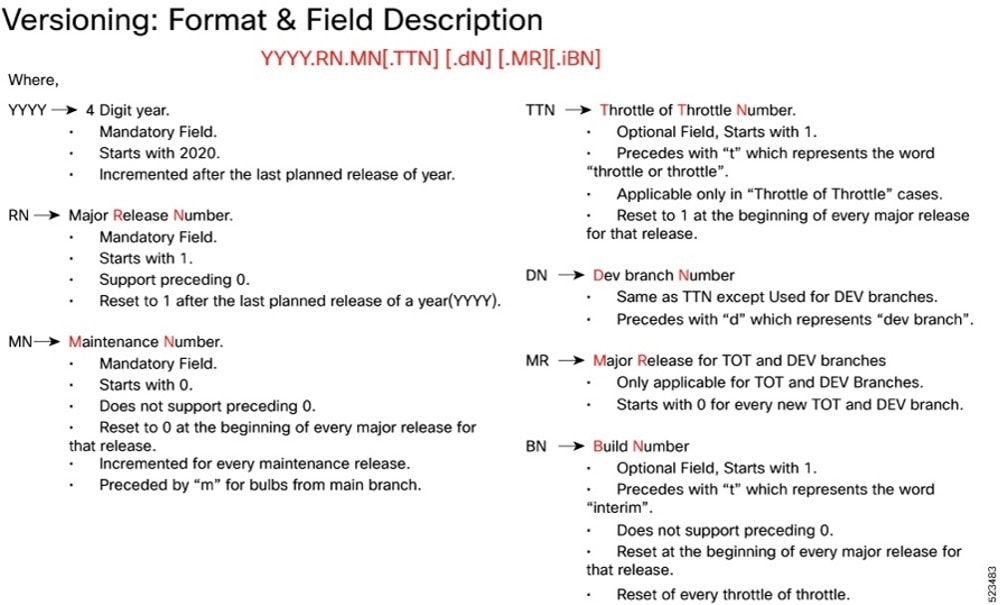
Image checksum information is available through Cisco.com Software Download Details. To find the checksum, hover the mouse pointer over the software image you have downloaded.
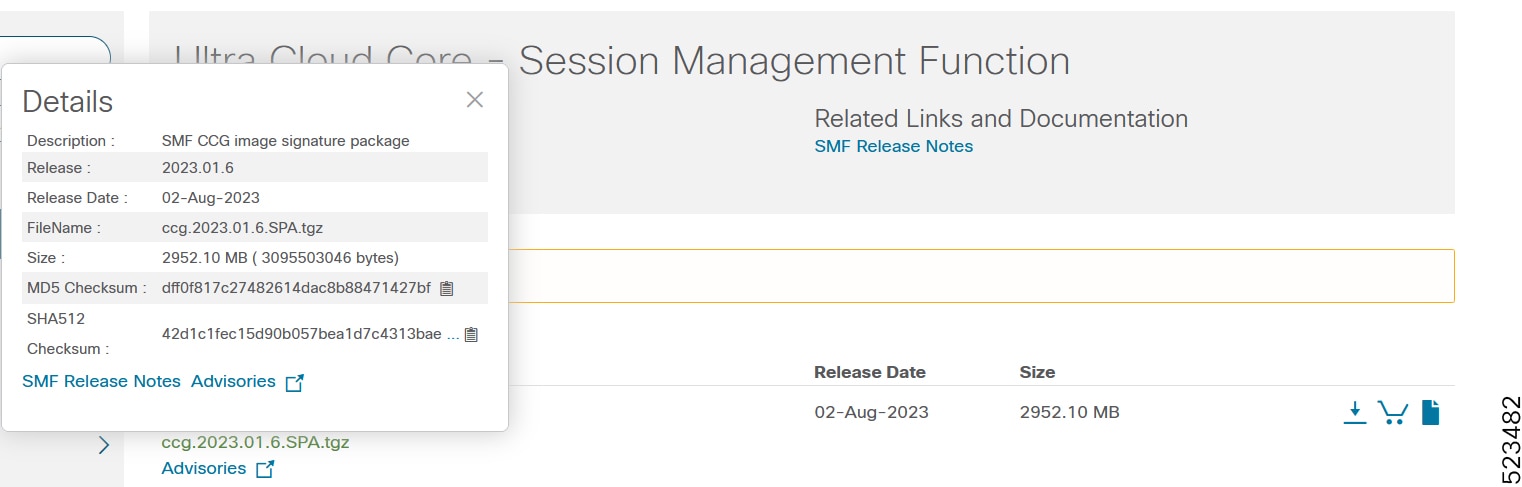
To validate the information, calculate a SHA512 checksum using the information in the following table and verify that it matches the one provided on the software download page.
To calculate a SHA512 checksum on your local desktop, see this table.
Table 6. Checksum calculations per operating system
| Operating System |
SHA512 checksum calculation command examples |
| Microsoft Windows |
Open a command line window and type the following command: > certutil.exe -hashfile <filename.extension> SHA512 |
| Apple MAC |
Open a terminal window and type the following command: $ shasum -a 512 <filename.extension> |
| Linux |
Open a terminal window and type the following command: $ sha512sum <filename.extension> OR $ shasum -a 512 <filename.extension> |
| Note: <filename> is the name of the file. <extension> is the file type extension (for example, .zip or .tgz). |
|
If the SHA512 checksum does not match, we advise you not to attempt upgrading any systems with the corrupted software image. Download the software again and verify the SHA512 checksum again. If there is a constant mismatch, please open a case with the Cisco Technical Assistance Center.
This table provides key resources and links to the support information and essential documentation for related Ultra Cloud Core (UCC) products.
Table 7. Related resources and additional information
| Resource |
Link |
| SMF documentation |
|
| cnSGWc documentation |
|
| SMI documentation |
|
| UPF documentation |
|
| Service request and additional information |
Cisco and the Cisco logo are trademarks or registered trademarks of Cisco and/or its affiliates in the U.S. and other countries. To view a list of Cisco trademarks, go to this URL: www.cisco.com/go/trademarks. Third-party trademarks mentioned are the property of their respective owners. The use of the word partner does not imply a partnership relationship between Cisco and any other company. (1110R)
Any Internet Protocol (IP) addresses and phone numbers used in this document are not intended to be actual addresses and phone numbers. Any examples, command display output, network topology diagrams, and other figures included in the document are shown for illustrative purposes only. Any use of actual IP addresses or phone numbers in illustrative content is unintentional and coincidental.
© 2026 Cisco Systems, Inc. All rights reserved.