Release Notes for UCC SMF and cnSGWc, Release 2026.03.3
Available Languages
Bias-Free Language
The documentation set for this product strives to use bias-free language. For the purposes of this documentation set, bias-free is defined as language that does not imply discrimination based on age, disability, gender, racial identity, ethnic identity, sexual orientation, socioeconomic status, and intersectionality. Exceptions may be present in the documentation due to language that is hardcoded in the user interfaces of the product software, language used based on RFP documentation, or language that is used by a referenced third-party product. Learn more about how Cisco is using Inclusive Language.
- US/Canada 800-553-2447
- Worldwide Support Phone Numbers
- All Tools
 Feedback
 Feedback
Ultra Cloud Core - Session Management and Serving Gateway Function, Release 2026.03.3
Ultra Cloud Core - Session Management and Serving Gateway Function, Release 2026.03.3
This Release Notes identifies changes and issues related to the software release of 5G Converged Core Session Management Function (SMF) and Serving Gateway Control Plane Function (cnSGWc).
The key highlights of this release include:
· Dual-Stack mobility for cnSGWc: Ensures seamless handovers and session continuity by providing both IPv4 and IPv6 tunnel addresses, regardless of the connection type used by the source network.
· Resilient network discovery: Improves connection speeds and service reliability by optimizing how network components locate one another, specifically in distributed and edge-cloud environments.
· Enhanced voice call stability: Reduces call drops and minimizes audio interruptions during network transitions, ensuring a more reliable and seamless communication experience for users.
For more information about Ultra Cloud Core - Session Management Function and Serving Gateway Control Plane Function (cnSGWc), see the Related resources section.
Release lifecycle milestones
The following table provides EoL milestones for Cisco UCC SMF and UCC cnSGWc software:
Table 1. EoL milestone information for UCC SMF and cnSGWc, Release 2026.03.3
| Milestone |
Date |
| First Customer Ship (FCS) |
23-July-2026 |
| End of Life (EoL) |
23-July-2026 |
| End of Software Maintenance (EoSM) |
22-Jan-2028 |
| End of Vulnerability and Security Support (EoVSS) |
31-Jan-2028 |
| Last Date of Support (LDoS) |
31-Jan-2029 |
These milestones and the intervals between them are defined in the Cisco Ultra Cloud Core (UCC) Software Release Lifecycle Product Bulletin available on cisco.com.
This section provides a brief description of the new software features introduced in this release.
Table 2. New software features for UCC SMF and cnSGWc, Release 2026.03.3
| Product impact |
Feature |
Description |
| Software Reliability |
DNS-based AMF discovery (N11 interface without NRF) |
Introduces support for AMF endpoint discovery using DNS-based FQDN generation. This feature removes the mandatory dependency on the NRF for N11 signaling by deriving FQDNs directly from the GUAMI. This enhancement improves latency, supports edge-cloud deployments, and enables seamless AMF discovery in multi-AMF environments. |
| Software Reliability |
Stabilizing voice call continuity during failed 5G to 4G handover |
You maintain voice call continuity and minimize call drops when a 5G to 4G handover fails. Your device can quickly resume 5G voice service with near-instant recovery and improved call stability. |
| Software Reliability |
Dual-Stack UPF tunnel allocation for seamless mobility
|
In dual-stack configurations, the cnSGW now allocates both IPv4 and IPv6 UPF tunnel endpoints during the SGW relocation procedure. This occurs regardless of the address family used by the incoming eNB F-TEID. By providing both addresses in the Create Session Response, the cnSGW allows the MME to share the appropriate IP version with the target eNB, ensuring seamless handovers during 4G/5G mobility. |
This section provides a brief description of the behavior changes introduced in this release.
Table 3. Behavior changes for UCC SMF and cnSGWc, Release 2026.03.3
| Description |
Behavior changes |
| Enhanced service request prioritization during 5G-to-4G handovers |
Previous Behavior: A Service Request (UE-initiated Idle Mode Exit) arriving during a 5G-to-4G handover without the corresponding Handover Cancel from the access side was rejected by the SMF with an HTTP 400 error. The rejection itself was correct behavior — the failure was caused by the missing Handover Cancel, which left the Service Request colliding with the active handover and led to the voice call drop. New Behavior: If a service request is received during an ongoing 5G-to-4G handover, the SMF now automatically terminates the pending handover and performs a clean resource teardown. The system then immediately prioritizes and processes the Service Request via an Idle mode exit procedure. If a voice call is active, the SMF also ensures the PCF is updated with the current rule status. Customer Impact: This change significantly reduces voice call drops and improves call continuity during 5G-to-4G transitions. Operators can expect improved voice call KPIs and a more reliable handoff experience for end-users. |
| Optimized EDR file transfer to prevent packet drops
|
Previous Behavior: In previous releases, the edr-monitoring pod used kubectl exec based commands to copy compressed NAS EDR files from the smf-service pods. This method created excessive processing overhead, leading to a significant increase in packet drops (RX_DROPS) on the physical NIC interfaces of the control plane nodes hosting the edr-monitoring pods. New Behavior: The system now employs a highly efficient HTTP curl-based transfer method. A new internal endpoint has been implemented on each service pod to facilitate the transfer of EDR records. The edr-monitor pod utilizes this endpoint to retrieve files, replacing the previous resource-intensive process. Customer Impact: This optimization improves system stability and network performance by significantly reducing the RX_DROPS previously caused by the EDR file transfer process. The change is transparent to the end-user, and the final delivery of EDRs to external storage remains unchanged. |
| Improved error handling for N11 release and N1N2 failure scenarios
|
Previous Behavior: During "Create-over-Create" (5G to 4G) transitions, a collision could occur if an N11 release was received from the AMF. Because 5G cleanup is asynchronous and fast, the N11 release often arrived when the context was already cleared or while 4G establishment was underway, causing the SMF to return an HTTP 500 error. Similarly, "UE-unreachable" N1N2 failure notifications during initial 5G setup were often left unprocessed, leading to subsequent release collisions and HTTP 500 errors. New Behavior: SMF now returns a successful HTTP 204 response for N11 release messages if the context is already in an IDLE or released state, or if the session is currently transitioning to 4G. Additionally, the SMF now correctly processes "UE-unreachable" N1N2 failure notifications, providing a successful acknowledgment and triggering a controlled session cleanup. Customer Impact: This change improves session stability by significantly reducing unnecessary HTTP 500 error responses during 4G/5G mobility and failed 5G setups. It ensures more robust cleanup handling during race conditions, while the standard release behavior for established sessions remains unchanged. |
This table lists the resolved issues in this specific software release.
Note: This software release may contain bug fixes first introduced in other releases. To see additional information, click the bug ID to access the Cisco Bug Search Tool. To search for a documented Cisco product issue, type in the browser: <bug_number> site:cisco.com
Table 4. Resolved issues for UCC SMF and cnSGWc, Release 2026.03.3
| Bug ID |
Description |
| gtpc s11 pod go routine constantly showing high during longevity run post SMI upgrade. |
|
| Mobility-collision - NR to LTE colliding between NR to Wifi CSR and CBR. |
|
| Rx_drops increased after enabling NAS EDR in SMF. |
|
| Multi-party call issue. |
|
| Show NRF commands are not working and application communication failure. |
|
| IM exit colliding with N7 delete, upon guard time expiry Rulereport sent to PCF. |
|
| N11 SM release failure increased post upgrade. |
|
| Voice-collision UE init mod req - semantic error results in flow deletion. |
|
| Voice call failure during transition from idle to active state. |
This table lists the open issues in this specific software release.
Note: This software release may contain bug fixes first introduced in other releases. To see additional information, click the bug ID to access the Cisco Bug Search Tool. To search for a documented Cisco product issue, type in the browser: <bug_number> site:cisco.com.
Table 5. Open issues for UCC SMF and cnSGWc, Release 2026.03.3
| Bug ID |
Description |
| CPU utilization for S11 GTPC pod has been increased by 200% more post July '26 SMI upgrade. |
|
| S11 MB Response latency has increased after upgrading to July '26 SMI. |
This section lists compatibility information of the Cisco UCC software products that are verified to work with this version of the UCC SMF and cnSGWc software.
Table 6. Compatibility information for UCC SMF and cnSGWc, Release 2026.03.3
| Product |
Supported Release |
| Ultra Cloud Core SMI |
2026.03.1.08 |
| Ultra Cloud CDL |
2.3.0 |
| Ultra Cloud Core UPF |
2026.03.0 |
| Ultra Cloud cnSGWc |
2026.03.3 |
This section provides information about the release packages associated with UCC SMF and cnSGWc software.
Table 7. Software packages for UCC SMF and cnSGWc, Release 2026.03.3
| Software Package |
Description |
Release |
| ccg-2026.03.3.SPA.tgz |
The SMF and cnSGWc offline release signature package. This package contains the SMF deployment software, NED package, as well as the release signature, certificate, and verification information. |
2026.03.3 |
| ncs-6.4.8.3-ccg-nc-1.1.2026.03.3.tar.gz |
The NETCONF NED package. This package includes all the yang files that are used for NF configuration. Note that NSO is used for the NED file creation. |
6.4.8.3 |
| ncs-6.1.14-ccg-nc-1.1. 2026.03.3.tar.SPA.tgz |
6.1.14 |
Cloud native product version numbering system
The show helm list command displays detailed information about the version of the cloud native product currently deployed.
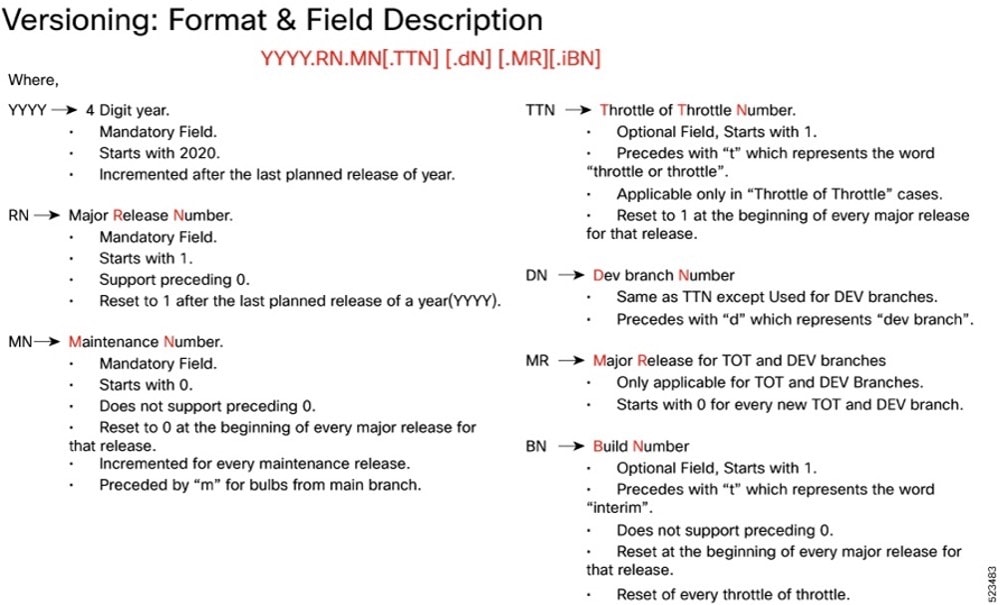
Image checksum information is available through Cisco.com Software Download Details. To find the checksum, hover the mouse pointer over the software image you have downloaded.
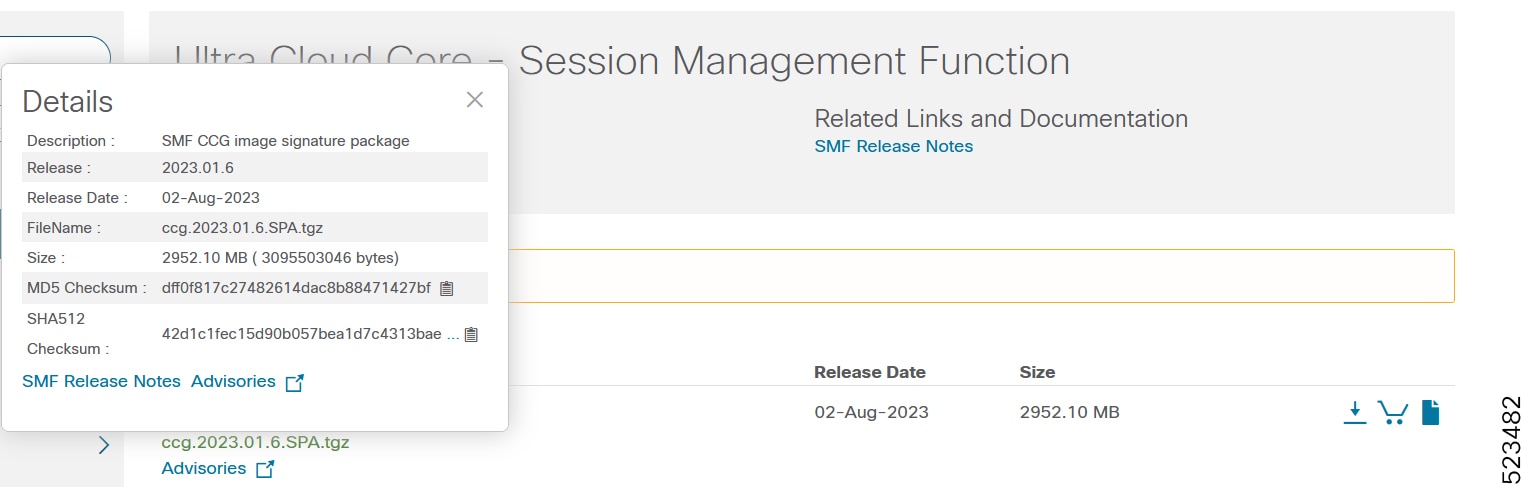
To validate the information, calculate a SHA512 checksum using the information in the following table and verify that it matches the one provided on the software download page.
To calculate a SHA512 checksum on your local desktop, see this table.
Table 8. Checksum calculations per operating system
| Operating System |
SHA512 checksum calculation command examples |
| Microsoft Windows |
Open a command line window and type the following command: > certutil.exe -hashfile <filename.extension> SHA512 |
| Apple MAC |
Open a terminal window and type the following command: $ shasum -a 512 <filename.extension> |
| Linux |
Open a terminal window and type the following command: $ sha512sum <filename.extension> OR $ shasum -a 512 <filename.extension> |
| Note: <filename> is the name of the file. <extension> is the file type extension (for example, .zip or .tgz). |
|
If the SHA512 checksum does not match, we advise you not to attempt upgrading any systems with the corrupted software image. Download the software again and verify the SHA512 checksum again. If there is a constant mismatch, please open a case with the Cisco Technical Assistance Center.
This table provides key resources and links to the support information and essential documentation for related Ultra Cloud Core (UCC) products.
Table 9. Related resources and additional information
| Resource |
Link |
| SMF documentation |
|
| cnSGWc documentation |
|
| SMI documentation |
|
| UPF documentation |
|
| Service request and additional information |
Cisco and the Cisco logo are trademarks or registered trademarks of Cisco and/or its affiliates in the U.S. and other countries. To view a list of Cisco trademarks, go to this URL: www.cisco.com/go/trademarks. Third-party trademarks mentioned are the property of their respective owners. The use of the word partner does not imply a partnership relationship between Cisco and any other company. (1110R)
Any Internet Protocol (IP) addresses and phone numbers used in this document are not intended to be actual addresses and phone numbers. Any examples, command display output, network topology diagrams, and other figures included in the document are shown for illustrative purposes only. Any use of actual IP addresses or phone numbers in illustrative content is unintentional and coincidental.
© 2026 Cisco Systems, Inc. All rights reserved.