Release Notes for Ultra Cloud Core: Session Management Function, Release 2025.03.0
Available Languages
Bias-Free Language
The documentation set for this product strives to use bias-free language. For the purposes of this documentation set, bias-free is defined as language that does not imply discrimination based on age, disability, gender, racial identity, ethnic identity, sexual orientation, socioeconomic status, and intersectionality. Exceptions may be present in the documentation due to language that is hardcoded in the user interfaces of the product software, language used based on RFP documentation, or language that is used by a referenced third-party product. Learn more about how Cisco is using Inclusive Language.
- US/Canada 800-553-2447
- Worldwide Support Phone Numbers
- All Tools
 Feedback
 Feedback
Ultra Cloud Core - Session Management Function, Release 2025.03.0
Ultra Cloud Core - Session Management Function, Release 2025.03.0
The key highlights of this release include:
· Expanded Network Support: Introduction of Reduced Capability (RedCap) support on SMF for High Latency Communication sessions, and comprehensive S4-SGSN session handover and mobility management for 2G and 3G networks, including QoS negotiation and GTPv1 attach/detach procedures.
· Enhanced Reliability and Operational Efficiency: Improved IPAM failure handling to prevent IP mismatches and reduce call failures, and specific SMF failure handling for HTTP Status Code 429 to mitigate congestion.
· Scalability and Performance: Seamless scaling of the Converged Core Cluster with Node Labeling and Required Affinity, allowing dynamic server additions without disruption.
· Improved Analytics and Charging: Support for saving PGW CDR records on local storage and extended QoS Flow-Based Charging (QBC) for 4G roaming, enhancing billing accuracy and data collection.
· Diagnostic and Management Improvements: Enhanced consistent event failure logs for N2HO procedures and NF-Set based subscription towards NRF for improved tracking of dynamic NF Set changes.
· NF Discovery based on Preferred Locality: Support for 3gpp-Sbi-Discovery-preferred-locality HTTP header when communicating with the SCP, enabling more efficient NF selection based on locality during peer NF discovery for optimized interactions and improved service delivery.
· IPv6 transport on N4 interface: IPv6 address support is provided on both N4 and Sx interfaces.
For more information about SMF, see the Related resources section.
Release lifecycle milestones
The following table provides EoL milestones for Cisco UCC SMF software:
Table 1. EoL milestone information for UCC SMF, Release 2025.03.0
| Milestone |
Date |
| First Customer Ship (FCS) |
14-Aug-2025 |
| End of Life (EoL) |
14-Aug-2025 |
| End of Software Maintenance (EoSM) |
12-Feb-2027 |
| End of Vulnerability and Security Support (EoVSS) |
12-Feb-2027 |
| Last Date of Support (LDoS) |
29-Feb-2028 |
These milestones and the intervals between them are defined in the Cisco Ultra Cloud Core (UCC) Software Release Lifecycle Product Bulletin available on cisco.com.
This section provides a brief description of the new software features introduced in this release.
Table 2. New software features for UCC SMF, Release 2025.03.0
| Product impact |
Feature |
Description |
| Upgrade
|
This feature allows the SMF to support High Latency Communication sessions for Reduced Capabilities UEs. Commands introduced: · user-plane-buffering-mgmt true: This CLI is configured under DNN profile to enable buffering at UPF. · hlcom true: This CLI is configured under DNN profile to enable HLCOM sessions for entire DNN. · policy extended-buffering extbuff { sbpc sbpc_count ddnd ddnd_count | dbpc dbpc_count dbd dbd_duration } : This CLI is configured under the Policy Extended buffering to define the SBPC, DDND, DPDC and DBD parameters. · priority priority_val ruledef ruledef_name actiondef actdef_name event im-entry/paging_failure: This CLI is configured under Policy Event Management to define to define the event policy. · ruledef ruledef_name condition { rat matches redcap | hlcom is true }: This CLI is configured under Policy Rule Management to define the rule. Default Setting: Disabled–Configuration Required |
|
| Software Reliability
|
Event failure logs for N2HO procedure
|
With this feature, the consistent event failure logs are enhanced to support the N2HO procedure for the SMF and vSMF interfaces. |
| Software Reliability
|
Failure handling for IPAM chunk operations
|
IPAM failure handling prevents IP mismatch between SMF and UPF, which reduces call failures and improves operational efficiency. This feature enables IPAM to trigger failure handling when SMF fails to notify or apply chunk operations on UPF.
· N4AssociationUpdateReq message type in profile failure-handling interface pfcp message type configuration. · assoc-setup and route-update conditions and retry-ignore and retry-continue actions for N4AssociationUpdateReq message type. |
| Upgrade
|
S4-SGSN session handover and mobility management for 2G and 3G networks |
This feature details the handling of Modify Bearer Requests (MBR) and handover scenarios within the context of 2G and 3G support for S4SGSN in SMF. It outlines the procedures for user location changes, inter-RAT handovers (4G to 3G/2G and 3G/2G to 4G ), intra-RAT handovers (3G SGW handovers), and handovers involving dedicated bearers. This ensures that the sessions are maintained during handovers, minimizing disruption to user applications. |
| Ease of Use
|
SMF supports enhanced subscription criteria, enabling improved handling of NRF notifications for NF Set-based changes. Previously, SMF supported only {{nfInstanceId}}-based subscriptions. The enhanced subscription criteria improve SMF's ability to accurately track and respond to dynamic changes in NF Sets, such as peer additions or removals. Command introduced: nf-subscription-params nfSetCond—Used to configure NF Set-based subscription criteria.
|
|
| Upgrade |
This feature enables SMF to save PGW CDR records on local storage. CDR support is supported with Legacy Interfaces (Gx / Gy). |
|
| Upgrade |
Scaling Converged Core Cluster with Node Labeling and Required Affinity |
This feature enables the dynamic addition of servers to a running cluster without disrupting existing deployments. It allows seamless scalability to meet growing demands and minimizes downtime, enhancing operational continuity. |
| Upgrade |
This feature introduces Quality of Service (QoS) negotiation capabilities for 2G and 3G subscribers utilizing the S4-SGSN in SMF. It enables dynamic and automated adjustments to the QoS parameters of the default bearer based on triggers originating from the Home Location Register (HLR) or PCF. This allows the network to adapt to changing conditions and subscriber needs, optimizing resource utilization and enhancing the user experience. |
|
| Ease of Use
|
SMF includes the 3gpp-Sbi-Discovery preferred-locality HTTP header when communicating with the SCP. By populating this header, SMF enables more efficient NF selection based on locality during peer NF discovery, resulting in optimized network function interactions and improved service delivery. |
|
| Ease of Use
|
This feature extends QoS Flow-Based Charging (QBC) to 4G roaming, enabling precise per-QoS flow charging for outbound roamers, improving billing accuracy, and ensuring compliance with roaming agreements. The solution collects charging data at H-PLMN, generates QBC usage reports, and exchanges charging parameters during session establishment. It dynamically negotiates QBC capabilities with the Charging Function (CHF) and updates rules based on CHF responses. CLI commands allow customization of QBC profiles and triggers, while backward compatibility ensures existing homer behavior remains unaffected. The feature supports 4G homer-4G roamer, 4G homer-5G roamer, and 5G homer-4G roamer scenarios for seamless interoperability. |
|
| Software Reliability
|
This feature enables SMF to specifically handle the 429 error code, rather than treating it as a generic failure and using the standard failure handling template. |
|
| Upgrade |
2G and 3G session attach and detach procedures over GTPv1
|
This feature includes details on 2G and 3G session attach and detach support on SMF for v1SGSN. It captures the GTPv1 messages/procedure and information elements that are translated to GTPv2 equivalents. |
| Software Reliability |
IPv6 transport on N4 interface |
SMF now supports IPv6 addresses for both N4 and Sx interfaces. |
This section provides a brief description of the behavior changes introduced in this release.
Table 3. Behavior changes for UCC SMF, Release 2025.03.0
| Description |
Behavior changes |
| Default timer value for IDFT tunnel removal during N2/N26 handover |
Previous Behavior: During the N2 or N26 (4G to 5G) handover, when the IDFT is enabled but the timeout value is not configured, the IDFT tunnel gets deleted during the last N4 leg of handover (execution phase). New Behavior: When the IDFT is enabled during the N2 or N26 (4G to 5G) handover but the timeout is not configured, SMF considers 15 seconds as the default timeout value for N2/N26 handover IDFT timer. When the timer expires, SMF proceeds to delete the IDFT tunnel at UPF post the handover. |
| HSS-initiated QoS modification handling for 4G sessions |
Previous Behavior: 1. During HSS-initiated QoS modification for 4G sessions, the procedure metrics are pegged as “Success” for some failure scenarios. 2. In case the procedure is aborted due to another higher priority procedure like Handover, policy decision received in PCF update response is not processed once the other procedure (Handover) is completed. 3. For HSS-initiated QoS modification triggered by the modify bearer command, PCF sends an empty SmPolicyDecision in the 200 OK SM policy update response when the PCF decides not to update the policies. SMF does not send any modify bearer failure indication to SGW in this scenario. 4. In HSS-initiated QoS modification triggered by Modify Bearer command, when the SMPolicyUpdateResponse message from PCF is received without any change in policy, SMF triggers UBR and N4 modification message even though there is no change in QoS parameters. New Behavior: 1. For HSS-initiated QoS modification, the procedure metrics are pegged properly for failure scenarios. 2. In case the procedure is aborted due to another higher priority procedure like handover, policy decision received in PCF update response is processed once the other procedure (Handover) is complete. 3. For HSS-initiated QoS modification triggered by modify bearer command, PCF sends an empty SmPolicyDecision in the 200 OK SM policy update response when the PCF decides not to update the policies. SMF sends the modify bearer failure indication to SGW and the corresponding procedure is marked as failure. 4. In HSS-initiated QoS modification triggered by modify bearer command, when SMPolicyUpdateResponse from PCF is received without any change in policy, modify bearer failure indication is sent to SGW and the corresponding procedure is marked as failure. |
| Inter-PLMN SGW handover between homer and roamer for 4g-Only UE |
Previous Behavior: 1. When the ModifyBearerRequest received for SGW change homer to roamer handover to SMF, the SMF sends ModifyBearerResponse with the interplmn_ho_not_configured cause value. 2. When the ModifyBearerRequest received for SGW change roamer to homer handover to SMF, the SMF sends N4ModificationRequest to UPF with these values: · N3 PDR is created · S5 UL PDR is deleted and recreated · Update FAR New Behavior: 1. When the ModifyBearerRequest received for SGW change homer to roamer handover to SMF, the SMF sends N4ModificationRequest to UPF with these values: · S5 UL PDR is deleted and recreated · Update FAR 2. When the ModifyBearerRequest received for SGW change roamer to homer handover to SMF, the SMF sends N4ModificationRequest to UPF with these values: · S5 UL PDR is deleted and recreated · Update FAR |
| New causes to support DHCP lease expiry |
Previous Behavior: Upon session release triggered due to DHCP lease expiry, SMF was sending GTP cause "Reactivation Requested" in case of 4G and N1 SM Cause "missing or unknown DNN" in case of 5G sessions. New Behavior: Upon session release due to DHCP lease expiry, SMF sends EGTP Cause 73:"No resources available" in case of 4G and N1 SM Cause 26:"Insufficient Resources" in case of 5G sessions. |
| PLMN-Change charging trigger for 4G sessions |
Previous Behavior: The SMF could not detect Public Land Mobile Network (PLMN) changes, that is when a subscriber is moving from a roaming 4G network to the home 4G network. New Behavior: With the introduction of the Roaming Quota-Based Charging (QBC) feature, the SMF now supports PLMN change detection and PLMN-Change charging trigger, ensuring accurate billing during roaming scenarios. |
| SMF Response Update for Cancelled 4G to 5G Handover |
Previous Behavior: During the handover of a User Equipment (UE) from 4G to 5G, if the handover was cancelled and the AMF handover cancel request collides with the AMF release request at the SMF, the SMF sent a "400 Bad Request" message to the AMF. |
| Transport source validation for PFCP messages |
Previous Behavior: The SMF accepted and processed PFCP messages from any transport, even if the message came from a different source than the one originally associated with the UPF. This could allow untrusted sources to send messages to the SMF. Customer Impact: This update improves security by ensuring only messages from trusted UPFs are accepted. |
| Update to file-write CLI Command Behavior |
Previous Behavior: The file-write option could not be executed without specifying a bulk filter. |
| User location handling in charging updates |
Previous Behavior: If the user location information was missing in the PDU Session Modification message, the SMF used to clear the previously stored user location information. Consequently, any subsequent CHFUpdate messages sent by the SMF used to have an empty value for User Location Information IE in the QFI Container Information attribute. New Behavior: If the PDU Session Modification message does not include user location information, the SMF now retains the previously stored user location. This ensures that the CHFUpdate message continues to include the correct user location information from the SMF context. Customer Impact: This change prevents the loss of user location data in charging updates, ensuring consistency and accuracy in location-based charging and reporting. Customers benefit from improved reliability and compliance in charging records, particularly for regulatory or billing purposes. |
| Session-AMBR and vSMF prioritization updates |
Previous Behavior: 1. If the qos-profile is either not configured or does not specify a sess-ambr (Session-AMBR) value, the vSMF does not include sess-ambr in the Create-QER in N4EstdReq during an IBR call. There is no default value for sess-ambr. 2. QFI from hSMF is not updated in the vSMF session and CDL. New Behavior: 1. A new default value of 1GBps is added for session-ambr. This is applicable only if session-ambr is not configured. 2. The vSMF now correctly prioritizes QFI, 5QI, and ARP values received from the hSMF. Customer Impact: The sess-ambr now has a default value and vSMF prioritizes QFI values received from hSMF. |
This table lists the resolved issues in this specific software release.
Note: This software release may contain bug fixes first introduced in other releases. To see additional information, click the bug ID to access the Cisco Bug Search Tool. To search for a documented Cisco product issue, type in the browser: <bug_number> site:cisco.com
Table 4. Resolved issues for UCC SMF, Release 2025.03.0
| Bug ID |
Description |
| WIFI-LTE HO - N7 res sent with diff chgID for same RG-SID, N4 metering method sent wrongly |
|
| 400 for SM Context Update with HO cancel |
|
| Mismatch session type/RAT at SMF & UPF during 4G to 5G N26 HO failure during prep stage |
|
| N26 Handover issues in 4G to 5G Handover |
|
| SMF does not select PCF based on GEO locality when the preferred locality is exhausted |
|
| SMF - MBFI missing - request sent for SE_AMBR_CH, Policy update res with only revatimer, |
|
| Observing cli is broken in the current release of SMF for IPV6 prefix delegation feature |
|
| Follow-Up on CSCwo90545: Inconsistent SMF Processing of HO Cancel and AmfInitRelease during collision |
|
| N26 Handover IDFT default timeout in 4G to 5G Handover |
|
| wifi->lte: Removal of dnn profile inbetween, service pod restart seen |
|
| Quota Exhaust Retry Reason Logged Incorrectly in PDU Release Procedure |
|
| Remove EdrTransactionIdKys field from app-infra, and rename the csv filename with node name prepended to it. |
|
| show subscriber failopen is not giving the option to list N40OFF and N40DD together |
|
| One way audio on OBR 5G testing with roaming operator |
|
| Home SMF is not sending the N7 rule-inactive message to the PCF when the V-SMF rejects the NW_RES_MOD_REQ |
|
| QFI changes during IBR attach on n16 by H-SMF, any sx-rep-req is rejected by V-SMF post attach |
|
| PCSCF restoration in between Idle exit not handled |
This table lists the open issues in this specific software release.
Note: This software release may contain open bugs first identified in other releases. To see additional information, click the bug ID to access the Cisco Bug Search Tool. To search for a documented Cisco product issue, type in the browser: <bug_number> site:cisco.com
Table 5. Open issues for UCC SMF, Release 2025.03.0
| Bug ID |
Description |
| Rolling upgrade from JUL main to main branch getting failed with CEPS and session loss. |
|
| For half attach scenarios for 2g/3g over 5g, SmContextCreateReq is treated as HO request |
This section lists compatibility information of the Cisco UCC software products that are verified to work with this version of the UCC SMF software.
Table 6. Compatibility information for UCC SMF, Release 2025.03.0
| Product |
Supported Release |
| Ultra Cloud Core SMI |
2025.03.1.10 |
| Ultra Cloud CDL |
1.12.2 |
| Ultra Cloud Core UPF |
2025.03.0 |
| Ultra Cloud cnSGWc |
2025.03.0 |
This section provides information about the release packages associated with UCC SMF software.
Table 7. Software packages for UCC SMF, Release 2025.03.0
| Software Package |
Description |
Release |
| ccg-2025.03.0.SPA.tgz |
The SMF offline release signature package. This package contains the SMF deployment software, NED package, as well as the release signature, certificate, and verification information. |
2025.03.0 |
| ncs-6.4.5-ccg-nc-2025.03.0.tar.gz |
The NETCONF NED package. This package includes all the yang files that are used for NF configuration. Note that NSO is used for the NED file creation. |
6.4.5 |
| ncs-6.1.14-ccg-nc-2025.03.0.tar.gz |
6.1.14 |
Cloud native product version numbering system
The show helm list command displays detailed information about the version of the cloud native product currently deployed.
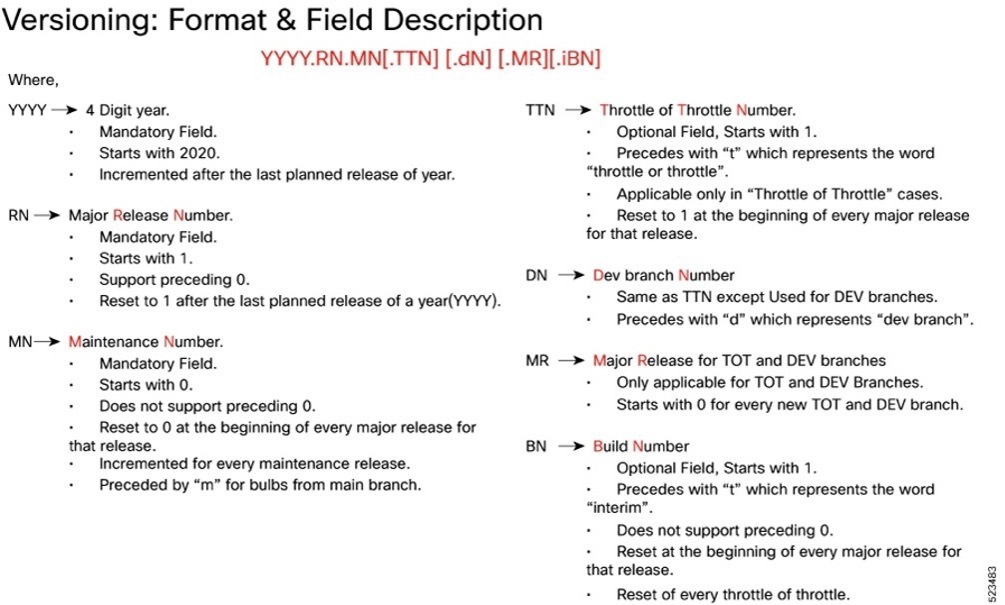
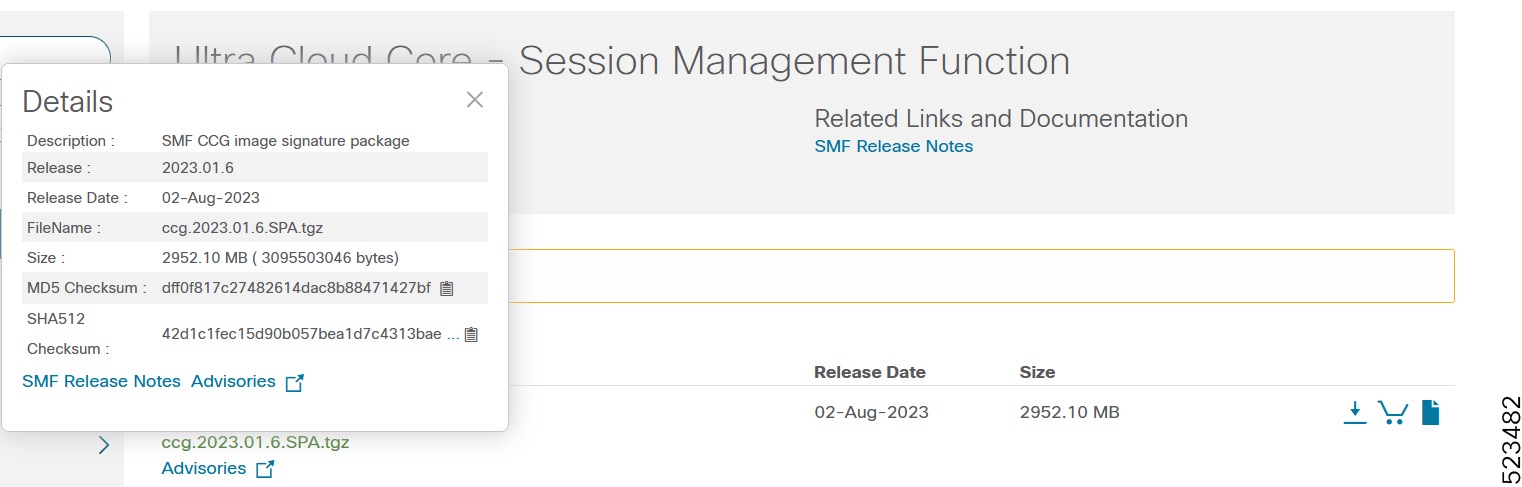
Image checksum information is available through Cisco.com Software Download Details. To find the checksum, hover the mouse pointer over the software image you have downloaded.
To validate the information, calculate a SHA512 checksum using the information in the following table and verify that it matches the one provided on the software download page.
To calculate a SHA512 checksum on your local desktop, see this table.
Table 8. Checksum calculations per operating system
| Operating System |
SHA512 checksum calculation command examples |
| Microsoft Windows |
Open a command line window and type the following command: > certutil.exe -hashfile <filename.extension> SHA512 |
| Apple MAC |
Open a terminal window and type the following command: $ shasum -a 512 <filename.extension> |
| Linux |
Open a terminal window and type the following command: $ sha512sum <filename.extension> OR $ shasum -a 512 <filename.extension> |
| Note: <filename> is the name of the file. <extension> is the file type extension (for example, .zip or .tgz). |
|
If the SHA512 checksum does not match, we advise you not to attempt upgrading any systems with the corrupted software image. Download the software again and verify the SHA512 checksum again. If there is a constant mismatch, please open a case with the Cisco Technical Assistance Center.
This table provides key resources and links to the support information and essential documentation for SMF and other Ultra Cloud Core (UCC) products.
Table 9. Related resources and additional information
| Resource |
Link |
| SMF documentation |
|
| cnSGWc documentation |
|
| SMI documentation |
|
| UPF documentation |
|
| Service request and additional information |
Cisco and the Cisco logo are trademarks or registered trademarks of Cisco and/or its affiliates in the U.S. and other countries. To view a list of Cisco trademarks, go to this URL: www.cisco.com/go/trademarks. Third-party trademarks mentioned are the property of their respective owners. The use of the word partner does not imply a partnership relationship between Cisco and any other company. (1110R)
Any Internet Protocol (IP) addresses and phone numbers used in this document are not intended to be actual addresses and phone numbers. Any examples, command display output, network topology diagrams, and other figures included in the document are shown for illustrative purposes only. Any use of actual IP addresses or phone numbers in illustrative content is unintentional and coincidental.
© 2025 Cisco Systems, Inc. All rights reserved.