Release Notes for Ultra Cloud Core: Serving Gateway Function, Release 2025.03.0
Available Languages
Bias-Free Language
The documentation set for this product strives to use bias-free language. For the purposes of this documentation set, bias-free is defined as language that does not imply discrimination based on age, disability, gender, racial identity, ethnic identity, sexual orientation, socioeconomic status, and intersectionality. Exceptions may be present in the documentation due to language that is hardcoded in the user interfaces of the product software, language used based on RFP documentation, or language that is used by a referenced third-party product. Learn more about how Cisco is using Inclusive Language.
- US/Canada 800-553-2447
- Worldwide Support Phone Numbers
- All Tools
 Feedback
 Feedback
Ultra Cloud Core - Serving Gateway Function, Release 2025.03.0
Ultra Cloud Core - Serving Gateway Function, Release 2025.03.0
This Release Notes identifies changes and issues related to the software release of Ultra Cloud Core (UCC) Serving Gateway Control Plane Function (cnSGWc).
The key highlights of this release include:
● Enhanced operational agility and scalability: This release significantly improves the ability to scale and manage network infrastructure. Key enhancements like dynamic cluster node addition without service disruption and the ability to configure critical network parameters without requiring pod restarts lead to greater operational efficiency, reduced downtime, and seamless growth.
● Improved network visibility and reliability: The release strengthens the platform's diagnostic capabilities and overall reliability. Enhanced event failure logs provide more consistent and comprehensive insights into service pod issues, supporting critical procedures and enabling quicker troubleshooting and more stable operations.
● Expanded connectivity and service control: This update broadens the platform's support for emerging cellular technologies and offers more granular control over subscriber services. With the introduction of NB-IoT and LTE-M RAT type support, the system can accurately identify and bill for a wider range of IoT devices. Additionally, configurable 5GSIWKI suppression provides precise control over interworking indications, allowing for differentiated handling of home and roaming subscribers.
For more information about cnSGWc, see the Related resources section.
Release lifecycle milestones
The following table provides EoL milestones for Cisco UCC cnSGWc software:
Table 1. EoL milestone information for UCC cnSGWc, Release 2025.03.0
| Milestone |
Date |
| First Customer Ship (FCS) |
14-Aug-2025 |
| End of Life (EoL) |
14-Aug-2025 |
| End of Software Maintenance (EoSM) |
12-Feb-2027 |
| End of Vulnerability and Security Support (EoVSS) |
12-Feb-2027 |
| Last Date of Support (LDoS) |
29-Feb-2028 |
These milestones and the intervals between them are defined in the Cisco Ultra Cloud Core (UCC) Software Release Lifecycle Product Bulletin available on cisco.com.
This section provides a brief description of the new software features introduced in this release.
Table 2. New software features for UCC cnSGWc, Release 2025.03.0
| Product impact |
Feature |
Description |
| Upgrade |
Scaling Converged Core Cluster with Node Labeling and Required Affinity |
This feature enables the dynamic addition of servers to a running cluster without disrupting existing deployments. It allows seamless scalability to meet growing demands and minimizes downtime, enhancing operational continuity. |
| Software Reliability |
With this feature, the consistent event failure logs are enhanced to support the IDFT, LI, Suspend Notification, Resume Notification, and PDN Disconnect (GTPU Path Failure) procedures for the service pods. |
|
| Software Reliability |
cnSGWc supports “RAT Type NB-IoT and LTE-M” to enable accurate identification and differentiation of Narrowband IoT (NB-IoT) and LTE-M devices in Charging Data Records (CDRs) for precise billing.
|
|
| Ease of use |
Configurable 5GSIWKI suppression |
You can now precisely control the 5GS Interworking Indication (5GSIWKI) flag, allowing differentiated handling for home and roaming subscribers. The cnSGWc introduces a new CLI command, ignore-5g-iwk, within the policy call-control-profile. If set to true, the cnSGWc suppresses the flag, sending False to the SMF or P-GW. If false, it forwards the flag as received from the MME. This configuration applies to new call sessions. This enhancement avoids the inconvenience of pod restarts, making the process more efficient and seamless. |
| Software Reliability |
IPv6 transport on Sx interface |
cnSGWc now supports IPv6 transport on Sx interfaces. |
This section provides a brief description of the behavior changes introduced in this release.
Table 3. Behavior changes for UCC cnSGWc, Release 2025.03.0
| Description |
Behavior changes |
| Removal of gauge type statistics |
Previous Behavior: The system provided gauge-type statistics for the following metrics: · sgw_ue_counters · sgw_pdn_counters · sgw_bearer_counters · sgw_pdn_emps_counters New Behavior: The following gauge-type statistics are removed and are no longer available: · sgw_ue_counters · sgw_pdn_counters · sgw_bearer_counters · sgw_pdn_emps_counters These statistics are available in CDL based statistics, which provide the same functionality. |
This table lists the resolved issues in this specific software release.
Note: This software release may contain bug fixes first introduced in other releases. To see additional information, click the bug ID to access the Cisco Bug Search Tool.
Table 4. Resolved issues for UCC cnSGWc, Release 2025.03.0
| Bug ID |
Description |
| Removal of older Gauge type statistics |
|
| Unable to push SGWCDR with IPv6 URL on SMF |
There are no open bugs in this specific software release.
This section lists compatibility information of the Cisco UCC software products that are verified to work with this version of the UCC cnSGWc software.
Table 5. Compatibility information for UCC cnSGWc, Release 2025.03.0
| Product |
Supported Release |
| Ultra Cloud Core SMI |
2025.03.1.10 |
| Ultra Cloud CDL |
1.12.2 |
| Ultra Cloud Core UPF |
2025.03.0 |
| Ultra Cloud cnSGWc |
2025.03.0 |
This section provides information about the release packages associated with UCC cnSGWc software.
Table 6. Software packages for UCC cnSGWc, Release 2025.03.0
| Software Package |
Description |
Release |
| ccg-2025.03.0.SPA.tgz |
The offline release signature package. This package contains the deployment software, NED package, as well as the release signature, certificate, and verification information. |
2025.03.0 |
| ncs-6.4.5-ccg-nc-2025.03.0.tar.gz |
The NETCONF NED package. This package includes all the yang files that are used for NF configuration. Note that NSO is used for the NED file creation. |
6.4.5 |
| ncs-6.1.14-ccg-nc-2025.03.0.tar.gz |
6.1.14 |
Cloud native product version numbering system
The show helm list command displays detailed information about the version of the cloud native product currently deployed.
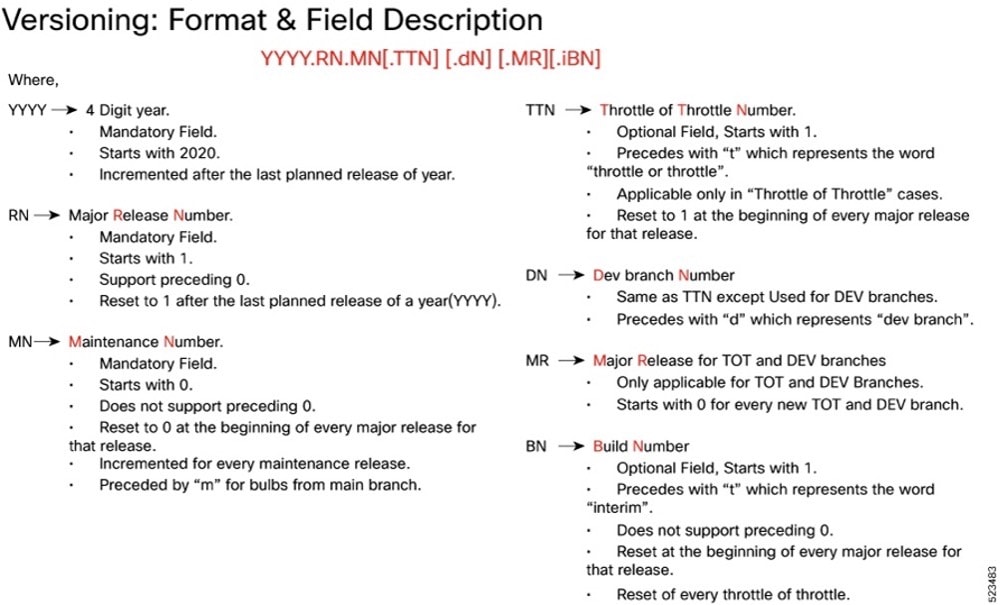
The appropriate version number field increments after a version has been released. The new version numbering format is a contiguous sequential number that represents incremental changes between releases. This format facilitates identifying the changes between releases when using Bug Search Tool to research software releases
Software integrity version
To verify the integrity of the software image you have from Cisco, you can validate the SHA512 checksum information against the checksum identified by Cisco for the software.
Image checksum information is available through Cisco.com Software Download Details. To find the checksum, hover the mouse pointer over the software image you have downloaded.
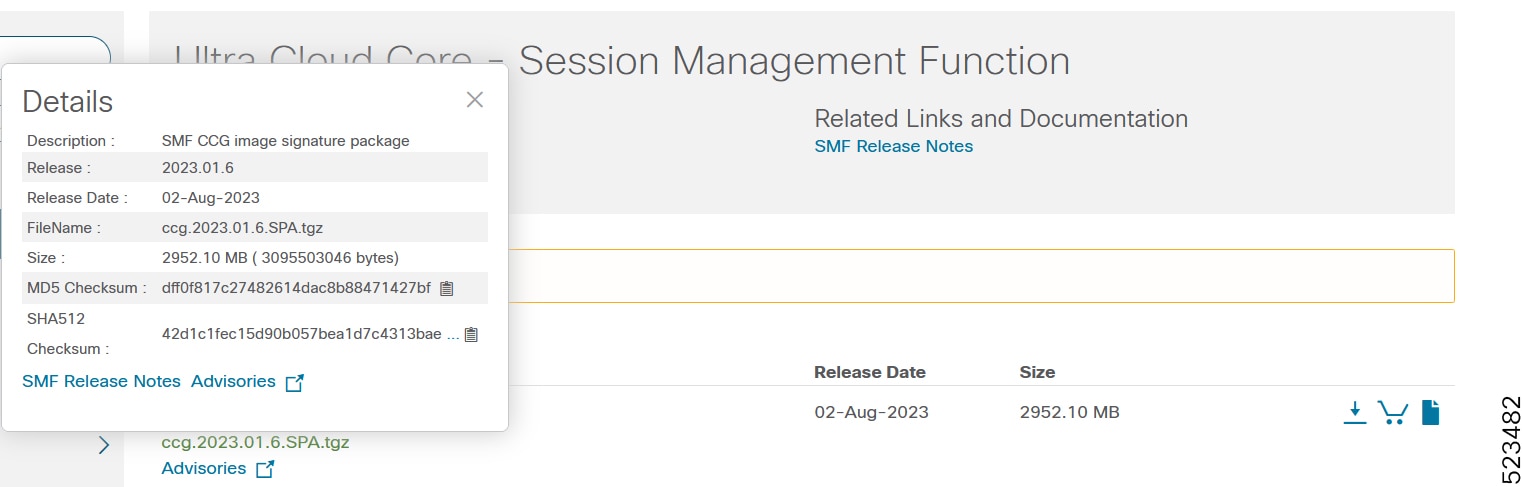
At the bottom you find the SHA512 checksum, if you do not see the whole checksum you can expand it by pressing the "..." at the end.
To validate the information, calculate a SHA512 checksum using the information in the following table and verify that it matches the one provided on the software download page.
To calculate a SHA512 checksum on your local desktop, see this table.
Table 7. Checksum calculations per operating system
| Operating System |
SHA512 checksum calculation command examples |
| Microsoft Windows |
Open a command line window and type the following command: > certutil.exe -hashfile <filename.extension> SHA512 |
| Apple MAC |
Open a terminal window and type the following command: $ shasum -a 512 <filename.extension> |
| Linux |
Open a terminal window and type the following command: $ sha512sum <filename.extension> OR $ shasum -a 512 <filename.extension> |
| Note: <filename> is the name of the file. <extension> is the file type extension (for example, .zip or .tgz). |
|
If the SHA512 checksum matches, you can be sure that no one has tampered with the software image or the image has not been corrupted during download.
If the SHA512 checksum does not match, we advise you not to attempt upgrading any systems with the corrupted software image. Download the software again and verify the SHA512 checksum again. If there is a constant mismatch, please open a case with the Cisco Technical Assistance Center.
Certificate validation
The software images are signed via x509 certificates. For information and instructions on how to validate the certificates, refer to the .README file packaged with the software
This table provides key resources and links to the support information and essential documentation for cnSGWc and other Ultra Cloud Core (UCC) products.
Table 8. Related resources and additional information
| Resource |
Link |
| cnSGWc documentation |
|
| SMF documentation |
|
| SMI documentation |
|
| UPF documentation |
|
| Service request and additional information |
Cisco and the Cisco logo are trademarks or registered trademarks of Cisco and/or its affiliates in the U.S. and other countries. To view a list of Cisco trademarks, go to this URL: www.cisco.com/go/trademarks. Third-party trademarks mentioned are the property of their respective owners. The use of the word partner does not imply a partnership relationship between Cisco and any other company. (1110R)
Any Internet Protocol (IP) addresses and phone numbers used in this document are not intended to be actual addresses and phone numbers. Any examples, command display output, network topology diagrams, and other figures included in the document are shown for illustrative purposes only. Any use of actual IP addresses or phone numbers in illustrative content is unintentional and coincidental.
© 2025 Cisco Systems, Inc. All rights reserved.