Interface Configuration

Feature Summary and Revision History

Summary Data

Table 1. Summary Data

Applicable Products or Functional Area

PCF

Applicable Platform(s)

SMI

Feature Default Setting

Enabled – Always-on

Related Documentation

Not Applicable

Revision History

Table 2. Revision History
Revision Details Release

First introduced.

2023.03.0

PCF Architecture

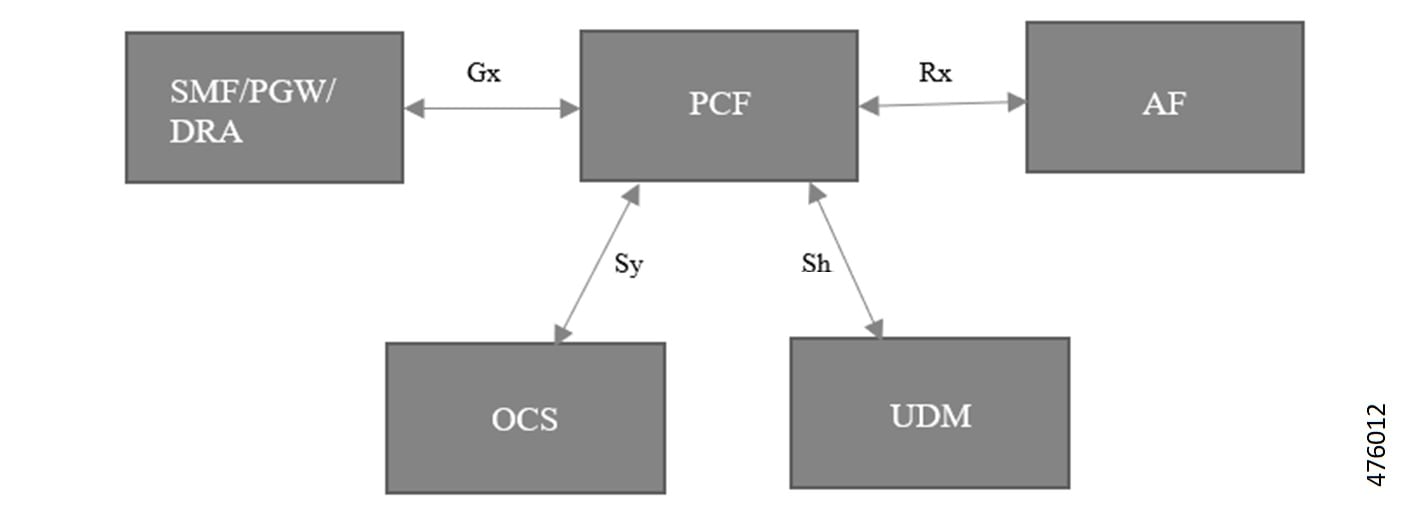
The following architecture shows the relationships between the different functional entities.

Figure 1. Reference Model for Gx, Rx, Sh and Sy

Engine configuration to skip the RX_5G_TGPP NDM and enable RX_TGPP NDM

To enable the RX_TGPP NDM, use the following configuration:

config 
   properties skipped.device.mgrs 
   value RX_5G_TGPP,N36_TGPP  
   exit 
end 

Note


In PCF, Rx_5G_TGPP NDM gets enabled as default. Either RX_TGPP or Rx_5G_TGPP gets enabled one at a time, and both RX_TGPP or Rx_5G_TGPP cannot be enabled at the same time.


Gx Interface Configuration

Feature Description

The Gx reference point gets defined between the PCF and the PCEF. Using the Gx reference point, the provisioning and removal of PCC rules from the PCF get done from the PCF to the PCEF. By applying AVPs relevant to the application, the Gx reference point gets used for charging control, policy control, or both. The Gx reference point also controls and detects the application's traffic.

How It Works

This section describes how Gx Interface Configuration feature works.

Feature Configuration

This section describes how to configure the Gx Interface.

To enable the Gx diameter endpoints, use the following configuration:

config 
   diameter group groupgx 
   mode server 
   stack gx 
   application gx 
   bind-ip     <bind-ip> 
   bind-port   <bind-port> 
   fqdn        <gx-fqdn> 
   realm       <gx-realm> 
   settings timeouts-ms request <timeout> 
   exit 
   exit 
end 

Rx Interface Configuration

Feature Description

The Rx reference point gets defined between the Application Function (AF) and the Policy Control Function (PCR). The Rx reference point is used to exchange application-level session information between the PCF and the Application Function (AF). The PCF exchanges the PCC rules with the PCEF and QoS rules with the Bearer Binding and Event Reporting Function (BBERF).

How It Works

This section describes how Rx Interface Configuration feature works.

Feature configuration

This section describes how to configure the Rx Interface.

To enable the Rx diameter endpoints, use the following configuration:

config 
   diameter group groupgx 
   mode server 
   stack rx 
   application rx 
   bind-ip     <bind-ip> 
   bind-port   <bind-port> 
   fqdn        <rx-fqdn> 
   realm       <rx-realm> 
   settings timeouts-ms request <timeout> 
   exit 
   exit 
end 

Sh Interface Configuration

Feature Description

The Diameter application allows a Diameter server and a Diameter client to download and update transparent and non-transparent user data and requests and send notifications on changes to user data.

How It Works

This section describes how Sh Interface Configuration feature works.

Engine Configuration for Sh Interface

To enable the engine configuration for Sh interface, use the following configuration:

config 
   properties loadByShSessionID 
   value true 
   exit 
end 

Feature Configuration

This section describes how to configure the Sh Interface.

To enable the Sh diameter endpoints, use the following configuration:

config 
   diameter group groupsh 
   mode server 
   stack sh 
   application sh 
   fqdn        <local fqdn> 
   realm       <local realm for sh server> 
   peer-host   <sh peer ip> 
   peer-port   <sh peer port> 
   peer-realm   <sh peer realm> 
   exit 
   exit 
end 

Sy Interface Configuration

Table 3. Feature History

Product impact

Feature

Description

Software Reliability

Sy Interface AVP support and enhancements

You can now improve session management and handle abort use cases on the Sy interface with the updated Policy Control Function (PCF). The PCF achieves this by supporting the Supported-Features and SN-Request-Type AVPs. These additions allow the system to negotiate features and accurately process different request types within incoming Spending-Status-Notification-Request (SNR) messages, ensuring more robust control over subscriber spending status reporting.

Feature Description

The Sy reference point is located between the Policy Control Function (PCF) and the Online Charging System (OCS). The Sy reference point enables the transfer of information relating to subscriber spending from OCS to PCF and supports the following functions:

  • Request of policy counter status reporting from PCF to OCS

  • Notifications of policy counter status change from OCS to PCF

  • Cancellations of policy counter status reporting from PCF to OCS

Since the Sy interface resides between PCF and OCS in the HPLMN, roaming with home routed or visited access as well as non-roaming scenarios is supported in the same manner.

Sy Interface AVP support and enhancements

PCF supports the following AVPs to enhance functionality on the Sy interface.

  • Supported-Features: A grouped AVP required to enable feature negotiation.

  • SN-Request-Type: This AVP is used to specify the request type in SNR messages, where the bitmask indicates either a standard spending limit report (Bit 0) or an abort session request (Bit 1).

This update enables the PCF to parse incoming Spending-Status-Notification-Request (SNR) messages and interpret the SN-Request-Type bitmask to distinguish between standard spending limit reports (Bit 0) and session termination requests (Bit 1).

How It Works

This section describes how Sy Interface Configuration feature works.

Feature configuration

Engine configuration for Sy interface

To enable the OCS ASR support for SNR request with SN-Request-Type AVP, use following engine property configuration:

config 
   properties supportOcsAsr 
   value { true | false } 
   exit 
end 

This section describes how to configure the Sy Interface.

To enable the Sy diameter endpoints, use the following configuration:

config 
   diameter group groupsy 
   mode server 
   stack sy 
   application sy 
   fqdn        <local fqdn> 
   realm       <local realm for sy server> 
   peer-host   <sy peer ip> 
   peer-port   <sy peer port> 
   peer-realm   <sy peer realm> 
   exit 
   exit 
end