Release notes for UCC Converged Policy and Charging (CPC) AAA, Release 2026.03.0
Available Languages
Bias-Free Language
The documentation set for this product strives to use bias-free language. For the purposes of this documentation set, bias-free is defined as language that does not imply discrimination based on age, disability, gender, racial identity, ethnic identity, sexual orientation, socioeconomic status, and intersectionality. Exceptions may be present in the documentation due to language that is hardcoded in the user interfaces of the product software, language used based on RFP documentation, or language that is used by a referenced third-party product. Learn more about how Cisco is using Inclusive Language.
- US/Canada 800-553-2447
- Worldwide Support Phone Numbers
- All Tools
 Feedback
 Feedback
Ultra Cloud Core CPC, Release 2026.03.0
Ultra Cloud Core CPC, Release 2026.03.0
This Release Notes identifies changes and issues related to the release of Ultra Cloud Core Converged Policy and Charging (CPC) software release.
The key highlights of this release include:
● Audit and logging enhancement: Centralizes security and compliance by forwarding login, configuration, and administrative event logs to the Centralized Log Management System (CLMS).
● Circle code labels for RADIUS KPIs: Enables geographic traffic visibility by dynamically extracting circle_code from RADIUS attributes for targeted analysis and alerting.
● CoA packet authenticator generation: Ensures RFC compliance and cryptographic integrity by correcting packet assembly logic to prevent CoA-Request rejections.
● KPI scheduler: Optimizes system performance and prevents data inconsistencies in multi-pod deployments by implementing a Kubernetes-based leader election mechanism.
● Manage OCS and BNG configurations with single API: Reduces deployment time and human error by providing a unified REST API and automation scripts for programmatic configuration management.
● RADIUS and Engine CPU configuration: Enhances system stability and performance by allowing dynamic, per-profile tuning of CPU and memory resources through the Ops-Center CLI.
● System health diagnostics: Simplifies troubleshooting by providing a consolidated health report across deployment, infrastructure, and application components through a single command.
● Virtual NAS-IP label for CoA KPIs: Improves operational visibility and traffic management in disaggregated architectures by integrating the user_plane_ip_address label into CoA metrics.
For more information about the Ultra Cloud Core CPC documentation, see the Related resources section.
Release lifecycle milestones
Table 1. EoL milestone information for CPC, Release 2026.03.0
| Milestone |
Date |
| First Customer Ship (FCS) |
23-July-2026 |
| End of Life (EoL) |
23-July-2026 |
| End of Software Maintenance (EoSM) |
23-Jan-2028 |
| End of Vulnerability and Security Support (EoVSS) |
23-Jan-2028 |
| Last Date of Support (LDoS) |
23-Jan-2029 |
These milestones and the intervals between them are defined in the Cisco Ultra Cloud Core (UCC) Software Release Lifecycle Product Bulletin available on cisco.com.
This section provides a brief description of the new software features introduced in this release.
Table 2. New software features for Ultra Cloud Core CPC, Release 2026.03.0
| Product impact |
Feature |
Description |
| Software Reliability |
Tracks login attempts, configuration changes, and administrative actions across subsystems, forwarding logs to the Centralized Log Management System (CLMS) to ensure a permanent security and compliance record. |
|
| Ease of Use |
Dynamically extracts a circle_code from the CALLED_STATION_ID AVP in inbound RADIUS messages, allowing for per-region traffic analysis and improved automated alerting. |
|
| Software Reliability |
RADIUS packet message authenticator
|
Updates RADIUS packet assembly logic to ensure full RFC 5176 compliance by finalizing all mutable fields before computing the Request-Authenticator, preventing cryptographic mismatches. |
| Software Reliability |
Implements a Kubernetes-based leader election mechanism to ensure that only one designated pod executes the KPI scheduler job, preventing redundant database queries and resource waste. |
|
| API Experience |
Introduces a unified REST API and automation scripts to manage OCS server and BNG device configurations, replacing manual processes to reduce deployment time and human error. |
|
| Ease of Use |
Enables dynamic resource allocation for engine and radius pods through the Ops-Center CLI, allowing operators to tune CPU and memory limits to match traffic demands and prevent OOM events. |
|
| Ease of Use |
Provides a consolidated health overview of the cnAAA environment using the cpc-system cnaaa-diagnostics all command, aggregating data on infrastructure and application status into a single report. |
|
| Software Reliability |
Integrates the user_plane_ip_address label into CoA metrics, enabling targeted traffic management and improved operational visibility in disaggregated BNG architectures. |
This section provides a brief description of the behavior changes introduced in this release.
Table 3. Behavior changes for Ultra Cloud Core CPC, Release 2026.03.0
| Description |
Behavior changes |
| Remove qns name from the log files in consolidated-aaa-logging-0 pod [CSCwu22620] |
Previous behavior: The log file names in the consolidated-aaa-logging-0 pod contained the prefix "qns" as qns-audit-pb.log, qns-audit-cc.log, qns-pb-publish-svn-diff.log, and qns-custrefdata_audit.log. New behavior: The prefix "qns" in the log file names is replaced with "cpc" in the consolidated-aaa-logging-0 pod, resulting in this log file names as cpc-audit-pb.log, cpc-audit-cc.log, cpc-pb-publish-svn-diff.log, and cpc-custrefdata_audit.log. Customer impact: Improves ease of use by updating log file names to reflect the new naming convention in the consolidated-aaa-logging-0 pod. |
This table lists the resolved issues in this specific software release.
Note: This software release may contain bug fixes first introduced in other releases. To see additional information, click the bug ID to access the Cisco Bug Search Tool. To search for a documented Cisco product issue, type in the browser: <bug_number> site:cisco.com
Table 4. Resolved issues for Ultra Cloud Core CPC, Release 2026.03.0
| Bug ID |
Description |
| Remove qns name from the log files in consolidated-aaa-logging-0 pod. |
|
| EMA requests failed with HTTP connection RST from cnAAA |
|
| Subscriber relocation fails due to response masking under specific error conditions. |
|
| cnAAA includes duplicate Attribute-Value Pairs (AVPs) in the Access-Accept RADIUS message. |
|
| Support the <networkId xmlns=""> element in SOAP requests during the SOAP proxy Kafka migration. |
|
| Engine and Controlcenter pods experience delayed startup due to MongoDB connection timeouts. |
|
| Added support for multiple Kafka partitions and configurable Kafka log retention policies. |
|
| WarmUp subscriber sessions persist in the engine pod after the completion of WarmUp activity. |
This table lists the open issues in this specific software release.
Note: This software release may contain open bugs first identified in other releases. To see additional information, click the bug ID to access the Cisco Bug Search Tool. To search for a documented Cisco product issue, type in the browser: <bug_number> site:cisco.com
Table 5. Open issues for Ultra Cloud Core CPC, Release 2026.03.0
| Bug ID |
Description |
| The SOAP API rate-limiting configuration in Policy Builder is reflected only after the deletion of the engine pods. |
|
| The BNG IP address addition script automatically publishes even when the new IP address conflicts with an existing CIDR entry in the Policy Builder |
|
| An "AccountingProxy Error" occurs after adding a BNG at the North and East cnAAA in production deployments. |
|
| The script execution summary reports a gateway timeout when adding RADIUS servers, even though the servers are added in the backend. |
|
| A new SMI user with read-only access is incorrectly shown as "admin" in the Policy Builder and CPC Central user interface. |
This section lists compatibility information of the Cisco UCC software products that are verified to work with this version of the UCC CPC cnAAA software.
Table 6. Compatibility information for Ultra Cloud Core CPC, Release 2026.03.0
| Product |
Supported release |
| Ultra Cloud Core SMI |
2026.03.1.08 |
| Ultra Cloud Core CDL |
2.2 |
| Unified Load Balancer (ULB) |
2026.03.0 |
This section provides information about the release packages associated with Ultra Cloud Core CPC, cnAAA software.
Table 7. Software packages for Ultra Cloud Core CPC, Release 2026.03.0
| Software package |
Description |
Release |
| cpc.2026.03.0.SPA.tgz |
The CPC offline release signature package. This package contains the CPC deployment software as well as the release signature, certificate, and verification information. |
2026.03.0 |
Cloud native product version numbering system
The show helm list command displays detailed information about the version of the cloud native product currently deployed.
This is a sample for version numbering system:
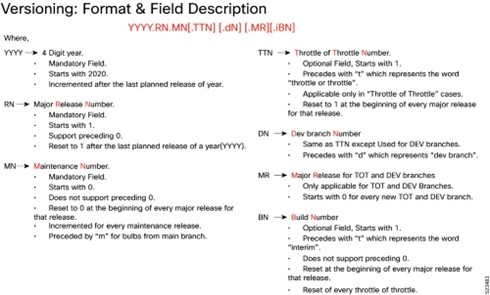
The appropriate version number field increments after a version has been released. The new version numbering format is a contiguous sequential number that represents incremental changes between releases. This format facilitates identifying the changes between releases when using Bug Search Tool to research software releases.
Software integrity verification
To verify the integrity of the software image you have from Cisco, you can validate the SHA512 checksum information against the checksum identified by Cisco for the software.
Image checksum information is available through Cisco.com Software Download Details. To find the checksum, hover the mouse pointer over the software image you have downloaded.
This is a sample for software integrity verification.
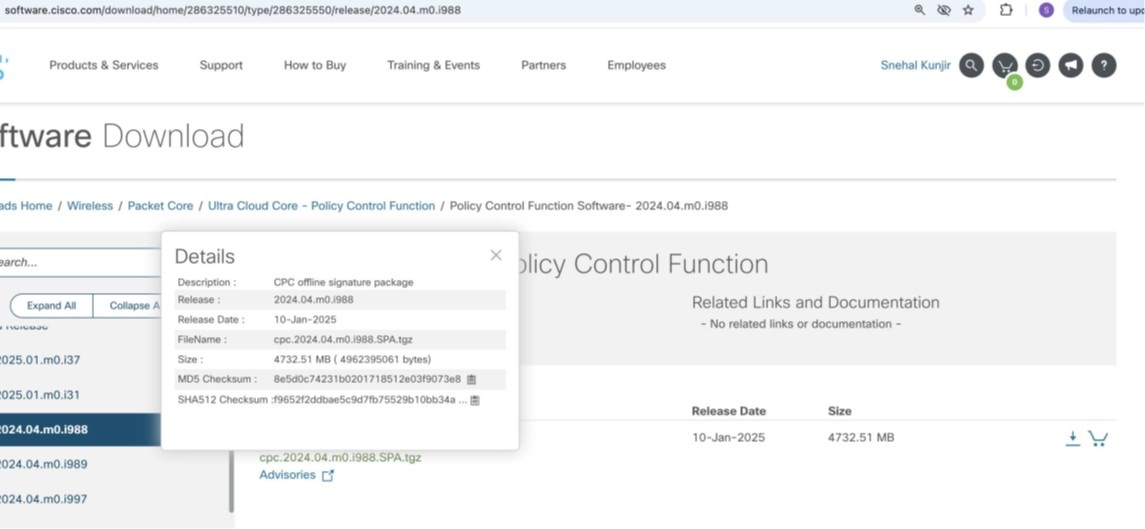
At the bottom, you will find the SHA512 checksum. If you do not see the whole checksum, you can expand
it by pressing "..." at the end.
To validate the information, calculate a SHA512 checksum using the information in Table 1 and verify that
it matches the provided on the software download page.
To calculate a SHA512 checksum on your local desktop, refer to the following table.
Table 8. Checksum calculations per operating system
| Operating System |
SHA512 checksum calculation command examples |
| Microsoft windows |
Open a command line window and type the following command: > certutil.exe -hashfile filename.extension SHA512 |
| Apple MAC |
Open a terminal window and type the following command: $ shasum -a 512 filename.extension |
| Linux |
Open a terminal window and type the following command: $ sha512sum filename.extension OR $ shasum -a 512 filename.extension |
| <filename> is the name of the file. <extension> is the file type extension (for example, .zip or .tgz). |
|
Certificate validation
CPC software images are signed through x509 certificates. For information and instructions on how to validate the certificates, refer to the .README file packaged with the software.
This table provides key resources and links to the support information and essential documentation for Ultra Cloud Core CPC AAA products.
Table 9. Related resources and additional information
| Resource |
Link |
| cnAAA documentation |
|
| Service Request and Additional information |
Cisco and the Cisco logo are trademarks or registered trademarks of Cisco and/or its affiliates in the U.S. and other countries. To view a list of Cisco trademarks, go to this URL: www.cisco.com/go/trademarks. Third-party trademarks mentioned are the property of their respective owners. The use of the word partner does not imply a partnership relationship between Cisco and any other company. (1721R)
Any Internet Protocol (IP) addresses and phone numbers used in this document are not intended to be actual addresses and phone numbers. Any examples, command display output, network topology diagrams, and other figures included in the document are shown for illustrative purposes only. Any use of actual IP addresses or phone numbers in illustrative context is unintentional and coincidental.
© 2026 Cisco Systems, Inc. All rights reserved.