Release notes for UCC Converged Policy and Charging (CPC) AAA, Release 2026.02.0
Available Languages
Bias-Free Language
The documentation set for this product strives to use bias-free language. For the purposes of this documentation set, bias-free is defined as language that does not imply discrimination based on age, disability, gender, racial identity, ethnic identity, sexual orientation, socioeconomic status, and intersectionality. Exceptions may be present in the documentation due to language that is hardcoded in the user interfaces of the product software, language used based on RFP documentation, or language that is used by a referenced third-party product. Learn more about how Cisco is using Inclusive Language.
- US/Canada 800-553-2447
- Worldwide Support Phone Numbers
- All Tools
 Feedback
 Feedback
Ultra Cloud Core CPC, Release 2026.02.0
Ultra Cloud Core CPC, Release 2026.02.0
This Release Notes identifies changes and issues related to the release of Ultra Cloud Core Converged Policy and Charging (CPC) software release.
The key highlights of this release include:
● Auto backup of MongoDB SPR: Automates Subscriber Profile Repository (SPR) backups to external servers. Use the Ops-Center CLI to configure periodic backup schedules and retention intervals for data protection.
● Centralized PCAP collection and merging: Executes tcpdump across cluster nodes in parallel to capture network traffic simultaneously. It merges the resulting Packet Capture (PCAP) files into a single, timestamp-sorted trace to simplify troubleshooting for distributed network issues.
● CoA throttling based on virtual NAS IP: Implements a granular Change of Authorization (CoA) throttling mechanism that uses a virtual User Plane IP address as the primary key. This ensures fair traffic management when multiple User Plane Broadband Network Gateways (BNGs) share a single Control Plane BNG.
● ConfD and Kubernetes upgrade: Upgrades the platform infrastructure to ConfD 8.6.2 and Kubernetes 1.35 to leverage improved YANG compilation, enhanced security patches, and modern Container Network Interface (CNI) and Container Storage Interface (CSI) plugin compatibility.
● Configurable MongoDB PV storage size: Enables per-replica-set persistent volume storage configuration for MongoDB through the Ops-Center CLI, allowing operators to configure storage capacity, with a default value of 5 Gi, based on deployment requirements.
● Subscriber bifurcation report: Adds a comprehensive reporting tool to the Control Center that enables operators to filter and export subscriber provisioning data, such as static counts and Plan0 service assignments, based on specific criteria like circle code and service type.
● Virtual NAS IP (vBNG) support: Enhances RADIUS accounting processing to extract the virtual NAS IP from incoming Vendor-Specific Attributes (VSAs) and persist this value in the Cisco Data Layer (CDL) session record to support abstract, scalable network management.
For more information about the Ultra Cloud Core CPC documentation, see the Related resources section.
Release lifecycle milestones
Table 1. EoL milestone information for CPC, Release 2026.02.0
| Milestone |
Date |
| First Customer Ship (FCS) |
23-April-2026 |
| End of Life (EoL) |
23-April-2026 |
| End of Software Maintenance (EoSM) |
23-Oct-2027 |
| End of Vulnerability and Security Support (EoVSS) |
23-Oct-2027 |
| Last Date of Support (LDoS) |
31-Oct-2028 |
These milestones and the intervals between them are defined in the Cisco Ultra Cloud Core (UCC) Software Release Lifecycle Product Bulletin available on cisco.com.
This section provides a brief description of the new software features introduced in this release.
Table 2. New software features for Ultra Cloud Core CPC, Release 2026.02.0
| Product impact |
Feature |
Description |
| Software Reliability |
This feature automates Subscriber Profile Repository (SPR) backups to external servers. Use the Ops-Center CLI to configure periodic backup schedules and retention intervals for data protection. |
|
| Ease of Use |
Executes tcpdump across cluster nodes in parallel to capture network traffic simultaneously. It merges the resulting Packet Capture (PCAP) files into a single, timestamp-sorted trace to simplify troubleshooting for distributed network issues. |
|
| Software Reliability |
Implements a granular CoA throttling mechanism that uses a virtual User Plane IP address as the primary key. This ensures fair traffic management and prevents bottlenecks when multiple User Plane BNGs share a single Control Plane BNG. |
|
| Upgrade |
Upgrades the platform infrastructure to ConfD 8.6.2 and Kubernetes 1.35 to leverage improved YANG compilation, enhanced security patches, and modern and CSI plugin compatibility. |
|
| Ease of Setup |
Enables per-replica-set persistent volume storage configuration for MongoDB through the Ops-Center CLI, allowing operators to configure storage capacity, with a default value of 5 Gi, based on deployment requirements. |
|
| Ease of Use |
Adds a reporting tool to the Control Center that enables operators to filter, analyze, and export subscriber provisioning data, such as static counts and Plan0 service assignments, based on criteria like circle code and service type. |
|
| Software Reliability |
Enhance RADIUS accounting processing to extract the virtual NAS IP from incoming Vendor-Specific Attributes (VSAs) and persist this value in the CDL session record to support abstract, scalable network management. |
This section provides a brief description of the behavior changes introduced in this release.
Table 3. Behavior changes for Ultra Cloud Core CPC, Release 2026.02.0
| Description |
Behavior changes |
| Segregating log directories by site and type [CSCws94192] |
Previous behavior: The cnAAA application stored all consolidated log files (API, engine, and application) in a single destination path on the external server. New behavior: The cnAAA application segregates logs into distinct directories based on site origin and log type. Specify three separate directories in the external-scp-server dest-path for API, engine, and application logs. The directory structure is <Destination_Path>/<Site_name>/<api/app/engine>/<Year>/<Month in Numerics>/<Filename>. Customer impact: Improves debugging by allowing you to locate specific logs across different sites and time periods, eliminating the need to manually sort through a single directory. |
| Upgrading CDL to KRaft mode [CSCwt20736] |
Previous behavior: CDL utilized Kafka with ZooKeeper for cluster management. New behavior: The cnAAA application supports CDL upgrades from version 1.12 to 2.2, migrating Kafka coordination from ZooKeeper to KRaft. Customer impact: Enables the use of a modern, efficient KRaft-based architecture for Kafka, aligning with current industry standards for cluster management and performance. |
| Performing immediate log copy on cron enablement |
Previous behavior: The cnAAA application copied consolidated logs to an external server only after the first interval of the cron scheduler was reached. New behavior: The cnAAA application performs an immediate initial copy of consolidated API, application, and engine logs as soon as you enable the cron job, regardless of the configured scheduler time interval. Customer impact: Provides immediate access to log files upon enabling the feature, which is critical for troubleshooting scenarios where waiting for the first scheduled interval is not feasible. |
| Forwarding OCS retry logs |
Previous behavior: The cnAAA application did not include OCS retry logs (success and failure) in the automated forwarding to the external SCP storage server. New behavior: The cnAAA application automatically forwards consolidated OCS retry success (success.csv) and failure logs to the external SCP storage server. Customer impact: Centralizes OCS retry status information, providing better visibility and easier auditing of retry operations across multiple sites. |
| Segregating record counts in the Grafana monitoring dashboard |
Previous behavior: The Grafana dashboard displayed record counts for all databases (including Subscriber Profile Repository [SPR], admin, and admin-config) within a single, consolidated panel, which made it difficult to distinguish between data types. New behavior: The dashboard features segregated panels. One panel displays records for SPR databases, and a separate panel displays data for Custom Reference Data (CRD. Customer impact: Provides improved visibility by separating SPR record counts from CRD and admin-related data, enabling more precise monitoring of specific database types. |
This table lists the resolved issues in this specific software release.
Note: This software release may contain bug fixes first introduced in other releases. To see additional information, click the bug ID to access the Cisco Bug Search Tool. To search for a documented Cisco product issue, type in the browser: <bug_number> site:cisco.com
Table 4. Resolved issues for Ultra Cloud Core CPC, Release 2026.02.0
| Bug ID |
Description |
| The cnAAA backup logic has been modified to use an internal URL instead of CRD and PB ingress. |
|
| Need to remove the Diameter Config from Policy Builder. |
|
| Audit and last login logs are to be forwarded to external server via CEE Ops-Center. |
|
| External-scp-server dest-path: Include Year and Month in folder name for better readability. |
|
| Need to add the Network-Id (MAC) in the logs which will give info about egress traffic (Access Responses, CoA messages). |
|
| Automatic schedule backup failed for PB and Ops-Center if CRD ingress URL is not configured. |
|
| Resolving exceptions in CRD Pod. |
|
| Specify three separate directories in the external-scp-server dest-path for API, engine, and app logs. |
|
| Get subscriber KPI status shows error even for success flow. |
|
| Deleting or restarting all consumer pods causes CRUD failures and inaccurate subscriber counts in cnAAA. |
This table lists the open issues in this specific software release.
Note: This software release may contain open bugs first identified in other releases. To see additional information, click the bug ID to access the Cisco Bug Search Tool. To search for a documented Cisco product issue, type in the browser: <bug_number> site:cisco.com
Table 5. Open issues for Ultra Cloud Core CPC, Release 2026.02.0
| Bug ID |
Description |
| TAC debug is not capturing logs in the latest CNDP build. |
|
| Policy Builder and CPC Central display incorrect default roles for new SMI users. |
This section lists compatibility information of the Cisco UCC software products that are verified to work with this version of the UCC CPC cnAAA software.
Table 6. Compatibility information for Ultra Cloud Core CPC, Release 2026.02.0
| Product |
Supported release |
| Ultra Cloud Core SMI |
2026.02.1.07 |
| Ultra Cloud Core CDL |
2.2 |
| Unified Load Balancer (ULB) |
2026.02.0 |
This section provides information about the release packages associated with Ultra Cloud Core CPC, cnAAA software.
Table 7. Software packages for Ultra Cloud Core CPC, Release 2026.02.0
| Software package |
Description |
Release |
| cpc.2026.02.0.SPA.tgz |
The CPC offline release signature package. This package contains the CPC deployment software as well as the release signature, certificate, and verification information. |
2026.02.0 |
Cloud native product version numbering system
The show helm list command displays detailed information about the version of the cloud native product currently deployed.
This is a sample for version numbering system:
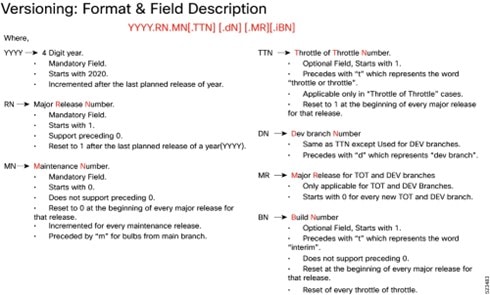
The appropriate version number field increments after a version has been released. The new version numbering format is a contiguous sequential number that represents incremental changes between releases. This format facilitates identifying the changes between releases when using Bug Search Tool to research software releases.
Software integrity verification
To verify the integrity of the software image you have from Cisco, you can validate the SHA512 checksum information against the checksum identified by Cisco for the software.
Image checksum information is available through Cisco.com Software Download Details. To find the checksum, hover the mouse pointer over the software image you have downloaded.
This is a sample for software integrity verification.
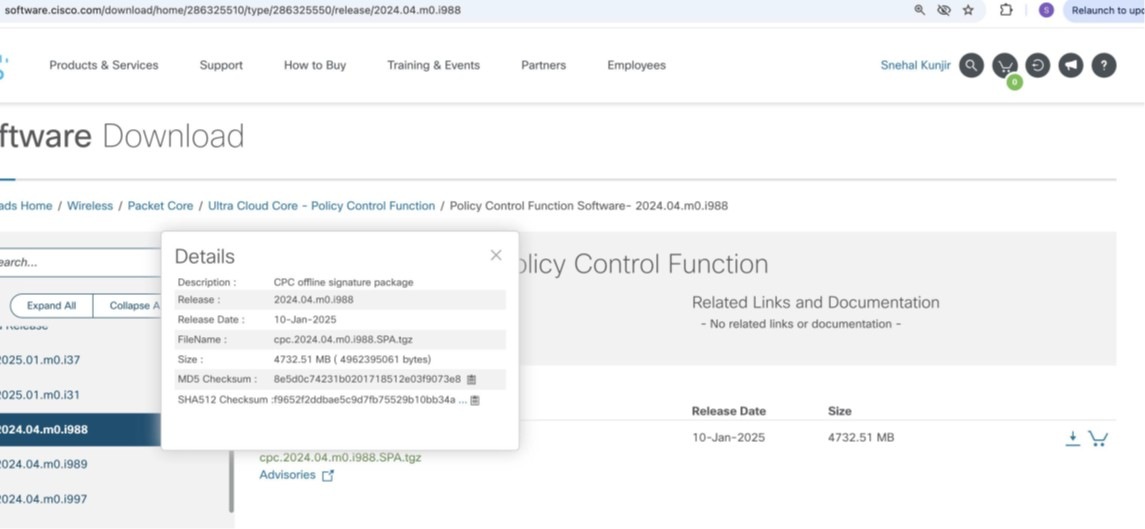
At the bottom, you will find the SHA512 checksum. If you do not see the whole checksum, you can expand
it by pressing "..." at the end.
To validate the information, calculate a SHA512 checksum using the information in Table 1 and verify that
it matches the provided on the software download page.
To calculate a SHA512 checksum on your local desktop, refer to the following table.
Table 8. Checksum calculations per operating system
| Operating System |
SHA512 checksum calculation command examples |
| Microsoft windows |
Open a command line window and type the following command: > certutil.exe -hashfile filename.extension SHA512 |
| Apple MAC |
Open a terminal window and type the following command: $ shasum -a 512 filename.extension |
| Linux |
Open a terminal window and type the following command: $ sha512sum filename.extension OR $ shasum -a 512 filename.extension |
| <filename> is the name of the file. <extension> is the file type extension (for example, .zip or .tgz). |
|
Certificate validation
CPC software images are signed through x509 certificates. For information and instructions on how to validate the certificates, refer to the .README file packaged with the software.
This table provides key resources and links to the support information and essential documentation for Ultra Cloud Core CPC AAA products.
Table 9. Related resources and additional information
| Resource |
Link |
| cnAAA documentation |
|
| Service Request and Additional information |
Cisco and the Cisco logo are trademarks or registered trademarks of Cisco and/or its affiliates in the U.S. and other countries. To view a list of Cisco trademarks, go to this URL: www.cisco.com/go/trademarks. Third-party trademarks mentioned are the property of their respective owners. The use of the word partner does not imply a partnership relationship between Cisco and any other company. (1110R)
Any Internet Protocol (IP) addresses and phone numbers used in this document are not intended to be actual addresses and phone numbers. Any examples, command display output, network topology diagrams, and other figures included in the document are shown for illustrative purposes only. Any use of actual IP addresses or phone numbers in illustrative content is unintentional and coincidental.
© 2026 Cisco Systems, Inc. All rights reserved.