RADIUS Configurations

This section covers all the RADIUS Configurations

Configure the node for the RADIUS Endpoint Pod

This section describes how to specify the node or host where the RADIUS endpoint must spawn the pod.


Note


Configuration changes to the RADIUS endpoint cause the endpoint to restart automatically. Cisco recommends making such changes only within the maintenance window.


Mandatory RADIUS configuration

To configure the RADIUS server with essential parameters for optimal network performance and security, use the following configuration:

radius bind-ip <bind IP address>
radius replicas 2
radius settings request-timeout-ms 5000
radius settings max-tries  1
radius async-threading-configuration default-processing-threads 100
radius async-threading-configuration default-action-priority 5
radius async-threading-configuration default-action-threads 100
radius async-threading-configuration default-action-queue-size 400000
radius async-threading-configuration default-action-drop-oldest-when-full true
radius device-group ASR9K
 	default-shared-secret     <secret value>
 	default-coa-shared-secret <secret value>
 	coa-port                  3799
 coa-timeout-seconds       3
 	device <BNG Device Name>
 	 ip                 <BNG IP Address>
  	shared-secret      <secret value>
  	coa-shared-secret  <secret value>
  	loopback-addresses [ <loopback addresses> ]
 exit
radius server-group <Server Group Name>
 servers <server name>
  	primary              <primary OCS IP Address>
 	 secondary            <secondary OCS IP Address>
 	 nas-ip               <nas p address>
 	 accounting-port      1803
  	authorization-port   1802
 	 auth-protocol        PAP
 	 radius-password      <radius password>
  	shared-secret        <secret value>
 	 timeout-seconds      3
  	test-message         false
  	test-userid          test
 	 test-password        test123
 	 thread-pool-size     330
 	 max-proxy-queue-size 50000
       server-type   online (or) offline
 	 retries              0
 exit
radius properties grpc.executors
 	value 5
exit
radius properties grpc.timeoutMs.processing
 value 5000
exit
radius properties io.netty.eventLoopThreads
 	value 16
exit
radius properties parallelChannelCount
 	value 5
exit
radius properties prometheusPort
 	value 9099
exit
radius properties radiusCorePoolSize
 	value 20
exit
radius properties radiusMaxQueue
 	value 4000
exit
radius properties traps.tps
 	value 4000
exit
radius properties udpMaxQueue
 	value 4000
exit
radius properties udpPoolSize
 value 20
exit
Ops-Center configuration for enabling IPv6 in RADIUS Endpoint

To enable the IPv6 on the RADIUS Endpoint within CPC, complete the following configurations in Ops-Center.

General RADIUS settings


radius accounting-port 1813
radius authorization-port 1812
radius coa-port    1700
radius bind-ip 2001:ddff::1
radius settings request-timeout-ms 5000
radius settings max-tries  1
radius settings min-processing-time-millis 3000
radius settings backoff-time-millis 1000

BNG device group configurations

BNG Client Configuration
device bng01
  ip                 2002:20:50:53::100/127
  shared-secret      cisco
  coa-shared-secret  cisco
  loopback-addresses [ 12.0.0.1 ]
 exit

RADIUS server group configuration

radius server-group grp1
 servers DEL_OCS
  primary              2002:20:50:52::100
  secondary            2002:20:50:52::101
  accounting-port      1803
  authorization-port   1802
  auth-protocol        PAP
  radius-password      test123
  shared-secret        cisco
  timeout-seconds      5
  test-message         false
  test-userid          test
  test-password        test123
  thread-pool-size     400
  max-proxy-queue-size 40000
  server-type   online (or) offline
  retries              3
 exit
exit

Configure the RADIUS Endpoint in cnAAA using Ops-Center

To configure the RADIUS Endpoint in cnAAA using Ops-Center, follow these steps:

Procedure


Step 1

Configure the RADIUS Device Group by defining shared secrets and loopback addresses for each BNG device.

radius device-group ASR9K
  default-shared-secret sh512
  default-coa-shared-secret aes256
  device dev1
    ip 10.1.2.12
    shared-secret aes128
    coa-shared-secret sh256
    loopback-addresses [12.3.1.2]
  exit
  device dev2
    ip 3.4.5.6
    shared-secret sh345
    coa-shared-secret aes111
    loopback-addresses [3.4.8.1]
  exit

Step 2

Configure the RADIUS Server Group by setting up primary and secondary server IPs, ports, server-type, and authentication protocols.

radius server-group grp1
  servers serv1
    primary 3.4.4.4
    secondary 5.5.5.3
    nas-ip 1.1.2.2
    accounting-port 8312
    authorization-port 1312
    auth-protocol PAP
    radius-password test123
    shared-secret sh233
    timeout-seconds 20
    test-message false
    test-userid test
    test-password test123
    thread-pool-size 10
    max-proxy-queue-size 3
    server-type   online (or) offline
  exit

Ops Center configuration to enable ULB on RADIUS Endpoint

To enable the ULB in cnAAA, configure the ops-center as follows:

  1. Set the ULB parameter to "true" to activate the backend load balancing service.

  2. If the ULB parameter is "false" the system uses default Kubernetes capabilities for traffic management.

General RADIUS Settings

cnaaa# show running-config radius | nomore
radius accounting-port 1812
radius authorization-port 1813
radius coa-port 2799

radius bind-ipv4 [ bind IPv4 address ]
radius bind-ipv6 [  bind IPv4 address ]
radius replicas 2 
radius lbs-service true
radius settings request-timeout-ms 5000
radius settings max-tries 4
radius settings min-processing-time-millis 3000
radius settings backoff-time-millis 1000

Configuration Notes

  • radius bind-ip host_address: Specifies the host address for the RADIUS binding.

  • replicas number_of_replicas: Indicates the number of replicas.

  • ULB-service boolean_value: Specifies whether the load balancing service is enabled (true or false).

  • settings request-timeout-ms timeout_in_milliseconds: Sets the request timeout in milliseconds.

  • settings max-tries max_attempts: Defines the maximum number of retry attempts.

  • settings min-processing-time-millis min_processing_time_in_milliseconds: Sets the minimum processing time in milliseconds.

  • settings backoff-time-millis backoff_time_in_milliseconds: Sets the backoff time in milliseconds.

RADIUS Device Group: ASR9K

radius device-group ASR9K                                                                                                                            
 default-shared-secret     sh512                                                                                                                     
 default-coa-shared-secret cisco                                                                                                                   
 device dev1                                                                                                                                         
  ip                 10.1.2.12                                                                                                                       
  shared-secret  cisco                                                                                                                           
  coa-shared-secret  cisco                                                                                                                        
  loopback-addresses [ 12.3.1.2 ]                                                                                                                    
 exit                                                                                                                                                
 device dev2                                                                                                                                         
  ip                 3.4.5.6                                                                                                                         
  shared-secret      cisco                                                                                                                          
  coa-shared-secret  cisco                                                                                                                          
  loopback-addresses [ 3.4.8.1 ]                                                                                                                     
 exit                                                                                                                                                
exit           

Configuration Notes

  • default-shared-secret cisco – Specifies the default shared secret for RADIUS communication.

  • default-coa-shared- cisco – Specifies the default shared secret for CoA communication.

  • device dev1 – Configures a RADIUS device with specific settings: ip– The IP address of the device.

  • shared-secret cisco – The shared secret for communication with the device.

  • coa-shared-secret cisco – The shared secret for CoA communication with the device.

  • loopback-addresses – Specifies the loopback addresses for the device.

RADIUS Server Group: grp1

radius server-group grp1                                                                                                                             
 servers serv1                                                                                                                                       
  primary              3.4.4.4                                                                                                                       
  secondary            5.5.5.3                                                                                                                       
  nas-ip               1.1.2.2                                                                                                                       
  accounting-port      8312                                                                                                                          
  authorization-port   1312                                                                                                                          
  auth-protocol        PAP                                                                                                                           
  radius-password      <password>                                                                                                                      
  shared-secret        <secret>
  timeout-seconds      20                                                                                                                            
  test-message         false
  server-type   online (or) offline                                                                                                                                                                                                                                                              

Configuration Notes

  • servers serv1 – Specifies the servers within the group.

  • primary– The primary server's IP address.

  • secondary – The secondary server's IP address.

  • nas-ip– The IP address of the Network Access Server (NAS).

  • authorization-port – The port used for authorization requests within the server group.

  • auth-protocol PAP – Specifies the authentication protocol used, in this case, PAP.

  • radius-password cisco– The password used for RADIUS authentication.

  • shared-secret cisco – The shared secret used for communication within the server group.

  • timeout-seconds 20 – Specifies the timeout duration in seconds for server responses.

  • test-message false – Indicates whether test messages are enabled or disabled.

  • test-userid cisco – The user ID used for test purposes.

  • test-password cisco – The password used for test purposes.

  • thread-pool-size 10 – Specifies the size of the thread pool for handling requests.

  • max-proxy-queue-size 3 – Specifies the maximum size of the proxy queue.

  • server-type - Specify as "online" for OCS server and "offline" for Passive-MZ server.

  • radius properties grpc.executors – Configures properties related to gRPC executors.

  • value 40 – Specifies the value for the gRPC executors property.

For more information on ULB, see the Unified Load Balancer Configuration and Administration Guide.

RADIUS Configuration

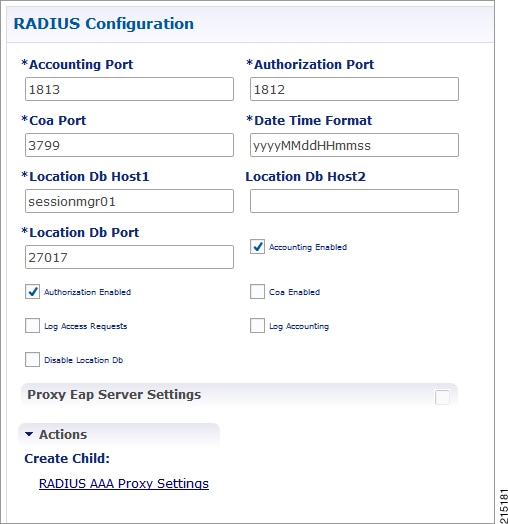
Click RADIUS Configuration in the right pane to add the configuration in the system.

Figure 1. RADIUS Configuration


The following parameters can be configured under RADIUS Configuration:

Table 1. RADIUS Configuration Parameters

Parameter

Description

Accounting Port

Port used for incoming radius accounting.

Authorization Port

Port used for incoming radius authorization.

Coa Port

Port used for Change of Authority between CPC and Radius Device.

Date Time Format

Time stamping format for radius transactions.

Location Db Host1

Mongo location for Primary Radius database.

Location Db Host2

Mongo location for Secondary Radius database.

Location Db Port

Port number for the Radius database.

Accounting Enabled

Enables CPC to receive incoming Radius Accounting.

Default value is True (checked).

Authorization Enabled

Enables CPC to receive incoming Radius Authorization.

Default value is True (checked).

Coa Enabled

Enables CPC to send and receive CoAs.

Log Access Requests

Log the radius accounting which is configured in /etc/broadhop/logback.xml. The typical default logging location is /var/broadhop/radius/accounting/accounting.current.

Log Accounting

Logs radius authorization requests, also configured in /etc/broadhop/logback.xml. The typical default logging location is /var/broadhop/radius/access/rejects.current.

Disable Location Db

Will not record WLC locations in the Radius mongo DB.

Default value is False (unchecked).

For information on proxy settings, refer to RADIUS AAA Proxy Settings.

RADIUS AAA Proxy Settings

Click RADIUS AAA Proxy Settings to add the configuration in the system. These proxy settings are used for domain-based subscriber authorization.

Table 2. RADIUS AAA Proxy Settings

Parameter

Description

RADIUS Server

Server Identification which will be mapped between Proxy Settings and Domain/Service.

Accounting Port

AAA Server Accounting Port which will receive and process accounting requests.

Authorization Port

AAA Server Authorization Port which will receive and process authentication requests.

Primary IP Address

Primary AAA Server IP address.

Secondary IP Address

Secondary AAA Server IP address.

RADIUS NAS IP Address

NAS IP address which will be sent in the proxied requests.

RADIUS Auth Protocol

RADIUS authentication protocol used. Default: PAP

RADIUS Password

RADIUS authentication password.

Retries

Number of times the requests will be retried in a failure scenario.

Shared Secret

Shared Secret of the AAA Server.

Test User Id

RADIUS username used for testing between CPC and AAA Server.

Test Password

RADIUS password used for testing between CPC and AAA Server.

Thread Pool Size

Number of threads to handle proxying of requests.

Max Proxy Queue Size

Maximum number of requests that can be queued before being proxied.

Send Test Message

Select this option to send a test message to the AAA server when CPC comes up.