Monitoring

Monitoring

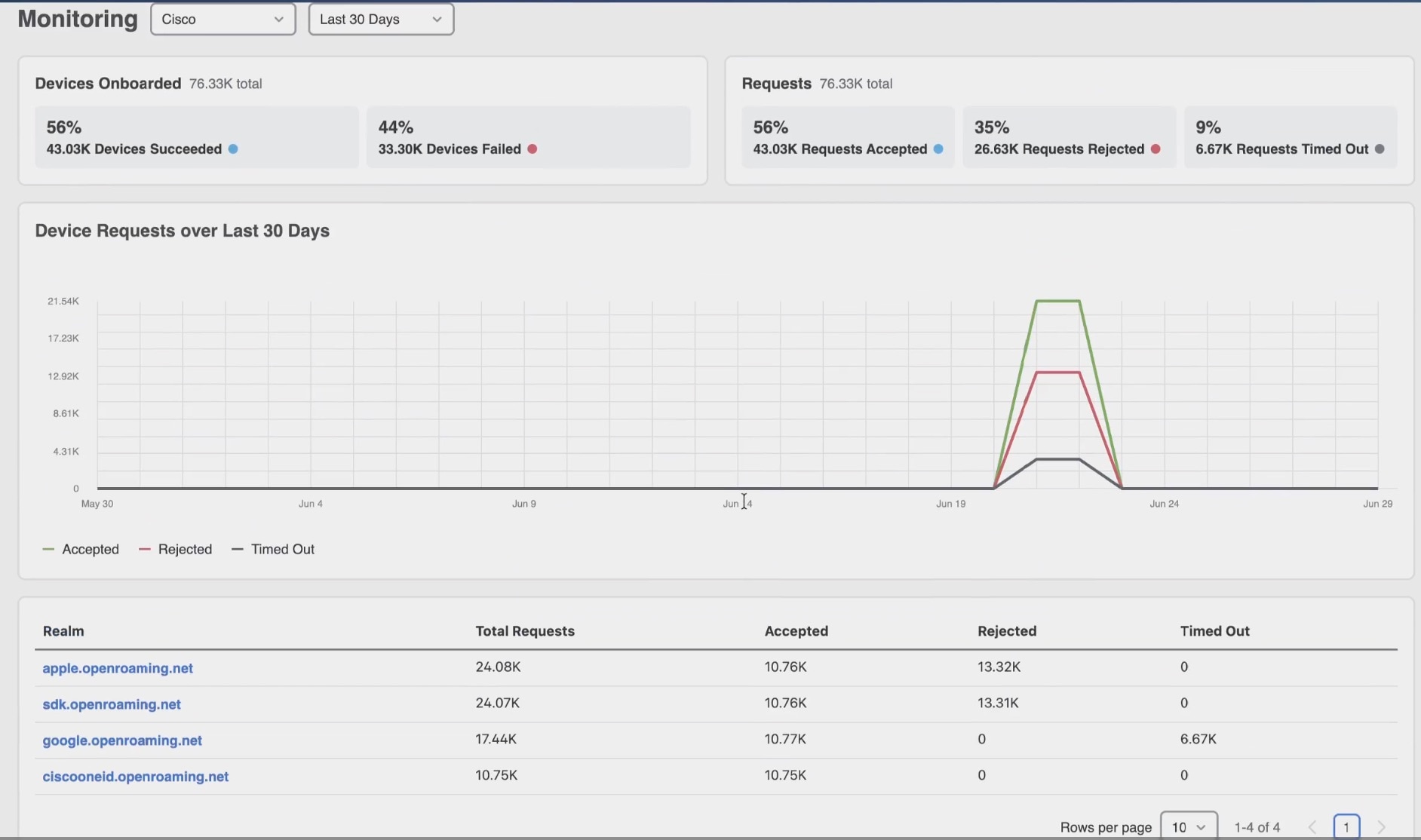
The Monitoring dashboard provides visibility into OpenRoaming authentication and accounting activity. It enables administrators to monitor authentication trends, identify failures, and analyze Identity Provider (IdP) activity through a centralized dashboard. The dashboard presents authentication and accounting information through graphical and tabular views.


Note


Monitoring uses the existing OpenRoaming configuration. You do not need additional configuration to view monitoring data after you configure OpenRoaming and controllers send authentication data.


Figure 1. Monitoring

View OpenRoaming monitoring data

Before you begin

Configure OpenRoaming.

Procedure


Step 1

In Cisco Spaces, choose OpenRoaming > Monitoring.

Step 2

To narrow the data to a specific identity provider, select an IDP.

Step 3

Select a time range.

You can view data for 8 hours, 24 hours, 1 week, or 30 days.

Step 4

Review Devices Onboarded to compare successful and failed onboarding activity.

Step 5

Review Requests to compare accepted, rejected, and timed-out authentication requests.

Step 6

Use the device requests graph to review request trends for the selected time range.

Step 7

In the Realm table, click a realm to view more details for that realm.

The details open on the page. Click Close to return to the monitoring dashboard.

Step 8

Use the Network/Controller table to review request sctivity by controller and network type.


OpenRoaming monitoring data

The Device Onboarding section displays the number and percentage of devices that successfully completed onboarding and those that failed.

The Requests section displays the following authentication request statistics as both numbers and percentages.

The Device Requests section displays graphical metrics that represent authentication and accounting activity over the selected time period.

Table 1. Realm

Realm

Total Rquests

Accepted Requests

Rejected Requests

Timed-Out Requests

Domain or realm that generated authentication requests.

Total number of authentication requests from the realm.

Total number of accepted requests from the realm.

Total number of rejected requests from the realm.

Total number of timed-out requests from the realm.

Table 2. Network and Controller

Network and Controller

Total Rquests

Accepted Requests

Rejected Requests

Timed-Out Requests

Network

List of network and controller

Total number of authentication requests from the controller.

Total number of accepted requests from the controller.

Total number of rejected requests from the controller.

Total number of timed-out requests from the network and controller.

Total number of network.