Introduction

Overview of the Access Point

The Cisco Catalyst IW9165D Heavy Duty Access Point and Wireless Client (IW9165D) is a robust wireless device designed to provide ultrareliable connectivity for moving vehicles and machines in industrial settings.

  • Supports operation as Cisco Ultra-Reliable Wireless Backhaul (URWB) and CAPWAP modes, starting from specific software releases.

  • Features a 2x2 Wi-Fi 6E design with options for internal and external antennas, simplifying wireless backhaul deployment.

  • Does not support 2.4G radio or scan radio functionalities.

Supported Modes and Features of the IW9165D Access Point

The IW9165D access point can operate in multiple modes, each tailored for specific deployment scenarios and requirements.

  • Local mode : The default mode where the AP serves clients, creating two CAPWAP tunnels (management and data) to the controller for central switching.

  • Flexconnect mode : Data traffic is switched locally, not sent to the controller. The AP behaves like an autonomous AP but is managed by the controller and continues to function if the controller connection is lost.

  • Fabric mode : The AP establishes a VxLAN tunnel (Access-Tunnel) to the fabric edge, preserving segmentation and inserting the SGT tag in the tunnel for secure connectivity.

  • Sniffer mode : The AP captures and forwards all client packets on a given channel to a remote machine running packet analyzers such as Airopeek or Wireshark, including details like timestamp, signal strength, and packet size.


    Note


    In sniffer mode, the server receiving the data must be on the same VLAN as the wireless controller management VLAN; otherwise, an error message is displayed.
  • Monitor mode : The AP acts as a dedicated sensor for location-based services, rogue AP detection, and intrusion detection, without serving client data traffic.

  • Site Survey mode : The AP GUI is enabled for configuring RF parameters during site survey investigations. For more information, see the Access Points Survey Mode section in the Cisco Catalyst 9800 Series Wireless Controller Software Configuration Guide .

Unsupported features for the IW9165D access point include:

  • 2.4G radio, and

  • Scan radio.

For more information about configuring the AP on the Wireless Controller, see the Cisco Catalyst 9800 Series Wireless Controller Software Configuration Guide .

Typical Deployment of the IW9165D Access Point

The IW9165D can be deployed on moving vehicles such as automated guided vehicles (AGVs) in a factory, providing seamless wireless connectivity using URWB mode for high availability and low latency, or CAPWAP mode for integration with a wireless controller.
Determining image

The Catalyst IW9165D Access Point supports two wireless technologies—CAPWAP and URWB—on a single hardware platform, allowing you to switch images by updating the software without changing the hardware.

  • CAPWAP and URWB are the two supported wireless modes.

  • Each mode requires a specific software image: ap1g6b-k9w8-xxx.tar for CAPWAP and ap1g6m-k9c1-xxx.tar for URWB.

  • The image can be determined using the show version command.

Software images and mode reference

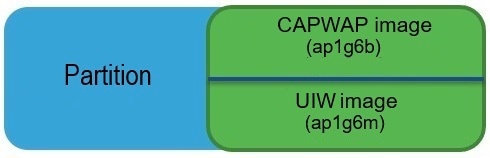
Software images are stored under different folders on the same partition on IW9165D. You need to choose the image to boot up with according to the mode your AP is running, CAPWAP or URWB.

Table 1. IW9165D Software Images

IW9165D Mode

Software Image

Description

CAPWAP

ap1g6b-k9w8-xxx.tar

Supports CAPWAP mode

URWB

Unified Industrial Wireless image ap1g6m-k9c1-xxx.tar

Supports URWB mode


Note


TIP: Select the correct image based on the desired operating mode of your access point.


This image shows the folder structure where software images are stored on the IW9165D:

Figure 1. IW9165D Software Image Folder Structure

Determining the running image using CLI

To determine the image that your IW9165D is running, use the show version command. The output will indicate the current image and mode:

  • If the show version output displays Cisco AP Software, (ap1g6b) , it means the AP is running the CAPWAP image ap1g6b-k9w8-xxx.tar , which supports the CAPWAP mode.

    Cisco AP Software, (ap1g6b), C9165, RELEASE SOFTWARE
    Technical Support: http://www.cisco.com/techsupport
    Copyright (c) 1986-2024 by Cisco Systems, Inc.
    Compiled Tue Feb 20 23:04:29 GMT 2024              
                        
  • If the show version output displays Cisco AP Software (ap1g6m) , it means the AP is running ap1g6m-k9c1-xxx.tar , which supports the Cisco URWB mode.

    Cisco AP Software, (ap1g6m), C9165, RELEASE SOFTWARE 
    Technical Support: http://www.cisco.com/techsupport
    Copyright (c) 1986-2024 by Cisco Systems, Inc.
    Compiled Tue Feb 20 23:04:29 GMT 2024
                        

Convert the IW9165D AP between CAPWAP and URWB Modes

This procedure describes how to change the operating mode of the IW9165D Access Point between CAPWAP and URWB. The device will reboot and start up in the selected mode after conversion.

Procedure


Step 1

Use the configure boot mode urwb command to convert from CAPWAP to URWB mode.

Example:

Device# configure boot mode urwb
                    

The access point reboots and starts up in URWB mode.

Step 2

Use the configure boot mode capwap command to convert from URWB to CAPWAP mode.

Example:

Device# configure boot mode capwap
                    

The access point reboots and starts up in CAPWAP mode.