- Introduction
- Design Overview
- Installing AIR-OEAP1810
- Understanding ports on AIR-OEAP1810
- Power Options on AIR-OEAP1810
- Software Features on AIR-OEAP1810
- Configuring WLC
- Configuring Voice or Data WLAN Connectivity
- Configuring AP Authentication
- Configuring Cisco OfficeExtend Access Point 1810
- Configuring Personal SSID on OfficeExtend Access Point 1810
Understanding ports
on AIR-OEAP1810
The Cisco Aironet® OfficeExtend Access Point 1810 has the following ports:
-
One 10/100/1000BASE-T PoE Uplink Port—This port is at the back of the OfficeExtend Access Point and is behind the back cover. It maps to the port labeled as Pass Thru at the bottom of the Access Point and also maps to WAN port on the Cradle when the Access Point is inserted in the cradle
-
Management Console Port (RJ45)—This is at the bottom of the OfficeExtend Access Point and is not accessible when it is inserted in the cradle
-
Three 10/100/1000BASE-T Ethernet ports—There are three Ethernet ports for wired client connectivity on the bottom of the Access Point as well as on the cradle. Ethernet port which is labeled as PSE LAN1 is the PoE out port. The other ports (LAN2 and LAN3) do not have PoE out. .LAN3 is a dedicated local port to access the local configuration on the AIR-OEAP1810.
-
Power port to connect the local power supply is AIR-PWR-D
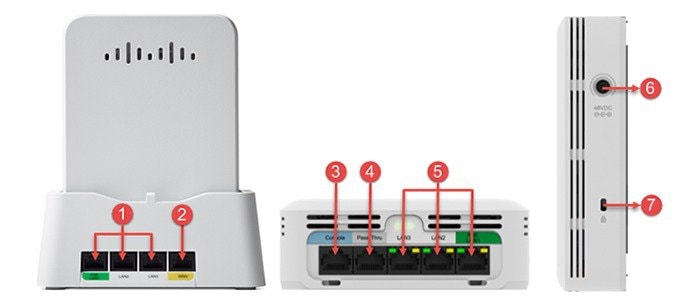
|
Porton OEAP1810 |
Port as Noted in Figure |
Port Numberas shown on OEAP1810 |
|---|---|---|
|
Local Ethernet Ports (on the cradle) |
1 |
PSE LAN1, LAN2, LAN3 |
|
WAN |
2 |
WAN |
|
Console |
3 |
Console |
|
Pass Pass Through |
4 |
Pass Through |
|
Local Ethernet Ports (Bottom of OEAP) |
5 |
PSE LAN1, LAN2, LAN3 |
|
Power Port |
6 |
48VDC |
|
Kensington Security Slot |
7 |
Lock |
 Feedback