- Introduction
- Design Overview
- Installing AIR-OEAP1810
- Understanding ports on AIR-OEAP1810
- Power Options on AIR-OEAP1810
- Software Features on AIR-OEAP1810
- Configuring WLC
- Configuring Voice or Data WLAN Connectivity
- Configuring AP Authentication
- Configuring Cisco OfficeExtend Access Point 1810
- Configuring Personal SSID on OfficeExtend Access Point 1810
Design
Overview
Design Overview
The Cisco OfficeExtend solution is specifically designed for the teleworker who primarily uses wireless devices. The solution consists of the following components:
Deployment Components
The OfficeExtend deployment is built around three main components: Cisco wireless LAN controllers, Cisco OfficeExtend Access Points and Corporate Firewall.
Cisco Wireless LAN Controllers
Cisco wireless LAN controllers are responsible for system-wide WLAN functions, such as security policies, intrusion prevention, RF management, quality of service (QoS), and mobility. They work in conjunction with Cisco OfficeExtend Access Points to support business-critical wireless applications for teleworkers. Cisco wireless LAN controllers provide the control, scalability, security, and reliability that network managers need to build a secure, scalable teleworker environment.
To allow users to connect their corporate devices to the organization's on-site wireless network, the Cisco OfficeExtend teleworking solution offers the same wireless Secure Set Identifiers (SSIDs) at teleworker's home as those that support data and voice inside the organization.
Cisco OfficeExtend Access Points
Cisco Aironet® OfficeExtend Access Point 1810 cannot act independently of a wireless LAN controller (WLC). As the access point communicates with the WLC resources, it will download its configuration and synchronize its software/firmware image, if required. Cisco Aironet® OfficeExtend Access Point 1810 establishes a secure Datagram Transport Layer Security (DTLS) connection between the access point and the controller to offer remote WLAN connectivity using the same profile as at the corporate office. Secure tunneling allows all traffic to be validated against centralized security policies and minimizes the management overhead associated with home-based firewalls.
Cisco OfficeExtend delivers full 802.11ac wireless performance and avoids congestion caused by residential devices because it operates simultaneously in the 2.4-GHz and the 5-GHz radio frequency bands. The access point also provides wired Ethernet connectivity in addition to wireless. The Cisco OfficeExtend Access Point provides wired and wireless segmentation of home and corporate traffic, which allows for home device connectivity without introducing security risks to corporate policy.
Corporate Firewall
The Wireless LAN Controller should be placed in DMZ and the corporate Firewall must allow CAPWAP Control and CAPWAP Data traffic through the Firewall to the Wireless LAN Controller.The general configuration on the firewall is to allow CAPWAP control and CAPWAP management port numbers through the firewall.
 Note | The UDP 5246 and 5247 ports need to be opened on the firewall for communication between the Wireless LAN controller and the Cisco OfficeExtend Access Point 1810. |
Design Models
For the most flexible and secure deployment of Cisco OfficeExtend, deploy a dedicated controller pair for Cisco OfficeExtend using the Cisco 8500 and 5500 LAN Controllers. In the dedicated design model, the controller is directly connected to the Internet edge demilitarized zone (DMZ) and traffic from the Internet is terminated in the DMZ versus on the internal network, while client traffic is still directly connected to the internal network.
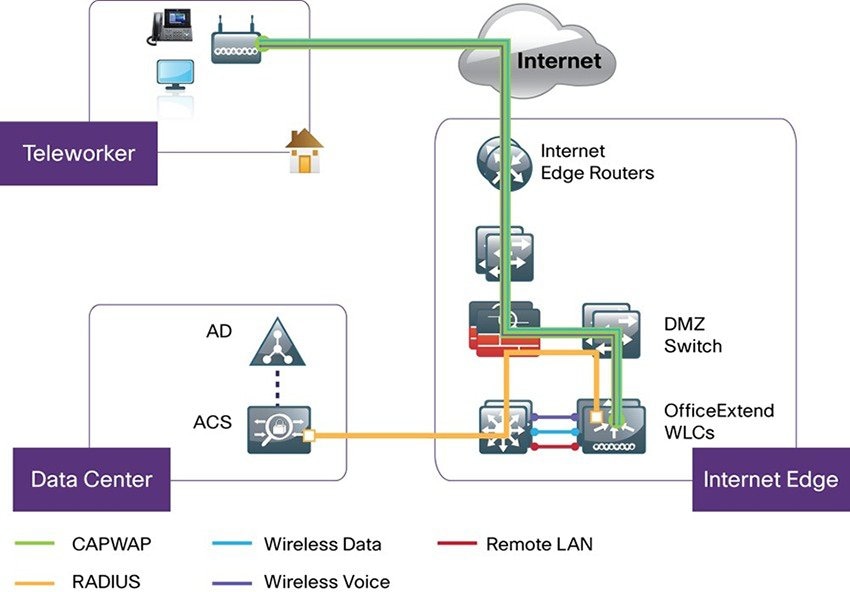
OfficeExtend Teleworker Workflow
The following steps describe the workflow carried out by the teleworker to connect the OfficeExtend Access Point to the corporate Wireless LAN Controller:
-
A user is given an OfficeExtend Access Point 1810 primed with the IP address of the corporate Wireless LAN controller. Alternatively, the teleworker can prime the OfficeExtend Access Point by entering the IP address of the Wireless LAN Controller in the local configuration screen of the OfficeExtend Access Point
-
The teleworker connects the WAN port on OfficeExtend Access Point to one of the home internet router LAN interfaces
-
The OfficeExtend Access Point will obtain an IP address from the home internet router and will initiate a join request to the corporate Wireless LAN Controller
-
After the OfficeExtend Access Point joins the corporate Wireless LAN Controller, it advertises the corporate SSID, extending the same security methods and services across the WAN to the teleworker’s remote home location
-
If Remote LAN (RLAN) is configured on Wired LAN ports of the OfficeExtend Access Points, devices can be connected to the corporate network via the Wired LAN ports
-
Teleworker can additionally configure a Personal SSID on the OfficeExtend Access Point for home networking
 Feedback