Easy PSK Deployment Guide
Available Languages
Bias-Free Language
The documentation set for this product strives to use bias-free language. For the purposes of this documentation set, bias-free is defined as language that does not imply discrimination based on age, disability, gender, racial identity, ethnic identity, sexual orientation, socioeconomic status, and intersectionality. Exceptions may be present in the documentation due to language that is hardcoded in the user interfaces of the product software, language used based on RFP documentation, or language that is used by a referenced third-party product. Learn more about how Cisco is using Inclusive Language.
- US/Canada 800-553-2447
- Worldwide Support Phone Numbers
- All Tools
 Feedback
 Feedback
Recommendations and Limitations
With the number of devices connecting to the internet increasing rapidly, a simple and easy way to implement a security mechanism is recommended for large-scale deployments. One such solution is Easy PSK feature. This feature bundles several pre-shared keys (PSKs) onto an SSID and performs client group authentication and authorization on the PSKs. Easy PSK feature eliminates the need for client preregistration, and automatically adds a client to a group and applies the requisite policies. This feature also provides the means to limit peer-to-peer communication among the clients of a group.
PSK grouping on an SSID is useful for different deployment scenarios such as multidwelling units, university halls, hospitality centers, and hospitals where a single SSID offers efficient use of airtime and roaming capabilities across the access infrastructure while segregating clients as if they were on a private SSID.
Recommendations and Limitations
● This feature supports only Local Mode, Central Authentication, and Central Switching
● When used with iPSK peer-to-peer blocking, this feature blocks traffic between the clients sharing the same VLAN, but not the same passphrases
● This feature is supported only on the following controllers:
● Cisco Catalyst 9800-CL Cloud Wireless Controller
● Cisco Catalyst 9800-L Wireless Controller
● Cisco Catalyst 9800-40 Wireless Controller
● Cisco Catalyst 9800-80 Wireless Controller
● CW 9800-M, H1, H2 Wireless Controllers
● This feature is not supported in Cisco Embedded Wireless Controller (EWC)
● This feature is not supported in fabric mode
● This feature is not supported with WPA3
The 9800 WLC can be setup in two distinct ways:
1. WLC integrated with AAA directly
2. WLC integrated with ISE as proxy
Note: In the example below, it is assumed that the PSK computation is handled by the radius server with all the AAA related configuration in place, and therefore only the WLC-related configurations are highlighted.
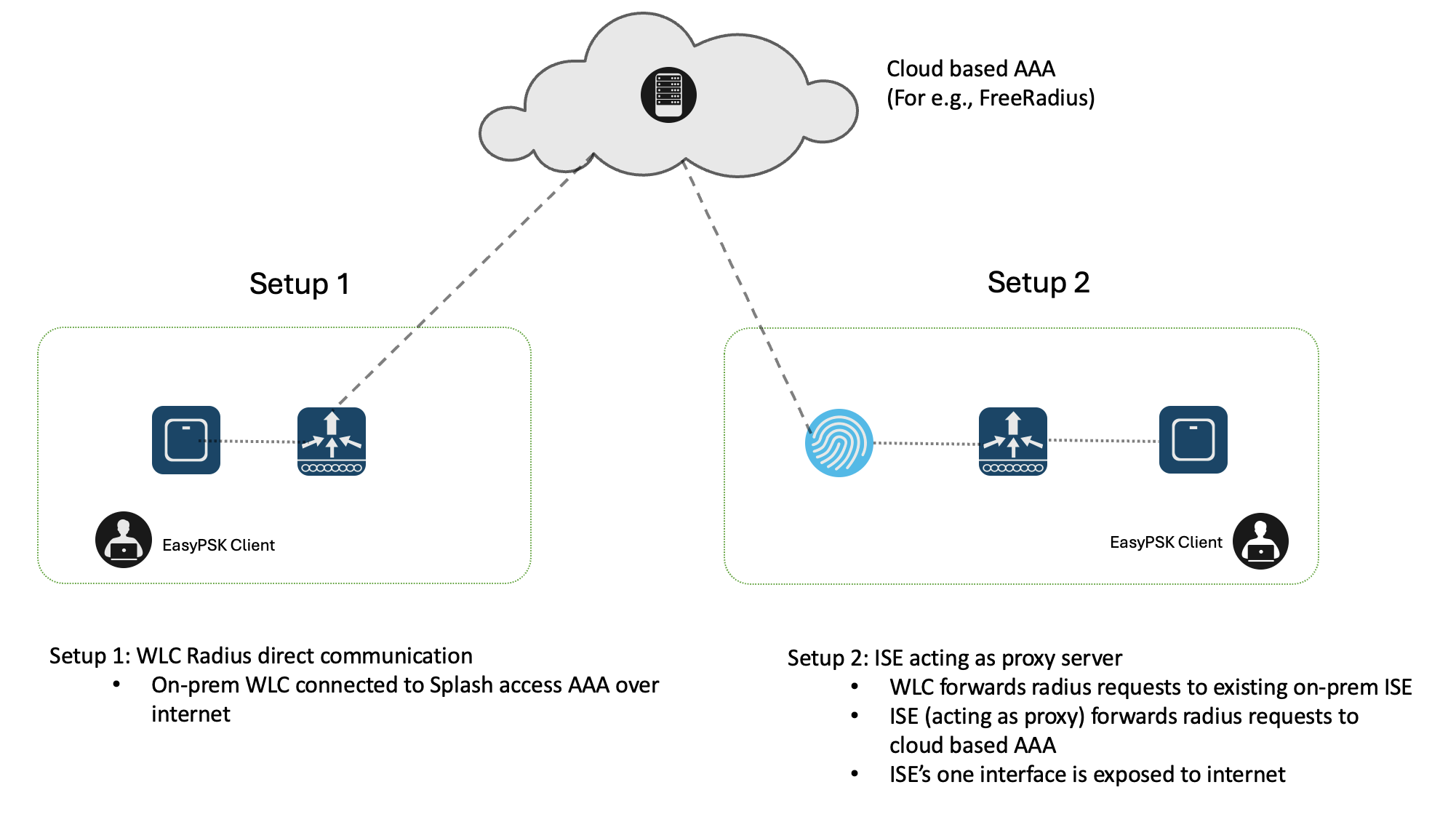
Step 1: Configure AAA server details by entering the IP address and setting up a radius server group
Step 2: Configure a named authorization list for the servers that are a part of the RADIUS server group
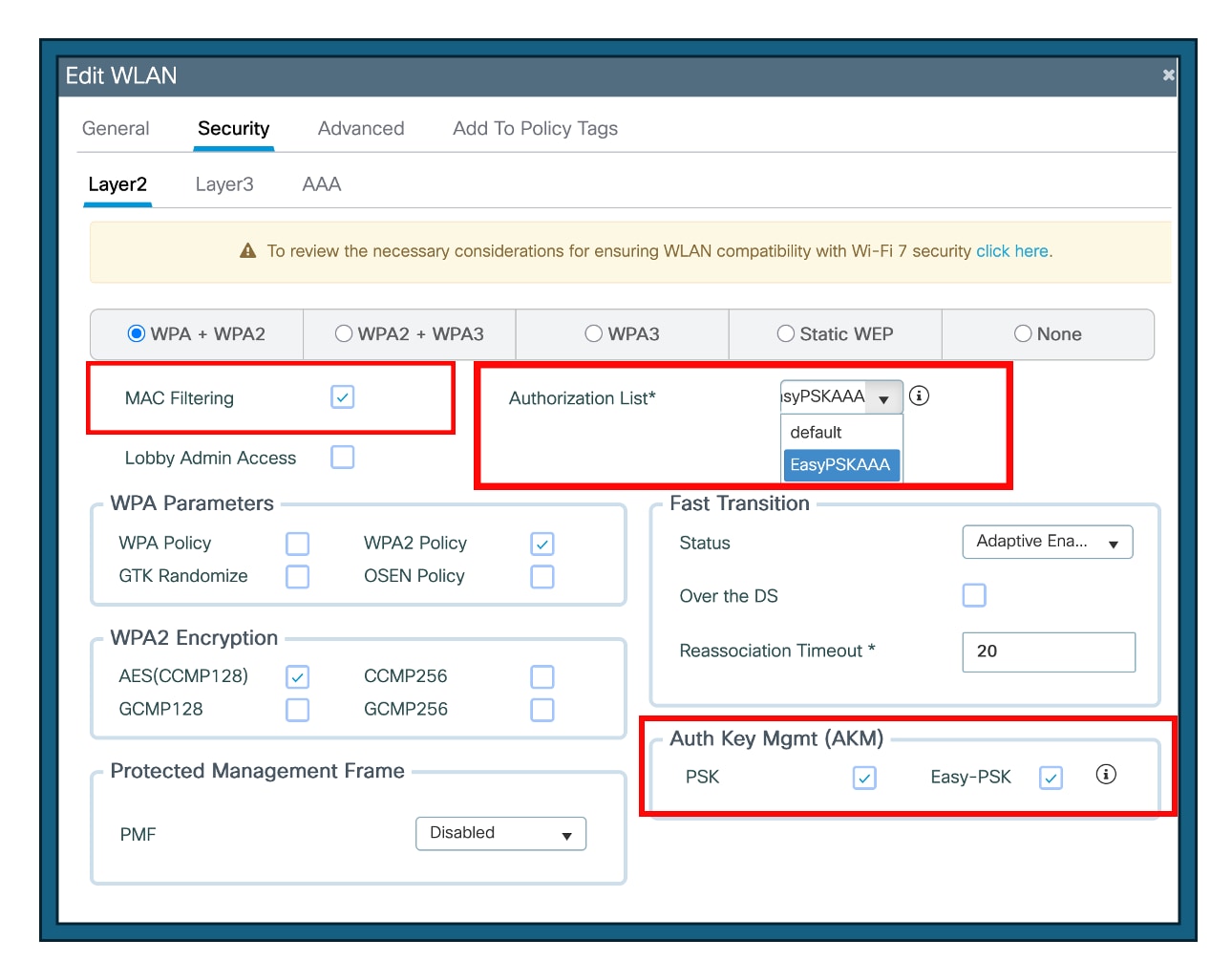
Step 3: Configure the SSID with Easy PSK enabled along with Mac-filtering.
Step 4: Set the authorization list to the named AAA server
Step 5: Check the PSK and Easy-PSK check box
Step 6: Click Update and Apply to Device
Step 7: Select ‘Allow AAA Override’ for the respective policy profile under Advanced option
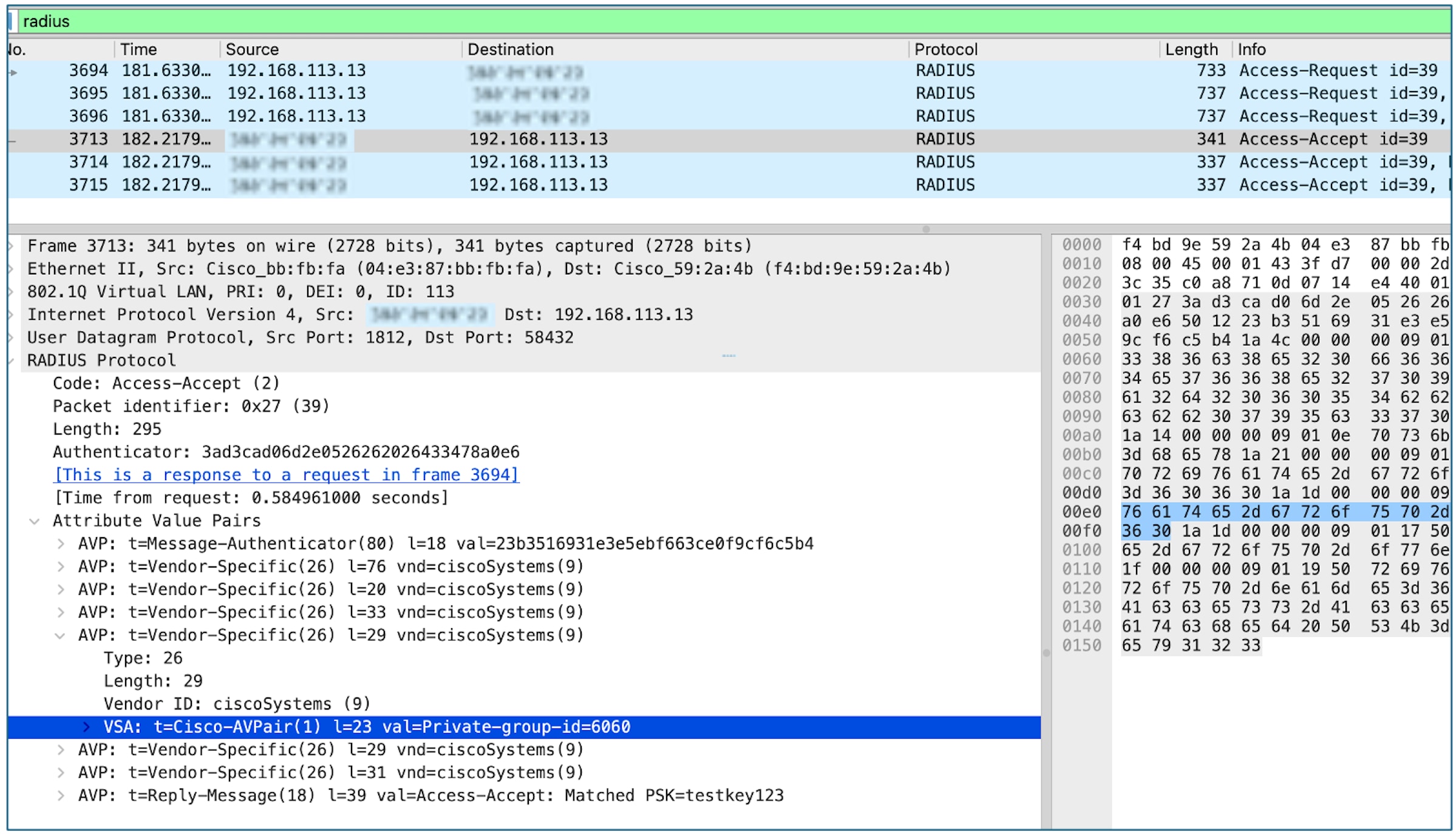
Try Connecting a client by entering the PSK:
The below commands may be used for troubleshooting:
· show wireless client upn
· show wireless client <mac> | sec Private
· show wireless client upn <group name>
The “Private Network” information will be made up of 3 new Radius Vendor Specific Attributes (VSA):
private-group-id
private-group-name
private-group-owner
Cisco and the Cisco logo are trademarks or registered trademarks of Cisco and/or its affiliates in the U.S. and other countries. To view a list of Cisco trademarks, go to this URL: www.cisco.com/go/trademarks. Third-party trademarks mentioned are the property of their respective owners. The use of the word partner does not imply a partnership relationship between Cisco and any other company. (1721R)
Any Internet Protocol (IP) addresses and phone numbers used in this document are not intended to be actual addresses and phone numbers. Any examples, command display output, network topology diagrams, and other figures included in the document are shown for illustrative purposes only. Any use of actual IP addresses or phone numbers in illustrative content is unintentional and coincidental.
© 2026 Cisco Systems, Inc. All rights reserved.