Supported Hardware Components

This chapter contains information about the supported hardware components on the Cisco Catalyst 9800-80 Wireless Controller.

Supported EPA

The following table lists the supported EPA on the Cisco Catalyst 9800-80 Wireless Controller.

PID

Description

EPA-18X1GE

Eighteen 1GE-ports that support small form-factor pluggable (SFP) optical transceivers to provide network connectivity. Ports are numbered 0 – 17.

See the Supported SFP Transceivers section, for supported transceivers.

EPA-10X10GE

Ten 10GE-ports that support small form-factor pluggable (SFP+) optical transceivers to provide network connectivity. Ports are numbered 0 – 9.

See Table 3: Supported SFP Transceivers, for supported transceivers.

EPA-1X40GE

EPA-2X40GE

EPA-1X100GE

EPA-1X100GE uses a CPAK module to provide network connectivity.

See Table 5: Supported CPAK Interface, for supported

CPAKs.

An EPA has two types of LEDs: an A/L (Active/Link) LED for each port on the EPA, and a STATUS LED, as shown in the following figure.
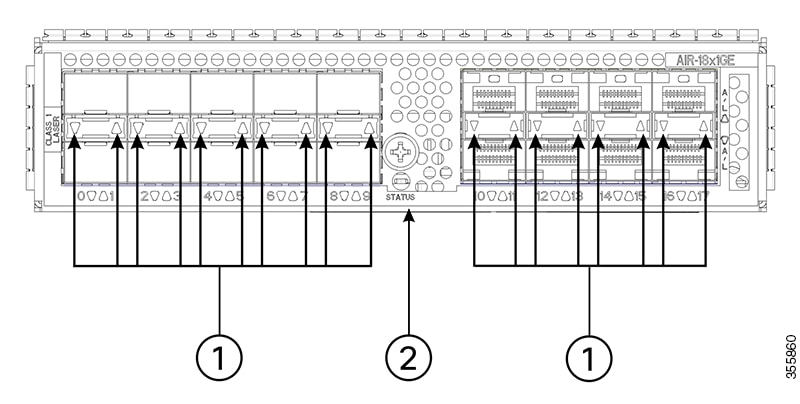
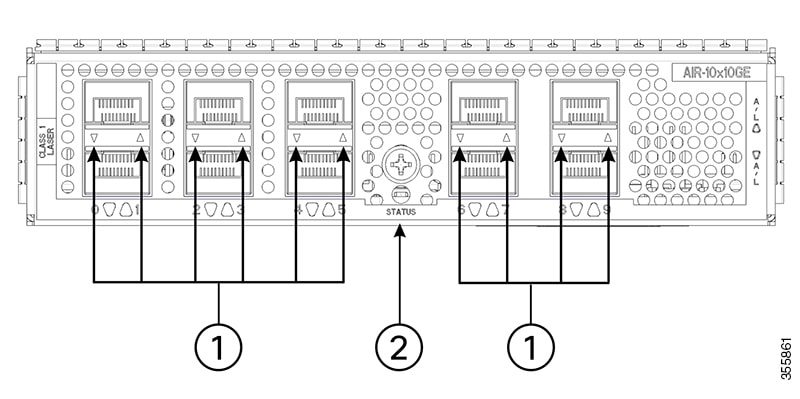
Figure 1. EPA-18X1GE LEDs
Figure 2. EPA-10X10GE LEDs

1

A/L

2

STATUS

Table 1. EPA LEDs

Function

Color or State

Description

A/L (Active/Link)

Green

Port is enabled and the link is up.

Amber

Port is enabled and the link is down.

Off

Port is not enabled.

Status

Green

EPA is ready and operational.

Amber

EPA power is on and good, and the EPA is being configured.

Off

EPA power is off.

Supported SFP Models

The following table lists the supported SFP models [40-GB and 100-GB] on the Cisco Catalyst 9800-80 Wireless Controller.

Table 2. SFP Model [40-GB]

SFP Model

Description

QSFP-40G-SR4

40-GB SFP model for SR4

QSFP-40G-LR4

40-GB SFP model for LR4

QSFP-40GE-LR4

40-GE SFP model for LR4

QSFP-40G-ER4

40-GB SFP model for ER4

QSFP-40G-SR4-S

40-GB SFP model for SR4-S

QSFP-40G-LR4-S

40-GB SFP model for LR4-S

QSFP-40G-SR-BD

40-GB SFP model for SR-BD

QSFP-40G-BD-RX

40-GB SFP model for BD-RX

Table 3. SFP Model [100-GB]

SFP Model

Description

QSFP-100G-SR4-S

100-GB SFP model for SR4-S

QSFP-100G-LR4-S

100-GB SFP model for LR4-S

Supported Transceivers

The Cisco Catalyst 9800-80 Wireless Controller supports the following small form-factor pluggable (SFP) and CPAK optical transceiver types:

Bay

Ports

Cisco Catalyst 9800-80 Wireless Controller

Bay 0

Ports TE0 – TE7 use 1GE or 10GE SFP+

SFP+

Bay 1

EPA-18X1GE— Ports 0 – 17

EPA-10X10GE— Ports 0 – 9

EPA-1X40GE— Port 0

EPA-2X40GE— Port 0 – 1

EPA-1X100GE— Port 0

SFP

SFP+

Table 4. Supported SFP Transceivers

PID

Description

GLC-BX-D

1000BASE-BX SFP, 1490nm

GLC-BX-U

1000BASE-BX SFP, 1310nm

GLC-LH-SMD

1000BASE-LX/LH SFP transceiver module, MMF/SMF, 1310nm,

DOM

GLC-SX-MMD

1000BASE-SX SFP transceiver module, MMF, 850nm, DOM

GLC-ZX-SMD

1000BASE-ZX SFP transceiver module, SMF, 1550nm, DOM

GLC-TE

1000BASE-T SFP transceiver module for category 5 copper wire

Table 5. Supported SFP+ Transceiver

PID

Description

SFP-10G-SR

10GBASE-SR SFP+ Module for MMF

SFP-10G-SR-X

10GBASE-SR SFP+ Module for Extended Temp range

SFP-10G-LR

10GBASE-LR SFP+ Module for SMF

SFP-10G-LRM

10GBASE-LRM SFP+

SFP-10G-LR-X

10GBASE-LR SFP+ Module for Extended Temp range

SFP-10G-ER

10GBASE-ER SFP+ Module for SMF

SFP-10G-ZR

10GBASE-ZR SFP+

SFP-H10GB-ACU7M

10GBASE-CU SFP+ Cable 7 Meter, active

SFP-H10GB-ACU10M

10GBASE-CU SFP+ Cable 10 Meter, active

DWDM-SFP10G-30.33 –DWDM-SFP10G-61.41

10GBASE DWDM

Power Supplies

The Cisco Catalyst 9800-80 Wireless Controllers support AC or DC power supply options. The modular chassis configurations support the installation of two power supplies for redundancy. When an external power supply fails or is removed, the other power supply provides power requirements for the chassis. This allows you to hot-swap the power supply without impacting the functionality of the controller.


Warning


Never install an AC power module and a DC power module in the same chassis.

Statement 1050


The power supplies are used in a 1 + 1 redundant configuration. There is no input switch on the faceplate of the power supplies. A power supply is switched from Standby to On by way of a system chassis power switch.

The following table lists the power supplies that you can order:

Part Number

Power Supply

C9800-AC-1100W

Cisco Catalyst 9800-80 Wireless Controller power supply module with plug-side intake airflow, AC, 1100W, 85-264V

C9800-AC-1100W=

Cisco Catalyst 9800-80 Wireless Controller power supply module with plug-side intake airflow, AC, 1100W, 85-264V, spare

C9800-DC-950W

Cisco Catalyst 9800-80 Wireless Controller power supply module with plug-side intake airflow, DC 950W

C9800-DC-950W=

Cisco Catalyst 9800-80 Wireless Controller power supply module with plug-side intake airflow, DC 950W, spare


Caution


The chassis has a front-to-rear airflow. All of the power supplies and fan modules in the chassis must use the same airflow direction or an error will occur with possible overheating and shut down of the controller. If you power up the controller with more than one airflow direction, you must power down the controller and replace the modules with the wrong airflow direction before powering up the controller.

Power Supply LEDs

The following table describes the power supply LEDs.

Table 6. AC Power Supply LEDs

Power Supply Condition

Green (OK) LED Status

Amber (FAIL) LED Status

No AC power to all power supplies

OFF

OFF

Power Supply Failure (includes over voltage, over current, over temperature and fan failure)

OFF

ON

Power Supply Warning events where the power supply continues to operate (high temperature, high power and slow fan)

OFF

1Hz Blinking

AC Present/3.3VSB on (PSU OFF)

1Hz Blinking

OFF

Power Supply ON and OK

ON

OFF

Power Supply Fans

The fans in the power supply module are used for cooling the power supply module itself while system-level cooling is provided by fans within the chassis. The power supplies do not depend on the system-level fans for cooling. Fan failure is determined by fan-rotation sensors.


Note


The fans in the Cisco Catalyst 9800-80 Wireless Controller power supplies have plug-side intake airflow.

Caution


The chassis has a front-to-rear airflow. All of the power supplies and fan modules in the same chassis must use the same airflow direction or an error will occur with possible overheating and shut down of the controller. If you power up the controller with more than one airflow direction, you must power down the controller and replace the modules with the wrong airflow direction before powering up the controller.


Note


The fans in the power supply modules will run as soon as the power supply is plugged in, even if the power switch is in the Standby position.