Release Notes for StarOS™ Software Version, Release 2026.03.gh0
Available Languages
Bias-Free Language
The documentation set for this product strives to use bias-free language. For the purposes of this documentation set, bias-free is defined as language that does not imply discrimination based on age, disability, gender, racial identity, ethnic identity, sexual orientation, socioeconomic status, and intersectionality. Exceptions may be present in the documentation due to language that is hardcoded in the user interfaces of the product software, language used based on RFP documentation, or language that is used by a referenced third-party product. Learn more about how Cisco is using Inclusive Language.
- US/Canada 800-553-2447
- Worldwide Support Phone Numbers
- All Tools
 Feedback
 Feedback
StarOS™ Software, Release 2026.03.gh0
StarOS™ Software, Release 2026.03.gh0
This Release Notes identifies changes and issues related to the Control and User Plane Separation (CUPS) software release.
The key highlights of this release include:
· Enhanced Account Security: Introduced password history configuration to prevent the reuse of recent passwords, with history retained across reboots and upgrades.
· 3GPP TS 29.338 Compliance: The MME now supports release 15.1.0 compliance for SMS over the SGd interface for SC-Address and Failed-AVP AVPs.
· 5GS Mobility Restriction: Added MME support to restrict UE mobility towards 5GS based on the HSS Interworking-5GS-Indicator, providing granular control over handover and idle-mode mobility.
· Lawful Intercept (LI) Decryption: Provided a new parameter (J option) for LI Admin users to decrypt and view LI AVP values in PGW messages, along with enhanced session monitoring.
· Secure CDR Storage: Enabled AES-256-CBC-SHA256 encryption for locally stored Charging Data Records (CDRs) to ensure data security during Charging Gateway Function outages.
· Improved ePDG Performance: Added support for multiple dcardmgr instances per Service Function (SF) card in VPC-DI, reducing session setup timeouts under heavy load.
· Modified Bearer Command Suppression: MME supports suppression of Modify Bearer Command (MBC) signaling during inter-PLMN mobility scenarios.
For more information about the StarOS product documentation, see the Related resources section.
Qualified products and platforms
Table 1. Products and platforms qualified in this release
| Component |
Qualified? |
| Products |
|
| CUPS |
Yes |
| MME |
Yes |
| ePDG |
Yes |
| P-GW |
Yes |
| SAEGW |
Yes |
| SGSN |
Yes |
| Platforms |
|
| ASR 5500 |
No |
| VPC-DI |
Yes |
| VPC-SI |
Yes |
The following table provides EoL milestones for Cisco StarOS software:
Table 2. EoL milestone information for StarOS™ Software
| Milestone |
Date |
| First Customer Ship (FCS) |
23-July-2026 |
| End of Life (EoL) |
23-July-2026 |
| End of Software Maintenance (EoSM) |
21-Jan-2028 |
| End of Vulnerability and Security Support (EoVSS) |
21-Jan-2028 |
| Last Date of Support (LDoS) |
31-Jan-2029 |
These milestones and the intervals between them are defined in the Cisco ASR 5500 and Ultra Packet Core software release lifecycle product bulletin available on cisco.com.
This section provides a brief description of the new software features introduced in this release.
Table 3. New software features for StarOS™ Software, Release 2026.03.gh0
| Product impact |
Feature |
Description |
| Software Reliability |
This feature strengthens account security by preventing the reuse of recent passwords. Once configured, the system prevents users from reusing recent passwords by comparing new entries against a stored history. This history remains intact through system reboots and upgrades. |
|
| Software Reliability |
Configuring release 15 compliance for SMS over SGd interface
|
The MME now supports 3GPP TS 29.338 version 15.1.0 compliance for SC-Address AVP in BCD format for EPS Combined Attach procedure and sending single instance of Failed-AVP AVP in Diameter answer message for all calls. This feature is enabled via a new CLI option under the call-control-profile. For more information, contact the Cisco account representative. |
| Software Reliability |
MME HSS interworking 5GS-indicator based mobility restriction enhancement |
This feature enables the MME to restrict UE mobility to 5GS based on the HSS Interworking-5GS-Indicator attribute. The MME evaluates this indicator across all active PDN connections: · If at least one PDN is subscribed: 5GS mobility is permitted. · If no PDNs are subscribed: Handover and idle-mode mobility are restricted based on configuration. |
| Software Reliability |
This feature provides LI Admin users to decrypt and view the Lawful Intercept AVP values in PGW messages using a new parameter, J option in monitor protocol and monitor subscriber catalog. This feature also enhances the show command show ims-authorization sessions full callid <id> to include a dedicated LI-Indicator-Gx section. For more information, contact the Cisco account representative. |
|
| Software Reliability |
CDR encryption and decryption at rest for GTPP storage-server |
This feature enables protection of locally stored Charging Data Records with AES-256-CBC-SHA256 encryption, while the Charging Gateway Function is unavailable. It encrypts and decrypts the CDRs and transmits once the connectivity is restored. It helps ensure that the sensitive billing data is secure during Commands enhanced: For more information contact the Cisco account representative. |
| Software Reliability |
Multi-dcardmgr support enhances ePDG performance by enabling multiple dcardmgr instances per Service Function (SF) card. This feature improves call setup times under heavy load by distributing the calls across multiple instances. The system defaults to a single instance if no configuration is provided. |
|
| Software Reliability |
Modify Bearer Command suppression during Inter-PLMN mobility |
This feature introduces a CLI-controlled mechanism in MME to suppress Modify Bearer Command (MBC) signaling during inter-PLMN mobility scenarios such as handover and TAU procedures. The enhancement prevents collision conditions that can occur when MME-triggered bearer updates and concurrent policy-driven QoS or APN-AMBR updates from PGW are processed simultaneously. The feature allows selective suppression of MBC for APN-AMBR changes only (ambr-only) QoS (QCI/ARP) changes only (qos-only) Any APN-AMBR or QoS change (any). The following CLI configuration command is introduced at the mme-service level. configure The following CLI configuration command is introduced at the call-control-profile level. configure call-control-profile profile_name suppress-mbc inter-plmn { ambr-only | qos-only | any} [ no | remove ] suppress-mbc inter-plmn end Note: These CLI commands are disabled by default to preserve standard 3GPP behavior unless explicitly enabled. |
This section provides a brief description of the behavior changes introduced in this release.
Table 4. Behavior changes for StarOS™ Software, Release 2026.03.gh0
| Description |
Behavior changes |
| Increased New Connections Accept Rate for IKEv2 SA-INIT Throttling [CSCwv31032] |
Previous behavior: The configurable new connection accept rate range for IKEv2 SA-INIT requests per second on the SWu interface was 50-6000. New behavior: The configurable new connection accept rate range for IKEv2 SA-INIT requests per second on the SWu interface has been increased to 50-7800 to support future scalability Note: The change provides a configurable limit for future scalability and does not reflect the product's current maximum operational NOP limit. |
| APN name accepts wildcard characters when Enabling monitor subscribers [CSCwt53545]
|
Previous behavior: When enabling monitor subscriber, the APN name did not accept wildcard characters such as * and $. New behavior: When enabling monitor subscriber, the APN name now accepts wildcard characters: $ represents a single character, and * represents multiple characters. This enhancement provides users with more flexible and efficient monitoring options. |
| Sessmgr traffic rejection for Unresolved predefined rule or Application IDs [CSCwt78261] |
Previous behavior: The UPF accepted the activation of predefined rules containing undefined ruledefs. This resulted in rule match failures and triggered an ADC rule crash. New behavior: During the Create-PDR procedure, sessmgr now rejects requests if the referenced predefined rule is unresolved due to a missing valid ruledef or group binding. |
| PGW IMSI Suppression during unauthenticated emergency attach messages [CSCwt19501] |
Previous behavior: · Subscription-Id-Type: END_USER_E164 (0) · Subscription-Id-Data: 9890098900 · Subscription-Id-Type: END_USER_IMSI (1) · Subscription-Id-Data: 404005123456788 New behavior: · Subscription-Id-Type: END_USER_E164 (0) · Subscription-Id-Data: 9890098900 Command introduced under the PGW service configuration mode: subscription-id service-type { closed_rp | ggsn | ha | ipsg | l2tplns | mipv6ha | pdsn | pgw | samog-epdg } { e164 | imsi | nai | lsm-emergency-imei-instead-of-uimsi } Note: This keyword is configured under the 'ims-auth service' for emergency APNs. It applies only to emergency APNs over TLS/QUIC, providing improved reliability and flexibility for charging data handling. |
| Increased maximum session limit for ePDG service [CSCwv41644] |
Previous behavior: The maximum configurable number of sessions per ePDG service was 5,000,000. New behavior: The maximum configurable number of sessions per ePDG service has been increased to 6,500,000 to support future scalability requirements. Note: This is a configuration limit and does not represent the actual supported capacity of the product. |
This table lists the resolved issues in this specific software release.
Note: This software release may contain bug fixes first introduced in other releases. To see additional information, click the bug ID to access the Cisco Bug Search Tool. To search for a documented Cisco product issue, type in the browser: <bug number> site:cisco.com.
Table 5. Resolved issues for StarOS™ Software, Release 2026.03.gh0
| Bug ID |
Description |
Product Found |
| Destination Realm AVP missing in CCR-I message after fallback to Local Policy |
cups-cp |
|
| Active CUPS CP - Assertion failure at sess/snx/drivers/sgw/sgw_recovery.c:720 - Function: sgwdrv_collect_pdn_info() |
cups-cp |
|
| Subscriber is remaining in SU state after OCS is back online-1 |
cups-cp |
|
| sxdemux restart at sn_memblock_cache_block_flush |
cups-cp |
|
| ipv4v6 flag is not set in IP allocation request sent from sessmgr to vpnmgr for 2G calls |
cups-cp |
|
| Zero volume Usage seen in UNIT_BEFORE_TARIFF_CHANGE in Gy CCR Update while validity time |
cups-cp |
|
| sessmgr and sxdemux crashes on an ASR5500 system running 21.28.m36 |
cups-cp |
|
| Wrong reported value of SN-Total-USU after CUPS CP switchover |
cups-cp |
|
| Multiple TCP connection over X3 interface |
cups-up |
|
| sessctl restart at Function: sessctrl_handle_mgr_notify_server_list_ipaddr_status_update() |
cups-up |
|
| Sessmgr is opening LI connection after switchover. |
cups-up |
|
| On CUPS-CP node multiple session manager restarts observed |
cups-up |
|
| MME is inserting a dummy PGW IPv4 address in the Create Session Request when DNS-based SGW/PGW selection is enabled. |
mme |
|
| session manager reloads at egtpc_resume_suspended_proc() |
mme |
|
| vpnmgr restart at sn_event_timer_delete() |
mme |
|
| MME fails to select the peer, while default egtp service is configured with ipv4 and S10/N26 EGTP Separation |
mme |
|
| Support higher bit encryption in SNMPv3 |
pdn-gw |
|
| Memory leak in acs_free_l3_session() cleanup path |
pdn-gw |
|
| CLI proclet restart observed during StarOS configuration loading following the upgrade of starOS 21.28.mh36 |
pdn-gw |
|
| WhatsApp calls blocking accuracy problem |
pdn-gw |
|
| Missing NOA/NPI Octet in PGW-CDRs when MSISDN length is greater than 10 digits |
pdn-gw |
|
| PDNGW unexpectedly includes User-CSG-Information in Rf ACR when CSReq and Gx CCA contain no CSG information |
pdn-gw |
|
| Some of the http flows are not getting accelerated |
pdn-gw |
|
| Session manager assertion failure at diameter/diabase/diabase.c:18995 |
sae-gw |
|
| MME ports fail to recover after iftask restart during node power OFF/ON |
staros |
|
| StarOS configuration loading is significantly slow following the upgrade of starOS 21.28.mh36. |
staros |
This table lists the open issues in this specific software release.
Note: This software release may contain open bugs first introduced in other releases. To see additional information, click the bug ID to access the Cisco Bug Search Tool. To search for a documented Cisco product issue, type in the browser: <bug number> site:cisco.com.
Table 6. Open issues for StarOS™ Software, Release 2026.03.gh0
| Bug ID |
Description |
Product Found |
| Silent sessctrl restart during booting up of n:m UP after reload/switchover |
cups-up |
|
| IPSECMGR restart observed in function ikev2_encode_header_ipv4 |
epdg |
|
| E-RAB Modification Collision During VoWiFi-to-VoLTE Handover Results in Bearer Setup Failure |
mme |
|
| Active Charging uplink CSS accounting missing for specific L2TP IPv4 sessions |
pdn-gw |
|
| ASR5500 sessmgr crash with SIGSEGV in ipms_msg_getstats() during IPMS config/unconfig handling |
sae-gw |
This section describes the known issue that may occur during the upgrade of the StarOS image.
Install and Upgrade Notes
This Release Note does not contain general installation and upgrade instructions. Refer to the existing installation documentation for specific installation and upgrade considerations.
Note: Cisco recommends offline upgrade-downgrade for CUPS CP VPC-DI ICSR deployments.
When upgrading the StarOS image from a previous version to the latest version, issues may arise if there is a problem with the Cisco SSH/SSL upgrade. To avoid such issues, ensure that the boot file for Service Function (SF) cards is properly synchronized.
To synchronize the boot file for all the Service Function (SF) VPC-DI non-management cards, use the following CLI command:
[local] host_name# system synchronize boot
This ensures that the changes in boot file are identically maintained across the SF cards.
Note: Execute the system synchronize boot command before reloading for version upgrade from any version earlier than 21.28.mh14 to version 21.28.mh14 or versions higher than 21.28.mh14.
Upgrade the confD version
This section explains upgrading third-party software. Upgrade the confD software to ensure system compatibility and performance.
Note: During the StarOS 2026.02 release, confD is upgraded to 8.6 version.
Prerequisites:
· Ensure you have appropriate permissions to perform this upgrade.
· Back up all necessary data and configurations to avoid permanent loss during file deletion.
· ConfD must be unconfigured (stopped) before running the clear confdmgr confd all CLI command.
Perform these steps to upgrade the confD version on the system.
1. Enter the debug shell using debug shell command.
2. Navigate to the confD directory.
3. Run the command: cd /mnt/hd-raid/meta/confd/ to access the directory.
4. Remove existing files with the command; rm -rf *
-or-
Run the StarOS CLI command clear confdmgr confd all to clear the same confD contents.
Note: The /mnt/hd-raid/meta/confd directory will be empty. After clearing, confD can be started again as required. This clear cli should be used only during ConfD upgrade scenarios and not on each reload or reboot.
All files and subdirectories are deleted, preparing the system for a fresh installation. To preserve data across the Method of Procedure, users with ConfD configured must contact their Cisco account representative.
HD-RAID may fail to initialize during upgrades or downgrades between non-Hermes and Hermes builds
Issue: When upgrading or downgrading between non-Hermes builds (202x.0x.[g/l/ga/la]x) and Hermes builds 202x.0x.[gah]x), on VPC-DI and VPC-SI platforms, the HD-RAID may fail to initialize as expected.
Workaround: This Method of Procedure (MOP) should be used during upgrades or downgrades between non-Hermes and Hermes builds.
To avoid HD-RAID failure, perform these steps during upgrade or downgrade (for example, from 2026.02.gx to 2026.03.ghx:
1. Pre-requisite: Back up all files stored in /hd-raid before upgrading from .mx to .mhx builds.
Note: All data in /hd-raid will be lost during recovery.
2. Before the upgrade: On the current (source) build, run the **hd raid clear** command.
3. Upgrade and reboot: Reboot the node to upgrade to the newer (target) build.
4. Wait for the hd-raid to recover and restore the files from backup.
Note: It is recommended to use this Method of Procedure (MOP) for upgrading and downgrading between.mx and .mhx builds.
This section provides compatibility information about the StarOS package version, and the hardware and software requirements for the Legacy Gateway and CUPS software release.
Compatible StarOS package version
Table 7. Release package version information
| StarOS packages |
Version |
Build number |
| StarOS package |
2026.03.gh0 |
21.28.mh40.101104 |
Compatible software and hardware components
This table lists only the verified basic software and hardware versions. For more information on the verified software versions for the products qualified in this release contact the Cisco account representative.
Table 8. Compatibility software and hardware information, Release 2026.03.gh0
| Product |
Version |
| ADC P2P Plugin |
2.74.gh3.2817 |
| RCM |
20260721-113945Z Note: Use this link to download the RCM package associated with the software. |
| ESC |
6.0.0.58 |
| HVIM |
6.0.0 (RHOSP 18.0, RHEL 9.4, CIMC 4.3) Note: HVIM and ESC versions are qualified with 2026.03.0 build. The 24-core VPP deployment has been tested with the 1.16.3 out-of-tree ice driver patch. |
| Host OS |
RHEL 9.2 |
| RedHat OpenStack |
RHOSP 17.1 |
| Intel XL710C NIC Version |
Driver version: i40e-2.17.4 Firmware: 7.00 0x80005119 0.385.115 |
| CIMC |
4.2 (3) |
| NSO MFP |
ncs-6.4.8.2-nso-mob-fp-4.0-bf213e2-2026-04-17T0418 ncs-6.4.8.2-nso-mob-fp-4.0-bf213e2-2026-04-17T0418.tar.gz Note: MFP 4.0 includes two OpenStack NED versions: 4.2.33 and 4.2.34. For deployments using Red Hat OpenStack Platform 13, it is recommended to use NED version 4.2.33 due to an API version incompatibility between NED 4.2.34 and OSP 13. |
This section provides information about the release packages associated with Control, and User Plane Separation (CUPS) software.
Table 9. Software packages for Release 2026.03.gh0
| Description |
|
| NSO |
|
| nso-mob-fp-4.0-2026.03.gh0.zip |
Contains the signed NSO software image, the signature file, a verification script, the x509 certificate, and a README file containing information on how to use the script to validate the certificate. |
| VPC companion package |
|
| companion-vpc-2026.03.gh0.zip |
Contains numerous files pertaining to this version of the VPC including SNMP MIBs, RADIUS dictionaries, ORBEM clients. These files pertain to both VPC-DI and VPC-SI, and for trusted and non-trusted build variants. |
| VPC-DI |
|
| qvpc-di-2026.03.gh0.bin.zip |
Contains the VPC-DI binary software image that is used to replace a previously deployed image on the flash disk in existing installations. |
| qvpc-di_T-2026.03.gh0.bin.zip |
Contains the trusted VPC-DI binary software image that is used to replace a previously deployed image on the flash disk in existing installations. |
| qvpc-di-2026.03.gh0.iso.zip |
Contains the VPC-DI ISO used for new deployments; a new virtual machine is manually created and configured to boot from a CD image. |
| qvpc-di_T-2026.03.gh0.iso.zip |
Contains the trusted VPC-DI ISO used for new deployments, a new virtual machine is manually created and configured to boot from a CD image. |
| qvpc-di-template-vmware-2026.03.gh0.zip |
Contains the VPC-DI binary software image that is used to on-board the software directly into VMware. |
| qvpc-di-template-vmware_T-2026.03.gh0.zip |
Contains the trusted VPC-DI binary software image that is used to on- board the software directly into VMware. |
| qvpc-di-template-libvirt-kvm-2026.03.gh0.zip |
Contains the same VPC-DI ISO identified above and additional installation files for using it on KVM. |
| qvpc-di-template-vmware-2026.03.gh0.zip |
Contains the VPC-DI binary software image that is used to on-board the software directly into VMware. |
| qvpc-di-template-libvirt-kvm_T-2026.03.gh0.zip |
Contains the same trusted VPC-DI ISO identified above and additional installation files for using it on KVM. |
| qvpc-di-2026.03.gh0.qcow2.zip |
Contains the VPC-DI binary software image in a format that can be loaded directly with KVM using an XML definition file, or with OpenStack. |
| qvpc-di_T-2026.03.gh0.qcow2.zip |
Contains the trusted VPC-DI binary software image in a format that can be loaded directly with KVM using an XML definition file, or with OpenStack. |
| VPC-SI |
|
| intellig3nt_onboarding-2026.03.gh0.zip |
Contains the VPC-SI onboarding signature package that is used to replace a previously deployed image on the flash disk in existing installations. |
| qvpc-si-2026.03.gh0.bin.zip |
Contains the VPC-SI binary software image that is used to replace a previously deployed image on the flash disk in existing installations. |
| qvpc-si_T-2026.03.gh0.bin.zip |
Contains the trusted VPC-SI binary software image that is used to replace a previously deployed image on the flash disk in existing installations. |
| qvpc-si-2026.03.gh0.iso.zip |
Contains the VPC-SI ISO used for new deployment. A new virtual machine is manually created and configured to boot from a CD image. |
| qvpc-si_T-2026.03.gh0.iso.zip |
Contains the trusted VPC-SI ISO used for new deployments a new virtual machine is manually created and configured to boot from a CD image. |
| qvpc-si-template-vmware-2026.03.gh0.zip |
Contains the VPC-SI binary software image that is used to on-board the software directly into VMware. |
| qvpc-si-template-vmware_T-2026.03.gh0.zip |
Contains the trusted VPC-SI binary software image that is used to on-board the software directly into VMware. |
| qvpc-si-template-libvirt-kvm-2026.03.gh0.zip |
Contains the same VPC-SI ISO identified above and additional installation files for using it on KVM. |
| qvpc-si-template-libvirt-kvm_T-2026.03.gh0.zip |
Contains the same trusted VPC-SI ISO identified above and additional installation files for using it on KVM. |
| qvpc-si-2026.03.gh0.qcow2.zip |
Contains the VPC-SI binary software image in a format that can be loaded directly with KVM using an XML definition file, or with OpenStack. |
| qvpc-s3_T-2026.03.gh0.qcow2.zip |
Contains the trusted VPC-SI binary software image in a format that can be loaded directly with KVM using an XML definition file, or with OpenStack. |
StarOS product version numbering system
The output of the show version command displays detailed information about the version of StarOS currently running on the ASR 5500 or Cisco Virtualized Packet Core platform.
Starting 2024.01.0 release (January 2024), Cisco is transitioning to a new release versioning scheme. The release version is based on the current year and product. Refer to the figure for more details.
Note: During the transition phase, some file names will reflect the new versioning whereas others will refer to the 21.28.x- based naming convention. With the next release, StarOS-related packages will be completely migrated to the new versioning scheme.
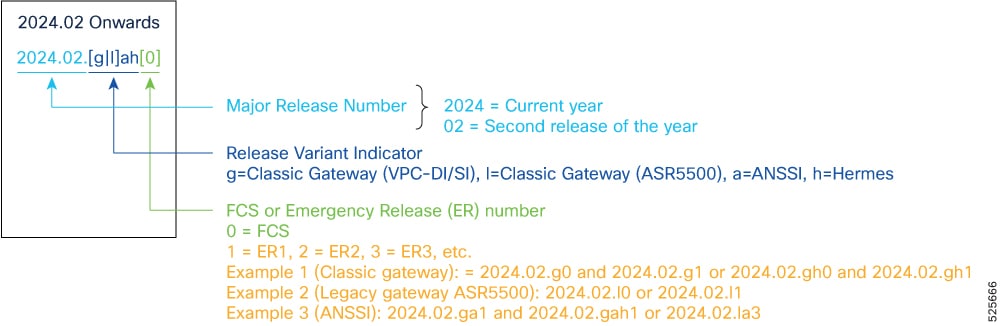
For any clarification, contact your Cisco account representative.
Software integrity verification
To verify the integrity of the software image you have from Cisco, you can validate the SHA512 checksum information against the checksum identified by Cisco for the software. Image checksum information is available through Cisco.com Software Download details. Click Linux and then choose the Software Image Release Version.
To find the checksum, hover the mouse pointer over the software image you have downloaded. At the bottom you find the SHA512 checksum, if you do not see the whole checksum, you can expand it by pressing the "..." at the end.
To validate the information, calculate a SHA512 checksum using the information in the table and verify that it matches the one provided on the software download page. To calculate a SHA512 checksum on your local desktop see the table.
Table 10. Checksum calculations per operating system
| Operating system |
SHA512 checksum calculation command examples |
| Microsoft Windows |
Open a command line window and type the following command: > certutil.exe -hashfile <filename>.<extension> SHA512 |
| Apple MAC |
Open a terminal window and type the following command: $ shasum -a 512 filename.extension |
| Linux |
Open a terminal window and type the following command: $ sha512sum filename.extension OR $ shasum -a 512 filename.extension |
| Note: filename is the name of the file. extension is the file extension (for example, .zip or .tgz). |
|
If the SHA512 checksum matches, you can be sure that no one has tampered with the software image or the image has not been corrupted during download.
If the SHA512 checksum does not match, we advise you to not attempt upgrading any systems with the corrupted software image. Download the software again and verify the SHA512 checksum again. If there is a constant mismatch, please open a case with the Cisco Technical Assistance Center.
Certificate validation
In 2024.01 and later releases, software images for StarOS, VPC-DI, and VPC-SI, and the companion software packages for StarOS and VPC are signed via x509 certificates. USP ISO images are signed with a GPG key. For more information and instructions on how to validate the certificates, refer to the README file available with the respective software packages.
This table provides key resources and links to the support information and essential documentation for StarOS and CUPS products.
Table 11. Related resources and additional information
| Resource |
Link |
| Cisco ASR 5500 documentation |
|
| Cisco Ultra Packet Core documentation |
|
| Service request and additional information |
Cisco and the Cisco logo are trademarks or registered trademarks of Cisco and/or its affiliates in the U.S. and other countries. To view a list of Cisco trademarks, go to this URL: www.cisco.com/go/trademarks. Third-party trademarks mentioned are the property of their respective owners. The use of the word partner does not imply a partnership relationship between Cisco and any other company. (1110R)
Any Internet Protocol (IP) addresses and phone numbers used in this document are not intended to be actual addresses and phone numbers. Any examples, command display output, network topology diagrams, and other figures included in the document are shown for illustrative purposes only. Any use of actual IP addresses or phone numbers in illustrative content is unintentional and coincidental.
© 2026 Cisco Systems, Inc. All rights reserved.