Release Notes for StarOS™ Software Version, Release 2026.01.g0
Available Languages
Bias-Free Language
The documentation set for this product strives to use bias-free language. For the purposes of this documentation set, bias-free is defined as language that does not imply discrimination based on age, disability, gender, racial identity, ethnic identity, sexual orientation, socioeconomic status, and intersectionality. Exceptions may be present in the documentation due to language that is hardcoded in the user interfaces of the product software, language used based on RFP documentation, or language that is used by a referenced third-party product. Learn more about how Cisco is using Inclusive Language.
- US/Canada 800-553-2447
- Worldwide Support Phone Numbers
- All Tools
 Feedback
 Feedback
StarOS™ Software, Release 2026.01.g0
StarOS™ Software, Release 2026.01.g0
The key highlights of this release include:
· Granular APN tracking and reporting: Supports TLVs containing APN and Virtual APN in pilot packets, enabling more granular tracking, context-specific policy application, and APN-level reporting based on pilot packet data.
For more information about the StarOS product documentation, see the Related resources section.
Qualified products and platforms
Table 1. Products and platforms qualified in this release
| Component |
Qualified? |
| Products |
|
| CUPS |
Yes |
| MME |
Yes |
| ePDG |
Yes |
| P-GW |
Yes |
| SAEGW |
Yes |
| SGSN |
Yes |
| Platforms |
|
| ASR 5500 |
No |
| VPC-DI |
Yes |
| VPC-SI |
Yes |
Release lifecycle milestones
The following table provides EoL milestones for Cisco StarOS software:
Table 2. EoL milestone information for StarOS™ Software, Release 2026.01.g0
| Milestone |
Date |
| First Customer Ship (FCS) |
30-Jan-2026 |
| End of Life (EoL) |
30-Jan-2026 |
| End of Software Maintenance (EoSM) |
31-July-2027 |
| End of Vulnerability and Security Support (EoVSS) |
31-July-2027 |
| Last Date of Support (LDoS) |
31-July-2028 |
These milestones and the intervals between them are defined in the Cisco ASR 5500 and Ultra Packet Core software release lifecycle product bulletin available on cisco.com.
This section provides a brief description of the new software features introduced in this release.
Table 3. New software features for StarOS™ Software, Release 2026.01.g0
| Product impact |
Feature |
Description |
| Software Reliability |
This feature introduces support for including APN Name and Virtual APN Name as optional TLV attributes in pilot packets generated for subscriber session events. With this enhancement, external systems can perform more granular tracking, apply context-specific policies, and generate APN-level reports based on pilot packet data. The feature is configurable per context and applies to all pilot packet triggers. |
This section provides a brief description of the behavior changes introduced in this release.
Table 4. Behavior changes for StarOS™ Software, Release 2026.01.g0
| Description |
Behavior changes |
| Cap on zero volume CDRs for secondary RAT records (CSCwr48395) |
Previous behavior: When the CLI command gtpp suppress-cdrs zero-volume external-trigger-cdr was configured, all Zero Volume interim CDRs generated due to external triggers were suppressed, regardless of the number of secondary RAT records. New behavior: With the CLI command configured, Zero Volume interim CDRs generated due to external triggers are suppressed only up to 255 secondary RAT records. Once the limit of 255 secondary RAT records is reached, a Zero Volume external-trigger CDR will be generated. |
This table lists the resolved issues in this specific software release.
Note: This software release may contain bug fixes first introduced in other releases. To see additional information, click the bug ID to access the Cisco Bug Search Tool. To search for a documented Cisco product issue, type in the browser: <bug number> site:cisco.com.
Table 5. Resolved issues for StarOS™ Software, Release 2026.01.g0
| Bug ID |
Description |
Product Found |
| Sessmgr restarted at function egtpc_handle_user_sap_event |
cups-cp |
|
| Wrong Time Quota observed in second SX_SESSION_MODIFICATION_REQUEST when new quota with RAR Trigger |
cups-cp |
|
| Addition of a trap after the state of the peer user plane changes from configured to not configured or vice versa. |
cups-cp |
|
| Gy session out of SU reports huge volume threshold in SxModify |
cups-cp |
|
| sxdemux task memory usage high leading to a restart |
cups-cp |
|
| DHCP service sends IMSI instead of configured MSISDN in DHCP request |
cups-up |
|
| Sx Sess-Mod-Req failure with CC 69 Mandatory IE Incorrect |
cups-cp |
|
| ePDG VPC-SI : dhmgr mem warn |
epdg |
|
| The ERAB Failed List IE is missing in the Path Switch Acknowledge message when the Path Switch Request contains invalid tunnel details. |
mme |
|
| DNS Records used for selecting AMF peer not released |
mme |
|
| sessmgr restart at sn_aaa_client_action_item_lookup_by_key() |
pdn-gw |
|
| Legacy-GW: VzW ASR5500: sessmgr restart observed during configuration of new apn, new rulebase, new fw-nat-policy, and SRP switchover |
pdn-gw |
|
| Assertion failure: EGTP-C service is being used by another MME/SGW/PGW service |
pdn-gw |
|
| P-CSCF Address Missing in CSRsp When DNS Returns Only CNAME Without Resource Records |
pdn-gw |
|
| Traffic is being re-directed in error by the PGW due to GOR ruledef update |
pdn-gw |
|
| UDP quic traffic detection problem |
pdn-gw |
|
| PGW (VPC) incorrectly charges for Router Solicitation (RS) packets in IPv6 sessions. |
pdn-gw |
|
| PGW is sending '0x40' for IP Address instead of '0x04' |
pdn-gw |
This table lists the open issues in this specific software release.
Note: This software release may contain open bugs first introduced in other releases. To see additional information, click the bug ID to access the Cisco Bug Search Tool. To search for a documented Cisco product issue, type in the browser: <bug number> site:cisco.com.
Table 6. Open issues for StarOS™ Software, Release 2026.01.g0
| Bug ID |
Description |
Product Found |
| Resource Allocation Failure due to ACS_RULE_OPTION_LIST_MATCHING_FLOW_NOT_FOUND |
cups-cp |
|
| Sessmgr restart due to Segmentation fault: acsmgr_allocate_cups_sef_info() |
cups-cp |
|
| Difference in the volume reported in Sx-Volume Measurement and monsub- CALL STATS |
cups-up |
|
| Wrong USERNAME is getting displayed in show sub all cli output |
cups-up |
|
| Assertion failure at diameter/diabase/diabase' |
pdn-gw |
|
| GW is sending CCR-U with charging rule report with cause "Rule-Failure-Code: UNSUCCESSFUL_QOS_VALIDATION" |
pdn-gw |
|
| PGW Session Setup Failure: Static IPv4 Address Mismatch for APN "nemo-cust101" |
pdn-gw |
|
| Unable to convert date-time string in the Diameter credit-control-request message processing |
pdn-gw |
This section describes the known issue that may occur during the upgrade of the StarOS image.
Install and Upgrade Notes
This Release Note does not contain general installation and upgrade instructions. Refer to the existing installation documentation for specific installation and upgrade considerations.
When upgrading the StarOS image from a previous version to the latest version, issues may arise if there is a problem with the Cisco SSH/SSL upgrade. To avoid such issues, ensure that the boot file for Service Function (SF) cards is properly synchronized.
To synchronize the boot file for all the Service Function (SF) VPC-DI non-management cards, use the following CLI command:
[local] host_name# system synchronize boot
This ensures that the changes in boot file are identically maintained across the SF cards.
Note: Ensure that you execute the system synchronize boot command before reloading for a version upgrade from any version less than 21.28.m23 to 21.28.m23, or versions higher than 21.28.m23.
Upgrade the confd version
This section explains upgrading third-party software. Upgrade the confd software to ensure system compatibility and performance.
Note: During the July 2025.03.0 release, confd is upgraded to 8.1.16.2 version.
Prerequisites:
· Ensure you have appropriate permissions to perform this upgrade.
· Back up all necessary data and configurations to avoid permanent loss during file deletion.
Perform these steps to upgrade the confd version on the system.
1. Enter the debug shell using debug shell command.
2. Navigate to the confd directory.
3. Run the command: cd /mnt/hd-raid/meta/confd/ to access the directory.
4. Remove existing files with the command; rm -rf *
All files and subdirectories are deleted, preparing the system for a fresh installation. To preserve data across the Method of Procedure, users with ConfD configured must contact their Cisco representative.
Method of Procedure (MOP): Upgrade/Downgrade Between Non-Hermes and Hermes Builds
CSCwr80301: HD-RAID Not Ready During Upgrade from Non-Hermes to Hermes
Issue: When upgrading from a non-Hermes (202x.0x.gx) to a Hermes (202x.0x.ghx) build on both Virtualized Packet Core—Distributed Instance (VPC-DI) and Virtualized Packet Core—Single Instance (VPC-SI) platforms, the HD-RAID may not come up as expected.
Workaround: To avoid this hd-raid failure, follow the steps below during the upgrade and downgrade (for example, from 2025.03.g0 to 2025.04.gh0):
1. Pre-requisite: Back up all files stored in /hd-raid before upgrading from the .mx to .mhx build.
Note: All data in /hd-raid will be lost during recovery.
2. Before the upgrade: On the .mx build, run the hd raid clear command.
3. Reboot and upgrade: Reboot the node to upgrade to the .mhx build.
4. Perform the CF card migration in case of VPC-DI or Reload the chassis on VPC-SI. Wait for the HD-RAID to recover.
Note: It is recommended to use this Method of Procedure (MOP) for both upgrading and downgrading between Hermes and Non-Hermes StarOS builds.
This section provides compatibility information about the StarOS package version, and the hardware and software requirements for the Legacy Gateway and CUPS software release.
Compatible StarOS package version
Table 7. Release package version information
| StarOS packages |
Version |
Build number |
| StarOS package |
2026.01.g0 |
21.28.m41.99724 |
Compatible software and hardware components
This table lists only the verified basic software and hardware versions. For more information on the verified software versions for the products qualified in this release contact the Cisco account representative.
Table 8. Compatibility software and hardware information, Release 2026.01.g0
| Product |
Version |
| ADC P2P Plugin |
2.74.14.2762 |
| RCM |
20260120-131924Z |
| ESC |
6.0.0.55 |
| CVIM |
5.0.4 |
| Host OS |
RHEL 9.2 |
| RedHat OpenStack |
RHOSP 17.1 |
| Intel XL710C NIC Version |
Driver version: i40e-2.17.4 Firmware: 7.00 0x80005119 0.385.115 |
| CIMC |
4.0 (4) |
| NED Package |
ncs-6.1.11.2-nso-mob-fp-3.5.2-ad74d4f-2024-10-18T1052 ncs-6.1.11.2-nso-mob-fp-3.5.2-ad74d4f-2024-10-18T1052.tar.gz |
| NSO MFP |
nso-mob-fp-3.5.2.2024.04.g0 Note: MFP is qualified only with RHOSP 13 |
Note: CVIM and ESC versions are qualified as part of 2025.04.0 release.
This section provides information about the release packages associated with StarOS Classic Gateway, Control, and User Plane Separation (CUPS) software.
Table 9. Software packages for Release 2026.01.g0
| Description |
|
| NSO |
|
| nso-mob-fp-3.5.2-2024.04.g0.zip |
Contains the signed NSO software image, the signature file, a verification script, the x509 certificate, and a README file containing information on how to use the script to validate the certificate. |
| VPC companion package |
|
| companion-vpc-2026.01.g0.zip |
Contains numerous files pertaining to this version of the VPC including SNMP MIBs, RADIUS dictionaries, ORBEM clients. These files pertain to both VPC-DI and VPC-SI, and for trusted and non-trusted build variants. |
| VPC-DI |
|
| qvpc-di-2026.01.g0.bin.zip |
Contains the VPC-DI binary software image that is used to replace a previously deployed image on the flash disk in existing installations. |
| qvpc-di_T-2026.01.g0.bin.zip |
Contains the trusted VPC-DI binary software image that is used to replace a previously deployed image on the flash disk in existing installations. |
| qvpc-di-2026.01.g0.iso.zip |
Contains the VPC-DI ISO used for new deployments; a new virtual machine is manually created and configured to boot from a CD image. |
| qvpc-di_T-2026.01.g0.iso.zip |
Contains the trusted VPC-DI ISO used for new deployments, a new virtual machine is manually created and configured to boot from a CD image. |
| qvpc-di-template-vmware-2026.01.g0.zip |
Contains the VPC-DI binary software image that is used to on-board the software directly into VMware. |
| qvpc-di-template-vmware_T-2026.01.g0.zip |
Contains the trusted VPC-DI binary software image that is used to on- board the software directly into VMware. |
| qvpc-di-template-libvirt-kvm-2026.01.g0.zip |
Contains the same VPC-DI ISO identified above and additional installation files for using it on KVM. |
| qvpc-di-template-vmware-2026.01.g0.zip |
Contains the VPC-DI binary software image that is used to on-board the software directly into VMware. |
| qvpc-di-template-libvirt-kvm_T-2026.01.g0.zip |
Contains the same trusted VPC-DI ISO identified above and additional installation files for using it on KVM. |
| qvpc-di-2026.01.g0.qcow2.zip |
Contains the VPC-DI binary software image in a format that can be loaded directly with KVM using an XML definition file, or with OpenStack. |
| qvpc-di_T-2026.01.g0.qcow2.zip |
Contains the trusted VPC-DI binary software image in a format that can be loaded directly with KVM using an XML definition file, or with OpenStack. |
| VPC-SI |
|
| intellig3nt_onboarding-2026.01.g0.zip |
Contains the VPC-SI onboarding signature package that is used to replace a previously deployed image on the flash disk in existing installations. |
| qvpc-si-2026.01.g0.bin.zip |
Contains the VPC-SI binary software image that is used to replace a previously deployed image on the flash disk in existing installations. |
| qvpc-si_T-2026.01.g0.bin.zip |
Contains the trusted VPC-SI binary software image that is used to replace a previously deployed image on the flash disk in existing installations. |
| qvpc-si-2026.01.g0.iso.zip |
Contains the VPC-SI ISO used for new deployment. A new virtual machine is manually created and configured to boot from a CD image. |
| qvpc-si_T-2026.01.g0.iso.zip |
Contains the trusted VPC-SI ISO used for new deployments a new virtual machine is manually created and configured to boot from a CD image. |
| qvpc-si-template-vmware-2026.01.g0.zip |
Contains the VPC-SI binary software image that is used to on-board the software directly into VMware. |
| qvpc-si-template-vmware_T-2026.01.g0.zip |
Contains the trusted VPC-SI binary software image that is used to on-board the software directly into VMware. |
| qvpc-si-template-libvirt-kvm-2026.01.g0.zip |
Contains the same VPC-SI ISO identified above and additional installation files for using it on KVM. |
| qvpc-si-template-libvirt-kvm_T-2026.01.g0.zip |
Contains the same trusted VPC-SI ISO identified above and additional installation files for using it on KVM. |
| qvpc-si-2026.01.g0.qcow2.zip |
Contains the VPC-SI binary software image in a format that can be loaded directly with KVM using an XML definition file, or with OpenStack. |
| qvpc-s3_T-2026.01.g0.qcow2.zip |
Contains the trusted VPC-SI binary software image in a format that can be loaded directly with KVM using an XML definition file, or with OpenStack. |
| RCM |
|
| rcm-vm-airgap-2024.04.g0.ova.zip |
Contains the RCM software image that is used to on-board the software directly into VMware. |
| rcm-vm-airgap-2024.04.g0.qcow2.zip |
Contains the RCM software image in a format that can be loaded directly with KVM using an XML definition file, or with OpenStack. |
| rcm-vm-airgap-2024.04.g0.vmdk.zip |
Contains the RCM virtual machine disk image software for use with VMware deployments. |
StarOS product version numbering system
The output of the show version command displays detailed information about the version of StarOS currently running on the ASR 5500 or Cisco Virtualized Packet Core platform.
Starting 2024.01.0 release (January 2024), Cisco is transitioning to a new release versioning scheme. The release version is based on the current year and product. Refer to the figure for more details.
Note: During the transition phase, some file names will reflect the new versioning whereas others will refer to the 21.28.x- based naming convention. With the next release, StarOS-related packages will be completely migrated to the new versioning scheme.
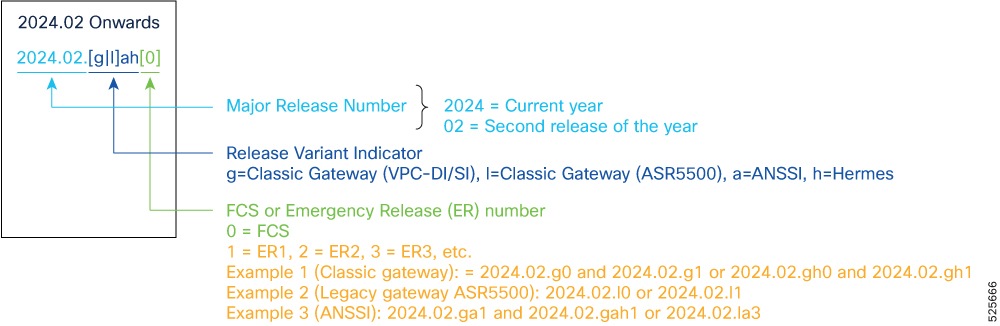
Note: For any clarification, contact your Cisco account representative.
Software integrity verification
To verify the integrity of the software image you have from Cisco, you can validate the SHA512 checksum information against the checksum identified by Cisco for the software. Image checksum information is available through Cisco.com Software Download details. Click Linux and then choose the Software Image Release Version.
To find the checksum, hover the mouse pointer over the software image you have downloaded. At the bottom you find the SHA512 checksum, if you do not see the whole checksum, you can expand it by pressing the "..." at the end.
To validate the information, calculate a SHA512 checksum using the information in the table and verify that it matches the one provided on the software download page. To calculate a SHA512 checksum on your local desktop see the table.
Table 10. Checksum calculations per operating system
| Operating system |
SHA512 checksum calculation command examples |
| Microsoft Windows |
Open a command line window and type the following command: > certutil.exe -hashfile <filename>.<extension> SHA512 |
| Apple MAC |
Open a terminal window and type the following command: $ shasum -a 512 filename.extension |
| Linux |
Open a terminal window and type the following command: $ sha512sum filename.extension OR $ shasum -a 512 filename.extension |
| Note: filename is the name of the file. extension is the file extension (for example, .zip or .tgz). |
|
If the SHA512 checksum matches, you can be sure that no one has tampered with the software image or the image has not been corrupted during download.
If the SHA512 checksum does not match, we advise you to not attempt upgrading any systems with the corrupted software image. Download the software again and verify the SHA512 checksum again. If there is a constant mismatch, please open a case with the Cisco Technical Assistance Center.
Certificate validation
In 2024.01 and later releases, software images for StarOS, VPC-DI, and VPC-SI, and the companion software packages for StarOS and VPC are signed via x509 certificates. USP ISO images are signed with a GPG key. For more information and instructions on how to validate the certificates, refer to the README file available with the respective software packages.
This table provides key resources and links to the support information and essential documentation for StarOS and CUPS products.
Table 11. Related resources and additional information
| Resource |
Link |
| Cisco ASR 5500 documentation |
|
| Cisco Ultra Packet Core documentation |
|
| Service request and additional information |
Cisco and the Cisco logo are trademarks or registered trademarks of Cisco and/or its affiliates in the U.S. and other countries. To view a list of Cisco trademarks, go to this URL: www.cisco.com/go/trademarks. Third-party trademarks mentioned are the property of their respective owners. The use of the word partner does not imply a partnership relationship between Cisco and any other company. (1110R)
Any Internet Protocol (IP) addresses and phone numbers used in this document are not intended to be actual addresses and phone numbers. Any examples, command display output, network topology diagrams, and other figures included in the document are shown for illustrative purposes only. Any use of actual IP addresses or phone numbers in illustrative content is unintentional and coincidental.
© 2026 Cisco Systems, Inc. All rights reserved.