Table Of Contents
Software Installation and Configuration Documentation
Obtaining Technical Assistance
Preface
Document Objectives
This document describes the information you need to provision your Cisco media gateway controller (MGC). The document contains tables and worksheets for you to use for provisioning your system.
Audience
The primary audience for this document is network operators and administrators who have experience in the following areas:
•
Telecommunications network operations
•
Data network operations
•
SS7 protocols, switching, and routing
•
Telecommunications hardware
•
Data network hardware
In addition, the following audiences may find this document useful:
•
Software and hardware installers
•
Network designers
Document Organization
This document contains the chapters listed in the following table.
Chapters Title DescriptionThis chapter includes a checklist of tasks to perform before you use this guide to provision your system, and information to gather before beginning. It also includes the following information:
•
Configuring the Media Gateway Controller
This chapter provides a general overview of planning for provisioning, including:
•
Planning signaling routes to other switches
•
Planning signaling links to Signaling Points (SPs)
•
Planning media gateway control links
•
Planning trunks, trunk groups, and routes
This chapter describes the CCM provisioning procedures for software release 7.4(x).
Using the Voice Services Provisioning Tool to Provision a Cisco Media Gateway Controller
This chapter describes the Voice Services Provisioning Tool provisioning procedures.
This chapter describes how to use MML commands to configure the MGC.
This chapter describes how to use MML commands to add system components.
This chapter lists the components and properties definitions, default values, and ranges identified in Chapter 2.
This chapter lists the nature of address, numbering plan indicator codes, and location codes for the result types described in Chapter 2.
Documentation Map
Refer to the following documentation map to navigate through the Cisco MGC software documentation suite.
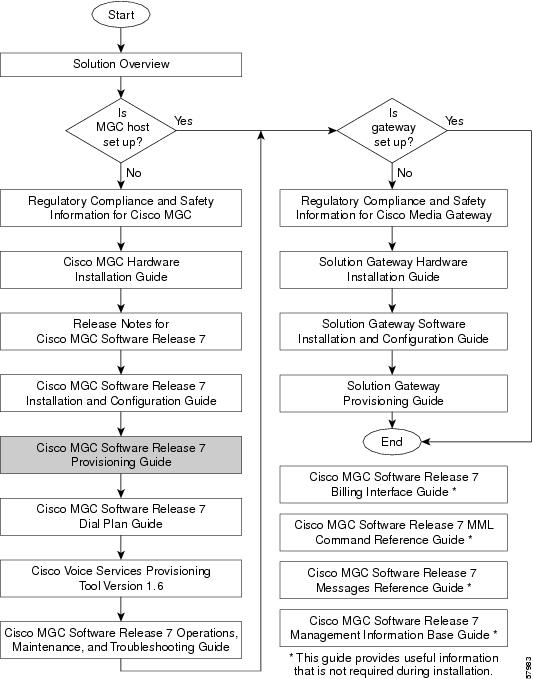
![]()
Documentation Suite
Consult the following related documentation for information about the Cisco MGC software and the solutions it supports, including the Cisco SS7 Interconnect for Access Servers Solution and the Cisco SS7 Interconnect for Voice Gateways Solution and the Cisco Packet Tandem Solution.
Hardware Documentation
•
Cisco Media Gateway Controller Hardware Installation Guide
•
Regulatory Compliance and Safety Information for Cisco Media Gateway Controller Hardware
Software Installation and Configuration Documentation
•
Cisco Media Gateway Controller Software Release 7 Installation and Configuration Guide
•
Cisco Media Gateway Controller Software Release 7 Provisioning Guide
•
Cisco Media Gateway Controller Software Release 7 Dial Plan Guide
•
Cisco Media Gateway Controller Software Release 7 Operations, Maintenance, and Troubleshooting Guide
•
Release Notes for Cisco Media Gateway Controller Software Release 7
•
Cisco Media Gateway Controller Online Documentation Notice
•
Cisco Media Gateway Controller SLT Documentation Notice
Gateway Documentation
Cisco DAS and H.323 VoIP Gateway Installation and Configuration Guide
Terminology
The following terms are used in this document:
•
Cisco MGC host—A Sun host server running Cisco media gateway controller software. If your product is the Cisco SC2200, this is also called an SC host. If your product is the Cisco PGW 2200, this is also called a virtual switch controller (VSC) host.
•
Cisco SC node—The combination of the Cisco SC2200 product and the control signaling network. The SC node consists of all solution components except the media gateway.
•
Cisco VSC node—The logical grouping of the active and standby VSC hosts, the control signaling network, and the Cisco Signaling Link Terminals (SLTs).
•
Cisco MGC node—A generic term used that can mean either the Cisco SC node or the Cisco VSC node.
•
Simplex MGC node—A node that uses a single Cisco MGC host. Typically, these types of nodes are used for solution evaluation tests or for small installations. In this configuration, any loss of service in the Cisco MGC host disrupts all call traffic. If your product is the Cisco SC2200, this is also called a simplex SC node. If your product is the Cisco PGW 2200, this is also called a simplex VSC node.
•
Continuous-service MGC node—A node that uses two Cisco MGC hosts to prevent system downtime caused by failure of a single MGC host. Calls in progress are maintained when one MGC host fails. Continuous-service nodes use SLTs to preprocess SS7 signaling and distribute signaling to both MGC hosts. If a failover occurs, all stable calls are maintained. If your product is the Cisco SC2200, this is also called a continuous-service SC node. If your product is the Cisco PGW 2200, this is also called a continuous-service VSC node.
Document Conventions
Notes use the following conventions:
![]()
Note
Means reader take note. Notes contain helpful suggestions or references to material not covered in the publication.
Cautions use the following conventions:
![]()
CautionMeans reader be careful. In this situation, you might do something that could result in equipment damage or loss of data.
Obtaining Documentation
These sections explain how to obtain documentation from Cisco Systems.
World Wide Web
You can access the most current Cisco documentation on the World Wide Web at this URL:
Translated documentation is available at this URL:
http://www.cisco.com/public/countries_languages.shtml
Documentation CD-ROM
Cisco documentation and additional literature are available in a Cisco Documentation CD-ROM package, which is shipped with your product. The Documentation CD-ROM is updated monthly and may be more current than printed documentation. The CD-ROM package is available as a single unit or through an annual subscription.
Ordering Documentation
You can order Cisco documentation in these ways:
•
Registered Cisco.com users (Cisco direct customers) can order Cisco product documentation from the Networking Products MarketPlace:
http://www.cisco.com/cgi-bin/order/order_root.pl
•
Registered Cisco.com users can order the Documentation CD-ROM through the online Subscription Store:
http://www.cisco.com/go/subscription
•
Nonregistered Cisco.com users can order documentation through a local account representative by calling Cisco Systems Corporate Headquarters (California, U.S.A.) at 408 526-7208 or, elsewhere in North America, by calling 800 553-NETS (6387).
Documentation Feedback
You can submit comments electronically on Cisco.com. In the Cisco Documentation home page, click the Fax or Email option in the "Leave Feedback" section at the bottom of the page.
You can e-mail your comments to bug-doc@cisco.com.
You can submit your comments by mail by using the response card behind the front cover of your document or by writing to the following address:
Cisco Systems
Attn: Document Resource Connection
170 West Tasman Drive
San Jose, CA 95134-9883We appreciate your comments.
Obtaining Technical Assistance
Cisco provides Cisco.com as a starting point for all technical assistance. Customers and partners can obtain online documentation, troubleshooting tips, and sample configurations from online tools by using the Cisco Technical Assistance Center (TAC) Web Site. Cisco.com registered users have complete access to the technical support resources on the Cisco TAC Web Site.
Cisco.com
Cisco.com is the foundation of a suite of interactive, networked services that provides immediate, open access to Cisco information, networking solutions, services, programs, and resources at any time, from anywhere in the world.
Cisco.com is a highly integrated Internet application and a powerful, easy-to-use tool that provides a broad range of features and services to help you with these tasks:
•
Streamline business processes and improve productivity
•
Resolve technical issues with online support
•
Download and test software packages
•
Order Cisco learning materials and merchandise
•
Register for online skill assessment, training, and certification programs
If you want to obtain customized information and service, you can self-register on Cisco.com. To access Cisco.com, go to this URL:
Technical Assistance Center
The Cisco Technical Assistance Center (TAC) is available to all customers who need technical assistance with a Cisco product, technology, or solution. Two levels of support are available: the Cisco TAC Web Site and the Cisco TAC Escalation Center.
Cisco TAC inquiries are categorized according to the urgency of the issue:
•
Priority level 4 (P4)—You need information or assistance concerning Cisco product capabilities, product installation, or basic product configuration.
•
Priority level 3 (P3)—Your network performance is degraded. Network functionality is noticeably impaired, but most business operations continue.
•
Priority level 2 (P2)—Your production network is severely degraded, affecting significant aspects of business operations. No workaround is available.
•
Priority level 1 (P1)—Your production network is down, and a critical impact to business operations will occur if service is not restored quickly. No workaround is available.
The Cisco TAC resource that you choose is based on the priority of the problem and the conditions of service contracts, when applicable.
Cisco TAC Web Site
You can use the Cisco TAC Web Site to resolve P3 and P4 issues yourself, saving both cost and time. The site provides around-the-clock access to online tools, knowledge bases, and software. To access the Cisco TAC Web Site, go to this URL:
All customers, partners, and resellers who have a valid Cisco service contract have complete access to the technical support resources on the Cisco TAC Web Site. The Cisco TAC Web Site requires a Cisco.com login ID and password. If you have a valid service contract but do not have a login ID or password, go to this URL to register:
http://www.cisco.com/register/
If you are a Cisco.com registered user, and you cannot resolve your technical issues by using the Cisco TAC Web Site, you can open a case online by using the TAC Case Open tool at this URL:
http://www.cisco.com/tac/caseopen
If you have Internet access, we recommend that you open P3 and P4 cases through the Cisco TAC Web Site.
Cisco TAC Escalation Center
The Cisco TAC Escalation Center addresses priority level 1 or priority level 2 issues. These classifications are assigned when severe network degradation significantly impacts business operations. When you contact the TAC Escalation Center with a P1 or P2 problem, a Cisco TAC engineer automatically opens a case.
To obtain a directory of toll-free Cisco TAC telephone numbers for your country, go to this URL:
http://www.cisco.com/warp/public/687/Directory/DirTAC.shtml
Before calling, please check with your network operations center to determine the level of Cisco support services to which your company is entitled: for example, SMARTnet, SMARTnet Onsite, or Network Supported Accounts (NSA). When you call the center, please have available your service agreement number and your product serial number.
Document Change History
Table 1 describes the document changes made after the initial release of the Cisco Media Gateway Controller Software Release 7 Provisioning Guide.
Table 1 Summary History of Document Changes
Subject Document #, Change Date Change SummaryRemoved properties not supported
OL-1174-09, January 14, 2003
•
In "Components and Properties," removed properties not supported in the software.
Updated parameter descriptions
OL-1174-08, November 12, 2002
•
Updated descriptions for BothwayWorking and SS7-ITU.mtp3MsgPriority parameters according to post-release change requests.
•
Added default port number values to Step 9 on page 3-32.
Re-ordered routing properties
CUSTGRPID
Added text
OL-1174-07, January 4, 2002
•
In "Adding System Components with MML," re-ordered properties under Routing
•
In "Components and Properties," added the CUSTGRPID property to NAS Signaling Service (sigpath).
•
In "Adding System Components with MML," under Adding Multiple OPCs added 5th bullet text (Each OPC must have a unique network address).
Single MGC initial provisioning
OL-1174-06, October 19, 2001
•
Changed VSC3000 to PGW 2200.
•
In "Using the Voice Services Provisioning Tool to Provision a Cisco Media Gateway Controller," added Backup and Restore, page 63.
•
In "Configuring with MML," added a note for PROV-CPY—Copy Provisioning Session and PROV-DPLY—Deploy Provisioning Session.
•
Also removed text under "Committing a Provisioning Session to a Single MGC" section regarding stopping the engine.
•
In "Components and Properties," revised the definition for *.TlinkAlignTime.
Note added regarding Get Existing.
OL-1174-05, July 23, 2001
•
Under "CMM Provisioning Procedures for Release 7.4(x)," added note on page 45
Deleted references to software Release 7.3.
OL-1174-04, June 28, 2001
•
Removed "TCM Provisioning Procedures for Release 7.3(x)."
•
Changed the maximum values in Table 6-5.
Document reorganization.
OL-1174-03, June 20, 2001
•
Under "Software Release Version 7.4(x)" section, revised the second paragraph and deleted the last two bullets.
•
Under Table 2-16, added more external node types to the TYPE row.
•
Under "Defining Users and Permissions" section on page 10, added the Note text.
•
Moved dial plan text, starting with "Dial Plan Implementation" section on page 47, to the Cisco MGC Software Release 7 Dial Plan Guide.
•
Under "TCM Provisioning Procedures for Release 7.3(x)," deleted the last bullet of the first paragraph.
•
Moved dial plan text, starting with the "Provisioning the Dial Plan/Number Analysis" section on page 38 to the Cisco MGC Software Release 7 Dial Plan Guide.
•
Under "CMM Provisioning Procedures for Release 7.4(x)," deleted the last two bullets of the first paragraph.
•
Moved dial plan text, starting with the "Provisioning the Dial Plan/Number Analysis" section on page 47 to the Cisco MGC Software Release 7 Dial Plan Guide.
•
Moved dial plan text, starting with the "Adding a Dial Plan" section on page 87 to the Cisco MGC Software Release 7 Dial Plan Guide.
Document reorganization.
OL-1174-03, June 20, 2001
•
Under "Using the Voice Services Provisioning Tool to Provision a Cisco Media Gateway Controller," added "Installing the Cisco Voice Services Provisioning Tool" section on page 2 and following text.
•
Deleted the NUMAN-ADD information from Table 5-2.
•
Under the "Working with Provisioning Session Commands" section, deleted the last five bullets.
•
Moved dial plan text starting with the "Adding an Element to a Dial Plan Table" section on page 30 through the "Retrieving an Element in a Dial Plan Table" section on page 32 to the Cisco MGC Software Release 7 Dial Plan Guide.
•
Under "Adding System Components with MML," deleted the fifth bullet.
•
Moved dial plan text starting with "Scaling System Components" section through the "Adding a Called Number to the BBLACK Table" section on page 43 to the Cisco MGC Software Release 7 Dial Plan Guide.
Document reorganization.
OL-1174-03, June 20, 2001
•
Moved Appendix A, "Result Type Definitions", "Planning Worksheets", and "Cause and Location Codes" to the Cisco MGC Software Release 7 Dial Plan Guide.
•
Added "Components and Properties" and "Planning Worksheets".
Default result for B-number analysis
OL-1174-02, April 9, 2001
•
Under Table 2-50 on page 82, added WHITELIST.
•
Under "Result Set Table Example (Release 7.4(x))" section on page 82, added text after the sixth paragraph.
•
Figure 2-38, added the set8 row and corresponding MML command.
•
Figure 2-40, added two lines for set8 and default result set.
•
Under Appendix A, "Result Type Definitions" added "WHITELIST" section on page 8.
Mixed codec support
•
Added "Modifying an MGCP Signaling Service Property" section.
Running multiple batch files
•
Under "Creating a Batch File" section, added the sixth note.
OL-1174-01, March 29, 2001
Initial release.