About the Expressway
Cisco Expressway Series (Expressway) is designed specifically for comprehensive collaboration services. It features established firewall-traversal technology and helps to redefine traditional enterprise collaboration boundaries, to support our Cisco vision of any-to-any collaboration.
Expressway offers the following primary features and benefits:
-
Provides proven, highly secure, firewall-traversal technology.
-
Facilitates connections for business-to-business, business-to-consumer, and business-to-cloud-service-provider.
-
Facilitates session-based access to collaboration services for remote workers, with no need for a separate VPN client.
-
Supports a wide range of devices, including Cisco Jabber for smartphones, tablets, and desktops.
-
Complements bring-your-own-device strategies and policies for remote and mobile workers.
A typical Expressway system is deployed as a pair: an Expressway-C with a trunk and line-side connection to Unified CM, and an Expressway-E deployed in the DMZ and configured with a traversal zone to an Expressway-C.
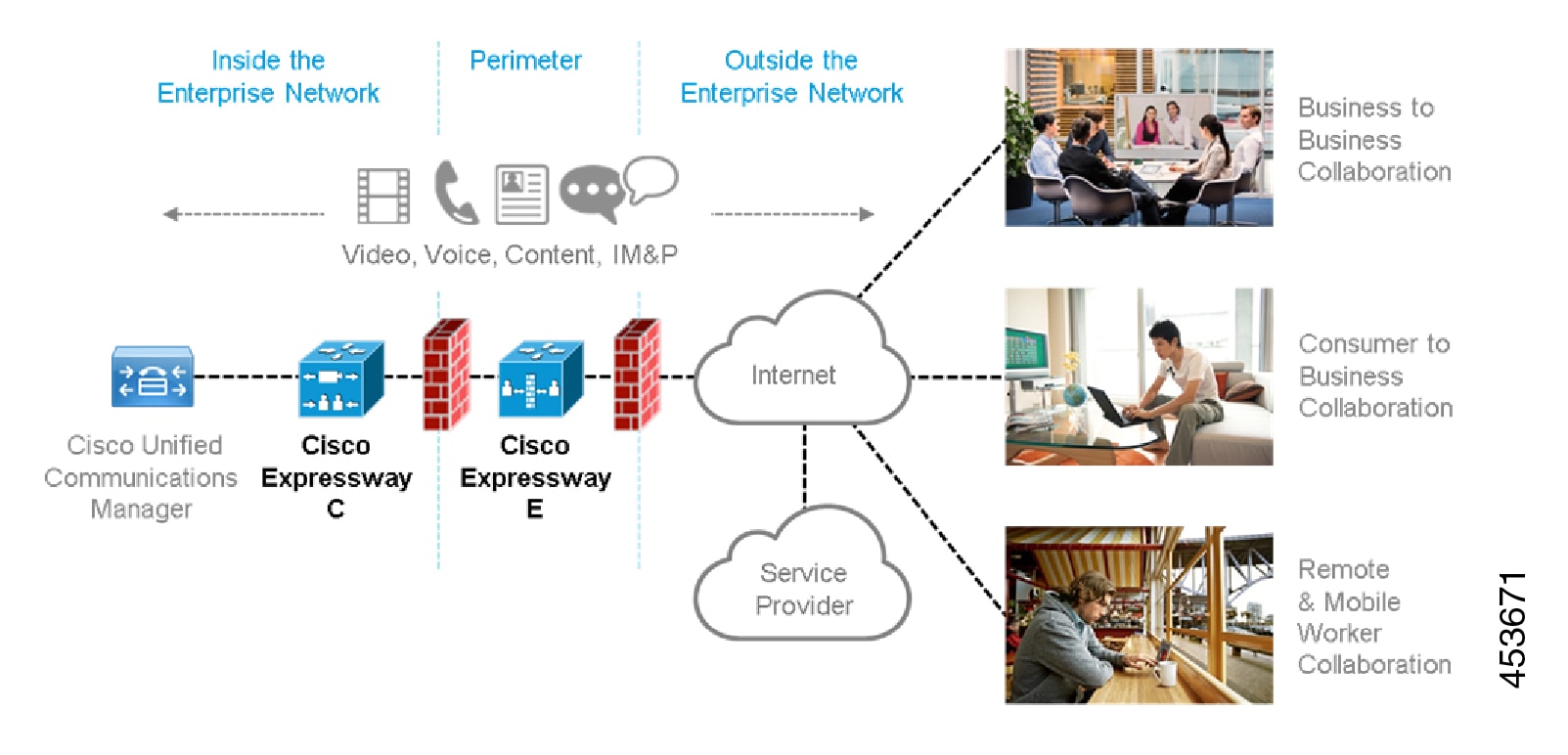
Expressway is available on a dedicated physical appliance such as a CE12100, or as a virtual machine (VM) on a Cisco UCS server.
Expressway Types
Each Expressway can be configured as one of two types, which offer different capabilities.
Expressway-C
Expressway-C delivers any-to-any enterprise wide conference and session management and interworking capabilities. It extends the reach of telepresence conferences by enabling interworking between Session Initiation Protocol (SIP)- and H.323-compliant endpoints, interworking with third-party endpoints; it integrates with Unified CM and supports third-party IP private branch exchange (IP PBX) solutions. Expressway-C implements the tools required for creative session management, including definition of aspects such as routing, dial plans, and bandwidth usage, while allowing organizations to define call-management applications, customized to their requirements.
Expressway-E
The Expressway-E deployed with the Expressway-C enables smooth video communications easily and securely outside the enterprise. It enables business-to-business video collaboration, improves the productivity of remote and home-based workers, and enables service providers to provide video communications to customers. The application performs securely through standards-based and secure firewall traversal for all SIP and H.323 devices. As a result, organizations benefit from increased employee productivity and enhanced communication with partners and customers.
It uses an intelligent framework that allows endpoints behind firewalls to discover paths through which they can pass media, verify peer-to-peer connectivity through each of these paths, and then select the optimum media connection path, eliminating the need to reconfigure enterprise firewalls.
The Expressway-E is built for high reliability and scalability, supporting multivendor firewalls, and it can traverse any number of firewalls regardless of SIP or H.323 protocol.
Standard Features
Standard features on Expressway include the following:
-
Secure firewall traversal and session-based access to Cisco Unified Communications Manager for remote workers, without the need for a separate VPN client
-
Endpoint registration support.
-
SIP Registrar (requires Room or Desktop SIP Proxy. Note that SIP and H.323 protocols are disabled by default on new installs, and can be enabled from Registration licenses.)
-
SIP and H.323 support, including SIP / H.323 interworking
-
IPv4 and IPv6 support, including IPv4 / IPv6 interworking
-
TURN relay licenses
-
Advanced networking
-
Device provisioning and FindMe services
-
H.323 gatekeeper
-
QoS tagging
-
Bandwidth management on both a per-call and a total usage basis, configurable separately for calls within the local subzones and to external systems and zones
-
Automatic downspeeding option for calls that exceed the available bandwidth
-
URI and ENUM dialing via DNS, enabling global connectivity
-
Rich media session (RMS) support
-
1000 external zones with up to 2000 matches
-
1000 subzones and supporting up to 3000 membership rules
-
Flexible zone configuration with prefix, suffix and regex support
-
Can function as a standalone Expressway, or be neighbored with other systems such as other Expressways, gatekeepers and SIP proxies
-
Can be clustered with up to 6 Expressways to provide n+1 redundancy, and up to 4 x individual capacity.
-
Intelligent Route Director for single number dialing and network failover facilities
-
Optional endpoint authentication
-
Control over which endpoints are allowed to register
-
Call Policy (also known as Administrator Policy) including support for CPL
-
Support for external policy servers
-
Can be managed with Cisco TelePresence Management Suite 13.2 or later
-
Active Directory authentication
-
Pre-configured neighbor zone defaults for Cisco Unified Communications Manager and for Nortel Communication Server
-
Embedded setup wizard using a serial port for initial configuration
-
System administration using a web interface or SSH, or via the CIMC port for a CEnnnn physical appliance
-
Intrusion protection
Do Not Install Other Cisco or Third-Party Software onto Expressway
Cisco does not support the installation of any additional Cisco or third-party software, applications, or agents on Expressway (VMs or physical appliances), unless we state explicitly otherwise. Non-Expressway products may corrupt the Expressway code and must not be installed.
Hardware Appliance and Virtual Machine Options
Expressway supports on-premises and cloud applications and is available as a dedicated appliance or as a virtualized application on VMware, with additional support for Cisco Unified Computing System (Cisco UCS) platforms.
Virtual Machine Options
Expressway has these virtualized application deployment types:
-
Small (for Cisco Business Edition 6000 or supported VMware ESXi platforms, subject to the required minimum hardware specification)
-
Medium (standard installation)
-
Large (extra performance and scalability capabilities)
See Cisco Expressway Virtual Machine Installation Guide on the Expressway Installation Guides page.
Hardware CE Series Appliances
The Expressway is also available as a dedicated CE Series appliance based on UCS hardware. For example, the CE1200 appliance based on a UCS C220 M5L, operates as a medium capacity or large capacity Expressway.
 Note |
The Cisco VCS series is not supported on CE1200 appliances. |
Changing the default system size
For appliances deployed as Expressway-E you can manually change the default system size of appliances from Large to Medium, or the other way round. This capability was introduced to mitigate an issue with demultiplexing ports for media traversal on appliances with a 1 Gbps NIC (SFP module) that are configured as Medium systems.
To change the size of the appliance, go to settings page and select the required size from the Deployment Configuration list.
Installation information
See Cisco Expressway CE1200 Appliance Installation Guide on the Expressway Installation Guides page.
 Feedback