Cisco Unified Edge and Nutanix NKP for Edge Deployments Design Guide
Available Languages
Bias-Free Language
The documentation set for this product strives to use bias-free language. For the purposes of this documentation set, bias-free is defined as language that does not imply discrimination based on age, disability, gender, racial identity, ethnic identity, sexual orientation, socioeconomic status, and intersectionality. Exceptions may be present in the documentation due to language that is hardcoded in the user interfaces of the product software, language used based on RFP documentation, or language that is used by a referenced third-party product. Learn more about how Cisco is using Inclusive Language.
- US/Canada 800-553-2447
- Worldwide Support Phone Numbers
- All Tools
 Feedback
 Feedback
In partnership with:

About the Cisco Validated Design Program
The Cisco Validated Design (CVD) program consists of systems and solutions designed, tested, and documented to facilitate faster, more reliable, and more predictable customer deployments. For more information, go to: https://www.cisco.com/go/designzone
Executive Summary
We’re at a critical inflection point. The edge has emerged as the place where the physical and digital worlds meet, demanding real-time processing and analysis of data to deliver informed decisions, improved experiences, and increased productivity. However, legacy infrastructure wasn’t built for the AI era and can’t keep up with the scale, speed, and intelligence required by AI-driven operations. While much of the model training happens in the data center, the shift of test-time inference to the edge makes it the new frontier for enterprise AI.
Deploying AI at the edge remains complicated and demanding. Interoperability, security, cost, and rigid deployment models are all potential performance and productivity blockers. The increasing demand for AI and digitization at the edge necessitates a full system rethink, as evolving business needs and the sheer scale highly distributed edge environments and modern AI workloads create a beyond-human complexity nightmare. We need something more than just more boxes; we need a brand-new edge infrastructure and operations vision.
Cisco Unified Edge is an AI-ready system that redefines computing at the edge by converging computer, networking, storage, and security. Designed from the edge up, for the next decade, the modular design is future-ready, energy-efficient, and easy-to-service, and can be tailored to support today’s workloads and use cases, while remaining adaptable to the rapidly evolving AI landscape. Seamless integration with third-party technologies and validated solutions for industry-specific needs ensure both compatibility and optimized performance.
Delivering breakthrough operational simplicity at scale, this software-defined system features centralized cloud management, zero-touch deployment, curated blueprints, and automated orchestration. These capabilities enable high scalability with minimal complexity. End-to-end observability with real-time analytics accelerates error detection and correction, helping minimize service outages. Security is designed-in, with integrated physical and digital safeguards to protect applications and data at the edge while multi-layered security capabilities protect infrastructure, applications, and AI models.
By combining computer, networking, security, and storage into a full stack, AI-ready system, Cisco Unified Edge introduces a fundamentally different infrastructure and operational paradigm for the enterprise edge. Unlike other solutions that may lack critical capabilities or are not optimized for edge use cases, this system offers fully validated solutions that deliver AI-era performance, simplicity, and security.
Benefits
Key benefits are:
● Future-ready performance: Adaptable to meet today and tomorrow's edge workload demands with ease, stopping the rip-and-replace cycle with a fully integrated, modular edge environment built for the next decade. Deploy applications and infrastructure faster and profit sooner with proven solutions that are tested and certified for vertical-specific workloads and use cases, ensuring compatibility and performance.
● Full-scale simplicity: Onboard quickly and with ease without the need for highly skilled IT expertise or on-site visits. Whether deploying ten systems or ten thousand, zero-touch provisioning, curated blueprints and automation ensure consistent, effortless rollout. A consistent operating model from core to edge makes it easy to scale, upgrade, and support your infrastructure.
● Designed-in security: Prevent tampering at the edge with robust physical and digital protection. Proven policy-based templates eliminate configuration drift across sites. Embedded, zero-trust security capabilities ensure unmatched protection for your edge infrastructure, data, and AI models.
Hyperconverged Infrastructure (HCI) is the solution to many of today’s challenges at the edge because it offers built-in data redundancy and a smooth path to scaling up computing and storage resources as your needs grow.
The Cisco Compute Hyperconverged (CCHC) with Nutanix solution helps you overcome the challenge of deploying on a global scale with an integrated workflow. This architecture leverages Cisco Intersight® to deploy and manage physical infrastructure, and Nutanix Prism Central to oversee your hyperconverged environment. By tightly integrating these tools through APIs, Cisco and Nutanix have established a seamless, joint cloud-operating model.
To meet the demands of modern, containerized workloads, the solution now incorporates the Nutanix Kubernetes Platform (NKP). This provides a consistent, enterprise-grade Kubernetes experience across the distributed edge. NKP can be deployed directly on top of the Nutanix AHV hypervisor for a fully integrated HCI experience, or on top of a bare-metal Ubuntu Linux platform for environments requiring a lightweight, container-optimized footprint.
Whether at the core, edge, or remote site, Cisco HCI with Nutanix—augmented by NKP—provides a best-in-class solution. It enables zero-touch accelerated deployment through automated workflows and simplified operations with an enhanced solution-support model. This is combined with proactive, automated resiliency, secure cloud-based management through Cisco Intersight, and enhanced flexibility with a choice of compute, network, and orchestration layers.
This Cisco Validated Design and Deployment Guide provides prescriptive guidance for the design, setup, and configuration of Cisco Compute Hyperconverged with Nutanix in Intersight Standalone mode. This configuration allows nodes to be connected to a pair of Top-of-Rack (ToR) switches while servers and Kubernetes clusters are centrally managed using Cisco Intersight and Nutanix Prism.
For more information on Cisco Compute for Hyperconverged with Nutanix, go to: https://www.cisco.com/go/hci.
Solution Overview
This chapter contains the following:
● Audience
The intended audience for this document includes sales engineers, field consultants, professional services, IT managers, partner engineering staff, and customers deploying Cisco Compute Hyperconverged Solution with Nutanix. External references are provided wherever applicable, but readers are expected to be familiar with Cisco Compute, Nutanix, plus infrastructure concepts, network switching and connectivity, and the security policies of the customer installation.
This solution option is part of a range of solution designs captured in the Cisco Unified Edge with Nutanix Solutions Deployment Guide published here:
This document describes the design, configuration, deployment steps for Cisco Compute Hyperconverged with Nutanix on Unified Edge. By integrating the Nutanix Kubernetes Platform (NKP), this solution provides a unified infrastructure for both virtualized and containerized workloads at the edge.
Scope of this document
● Hardware Architecture: Design considerations for the Cisco UCS XE9305 Chassis, dual Edge Chassis Management Controllers (ECMC), and the XE130c/XE150c M8 compute nodes.
● Software Architecture: Architectural mapping of the Nutanix portfolio onto Cisco hardware, including:
◦ NCI (Nutanix Cloud Infrastructure): The foundation of AHV and AOS for resilient storage and virtualization.
◦ NKP (Nutanix Kubernetes Platform): The orchestration layer, detailing the deployment of the NKP Management Cluster and Workload Clusters.
◦ NKP Metal: Specific configurations for running Kubernetes directly on bare-metal Ubuntu Linux to maximize performance for AI and latency-sensitive payloads.
● Solution Scenarios: Detailed design analysis of different deployment models, ranging from single-node lean edge deployments to multi-node, highly available clusters.
● Management Plane Design: Strategies for Zero-Touch Provisioning (ZTP), fleet management, and continuous lifecycle operations using Cisco Intersight and Nutanix Prism management tools.
● Security and High Availability: Foundational design principles for ensuring data integrity, node survivability, and cluster failover in disconnected or bandwidth-constrained environments.
Out of Scope
The following are not fully explained in this CVD:
● Core Data Center Design: While integration with centralized management (like a Prism Central) is discussed, the design of the core data center itself is excluded.
● Application-Specific Logic: The document provides the infrastructure platform to run AI/ML and microservices but does not dictate how to write or compile the specific application payloads.
The Cisco Compute Hyperconverged with Nutanix family of appliances delivers pre-configured Unified Edge server nodes that are ready to be deployed to form Nutanix clusters in a variety of configurations. Each server appliance supports a flexible software stack: UCS server firmware, the Nutanix Cloud Infrastructure (NCI)—which includes the hypervisor (Nutanix AHV) and hyperconverged storage (Nutanix AOS)—and the Nutanix Kubernetes Platform (NKP).
Depending on the specific workload requirements, NKP can be deployed in two distinct modes:
● NKP on AHV: Kubernetes clusters run as virtualized guests on top of the Nutanix AHV hypervisor (deployed using ClusterAPI CAPX provider), providing maximum resource isolation and simplified management for mixed VM and container environments.
● NKP on Bare-Metal: Kubernetes is deployed directly on bare-metal Ubuntu Linux nodes using ClusterAPI preprovisioned provider, eliminating hypervisor overhead to provide the low-latency performance required for advanced AI/ML and real-time industrial applications.
Physically, nodes are deployed into clusters consisting of Cisco Unified Edge nodes. These clusters support a broad spectrum of workloads, ranging from virtual desktops and general-purpose VMs at the edge to high-performance containerized microservices in mission-critical environments. Nutanix clusters can be scaled out to the maximum cluster server limit documented by Nutanix, while NKP enables the centralized orchestration across a fleet of Kubernetes clusters
The present solution elaborates on design and deployment details to deploy Cisco Unified Edge nodes for Nutanix configured in Intersight Standalone Mode. This integration ensures that hardware, virtualization, and the NKP Kubernetes stack are all governed by a unified, policy-driven management framework.
Like all other Cisco Validated solution designs, Unified Edge with Nutanix and NKP is configurable according to demand and usage. The architecture is highly modular, adapting to the specific constraints of any edge location. By standardizing on this joint architecture, enterprises eliminate the "rip-and-replace" cycle, allowing them to scale up (adding more resources to a chassis) or scale out (adding more locations and Kubernetes clusters) seamlessly.
Technology Overview
This chapter contains the following:
● Cisco Unified Edge Management
Cisco Unified Edge with Nutanix architecture is built using compute, network, and storage components integrated in the Unified Edge platform bundled with Nutanix software components. The solution in this document consists of the following elements:
● Cisco Unified Edge System (Cisco UCS XE9305)
● Nutanix AHV and AOS
● Nutanix Kubernetes Platform
● Nutanix Prism
These components are connected and configured according to the best practices of both Cisco and Nutanix to provide an ideal platform for running a variety of traditional and new edge workloads with confidence. Cisco Unified Edge can scale up for greater performance and capacity (adding compute resources individually as needed), or it can scale out for environments that require multiple consistent deployments (such as rolling out of additional Cisco Unified Edge stacks).
One of the key benefits of Cisco Unified Edge is its ability to maintain consistency during scale where required. Each of the components offers platform and resource options to scale the infrastructure up or down while supporting the same features and functionality that are required under the configuration and connectivity best practices. The key features and highlights of the components are explained below.
One of the key benefits of Cisco Unified Edge is its ability to maintain consistency during scale where required. Each of the components offers platform and resource options to scale the infrastructure up or down while supporting the same features and functionality that are required under the configuration and connectivity best practices. The key features and highlights of the components are explained in the following sections.
Cisco Unified Edge is part of the Cisco Unified Computing System (Cisco UCS) family designed from ground up to address deployments where traditional data center servers are not a perfect fit. With its new physical design and the new components, the Cisco Unified Edge uses, like other Cisco UCS platforms, Cisco Intersight as the management tool.
Cisco Intersight
The Cisco Intersight platform is a Software-as-a-Service (SaaS) infrastructure lifecycle management platform that delivers simplified configuration, deployment, maintenance, and support. The Cisco Intersight platform is designed to be modular, so you can adopt services based on your individual requirements. The platform significantly simplifies IT operations by bridging applications with infrastructure, providing visibility and management from bare-metal servers and hypervisors to serverless applications, thereby reducing costs and mitigating risk. This unified SaaS platform uses an Open API design that natively integrates with third-party platforms and tools.
The capabilities of Cisco Intersight were extended with a Fleet Management option to automate and accelerate deployment of Cisco UCS and Unified Edge systems at remote locations at scale. With the new Fleet Management, it is possible to define location profiles and Blueprints to allow zero-touch provisioning of the hardware and operating systems as soon as the new hardware is claimed in Intersight.
While Cisco UCS XE9305 is a programmable infrastructure, the Cisco Intersight API is how management tools program it. This enables the tools to help guarantee consistent, error-free, policy-based alignment of server personalities with workloads. Through automation, transforming the server and networking components of your infrastructure into a complete solution is fast and error-free because programmability eliminates the error-prone manual configuration of servers and integration into solutions. Server, network, and storage administrators are now free to focus on strategic initiatives rather than spending their time performing tedious tasks (Figure 1).
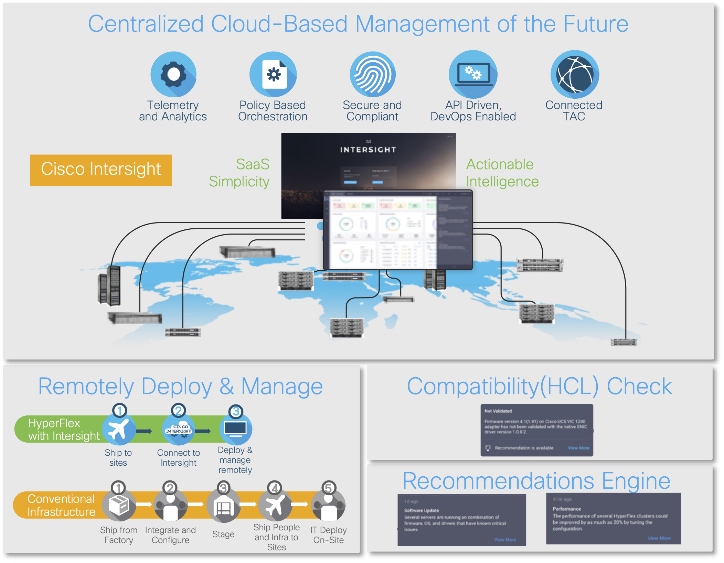
The main benefits of Cisco Intersight infrastructure services are as follows:
● Simplify daily operations by automating many daily manual tasks
● Combine the convenience of a SaaS platform with the capability to connect from anywhere and manage infrastructure through a browser or mobile app
● Stay ahead of problems and accelerate trouble resolution through advanced support capabilities
● Gain global visibility of infrastructure health and status along with advanced management and support capabilities.
Cisco Intersight Virtual Appliance and Private Virtual Appliance
In addition to the SaaS deployment model running on Intersight.com, on-premises options can be purchased separately. The Cisco Intersight Virtual Appliance and Cisco Intersight Private Virtual Appliance are available for organizations that have additional data locality or security requirements for managing systems. The Cisco Intersight Virtual Appliance delivers the management features of the Cisco Intersight platform in an easy-to-deploy KVM virtual machine that allows customers to control the system details that leave their premises. The Cisco Intersight Private Virtual Appliance is provided in a form factor specifically designed for users who operate in disconnected (air gap) environments. The Private Virtual Appliance requires no connection to public networks or back to Cisco to operate.
Cisco Intersight Assist
Cisco Intersight Assist helps customers add endpoint devices to Cisco Intersight. A data center or site could have multiple devices that do not connect directly with Cisco Intersight. Any device that is supported by Cisco Intersight, but does not connect directly with it, will need a connection mechanism. Cisco Intersight Assist provides that connection mechanism. Tools and devices like NetApp Active IQ Unified Manager, Cisco Nexus and Cisco MDS switches connect to Intersight with the help of Intersight Assist VM.
Cisco Intersight Assist is available within the Cisco Intersight Virtual Appliance, which is distributed as a deployable virtual machine contained within an qcow2 file format. More details about the Cisco Intersight Assist VM deployment are covered in later sections.
Licensing Requirements
The Cisco Intersight platform uses a subscription-based license with multiple tiers. Customers can purchase a subscription duration of one, three, or five years and choose the required Cisco UCS server volume tier for the selected subscription duration. Each Cisco endpoint automatically includes a Cisco Intersight Base license at no additional cost when customers access the Cisco Intersight portal and claim a device. Customers can purchase any of the following higher-tier Cisco Intersight licenses using the Cisco ordering tool:
● Cisco Intersight Infrastructure Services Essentials: The Essentials license tier offers server management with global health monitoring, inventory, proactive support through Cisco TAC integration, multi-factor authentication, along with SDK and API access.
● Cisco Intersight Infrastructure Services Advantage: The Advantage license tier offers advanced server management with extended visibility, ecosystem integration, and automation of Cisco and third-party hardware and software, along with multi-domain solutions.
Servers in the Cisco Intersight managed mode require at least the Essentials license. For detailed information about the features provided in the various licensing tiers, see https://intersight.com/help/saas/getting_started/system_requirements.
DevOps and Tool Support
The Cisco Intersight API is of great benefit to developers and administrators who want to treat physical infrastructure the way they treat other application services, using processes that automatically provision or change IT resources. Similarly, your IT staff needs to provision, configure, and monitor physical and virtual resources; automate routine activities; and rapidly isolate and resolve problems. The Cisco Intersight API integrates with DevOps management tools and processes and enables you to easily adopt DevOps methodologies.
The Cisco Unified Edge Modular System is designed to take the current generation of the Cisco UCS platform to the next level with its future-ready design and cloud-based management. Decoupling and moving the platform management to the cloud allows Cisco UCS to respond to customer feature and scalability requirements in a much faster and more efficient manner. Cisco Unified Edge state of the art hardware simplifies the edge design by providing flexible server options.
Cisco Unified Edge XE9305 Chassis
The Cisco Unified Edge chassis is engineered to be adaptable and flexible. As seen in Figure 3, Cisco Unified Edge XE9305 chassis has a power-distribution backplane. This innovative design provides fewer obstructions for better airflow. For I/O connectivity, vertically oriented compute nodes intersect with horizontally oriented fabric modules, allowing the chassis to support future fabric innovations. Cisco UCS XE9305 Chassis’ superior packaging enables larger compute nodes, thereby providing more space for actual compute components, such as memory, GPU, drives, and accelerators. Improved airflow through the chassis enables support for higher power components, and more space allows for future thermal solutions (such as liquid cooling) without limitations.
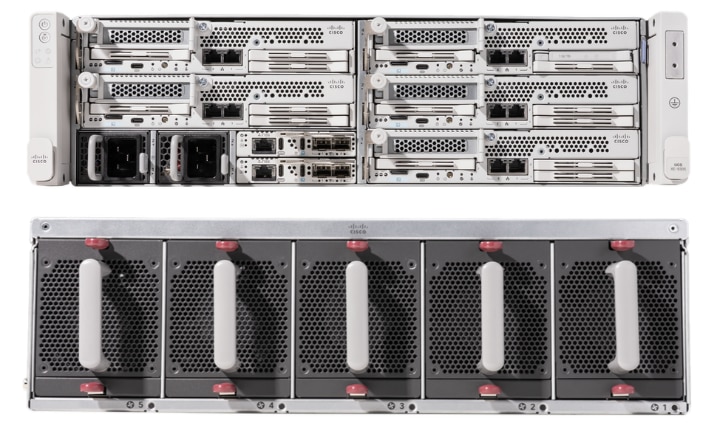
The Cisco UCS XE9305 3-Rack-Unit (3RU) chassis has five slots that can house up to 5 compute nodes at this time. In future, same slots can be utilized to install a secure router (network) node. At the bottom of the chassis are two edge Chassis Management Controller (ECMC) that connect the chassis to upstream network. On the left of the ECMCs there are two 2400 Watt Power Supply Units (PSUs) that provide power to the chassis with N+N redundancy. At the back of the chassis, five efficient, 80mm, dual counter-rotating fans deliver industry-leading airflow and power efficiency, and optimized thermal algorithms enable different cooling modes to best support the customer’s environment.
Cisco Unified Edge – Edge Chassis Management Controller
The Cisco Edge Chassis Management Controller (ECMC) provide a single point for connectivity and management for the entire Cisco Unified Edge system.
The Cisco Unified Edge ECMC provides the management and communication backbone for the Cisco UCS XE130c M8 compute nodes in the Cisco Unified Edge XE9305 Series Chassis. All nodes attached to the Cisco Unified Edge ECMC become part of a single, highly available management domain.
Cisco Unified Edge ECMC utilized in the current design includes one Ethernet port for management, two Ethernet ports for LAN traffic depending on the SFP and one Ethernet port to each slot in the chassis.
For more information about the Cisco Unified Edge ECMC see: https://www.cisco.com/c/en/us/products/collateral/servers-unified-computing/ucs6536-fabric-interconnect-ds.html.
Cisco UCS-XE130c Compute Node
The Cisco Unified Edge XE9305 Chassis is designed to host up to 5 Cisco UCS XE130c Compute Nodes. The hardware details of the Cisco UCS XE130c M8 Compute Nodes are shown in Figure 4.
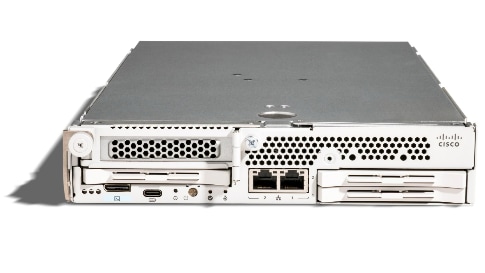
The Cisco UCS XE130c M8 features:
● CPU: One 6th Gen Intel Xeon SoC Processor with 12, 20, or 32 cores.
● Memory: Up to 8 x 96 GB DDR5-6400 DIMMs for a maximum of 768 GB of main memory.
● Disk storage: Up to 4 E3.s NVMe drives (with Storage optimized SKU) and one M.2 RAID controller with two M.2 memory cards with RAID 1 mirroring.
● LAN on Mainboard (LoM): Intel E825 NIC is integrated in the Xeon SoC Processor with two 25 Gbps ports on the Mid-plane and two 1/10 Gbps RJ45 ports on the front of each Compute Node.
● GPU: Dedicated PCIe Gen-5 slot for one HH/HL GPU with up to 75 Watt.
● Security: The server supports an optional Trusted Platform Module (TPM).
Cisco UCS-XE150c Compute Node
The Cisco Unified Edge XE9305 Chassis is designed to host up to 2 Cisco UCS XE150c Compute Nodes with an additional single high slot to host another node.
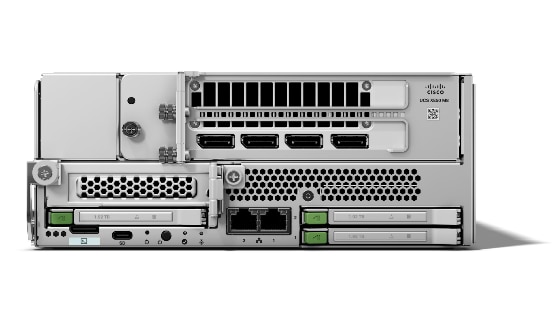
The hardware details of the Cisco UCS XE150c M8 Compute Nodes are:
● Formfactor: 2U/half-width node for the UCS XE9305 Chassis
● CPU: One 6th Gen Intel Xeon SoC Processor with 12, 20, or 32 cores.
● Memory: Up to 8 x 96 GB DDR5-6400 DIMMs for a maximum of 768 GB of main memory.
● Disk storage: Up to 4 E3.s NVMe drives (with Storage optimized SKU) and one M.2 RAID controller with two M.2 memory cards with RAID 1 mirroring.
● LAN on Mainboard (LoM): Intel E825 NIC is integrated in the Xeon SoC Processor with two 25 Gbps ports on the Mid-plane and two 1/10 Gbps RJ45 ports on the front of each Compute Node.
● GPU: Dedicated PCIe Gen-5 slot for one FH/FL GPU capped at 450 Watt.
● Security: The server supports an optional Trusted Platform Module (TPM).
Graphics Processing Units or GPUs are specialized processors designed to render images, animation, and video for computer displays. They perform these tasks by running many operations simultaneously. While the number and kinds of operations they can do are limited, GPUs can run many thousand operations in parallel making this massive parallelism extremely useful for deep learning applications. Deep learning relies on GPU acceleration for both training and inference, and GPU accelerated datacenters deliver breakthrough performance with fewer servers at a lower cost. This CVD details the following NVIDIA GPUs.
NVIDIA L4 Tensor Core GPU
The NVIDIA L4 Tensor Core, powered by the Ada Lovelace architecture, is a versatile and energy-efficient accelerator designed for workloads such as AI, video processing, graphics, and virtualization. Its low-profile form factor and high performance make it suitable for deployment across edge, data center, and cloud environments.

The NVIDIA L4 card is a single-slot PCI Express Gen4 card. It uses a passive heat sink for cooling, which requires system airflow to operate the card properly within its thermal limits. The NVIDIA L4 PCIe operates unconstrained up to its maximum thermal design power (TDP) level of 72 W to accelerate applications that require the fastest computational speed and highest data throughput at the edge.
NVIDIA RTX Pro 4500 Blackwell Server Edition
The NVIDIA RTX Pro 4500 Blackwell, powered by the revolutionary Blackwell architecture, is a next-generation professional accelerator designed to supercharge Agentic AI, neural rendering, and complex engineering simulations. Featuring 32 GB of ultra-fast GDDR7 memory and 5th Generation Tensor Cores, it provides the memory capacity and computational precision required for local fine-tuning of Large Language Models (LLMs) and real-time AI-augmented graphics.

The NVIDIA RTX Pro 4500 Blackwell Server Edition is a dual-slot, full-height, full-length (FHFL) PCI Express Gen5 card. It utilizes a passive heat sink for cooling, designed to leverage the high-pressure airflow of enterprise server chassis like the Cisco UCS XE9305. Operating at a total board power (TBP) of 200 W, it offers a massive leap in efficiency and performance, supporting FP4 precision to accelerate AI model processing while reducing overall memory footprint at the edge.
NVIDIA RTX Pro 6000 Blackwell Server Edition
The NVIDIA RTX Pro 6000 Blackwell is the world’s most powerful professional server GPU, engineered for the most data-intensive AI, high-performance computing (HPC), and photorealistic digital twin workloads. With a staggering 96 GB of GDDR7 ECC memory and 24,064 CUDA cores, it is designed to handle massive 3D datasets and multi-agent AI systems that previously required multi-GPU clusters. It introduces support for Fifth-Generation NVLink and Multi-Instance GPU (MIG), allowing for the creation of up to seven fully isolated hardware instances.
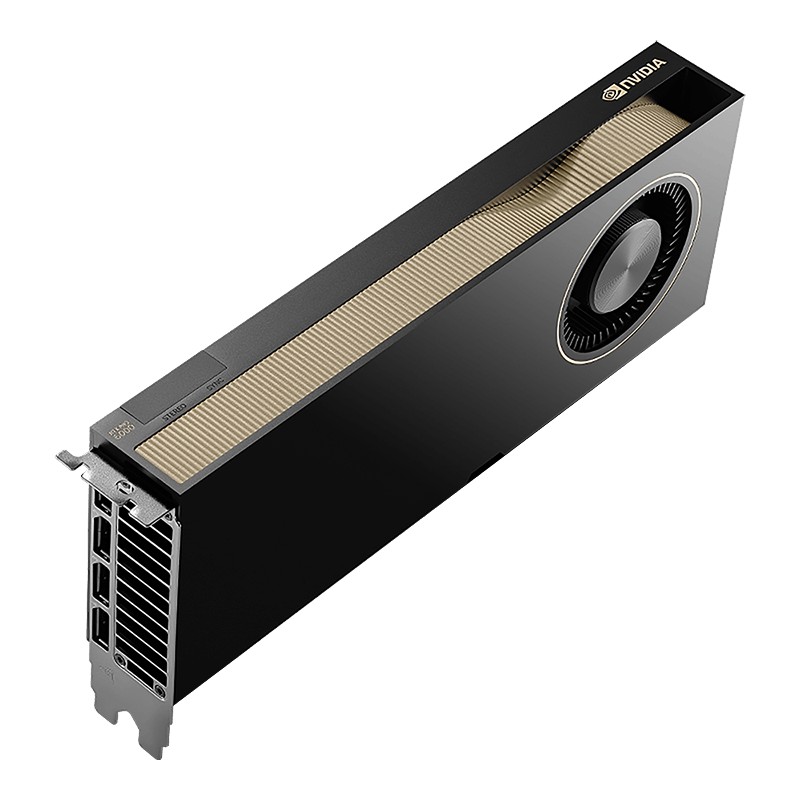
The NVIDIA RTX Pro 6000 Blackwell Server Edition is a dual-slot, full-height, full-length (FHFL) PCI Express Gen5 card. It features a high-surface-area passive thermal solution optimized for high-density rackmount environments. With a configurable power envelope of 400 W to 600 W, the RTX Pro 6000 Blackwell delivers unprecedented throughput for generative AI and real-time ray tracing, ensuring maximum stability and scalability for mission-critical enterprise edge deployments.
| Feature |
NVIDIA L4 |
RTX Pro 4500 |
RTX Pro 6000 |
| Architecture |
Ada Lovelace |
Blackwell (5th Gen Tensor) |
Blackwell (5th Gen Tensor) |
| GPU Memory |
24 GB GDDR6 |
32 GB GDDR7 (ECC) |
96 GB GDDR7 (ECC) |
| Slot Width |
Single-Slot |
Dual-Slot |
Dual-Slot |
| Cooling |
Passive |
Passive |
Passive |
| Max Power (TDP) |
72 W |
200 W |
400 - 600 W |
| Form Factor |
Low Profile |
Full Height / Full Length |
Full Height / Full Length |
Nutanix Cloud Platform (NCP) consolidates compute, storage, and networking into a unified software-defined infrastructure. It uses Nutanix Acropolis Operating System (AOS) for distributed storage services, Nutanix Acropolis Hypervisor (AHV) for virtualization, and Nutanix Prism Central for centralized management and orchestration across environments. NCP enables consistent performance and streamlined operations while allowing compute resources to scale independently through Nutanix’s compute-only licensing model.
Nutanix AOS
Nutanix AOS (Acropolis Operating System) is the foundational software architecture that drives the Nutanix hyperconverged infrastructure (HCI) platform. At its core, AOS replaces traditional complex, siloed data center architectures by converging compute, storage, and networking into a single software-defined stack.
Its most critical component is the Distributed Storage Fabric (DSF). AOS takes the locally attached storage drives (NVMe, SSDs, and HDDs) from every physical server (node) in a cluster and pools them together. This creates a highly resilient, shared storage pool that is accessible to all virtual machines and containers, effectively eliminating the need for expensive, complex SAN or NAS arrays.
AOS is designed to be autonomic and self-healing. It seamlessly handles enterprise-grade storage functions like data deduplication, compression, erasure coding, and real-time replication. If a physical drive or an entire server node fails, AOS automatically routes traffic and rebuilds data across the remaining healthy nodes with zero downtime.
Nutanix AHV
Nutanix AHV is an enterprise-class, type-1 hypervisor designed to eliminate the complexity and licensing costs associated with traditional virtualization layers. Originally based on the open-source KVM (Kernel-based Virtual Machine) project, AHV has been heavily evolved and hardened by Nutanix into a "lean" virtualization engine specifically optimized for hyperconverged environments.
The primary philosophy behind AHV is that virtualization should be an "invisible" part of the stack. Unlike legacy hypervisors that require separate management consoles and complex configuration, AHV is managed natively through Nutanix Prism. It includes built-in capabilities for high availability (HA), live migration, and automated resource scheduling (ADS), ensuring that virtual machines are balanced across the cluster for optimal performance.
By integrating directly with Nutanix AOS, AHV provides superior storage performance through its "data locality" feature, which keeps a VM's data on the same physical node as the compute resources. As the foundational layer for the Nutanix Kubernetes Platform (NKP), AHV provides a robust, secure, and high-performance environment for running both traditional virtualized applications and modern, containerized microservices without the overhead of third-party virtualization software.
Nutanix Prism
Nutanix Prism is the centralized management and intelligence pane for the entire Nutanix stack. It is designed to replace the fragmented management consoles of traditional IT with a "consumer-grade" user interface that simplifies complex infrastructure operations. Prism is split into two primary tiers: Prism Element, which manages a single local cluster, and Prism Central, which provides a unified "manager-of-managers" view for thousands of nodes distributed across global edge sites and data centers.
The platform leverages advanced machine learning (AIOps) to provide predictive analysis on resource consumption, "one-click" software and firmware upgrades, and automated remediation. For edge deployments, Prism is the critical link that enables Zero-Touch Provisioning (ZTP) and fleet-wide configuration consistency. By integrating with Cisco Intersight, Prism allows administrators to manage the entire lifecycle of the software stack—from the hypervisor to the Kubernetes layers—without ever needing to be physically present at the edge location.
Nutanix Foundation
Nutanix Foundation is the foundational automated imaging tool designed to bootstrap raw hardware into fully functional Nutanix clusters. While Foundation Central provides a cloud-based orchestration layer for massive scale, the on-premises Foundation utility is the enterprise standard for local, secure, or air-gapped deployments. It eliminates the need for manual, error-prone OS installations by providing a unified "one-click" imaging process that handles the hardware-to-software transition. Whether deployed as a standalone Virtual Machine (Foundation VM) or utilized via the discovery service on a factory-shipped node, Foundation ensures that the underlying infrastructure is configured correctly from the very first boot.
The utility streamlines the Day-0 workflow by simultaneously installing the Nutanix Cloud Infrastructure (NCI)—including the Nutanix AHV hypervisor and Nutanix AOS storage—or the Ubuntu Linux host for NKP Metal environments. For Cisco Unified Edge deployments, Foundation acts as the critical bridge between the bare-metal Cisco UCS XE9305 hardware and the Nutanix software layer. By automating network configuration, hypervisor hardening, and cluster creation locally, it provides a reliable, repeatable deployment model that functions perfectly even in environments with limited or no external internet connectivity
Nutanix Kubernetes Platform (NKP) is an enterprise-grade orchestration solution designed to simplify the deployment, management, and operation of production-ready Kubernetes clusters at scale. In 2026, it serves as the essential bridge between traditional virtualization and modern cloud-native applications, providing a consistent "fleet management" experience across the data center, public clouds, and the edge.
NKP is built on a modular, infrastructure-agnostic architecture that allows you to run it anywhere. Two primary deployment paths are most relevant to this design guide: NKP on NCI (Nutanix Cloud Infrastructure) and NKP on Bare-Metal (pre-provisioned).
● NKP on NCI: When running on the Nutanix Cloud Infrastructure, NKP leverages AHV hypervisor capabilities and cloud-like services provided by the NCI platform, including the resilience and data locality of the Nutanix Distributed Storage Fabric.
● NKP on Bare-Metal: For edge environments requiring extreme performance and minimal overhead, NKP Pre-provisioned allows Kubernetes to run directly on bare-metal nodes running Ubuntu Linux (and other supported Operating Systems). By bypassing the hypervisor layer entirely, NKP achieves a tiny footprint suitable for resource-constrained locations.
Beyond simple cluster creation, NKP provides a full-stack operational suite. This includes automated lifecycle management (upgrades and scaling), integrated monitoring, and "guardrail" security policies that ensure compliance across thousands of distributed nodes. By utilizing a "Management Cluster" to oversee multiple "Workload Clusters," NKP allows IT teams to treat their entire global edge footprint as a single, programmable resource, significantly reducing the operational burden of managing containerized AI and microservices in the field.
Nutanix Enterprise AI (NEAI) is a cloud-native platform designed to simplify the deployment, scaling, and management of Large Language Models (LLMs) and generative AI applications across hybrid multicloud environments. It is the evolution of the "GPT-in-a-Box" concept, moving from a bundle of infrastructure to a sophisticated AI-as-a-Service software layer.
The platform is built to solve the "AI Plumbing" problem—the complex task of configuring GPUs, drivers, inference servers, and model libraries.
Key Capabilities
● Model Management: Provides a curated library of pre-validated open-source models (e.g., Llama 3, Mistral, Gemma). It allows for "one-click" deployment of these models onto your own infrastructure, ensuring data sovereignty.
● NKP Integration: NAI runs natively on the Nutanix Kubernetes Platform (NKP). It leverages Kubernetes to scale inference services up or down based on demand, ensuring efficient use of expensive GPU resources.
● Hardware Agnostic AI: While optimized for Nutanix AHV and AOS, NAI is designed to be portable. It can run on-premises, at the edge (on Cisco Unified Edge), or in public clouds, providing a consistent API for developers regardless of where the model sits.
● Intel AMX acceleration: Intel AMX can be leveraged for inferencing by NAI if no gpu is available.
● NVIDIA Synergy: It includes deep integration with NVIDIA NIM (Inference Microservices) and the NVIDIA AI Enterprise software suite, allowing for optimized performance on H100, L40S, and A100 GPUs.
Why it matters for the Edge
In edge environments—like a factory floor or a retail store—bandwidth is often too limited to send data to a central cloud for AI processing. Nutanix Enterprise AI allows these sites to run "Local Inference."
By deploying NAI on Cisco XE9305 hardware at the edge, a company can process real-time video feeds or sensor data locally. This ensures low latency for critical decisions and keeps sensitive proprietary data within the physical walls of the facility, all while being managed centrally via Nutanix Prism.
AI Inferencing at the Edge Landscape
AI inferencing at the edge enables real-time decision-making by processing data locally on devices, gateways, or micro data centers instead of relying solely on centralized cloud infrastructure. This decentralized approach is vital in latency-sensitive, bandwidth-constrained, or privacy-focused environments where immediate action is required, and network connectivity may be intermittent.
Key Use Cases and Benefits
● Industrial Automation and Predictive Maintenance: Enables real-time predictive maintenance by analyzing sensor data locally, reducing downtime and maintenance costs.
● Retail Intelligence and Smart Environments: Uses smart cameras and AI analytics at the edge to optimize customer experience, shelf layouts, and inventory management. Healthcare and Medical Diagnostics
● Healthcare Diagnostics: Processes patient vitals and imaging data on edge devices for instant diagnostics while maintaining data privacy.
● Security and Surveillance: Performs on-site AI-based threat detection, facial recognition, and anomaly monitoring with minimal latency.
● Smart Agriculture: Employs drones and sensors running AI models to assess crop health, detect pests, and optimize irrigation in real time.
Technical Advantages with Nutanix NCP on Cisco Unified Edge
● Low-Latency AI Execution: Optimized hardware acceleration (GPU) with Nutanix AHV and Cisco UCS edge systems.
● Secure Lifecycle Management: OTA (Over-The-Air) updates ensure consistent and tamper-proof model deployments.
● Scalable AI Deployment: Works seamlessly with NKP for managing distributed inferencing workloads.
● Interoperability: Compatible with leading AI frameworks like TensorFlow Lite, ONNX Runtime, and OpenVINO.
● Operational Continuity: Ensures consistent performance even during network outages with localized decision-making.
Solution Design
This chapter contains the following:
The Cisco Unified Edge with Nutanix solution provides an integrated architecture with Cisco and Nutanix technologies that demonstrate support for Bare-metal, virtual, and K8s workloads with high availability and server redundancy.
Figure 9 illustrates a sample design with the required management components, like Intersight Assist or Nutanix Prism, installed outside of the solution stack.

This section outlines the key design requirements and prerequisites necessary for delivering the Cisco Unified Edge with Nutanix solution.
The solution is designed to support a wide range of deployment models, scalability levels, and operational use cases at the edge providing flexibility, resiliency, and simplified lifecycle management.
Physical components
This Cisco Unified Edge solution comes as an integrated stack with compute, storage and network and is connected to an external network domain. The compute nodes are configured to install the Nutanix AOS operating system or Ubuntu Linux on the local M.2 storage protected with RAID1. The persistent storage for bare-metal applications, Virtual machines and containers is provisioned on the local E3.s NVMe storage devices. The Unified Edge system is managed through Cisco Intersight Infrastructure Manager (IMM).
A typical topology for the Unified Edge based solution is shown in Figure 10.
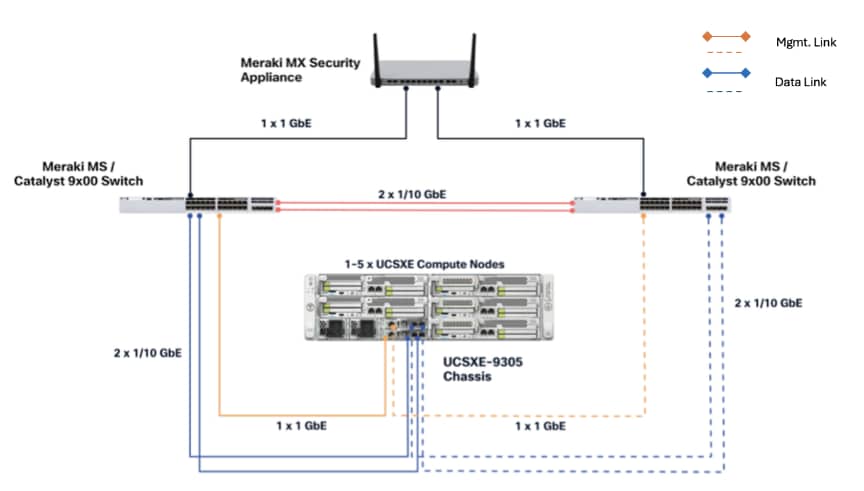
As the key components to deploy the solution are inside the Unified Edge chassis itself, there are some decisions to make regarding the connectivity to the external network:
● Both Edge Chassis Management Controllers must be connected with their management network port to a network reaching the Intersight.com.
● Both Edge Chassis Management Controllers must be connected with port-channel to the network for data traffic.
● Both internal network interfaces on the UCS XE130e compute node should be used with the same vSwitch / bond as uplink to provide high-availability.
Connectivity Inside the Chassis
The Cisco UCSXE-9305 chassis design illustrates a single Cisco UCSXE server equipped with two 25 Gbps NICs connected to the midplane. One NIC connects to an embedded 25 Gbps switch on one ECMC controller, while the second NIC connects to an embedded 25 Gbps switch on the other ECMC controller, providing redundant network connectivity.

Ubuntu Linux can configure the two NICs either as independent interfaces or combine them into a single bonded interface:
● When used independently, the server provides an aggregated bandwidth of 50 Gbps to the chassis.
● For bonded configurations, Active-Backup mode is recommended to ensure high availability and simpler failover behavior.

Ubuntu Linux supports bonding through Netplan, and Active-Backup (mode=1) is the recommended option. This mode ensures:
● Simplified redundancy without switch-side link aggregation.
● Predictable network traffic behavior.
● Automatic failover when a link becomes unavailable.
For consistent traffic distribution across servers, the primary link interface should be set to use the same ECMC switch on all servers. This keeps Layer-2 traffic within the chassis and reduces unnecessary external switching.
If a controller's uplink connectivity completely goes down, all associated NICs on the server side will also become unavailable to the operating system. This is controlled at ECMC level. At the operating system level, if a bond interface is used, the operating system will automatically switch traffic from the failed link to the backup link, ensuring continuous connectivity.

VLAN Configuration
Table 2 lists the VLANs which can be used for setting up the solutions along with their usage. The list in only an example and some of the VLANs are used in the deployment guide(s) based on this design document.
| VLAN ID |
Name |
Usage |
| 5 |
Native-VLAN |
Use VLAN 5 as native VLAN instead of default VLAN (1). |
| 1310 |
OOB-MGMT-VLAN |
Out-of-band management VLAN to connect management ports for various devices. |
| 1311 |
IB-MGMT-VLAN |
In-band management VLAN utilized for all in-band management connectivity - for example, Linux hosts, management tools, and so on. |
| Optional VLANs |
||
| 1312 |
DATA-VLAN |
Data traffic VLAN for bare-metal applications, virtual machines, and containers. |
| 1313 |
VM-VLAN |
Data traffic VLAN from/to Virtual Machines |
| 1314 |
CONTAINER-VLAN |
Data traffic VLAN from/to containers |
| 3030 |
CLOCK-VLAN |
Clock synchronization VLAN for manufacturing applications |
| 3040 |
APP1-VLAN |
Dedicated VLAN for Application 1 Use-case, such as App to DB traffic. |
| 3050 |
APP2-VLAN |
Dedicated VLAN for Application 2 Use-case, such as Sensor to App traffic. |
| 3999 |
GUEST-VLAN |
VLAN ID for guests or Hotspot WiFi. |
Some of the key highlights of VLAN usage are as follows:
● VLAN 1310 allows customers to manage and access out-of-band management interfaces of various devices and is brought into the infrastructure to allow IMC access to the Unified Edge ECMC or Catalyst devices and is also available to infrastructure virtual machines (VMs). Interfaces in this VLAN are configured with MTU 1500.
● VLAN 1311 is used for in-band management of VMs, hosts, and other infrastructure services. This VLAN is also required to use vMedia policy and CIMC-Mounted ISO images inside Unified Edge. Interfaces in this VLAN are configured with MTU 1500.
● VLAN 1312 is the default VLAN used to access applications, use-cases, and traditional data traffic. Interfaces in this VLAN are configured with MTU1500.
● VLAN 1313 is used to access applications, use-cases, and traditional data traffic deployed on virtual machines. Interfaces in this VLAN are configured with MTU1500.
● VLAN 1314 is used to access applications, use-cases, and traditional data traffic deployed in containers. Interfaces in this VLAN are configured with MTU1500.
● VLAN 3030 is used to by Industrial Edge applications to synchronize the clock and time information for critical command traffic. Interfaces in this VLAN are configured with MTU1500.
● VLAN 3040 is used to access a specific application or use-case like application to database traffic for a multi-tier application. Interfaces in this VLAN are configured with MTU1500.
● VLAN 3050 is used to access a specific application or use-case like data traffic from sensors to the data collector application. Interfaces in this VLAN are configured with MTU1500.
● VLAN 3999 is used for Guest access to the internet. Interfaces in this VLAN are configured with MTU1500.
Physical Components
The list of the required hardware components used to build a validated solution contains the Cisco Unified Edge components and the used network domain, see Table 3. You are encouraged to review your requirements and adjust the size or quantity of various components as needed.
Table 3. Unified Edge with Network Domain hardware components
| Component |
Hardware |
Comments |
| Cisco Unified Edge Chassis with two eCMCs |
Cisco UCS-XE 9305 Chassis with two eCMC |
The Unified Edge Chassis with the eCMC is the core of the solution design. |
| Cisco Unified Edge Compute nodes |
One to five Cisco UCS-XE130c compute nodes |
Your requirements will determine the amount of compute nodes required to build the solution. |
| Cisco Meraki Network Domain |
One or two Meraki Switches (MS). One or two Meraki Appliances (MX). |
Your requirements will determine the switch model and the amount of network ports and network speed required to build the solution. At least one Meraki MX device is required to remote locations to access the internet or the corporate network. |
| Cisco Catalyst Network Domain |
One or two Cisco Catalyst 9000 series Switches. One or two Cisco Catalyst 8000 series routers. |
Your requirements will determine the switch model and the amount of network ports and network speed required to build the solution. At least one Catalyst router is required to remote locations to access the internet or the corporate network. |
| Management Cluster |
||
| Hosted at a central place like the core data center. |
A minimum of two Cisco UCS servers to host components like DNS, Intersight Assist, Nutanix Foundation, Nutanix Central, and others. |
To reduce the number of physical servers the use of a supported virtualization software like KVM is recommended. |
Software Components
Table 4 lists various software components used in the solution. The minimum versions of the components and additional drivers and software tools versions will be explained in the deployment guide.
Table 4. Software components and versions
| Component |
Version |
| Cisco Unified Edge Firmware Package |
6.0(1) |
| Cisco Catalyst 8000 |
IOS-XE |
| Cisco Catalyst 9000 |
IOS-XE |
| Cisco Meraki MX |
MX 18.211.6 |
| Cisco Meraki MS |
CS 17.2.2 |
| Canonical Ubuntu Server |
24.04.4 LTS |
| Nutanix NKP |
2.17.1 |
The Cisco Unified Edge with Nutanix solution provides a flexible and automated deployment architecture designed to support a wide range of edge computing scenarios.
All deployments are fully automated through Cisco Intersight using Blueprints, custom workflows, or scripts, ensuring consistent configuration, simplified operations, and lifecycle management.
The automation is based on the design and configuration principles defined in this guide and its associated deployment documents.
Overview of Nutanix Kubernetes Platform (NKP)
In this architecture, NKP runs directly on top of AHV where AHV is present or directly on the Baremetal nodes running Ubuntu where there is limited capacity and does not allow AHV to be run.
NKP on NCI
In scenarios where AHV can be run it creates a symbiotic relationship between virtualization and containerization. This is the "NKP on NCI" deployment path, which is the enterprise standard for mixed-workload edge sites.
NKP on NCI (Nutanix Cloud Infrastructure) provides Full-Stack Orchestration.
NKP on NCI provides a production-ready Kubernetes environment that is automatically provisioned and managed by the NKP Management Cluster. This replaces the need for manual Kubernetes installations offering:
● Automated Provisioning: NKP uses the Kubernetes Cluster API (CAPI) to automatically spin up, scale, and heal Kubernetes nodes as AHV virtual machines.
● Integrated Storage (CSI): NKP is pre-configured to use the Nutanix CSI driver, allowing containers to dynamically claim high-performance persistent storage directly from the Nutanix Unified Storage (NUS)
● Fleet-Wide Consistency: Whether you have one node or one thousand, NKP ensures every site runs the exact same version of Kubernetes with the same security policies and monitoring tools.
Cloud Native Edge Designs (Bare Metal Ubuntu + NKP) Single Node
In many edge computing deployments, power availability, and budget constraints necessitate a compact, single-server footprint. The Cisco Unified Edge platform, specifically using a single XE130c M8 or XE150c M8 compute node within the XE9305 chassis, provides the enterprise-grade performance required for these sites. These designs prioritize resource efficiency, security hardening, and ease of remote management over high availability.
Cloud Native Edge Single node (Ubuntu + NKP)
The Modern Hybrid Host blends traditional virtualization with Kubernetes orchestration. It enables organizations to modernize at their own pace while keeping existing workloads fully operational.

Logical Architecture
The Host Layer: Ubuntu Server Linux provides a robust foundation for both VMs and containers, ensuring consistent performance and security.
The Orchestration Layer: NKP introduces Kubernetes orchestrator for new applications. It manages container lifecycle, scaling, and health checks. In addition to this NKP provides a production ready platform to manage the lifecycle of the cluster and provide other capabilities like observability, backup and recovery, single sign on, policy management etc.
CNI: Cilium and Cilium replacement for Kubeproxy is used to leverage eBPF capabilities introduced in the cilium stack. This provides both better performance, observability and opens up other options.
Load Balancing: There are two components used for load balancing:
● KubeVIP that provides load balancing for the Control Plane. This is needed even in a single node deployment to allow scaling to three nodes in the future
● MetalLB that provides load balancing for Kubernetes services of type LoadBalancer.
Persistent Storage: The 1.7TB NVMe disk is converted into a LVM VolumeGroup that is used by TopoLVM to carve out Kubernetes PersistentVolumes. Since distributed storage can’t be deployed on a single node cluster, this will be the only storage class available providing local storage.
Backup & Recovery: NKP packages Velero in it’s Application catalog. If it needs to be used, the only way would be to provide it with an external S3 compatible object store.
Cloud Native Tooling: NKP provides a variety of Cloud Native tooling ranging from Observability to policy management. Choose what tools are necessary for the deployment. More details can be found in the deployment guide.
The deployment guide for this option is here: https://www.cisco.com/c/en/us/td/docs/unified_computing/ucs/UCS_CVDs/cisco_unified_edge_nutanix_nkp_ubuntu_deployment.html
Cloud Native Edge Designs (Bare Metal Ubuntu + NKP) Multi Node
For mission-critical edge deployments, the failure of a single hardware component or compute node cannot be allowed to disrupt business operations. Regional hubs, manufacturing floors, retail stores, and healthcare facilities require High Availability (HA). This section details the multi-node designs using the Cisco XE9305 chassis with 3 to 5 XE130c/XE150c nodes, powered by Nutanix NCI and NKP. These solutions provide a self-healing "Private Edge Cloud" that automates recovery from hardware failures.
Resilient Edge Cluster (Ubuntu + KVM + NKP)
The Resilient Edge Cluster extends the Modern Hybrid Host into a multi-node design. It enables non-disruptive scaling, shared storage, and high availability while keeping the operational model identical to the single-node variant.

Logical Architecture
The Host Layer: Ubuntu Server Linux provides a stable, enterprise-grade base OS. It supports both traditional virtualization and modern container workloads without requiring architectural changes.
The Orchestration Layer: NKP introduces Kubernetes orchestrator for new applications. It manages container lifecycle, scaling, and health checks. In addition to this NKP provides a production ready platform to manage the lifecycle of the cluster and provide other capabilities like observability, backup and recovery, single sign on, policy management etc.
CNI: Cilium and Cilium replacement for Kubeproxy is used to leverage eBPF capabilities introduced in the cilium stack. This provides both better performance, observability and also opens up other options.
Load Balancing: There are two components used for load balancing:
● KubeVIP that provides load balancing for the Control Plane. This is needed even in a single node deployment to allow scaling to three nodes in the future
● MetalLB that provides load balancing for Kubernetes services of type LoadBalancer.
Persistent Storage: The 1.7TB NVMe disk is converted into a LVM VolumeGroup that is used by TopoLVM to carve out Kubernetes PersistentVolumes. This is the default StorageClass for the Kubernetes cluster. For 3 node clusters, Rook-Ceph is deployed and it leverages the TopoLVM provided Block device PersistentVolume to serve as the OSD devices. This keeps the system very flexible. High performance application that chose performance over resiliency can use TopoLVM as their storage class to access that local NVMe disk directly without any replication overhead. Applications that lean towards resiliency over performance can use the rook-cephfilesystem as their storage class by explicitly specifying it in their PVC.
Backup & Recovery: NKP packages Velero in it’s Application catalog. If it needs to be used, the only way would be to provide it with an external S3 compatible object store.
Cloud Native Tooling: NKP provides a variety of Cloud Native tooling ranging from Observability to policy management. Choose what tools are necessary for the deployment. More details can be found in the deployment guide.
Resiliency Mechanism
If a node goes offline, NKP automatically reschedules workloads to healthy nodes. Rook-ceph ensures that replicated volumes remain accessible, preventing data loss and minimizing downtime.
Note: To ensure that applications don’t suffer downtime, ensure that the application is running at least 2 replicas and use RWX volumes if there is persistent data involved.
Also use Velero to take backups of critical workload. Although a three-node cluster with rook-ceph enabled provides a S3 compatible object store that would be configured out of the box with the NKP Catalog deployed Velero, it is better to use external S3 compatible object store for higher resiliency.
Key Benefits and Use Cases
Non-Disruptive Scale: Add nodes without rearchitecting applications or interrupting services.
High Availability: Workloads and data survive node failures when deployed in HA mode (multiple replicas with RWX volume)
Use Case: Retail back-office clusters, factory floor control systems, or regional micro-data centers needing continuous operation.
The Kubernetes deployment architecture validated in this design provides the following capabilities depending on the deployment option selected:
Option 1: NKP Management Cluster Managed NKP Workload Clusters
In this case the NKP Management Cluster with NKP Ultimate License provides fleet management capabilities like:
● Cluster Lifecycle Management (using Kubernetes Cluster API)
● Single Pane of Glass Dashboard to view all Workload Clusters
● Centralized Observability
● Centralized Application Deployments (powered by FluxCD)
● Centralized Policy Management (RBAC, Network Policies, Quotas & Limits etc.)
● Centralized Authentication
The Management Cluster could be deployed in the Main or Regional Datacenter close to the edge location and it could be running on Nutanix Infrastructure, Public Cloud or another Infrastructure provider supported by NKP.

Option 2: Self Managed NKP Workload Clusters
In this case there is no central management, and each cluster manages its own lifecycle. A bootstrap Kind (Kubernetes in Docker) cluster is created to deploy the cluster using Cluster API (the bootstrap works as an ephemeral Clusters API Management Cluster) after which the lifecycle ownership is moved to the Workload cluster and the bootstrap cluster is deleted. All the management components are then deployed to the cluster itself by explicitly installing the Kommander component (More details in the Deployment Section)
The capabilities in this case are:
● Self Managed Cluster
● Local Observability
● Local Application Deployments
● Local Authentication
● Local Policy Management
● Can be completely air-gapped/isolated as it does not require connectivity to the management cluster

Both the solutions support single and three node deployments and the ability to grow from single node to three nodes if required.
Single Node Clusters provide only TopoLVM as the StorageClass while three node clusters also provide an option for distributed storage and S3 compatible Object Store in the form of rook-ceph.
● TopoLVM (default StorageClass) is used to provide fast NVMe local storage to workloads that prioritize workload over resilience or if the workload provides its own clustering (for example, Cassandra, kafka and so on).
● Rook-Ceph (only on 3 node clusters) is used to provide distributed RWX storage for workloads that require resiliency and for S3 compatible local ObjectStore. For providing maximum flexibility, rook-ceph uses Block volumes created by TopoLVM as its OSD devices.
The deployment guide for this option is here: https://www.cisco.com/c/en/us/td/docs/unified_computing/ucs/UCS_CVDs/cisco_unified_edge_nutanix_nkp_ubuntu_deployment.html
AI and GPU Integration
Using this solution on Cisco XE130c or XE150c nodes enables advanced GPU virtualization across all supported architectures. Any of the single‑node or multi‑node designs can allocate virtualized portions of an NVIDIA L4, RTX Pro 4500, or RTX Pro 6000 GPU. This allows multiple AI‑inference workloads—whether containerized, virtualized, or orchestrated by Kubernetes—to share the same high‑performance accelerator while maintaining strict workload isolation and predictable performance
Networking and East-West Traffic
A critical design consideration for multi-node Nutanix clusters is the Storage Replication Network. Because CEPH replicates data synchronously, it generates significant "East-West" traffic between nodes.
Cisco Advantage: In traditional edge servers, this traffic would require 10G/25G cables between nodes. In the XE9305, this traffic is contained entirely within the 25GbE of the ECMC over the backplane. This integrated fabric ensures that storage latency remains ultra-low, which is vital for the performance of databases and write-intensive edge applications.
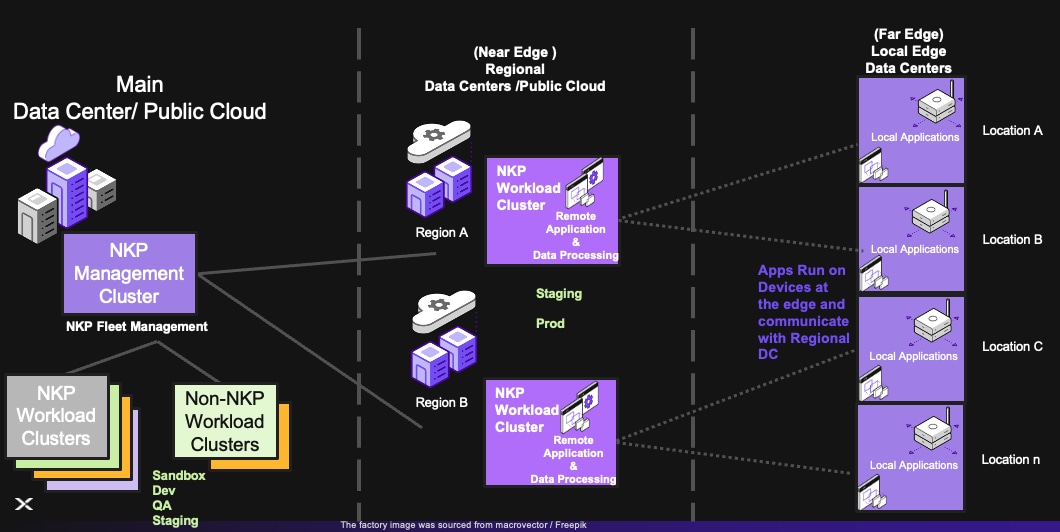
Here are the most common deployment topologies for deploying NKP for edge use cases that map to the Common Edge Architectures mentioned in the Executive Summary section of this Reference Architecture.
1. NKP Edge - Without Regional Data Centers
In this architecture, a single NKP Management Cluster would be used to manage all Workload Clusters running at the Far Edge Locations and the Main Datacenter.
Note: Look at the Limitations section for any limitations
The following clusters would be run in the Main Datacenter:
● NKP Management Cluster
● NKP (and optionally Non-NKP CNCF conformant Lightweight Single Node Clusters) Workload Clusters for the following environments:
◦ Sandbox
◦ Dev
◦ QA
◦ Staging
◦ Production (In some use cases where some Application Hosting & Data Processing also needs to be done centrally)
The following clusters would be run at the Far Edge
● NKP (and optionally Non-NKP CNCF conformant Lightweight Single Node Clusters) Workload Clusters for the following environments:
◦ Staging
◦ Production

2. NKP Edge With Regional Data Centers with No Application Hosting or Data Processing at Far Edge
In this architecture, a single NKP Management Cluster would be used to manage all Workload Clusters running at the Main Datacenter and the Near Edge Locations (such as Regional Datacenters). There won't be any Kubernetes Clusters running in the Far Edge, and the far edge would run applications on appliances (for example, appliances that send telemetry data to Regional Datacenters)
Note: Look at the Limitations section for any limitations.
The following clusters would be run in the Main Datacenter:
● NKP Management Cluster
● NKP (and optionally Non-NKP CNCF conformant Lightweight Single Node Clusters) Workload Clusters for the following environments:
◦ Sandbox
◦ Dev
◦ QA
◦ Staging
◦ Production (In some use cases where some Application Hosting & Data Processing also needs to be done centrally)
The following clusters would be run at the Near Edge (such as Regional Datacenters):
● NKP (and optionally Non-NKP CNCF conformant Lightweight Single Node Clusters) Workload Clusters for the following environments:
◦ Staging
◦ Production
3: Independent Self-Managed Workload Clusters
In this topology, independent, self-managed NKP clusters are deployed to edge nodes and there is no centralized management. This is suitable for environments where NKP Fleet Management capabilities are not desired and/or a different (often home-grown) solution is used to manage the Edge clusters and the workloads running in them. There is no Network connectivity requirement between the Edge clusters and a Central Management Cluster. This might seem like the easier thing to do, but could result in drift, custom solutions and more operational overheads eventually.

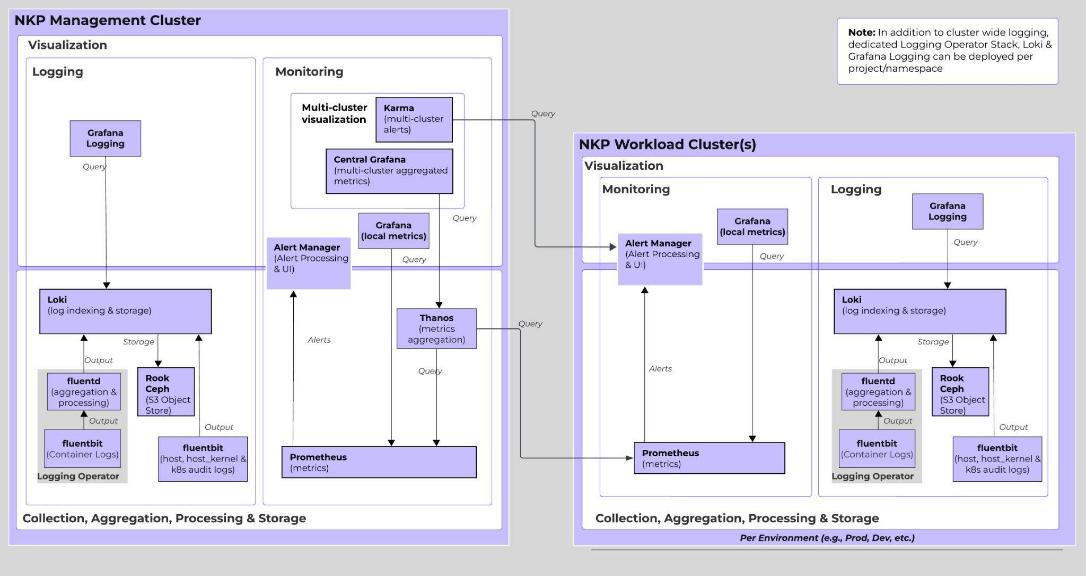
Observability for Management Cluster with Managed Edge Clusters
In addition to the components mentioned above, for a Management Cluster with Managed Edge Cluster setup the following components are also deployed in the Management cluster for Monitoring and Alerting. Logs are kept local to a cluster.
| Component |
Tool |
Notes |
| Metrics |
Thanos, Central Grafana |
Thanos for multi-cluster metric aggregation Central Grafana for visualizing aggregated metrics |
| Alerting |
Karma |
Karma for centralized Alter Visualization |
NKP Multi-tenancy and Application Stack Management
NKP Ultimate Management Cluster provides two multi-tenancy constructs, Workspaces (Hard multi-tenancy) & Projects (Soft multi-tenancy). Among other features, both these constructs provide ways of deploying and managing Applications on associated Workload Clusters using FluxCD under the hood. This is extremely useful for building and managing Workload clusters with the required Application stack on top of the base cluster. Specially for edge clusters where it is very desirable to bring up new edge sites with the entire Application stack on top or roll out validated Application updates to all the sites in a true gitops fashion. The mechanisms provided for this in NKP Management cluster are:
● NKP Workspace Application Catalog - this deploys workspace scoped applications to associated Workload cluster(s)
● NKP Project Application Catalog - this deploys project scoped applications to associated Workload cluster(s)
● Projects CD (Continuous Delivery) - feature to deploy namespace scoped applications from a git repository
Note: Both Categories of Application Catalogs can be extended to include custom applications
The following sections describe these multi-tenancy and application stack concepts and usage in more detail.
Workspaces
A workload cluster is either "created in" or "attached to" a single NKP workspace. A workspace can however have multiple workload clusters. Thus, forming a many-to-one relationship between a cluster and a workspace. This provides complete isolation from clusters in other workspaces and gives the ability to grant complete access to clusters; cluster lifecycle management and other self-service fleet management capabilities to workspace admins. Workspace association results in a namespace with an identical name in all Workload clusters in that Workspace. This is called the Workspace namespace. Since there is a many-to-one relationship between clusters to workspaces, there will be only one Workspace namespace in a Workload cluster managed by a NKP Management cluster.
Create dedicated Workspaces and grant appropriate RBAC access if this is a desired topology, else create one common workspace which is managed by the Global Platform Admin.
NKP Workspace Application Catalog
The NKP Workspace Application Catalog is workspace scoped and enabling an application at this level will deploy these applications to all the Workload clusters in the Workspace namespace.
Use NKP Workspace Application Catalog to deploy and manage Platform Applications that will be used by the entire cluster which are not specific to a namespace.
Projects
A workload cluster(s) can be attached to one or more Projects within a workspace forming a many-to-many relationship between the two. Projects provide something like a federated Namespace as a Service that allows slicing a single or multiple clusters into multiple namespaces which in-turn allow granting access to users via standard Kubernetes RBAC. Like Workspaces, associating a Workload cluster with a Project results in a namespace with the identical name being created in those cluster(s). This is called the Project namespace. The difference is that since there is a many-to-many relationship between the two, you can have multiple Project namespaces in a Workload cluster. Since there can be multiple Projects associated with a Workload cluster there can be multiple Project namespaces in a Workload cluster.
Use Projects to share clusters with multiple tenants each requiring just a single namespace and use other project features like federated rbac, quotas and network policies to restrict what a user can do in that namespace.
NKP Project Application Catalog
The NKP Project Application Catalog is project scoped and enabling an Application from the Catalog at the Project level will deploy it to the Project namespace in all the associated Workload clusters.
Use NKP Project Application Catalog to deploy Application or namespace scoped Applications.
Projects CD (Continuous Delivery)
Project CD provides the capability to deploy Kubernetes resources defined in a git repository to Workload cluster(s) associated with a Project.
Use this feature to deploy Application stacks and dependencies defined in a git repository (ideally following flux structure).
Recommended Cluster Grouping and Slicing with NKP Workspaces & Projects
Now that you understand how Workspaces & Projects work and how they impact applications/configuration deployed at these levels. Here is the recommended grouping of clusters with NKP Workspaces and how Projects can be created to slice the clusters within each workspace to create a federated namespace for different Applications/Application Teams.
Grouping of Clusters Using Workspaces
As explained in the Logical topology section of this reference architecture, you would have a Production and multiple Non-Production (for example Sandbox, Dev, QA, Staging & Prod) environments. New application and existing application updates would be introduced in the lowest environment in the hierarchy (for example, Sandbox) and a DevOps/GitOps/CD process would be used to promote it all the way to production. For such a setup the recommendation would be to create workspaces with these environment names. For example, you would have the following Workspaces (each representing an environment):
● sandbox
● dev
● qa
● staging
● prod
Then add/attach the respective clusters in the appropriate workspace. As mentioned earlier, a cluster can only be added to a single workspace. You have the option to either deploy a cluster to a workspace or attach an existing one either via the GUI or declaratively by creating the KommanderCluster resource.
Note: Add labels to clusters when attaching to be able to leverage these labels to dynamically assign clusters to Projects.
Typically sandbox to staging clusters would typically be in the Datacenter and staging & prod would be in the edge (this would be Near/Regional or Far Edge depending on the Topology).
Cluster Wide Access for these workspaces can be controlled through the Workspace level "Access Control" section in the NKP Fleet Management Portal or declaratively using the VirtualGroup & VirtualGroupClusterRoleBinding resources. See more details here.
Any Applications enabled via the Workspace Application Catalog will only impact the clusters in the given workspace.

Slicing of Clusters Using Workspaces
Once the Workspaces have been created and Clusters added to the respective Workspace. Next start slicing these clusters with Projects to represent an Application or Application team (whatever promotes sharing the clusters without stepping on each other toes). As mentioned earlier, the same cluster can be added to multiple projects within each workspace.
Since projects exist only within the context of the workspace the same set of projects will have to be created in each workspace. Note that, even when the name of the projects are identical, the underlying federated namespace will have a unique postfix added automatically. This will allow multiple projects with same name in each workspace in the same NKP Management Cluster.
Now start attaching clusters to projects. Best practice is to use labels to attach unless that is not desirable.
Once clusters are attached to projects, configure Application Catalog deployments, Project CD, RBAC, Quotas & Limits, and Network Policies for the project as required.
This setup with Workspaces & Projects will ensure that changes are only propagated to the right cluster.

NKP Helm and Image Registries
NKP provides an option to build clusters in an air-gapped first approach. In this mode, an internal registry is deployed to the NKP Management Cluster during the cluster bootstrap process. All container images and helm charts (oci) for successfully building a NKP cluster are pushed to that registry. This is automatically set as the registry mirror and Flux CD helm proxy endpoint for the Management Cluster.
When a Workload cluster is deployed to a Workspace in this Management Cluster, an internal registry is created in that Workload cluster and the images/charts from the Management Cluster are pushed to it. By default, this is set as a registry mirror and Flux CD helm proxy endpoint for the workload cluster.
In addition to this, in the "Management Cluster Workspace", NKP provides a "Harbor" Catalog Application for deploying a Harbor Registry to the Management cluster that can be used by the end users to host Images and OCI Helm Charts for their workloads. When building workload clusters, NKP provides an option to set this registry as a private registry for that cluster.
Conclusion
Summary of Multi-Node Value
Multi-node designs transform the Cisco Unified Edge from a collection of servers into a resilient system. By leveraging Nutanix AHV hyperconvergence, organizations can guarantee uptime for their most critical edge services, ensuring that a single hardware failure does not result in a "dark site" or a loss of production data.
The logical configuration of the Cisco Unified Edge system may vary depending on the intended workload and solution architecture. For example:
● Deploying three standalone single-node Ubuntu Server Linux with NKP running independent workloads does not require a dedicated storage replication network.
● Conversely, deploying a three-node Nutanix AHV cluster benefits from a dedicated storage and replication network to optimize data synchronization, fault tolerance, and performance
This flexible design approach ensures that the Cisco Unified Edge platform can be optimized for a variety of edge computing use cases from lightweight single-node deployments to robust, clustered multi-node environments with full redundancy and high availability.
Overview of Nutanix NKP
Nutanix Kubernetes Platform (NKP) is the enterprise-standard orchestration engine for managing Kubernetes clusters and OCI-compliant containers. In a single-node Ubuntu environment, NKP Metal is used to deploy a production-ready Kubernetes distribution directly on the host OS. This provides a highly secure and scalable environment for modern applications, particularly at the edge.
Enterprise-Grade Orchestration and Security
NKP goes beyond basic container runtimes by providing a full-lifecycle management suite. Its architecture is designed to meet the security, and scalability demands of modern edge environments. NKP is rootless-capable and leverages hardened base images, significantly reducing the attack surface. If a containerized application is compromised, the damage is restricted by NKP’s built-in security guardrails and namespace isolation, preventing lateral movement to the host system.
Cloud-Native Alignment
NKP acts as a bridge to complex hybrid-cloud architectures. It is built around the concept of "Clusters" and "Pods," providing enterprise-grade networking, storage using CSI (Container Storage Interface), and integrated load balancing. This workflow allows developers to build and test locally before seamlessly scaling the exact same configuration to a global fleet managed via NKP Management Cluster.
Transitioning and Use Cases
In 2026, NKP is particularly vital for Edge Computing and AI/ML pipelines. Its integration with Nutanix Enterprise AI allows the Ubuntu host to run localized inference models with direct access to GPU hardware. NKP's lightweight footprint on Ubuntu makes it the most efficient choice for building and running distributed microservices where low latency and high availability are paramount.
About the authors
Ulrich Kleidon, Principal Engineer, UCS Solutions, Cisco Systems, Inc.
Ulrich is a Principal Engineer for Cisco's Unified Computing System (Cisco UCS) solutions team and a lead architect for solutions around converged infrastructure stacks, enterprise applications, data protection, software-defined storage, and Hybrid-Cloud. He has over 25 years of experience designing, implementing, and operating solutions in the data center.
Arvind Bhoj, Staff Solutions Architect, Nutanix.
Arvind is a Staff Solutions Architect for Cloud Native Technology at Nutanix, bringing over 20 years of expertise to the forefront of infrastructure evolution. A specialist in Kubernetes and IT automation, Arvind bridges the gap between complex product engineering and real-world global deployments. He has spent his career partnering with large-scale organizations worldwide, guiding their transition into container orchestration and modern cloud-native architectures.
Acknowledgements
For their support and contribution to the design, validation, and creation of this Cisco Validated Design, the authors would like to thank:
● Wolfgang Huse, Sr. Manager Solution & Performance Engineering, Nutanix
Appendix
This appendix contains the following:
Appendix A - References
Compute
Cisco Intersight: https://www.intersight.com
Cisco Intersight Managed Mode: https://www.cisco.com/c/en/us/td/docs/unified_computing/Intersight/b_Intersight_Managed_Mode_Configuration_Guide.html
Nutanix
Nutanix NKP: https://www.nutanix.com/products/kubernetes-management-platform
NVIDIA
NVIDIA L4 GPU: https://www.nvidia.com/en-in/data-center/l4/
NVIDIA RTX Pro 4500: https://www.nvidia.com/en-in/data-center/rtx-pro-4500-blackwell-server-edition/
NVIDIA RTX Pro 6000: https://www.nvidia.com/en-in/data-center/rtx-pro-6000-blackwell-server-edition/
NVAIE: https://www.nvidia.com/en-in/data-center/products/ai-enterprise/
NVAIE Product Support Matrix: https://docs.nvidia.com/ai-enterprise/latest/product-support-matrix/index.html#support-matrix__suse-linux-enterprise-server
Interoperability Matrix
Cisco UCS Hardware Compatibility Matrix: https://ucshcltool.cloudapps.cisco.com/public/
CVD Program
ALL DESIGNS, SPECIFICATIONS, STATEMENTS, INFORMATION, AND RECOMMENDATIONS (COLLECTIVELY, "DESIGNS") IN THIS MANUAL ARE PRESENTED "AS IS," WITH ALL FAULTS. CISCO AND ITS SUPPLIERS DISCLAIM ALL WARRANTIES, INCLUDING, WITHOUT LIMITATION, THE WARRANTY OF MERCHANTABILITY, FITNESS FOR A PARTICULAR PURPOSE AND NONINFRINGEMENT OR ARISING FROM A COURSE OF DEALING, USAGE, OR TRADE PRACTICE. IN NO EVENT SHALL CISCO OR ITS SUPPLIERS BE LIABLE FOR ANY INDIRECT, SPECIAL, CONSEQUENTIAL, OR INCIDENTAL DAMAGES, INCLUDING, WITHOUT LIMITATION, LOST PROFITS OR LOSS OR DAMAGE TO DATA ARISING OUT OF THE USE OR INABILITY TO USE THE DESIGNS, EVEN IF CISCO OR ITS SUPPLIERS HAVE BEEN ADVISED OF THE POSSIBILITY OF SUCH DAMAGES.
THE DESIGNS ARE SUBJECT TO CHANGE WITHOUT NOTICE. USERS ARE SOLELY RESPONSIBLE FOR THEIR APPLICATION OF THE DESIGNS. THE DESIGNS DO NOT CONSTITUTE THE TECHNICAL OR OTHER PROFESSIONAL ADVICE OF CISCO, ITS SUPPLIERS OR PARTNERS. USERS SHOULD CONSULT THEIR OWN TECHNICAL ADVISORS BEFORE IMPLEMENTING THE DESIGNS. RESULTS MAY VARY DEPENDING ON FACTORS NOT TESTED BY CISCO.
CCDE, CCENT, Cisco Eos, Cisco Lumin, Cisco Nexus, Cisco StadiumVision, Cisco TelePresence, Cisco WebEx, the Cisco logo, DCE, and Welcome to the Human Network are trademarks; Changing the Way We Work, Live, Play, and Learn and Cisco Store are service marks; and Access Registrar, Aironet, AsyncOS, Bringing the Meeting To You, Catalyst, CCDA, CCDP, CCIE, CCIP, CCNA, CCNP, CCSP, CCVP, Cisco, the Cisco Certified Internetwork Expert logo, Cisco IOS, Cisco Press, Cisco Systems, Cisco Systems Capital, the Cisco Systems logo, Cisco Unified Computing System (Cisco UCS), Cisco UCS B-Series Blade Servers, Cisco UCS C-Series Rack Servers, Cisco UCS S-Series Storage Servers, Cisco UCS X-Series, Cisco UCS Manager, Cisco UCS Management Software, Cisco Unified Fabric, Cisco Application Centric Infrastructure, Cisco Nexus 9000 Series, Cisco Nexus 7000 Series. Cisco Prime Data Center Network Manager, Cisco NX-OS Software, Cisco MDS Series, Cisco Unity, Collaboration Without Limitation, EtherFast, EtherSwitch, Event Center, Fast Step, Follow Me Browsing, FormShare, GigaDrive, HomeLink, Internet Quotient, IOS, iPhone, iQuick Study, LightStream, Linksys, MediaTone, MeetingPlace, MeetingPlace Chime Sound, MGX, Networkers, Networking Academy, Network Registrar, PCNow, PIX, PowerPanels, ProConnect, ScriptShare, SenderBase, SMARTnet, Spectrum Expert, StackWise, The Fastest Way to Increase Your Internet Quotient, TransPath, WebEx, and the WebEx logo are registered trade-marks of Cisco Systems, Inc. and/or its affiliates in the United States and certain other countries. (LDW_P1)
All other trademarks mentioned in this document or website are the property of their respective owners. The use of the word partner does not imply a partnership relationship between Cisco and any other company. (0809R)