Cisco Unified Edge and Canonical Ubuntu for Edge Deployments Design Guide
Available Languages
Bias-Free Language
The documentation set for this product strives to use bias-free language. For the purposes of this documentation set, bias-free is defined as language that does not imply discrimination based on age, disability, gender, racial identity, ethnic identity, sexual orientation, socioeconomic status, and intersectionality. Exceptions may be present in the documentation due to language that is hardcoded in the user interfaces of the product software, language used based on RFP documentation, or language that is used by a referenced third-party product. Learn more about how Cisco is using Inclusive Language.
- US/Canada 800-553-2447
- Worldwide Support Phone Numbers
- All Tools
 Feedback
 Feedback
In partnership with:

About the Cisco Validated Design Program
The Cisco Validated Design (CVD) program consists of systems and solutions designed, tested, and documented to facilitate faster, more reliable, and more predictable customer deployments. For more information, go to: http://www.cisco.com/go/designzone.
Executive Summary
We’re at a critical inflection point. The edge has emerged as the place where the physical and digital worlds meet, demanding real-time processing and analysis of data to deliver informed decisions, improved experiences, and increased productivity. However, legacy infrastructure wasn’t built for the AI era and can’t keep up with the scale, speed, and intelligence required by AI-driven operations. While much of the model training happens in the data center, the shift of test-time inference to the edge makes it the new frontier for enterprise AI.
Deploying AI at the edge remains complicated and demanding. Interoperability, security, cost, and rigid deployment models are all potential performance and productivity blockers. The increasing demand for AI and digitization at the edge necessitates a full system rethink, as evolving business needs and the sheer scale highly distributed edge environments and modern AI workloads create a beyond-human complexity nightmare. We need something more than just more boxes; we need a brand-new edge infrastructure and operations vision.
Cisco Unified Edge is an AI-ready system that redefines computing at the edge by converging computer, networking, storage, and security. Designed from the edge up, for the next decade, the modular design is future-ready, energy-efficient, and easy-to-service, and can be tailored to support today’s workloads and use cases, while remaining adaptable to the rapidly evolving AI landscape. Seamless integration with third-party technologies and validated solutions for industry-specific needs ensure both compatibility and optimized performance.
Delivering breakthrough operational simplicity at scale, this software-defined system features centralized cloud management, zero-touch deployment, curated blueprints, and automated orchestration. These capabilities enable high scalability with minimal complexity. End-to-end observability with real-time analytics accelerates error detection and correction, helping minimize service outages. Security is designed-in, with integrated physical and digital safeguards to protect applications and data at the edge while multi-layered security capabilities protect infrastructure, applications, and AI models.
By combining computer, networking, security, and storage into a full stack, AI-ready system, Cisco Unified Edge introduces a fundamentally different infrastructure and operational paradigm for the enterprise edge. Unlike other solutions that may lack critical capabilities or are not optimized for edge use cases, this system offers fully validated solutions that deliver AI-era performance, simplicity, and security.
Benefits
Key benefits are:
● Future-ready performance: Adaptable to meet today and tomorrow's edge workload demands with ease, stopping the rip-and-replace cycle with a fully integrated, modular edge environment built for the next decade. Deploy applications and infrastructure faster and profit sooner with proven solutions that are tested and certified for vertical-specific workloads and use cases, ensuring compatibility and performance.
● Full-scale simplicity: Onboard quickly and with ease without the need for highly skilled IT expertise or on-site visits. Whether deploying ten systems or ten thousand, zero-touch provisioning, curated blueprints and automation ensure consistent, effortless rollout. A consistent operating model from core to edge makes it easy to scale, upgrade, and support your infrastructure.
● Designed-in security: Prevent tampering at the edge with robust physical and digital protection. Proven policy-based templates eliminate configuration drift across sites. Embedded, zero-trust security capabilities ensure unmatched protection for your edge infrastructure, data, and AI models.
Canonical, the company behind Ubuntu, offers a robust and composable suite of open-source technologies designed to streamline enterprise IT operations, accelerate innovation, and reduce complexity across cloud, datacenter, and edge environments. This technical design guide explores how Canonical’s portfolio can be effectively used on Cisco Unified Edge System (Cisco UCS XE9305) to deliver scalable, secure, and cost-efficient solutions.
Canonical’s modular architecture aligns with Cisco Unified Edge infrastructure model, enabling:
● Rapid provisioning and scaling of workloads
● Unified management across compute, storage, and networking
● Optimized performance for cloud-native and legacy applications
Together, Canonical and Cisco Unified Edge empower enterprises to build resilient, future-ready platforms that support digital transformation, edge computing, and AI innovation.
The design of this solution is driven by its ability to evolve and incorporate both technology and product innovations in the areas of management, computing, storage, and networking to be used at the Edge. To help organizations with their digital transformation and application modernization practices, Cisco and Canonical have partnered to produce this Cisco Validated Design (CVD) for the joint Unified Edge and Canonical solution minimizing risks by validating the integrated architecture to ensure compatibility between various components. The solution also addresses pain points by providing documented design guidance, deployment guidance, and support that can be used in various stages (planning, designing, and implementation) of a business project targeting Edge deployments. The solution is part of Cisco’s Blueprint and Fleet management enhancement of Intersight and will be delivered as IaC to further eliminate error-prone manual tasks, allowing quicker and more consistent solution deployments.
Introduction
This chapter contains the following:
● Audience
The featured solutions are a pre-designed, integrated, and validated architectures for the edge that combines Cisco Unified Edge - servers, network, security - and Canonical products into a single, flexible architecture. The solutions are designed to meet a broad range of high availability (HA) and scale options, with no single point of failure (where applicable), while maintaining cost-effectiveness and flexibility in the design to support a wide variety of workloads.
The range of deployment options goes from single node Linux host to run a small number of virtual machines up to multi-node hypervisor or Kubernetes cluster with an integrated software defined storage option to provide full high-availability and scalability for a larger number of virtual machines, container-based applications, AI workloads, and mission critical control units.
The following design and deployment aspects of this edge solution are explained in this document:
● Cisco Unified Edge
● Canonical Ubuntu
● Kernel-based Virtual Machine (KVM)
● Linux Daemon (LXD), MicroCloud
● Canonical Kubernetes
● Scale options for single node systems and multi-node cluster
● Scale options for virtual machines and container-based workloads
● Integration into edge networks
The intended audience of this document includes but is not limited to IT architects, sales engineers, field consultants, professional services, IT managers, partner engineering, and customers who want to take advantage of an infrastructure built to deliver efficiency and enable innovation.
This document provides design guidance around incorporating the Cisco Intersight—managed Cisco Unified Edge platform to run Canonical Ubuntu Linux and virtualization / container options. The document introduces various design elements and covers various considerations and best practices for a successful deployment.
The components are integrated and validated, and – where possible - the installation and configuration of the entire stack will be covered by Intersight Blueprints so that customers can deploy the solution quickly and economically while eliminating many of the risks associated with researching, designing, building, and deploying similar solutions from the ground up.
The Cisco Unified Edge with Canonical solution offers the following key customer benefits:
● Integrated solution that supports the entire Canonical software-defined Linux and Kubernetes stack
● Standardized architecture for quick, repeatable, error-free deployments of workload domains
● Automated life cycle management to keep all the system components up to date
● Simplified cloud-based management of various components
● Hybrid-cloud-ready, policy-driven modular design
● Highly available, flexible, and scalable architecture
● Cooperative support model and Cisco Solution Support
● Easy to deploy, consume, and manage design that aligns with Cisco and Canonical best practices and compatibility requirements
● Support for component monitoring, solution automation and orchestration, and workload optimization
● Validated integration into Meraki and Catalyst network domains
Like all other Cisco Validated solution designs, Unified Edge with Canonical is configurable according to demand and usage. You can purchase the exact infrastructure you need for your current application requirements. You can scale up by adding more resources to the solution or scale out by adding more Unified Edge instances.
Technology Overview
This chapter contains the following:
● Cisco Unified Edge management
● Ansible
Cisco Unified Edge with Canonical architecture is built using compute, network, and storage components integrate in the Unified Edge platform. The solution consists of the following core elements.
● Cisco Unified Edge System (Cisco UCS XE9305)
● Canonical Ubuntu Server
● Canonical Kubernetes
● Canonical LXD
These components are connected and configured according to the best practices of both Cisco and Canonical to provide an ideal platform for running a variety of traditional and new edge workloads with confidence. Cisco Unified Edge can scale up for greater performance and capacity (adding compute resources individually as needed), or it can scale out for environments that require multiple consistent deployments (such as rolling out of additional Cisco Unified Edge stacks).
One of the key benefits of Cisco Unified Edge is its ability to maintain consistency during scale where required. Each of the components offers platform and resource options to scale the infrastructure up or down while supporting the same features and functionality that are required under the configuration and connectivity best practices. The key features and highlights of the components are explained below.
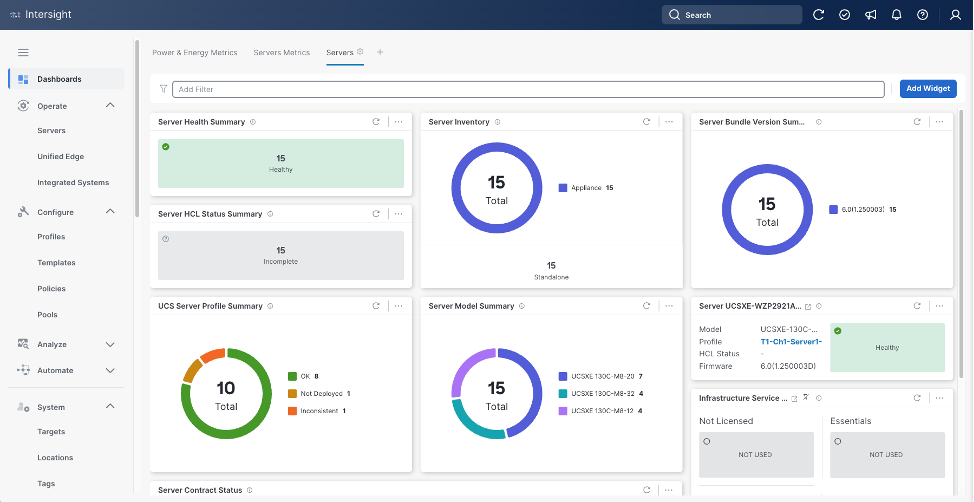
Cisco Unified Edge is part of the Cisco Unified Computing System (Cisco UCS) family designed from ground up to address deployments where traditional data center servers are not a perfect fit. With its new physical design and the new components, the Cisco Unified Edge uses, like other Cisco UCS platforms, Cisco Intersight as the management tool.
The capabilities of Cisco Intersight were extended with a Fleet Management option to automate and accelerate deployment of Cisco UCS and Unified Edge systems at remote locations at scale. With the new Fleet Management, it is possible to define location profiles and Blueprints to allow zero-touch provisioning of the hardware and operating systems as soon as the new hardware is claimed in Intersight.
While Cisco UCS XE9305 is a programmable infrastructure, the Cisco Intersight API is how management tools program it. This enables the tools to help guarantee consistent, error-free, policy-based alignment of server personalities with workloads. Through automation, transforming the server and networking components of your infrastructure into a complete solution is fast and error-free because programmability eliminates the error-prone manual configuration of servers and integration into solutions. Server, network, and storage administrators are now free to focus on strategic initiatives rather than spending their time performing tedious tasks.
The Cisco Intersight platform is a Software-as-a-Service (SaaS) infrastructure lifecycle management platform that delivers simplified configuration, deployment, maintenance, and support. The Cisco Intersight platform is designed to be modular, so customers can adopt services based on their individual requirements. The platform significantly simplifies IT operations by bridging applications with infrastructure, providing visibility and management from bare-metal servers and hypervisors to serverless applications, thereby reducing costs and mitigating risk. This unified SaaS platform uses an Open API design that natively integrates with third-party platforms and tools.
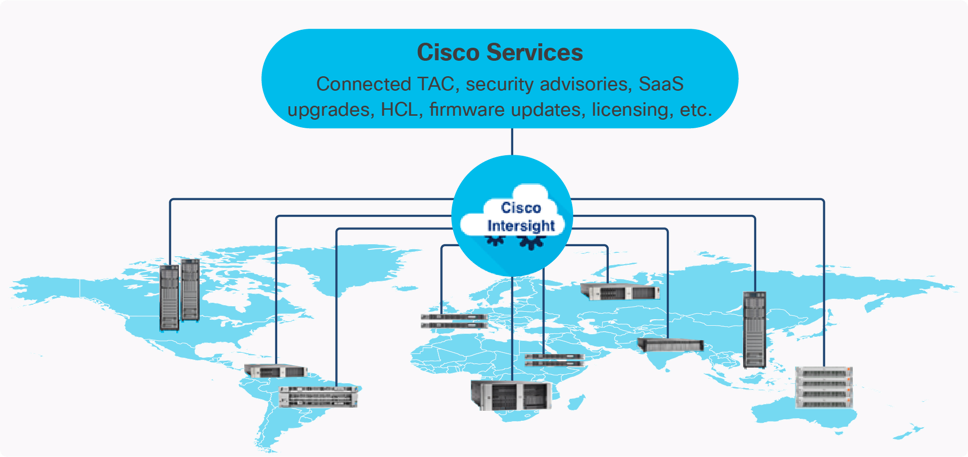
The main benefits of Cisco Intersight infrastructure services are as follows:
● Simplify daily operations by automating many daily manual tasks
● Combine the convenience of a SaaS platform with the capability to connect from anywhere and manage infrastructure through a browser or mobile app
● Stay ahead of problems and accelerate trouble resolution through advanced support capabilities
● Gain global visibility of infrastructure health and status along with advanced management and support capabilities
Cisco Intersight Virtual Appliance and Private Virtual Appliance
In addition to the SaaS deployment model running on Intersight.com, on-premises options can be purchased separately. The Cisco Intersight Virtual Appliance and Cisco Intersight Private Virtual Appliance are available for organizations that have additional data locality or security requirements for managing systems. The Cisco Intersight Virtual Appliance delivers the management features of the Cisco Intersight platform in an easy-to-deploy VMware Open Virtualization Appliance (OVA) or Microsoft Hyper-V Server virtual machine that allows customers to control the system details that leave their premises. The Cisco Intersight Private Virtual Appliance is provided in a form factor specifically designed for users who operate in disconnected (air gap) environments. The Private Virtual Appliance requires no connection to public networks or back to Cisco to operate.
Cisco Intersight Assist
Cisco Intersight Assist helps customers add endpoint devices to Cisco Intersight. A data center or site could have multiple devices that do not connect directly with Cisco Intersight. Any device that is supported by Cisco Intersight, but does not connect directly with it, will need a connection mechanism. Cisco Intersight Assist provides that connection mechanism. Tools and devices like VMware vCenter, NetApp Active IQ Unified Manager, Cisco Nexus and Cisco MDS switches connect to Intersight with the help of Intersight Assist VM.
Cisco Intersight Assist is available within the Cisco Intersight Virtual Appliance, which is distributed as a deployable virtual machine contained within an Open Virtual Appliance (OVA) file format. More details about the Cisco Intersight Assist VM deployment are covered in later sections.
Licensing Requirements
The Cisco Intersight platform uses a subscription-based license with multiple tiers. Customers can purchase a subscription duration of one, three, or five years and choose the required Cisco UCS server volume tier for the selected subscription duration. Each Cisco endpoint automatically includes a Cisco Intersight Base license at no additional cost when customers access the Cisco Intersight portal and claim a device. Customers can purchase any of the following higher-tier Cisco Intersight licenses using the Cisco ordering tool:
● Cisco Intersight Infrastructure Services Essentials: The Essentials license tier offers server management with global health monitoring, inventory, proactive support through Cisco TAC integration, multi-factor authentication, along with SDK and API access.
● Cisco Intersight Infrastructure Services Advantage: The Advantage license tier offers advanced server management with extended visibility, ecosystem integration, and automation of Cisco and third-party hardware and software, along with multi-domain solutions.
Servers in the Cisco Intersight managed mode require at least the Essentials license. For detailed information about the features provided in the various licensing tiers, see https://intersight.com/help/getting_started#licensing_requirements.
DevOps and Tool Support
The Cisco Intersight API is of great benefit to developers and administrators who want to treat physical infrastructure the way they treat other application services, using processes that automatically provision or change IT resources. Similarly, your IT staff needs to provision, configure, and monitor physical and virtual resources; automate routine activities; and rapidly isolate and resolve problems. The Cisco Intersight API integrates with DevOps management tools and processes and enables you to easily adopt DevOps methodologies.
The Cisco Unified Edge Modular System is designed to take the current generation of the Cisco UCS platform to the next level with its future-ready design and cloud-based management. Decoupling and moving the platform management to the cloud allows Cisco UCS to respond to customer feature and scalability requirements in a much faster and more efficient manner. Cisco Unified Edge state of the art hardware simplifies the edge design by providing flexible server options.
Cisco Unified Edge XE9305 Chassis
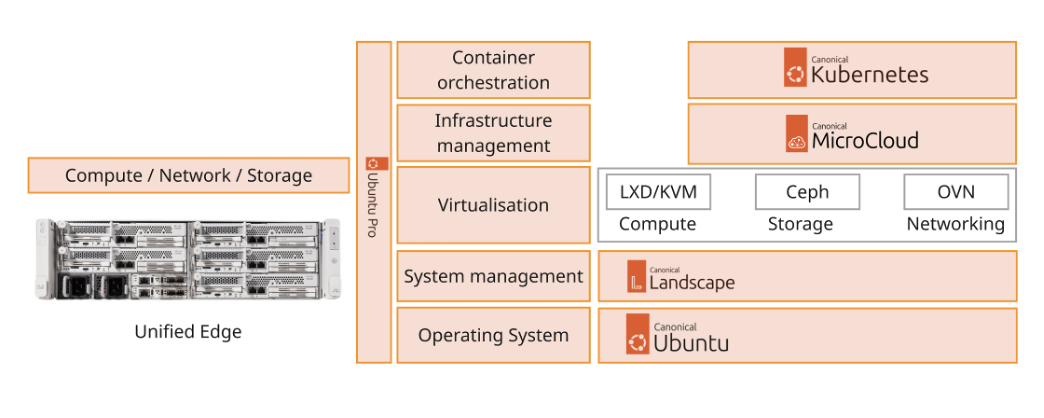
The Cisco Unified Edge chassis is engineered to be adaptable and flexible. As seen in Figure 3, Cisco Unified Edge XE9305 chassis has a power-distribution backplane. This innovative design provides fewer obstructions for better airflow. For I/O connectivity, vertically oriented compute nodes intersect with horizontally oriented fabric modules, allowing the chassis to support future fabric innovations. Cisco UCS XE9305 Chassis’ superior packaging enables larger compute nodes, thereby providing more space for actual compute components, such as memory, GPU, drives, and accelerators. Improved airflow through the chassis enables support for higher power components, and more space allows for future thermal solutions (such as liquid cooling) without limitations.
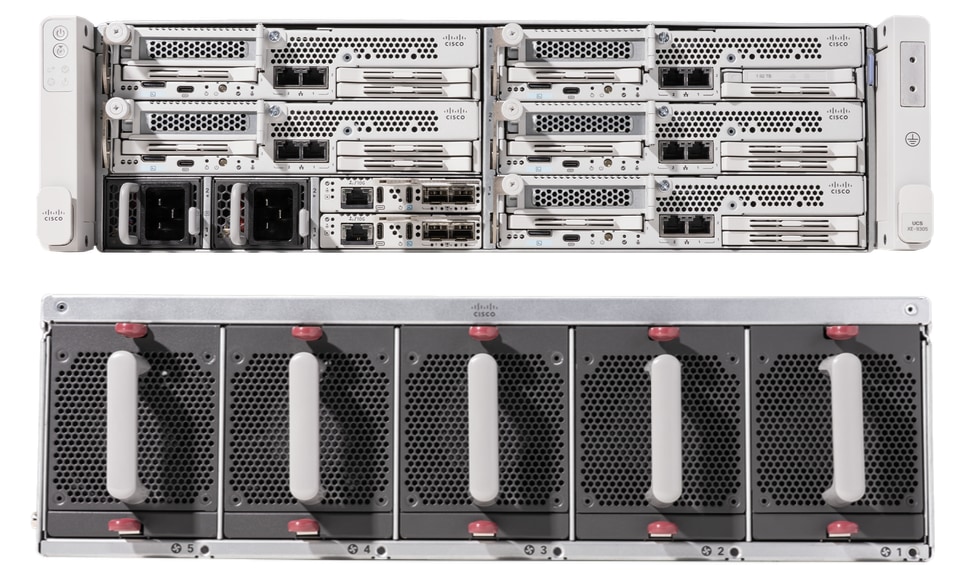
The Cisco UCS XE9305 3-Rack-Unit (3RU) chassis has five slots that can house up to 5 compute nodes at this time. In future, same slots can be utilized to install a secure router (network) node. At the bottom of the chassis are two edge Chassis Management Controller (eCMC) that connect the chassis to upstream network. On the left of the eCMCs there are two 2400 Watt Power Supply Units (PSUs) that provide power to the chassis with N+N redundancy. At the back of the chassis, five efficient, 80mm, dual counter-rotating fans deliver industry-leading airflow and power efficiency, and optimized thermal algorithms enable different cooling modes to best support the customer’s environment.
Cisco Unified Edge – Edge Chassis Management Controller
The Cisco Edge Chassis Management Controller (eCMC) provide a single point for connectivity and management for the entire Cisco Unified Edge system.
The Cisco Unified Edge eCMC provides the management and communication backbone for the Cisco UCS XE130c M8 compute nodes in the Cisco Unified Edge XE9305 Series Chassis. All nodes attached to the Cisco Unified Edge eCMC become part of a single, highly available management domain.
Cisco Unified Edge eCMC utilized in the current design includes one Ethernet port for management, two Ethernet ports for LAN traffic depending on the SFP and one Ethernet port to each slot in the chassis.
For more information about the Cisco Unified Edge eCMC see: https://www.cisco.com/c/en/us/products/collateral/servers-unified-computing/ucs6536-fabric-interconnect-ds.html.
Cisco UCS-XE130c Compute Node
The Cisco Unified Edge XE9305 Chassis is designed to host up to 5 Cisco UCS XE130c Compute Nodes. The hardware details of the Cisco UCS XE130c M8 Compute Nodes are shown in Figure 4.
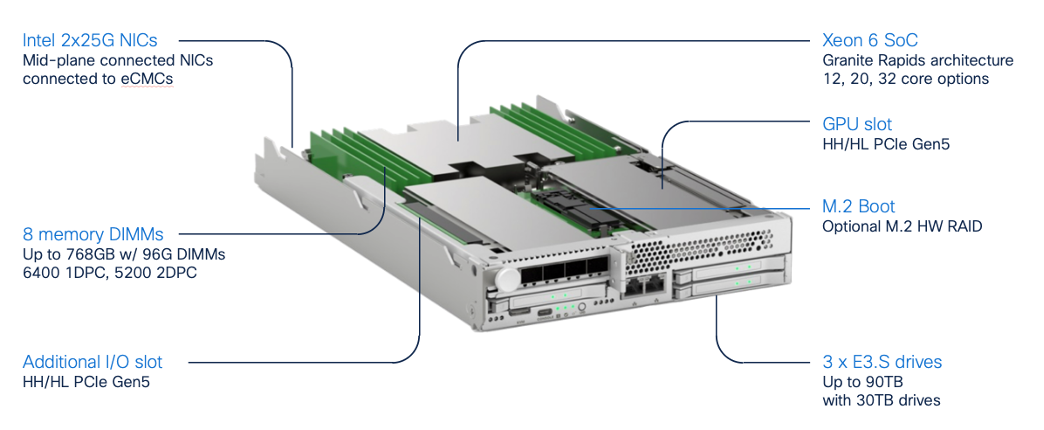
The Cisco UCS XE130c M8 features:
● CPU: One 6th Gen Intel Xeon SoC Processor with 12, 20, or 32 cores.
● Memory: Up to 8 x 96 GB DDR5-6400 DIMMs for a maximum of 768 GB of main memory.
● Disk storage: Up to 4 E3.s NVMe drives (with Storage optimized SKU) and one M.2 RAID controller with two M.2 memory cards with RAID 1 mirroring.
● LAN on Mainboard (LoM): Intel E825 NIC is integrated in the Xeon SoC Processor with two 25 Gbps ports on the Mid-plane and two 1/10 Gbps RJ45 ports on the front of each Compute Node.
● GPU: Dedicated PCIe Gen-5 slot for one HH/HL GPU with up to 75 Watt.
● Security: The server supports an optional Trusted Platform Module (TPM).
Graphics Processing Units or GPUs are specialized processors designed to render images, animation, and video for computer displays. They perform these tasks by running many operations simultaneously. While the number and kinds of operations they can do are limited, GPUs can run many thousand operations in parallel making this massive parallelism extremely useful for deep learning applications. Deep learning relies on GPU acceleration for both training and inference, and GPU accelerated datacenters deliver breakthrough performance with fewer servers at a lower cost. This CVD details the following NVIDIA GPUs.
NVIDIA L4 Tensor Core GPU
The NVIDIA L4 Tensor Core, powered by the Ada Lovelace architecture, is a versatile and energy-efficient accelerator designed for workloads such as AI, video processing, graphics, and virtualization. Its low-profile form factor and high performance make it suitable for deployment across edge, data center, and cloud environments.
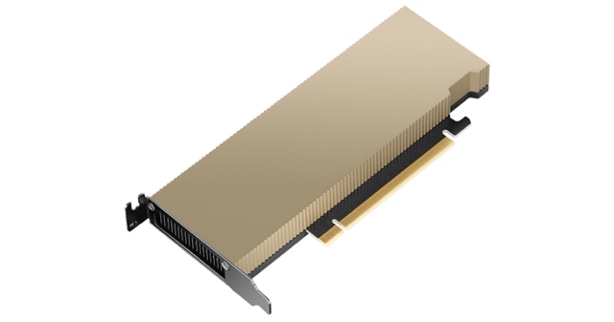
The NVIDIA L4 card is a single-slot PCI Express Gen4 card. It uses a passive heat sink for cooling, which requires system airflow to operate the card properly within its thermal limits. The NVIDIA L4 PCIe operates unconstrained up to its maximum thermal design power (TDP) level of 72 W to accelerate applications that require the fastest computational speed and highest data throughput at the edge.
NVIDIA AI Enterprise is an end-to-end, secure AI software platform that accelerates the data science pipeline and streamlines the development and deployment of production AI. The software layer of the NVIDIA AI platform, NVIDIA AI Enterprise, accelerates the data science pipeline and streamlines the development and deployment of production AI including generative AI, computer vision, speech AI and more. With over 50 frameworks, pre-trained models, and development tools, NVIDIA AI Enterprise is designed to accelerate enterprises to the leading edge of AI while simplifying AI to make it accessible to every enterprise.
Canonical
Canonical Ltd. is a global software company founded in 2004 and widely recognized for leading the development of Ubuntu, one of the most widely deployed Linux platforms in the world. Ubuntu powers millions of systems across cloud, server, desktop, and IoT environments, and is trusted by enterprises, developers, and technology partners alike. Through Ubuntu, Canonical delivers secure, reliable, and scalable open-source solutions that support modern infrastructure, edge computing, and emerging technologies.
For technical audiences, Canonical delivers a comprehensive ecosystem that supports scalable infrastructure and modern DevOps workflows. Its key offerings include:
● Ubuntu Server and Ubuntu Core: Optimized for cloud-native applications, containers, and edge devices.
● Snapcraft: A packaging system for creating and distributing sandboxed applications across Linux distributions.
● Juju: A model-driven orchestration tool for deploying and managing complex applications across public and private clouds.
● MAAS (Metal as a Service): Enables automated provisioning and lifecycle management of physical servers.
● Landscape: A systems management tool for monitoring, updating, and controlling Ubuntu deployments at scale.
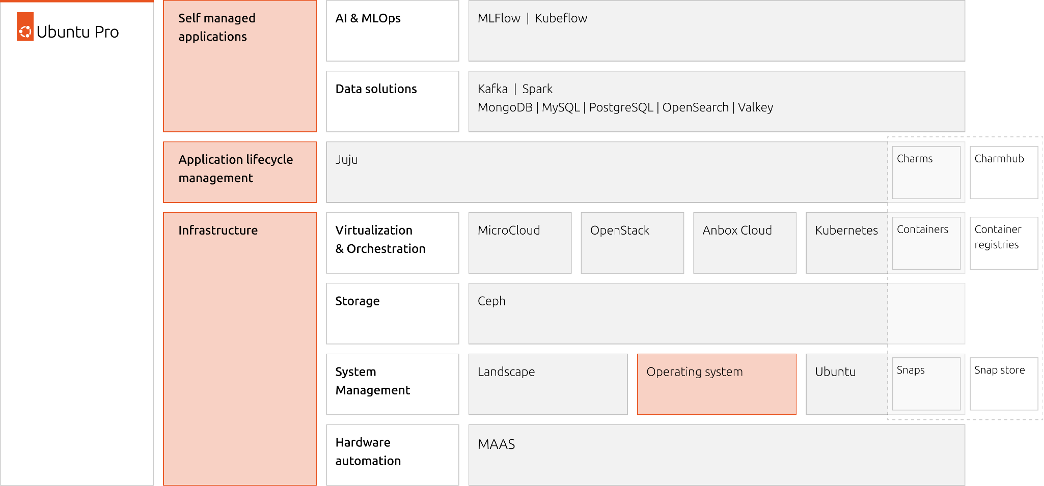
Canonical is a major contributor to open-source projects such as OpenStack, Kubernetes, and it ensures long-term support (LTS) releases with up to 15 years of security maintenance under Ubuntu Pro. It also collaborates with major cloud providers—AWS, Azure, Google Cloud—to deliver optimized Ubuntu images and certified workloads.
With a strong emphasis on automation, security, and performance, Canonical empowers developers and enterprises to build resilient, scalable systems fully based on open source components. Its commitment to open standards and interoperability makes it a strategic partner for organizations embracing hybrid cloud, edge computing, and containerized architectures.
Ubuntu Server is a powerful, open-source operating system designed for enterprise-grade and telco grade deployments across cloud, data center, and edge environments. Built on the Linux kernel, it offers a secure, stable, and scalable platform for hosting applications, managing infrastructure, and running containerized workloads. At its core, Ubuntu Server emphasizes simplicity and automation. It supports cloud-init for instance initialization, integrates seamlessly with orchestration tools like Ansible and Terraform, and offers native support for containers via Docker and Kubernetes.
Ubuntu Server is released in regular six-month cycles, with Long-Term Support (LTS) versions maintained for up to -15 years under Ubuntu Pro. These LTS releases are favored for production environments due to their stability and extended security coverage, including patches for thousands of open-source packages. Ubuntu Server also supports modern networking stacks, ZFS and LVM for storage management, and robust security features like AppArmor and unattended upgrades. Its minimal footprint and modular architecture make it ideal for microservices and edge computing.
Whether powering web servers, databases, CI/CD pipelines, or AI workloads, Ubuntu Server delivers a reliable foundation with a vast ecosystem of packages and community support. Its blend of performance, flexibility, and enterprise readiness makes it a top choice for developers and IT professionals worldwide.
Canonical’s LXD (open source virtualization platform) leverages Linux Containers to provide lightweight virtualization for Linux systems, enabling efficient, secure, and scalable containerized environments. Linux Containers offer low-level container capabilities, acting as an OS-level virtualization method that isolates processes and file systems using kernel features like cgroups and namespaces. It’s ideal for running multiple Linux distributions on a single host with minimal overhead.
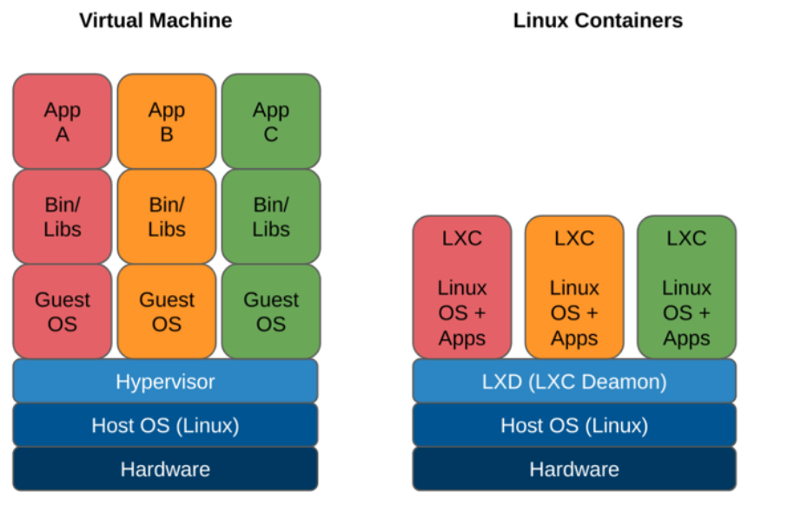
LXD builds on Linux Containers and KVM/QEMU for virtual machines by adding a REST API, intuitive CLI and GUI, and advanced features like multi-tenancy, image management, and network/storage integration. It treats containers like lightweight virtual machines, supporting full system containers with persistent state, making it suitable for cloud workloads, CI/CD pipelines, and edge deployments. LXD supports clustering, allowing multiple hosts to be managed as a single pool, and integrates with ZFS, Ceph, and other storage backends for snapshotting and replication. It also supports virtual machines via QEMU, offering unified management for containers and VMs.
Canonical maintains LXD with a focus on performance, security, and ease of use. It’s widely adopted in enterprise environments for its flexibility and automation capabilities and is available on Ubuntu and other Linux distributions. LXD offers a robust platform for modern infrastructure and application delivery.
Canonical Kubernetes is an enterprise-grade, fully conformant Kubernetes distribution maintained by Canonical. It delivers secure, scalable, and automated container orchestration across public clouds, private data centers, and edge environments. Built on upstream Kubernetes, it ensures full compatibility with the broader ecosystem while simplifying operations and providing long-term support.
Deployment is streamlined through the Canonical Kubernetes charm, a model-driven approach powered by Juju, enabling simplified lifecycle management including installation, upgrades, scaling, and seamless integration with observability and security tools. For lightweight or single-node deployments, the Canonical Kubernetes snap package provides a minimal yet fully functional Kubernetes environment, making it ideal for edge computing, developer workstations, or test clusters.
Key features include:
● Automated updates and security: Continuous upstream security patches and updates via Ubuntu Pro for minimal operational overhead.
● Built-in container and storage support: Includes container runtimes, CNI networking plugins, and CSI storage drivers out of the box.
● Observability and monitoring: Integrated with Prometheus, Grafana, and Fluentd for metrics, logging, and visualization.
● Enterprise-grade security: Role-Based Access Control (RBAC), OIDC authentication, TLS encryption, and fine-grained access controls.
● GPU and AI/ML workload support: Optimized for AI, machine learning, and GPU-accelerated workloads.
● Flexible deployment and scaling: Supports bare metal, VMs, or cloud environments, with easy cluster scaling from single nodes to multi-node deployments.
● Composable and modular architecture: Modular stack allows easy integration with existing infrastructure and supports hybrid or edge deployments.
Canonical Kubernetes is optimized for performance and reliability, with support for high-availability control planes and multi-cloud federation. It’s backed by Canonical’s commercial support and SLAs, making it a trusted choice for organizations seeking open-source flexibility with enterprise assurance.
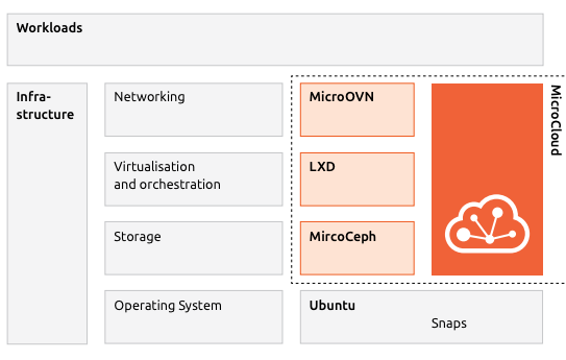
Canonical MicroCloud is a lightweight, automated private cloud solution purpose-built for edge computing, remote offices, and resource-constrained environments. It enables rapid deployment of fully functional, production-grade cloud clusters with a single command, drastically reducing operational complexity and eliminating the need for deep cloud expertise.
MicroCloud integrate key Canonical technologies to deliver a unified and self-managing cloud stack:
● LXD: Provides efficient, secure system containers and virtual machines for compute virtualization
● MicroCeph: Delivers resilient, distributed storage with replication and scalability
● MicroOVN: Enables software-defined networking (SDN) for secure, isolated virtual networks
● Ubuntu Core/Server + Snaps: Secure, atomic, auto-updating OS foundation
These components are packaged as snaps, ensuring reproducible deployments, transactional updates, and enhanced security. MicroCloud supports self-healing clusters, zero-downtime upgrades, and fine-grained access control, making it ideal for sensitive workloads and resource-constrained environments.
How does MicroCloud solve the edge constraints and challenges?
● Flexibility and Scalability: MicroCloud uses a modular, layered architecture that allows easy scaling and customization across bare metal, virtual machines, and containers enabling seamless growth and adaptation to changing workloads.
● Full Automation: Provides fully automated provisioning, updates, and management, minimizing on-site operations and making remote edge deployments low-touch and cost-effective.
● Open and Standard APIs: MicroCloud are built on open, non-proprietary APIs, ensuring compatibility with existing enterprise systems and avoiding vendor lock-in while enabling integration across diverse edge and cloud environments.
● Abstraction Layer: Includes an abstraction layer that makes applications independent of the underlying hardware or cloud substrate, allowing flexible deployment and futureproofing against infrastructure changes.
Canonical MicroCloud can start with a single node and scale up to 50 nodes, offering high availability with just three machines. It runs on Ubuntu Server or Ubuntu Core and provides a secure, flexible, and cost efficient platform. Designed for zero-ops automation, MicroCloud delivers self-healing, over-the-air updates, and minimal on-site maintenance making it ideal for remote and edge environments. Its composable architecture supports edge deployments, hybrid clouds, and test labs, enabling simple, scalable, and modern distributed cloud infrastructure.
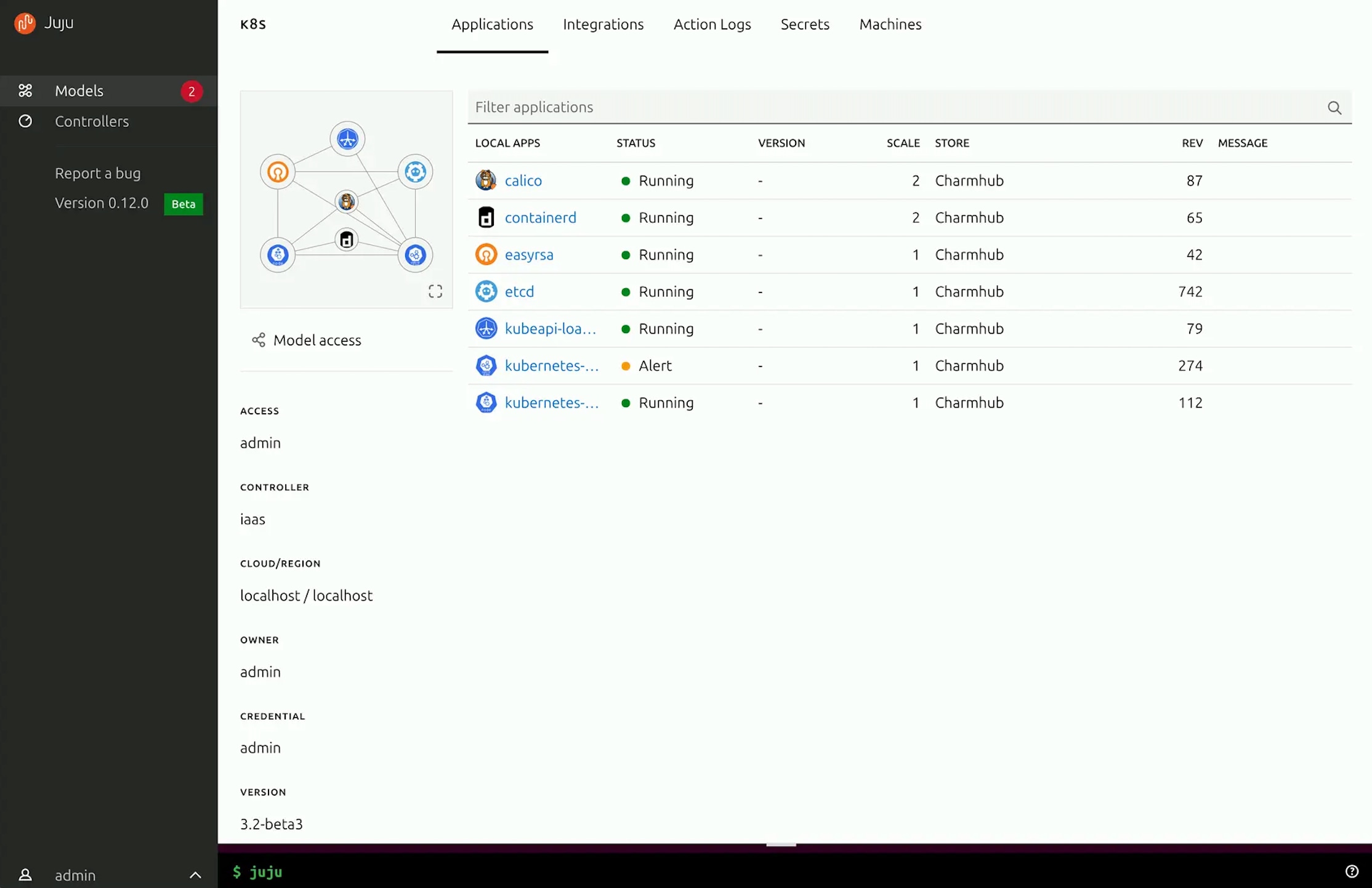
Canonical Juju is an open-source, model-driven application orchestration tool designed to simplify the deployment, scaling, and management of complex software stacks across public clouds, private infrastructure, and edge environments. Juju abstracts infrastructure concerns by using charms — reusable, declarative packages that encapsulate the operational logic of applications, including installation, configuration, integration, and lifecycle management.
Juju provides a declarative, model-driven, and interactive way to install, provision, maintain, update, and integrate applications on and across Kubernetes, Linux containers, virtual machines, and bare metal machines, on public or private cloud. Its controller-based architecture allows centralized management of multiple models and environments, making it ideal for multi-cloud and hybrid deployments.
With Juju, you can deploy entire solutions like Canonical Kubernetes or machine learning pipelines using a few commands. It integrates with CI/CD workflows, has a Terraform client and supports role-based access control (RBAC), making it suitable for enterprise-grade operations. Juju’s CLI and GUI interfaces provide intuitive control, while its integration with Canonical Charmhub offers a rich ecosystem of pre-built charms for popular applications. Whether you're managing a single-node service or a distributed microservices architecture, Juju streamlines operations, reduces complexity, and accelerates time-to-value for infrastructure and application delivery.
Ansible is simple and powerful, allowing users to easily manage various physical devices, operating systems, and applications. All Cisco and Canonical components used in this solution have integration with Ansible and include simple playbooks to automate both complex deployments and routine configuration tasks. While this Cisco Validated Design (CVD) leverages the Blueprint option in Cisco Intersight to automate installation and configuration, it can also be seamlessly integrated into existing Ansible automation frameworks for unified operations across hybrid environments.
Key Use Cases and Benefits
● Infrastructure Provisioning: Automates end-to-end deployment of Cisco UCS servers, networking, and Canonical Ubuntu environments.
● Configuration Management: Ensures consistent configuration across compute, storage, and networking components with version-controlled playbooks.
● Application Deployment: Streamlines rollout of AI, ML, and edge workloads across distributed nodes using standardized automation workflows.
● Integration with Intersight: Complements Cisco Intersight automation by extending customization and post-deployment configuration capabilities through Ansible.
● Scalability and Repeatability: Enables rapid scaling of infrastructure with repeatable, tested playbooks that reduce human error.
● Cross-Platform Automation: Manages both Cisco hardware and Canonical software components under a single automation framework.
● Operational Efficiency: Minimizes deployment time and simplifies lifecycle management, allowing teams to focus on innovation rather than manual tasks.
AI Inferencing at the Edge Landscape
AI inferencing at the edge enables real-time decision-making by processing data locally on devices, gateways, or micro data centers instead of relying solely on centralized cloud infrastructure. This decentralized approach is vital in latency-sensitive, bandwidth-constrained, or privacy-focused environments where immediate action is required, and network connectivity may be intermittent.
Key Use Cases and Benefits
● Industrial Automation and Predictive Maintenance: Enables real-time predictive maintenance by analyzing sensor data locally, reducing downtime and maintenance costs.
● Retail Intelligence and Smart Environments: Uses smart cameras and AI analytics at the edge to optimize customer experience, shelf layouts, and inventory management. Healthcare and Medical Diagnostics
● Healthcare Diagnostics: Processes patient vitals and imaging data on edge devices for instant diagnostics while maintaining data privacy.
● Security and Surveillance: Performs on-site AI-based threat detection, facial recognition, and anomaly monitoring with minimal latency.
● Smart Agriculture: Employs drones and sensors running AI models to assess crop health, detect pests, and optimize irrigation in real time.
Technical Advantages with Canonical Ubuntu on Cisco Unified Edge
● Low-Latency AI Execution: Optimized hardware acceleration (GPU) with Canonical Ubuntu and Cisco UCS edge systems.
● Secure Lifecycle Management: OTA (Over-The-Air) updates via Snap packages ensure consistent and tamper-proof model deployments.
● Scalable AI Deployment: Works seamlessly with Canonical MicroK8s and LXD for managing distributed inferencing workloads.
● Interoperability: Compatible with leading AI frameworks like TensorFlow Lite, ONNX Runtime, and OpenVINO.
● Operational Continuity: Ensures consistent performance even during network outages with localized decision-making.
Solution Design
This chapter contains the following:
● Single-Node Ubuntu Server with LXD
● Single-Node Ubuntu Server with LXD and Canonical Kubernetes
● Multi-Node cluster with Canonical Kubernetes
● Secure Multi-Tenancy / Multi-Tenancy
The Cisco Unified Edge with Canonical solution provides an integrated architecture with Cisco and Canonical technologies that demonstrate support for bare-metal, virtual, and K8s workloads with high availability and server redundancy.
Figure 10 illustrates a sample design with the required management components, like Intersight Assist or Canonical Juju, installed outside of the solution stack.
This section outlines the key design requirements and prerequisites necessary for delivering the Cisco Unified Edge with Canonical solution.
The solution is designed to support a wide range of deployment models, scalability levels, and operational use cases at the edge providing flexibility, resiliency, and simplified lifecycle management.
The following are the general design requirements for this solution:
● Simple Single-Node Deployment for Bare Metal, Virtual Machines, and Containers.
◦ Provides a lightweight and easy-to-deploy edge platform capable of running bare-metal applications, virtual machines (VMs), and containerized workloads.
◦ Ideal for environments where footprint, cost, and simplicity are key priorities.
Note: This deployment model does not include integrated high availability (HA) at either the hardware or software layer.
● Single-Node Kubernetes Deployment
◦ Offers a minimal, single-node Kubernetes environment (for example, MicroK8s or K3s) for container orchestration at the edge.
◦ Suitable for small-scale edge applications, local AI inference, and test or pilot environments.
● Multi-Node Deployment for Bare Metal, Virtual Machines, and Containers
◦ Enables a scalable and resilient multi-node architecture supporting both traditional and cloud-native workloads.
◦ Designed for high availability and fault tolerance with no single point of failure across the infrastructure layers.
◦ Allows horizontal scalability by adding compute or storage nodes on demand as workload or business requirements evolve.
● Modular and Repeatable Design
◦ Provides a modular architecture that can be replicated across multiple edge locations or scaled to meet increasing business demands.
◦ Ensures consistent deployment experience through automation tools such as Cisco Intersight, Canonical MAAS, and Juju.
● Flexible and Extensible Architecture
◦ Offers the flexibility to integrate components beyond those validated and documented in this guide, allowing for future expansion.
◦ Supports interoperability with third-party systems, additional Canonical services (for example, Landscape, MicroCloud), and Cisco ecosystem solutions (for example, SecureX, Intersight Workload Optimizer).
This Cisco Unified Edge solution comes as an integrated stack with compute, storage and network and is connected to an external network domain. The compute nodes are configured to install the Ubuntu Server operating system on the local M.2 storage protected with RAID1. The persistent storage for bare-metal applications, Virtual machines and containers is provisioned on the local E3.s NVMe storage devices. The Unified Edge system is managed through Cisco Intersight Infrastructure Manager (IMM).
A typical topology for the Unified Edge based solution is shown in Figure 11.
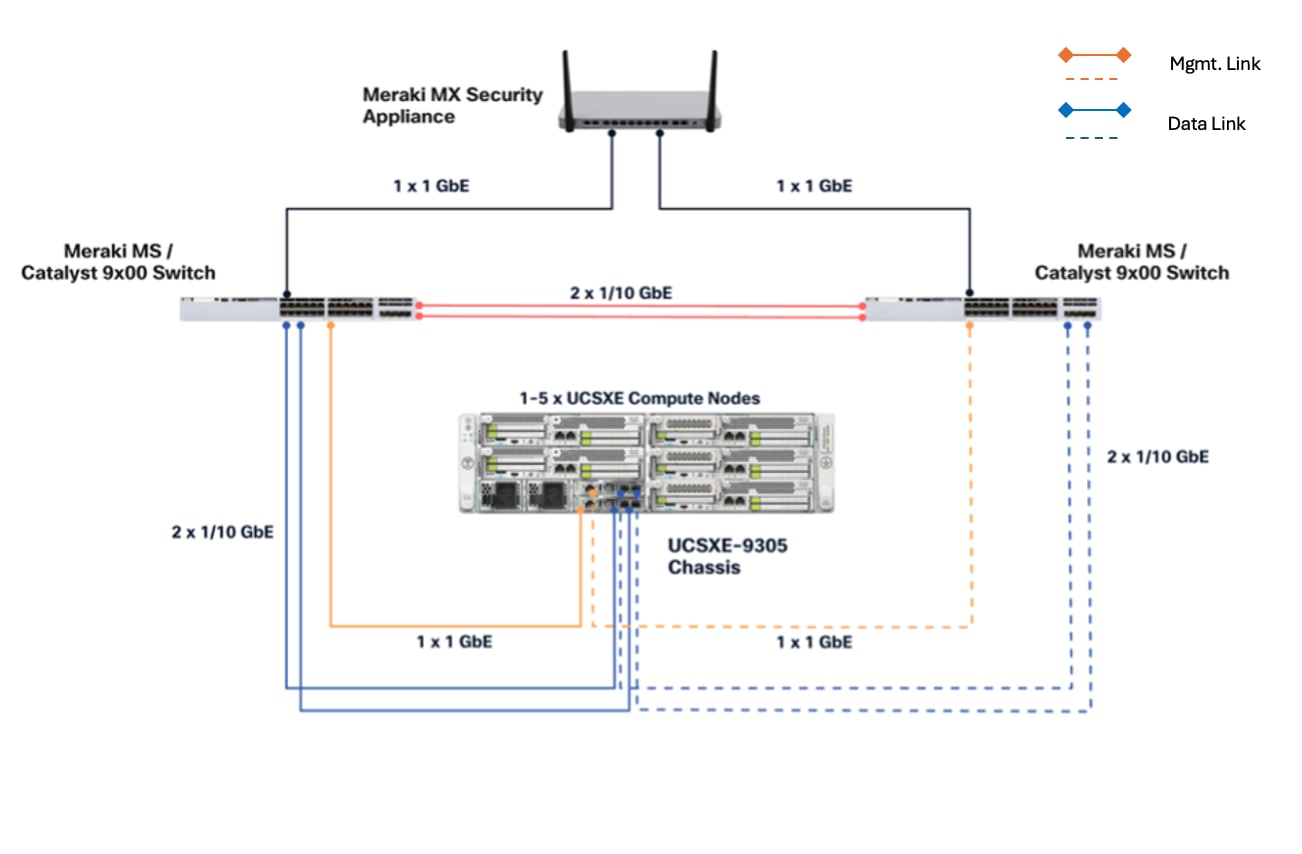
As the key components to deploy the solution are inside the Unified Edge chassis itself, there are some decisions to make regarding the connectivity to the external network:
● Both Edge Chassis Management Controllers must be connected with their management network port to a network reaching the Intersight.com.
● Both Edge Chassis Management Controllers must be connected with port-channelto the network for data traffic.
● Both internal network interfaces on the UCS XE130e compute node should be used with the same vSwitch / bond as uplink to provide high-availability.
Connectivity Inside the Chassis
The Cisco UCSXE-9305 chassis design illustrates a single Cisco UCSXE server equipped with two 25 Gbps NICs connected to the midplane. One NIC connects to an embedded 25 Gbps switch on one ECMC controller, while the second NIC connects to an embedded 25 Gbps switch on the other ECMC controller, providing redundant network connectivity.
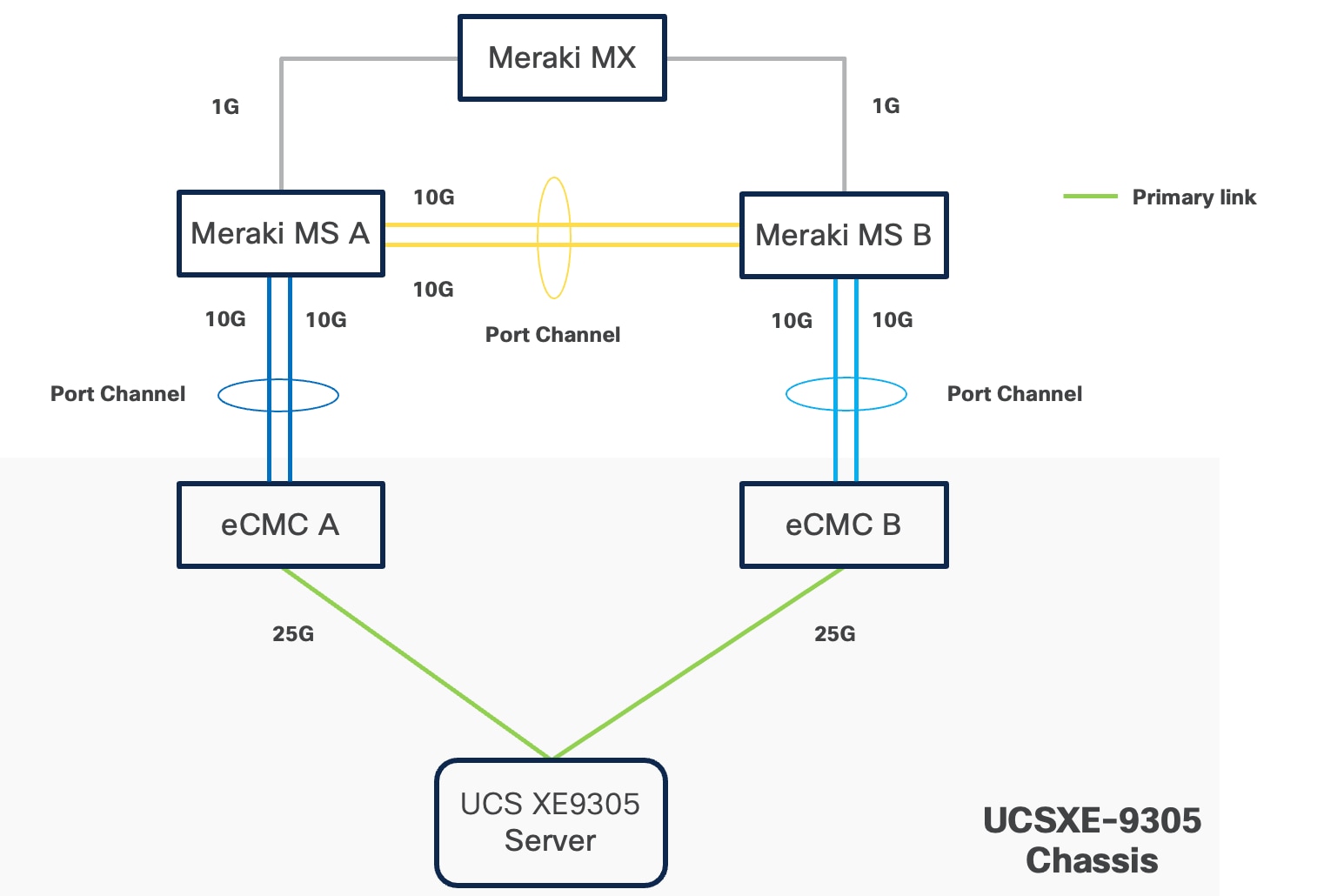
Ubuntu can configure the two NICs either as independent interfaces or combine them into a single bonded interface:
● When used independently, the server provides an aggregated bandwidth of 50 Gbps to the chassis.
● For bonded configurations, Active-Backup mode is recommended to ensure high availability and simpler failover behavior.
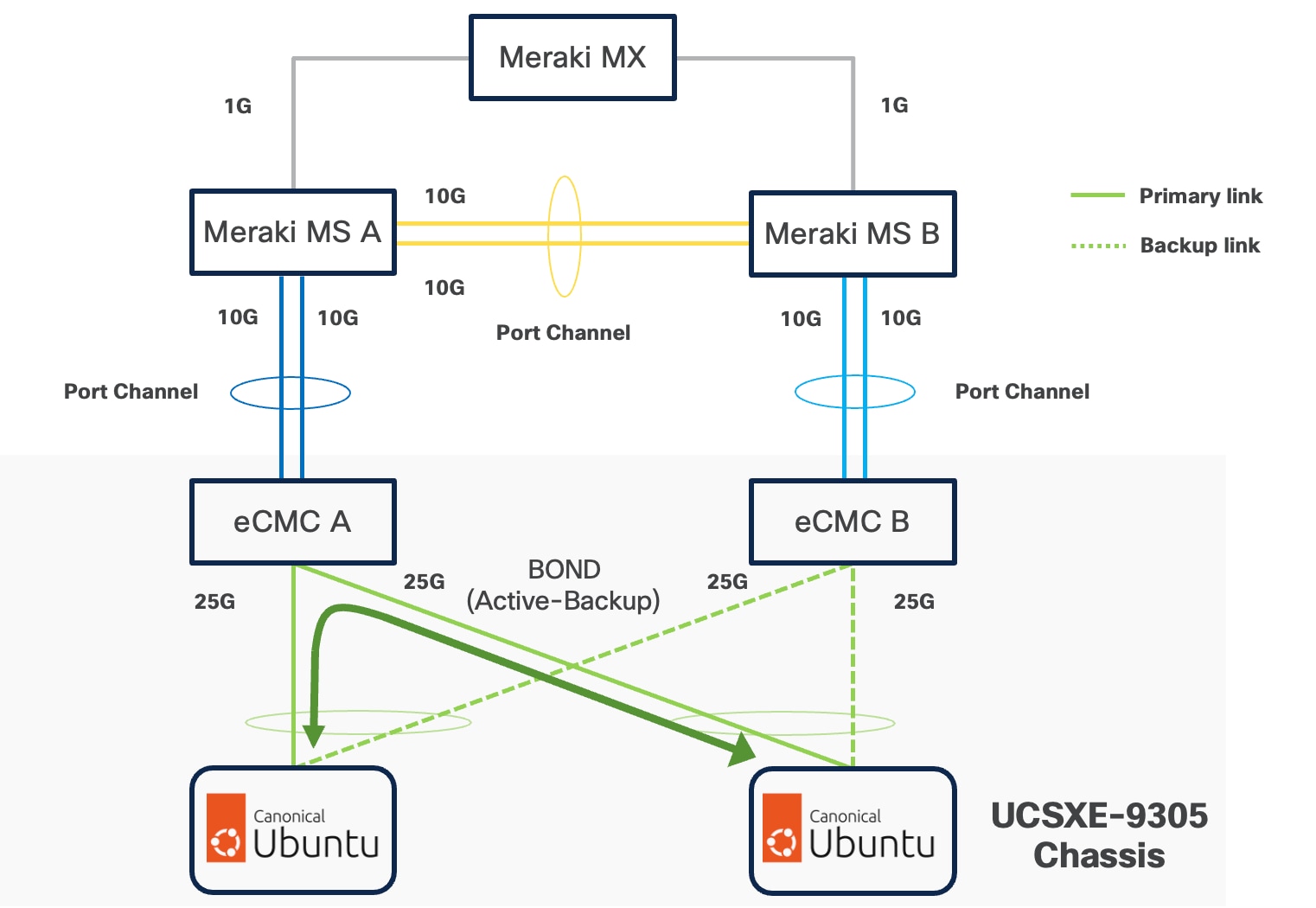
Ubuntu supports bonding through Netplan, and Active-Backup (mode=1) is the recommended option. This mode ensures:
● Simplified redundancy without switch-side link aggregation.
● Predictable network traffic behavior.
● Automatic failover when a link becomes unavailable.
For consistent traffic distribution across servers, the primary link interface should be set to use the same eCMC switch on all servers. This keeps Layer-2 traffic within the chassis and reduces unnecessary external switching.
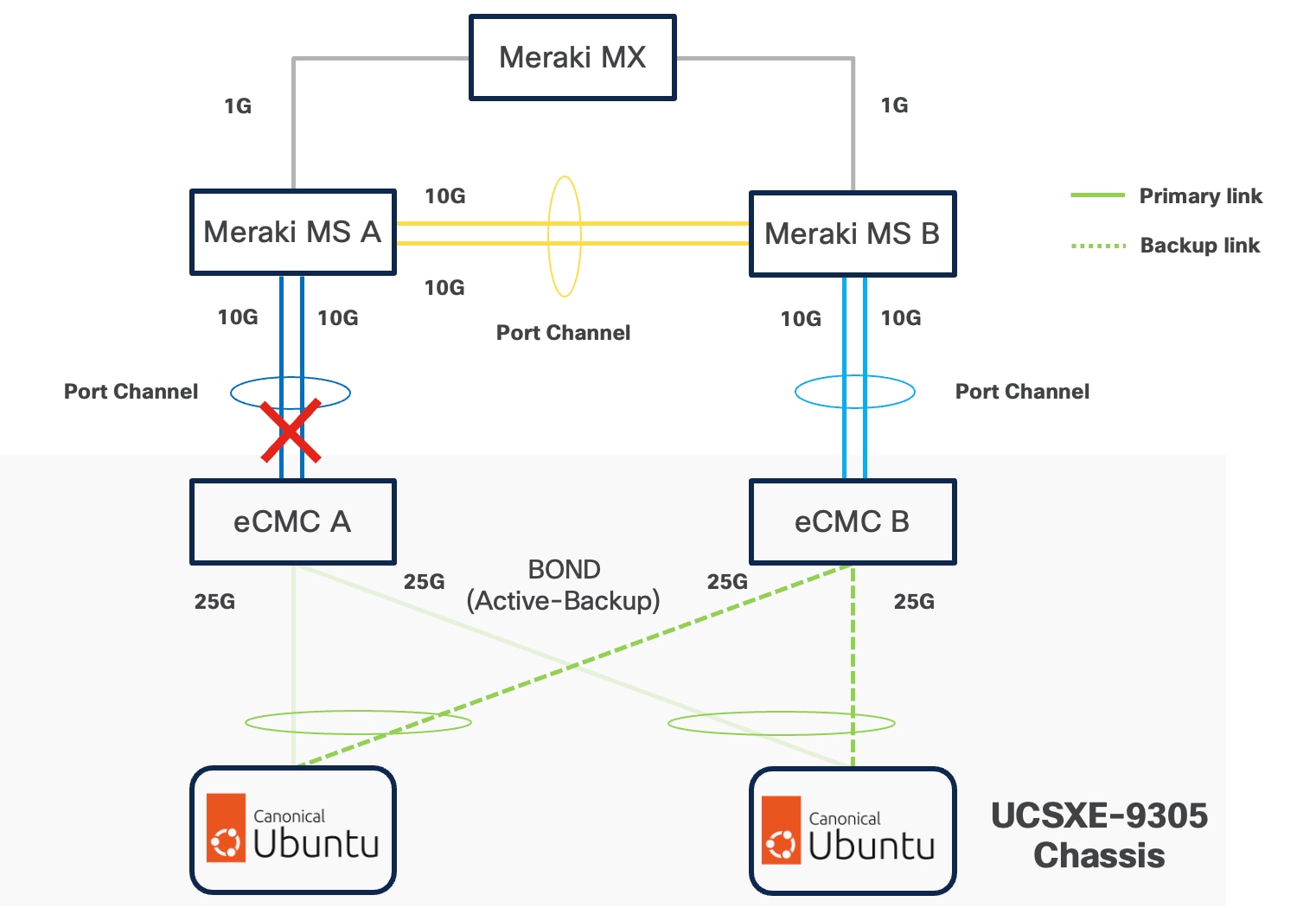
If a controller's uplink connectivity completely goes down, all associated NICs on the server side will also become unavailable to the operating system. This is controlled at ECMC level. At operating system level, if a bond interface is used, the operating system will automatically switch traffic from the failed link to the backup link, ensuring continuous connectivity.
VLAN Configuration
Table 1 lists the VLANs which can be used for setting up the solutions along with their usage. The list in only an example and some of the VLANs are used in the deployment guide(s) based on this design document.
| VLAN ID |
Name |
Usage |
| 5 |
Native-VLAN |
Use VLAN 5 as native VLAN instead of default VLAN (1). |
| 1320 |
OOB-MGMT-VLAN |
Out-of-band management VLAN to connect management ports for various devices. |
| 1321 |
IB-MGMT-VLAN |
In-band management VLAN utilized for all in-band management connectivity - for example, Linux hosts, management tools, and so on. |
| 1322 |
DATA-VLAN |
Data traffic VLAN for bare-metal applications, virtual machines, and containers. |
| 1323 |
VM-VLAN |
Data traffic VLAN from/to Virtual Machines |
| 1324 |
CONTAINER-VLAN |
Data traffic VLAN from/to containers |
| 3020 |
STORAGE-VLAN |
Storage replication traffic VLAN for SDS like CEPH |
| 3030 |
CLOCK-VLAN |
Clock synchronization VLAN for manufacturing applications |
| 3040 |
APP1-VLAN |
Dedicated VLAN for Application 1 Use-case, such as App to DB traffic. |
| 3050 |
APP2-VLAN |
Dedicated VLAN for Application 2 Use-case, such as Sensor to App traffic. |
| 3999 |
GUEST-VLAN |
VLAN ID for guests or Hotspot WiFi. |
Some of the key highlights of VLAN usage are as follows:
● VLAN 1320 allows customers to manage and access out-of-band management interfaces of various devices and is brought into the infrastructure to allow IMC access to the Unified Edge eCMC or Catalyst devices and is also available to infrastructure virtual machines (VMs). Interfaces in this VLAN are configured with MTU 1500.
● VLAN 1321 is used for in-band management of VMs, hosts, and other infrastructure services. This VLAN is also required to use vMedia policy and CIMC-Mounted ISO images inside Unified Edge. Interfaces in this VLAN are configured with MTU 1500.
● VLAN 1322 is the default VLAN used to access applications, use-cases, and traditional data traffic. Interfaces in this VLAN are configured with MTU1500.
● VLAN 1323 is used to access applications, use-cases, and traditional data traffic deployed on virtual machines. Interfaces in this VLAN are configured with MTU1500.
● VLAN 1324 is used to access applications, use-cases, and traditional data traffic deployed in containers. Interfaces in this VLAN are configured with MTU1500.
● VLAN 3020 is configured to allow storage replication traffic between the nodes. Interfaces in these VLANs are configured with MTU 9000.
● VLAN 3030 is used to by Industrial Edge applications to synchronize the clock and time information for critical command traffic. Interfaces in this VLAN are configured with MTU1500.
● VLAN 3040 is used to access a specific application or use-case like application to database traffic for a multi-tier application. Interfaces in this VLAN are configured with MTU1500.
● VLAN 3050 is used to access a specific application or use-case like data traffic from sensors to the data collector application. Interfaces in this VLAN are configured with MTU1500.
● VLAN 3999 is used for Guest access to the internet. Interfaces in this VLAN are configured with MTU1500.
Physical Components
The list of the required hardware components used to build a validated solution contains the Cisco Unified Edge components and the used network domain, see Table 2. You are encouraged to review your requirements and adjust the size or quantity of various components as needed.
Table 2. Unified Edge with Network Domain hardware components
| Component |
Hardware |
Comments |
| Cisco Unified Edge Chassis with two eCMCs |
Cisco UCS-XE9305 Chassis with two eCMC |
The Unified Edge Chassis with the eCMC is the core of the solution design. |
| Cisco Unified Edge Compute nodes |
One to five Cisco UCS-XE130c compute nodes |
Your requirements will determine the amount of compute nodes required to build the solution. |
| Cisco Meraki or Catalyst Network Domain |
● One or two Cisco Meraki MS switches or Cisco Catalyst 9000 Series switches
● One or two Cisco Meraki MX appliances or Cisco Catalyst 8000 Series routers
|
The specific switch and routing platform, port count, and link speeds are determined by solution requirements. At least one routing device (Meraki MX or Catalyst 8000 Series router) is required at remote locations to provide access to the internet and/or the corporate network. |
| Management Cluster |
||
| Hosted at a central place like the core data center. |
A minimum of two Cisco UCS servers to host components like DNS, Intersight Assist Juju Server, MaaS Server, and others. |
To reduce the number of physical servers the use of a supported virtualization software like KVM is recommended. |
Software Components
Table 3 lists various software components used in the solution. The minimum versions of the components and additional drivers and software tools versions will be explained in the deployment guide.
Table 3. Software components and versions
| Component |
Version |
| Cisco Unified Edge Firmware Package |
6.0(1) |
| Cisco Catalyst 8000 |
IOS-XE |
| Cisco Catalyst 9000 |
IOS-XE |
| Cisco Meraki MX |
MX 18.211.6 |
| Cisco Meraki MS |
CS 17.2.2 |
| Canonical Ubuntu Server |
24.04.3 LTS |
| Canonical LXD |
5.21 (stable) |
| Canonical MicroCloud |
2.1.1-d49bea6 |
| Canonical Kubernetes |
1.32-classic |
| Canonical Management Tools |
|
| Canonical Juju |
3.6.12 |
The Cisco Unified Edge with Canonical solution provides a flexible and automated deployment architecture designed to support a wide range of edge computing scenarios.
All deployments are fully automated through Cisco Intersight using Blueprints or custom workflows, ensuring consistent configuration, simplified operations, and lifecycle management.
The automation is based on the design and configuration principles defined in this guide and its associated deployment documents.
To support various deployment use cases, this design guide includes the following logical design options:
● Single-Node Canonical Ubuntu Server with LXD
◦ Provides lightweight container-based virtualization using LXD edge workloads on a single node.
● Single-Node Canonical Ubuntu Server with LXD and Canonical Kubernetes
◦ Supports mixed workload environments using system containers (using LXD) and Kubernetes-orchestrated application containers (using Canonical Kubernetes) on a single host, suitable for legacy system workloads and modern cloud-native applications coexisting at the edge.
● Multi-Node Cluster with Canonical MicroCloud
◦ Delivers a highly available and self-managing multi-node cluster that can host virtual machines and containers with built-in replication, resilience, and scale-out capability.
● Single-Node Canonical Ubuntu Server with Canonical Kubernetes
◦ Offers a minimal Kubernetes environment via Canonical Kubernetes on a single node, ideal for small-scale edge applications or development and testing environments.
● Multi-Node Cluster with Canonical Kubernetes
◦ Enables distributed, production-grade Kubernetes clusters with high availability, horizontal scaling, and lifecycle automation using Juju and Intersight.
The logical configuration of the Cisco Unified Edge system may vary depending on the intended workload and solution architecture. For example:
● Deploying three standalone single-node Ubuntu servers running independent workloads does not require a dedicated storage replication network.
● Conversely, deploying a three-node Canonical MicroCloud cluster benefits from a dedicated storage and replication network to optimize data synchronization, fault tolerance, and performance
This flexible design approach ensures that the Cisco Unified Edge platform can be optimized for a variety of edge computing use cases from lightweight single-node deployments to robust, clustered multi-node environments with full redundancy and high availability.
Single-Node Ubuntu Server with LXD
The Single-Node Canonical Ubuntu Server with LXD deployment model provides a lightweight and efficient virtualization platform designed for hosting edge workloads, virtual environments, and containerized applications.
This option is ideal for single-node edge deployments that require resource efficiency, rapid provisioning, and simplified lifecycle management without the complexity of a full Kubernetes or clustered environment.
Overview of LXD
LXD is an open-source virtualization platform built on top of LXC and KVM. It simplifies system container and VM operations by offering a more intuitive, API-driven experience and includes remote management capabilities over the network.
Under the hood, LXD uses LXC to create and manage system containers, but extends it with advanced features such as:
● Image management and remote image servers
● Built-in REST API and CLI management tools
● User-friendly GUI
● Integrated networking and storage configuration
● Support for both system containers and virtual machines
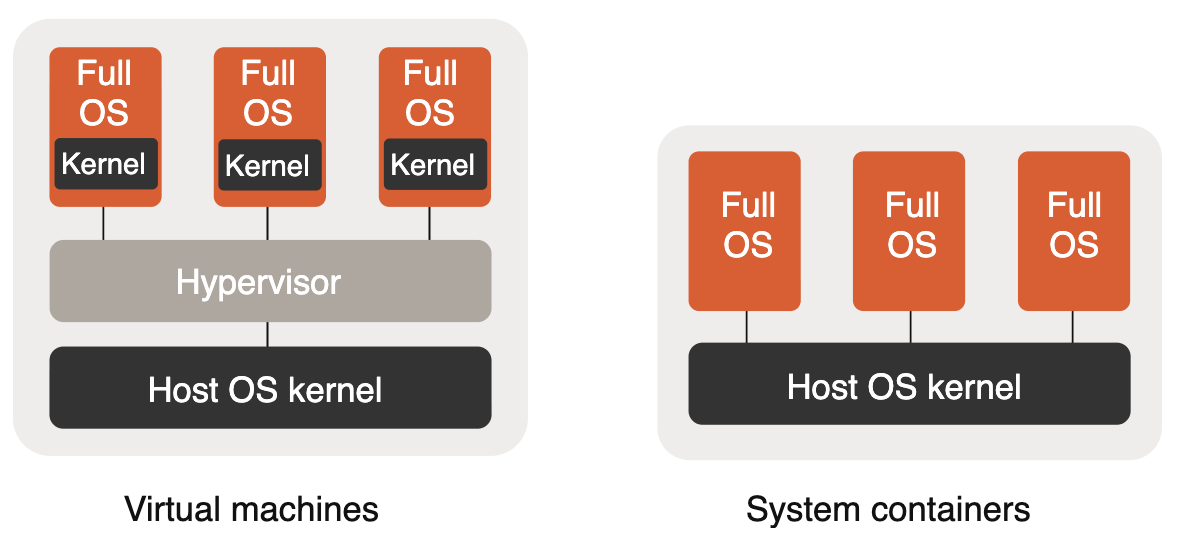
Instance Types: Virtual Machines, System Containers, and Application Containers
● System Containers
◦ System containers emulate a full operating system environment by leveraging the kernel of the host system.
◦ These containers are lightweight, boot quickly, and are ideal for hosting full Linux environments or infrastructure services.
◦ They do not run single-process application containers (like Docker containers) natively.
● Virtual Machines (VMs)
◦ LXD also provides native support for VMs, using the host hardware but supplying its own guest kernel.
This allows you to run different operating systems or kernel versions within the same environment, providing additional isolation when required.
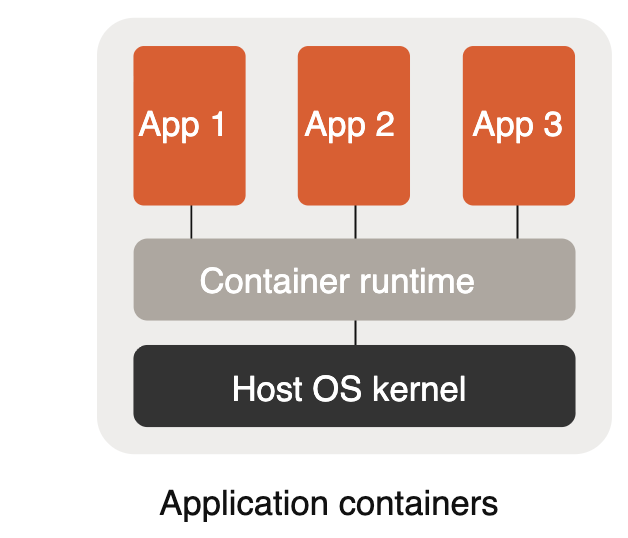
In contrast, Application Containers (for example, those managed by Kubernetes) are designed to encapsulate and run a single process or application. They are typically managed by standalone container runtimes and are not run natively by LXD.
However, LXD VMs can be used to host container runtimes such as Kubernetes if application containers are required. This keeps the statement accurate without implying LXD manages OCI containers directly.
Design Considerations
The following are key design considerations:
● The LXD-based single-node deployment offers an optimal balance between isolation, performance, and simplicity.
● It can host a diverse range of edge workloads—from network functions and telemetry collectors to AI inference services.
● Network and storage can be configured via LXD profiles for consistency and easy replication.
● Management and monitoring can be integrated with Cisco Intersight, Canonical Landscape, or other orchestration frameworks for unified lifecycle operations.
Single-Node Ubuntu Server with LXD and Canonical Kubernetes
The Single-Node Canonical Ubuntu Server with LXD and Canonical Kubernetes deployment model provides a flexible platform that supports both system containers (LXD) and lightweight Kubernetes orchestration on the same edge node.
This model is well suited for mixed workload environments where legacy or system-level workloads need to coexist alongside cloud-native, orchestrated applications—offering a unified approach to system-container management and Kubernetes orchestration on Ubuntu.
Overview of LXD and Canonical Kubernetes
This section provides a high-level overview of LXD and Canonical Kubernetes.
LXD (system containers)
LXD is a next-generation system container manager from Canonical that provides a virtual-machine-like experience with the efficiency of containers. It runs full Linux distributions inside lightweight, secure system containers while providing strong isolation, predictable performance, and a familiar VM-like lifecycle model.
Using LXD on Ubuntu provides the following:
● System/container-level isolation that supports running entire Linux distributions (useful for legacy apps that expect a full OS)
● Fast startup times and low overhead compared to traditional VM hypervisors
● Native snapshotting, storage, and networking primitives tightly integrated with Ubuntu
● Fine-grained device passthrough and control for workloads that require hardware access
Canonical Kubernetes
Canonical’s Kubernetes provide a lightweight, production-capable Kubernetes that can run on a single node or be scaled to multiple nodes when needed. It enables orchestration of cloud-native workloads with full Kubernetes APIs and ecosystem compatibility.
Key characteristics include:
● Small-footprint, fast install and upgrade experience tailored for edge and on-prem deployments
● Support for standard Kubernetes features (CRDs, Operators, Ingress, CNI plugins, storage classes)
● Tight integration with Ubuntu for security updates and lifecycle management
● Ability to run in single-node mode for edge scenarios, then scale to multi-node if required
By combining LXD and Canonical Kubernetes on a single Ubuntu node, this deployment model enables operators to host a wide variety of workloads—from system-containerized legacy stacks to fully orchestrated cloud-native applications—on a single, efficient, and easily managed platform.
Workload Types
The following are the details for the workload types:
● Legacy or Specialized Applications in LXD System Containers
◦ Ideal for applications requiring a full distribution, custom kernels, or specific system-level configuration.
◦ LXD gives a VM-like environment with lower resource overhead and fast lifecycle operations.
◦ Provides isolation and compatibility for enterprise workloads that aren’t easily containerized as application containers.
● Microservices and Modern Applications in Kubernetes (Canonical Kubernetes)
◦ Kubernetes-managed containers are optimized for scalable, self-healing microservices and modern cloud-native stacks.
◦ Use Kubernetes primitives (Deployments, Services, StatefulSets) to manage lifecycle, scaling, and networking of app containers.
◦ Integrate with storage classes and ingress for persistent workloads and north-south traffic.
● Hybrid Workloads
◦ Supports side-by-side operation of LXD system containers and Kubernetes-managed containers, enabling gradual modernization.
◦ Example: Run a legacy database or stateful service in an LXD container while hosting web front-end and API layers in Kubernetes.
Design Considerations
Be aware of the following design considerations:
● Edge sites that require both system-container isolation and Kubernetes orchestration without a full multi-node Kubernetes cluster
● Development, testing, and staging environments needing flexible workload isolation and fast provisioning
● Local processing, caching, AI inferencing, or network-function workloads at the edge
● Networking and Storage
◦ LXD and Canonical Kubernetes both leverage native Linux networking. LXD provides bridged networks, macvlan, and managed networks; Kubernetes uses CNI plugins—design the network so containers and LXD instances can be segmented or connected as needed.
◦ Local storage (ZFS, LVM) or remote storage (NFS, Ceph, CSI-backed volumes) can be used. LXD has built-in storage pool management; Kubernetes uses storage classes and CSI drivers.
◦ Consider how you will expose services: use Kubernetes Ingress for app traffic and LXD-managed networking for system containers, or route via a bridge that both can use.
● Management and Integration
◦ Orchestrate LXD and Kubernetes lifecycle with tools such as Canonical Landscape, Juju, or Ansible automation.
◦ Monitoring and telemetry can be integrated with Prometheus, Grafana, or Canonical’s monitoring solutions for observability across both LXD instances and Kubernetes workloads.
◦ Use systemd and Juju/Charm integrations (if desired) to manage startup, recovery, and updates for system services.
Operational Patterns and Examples
The details the operational patterns and examples are as follows:
● Migration path for modernization
Start by containerizing stateless services into Kubernetes, keep stateful or system-dependent apps inside LXD for compatibility, then gradually migrate components into Kubernetes as they are modernized.
● Resource isolation
Use LXD profiles to reserve CPU/memory and device access for system containers; use Kubernetes resource requests/limits and QoS classes for application containers.
● High-availability and scaling
On a single node, provide resilience through process supervision, snapshots, and backups. When scaling is required, expand Canonical Kubernetes to additional nodes to gain multi-node HA.
Security and Compliance
For security and compliance be aware of the following:
● LXD runs system containers with strong namespace isolation; use unprivileged containers where possible and carefully manage device passthrough.
● Canonical Kubernetes benefits from upstream Kubernetes security best practices—RBAC, Pod Security Policies (or replacements), network policies, and secure container image supply chains.
● Keep Ubuntu and LXD/Kubernetes packages updated via Canonical Livepatch, unattended upgrades, or a managed update pipeline.
The Single-Node Ubuntu Server with LXD and Canonical Kubernetes model provides a pragmatic, flexible approach for edge and single-node deployments where both system-level compatibility and cloud-native orchestration are required. It allows operators to run legacy stacks and modern microservices side-by-side, offering an incremental path to modernization while leveraging Ubuntu-native tooling for lifecycle and security management.
Multi-Node cluster with Canonical Kubernetes
The Cisco Unified Edge with Canonical Kubernetes solution delivers a fully integrated, production-ready Kubernetes platform optimized for edge deployments, combining the hardware reliability and lifecycle automation of Cisco infrastructure with the operational simplicity and robustness of Canonical Kubernetes.
This design provides a scalable, highly available, and secure Kubernetes cluster running on Cisco Unified Edge nodes, capable of supporting diverse workloads—from enterprise microservices and AI/ML inference to data aggregation and industrial edge analytics.
Solution Overview
Canonical Kubernetes is a lightweight, secure, and upstream-aligned distribution of Kubernetes engineered for flexibility across both cloud and edge environments. Canonical enhances the core Kubernetes stack by packaging all necessary components—networking, storage, ingress, metrics, and lifecycle tools—into a single integrated solution that’s validated, automated, and supported by both Cisco and Canonical.
When deployed on Cisco Unified Edge platforms, Canonical Kubernetes benefits from:
● Cisco’s edge-optimized compute and networking fabric for deterministic performance and reduced latency.
● Cisco Intersight automation and Blueprints for consistent, repeatable deployments.
● Secure multi-tenant capabilities leveraging Cisco’s zero-trust and segmentation frameworks.
Integrated Components
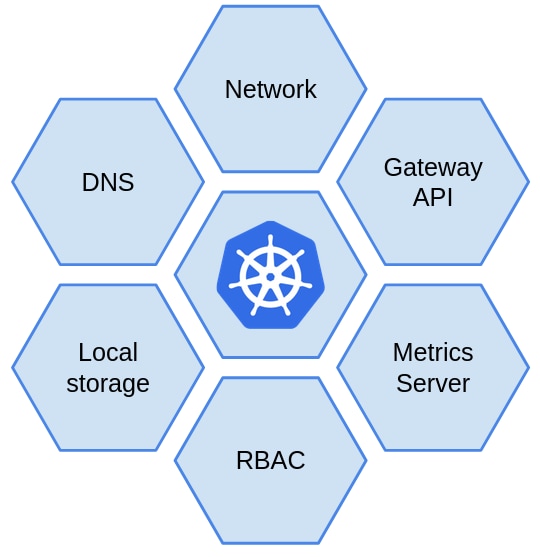
Canonical Kubernetes includes all foundational services required for a self-contained cluster:
● DNS Service – Provides name resolution for Kubernetes pods and services.
● Container Network Interface (CNI) – Enables pod networking and cluster communication; supports integrations with Calico, OVN, or Cisco SDN fabric.
● Storage Provider – Offers dynamic provisioning for persistent volumes using CSI drivers.
● Ingress Provider – Manages external access to applications within the cluster.
● Load Balancer – Distributes network traffic across nodes to enhance resilience and scalability.
● Gateway API Controller – Enables fine-grained routing, traffic policy, and observability.
● Metrics Server – Gathers telemetry and resource metrics for autoscaling and monitoring.
Design Considerations
The following are key design considerations:
● High Availability (HA): Control plane components are distributed across multiple nodes to eliminate single points of failure.
● Resilience and Self-Healing: Integrated health checks and Canonical’s automated recovery mechanisms ensure continuous operation.
● Security: Built-in security hardening aligned with both Cisco SecureX and Canonical CIS benchmarks.
● Resource Efficiency: Designed for constrained environments with minimal footprint while maintaining enterprise-grade reliability.
● Automation: Full lifecycle management using Cisco Intersight Blueprints, including provisioning, scaling, and upgrading.
● Observability: Integrated telemetry, metrics, and logging for proactive health and performance insights.
Use Cases
The following detail the use cases:
● Edge AI/ML Inference: Deploy, orchestrate, and update containerized AI models at remote sites.
● IoT and Industrial Edge: Aggregate, process, and secure operational data close to the source.
● Retail and Smart City Deployments: Host localized microservices and analytics workloads with low latency.
● 5G and Private Network Edge: Manage network functions and user plane workloads near access points.
● Enterprise Multi-Tenant Edge: Host secure, isolated workloads for multiple customers or business units.
Secure Multi-Tenancy / Multi-Tenancy
The Cisco Unified Edge with Canonical solution enables secure, scalable, and efficient hosting of multiple tenant environments on shared edge infrastructure. Designed for modern distributed deployments, this architecture ensures complete compute, network, and storage isolation between tenants while maintaining operational simplicity and unified visibility through Cisco and Canonical integration.
Multi-tenancy is fundamental to this design allowing enterprises, service providers, or industrial operators to run multiple workloads or customer environments securely on the same edge platform.
Multi-Tenancy Architecture Overview
The solution implements tenant isolation across multiple layers of the technology stack as listed below:
| Layer |
Technology |
Functionality |
| Compute / Virtualization |
LXD and KVM |
Tenant-level VM or container isolation on Ubuntu Server. |
| Container Orchestration |
Kubernetes Namespaces, RBAC, PodSecurity |
Logical isolation for tenant applications. |
| Networking |
MicroOVN / Calico with Cisco Edge Fabric |
Network segmentation, zero-trust boundaries, and per-tenant overlays. |
| Storage |
MicroCeph / CSI drivers |
Tenant-specific persistent volumes with encryption-at-rest. |
| Monitoring and Security |
Splunk for Cisco Unified Edge |
Centralized observability, security analytics, and compliance reporting. |
| Management |
Cisco Intersight and Canonical Landscape |
Tenant lifecycle, configuration, and resource governance. |
This architecture ensures that each tenant operates within a logically isolated boundary while leveraging shared physical infrastructure for cost and performance efficiency.
LXD Projects for Strong Multi-Tenancy
In addition to Kubernetes-based multi-tenancy, the solution also supports secure multi-tenancy using LXD Projects, a Canonical capability designed for strong isolation at the virtualization layer.
Why LXD Projects Matter
LXD Projects provide:
● Per-tenant isolation of system containers and VMs
● Separate resource quotas (CPU, RAM, storage, networks)
● Dedicated images, profiles, and network namespaces
● Independent RBAC scopes for each project
This enables an additional layer of separation beyond Kubernetes namespaces—ideal for regulated, industrial, or multi-customer edge environments.
● Hard Multi-Tenancy with Per-Tenant Kubernetes Clusters
Since LXD can isolate full VMs inside each project, the solution can implement hard multi-tenancy:
◦ Each tenant receives its own LXD Project
◦ Inside the project, the tenant gets its own VM(s)
◦ Each VM can run an independent Kubernetes cluster
● This model prevents cross-tenant influence at both the virtualization and orchestration layers, making it well-suited for:
◦ MSPs hosting multiple customers
◦ Telco/industrial deployments requiring strict tenant separation
◦ Highly regulated workloads
Security and Isolation Principles
The Cisco and Canonical design enforces multi-tenancy and zero-trust security through a combination of access control, network policies, and telemetry analytics:
● Namespace Isolation: Each tenant operates in an isolated Kubernetes namespace with dedicated RBAC and resource quotas.
● Network Segmentation: Network isolation is enforced at the Kubernetes and infrastructure layers using Container Network Interface (CNI) based network policies and software defined networking (SDN) capabilities in the underlying Cisco infrastructure. Kubernetes CNI plugins (for example, Calico or Cilium) control pod-to-pod and pod-to-service traffic, while MicroOVN or Cisco network fabrics provide east-west and north-south segmentation outside the cluster.
● RBAC Enforcement: Role-Based Access Control restricts tenant permissions to specific resources and namespaces.
● Pod Security and AppArmor: Enforces least privilege and runtime isolation for containerized workloads.
● Encrypted Storage: MicroCeph and CSI-backed volumes support encryption-at-rest and per-tenant key management.
● Telemetry and Auditing with Splunk:
◦ Splunk collects system, network, and application-level telemetry from all edge nodes.
◦ It provides centralized dashboards for tenant activity, security events, and infrastructure health.
◦ Splunk correlation rules detect cross-tenant anomalies, failed login attempts, and policy violations in real time.
Tenant Lifecycle Management
Tenants can be provisioned, managed, and decommissioned seamlessly using Cisco Intersight Blueprints and Canonical Juju charms:
● Provisioning: Create tenant namespaces, assign network overlays, and define RBAC roles.
● Operations: Deploy workloads, monitor health, and enforce quotas through centralized policies.
● Scaling: Dynamically expand compute or storage resources per tenant as demand grows.
● Decommissioning: Automated teardown of workloads and data cleanup with full audit traceability (via Splunk).
All management operations are logged in Splunk for compliance, auditing, and incident investigation.
Splunk Integration for Secure Observability
Splunk for Cisco Unified Edge provides deep observability and security insights across the multi-tenant environment:
● Unified Visibility: Aggregates logs, metrics, and events from Cisco hardware, Canonical services, and Kubernetes workloads.
● Anomaly Detection: Detects abnormal behaviors or performance degradation across tenants using machine learning.
● Security Analytics: Monitors authentication logs, access violations, and potential lateral movement attempts.
● Operational Dashboards: Visualizes tenant-level resource usage, network throughput, and application health.
● Alerting and Compliance: Supports automated alerts and compliance audits for SOC or IT governance teams.
This Splunk integration transforms the edge environment into a securely monitored, policy-enforced, and analytics-driven platform.
About the authors
Ulrich Kleidon, Principal Engineer, UCS Solutions, Cisco Systems, Inc.
Ulrich is a Principal Engineer for Cisco's Unified Computing System (Cisco UCS) solutions team and a lead architect for solutions around converged infrastructure stacks, enterprise applications, data protection, software-defined storage, and Hybrid-Cloud. He has over 25 years of experience designing, implementing, and operating solutions in the data center.
Vinayaka Shivanna, Technical Marketing Engineer, UCS Solutions, Cisco Systems, Inc.
Vinayaka is a Technical Marketing Engineer on the Cisco Compute team. He has over six years of experience in the technology industry. Vinayaka has a strong background as a Full-Stack developer and AI engineer, with hands-on expertise in building and delivering AI-driven solutions across multiple domains. At Cisco, Vinayaka focuses on showcasing and enabling innovative compute and infrastructure capabilities, including Cisco UCS and AI integrations.
Acknowledgements
For their support and contribution to the design, validation, and creation of this Cisco Validated Design, the authors would like to thank:
● Chris O’Brien, Sr. Manager, UCS Solutions, Cisco Systems, Inc.
● Miona Aleksic, Product Manager, MicroCloud, Canonical
● Enrico Panetta, Alliance Field Engineer, Canonical
Appendix
This appendix contains the following:
● Compute
● NVIDIA
Cisco Intersight: https://www.intersight.com
Cisco Intersight Managed Mode: https://www.cisco.com/c/en/us/td/docs/unified_computing/Intersight/b_Intersight_Managed_Mode_Configuration_Guide.html
Canonical Kubernetes: https://documentation.ubuntu.com/canonical-kubernetes/latest/
Canonical MicroCloud: https://documentation.ubuntu.com/microcloud/v2-edge/microcloud/
Canonical LXD: https://documentation.ubuntu.com/microcloud/v2-edge/lxd/
Canonical MicroCeph: https://documentation.ubuntu.com/microcloud/v2-edge/microceph/
Canonical MicroOVN: https://documentation.ubuntu.com/microcloud/v2-edge/microovn/
Canonical Ubuntu Core: https://documentation.ubuntu.com/core/
Canonical Ubuntu Server: https://documentation.ubuntu.com/server/
NVIDIA L4 GPU: https://www.nvidia.com/en-in/data-center/l4/
NVAIE: https://www.nvidia.com/en-in/data-center/products/ai-enterprise/
NVAIE Product Support Matrix: https://docs.nvidia.com/ai-enterprise/latest/product-support-matrix/index.html#support-matrix__suse-linux-enterprise-server
Cisco UCS Hardware Compatibility Matrix: https://ucshcltool.cloudapps.cisco.com/public/
Feedback
For comments and suggestions about this guide and related guides, join the discussion on Cisco Community here: https://cs.co/en-cvds.
CVD Program
"DESIGNS") IN THIS MANUAL ARE PRESENTED "AS IS," WITH ALL FAULTS. CISCO AND ITS SUPPLIERS DISCLAIM ALL WARRANTIES, INCLUDING, WITHOUT LIMITATION, THE WARRANTY OF MERCHANTABILITY, FITNESS FOR A PARTICULAR PURPOSE AND NONINFRINGEMENT OR ARISING FROM A COURSE OF DEALING, USAGE, OR TRADE PRACTICE. IN NO EVENT SHALL CISCO OR ITS SUPPLIERS BE LIABLE FOR ANY INDIRECT, SPECIAL, CONSEQUENTIAL, OR INCIDENTAL DAMAGES, INCLUDING, WITHOUT LIMITATION, LOST PROFITS OR LOSS OR DAMAGE TO DATA ARISING OUT OF THE USE OR INABILITY TO USE THE DESIGNS, EVEN IF CISCO OR ITS SUPPLIERS HAVE BEEN ADVISED OF THE POSSIBILITY OF SUCH DAMAGES.
THE DESIGNS ARE SUBJECT TO CHANGE WITHOUT NOTICE. USERS ARE SOLELY RESPONSIBLE FOR THEIR APPLICATION OF THE DESIGNS. THE DESIGNS DO NOT CONSTITUTE THE TECHNICAL OR OTHER PROFESSIONAL ADVICE OF CISCO, ITS SUPPLIERS OR PARTNERS. USERS SHOULD CONSULT THEIR OWN TECHNICAL ADVISORS BEFORE IMPLEMENTING THE DESIGNS. RESULTS MAY VARY DEPENDING ON FACTORS NOT TESTED BY CISCO.
CCDE, CCENT, Cisco Eos, Cisco Lumin, Cisco Nexus, Cisco StadiumVision, Cisco TelePresence, Cisco WebEx, the Cisco logo, DCE, and Welcome to the Human Network are trademarks; Changing the Way We Work, Live, Play, and Learn and Cisco Store are service marks; and Access Registrar, Aironet, AsyncOS, Bringing the Meeting To You, Catalyst, CCDA, CCDP, CCIE, CCIP, CCNA, CCNP, CCSP, CCVP, Cisco, the Cisco Certified Internetwork Expert logo, Cisco IOS, Cisco Press, Cisco Systems, Cisco Systems Capital, the Cisco Systems logo, Cisco Unified Computing System (Cisco UCS), Cisco UCS B-Series Blade Servers, Cisco UCS C-Series Rack Servers, Cisco UCS S-Series Storage Servers, Cisco UCS X-Series, Cisco UCS Manager, Cisco UCS Management Software, Cisco Unified Fabric, Cisco Application Centric Infrastructure, Cisco Nexus 9000 Series, Cisco Nexus 7000 Series. Cisco Prime Data Center Network Manager, Cisco NX-OS Software, Cisco MDS Series, Cisco Unity, Collaboration Without Limitation, EtherFast, EtherSwitch, Event Center, Fast Step, Follow Me Browsing, FormShare, GigaDrive, HomeLink, Internet Quotient, IOS, iPhone, iQuick Study, LightStream, Linksys, MediaTone, MeetingPlace, MeetingPlace Chime Sound, MGX, Networkers, Networking Academy, Network Registrar, PCNow, PIX, PowerPanels, ProConnect, ScriptShare, SenderBase, SMARTnet, Spectrum Expert, StackWise, The Fastest Way to Increase Your Internet Quotient, TransPath, WebEx, and the WebEx logo are registered trade-marks of Cisco Systems, Inc. and/or its affiliates in the United States and certain other countries. (LDW_P8)
All other trademarks mentioned in this document or website are the property of their respective owners. The use of the word partner does not imply a partnership relationship between Cisco and any other company. (0809R)