AI Defense on Cisco AI PODs Reference Architecture
Available Languages
Bias-Free Language
The documentation set for this product strives to use bias-free language. For the purposes of this documentation set, bias-free is defined as language that does not imply discrimination based on age, disability, gender, racial identity, ethnic identity, sexual orientation, socioeconomic status, and intersectionality. Exceptions may be present in the documentation due to language that is hardcoded in the user interfaces of the product software, language used based on RFP documentation, or language that is used by a referenced third-party product. Learn more about how Cisco is using Inclusive Language.
- US/Canada 800-553-2447
- Worldwide Support Phone Numbers
- All Tools
 Feedback
 Feedback
AI Defense addresses the risks introduced by the development, deployment, and usage of AI. It combines new AI-specific detection and defense measures with the existing network visibility and enforcement points in Cisco Security Cloud.
AI Defense addresses three key areas in AI security:
● Discovery of all AI workloads, applications, models, data and user access across distributed cloud environments.
● Detection of security vulnerabilities in your AI models and AI applications to reduce risks to your users and organization.
● Runtime Protection of AI applications and their users to guard against rapidly evolving threats, including prompt injections, denial of service attacks, and data leakage.
Note: See the User Guide for more information on the use cases and key capabilities of AI Defense.
The AI Defense data plane is where Validation (detection) and Runtime (protection) processing occur. The data plane can be available in SaaS, or can be deployed in a customer’s private cloud, or on-prem on their AI POD. This document provides a pre-validated design for AI Defense on AI PODs with Red Hat OpenShift.
AI Defense on AI PODs deployment benefits
With AI Defense on AI PODs, Validation and Runtime processing can now occur within the customer’s environment. The primary benefit of this being models and applications being validated/protected do not need to be exposed externally to the public Internet. AI workloads can remain contained to the AI POD while still being secured by AI Defense.
Control Plane Flexibility Enhancement
To reduce hardware footprint and increase deployment flexibility, AI Defense on Cisco AI PODs now supports a VMware-based OpenShift control plane deployment option, which enables customers to:
● Eliminate dedicated physical management nodes.
● Leverage existing Kubernetes or VMware infrastructure.
● Reduce infrastructure qualification friction.
● Accelerate Proof of Value (POV) environments.
Reference architecture
This section outlines the reference architecture for deploying Cisco AI Defense on AI PODs.
First, this diagram illustrates how the AI Defense on AI POD data plane connects to the AI Defense SaaS control plane.
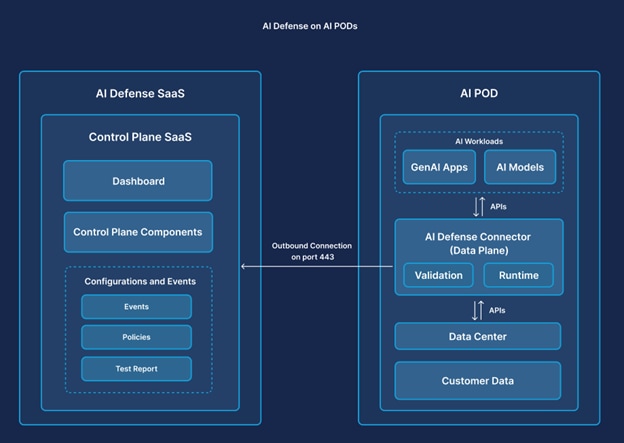
The SaaS control plane, which hosts the AI Defense cloud gateway, is accessed through Cisco Security Cloud Control (SCC) and is where configurations are set. The data plane, which hosts the AI Defense on-prem gateway, is installed on the AI POD. The cloud gateway and the on-prem gateway are the entry and exit points for all the data flowing through the control and data plane.
Communication between gateways is established over a bi-directional gRPC stream, which is encrypted using TLS. The connection is only initiated from the data plane; there are no outbound connection requests from the control plane.
Solution prerequisites
Requirements before starting the AI Defense on AI POD Deployment.
Hardware and infrastructure prerequisites
This section includes information about the prerequisites required to deploy AI Defense on AI PODs.
Network prerequisites
This network needs to be available in the on-prem environment to deploy AI Defense on Cisco AI PODs.
Table 1. Network prerequisites
| Network options |
Details |
| DNS |
Local DNS used to resolve internet access as well as local DNS address needs to be accessible to OpenShift cluster. |
| Network Access |
Outbound Internet AI Model Endpoint Access Internal DNS Access |
| Outbound Firewall Rules |
Outbound Port Access – 443 |
Hardware requirements
Cisco has identified three different validated sizing options for AI Defense on AI PODs. AI Defense will be deployed on an OpenShift Container Platform (OCP) cluster which consists of a set of Control Plane Nodes and Worker Nodes.
These tables outline the hardware requirements of the OCP Control Plane Nodes and Worker Nodes utilized for each size of the AI Defense on AI PODs deployment.
Table 2. Hardware requirements for Red Hat OCP Control Plane Nodes
| Deployment model |
Control Plane minimum requirements |
| Dedicated physical Control Plane (default) |
3x UCS C220 M7 |
| VMware-based Control Plane (UPI model) |
3x virtual machines provisioned on customer VMware vSphere infrastructure |
Control Plane deployment options
AI Defense on Cisco AI PODs supports two control plane deployment models:
Option A – Dedicated physical Control Plane (default)
● 3x UCS C220 M7 servers
● Managed as part of the AI POD infrastructure
● Recommended for fully contained on-prem AI data center deployments
Option B – VMware-based Control Plane (UPI model)
● 3x Control Plane Virtual Machines
● Deployed on customer-provided VMware vSphere infrastructure
● Uses OpenShift UPI deployment model
● Physical UCS C220 servers are not required
VMware Control Plane VM specifications
Each control plane VM must meet these minimum specifications:
● 8 vCPU
● 32 GB RAM
● 120 GB storage
● BIOS firmware mode
● VMXNET3 network adapter
● RHCOS ISO boot (UPI model)
Note: When you select the VMware-based control plane, ensure that your OpenShift subscription quantities reflect the total node count (three master VMs plus worker nodes).
Table 3. Hardware requirements for Red Hat OCP Worker Nodes
| Size |
Small |
Medium |
Large |
| Hardware Model |
UCS C845A |
UCS C845A |
UCS C845A |
| Hardware Quantity |
2 |
2 |
3 |
| GPUs Included |
4 L40S per C845A |
8 L40S per C845A |
8 L40S per C845A |
| Networking Supported |
1/10Gb, 25/50 Gb 100/200 Gb |
1/10Gb, 25/50 Gb 100/200 Gb |
1/10Gb, 25/50 Gb 100/200 Gb |
| Load Supported |
100 Req/s 20 Apps |
200 Req/s 40 Apps |
300 Req/s 60 Apps |
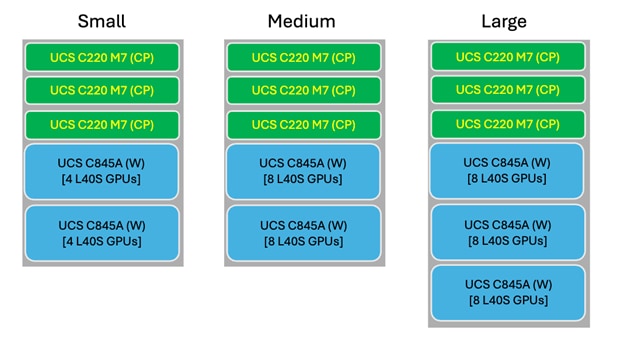
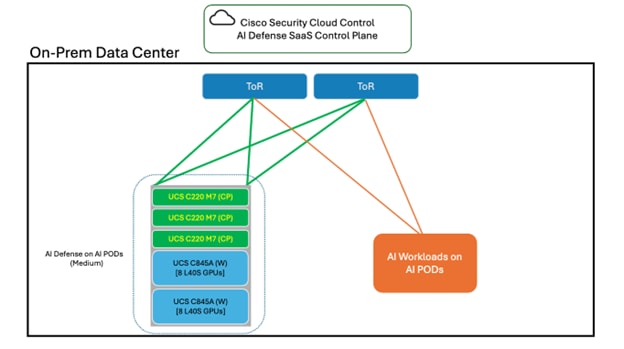
Note: Select the appropriate AI Defense on AI POD hardware size based on your needs. The application load supports an AI application running at 5 requests per second with a 2.5k token request. You may alternatively deploy the control plane nodes as virtual machines on your VMware infrastructure using the OpenShift UPI model.
OpenShift prerequisites
This table describes the OCP cluster to be configured and accessible on the hardware mentioned in the previous section.
Table 4. OpenShift prerequisites
| Option |
Details |
| Red Hat OCP Version |
4.18 or Higher |
| Red Hat OCP Cluster Jump Server |
Jump server |
| Number of OCP Control Plane Nodes |
3 (Minimum) |
| Number of OCP Worker Nodes |
2 (Minimum) |
| Network Access |
Outbound Internet AI Model Endpoint Access Internal DNS Access |
| AI Model Endpoint Access |
NVIDIA GPU Ingress Operator |
The three OCP Control Plane Nodes may be deployed as either:
● physical UCS C220 servers (default model), or
● virtual machines on VMware vSphere infrastructure (UPI deployment model).
Installation Guides
These guides can be used to assist in the installation and set up of the prerequisite software.
Table 5. OpenShift prerequisites installation guides
| Software |
Guide link |
| Red Hat OCP |
|
| NVIDIA Operator |
https://docs.nvidia.com/datacenter/cloud-native/openshift/latest/index.html |
| Ingress Operator |
Note: Runtime capability on AI Defense on AI PODs requires an Ingress Operator installed on the OCP cluster to enable inbound access to the AI Defense Proxy Gateway and API endpoint. For this guide, the Ingress NGINX operator is provided as an example.
Solution components
This section outlines all the components of the AI Defense Solution which will be required to start the deployment process.
Table 6. Solution components
| Component |
Details |
| AI Defense hybrid connector |
Deployed through Cisco Provided Helm Charts on On-Prem OCP Cluster |
| AI Defense SaaS Controller |
Accessible through Cisco SCC |
| Local DNS |
Access needed to update DNS records. |
Deployment details
These sections cover the deployment of AI Defense on AI POD.
Prerequisites checklist
Confirm the prerequisites listed in these tables are completed before moving forward:
Table 7. Network prerequisite checklist
| Network Option |
Details |
| DNS |
Local DNS used to resolve internet access as well as local DNS address needs to be accessible to OpenShift cluster. |
| Network Access |
Outbound Internet AI Model Endpoint Access Internal DNS Access |
| Outbound Firewall Rules |
Outbound Port Access – 443 |
Table 8. OpenShift prerequisite checklist
| Option |
Details |
| Red Hat OCP Version |
4.18 or newer |
| Number of OCP Control Plane Nodes |
3 (Physical or VMware-based) |
| Number of OCP Worker Nodes |
2 |
| Network Access |
Outbound Internet AI Model Endpoint Access Internal DNS Access |
| Installed Operators |
NVIDIA GPU Ingress Operator |
If deploying VMware-based Control Plane Nodes, confirm:
● vSphere infrastructure is available,
● RHCOS ISO is uploaded to datastore,
● DNS and static IP assignments are prepared, and
● ignition configurations are generated for UPI deployment.
AI Defense on AI POD installation
After the OCP cluster is set up and ready for the deployment, AI Defense can be installed. In the AI Defense UI, you will create a hybrid connector, which is the connection point with the on-prem data plane.
These instructions describe how to configure the OCP cluster for AI Defense and navigate within the AI Defense UI to get access to the appropriate commands, which will be used to deploy AI Defense to the OpenShift Cluster.
Procedure 1. How to install AI Defense on the OCP cluster:
Step 1. From the OCP jump server used to manage the cluster, connect to the OCP cluster, which will be used for the AI Defense deployment.
Step 2. Before installing the helm charts for the AI Defense on AI POD deployment, these OCP Security Context Constraints must be configured:
◦ Run these commands from the OCP jump server used to manage the OCP cluster.

Step 3. Now the helm charts can be installed in OCP. Navigate to AI Defense using Cisco SCC in the browser.
Step 4. From the Dashboard of AI Defense, use the menu on the left to navigate to Administration > Hybrid Deployment.
Step 5. Select Deploy a Connector.
Step 6. Follow the instructions provided in the interface to select your configuration preference.
Step 7. From the AI Defense UI, follow the instructions to install AI Defense from the relevant helm charts to the OpenShift Cluster. The command provided in the interface runs from the OpenShift jump server used to manage the cluster.
◦ Generate the API key. When requested, insert it into the relevant command.
Step 8. After completing the AI Defense installation from the OpenShift jump server, refresh the AI Defense interface in your browser.
Hybrid connector post deployment set up
After the AI Defense hybrid connector is up and running in the OpenShift cluster two (2) post deployment tasks need to be completed to use the deployment.
Ingress configuration
Note: Runtime capability on AI Defense on AI PODs requires an Ingress Operator installed on the OCP cluster to enable inbound access to the AI Defense Proxy Gateway and API endpoint. For this guide, the Ingress NGINX operator is provided as an example.
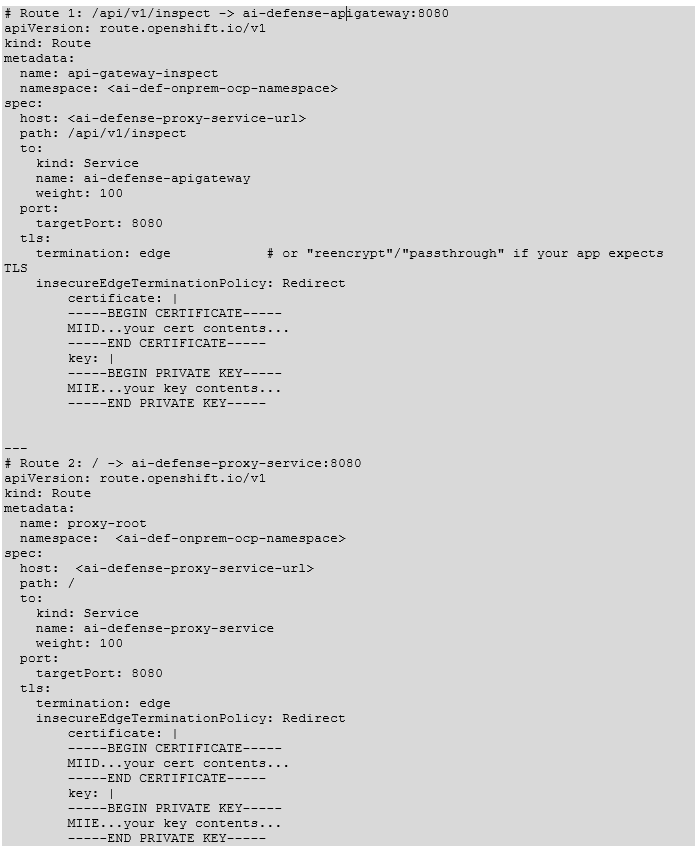
To support the AI Defense runtime use case, an ingress service will need to be configured in OCP. This will enable AI Applications in the on-prem network to use AI Defense as a proxy or query the AI Defense API.
Provided is a YAML file, which will be deployed to configure Nginx after the Nginx operator is deployed. (This should have been completed as part of the prerequisites). This YAML file creates an instance on the redirecting Ingress controller (host) to redirect to the two (2) AI Defense services, which are:
Table 9. AI Defense Ingress services
| Service |
URL |
Purpose |
| ai-defense-apigateway |
<subdomain.domain.com> Path: /api/v1/inspect |
API endpoint used for the API disposition use case |
| ai-defense-proxy-service |
<subdomain.domain.com> Path: / |
Proxy endpoint used for the AI Defense gateway use case |
In this example, we are incorporating the Certificate/Key into the Route(s) but customers may have a domain wide certificate, which can be configured in a different method. Incorporating certificates may vary depending on customer’s environment. In this environment we are inserting the certificate into the specific routes.
DNS configuration
After the AI Defense hybrid connector has been deployed on the On-Prem OCP cluster, these DNS settings must be updated in the internal DNS of the On-Prem environment.
Table 10. AI Defense On-Prem DNS entries
| DNS name |
DNS entry |
| <subdomain.domain.com> |
<IP of OpenShift Cluster Ingress Controller> |
Note: The DNS name used here is the same URL configured in the AI Defense Ingress services table.
AI Defense post-implementation validation
After the AI Defense hybrid connector has been successfully deployed to the OpenShift cluster and the post implementation steps have been completed, these commands can be run to validate the functionality of the AI Defense on AI POD deployment.
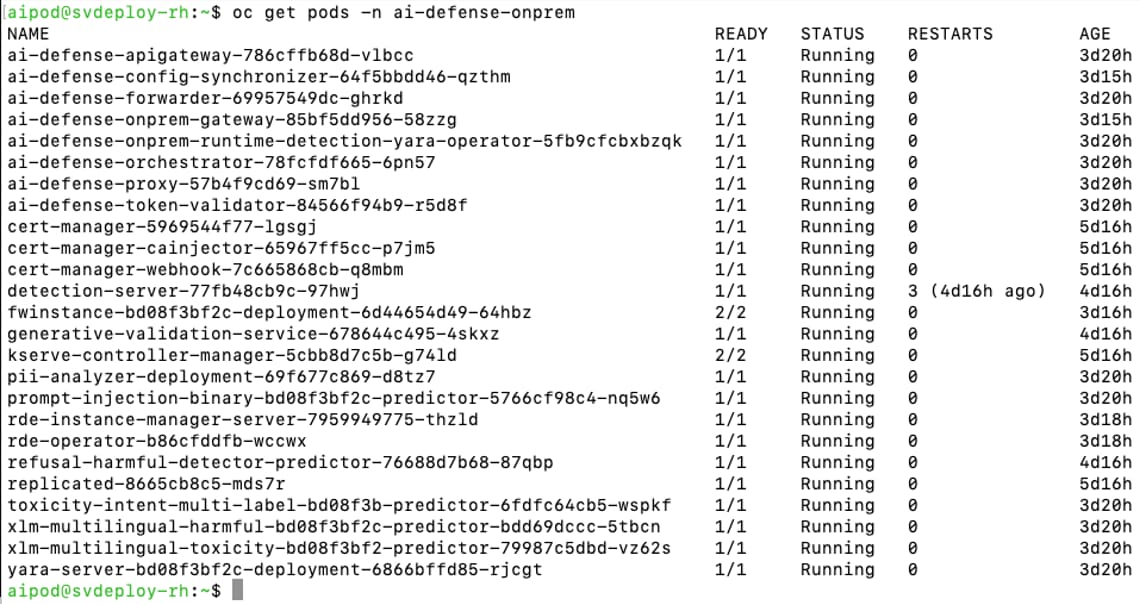
Hybrid connector deployment validation - View all AI Defense PODs
View all the PODs that have been deployed as part of the AI Defense on AI POD deployment.

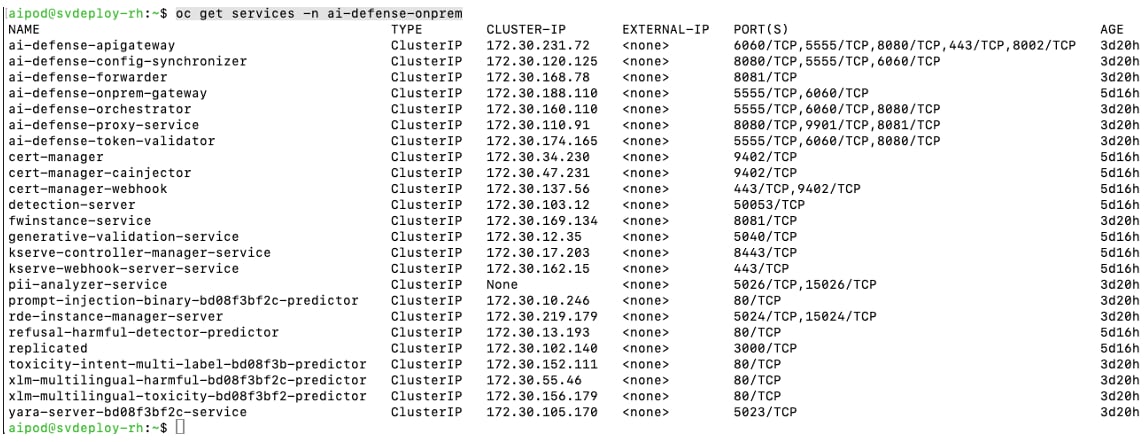
Hybrid connector deployment validation – View all AI Defense services
View all the services which have been deployed as part of the AI Defense On-Prem deployment.

Hybrid connector deployment validation - View all AI Defense routes
View all the routes that have been deployed as part of the AI Defense On-Prem deployment.


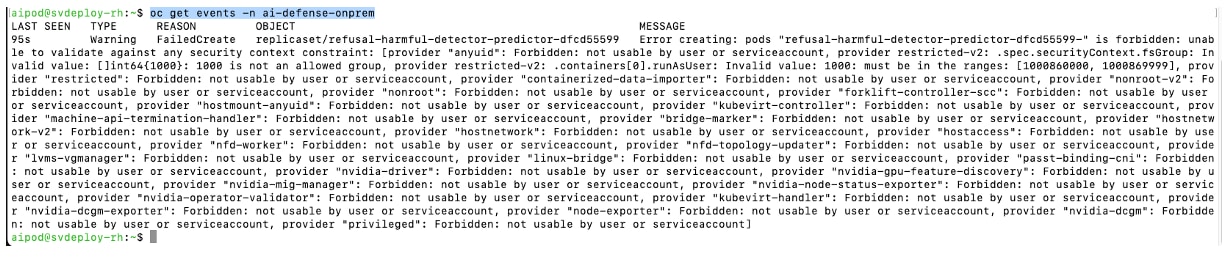
Hybrid connector deployment validation - View AI Defense namespace events
View the events to gain additional information about the PODs deployed in the AI Defense namespace on the OpenShift cluster.

Operations
This section gives a high-level overview of the AI Defense use cases applicable to AI Defense on AI PODs.
Note: See the User Guide for more information on the use cases and key capabilities of AI Defense.
Validation runs
AI Defense model validation is an advanced automated testing service designed to assess the security, privacy, and safety of AI models and applications.
Key benefits of validation:
● Comprehensive security testing – Evaluates AI models against a wide range of adversarial scenarios.
● Automated and scalable – Rapidly executes thousands of security tests without manual intervention.
● Standards-aligned reports – Generates validation test reports that adhere to industry frameworks such as:
◦ OWASP Top 10 for LLM Applications
◦ MITRE ATLAS
Validation report output helps to inform and refine the security policies you enforce in AI Defense Runtime, ensuring robust AI system protection.
Using the validation feature to validate a cloud-based, public model from an AI Defense on AI POD deployment is possible. Refer to the documentation for instructions. This guide focuses on validation tests against an AI Model hosted on your AI POD.
AI validation with the AI POD model
This section outlines the procedure to set up and run an AI Defense validation test against an AI POD hosted model.
Validation test prerequisites
Before starting this AI model validation test use case test these prerequisites must be completed:
Table 11. AI model validation test prerequisites
| Prerequisite |
Details |
| On-Prem AI Model |
An AI model should be configured and reachable at an https:// endpoint. An http:// endpoint can be utilized too, but it is preferred to utilize an https:// endpoint. |
| On-Prem AI Model Header Structure |
Structure utilized for the headers of a request made to this On-Prem AI Model Endpoint. |
| On-Prem AI Model Payload Structure |
Structure utilized for the payload of a request made to this On-Prem AI Model Endpoint. |
Validation test procedure
Note: After an AI Defense hybrid connector is successfully deployed, AI Defense validation runs can be executed in the same way as AI Defense SaaS. Refer to the documentation for further information.
Procedure 2. To start an AI Defense Validation run:
Step 1. From the AI Defense interface use the navigation menu on the left and select Validation.
Step 2. Select the button on the top right “+ Run Validation” to set up a new validation run.
Step 3. In the pop-up box enter this information:
Table 12. AI Defense validation run options
| Validation setting |
Setting selection |
| Asset Type |
External |
| Test Name |
<Validation Test Name> |
| Description (optional) |
|
| Target Endpoint |
<On-Prem AI Model URL, with extension> |
| Request Body Template |
<template of request body expected by model> |
| Path to Model Response |
choices.0.message.contents (default option for most models, update if your model will respond using a different format) |
| API Provider |
None |
| HTTP Headers |
None |
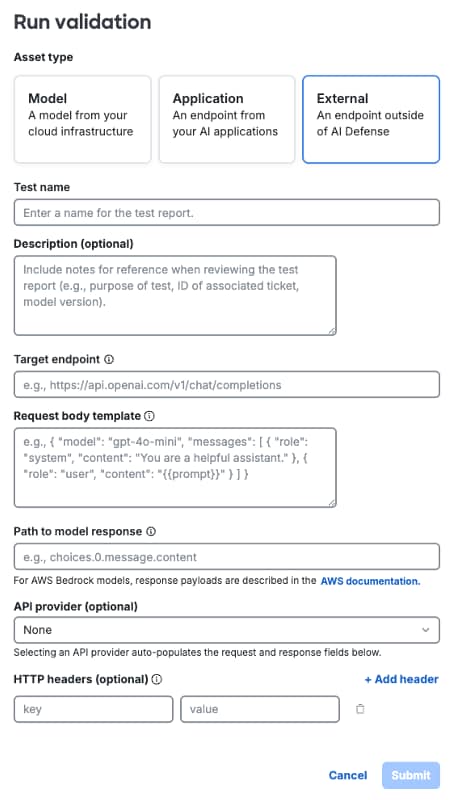
Step 4. After entering the relevant settings, click Submit to run the validation test. When submitted the validation test should begin.
Step 5. To check on the status of the validation run, navigate to Validation and select the name of the test you entered earlier.
Runtime
AI Defense runtime protection secures your LLM chat applications by inspecting user prompts and LLM responses in real time. When runtime protection detects content that violates your security, privacy, or safety policies, it raises an alert in the Events log and, if configured, blocks the content from reaching the user or the LLM.
In AI Defense, each chat application is represented as an application visible in the Applications panel. Each application contains one or more connections to represent the LLM API(s) being protected. Once you've created an application and its connections, you apply a runtime protection policy to each connection to secure it.
An application connection can be configured as an AI Defense gateway connection, or an API connection. See the AI Defense User Guide for more information.
AI Defense GW
AI application runtime protection integration uses the gateway-deployed approach to AI runtime, which enables AI Defense to monitor traffic to and from your AI model or application. In this approach, the AI Defense gateway acts as a proxy between your AI application and its users. Gateway-deployed runtime logs an event each time your policy is triggered and allows your policy rules to block each prompt or response that violates your policy.
AI Defense gateway prerequisites
Before starting this runtime protection test use case, these prerequisites must be completed:
Table 13. Runtime protection test – AI Defense gateway prerequisites
| Details |
|
| On-Prem AI Application |
AI Application should be able to reach the AI Defense Gateway endpoint. User should have the ability to modify/configure the application itself. |
| AI Model Endpoint |
URL of the AI Model endpoint utilized by the AI Application. |
AI Defense gateway procedure
Procedure 3. To test the AI Defense gateway runtime protection use case:
Step 1. From the AI Defense Dashboard navigate to Applications.
Step 2. Select + Add Application to start the configuration process. This object created in AI Defense can be configured with multiple connections if more than one model is utilized by the application.
Step 3. Fill in these values:
◦ Name:
◦ Connection Type: Gateway
◦ Description:
Step 4. Select Continue to save the application object in AI Defense.
Step 5. AI Defense redirects to the application object created in the previous step. Now connections can be added.
Step 6. Select Add Connection.
Step 7. To complete the connection configuration an endpoint needs to be added to AI Defense. Select Add or manage endpoint.
Step 8. Select Add Endpoint.
a. Select Model Provider > External Model.
b. Enter the AI Model URL collected during the prerequisite phase. This is the URL of the AI Model currently utilized by the AI application.
c. Select Save to save the endpoint.
d. Select Done.
Step 9. From the Add Connection menu, select the AI endpoint just created in the previous step and provide the connection with a name. Select Add Connection to save the configuration.
Step 10. On the application’s page in AI Defense, select the three dots on the right for the connection that was just created.
a. Select Connection Guide.
b. Copy the Gateway URL. Replace the host in the URL to the ai-defense-proxy-service URL created when setting up AI Defense on AI PODs. Save this for later (Step 14).
Step 11. Close the Connection Guide and using the menu on the left, navigate to Policies. The next step is to create a policy that can be applied to this connection.
Step 12. Select Create Policy, which redirects to a wizard for the policy configuration.
a. Enter a Name, Description, and Language (English for now), then click Next.
b. Use the radio button at the top to select Gateway then select the connection created earlier in this procedure. Click Next.
c. Continue through the Privacy and Safety guardrails, enabling Prompt and Response and Block for all options where possible.
d. Review the Policy Summary at the end and click Save and Enable to implement the policy for the selected connections.
Step 13. AI Defense is now configured to secure the AI application. Configure the AI application to use AI Defense.
Step 14. The gateway URL gathered earlier in this process replaces the AI Model URL currently used by the AI application. Update the AI application to point to this URL. All AI requests are proxied through AI Defense, enabling it to enforce the relevant policy.
API disposition
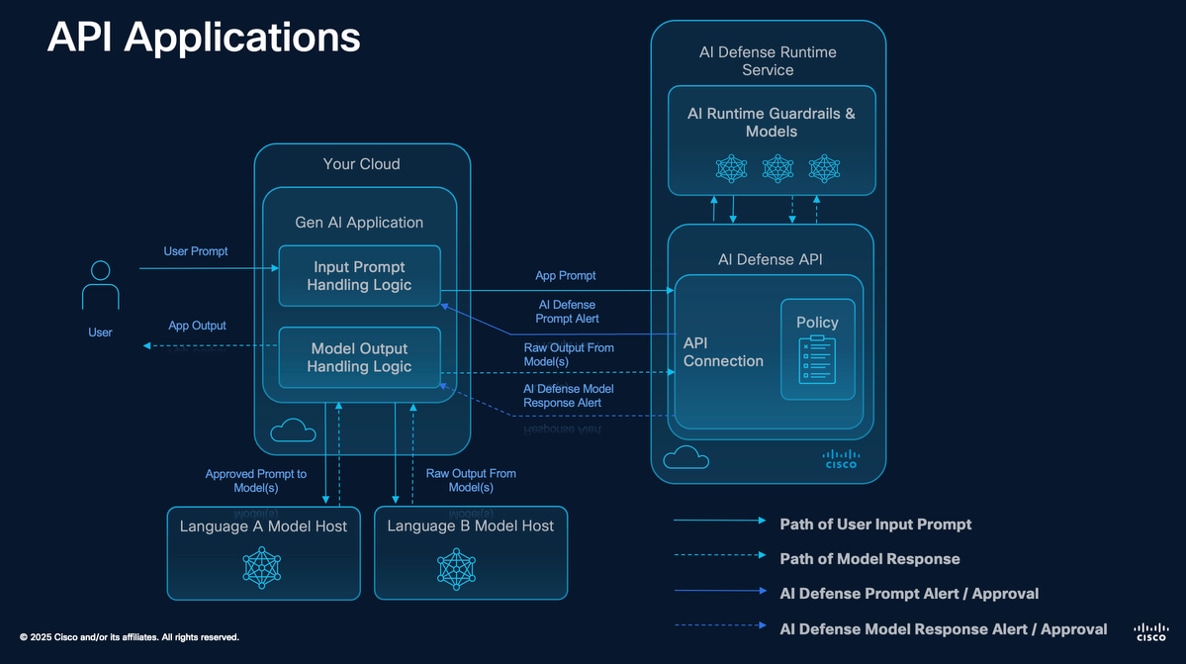
For the AI application runtime protection integration, the API runtime protection approach does not actively monitor your applications in real time. Instead, it evaluates prompts and responses only when they are explicitly sent to the runtime API endpoint. This means that enforcement and decision-making remain within your application, allowing you to process AI-generated content based on the evaluation results. If you require continuous, inline monitoring and automatic blocking of unsafe interactions, consider using runtime gateway for enhanced protection.
When using on-demand runtime, your policy rules do not block prompts or responses. Instead, AI Defense returns a response to your API call, and your application can react based on the response. Runtime logs policy violations in the event log.
API disposition prerequisites
Before starting this runtime protection test use case, these prerequisites must be completed:
Table 14. Runtime protection test – API disposition prerequisites
| Prerequisite |
Details |
| On-Prem AI Application |
AI Application should be able to reach the AI Defense API endpoint. User should have the ability to modify/configure the application itself. |
API disposition procedure
Procedure 4. To test the API disposition AI Defense runtime protection use case:
Step 1. From the AI Defense Dashboard navigate to Applications.
Step 2. Select + Add Application to start the configuration process. This object created in AI Defense can be configured with multiple connections if more than one model is utilized by the application.
Step 3. Fill in these values:
◦ Name:
◦ Connection Type: Gateway
◦ Description:
Step 4. Select Continue to save the application object in AI Defense.
Step 5. AI Defense redirects to the application object created in the previous step. Now connections can be added.
Step 6. Select Add Connection.
Step 7. Provide a name for the connection.
Step 8. Create an API key. This API key enables an application to authenticate to the AI Defense API endpoint when making and API call.
a. Provide a Name.
b. Provide an Expiration Date.
c. Select Generate API key.
Note: Save this API key in a secure location for use later. When navigated away from the Add API key page, the API key is no longer be accessible.
Step 9. Close the Add API key menu and select Done. Then navigate to Policies using the menu on the left. The next step will be to create a policy which can be applied to this connection.
Step 10. Select Create Policy to redirect to a wizard for the policy configuration.
a. Enter a Name, Description, and Language (English for now), then click Next.
b. Use the radio button at the top to select Gateway then select the connection created earlier in this procedure. Click Next.
c. Continue through the Privacy and Safety guardrails, enabling Prompt and Response and Block for all options where possible.
d. Review the Policy Summary at the end and click Save and Enable to implement the policy for the selected connections.
Step 11. AI Defense is now configured to secure the AI application. Configure the AI application to use the AI Defense API.
Step 12. Using this data, integrate AI Defense into the AI application.
a. API URL: Use URL plus extension found in AI Defense Ingress Services.
b. API Key: Collected in the previous step.
Note: See the AI Defense API documentation for more information on integrating the API disposition use case into an AI application.
Monitoring and observability
OpenTelemetry can be configured to send telemetry from the AI Defense on AI PODs deployment. For more information about setting up OpenTelemetry on OCP, see: https://docs.redhat.com/en/documentation/openshift_container_platform/4.12/html/red_hat_build_of_opentelemetry/install-otel
Monitoring of the AI Defense on AI POD deployment can also be done through the standard OCP logging mechanism. Utilizing OCP logging, or by sending logs to an external log collector, the AI Defense on AI POD logs can be collected and analyzed. For more information about how to setup external logging for an OCP cluster, see: https://docs.redhat.com/en/documentation/openshift_container_platform/4.8/html/logging/cluster-logging-external