Configuring Multicast in LISP VXLAN Fabric

Multicast traffic forwarding is used to simultaneously distribute copies of data to multiple network destinations. In a LISP VXLAN fabric, multicast traffic flow can be handled in the overlay or the underlay, depending on whether the underlay network supports multicast replication or not. This chapter describes how to configure overlay multicast in a LISP VXLAN Fabric.

LISP VXLAN Fabric Multicast Overview


Note


This document assumes that the reader is familiar with the fundamentals of Multicast technology. To understand the basics of Multicast technology, refer IP Multicast Technology Overview.


LISP VXLAN Fabric supports the following:

  • Layer 2 overlay Broadcast, Unknown Unicast, and Multicast (BUM) traffic to be transported over IP multicast in the underlay network

  • Layer 3 overlay multicast

Layer 2 Overlay Broadcast, Unknown Unicast, and Multicast

Multidestination Layer 2 traffic in a network is typically referred to as broadcast, unknown unicast, and multicast (BUM) traffic. In a LISP VXLAN Fabric, the underlay network forwards the BUM traffic to all the endpoints connected to a common Layer 2 broadcast domain in the VXLAN overlay. The BUM functionality is achieved using the Any Source Multicast (ASM) model in the underlay network. The rendezvous points (RPs) are configured on the border nodes. The RLOC devices, which are the source and receivers, join the shared multicast group that is attached to the RPs. We recommend a dual border topology with the RPs configured on both the border nodes for redundancy.


Note


Only IPv4 traffic is supported in the underlay.


Layer 3 Overlay Multicast

LISP VXLAN Fabric supports both PIM Any Source Multicast (ASM) and PIM Source Specific Multicast (SSM) in the overlay. Layer 3 overlay multicast supports only IPv4 multicast traffic.

The multicast source can either be outside the fabric site or can be in the fabric overlay, connected to the fabric edge node. Multicast receivers can be located outside the fabric site or be directly connected to the fabric edge nodes.

Multicast forwarding in the Layer 3 overlay uses two methods to distribute the traffic through the underlay: Headend Replication and Underlay Multicast. You can configure either Headend Replication or Underlay Multicast in a virtual network. Both cannot be configured together.


Note


Bidirectional PIM (Bidir-PIM) is not supported in the overlay and the underlay network.


Any Source Multicast

Any Source Multicast (ASM) is a multicast distribution mode that requires the use of rendezvous points (RPs) to act as a shared root between sources and receivers of multicast data. You can configure a single RP or multiple RPs in the network.

To configure ASM mode in the Layer 3 overlay, you configure the RP selection method, where you indicate the distribution mode and assigns the range of multicast groups.

External RP

External devices can be designated as the RP for the multicast tree in a fabric. To function as an external RP, a device must be a router with PIM enabled. This device is located external to the fabric and is connected to the fabric through one or more border nodes. The External RP address must be reachable in the VRF routing table on the border nodes.


Note


This release of LISP VXLAN Fabric supports only external RP for overlay multicast traffic.


Source Specific Multicast

Source Specific Multicast (SSM) creates an optimal path between the multicast source and receiver without the need for a rendezvous point.

You can configure the SSM multicast range that can be supported by the fabric.

Headend Replication

Headend replication is performed by the multicast first-hop router. The first fabric node (FHR) that receives the multicast traffic replicates multiple copies of the VXLAN-encapsulated data packet and unicasts a copy to each of the remote fabric edge nodes where the multicast receivers are located.

The advantage of headend replication is that it does not require multicast in the underlay network to transport the overlay multicast packets. However, it can create a high overhead on the FHRs and result in high bandwidth and CPU utilization.
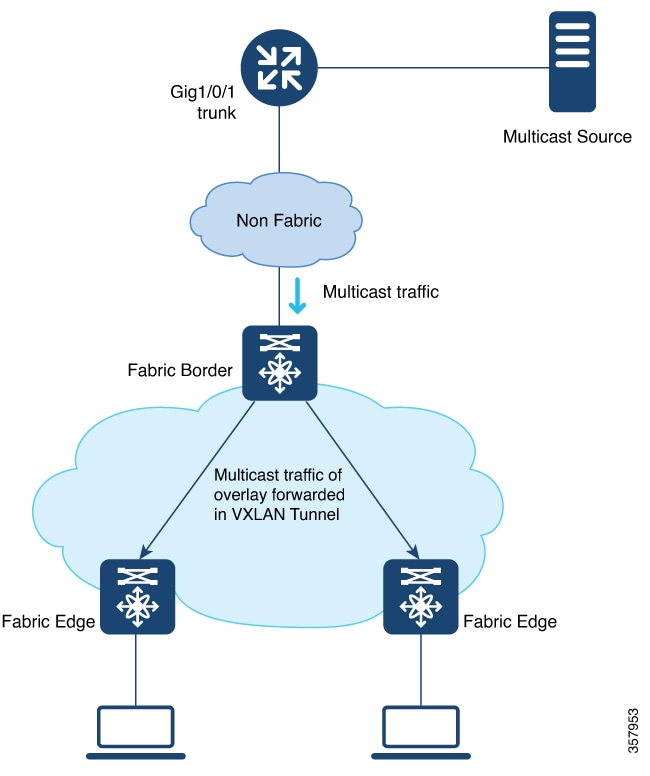
Figure 1. Headend Replication in a LISP VXLAN

Underlay Multicast

Underlay multicast works by performing multicast-in-multicast encapsulation. The multicast packets in the overlay network are transported as multicast in the underlay. The load of packet replication is shared across all the devices in the underlay network. To support underlay multicast, the FHRs, Last Hop Routers (LHRs), and all network infrastructure between them must be enabled for multicast. PIM SSM is used in the underlay for multicast transport.

Figure 2. Underlay Multicast Forwarding in LISP VXLAN

Layer 3 Overlay Multicast Support in LISP VXLAN Fabric

The following multicast methods are supported in this release of LISP VXLAN Fabric:

Layer 3 Overlay Multicast

  • SSM with Underlay Multicast

  • SSM with Headend Replication

  • ASM with Underlay Multicast, External Rendezvous Point

  • ASM with Headend Replication, External Rendezvous Point

How to Configure Broadcast, Unknown Unicast, Multicast

Layer 2 multicast supports only IPv4 multicast traffic in the underlay. Configure ASM mode in the underlay, with the RPs located on the border nodes. If the network has more than one border, configure the RPs on two border nodes with Multicast Source Discovery Protocol (MSDP) to provide redundancy in the network. Configure the fabric edge nodes or the RLOC devices as the multicast source and receivers.

Configure Layer 2 Overlay Broadcast, Unknown Unicast, and Multicast

Do the following configurations on the border node and edge node devices to configure Layer 2 overlay Broadcast, Unknown Unicast, and Multicast (BUM) traffic in the underlay network.

Before you begin

  • Ensure that multicast is enabled in the underlay.

  • Configure the border node device as the underlay rendezvous point.

  • Ensure that Multicast Source Discovery Protocol (MSDP) is enabled between the border nodes in the underlay network.

  • Ensure that PIM sparse-mode is enabled on Loopback 0 and all point-to-point interfaces.

Procedure


Step 1

Configure Multicast Source Discovery Protocol (MSDP) on the border nodes in the underlay.

If your fabric network has dual borders, configure MSDP on each of the borders to exchange multicast source information. MSDP also provides redundancy and load sharing between the two borders.

  1. ip msdp peer peer-address connect-source type [interface-path-id]

    Example:

    Device(config)# ip msdp peer 172.16.1.67 connect-source Loopback0

    Configures the MSDP peer and specifies the Loopback interface of the device as the source address for the MSDP connection. peer-address is the loopback0 address of the other border node.

  2. ip msdp cache-sa-state

    Example:

    Device(config)# ip msdp cache-sa-state

    Configures the Source-Active (SA) cache to store the SA messages that are received from the peer.

    The SA cache holds the information for all sources learned through SA messages.

  3. ip msdp originator-id type [interface-path-id]

    Example:

    Device(config)# ip msdp originator-id Loopback0

    Allows an MSDP speaker that originates an SA message to use the loopback0 address of the interface as the RP address in the SA message.

Step 2

Configure the Loopback interface for the anycast RP on the border nodes and enable PIM sparse mode on it.

Example:

Device(config)# interface Loopback100
Device(config-if)# ip address 172.16.1.100 255.255.255.255
Device(config-if)# ip pim sparse-mode

Step 3

ip multicast-routing

Example:

Device(config)# ip multicast-routing
                     

Enables IP multicast routing.

Step 4

ip pim register-source interface

Example:

Device(config)# ip pim register-source Loopback0
                     

Configures the loopback address of the device as the source address of a PIM Register message.

Step 5

ip pim rp-address address

Example:

Device(config)# ip pim rp-address 172.16.1.100
                     

Configures a static rendezvous point (RP) address.

Step 6

ip pim ssm default

Example:

Device(config)# ip pim ssm default
                     

Defines a default range of SSM multicast address.

Step 7

Do the following configurations on the fabric edge node:

  1. router lisp

    Example:

    Device(config)# router lisp

    Enters LISP configuration mode.

  2. instance-id id

    Example:

    Device(config-router-lisp)# instance-id 8188

    Specifies the instance ID.

  3. service ethernet

    Example:

    Device(config-router-lisp-inst)# service ethernet

    Enables Layer 2 network services.

  4. eid-table vlan vlan-id

    Example:

    Device(config-router-lisp-inst-serv-ethernet)# eid-table vlan 50

    Associates the VLAN with this Layer 2 service instance.

  5. broadcast-underlay multicast-ip

    Example:

    Device(config-router-lisp-inst-serv-ethernet)# broadcast-underlay 239.0.17.1

    Enables the broadcast functionality on the fabric edge node.

  6. flood unknown-unicast

    Example:

    Device(config-router-lisp-inst-serv-ethernet)# flood unknown-unicast

    Floods the unknown broadcast, unicast packets in the Layer 2 domain.

  7. flood arp-nd

    Example:

    Device(config-router-lisp-inst-serv-ethernet)# flood arp-nd

    Enables Address Resolution Protocol (ARP) flooding in the Layer 2 domain.

  8. exit-service-ethernet

    Example:

    Device(config-router-lisp-inst-serv-ethernet)# exit-service-ethernet

    Exits service Ethernet configuration mode, and enters LISP instance configuration mode.

  9. exit-instance-id

    Example:

    Device(config-router-lisp-inst)# exit-instance-id

    Exits instance configuration mode, and enters LISP configuration mode.

  10. end

    Example:

    Device(config-router-lisp)# end

    Returns to privileged EXEC mode.

Repeat the steps to enable broadcast, unknown unicast, and multicast functionality for all the Layer 2 instances that were created while configuring the fabric edge node

Refer the Configuring Fabric Edge Node chapter to see the Layer 2 instances that are created.


Configuration Example for Layer 2 Overlay Broadcast, Unknown Unicast, Multicast

Here is a sample configuration for Layer 2 overlay BUM traffic. The fabric network has two colocated border and control plane nodes. The underlay anycast RP is configured on the dual border nodes.

Note that the table shows only the snippet of the configurations that are required to enable Layer 2 overlay BUM.

Table 1. Fabric Edge and Border Node Configurations for Layer 2 BUM

Border Node Configurations

Fabric Edge Node Configurations

Border Node 1
 
interface Loopback0
 ip address 172.16.1.66 255.255.255.255
 ip pim sparse-mode
!
interface Loopback100
 ip address 172.16.1.100 255.255.255.255
 ip pim sparse-mode
  
ip multicast-routing
ip pim rp-address 172.16.1.100
ip pim register-source Loopback0
ip pim ssm default
!!
ip msdp peer 172.16.1.67 connect-source Loopback0
ip msdp cache-sa-state
ip msdp originator-id Loopback0
Border Node 2
 
interface Loopback0
 ip address 172.16.1.67 255.255.255.255
 ip pim sparse-mode
!
interface Loopback100
 ip address 172.16.1.100 255.255.255.255
 ip pim sparse-mode
!  
ip multicast-routing
ip pim rp-address 172.16.1.100
ip pim register-source Loopback0
ip pim ssm default
!
ip msdp peer 172.16.1.66 connect-source Loopback0
ip msdp cache-sa-state
ip msdp originator-id Loopback0
 
   
instance-id 8197
  service ethernet
   eid-table vlan 50
   broadcast-underlay 239.0.17.1
   flood arp-nd
   flood unknown-unicast
   exit-service-ethernet
  !      
 
ip multicast-routing
ip pim rp-address 172.16.1.100
ip pim register-source Loopback0
ip pim ssm default

How to Configure Layer 3 Overlay Multicast in a LISP VXLAN Fabric

This section uses a single procedure to describe the configuration steps for the Headend Replication (ASM and SSM) and Underlay Multicast (ASM and SSM) forwarding methods. Some steps are applicable only to a particular method, either Headend Replication or Underlay Multicast. Such steps are called out clearly at the beginning of the respective step.

The configuration procedure is followed by configuration examples.

Configure Layer 3 Overlay Multicast in a LISP VXLAN Fabric

This task describes how to configure multicast in the overlay network, and assumes that multicast is already configured in the underlay network.


Note


Unless otherwise noted, perform the following steps on both the border node and fabric edge node.


Before you begin

  • Ensure that multicast is enabled in the underlay network.

  • Ensure that the control plane node, border node, and edge nodes of the overlay are configured and virtual routing and forwarding (VRF) routing table instances are configured for unicast communication. Refer earlier chapters of this document for information on configuring the fabric.


Note


Ensure that you configure PIM Sparse mode on all the core-facing fabric devices.


Procedure


Step 1

Enable multicast routing for the overlay network, using the ip multicast-routing vrf vrf-name command in the global configuration mode.

Example:

Device(config)# ip multicast-routing vrf VN3
               

Enables IP multicast routing on the specified VRF.

Step 2

Configure a Loopback interface for multicast segment.

  1. interface Loopback multicast-segment-interface

    Example:

    Device(config)# interface Loopback4099
                         

    Configures the loopback interface and enters the interface configuration mode.

  2. vrf forwarding vrf-name

    Example:

    Device(config-if)# vrf forwarding VN3
                         

    Enables VRF forwarding on the interface.

  3. ip address address mask

    Example:

    Device(config-if)# ip address 10.22.1.1 255.255.255.255
                         

    Assigns an IP address to the interface.

  4. ip pim sparse-mode

    Example:

    Device(config-if)#ip pim sparse-mode
                         

    Enables Protocol Independent Multicast (PIM) on the interface for sparse-mode operation.

  5. exit

    Example:

    Device(config-if)# exit
    Device(Config)#
    

    Returns to the global configuration mode.

Step 3

Enable PIM on the LISP interface.

  1. interface interface-name

    Example:

    Device(config)# interface LISP0.4099
                         

    Configures the LISP interface and enters the LISP interface configuration mode.

  2. Perform this step only for Underlay Multicast: ip pim lisp transport multicast

    Example:

    Device(config-if)# ip pim lisp transport multicast
                         

    Enables multicast on the LISP interface.

  3. Perform this step only for Headend Replication: ip pim sparse-mode

    Example:

    Device(config-if)# ip pim sparse-mode

    Enables Protocol Independent Multicast (PIM) on the interface for sparse-mode operation.

    Execute this step only if you are configuring Headend Replication.

  4. Perform this step only for Headend Replication with SSM: ip pim lisp core-group-range start-SSM-address range-size

    Example:

    Device(config-if)# ip pim lisp core-group-range 232.0.0.1 1000
                         

    Configures the group of IP addresses for SSM on a LISP interface, to transport multicast traffic.

  5. exit

    Example:

    Device(config-if)# exit
    Device(config)#
    

    Returns to the global configuration mode.

Step 4

On the border node, if Layer 3 handoff is configured, configure PIM on the Layer 3 overlay.

  1. interface interface-number

    Example:

    Device(config)# interface Vlan222
                         

    Enters the Layer 3 overlay SVI configuration mode.

  2. ip pim sparse-mode

    Example:

    Device(config-if)#ip pim sparse-mode
                         

    Enables Protocol Independent Multicast (PIM) on the SVI for sparse-mode operation.

  3. exit

    Example:

    Device(config-if)# exit
    Device(config)#
    

    Returns to the global configuration mode.

Step 5

On the edge node, enable PIM and IGMP for the user-defined VRF.

  1. interface interface-number

    Example:

    Device(config)# interface Vlan50
                         

    Enters the interface configuration mode for the user-defined VRF.

  2. vrf forwarding vrf-name

    Example:

    Device(config-if)# vrf forwarding VN3
                         

    Enables VRF forwarding on the interface.

  3. ip pim passive

    Example:

    Device(config-if)# ip pim passive
                         

    Configures a PIM passive interface.

    A PIM passive interface does not send or receive any PIM control messages. However, a PIM passive interface acts as designated router (DR) and designated forwarder (DF)-election winner, and it can accept and forward multicast data.

  4. ip igmp version {1 | 2 | 3}

    Example:

    Device(config-if)# ip igmp version 3
                         

    Configures the version of the Internet Group Management Protocol (IGMP) for the device to use.

  5. exit

    Example:

    Device(config-if)# exit
    Device(config)#
    

    Returns to the global configuration mode.

Step 6

Map the multicast EID database to the instance ID of the VRF.

  1. router lisp

    Example:

    Device(config)# router lisp
                         

    Enters LISP configuration mode.

  2. instance-id id

    Example:

    Device(config-router-lisp)# instance-id 4099
                         

    Specifies the instance ID of the VRF.

  3. service ipv4

    Example:

    Device(config-router-lisp-inst)# service ipv4
                         

    Enables Layer 3 network services for this instance-id.

  4. database-mapping eid-prefix/prefix-length locator-set RLOC_name

    Example:

    Device(config-router-lisp-inst-serv-ipv4)# database-mapping 10.22.1.2/32 locator-set eid_LOCATOR
                         

    Configures EID-to-RLOC relationship in the LISP database.

  5. exit-service-ipv4

    Example:

    Device(config-router-lisp-inst-serv-ipv4)# exit-service-ipv4
                         

    Exits service IPv4 configuration mode, and enters LISP instance configuration mode

  6. exit-instance-id

    Example:

    Device(config-router-lisp-inst)# exit-instance-id
                         

    Exits instance configuration mode, and enters LISP configuration mode.

Step 7

(Optional) On the border node, advertise the loopback interface of the multicast segment to the external domain, using the BGP routing process.

  1. router bgp autonomous-system-number

    Example:

    Device(config)# router bgp 700
                         

    Configures a BGP routing process, and enters router configuration mode for the specified routing process.

  2. address-family {ipv4 | ipv6} [vrf vrf-name]

    Example:

    Device(config-router)# address-family ipv4 vrf VN3
                         

    Specifies the VRF instance with which the subsequent address family configuration commands are associated.

  3. network network-number [mask network-mask] [route-map route-map-name]

    Example:

    Device(config-router-af)# network 10.22.1.1 mask 255.255.255.255
                         

    Specifies the network to be advertised by BGP and adds it to the BGP routing table.

  4. aggregate-address address mask [summary-only]

    Example:

    Device(config-router-af)#  aggregate-address 10.22.1.0 255.255.255.0 summary-only 
                         

    Generates an aggregate entry in the BGP database.

    Use the optional summary-only keyword to create the aggregate route (for example, 10.*.*.*) and also suppresses advertisements of more-specific routes to all neighbors.

  5. exit-address-family

    Example:

    Device(config-router-af)# exit-address-family
                         

    Exits the address family configuration mode.

  6. exit

    Example:

    Device(config-router)# exit
    Device(config)#
    

    Returns to the global configuration mode.

Step 8

Perform this step only for SSM: Define the range of SSM multicast address.

  1. ip pim vrf vrf-name ssm range access-list

    Example:

    Device(config)# ip pim vrf VN3 ssm range SSM_RANGE_VN3
                         

    Configures the SSM service for the IP address range defined by the access list.

  2. ip access-list standard access-list-name

    Example:

    Device(config)# ip access-list standard SSM_RANGE_VN3
    Device(config)# 10 permit 232.0.0.0 0.255.255.255
    Device(config)# exit
                         

    Define the the access list for the SSM multicast IP address.

Step 9

Perform this step only for ASM: Create a loopback for PIM and configure a static rendezvous point.

  1. ip pim vrf vrf-name register-source interface-type interface number

    Example:

    Device(config)# ip pim vrf VN3 register-source Loopback4099
                         

    Configures the loopback address of the VRF as the source address of a PIM Register message.

  2. ip pim vrf vrf-name rp-address rp-address [access-list]

    Example:

    Device(config)# ip pim vrf VN3 rp-address 172.16.3.1 ASM_ACL_IPV4_VN3_172.16.3.1
                         

    Configures the IP address of the rendezvous point to be used for the static group-to-RP mapping and specifies the access list that defines the multicast groups to be statically mapped to the rendezvous point.

Step 10

Enable PIM sparse mode on all the core-facing interfaces of the underlay network.

Example:

Device(config)# interface Gigabitethernet1/0/1
               
Device(config)# ip pim sparse
               

Repeat this step for all the core-facing interfaces of the fabric devices.


Configuration Example for Underlay Multicast with SSM

This is a sample configuration for Underlay Multicast with SSM. In this sample, 10.22.1.0/24 is the multicast subnet. Multicast source is located outside the fabric. The multicast listeners are within the fabric overlay. This configuration assumes that multicast is already configured in the underlay and the LISP VXLAN fabric edge nodes, border node, and control plane node are also up and running.

Table 2. Configurations on the Fabric Edge and Border Nodes

Border Node Configurations

Edge Node Configurations

ip multicast-routing vrf VN3
!
interface Loopback4099
 vrf forwarding VN3
 ip address 10.22.1.1 255.255.255.255
 ip pim sparse-mode
!
 
interface LISP0.4099
 ip pim lisp transport multicast
 ip pim lisp core-group-range 232.0.0.1 1000
!
 
interface Vlan222
 ip pim sparse-mode
 
router lisp
 instance-id 4099
  service ipv4
   database-mapping 10.22.1.1/32 locator-set eid_LOCATOR
   exit-service-ipv4
  !
  exit-instance-id
 !

router bgp 700
 !
 address-family ipv4 vrf VN3
  network 10.22.1.1 mask 255.255.255.255
  aggregate-address 10.22.1.0 255.255.255.0 summary-only
 exit-address-family
 !
!

ip pim vrf VN3 ssm range SSM_RANGE_VN3
!
ip access-list standard SSM_RANGE_VN3
 10 permit 232.0.0.0 0.255.255.255
! 

interface Gig/Tengig/Hunderxxx
ip pim sparse
 
ip multicast-routing vrf VN3
!
interface Loopback4099
 vrf forwarding VN3
 ip address 10.22.1.2 255.255.255.255
 ip pim sparse-mode
!
interface LISP0.4099
 ip pim lisp transport multicast
 ip pim lisp core-group-range 232.0.0.1 1000
!

interface Vlan50
 vrf forwarding VN3
 ip pim passive
 ip igmp version 3
 ip igmp explicit-tracking

router lisp
 instance-id 4099
  service ipv4
   database-mapping 10.22.1.2/32 locator-set eid_LOCATOR
   exit-service-ipv4
  !
  exit-instance-id
 !

ip pim vrf VN3 ssm range SSM_RANGE_VN3
!
ip access-list standard SSM_RANGE_VN3
 10 permit 232.0.0.0 0.255.255.255
!

interface Gig/Tengig/Hunderxxx
ip pim sparse

Configuration Example for Underlay Multicast with ASM, External RP

This is a sample configuration for Underlay Multicast with ASM. In this sample, 10.22.1.0/24 is the multicast subnet. Multicast source is located outside the fabric. The multicast listeners are within the fabric overlay. The rendezvous point (RP) is located external to the fabric. This configuration assumes that multicast is already configured in the underlay and the LISP VXLAN fabric edge nodes, border node, and control plane node are also up and running.

Table 3. Configurations on the Fabric Edge and Border Nodes

Border Node Configurations

Edge Node Configurations

ip multicast-routing vrf VN3
!

interface Loopback4099
vrf forwarding VN3
ip address 10.22.1.1 255.255.255.255
ip pim sparse-mode
!

interface LISP0.4099
ip pim lisp transport multicast
ip pim lisp core-group-range 232.0.0.1 1000
!

interface Vlan222
 ip pim sparse-mode
 
router lisp
 instance-id 4099
  service ipv4
   database-mapping 10.22.1.1/32 locator-set eid_LOCATOR
   exit-service-ipv4
  !
  exit-instance-id
 !

router bgp 700
 !
 address-family ipv4 vrf VN3
  network 10.22.1.1 mask 255.255.255.255
  aggregate-address 10.22.1.0 255.255.255.0 summary-only
 exit-address-family
 !
!
ip pim vrf VN3 rp-address 172.16.3.1 ASM_ACL_IPV4_VN3_172.16.3.1
ip pim vrf VN3 register-source Loopback4099
!
ip access-list standard ASM_ACL_IPV4_VN3_172.16.3.1
10 permit 229.1.1.0 0.0.0.255
!

interface Gig/Tengig/Hunderxxx
ip pim sparse
 

ip multicast-routing vrf VN3
!

interface Loopback4099
vrf forwarding VN3
ip address 10.22.1.2 255.255.255.255
ip pim sparse-mode
!

interface LISP0.4099
ip pim lisp transport multicast
ip pim lisp core-group-range 232.0.0.1 1000
!

interface Vlan50
vrf forwarding VN3
ip pim passive
ip igmp version 3
ip igmp explicit-tracking
ipv6 mld explicit-tracking
ipv6 pim passive

router lisp
 instance-id 4099
  service ipv4
   database-mapping 10.22.1.2/32 locator-set eid_LOCATOR
   exit-service-ipv4
  !
  exit-instance-id
 !

ip pim vrf VN3 rp-address 172.16.3.1 ASM_ACL_IPV4_VN3_172.16.3.1
ip pim vrf VN3 register-source Loopback4099
!
ip access-list standard ASM_ACL_IPV4_VN3_172.16.3.1
10 permit 229.1.1.0 0.0.0.255
!
 

interface Gig/Tengig/Hunderxxx
ip pim sparse

Configuration Example for Headend Replication with SSM

This is a sample configuration for Headend Replication with SSM. In this sample, 10.22.1.0/24 is the multicast subnet. Multicast source is located outside the fabric. The multicast listeners are within the fabric overlay. This configuration assumes that multicast is already configured in the underlay and the LISP VXLAN fabric edge nodes, border node, and control plane node are also up and running.

Table 4. Configurations on the Fabric Edge and Border Nodes

Border Node Configurations

Edge Node Configurations

ip multicast-routing vrf VN3
!
!
interface Loopback4099
vrf forwarding VN3
ip address 10.22.1.1 255.255.255.255
ip pim sparse-mode!
 
interface LISP0.4099
 ip pim sparse-mode
!

interface Vlan222
 ip pim sparse-mode
 
 router lisp
 instance-id 4099
  service ipv4
   database-mapping 10.22.1.1/32 locator-set eid_LOCATOR
   exit-service-ipv4
  !
  exit-instance-id
 !

router bgp 700
 !
 address-family ipv4 vrf VN3
  network 10.22.1.1 mask 255.255.255.255
  aggregate-address 10.22.1.0 255.255.255.0 summary-only 
  exit-address-family
 !
!
ip pim vrf VN3 ssm range SSM_RANGE_VN3
!
ip access-list standard SSM_RANGE_VN3
10 permit 232.0.0.0 0.255.255.255
!
 

ip multicast-routing vrf VN3
!

interface Loopback4099
vrf forwarding VN3
ip address 10.22.1.2 255.255.255.255
ip pim sparse-mode
!

interface LISP0.4099
 ip pim sparse-mode
!

interface Vlan50
vrf forwarding VN3
ip pim passive
ip igmp version 3
ip igmp explicit-tracking
 
router lisp
 instance-id 4099
  service ipv4
   database-mapping 10.22.1.2/32 locator-set eid_LOCATOR
   exit-service-ipv4
  !

ip pim vrf VN3 ssm range SSM_RANGE_VN3
!
ip access-list standard SSM_RANGE_VN3
10 permit 232.0.0.0 0.255.255.255
!
ipv6 pim vrf VN3 register-source Loopback4099
 

Configuration Example for Headend Replication with ASM, External RP

This is a sample configuration for Headend Replication with ASM. In this sample, 10.22.1.0/24 is the multicast subnets. Multicast source is located outside the fabric. The multicast listeners are within the fabric overlay. The rendezvous point (RP) is located external to the fabric. This configuration assumes that multicast is already configured in the underlay and the LISP VXLAN fabric edge nodes, border node, and control plane node are also up and running.

Table 5. Configurations on the Fabric Edge and Border Nodes

Border Node Configurations

Edge Node Configurations

ip multicast-routing vrf VN3
!
interface Loopback4099
vrf forwarding VN3
ip address 10.22.1.1 255.255.255.255
ip pim sparse-mode
!

interface LISP0.4099
ip pim sparse-mode
!

interface Vlan222
 ip pim sparse-mode

router lisp
 instance-id 4099
  service ipv4
   database-mapping 10.22.1.1/32 locator-set eid_LOCATOR
   exit-service-ipv4
  !
  exit-instance-id
 !

router bgp 700
 !
 address-family ipv4 vrf VN3
  network 10.22.1.1 mask 255.255.255.255
  aggregate-address 10.22.1.0 255.255.255.0 summary-only 
  exit-address-family
 !
!

ip pim vrf VN3 rp-address 172.16.3.1 ASM_ACL_IPV4_VN3_172.16.3.1
ip pim vrf VN3 register-source Loopback4099
!
ip access-list standard ASM_ACL_IPV4_VN3_172.16.3.1
10 permit 229.1.1.0 0.0.0.255
!
ip multicast-routing vrf VN3
!
!
interface Loopback4099
vrf forwarding VN3
ip address 10.22.1.2 255.255.255.255
ip pim sparse-mode!

interface LISP0.4099
 ip pim sparse-mode
!

interface Vlan50
vrf forwarding VN3
ip pim passive
ip igmp version 3
ip igmp explicit-tracking

router lisp
 instance-id 4099
  service ipv4
   database-mapping 10.22.1.2/32 locator-set eid_LOCATOR
   exit-service-ipv4
  !
 !

ip pim vrf VN3 rp-address 172.16.3.1 
                    ASM_ACL_IPV4_VN3_172.16.3.1
ip pim vrf VN3 register-source Loopback4099
!
ip access-list standard ASM_ACL_IPV4_VN3_172.16.3.1
10 permit 229.1.1.0 0.0.0.255
!

Verify the Multicast Configuration in LISP VXLAN Fabric

This section provides sample outputs for the show commands to verify the multicast configuration on the fabric edge and border nodes.

Verify Layer 2 BUM

FabricEdge# show ip mfib 239.0.17.1 
Entry Flags:    C - Directly Connected, S - Signal, IA - Inherit A flag,
                ET - Data Rate Exceeds Threshold, K - Keepalive
                DDE - Data Driven Event, HW - Hardware Installed
                ME - MoFRR ECMP entry, MNE - MoFRR Non-ECMP entry, MP - MFIB 
                MoFRR Primary, RP - MRIB MoFRR Primary, P - MoFRR Primary
                MS  - MoFRR  Entry in Sync, MC - MoFRR entry in MoFRR Client,
                e   - Encap helper tunnel flag.
I/O Item Flags: IC - Internal Copy, NP - Not platform switched,
                NS - Negate Signalling, SP - Signal Present,
                A - Accept, F - Forward, RA - MRIB Accept, RF - MRIB Forward,
                MA - MFIB Accept, A2 - Accept backup,
                RA2 - MRIB Accept backup, MA2 - MFIB Accept backup
 
Forwarding Counts: Pkt Count/Pkts per second/Avg Pkt Size/Kbits per second
Other counts:      Total/RPF failed/Other drops
I/O Item Counts:   HW Pkt Count/FS Pkt Count/PS Pkt Count   Egress Rate in pps
Default
(*,239.0.17.1) Flags: C HW
   SW Forwarding: 0/0/0/0, Other: 0/0/0
   HW Forwarding:   11/0/172/0, Other: 0/0/0
   TwentyFiveGigE1/0/15 Flags: A NS
   L2LISP0.8197, L2LISP Decap Flags: F NS
     Pkts: 0/0/0    Rate: 0 pps
   L2LISP0.8194, L2LISP Decap Flags: F NS
     Pkts: 0/0/0    Rate: 0 pps
(172.16.1.69,239.0.17.1) Flags: HW
   SW Forwarding: 2/0/154/0, Other: 0/0/0
   HW Forwarding:   4710/0/172/0, Other: 0/0/0
   TwentyFiveGigE1/0/15 Flags: A NS
   L2LISP0.8197, L2LISP Decap Flags: F NS
     Pkts: 0/0/2    Rate: 0 pps
   L2LISP0.8194, L2LISP Decap Flags: F NS
     Pkts: 0/0/2    Rate: 0 pps
(172.16.1.68,239.0.17.1) Flags: HW
   SW Forwarding: 2/0/154/0, Other: 762/762/0
   HW Forwarding:   4476/0/145/0, Other: 0/0/0
   Null0 Flags: A
FabricEdge#

FabricEdge# show lisp instance-id 8197 ethernet map-cache
LISP MAC Mapping Cache for LISP 0 EID-table Vlan 50 (IID 8197), 1 entries
 
000c.29c6.6069/48, uptime: 20:50:25, expires: 03:09:34, via map-reply, complete
  Locator    Uptime    State  Pri/Wgt     Encap-IID
  172.16.1.68  20:50:25  up      10/10        -
 
 
FabricEdge# show lisp instance-id 8197 ethernet database
LISP ETR MAC Mapping Database for LISP 0 EID-table Vlan 50 (IID 8197), LSBs: 0x1
Entries total 3, no-route 0, inactive 0, do-not-register 1
 
0000.0c9f.f18e/48, dynamic-eid Auto-L2-group-8197, do not register, inherited from default locator-set rloc_set2
  Uptime: 5d20h, Last-change: 5d20h
  Domain-ID: local
  Service-Insertion: N/A
  Locator    Pri/Wgt  Source     State
  172.16.1.69   10/10   cfg-intf   site-self, reachable
000c.2966.f195/48, dynamic-eid Auto-L2-group-8197, inherited from default locator-set rloc_set2
  Uptime: 3d01h, Last-change: 3d01h
  Domain-ID: local
  Service-Insertion: N/A
  Locator    Pri/Wgt  Source     State
  172.16.1.69   10/10   cfg-intf   site-self, reachable
000c.2979.439d/48, dynamic-eid Auto-L2-group-8197, inherited from default locator-set rloc_set2
  Uptime: 3d01h, Last-change: 3d01h
  Domain-ID: local
  Service-Insertion: N/A
  Locator    Pri/Wgt  Source     State
  172.16.1.69   10/10   cfg-intf   site-self, reachable
 
FabricEdge# show mac address-table vlan 50
          Mac Address Table
-------------------------------------------
 
Vlan    Mac Address       Type        Ports
----    -----------       --------    -----
  50    0000.0c9f.f18e    STATIC      Vl50
  50    000c.2966.f195    DYNAMIC     Gi1/0/31
  50    000c.2979.439d    DYNAMIC     Gi1/0/30
  50    6c03.09cb.7a68    STATIC      Vl50
  50    000c.29c6.6069    CP_LEARN    L2LI0
Total Mac Addresses for this criterion: 4
Total Mac Addresses installed by LISP: REMOTE: 1 

Border# show ip msdp summary
MSDP Peer Status Summary
Peer Address     AS    State    Uptime/  Reset SA    Peer Name
                                Downtime Count Count
172.16.1.66      6502  Up       5d02h    0     0     ?
 

Check the multicast groups on RP

Border# show ip pim rp
Group: 239.0.17.1, RP: 172.16.1.100

View the IP Multicast Routing Table for the VRF:

FabricEdge# show ip mroute vrf VN3 summary 
IP Multicast Routing Table
Flags: D - Dense, S - Sparse, B - Bidir Group, s - SSM Group, C - Connected,
       L - Local, P - Pruned, R - RP-bit set, F - Register flag,
       T - SPT-bit set, J - Join SPT, M - MSDP created entry, E - Extranet,
       X - Proxy Join Timer Running, A - Candidate for MSDP Advertisement,
       U - URD, I - Received Source Specific Host Report, 
       Z - Multicast Tunnel, z - MDT-data group sender, 
       Y - Joined MDT-data group, y - Sending to MDT-data group, 
       G - Received BGP C-Mroute, g - Sent BGP C-Mroute, 
       N - Received BGP Shared-Tree Prune, n - BGP C-Mroute suppressed, 
       Q - Received BGP S-A Route, q - Sent BGP S-A Route, 
       V - RD & Vector, v - Vector, p - PIM Joins on route, 
       x - VxLAN group, c - PFP-SA cache created entry, 
       * - determined by Assert, # - iif-starg configured on rpf intf, 
       e - encap-helper tunnel flag, l - LISP decap ref count contributor
Outgoing interface flags: H - Hardware switched, A - Assert winner, p - PIM Join
                          t - LISP transit group
Timers: Uptime/Expires
Interface state: Interface, Next-Hop or VCD, State/Mode
 
(*, 229.1.1.1), 17:46:37/stopped, RP 10.22.1.1, OIF count: 1, flags: SJC
  (12.12.12.124, 229.1.1.1), 00:38:27/00:01:52, OIF count: 1, flags: JT
 
(*, 224.0.1.40), 17:47:10/00:02:51, RP 10.22.1.1, OIF count: 1, flags: SJ

View the multicast interfaces for the VRF:

Border# show ip pim vrf VN3 interface 
 
Address          Interface                Ver/   Nbr    Query  DR         DR
                                          Mode   Count  Intvl  Prior
10.22.1.1        Loopback4099             v2/S   0      30     1          10.22.1.1
10.22.1.1        LISP0.4099               v2/S   0      30     1          10.22.1.1
10.20.1.1        Vlan222                  v2/S   0      30     1          10.20.1.1
Border#

Border# show ip pim vrf VN3 tunnel  
Tunnel5 
  Type       : PIM Encap
  RP         : 10.22.1.1*
  Source     : 10.22.1.1
  State      : UP
  Last event : Created (18:06:00)
Tunnel7* 
  Type       : PIM Decap
  RP         : 10.22.1.1*
  Source     : -
  State      : UP
  Last event : Created (18:06:00

View the multicast groups in the VRFs:

FabricEdge# show ip mfib vrf VN3
Entry Flags:    C - Directly Connected, S - Signal, IA - Inherit A flag,
                ET - Data Rate Exceeds Threshold, K - Keepalive
                DDE - Data Driven Event, HW - Hardware Installed
                ME - MoFRR ECMP entry, MNE - MoFRR Non-ECMP entry, MP - MFIB 
                MoFRR Primary, RP - MRIB MoFRR Primary, P - MoFRR Primary
                MS  - MoFRR  Entry in Sync, MC - MoFRR entry in MoFRR Client,
                e   - Encap helper tunnel flag.
I/O Item Flags: IC - Internal Copy, NP - Not platform switched,
                NS - Negate Signalling, SP - Signal Present,
                A - Accept, F - Forward, RA - MRIB Accept, RF - MRIB Forward,
                MA - MFIB Accept, A2 - Accept backup,
                RA2 - MRIB Accept backup, MA2 - MFIB Accept backup
 
Forwarding Counts: Pkt Count/Pkts per second/Avg Pkt Size/Kbits per second
Other counts:      Total/RPF failed/Other drops
I/O Item Counts:   HW Pkt Count/FS Pkt Count/PS Pkt Count   Egress Rate in pps
VRF VN5
(*,224.0.0.0/4) Flags: C HW
   SW Forwarding: 0/0/0/0, Other: 0/0/0
   HW Forwarding:   NA/NA/NA/NA, Other: NA/NA/NA
(*,224.0.1.40) Flags: C HW
   SW Forwarding: 0/0/0/0, Other: 0/0/0
   HW Forwarding:   NA/NA/NA/NA, Other: NA/NA/NA
   LISP0.4099 Flags: A NS
   Loopback4099 Flags: F IC NS
     Pkts: 0/0/0    Rate: 0 pps
(*,232.0.0.0/8) Flags: HW
   SW Forwarding: 0/0/0/0, Other: 0/0/0
   HW Forwarding:   NA/NA/NA/NA, Other: NA/NA/NA
(12.12.12.124,232.1.1.1) Flags: HW
   SW Forwarding: 0/0/0/0, Other: 0/0/0
   HW Forwarding:   NA/NA/NA/NA, Other: NA/NA/NA
   LISP0.4099 Flags: A
   Vlan20 Flags: F NS
     Pkts: 0/0/0    Rate: 0 pps

Verify Underlay SSM Configuration