Configuring LISP VXLAN Fabric in a Campus Network

This section describes the configuration of a large fabric site with dedicated devices for control plane node, border node, and edge nodes that connect wired endpoints. All devices in the fabric are a part of the Cisco Catalyst 9000 Series switch family.

LISP VXLAN Fabric Topology for a Campus Network

A campus network could be a building with a three-tier network or a group of buildings comprising multiple distribution blocks. The building blocks of a campus network are a set of interconnected Local Area Networks (LANs).

A LISP VXLAN-based fabric site could span a single large campus or multiple fabric sites within a campus.
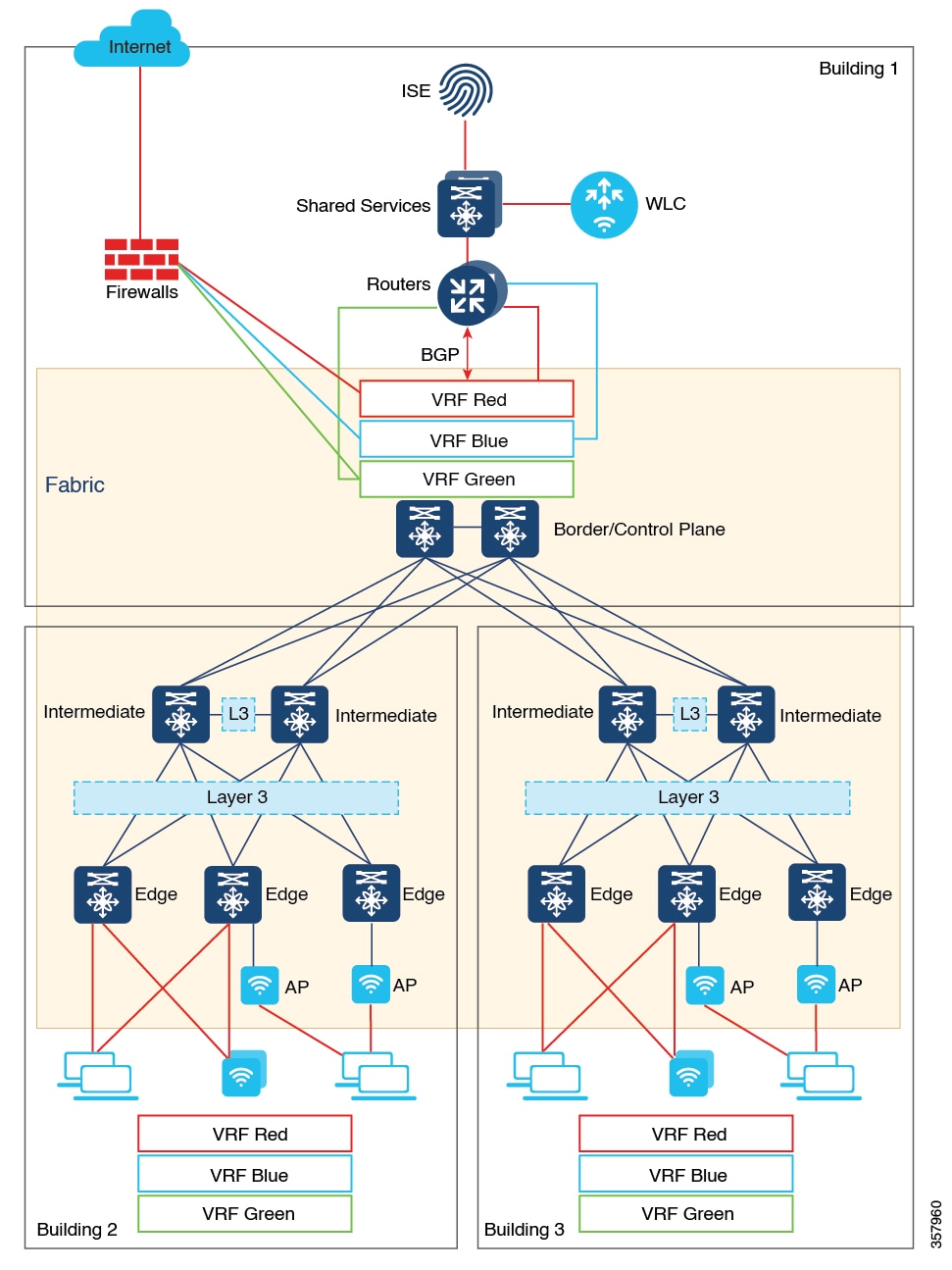
Figure 1. LISP VXLAN Topology for Campus Deployment

This topology shows three buildings within a campus. The campus core switches operate as the fabric border and control plane nodes, creating the boundary of the fabric site. The intermediate nodes connect the fabric edge, border, and control plane nodes and provide the Layer 3 underlay for fabric overlay traffic.

Wired clients directly connect to the fabric edge nodes at the access layer. The shared services such as DNS, DHCP, IPAM, and so on are external to the fabric but reside in the global routing table of the campus network. For the endpoints that reside in the overlay virtual network, an inter-VRF route leaking is required to access the shared services in the global routing space. An upstream router provides the inter-VRF route leaking by importing and exporting the routes in different VRF tables to merge them. To maintain the isolation between the different overlay networks, VRF-lite extends from the fabric border nodes to the upstream routers. BGP is the protocol that is used between the fabric border and the upstream routers.

The Shared Services block provides a centralized unit for server and services management in the campus network. End user applications and services such as DNS, DHCP, and so on, are all managed within this Shared Services block.

A wireless controller is located external to the fabric and is connected to the Shared Services unit to manage the wireless clients. The wireless controller also provides Access Point (AP) image and configuration management, client session management, and mobility services.

An AP connects to a fabric edge node and is located in the default instance of the overlay. The AP establishes a CAPWAP control plane tunnel to the wireless controller and joins as local-mode AP. Wireless clients that successfully connect (authenticated and authorised) to an AP are placed in the overlay virtual network.

How to Configure a LISP VXLAN Fabric for Campus Deployment

  1. Configure the underlay network with point-to-point routed links between the devices using an Interior Gateway Protocol (IGP). Assign Loopback0 IP addresses to all the fabric nodes. The loopback addresses of the underlay devices need to propagate outside of the fabric to establish connectivity to infrastructure services and, so on.

  2. Configure a control plane node to have a mapping system that maps the endpoint IDs to their locators, a Map Server and Map Resolver to accept and respond to queries about the endpoints location, from the network devices.

  3. Configure a border node to connect to other fabric sites and to the external network.

  4. Configure a fabric edge node to accept endpoint registrations, encapsulate or decapsulate the traffic to and from the fabric, and act as an anycast gateway.

  5. Configure support for wireless network:

    A LISP VXLAN fabric supports wireless clients in the following ways:

    • Fabric-Enabled Wireless: The wireless controller is integrated with the fabric control plane to provide a centralized service for the wired and wireless users. This is the preferred method because it provides the same benefits of a fabric to both the wired and wireless users. Fabric-Enabled Wireless is the recommended deployment model for a large campus network.

    • Over-the-Top Centralized Wireless: The control plane traffic and data plane traffic, both traverse using a Control and Provisioning of Wireless Access Points (CAPWAP) tunnel between APs and the wireless controller. The CAPWAP tunnel between wireless controller and an AP traverses the campus backbone network, using the wired fabric as a transport medium.

  6. Configure Multicast:

  7. Configure Fabric Security.

    Set up AAA services for the fabric to ensure secure fabric access to the endpoints. The AAA policies are enforced at the fabric edge node where the endpoints connect.