- Preface
- New and Changed Information
- Overview
- Using the Cisco NX-OS Setup Utility
- Using PowerOn Auto Provisioning
- Understanding the Command-Line Interface
- Configuring Terminal Settings and Sessions
- Basic Device Management
- Using the Device File Systems, Directories, and Files
- Working with Configuration Files
- Configuring CDP
- Configuring NTP
- Managing System Hardware
- Managing Modules
- Index
Contents
- Overview
- Software Compatibility
- Modular Software Design
- Serviceability
- Switched Port Analyzer
- Call Home
- Online Diagnostics
- Embedded Event Manager
- Manageability
- Simple Network Management Protocol
- Role-Based Access Control
- Cisco NX-OS Software Configuration
- Tools for Software Configuration
- CLI
- NTP
- Licensing
- Quality of Service
Overview
This chapter provides an overview of the Cisco NX-OS software.
- Software Compatibility
- Serviceability
- Manageability
- Cisco NX-OS Software Configuration
- Licensing
- Quality of Service
Software Compatibility
The Cisco NX-OS software interoperates with Cisco products that run any variant of the Cisco IOS software. The Cisco NX-OS software also interoperates with any networking operating system that conforms to the IEEE and RFC compliance standards.
Modular Software Design
The Cisco NX-OS software supports distributed multithreaded processing on symmetric multiprocessors (SMPs), multi-core CPUs, and distributed data module processors. The Cisco NX-OS software offloads computationally intensive tasks, such as hardware table programming, to dedicated processors distributed across the data modules. The modular processes are created on demand, each in a separate protected memory space. Processes are started and system resources are allocated only when you enable a feature. A real-time preemptive scheduler helps to ensure the timely processing of critical functions.
Serviceability
The Cisco NX-OS software has serviceability functions that allow the device to respond to network trends and events. These features help you with network planning and improving response times.
Switched Port Analyzer
The Switched Port Analyzer (SPAN) feature allows you to analyze all traffic between ports (called the SPAN source ports) by nonintrusively directing the SPAN session traffic to a SPAN destination port that has an external analyzer attached to it. For more information about SPAN, see the Cisco MDS 9000 Family NX-OS System Management Configuration Guide.
Call Home
The Call Home feature continuously monitors hardware and software components to provide e-mail-based notification of critical system events. A versatile range of message formats is available for optimal compatibility with pager services, standard e-mail, and XML-based automated parsing applications. It offers alert grouping capabilities and customizable destination profiles.You can use this feature, for example, to directly page a network support engineer, send an e-mail message to a network operations center (NOC), and employ Cisco AutoNotify services to directly generate a case with the Cisco Technical Assistance Center (TAC). For more information about Call Home, see the Cisco MDS 9000 Family NX-OS System Management Configuration Guide.
Online Diagnostics
Cisco generic online diagnostics (GOLD) verify that hardware and internal data paths are operating as designed. Boot-time diagnostics, continuous monitoring, and on-demand and scheduled tests are part of the Cisco GOLD feature set. GOLD allows rapid fault isolation and continuous system monitoring. For information about configuring GOLD, see the Cisco MDS 9000 Family NX-OS System Management Configuration Guide.
Embedded Event Manager
Cisco Embedded Event Manager (EEM) is a device and system management feature that helps you to customize behavior based on network events as they happen. For information about configuring EEM, see the Cisco MDS 9000 Family NX-OS System Management Configuration Guide.
Manageability
This section describes the manageability features in the Cisco NX-OS software.
Simple Network Management Protocol
The Cisco NX-OS software is compliant with Simple Network Management Protocol (SNMP) version 1, version 2, and version 3. A large number of MIBs is supported. For more information about SNMP, see the Cisco MDS 9000 Family NX-OS System Management Configuration Guide.
Role-Based Access Control
With role-based access control (RBAC), you can limit access to device operations by assigning roles to users. You can customize access and restrict it to the users who require it. For more information about RBAC, see the Cisco MDS 9000 Family NX-OS Security Configuration Guide.
Cisco NX-OS Software Configuration
This section describes the tools you can use to configure Cisco NX-OS software, and provides an overview of the software configuration process with links to the appropriate chapters.
Tools for Software Configuration
You can use one of two configuration management tools to configure your SANs:
-
The command-line interface (CLI) can manage Cisco MDS 9000 Family switches using Telnet, SSH, or a serial connection.
-
The Cisco MDS 9000 Fabric Manager, a Java-based graphical user interface, can manage Cisco MDS 9000 Family switches using SNMP.
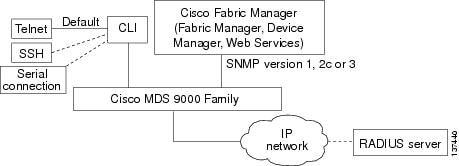
CLI
With the CLI, you can type commands at the switch prompt, and the commands are executed when you press the Enter key. The CLI parser provides command help, command completion, and keyboard sequences that allow you to access previously executed commands from the buffer history.
Continue reading this document for more information on configuring the Cisco MDS switch using the CLI.
NTP
In a large enterprise network, having one time standard for all network devices is critical for management reporting and event logging functions when trying to correlate interacting events logged across multiple devices. Many enterprise customers with extremely mission-critical networks maintain their own stratum-1 NTP source.
Time synchronization occurs when several frames are exchanged between clients and servers. The switches in client mode know the address of one or more NTP servers. The servers act as the time source and receive client synchronization requests.
By configuring an IP address as a peer, the Cisco NX-OS device will obtain and provide time as required. The peer is capable of providing time on its own and is capable of having a server configured. If both of these instances point to different time servers, your NTP service is more reliable. Even if the active server link is lost, you can still maintain the correct time due to the presence of the peer.
If an active server fails, a configured peer helps in providing the NTP time. To ensure backup support if the active server fails, provide a direct NTP server association and configure a peer.
If you only configure a peer, the most accurate peer takes on the role of the NTP server and the other peer acts as a peer. Both devices end at the correct time if they have the correct time source or if they point to the correct NTP source.
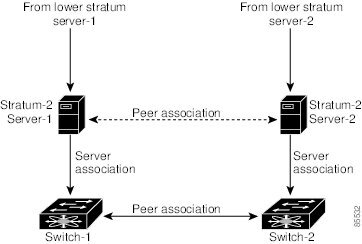
In this configuration, the switches were configured as follows:
Licensing
The Cisco NX-OS software licensing feature allows you to access premium features on the device after you install the appropriate license for that feature. Any feature not included in a license package is bundled with the Cisco NX-OS software and is provided to you at no extra charge.
You must purchase and install a license for each device.
 Note | You can enable a feature without installing its license. The Cisco NX-OS software gives you a grace period that allows you to try a feature before purchasing its license. You must install the Advanced Services license package to enable the Cisco TrustSec feature. |
For detailed information about Cisco NX-OS software licensing, see the Cisco MDS 9000 Family NX-OS Software Licensing Guide.
For information about troubleshooting licensing issues, see the Cisco MDS 9000 Family NX-OS Troubleshooting Guide.
Quality of Service
The Cisco NX-OS software supports quality of service (QoS) functions for classification, marking, queuing, policing, and scheduling. Modular QoS CLI (MQC) supports all QoS features. You can use MQC to provide uniform configurations across various Cisco platforms. For more information, see the Cisco MDS 9000 Family NX-OS Quality of Service Configuration Guide.