
NX-OS Smart Licensing Using Policy on Nexus Switches
Smart Licensing Using Policy for Nexus 9000 and 3000 Switches
This article provides information about the Smart Licensing Using Policy (SLP) solution, which is an enhanced version of Smart Licensing. SLP doesn't interrupt with the operations of your network and enables a compliance relationship to account for the hardware and software licenses that you purchase and use.
Simplify licensing with Smart Licensing Using Policy
Smart Licensing Using Policy (SLP) is a software licensing model that
- provides a seamless licensing experience without disrupting network operations,
- allows immediate use of features without prior registration or key generation, and
- tracks license usage and reports it for compliance and management.
Evolution of Smart Licensing Using Policy
In the fast-paced network operations environment, there is an increasing need for a simple and streamlined licensing process. License reporting is crucial for your devices to ensure network compliance.
Smart Licensing Using Policy (SLP) is a policy-based, flexible software licensing model built on the existing Smart Licensing model. SLP simplifies the licensing process for Nexus products by offering a more adaptable and automated method of licensing. It enables network administrators to easily activate and manage licenses as well as monitor usage patterns.
This image illustrates the evolution of SLP from Smart Licensing and Traditional or PAK-based licensing model through NX-OS Releases.
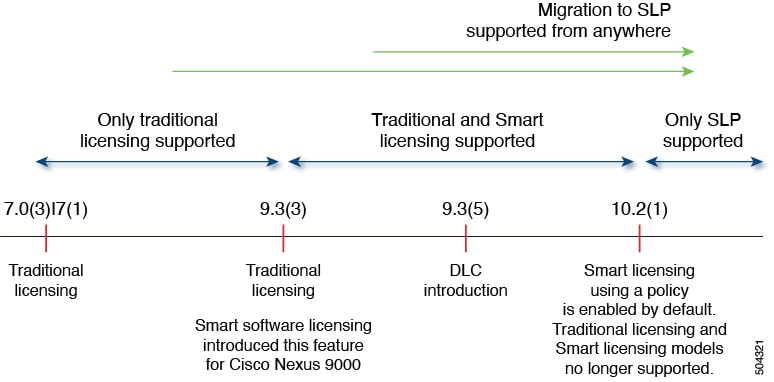
Comparison of traditional, Smart Licensing, and Smart Licensing Using Policy
This reference compares the deployment types and key differences between traditional (PAK-based), Smart Licensing, and Smart Licensing Using Policy (SLP) models.
Comparison of supported deployments in traditional or PAK-based licensing with SLP
Few concepts and terminologies have evolved with the evolution of licensing from traditional or PAK based to Smart Licensing (SL) and then to Smart Licensing Using Policy (SLP). This table compares the deployment types per the license scheme and can be used as a reference to check especially the SL and SLP documentation.
|
Supported Deployments |
Traditional Licensing (PAK) |
Smart Licensing |
Smart Licensing Using Policy |
|---|---|---|---|
|
Direct Internet access |
Hardware local license install |
Communication directly with CSSM |
Communication directly with CSSM |
|
On-Premises |
Hardware local license install |
Communication with CSSM On-Prem |
Communication with CSSM On-Prem or Cisco Smart Licensing Utility (CSLU) |
|
Offline or air-gapped networks |
Hardware local license install |
CSSM On-Prem, Specific License Reservation, Permanent License Reservation |
SSM On-Prem, CSLU, or Disconnected (from switch where transport mode is off) |
|
Supported Deployments |
Traditional Licensing (PAK) |
Smart Licensing |
Smart Licensing Using Policy |
|---|---|---|---|
|
Product Instance |
No CSSM |
Hostname displayed in CSSM |
Hostname is no longer displayed in CSSM and License UDI is displayed instead. |
|
Relationship with CSSM |
No CSSM |
Registers with CSSM |
Creates a trust relationship with CSSM |
|
Day 0 (Licensing deployment) |
If no license is installed, features are not available |
No licensing is available without registration. Enforced license features cannot be used until licenses are authorized after registration with CSSM. Some features permit evaluation period. |
Licenses are enabled by default. Compliance is still required but not mandatory for the initial deployment. |
|
Report to CSSM |
Does not communicate with CSSM |
SL does not report license usage to CSSM. Instead, it authorizes license requests sent by the device. |
RUM reports are used as proof of license usage and uploaded to CSSM either automatically or manually. |
|
Communication method |
Does not communicate with CSSM |
Call Home |
Call Home or SmartReceiver |
Comparison of Smart Licensing with Smart Licensing Using Policy
|
Smart Licensing (SL) |
Smart Licensing Using Policy (SLP) |
|---|---|
|
The default license communication transport mode is callhome. The device initiates a Call Home and requests the licenses.
|
The license communication transport modes for SLP are:
|
|
Register devices with SSM On-Prem or CSSM (after device installation or bring-up of devices) in the network to meet software compliance. |
Devices must establish trust with SSM On-Prem, CSLU, or CSSM within 90 days to meet software compliance. |
|
License states available are Evaluation, Evaluation Expired Registered, Authorized, Out of Compliance, Authorization Expired. |
License states available are Pending, Out-of-Compliance, and Authorized. |
|
License reporting is every 30 days. |
License reporting (default policy) is 90 days. |
License states in Smart Licensing and Smart Licensing Using Policy
License states indicate the actual status of the license of a device. Both Smart Licensing (SL) and Smart Licensing Using Policy (SLP) solutions use license states to indicate the status of a license.
When you upgrade or downgrade your devices between the solutions, the license states change accordingly. The table describes the mapping of license states during migration.
|
License States in SL |
License States in SLP |
|---|---|
|
Evaluation |
Pending |
|
Evaluation Expired |
|
|
Authorized(Registered) |
Authorized |
|
Out-of-Compliance |
Out-of-Compliance |
|
Authorization Expired. |
Smart Licensing Using Policy support on Nexus switches
Beginning with NX-OS Release 10.2(1)F, Smart Licensing Using Policy is enabled by default on all Nexus devices. The default communication transport mode is cslu transport.
Benefits of Smart Licensing Using Policy
With SLP, you no longer need to register your device during installation, and there is no evaluation license period. SLP uses policies to report license usage and consumption from devices to Cisco Smart Software Manager (CSSM).
The primary benefits of SLP are:
- Seamless day-0 operations After a license is ordered, preliminary steps, such as registration or generation of keys, are not required and product features can be configured on the device right-away. There are no export-controlled or enforced licenses on Nexus Switches.
- Consistency in NX-OS Devices that run NX-OS Software have a uniform licensing experience.
- Visibility and manageability Tools, telemetry, and product tagging.
- Flexible, time series reporting remaining compliant Easy reporting options are available, whether you are directly or indirectly connected to Cisco Smart Software Manager (CSSM) or are in an air-gapped network.
Policy-driven licensing
A policy is a set of predefined rules that are associated with a smart account and is automatically installed on new devices. These rules determine how often and under what conditions devices report their software license usage. The policy sets the initial reporting requirements for new licenses, the ongoing report acknowledgment protocols, and the regular intervals at which these reports must be submitted to maintain license compliance.
CSSM determines the policy that is applied to a switch. Only one policy is in use at a given point in time. The policy and its values are based on several factors, including the licenses being used.
A policy provides the switch with these reporting instructions:
- License usages report acknowledgment requirement (Reporting ACK required): The license usage report is known as a Resource Utilization Measurement (RUM) Report and the acknowledgment is referred to as an ACK. This is a yes or no value that specifies if the report for this product instance requires CSSM acknowledgment. The default policy is always set to yes.
- The default duration in days for uploading of RUM report while using the Smart Licensing Using Policy is specified. The RUM reports must be sent within the specified duration, even when there is a change in license usage.
Default policy for NX-OS
Default policy is a policy that is always available in the product instance. If no other policy is applied, the product instance applies this default policy. New Nexus devices come pre-installed with the default policy for NX-OS. This table displays the default policy values for Nexus switches.
|
Policy: Default |
Policy Requirements |
|---|---|
|
Unenforced/Non-Export |
Report ACK required: Yes First report requirement (days): 90 Subsequent reporting frequency (days): 365 On license change Report on change (days): Within 90 |
Key concepts of Smart Licensing Using Policy
This section explains the key components that you need to understand before implementing SLP.
License enforcement types and duration
The two license enforcement types are:
- Enforced - The terms of use for such licenses are as per the end user license agreement (EULA). Enforced and Export licenses are not supported on Nexus switches.
- Unenforced – These do not require authorization before use in air-gapped networks or in connected networks. Nexus 9000 and 3000 switches support only Unenforced licenses.
License duration is the duration or term for which a purchased license is valid. A license enforcement type is either Enforced or Unenforced and is valid for these two durations:
- Perpetual: A perpetual license enables you to make a one-time purchase of a license that does not expire.
- Subscription: A subscription-based license enables you to purchase a license for a specific period of time based on your requirement.
Product Instance or switch
A Product Instance (PI), for example, a switch, is a single instance of a product, which is identified by a Unique Device Identifier (UDI).
A PI records and reports license usage (Resource Utilization Measurement reports) and provides alerts and system messages about issues such as overdue reports and communication failures. Resource Utilization Measurement (RUM) reports and usage data are securely stored in the product instance.
Throughout this document, the term product instance refers to all supported physical and virtual product instances, unless noted otherwise. For information about the product instances that are within the scope of this document, see Supported Products .
CSSM
Cisco Smart Software Manager (CSSM) is a portal that enables you to manage all your software licenses from a centralized location. CSSM helps you manage current requirements and review usage trends to plan for future license requirements.
You can access the CSSM Web UI at https://software.cisco.com/software/smart-licensing/alerts. Navigate to Manage licenses link. See the Supported Topologies section to know about the different ways in which you can connect to CSSM.
In CSSM you can perform these tasks:
- Create, manage, or view virtual accounts
- Create and manage Product Instance Registration Tokens
- Transfer licenses between virtual accounts or view licenses
- Transfer, remove, or view Product Instance
- Run reports against your virtual accounts
- Modify your email notification settings
- View overall account information
CSLU
Cisco Smart License Utility (CSLU) is a Windows-based reporting utility that provides aggregate licensing workflows. This utility performs the following key functions:
- Provides options relating to how workflows are triggered. The workflows can be triggered by CSLU or by the product instance.
- Collects usage reports from the product instance and uploads these usage reports to the corresponding Smart Account or Virtual Account, online or offline, using files. Similarly, the RUM report ACK is collected online or offline and sent back to the product instance.
- Sends authorization code requests to CSSM and receives authorization codes from CSSM, if applicable.
CSLU can be part of your implementation in the following ways:
- Install the Windows application to use CSLU as a standalone tool that is connected to CSSM.
- Install the Windows application to use CSLU as a standalone tool that is disconnected from CSSM. With this option, the required usage information is downloaded to a file and then uploaded to CSSM. This is suited for air-gapped networks.
SSM On-Prem
Smart Software Manager On-Prem (SSM On-Prem) is an asset manager, which works in conjunction with CSSM. It enables you to administer products and licenses on your premises instead of having to directly connect to CSSM.
Information about the required software versions to implement SLP with SSM On-Prem, is provided below:
|
Minimum Required SSM On-Prem Version for SLP 1 |
Minimum Required NX-OS Version 2 |
|---|---|
|
Version 8, August 2021 |
NX-OS Release 10.2(1)F |
1 The minimum required SSM On-Prem version. This means support continues on all subsequent releases - unless noted otherwise.
2 The minimum required software version on the product instance. This means support continues on all subsequent releases - unless noted otherwise.
 Note
NoteFor the latest version of SSM On-Prem for SLP, see Supported Version.
Resource Utilization Measurement reports
A RUM report is a license usage report, which fulfills the reporting requirements as specified by the policy. It is an ISO 19770–4 report that is delivered in the JSON format and signed as per the trust model.
The RUM report contains information such as:
- license usage filtered by ID
- license name, and
- summary of the license information.
The devices record license usage information and any modifications to license usage in an open RUM report. At specific intervals, open RUM reports are closed, and new RUM reports are opened to record license usage. The closed RUM reports are sent to CSSM.
Trust code
Trust code is a UDI-tied public key with which the product instance signs a RUM report. This prevents tampering and ensures data authenticity.
Key features of Smart Licensing Using Policy
This section provides a summary of the main features of Smart Licensing Using Policy (SLP), highlighting how it automates license management, improves compliance, and enhances device registration and reporting.
The main features of Smart Licensing Using Policy (SLP) are:
- Policy-Based Management – The default policy is enabled by default and automates license management, streamlines operations and ensures compliance.
- Streamlined Activation – SLP automates the device registration at the time of installation, which allows for immediate use of the network devices.
- License Pooling – Licenses can be pooled across the entire network, allowing for more flexible and efficient use of software entitlements.
- Seamless Integration with CSSM – SLP integrates with CSSM for easy license management and visibility, enabling self-service for license deployments and maintenance.
- No Evaluation License Period – Devices with SLP can boot up and operate with full feature sets immediately.
- Trust Establishment – Devices must establish trust with CSSM or SSM using a trust code within 90 days to report license consumption. This ensures a secure and verified licensing environment.
- Automated Usage Reports – The Resource Utilization Measurement (RUM) reports automate the recording of license usage. Data can be securely stored on the device and synced automatically or manually for compliance.
Software License Management Solution
SLP as a software license management solution provides a seamless experience with four aspects of licensing.
- Purchase – Purchase licenses through the existing channels and use the Cisco Smart Software Manager (CSSM) portal to view product instances and licenses. To simplify the implementation of SLP, provide your Smart Account and Virtual Account information when placing an order for a new hardware or software. This allows for installation of applicable policies at the time of buying the product.
- License type – All licenses on Nexus Switches are unenforced. This means that you do not have to complete any licensing-specific operations, such as registering or generating keys before you start using the software and the licenses that are tied to it. License usage is recorded on your device with timestamps and the required workflows can be completed later.
- Report – License usage should be reported to CSSM. Multiple options are available for license usage reporting. You can use the Cisco Smart Licensing Utility (CSLU), or report usage information directly to CSSM. For air-gapped networks, a provision for offline reporting where you download usage information and upload it to CSSM, is also available. The usage report is in plain text XML format.
- Reconcile – Reconciliation is available for situations where delta billing applies (between purchased and consumed).
Smart Licensing Using Policy workflow
Smart Licensing Using Policy solution makes it easier for you to procure, deploy, and manage your license. Cisco Smart Software Manager (CSSM) is your primary licensing server and portal where you can create your smart accounts and manage licenses.
Smart Software Manager On-Prem and Cisco Smart Licensing Utility (CSLU) are your locally installed on-premises user portals that work with CSSM.
After purchasing licenses, activate your licenses on your devices in your deployments. As the devices establish trust and report license usage, you can manage your licenses through continuous reporting.
Summary
Key components involved in the Smart Licensing Using Policy workflow:
- Cisco Smart Software Manager (CSSM): Primary licensing server and portal for creating smart accounts and managing licenses.
- Smart Software Manager On-Prem: Locally installed on-premises user portal that works with CSSM.
- Cisco Smart Licensing Utility (CSLU): Another on-premises user portal that works with CSSM.
This process enables you to order, activate, and manage licenses efficiently for your devices and deployments.
Smart Licensing Using Policy workflow in a nutshell
Workflow
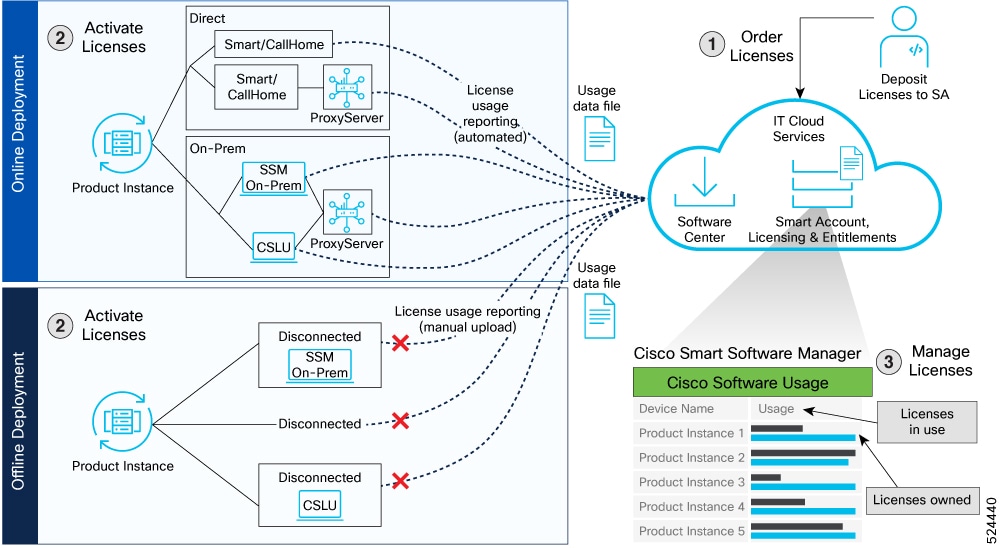
These are the stages for deploying Smart Licensing Using Policy:
-
Order licenses
- Order your license from Cisco Commerce Workspace (CCW).
- Access CSSM and create the smart account and virtual accounts to organize your licenses.
-
Activate licenses
-
Select the deployment methods:
- Online Deployments
- Offline or air-gapped Deployments
- Configure the smart license transport mode and establish trust with CSSM.
-
Select the deployment methods:
-
Manage licenses
- Generate your Resource Utilization Measurement (RUM) report from the device and synchronize the report with CSSM either automatically or manually.
- Monitor the license usage and compliance status through the CSSM portal.
Deployment models for Smart Licensing Using Policy
The deployment models available for Smart Licensing Using Policy are listed in this section.
Online deployments
-
Direct deployments (with transport mode as Smart or Call Home)
- Direct cloud access (CSSM)
- Direct cloud access (CSSM) through a proxy server
-
On-premises deployments
- Smart Software Manager (SSM) On-Prem (recommended)
- Smart Software Manager (SSM) On-Prem through a proxy server
- Cisco Smart License Utility (CSLU)
- Cisco Smart License Utility (CSLU) through a proxy server
Offline or air-gapped deployments
- Disconnected (from the switch where transport is off) or air-gapped deployment from the switch
- SSM On-Prem disconnected (remote deployment)
- CSLU offline (remote deployment)
Supported deployment models and topologies
This section describes the various ways in which you can implement a smart licensing policy. For each topology, refer to the accompanying overview to know how the setup is designed to work, and refer to the considerations and recommendations, if any.
Choosing a topology
This table allows you to choose a topology depending on your network deployment.
|
Deployment Model |
Topology |
Recommendations |
|---|---|---|
|
Online deployment > Direct (Smart transport/call home) |
Topology 2: Connected directly to CSSM |
Use this topology when you have switches that are already registered to CSSM and need to continue in the same mode. If you need to continue using this topology after upgrading to SLP, then Smart Transport is the preferred transport method. See Topology 2 Connected directly to CSSM . |
|
Online deployment > On-Prem > Smart Software Manager (SSM) On-Prem (recommended) |
Topology 4: Connected to CSSM through SSM On-Prem |
Use this topology when you want to collect licensing information from each switch in the network and when there is no connectivity to CSSM. See Connected mode in Topology 4 Connected to CSSM through SSM On-Prem |
|
Online deployment > On-Prem > CSLU |
Topology 1: Connected to CSSM through CSLU |
Use this topology when you do not want the switches to be directly connected to CSSM. This topology supports only one SA/VA combination. See Online mode in Topology 1 Connected to CSSM through CSLU . |
|
Offline deployment > from the switch |
Topology 6: No connectivity to CSSM and no CSLU (offline mode) |
Use this topology when you want to collect licensing information from a single source and when there is no connectivity to CSSM. You cannot view license consumption locally. Also, only a single VA can be used. See Topology 6 No connectivity to CSSM and no CSLU . |
|
Offline deployment > SSM On-Prem disconnected |
Topology 5: SSM On-Prem disconnected from CSSM |
Use this topology when you want to manage or view licenses from a single source. You can view license consumption locally. You can also use multiple SA/VA combinations. See SSM On-Prem in disconnected mode in Topology 5 SSM On-Prem disconnected from CSSM . |
|
Offline deployment > CSLU offline |
Topology 3: CSLU disconnected from CSSM |
Use this topology when you need to manage or view license consumption locally. You can also use multiple VA. See CSLU in Offline Mode in Topology 3 CSLU disconnected from CSSM . |
Topology 1 Connected to CSSM through CSLU
In this topology, switches in the network are connected to CSLU, and CSLU becomes the single point of interface with CSSM. A switch can be configured to push the required information to CSLU.
The communication from the Product Instance (PI, for example, a switch) to CSLU, and CSLU to CSSM occurs online through HTTPS mode. The switch service port is 8182, and the REST API port number is 8180.
Switch-initiated communication (push) - A switch initiates communication with CSLU, by connecting to a REST endpoint in CSLU. Data that is sent includes RUM reports. You can configure the switch to automatically send RUM reports to CSLU at required intervals.
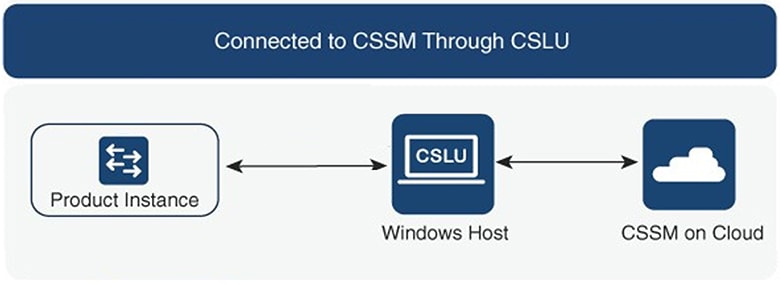
Considerations or recommendations
Choose the method of communication depending on your network’s security policy.
Topology 2 Connected directly to CSSM
This topology is available in the earlier version of Smart Licensing and continues to be supported with SLP.
In this topology, you establish a direct and trusted connection from a switch to CSSM. The direct connection requires network availability to CSSM. For the switch to then exchange messages and communicate with CSSM, configure one of the transport options available with this topology (described below). Lastly, the establishment of trust requires the generation of a token from the corresponding Smart Account and Virtual Account in CSSM, and installation on the switch.
You can configure a switch to communicate with CSSM in any one of the two ways:
-
Use smart transport to communicate with CSSM
Smart transport is a transport method where a Smart Licensing message (JSON) is contained within a HTTPS message, and exchanged between a switch and CSSM, to communicate. The available smart transport configuration options are:
- Smart transport – In this method, a switch uses a specific smart transport licensing server URL. This must be configured exactly as shown in the workflow section.
- Smart transport through a proxy – In this method, a switch uses a proxy server to communicate with the licensing server, and eventually, CSSM.
-
Use Call Home to communicate with CSSM
Call Home provides e-mail-based and web-based notification of critical system events. This method of connecting to CSSM is available in the earlier Smart Licensing environment and remains available with SLP. The available Call Home configuration options are:
- Direct cloud access – In this method, a switch sends usage information directly over the internet to CSSM; no additional components are needed for the connection.
- Direct cloud access through a proxy – In this method, a switch sends usage information over the internet through a proxy server - either a Call Home Transport Gateway or an off-the-shelf proxy (such as Apache) to CSSM.
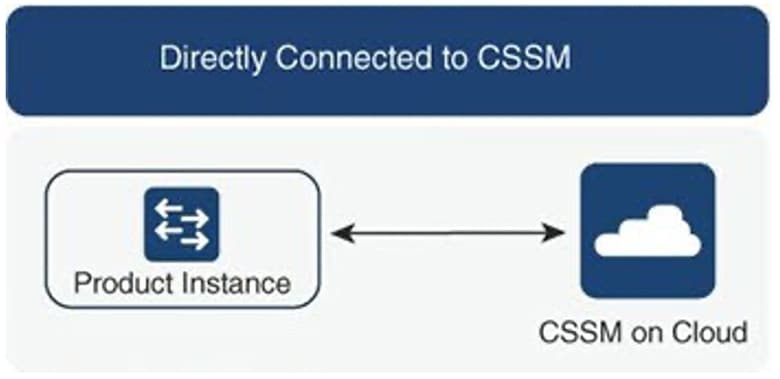
Considerations or recommendations
Smart transport is the recommended transport method when directly connecting to CSSM. This recommendation applies to:
- New deployments
- Earlier licensing models (Change configuration after migration to SLP)
- Registered licenses that currently use the Call Home transport method (Change configuration after migration to SLP)
- Evaluation or expired licenses in an earlier licensing model (Change configuration after migration to SLP)
To change configuration after migration, navigate to .
Topology 3 CSLU disconnected from CSSM
In this topology, a switch communicates with CSLU, and you can implement the switch-initiated communication. The other side of the communication, between CSLU and CSSM, is offline. CSLU provides you with the option of working in a move that is disconnected from CSSM.
Communication between CSLU and CSSM is sent and received in the form of signed files that are saved offline and then uploaded to or downloaded from CSLU or CSSM.
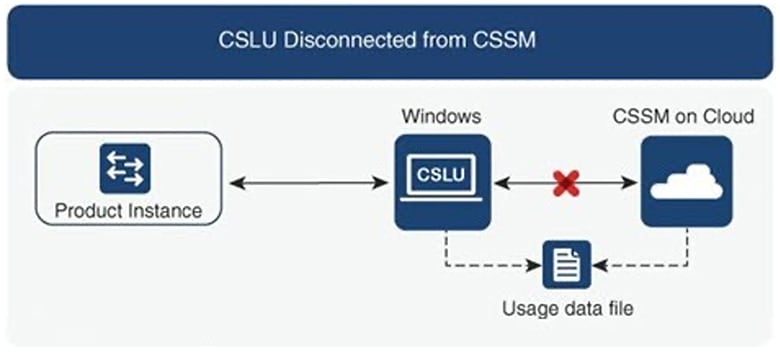
Considerations or recommendations
None
Topology 4 Connected to CSSM through SSM On-Prem
Switches in the network are connected to Smart Software Manager (SSM) On-Prem, and SSM On-Prem becomes the single point of interface with CSSM.
Switches in the network are connected to Smart Software Manager (SSM) On-Prem, and SSM On-Prem becomes the single point of interface with CSSM. A switch can be configured to push the required information to SSM On-Prem.
Switch-initiated communication (push) – A switch initiates communication with SSM On-Prem, by connecting to a REST endpoint in SSM On-Prem. Data that is sent includes RUM reports. You can configure the switch to automatically send RUM reports to SSM On-Prem at required intervals.
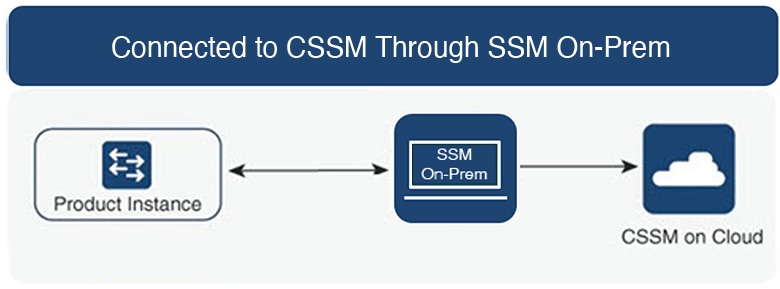
Considerations or recommendations
Choose the method of communication depending on your network’s security policy.
Topology 5 SSM On-Prem disconnected from CSSM
In this topology, the switch communicates with SSM On-Prem, and you can implement the switch-initiated communication. The other side of the communication, between SSM On-Prem and CSSM, is offline. SSM On-Prem provides you with the option of working in a mode that is disconnected from CSSM.
Communication between SSM On-Prem and CSSM is sent and received in the form of signed files that are saved offline and then uploaded to or downloaded from SSM On-Prem or CSSM.
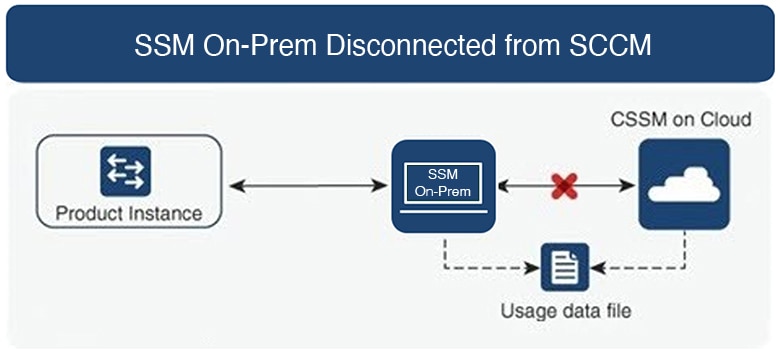
Considerations or recommendations
None
Topology 6 No connectivity to CSSM and no CSLU
This topology, where there is no connectivity to CSSM or CSLU, operates in the offline mode. In the offline mode, a switch and CSSM are disconnected from each other, and without any other intermediary utilities or components. All communication is in the form of uploaded and downloaded files.
NoteRUM reports cannot be saved if no licensing features are active.
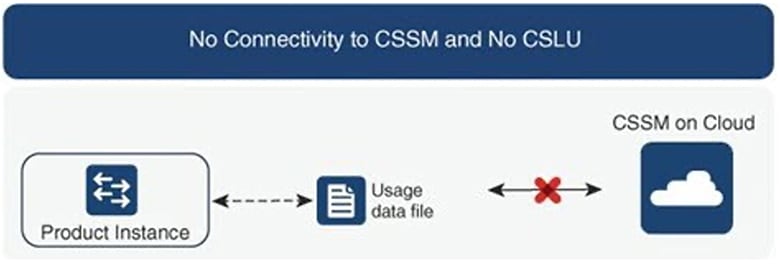
Considerations or recommendations
This topology is suited to a high-security deployment where a switch cannot communicate online, with anything outside its network.
Supported products
This section provides information about the NX-OS switches that are within the scope of this document and support SLP. All models (Product IDs or PIDs) in a product series are supported – unless indicated otherwise.
|
Nexus Switches |
When Support was Introduced |
|---|---|
|
Nexus 9348Y12C-SE1 switch |
NX-OS Release 10.6(3)F |
|
N9164E-NS4-O switch |
NX-OS Release 10.6(2n) |
|
Nexus 9396Y12C-SE1 switch Nexus 9396T12C-SE1 switch Nexus 9324C-SE1U smart switch Nexus 9348Y2C6D-SE1U smart switch |
NX-OS Release 10.6(2)F |
|
Nexus 9336C-SE1 switch |
NX-OS Release 10.6(1)F |
|
Nexus 9364E-SG2-O switch Nexus 9364E-SG2-Q switch |
NX-OS Release 10.5(3)F |
|
Nexus 9364C-H1 switch |
NX-OS Release 10.4(3)F |
|
Nexus 93108TC-FX3 switch, Nexus 93400LD-H1 switch |
NX-OS Release 10.4(2)F |
|
Nexus 9804 switch, Nexus 9332D-H2R switch, Nexus 9348GC-FX3 switch, Nexus 9348GC-FX3PH switch |
NX-OS Release 10.4(1)F |
|
Nexus 9408 Platform Switches |
NX-OS Release 10.3(2)F |
|
Nexus 9808 Platform Switches |
NX-OS Release 10.3(1)F |
|
Nexus 9500 Series Switches |
NX-OS Release 10.2(1)F |
|
Nexus 9300 Series Switches |
NX-OS Release 10.2(1)F NoteBeginning from NX-OS Release 10.3(1)F, 24-port licensing support is provided for the following Nexus platform switches:
|
|
Nexus 3600 Series Switches |
NX-OS Release 10.2(1)F |
|
Nexus 3500 Series Switches |
NX-OS Release 10.2(1)F |
NoteFor the hardware that are not supported, refer to Cisco Nexus 9000 Series NX-OS Release Notes, Release 10.1(1) - Cisco .
Supported version of SA, CSLU, and NX-OS for on-prem version
This table provides data about the supported Smart Account agent version and CSLU version for the respective NX-OS releases for the on-prem version of SLP.
|
NX-OS |
Integrated SA Agent |
On-Prem |
CSLU |
|---|---|---|---|
|
10.6(3)F |
v5.7.34/0c828e0d8 |
9-202507 |
2.4.0, 2.5.1 |
|
10.6(2)F |
v5.7.34/0c828e0d8 |
9-202507, 9-202501 |
2.4.0 |
|
10.6(1)F |
v5.7.34/0c828e0d8 |
9-202507, 9-202501 |
2.4.0 |
|
10.5(3)F |
v5.7.33/af0feb9 |
9-202410, 9-202501 |
2.4.0 |
|
10.5(1)F and 10.5(2)F |
5.7.30_rel/108 |
8-202401 |
2.2.0 |
|
10.4(3)F |
5.7.30_rel/108 |
8-202304, 8-202308 |
2.2.0 |
|
10.3(4a)M |
5.7.25_rel/84 |
8-202212, 8-202304 |
2.2.0 |
|
10.2(4)M |
5.2.4_rel/79 |
8-202212, 8-202304 |
2.2.0 |