New and Changed Information
The following table provides an overview of the significant changes to this guide up to this current release. The table does not provide an exhaustive list of all changes that are made to the guide or of the new features up to this release.
|
Cisco APIC Release Version |
Feature |
Description |
|---|---|---|
|
5.1(3) |
-- |
This guide became available. |
About OpFlex Prometheus Integration
Prometheus Integration adds support for exporting metrics from both opflex-agent and opflex-server that can be collected by in-cluster or external Prometheus server instance. Following are the goals of this integration:
-
Large clusters are a black box; goal is to improve debugging and troubleshooting of operational and network issues
-
Collect as many control (OpFlex) and data-path (Open vSwitch) statistics as possible
-
Expose these statistics as Prometheus metrics to maintain time series per metric
-
Scrape these metrics from the cluster nodes and endpoints
-
Use Grafana to display dashboard of these metrics
Prometheus is an open-source systems monitoring and alerting toolkit which can act as data source for grafana, a frontend visualization for the exported metrics. Unlike many other stats collectors, Prometheus prefers collecting metrics via a pull model from each of the exporters.
Opflex-agent and opflex-server have been integrated with prometheus-cpp client exporter library. By default opflex-agent exports metrics on port 9612 and opflex-server exports metrics on port 9632.
To perform automatic service discovery of these ports in k8s, the following annotations and container ports have been configured
inside "aci-containers-host" pod:
name: aci-containers-host
        network-plugin: aci-containers
      annotations:
        scheduler.alpha.kubernetes.io/critical-pod: ''
        prometheus.io/scrape: true
        prometheus.io/port: 9612
…
        - name: opflex-server
          ports:
            - containerPort: 8009
            - name: metrics
              containerPort: 9632
Relabeling is a powerful tool used by the Prometheus server to dynamically rewrite the label set of a target before it gets scraped. Multiple relabeling steps can be configured per scrape configuration. They are applied to the label set of each target in order of their appearance in the configuration file.
For more information, see:
https://prometheus.io/docs/prometheus/latest/configuration/configuration/#relabel_config
You can use in-cluster prometheus server "relabel configuration" to scrape metrics from opflex-agent and opflex-server below:
-
Relabel_config for pulling metrics from opflex-agent: "prometheus.io/scrape = true" and "prometheus.io/port" to scrape from port 9612
-
Relabel_config for pulling metrics from opflex-server: "prometheus.io/scrape = true", "containerPortName = metrics" and "containerPort" to scrape from 9632
Relabel_config is part of scrape_config. For more information, see:
https://prometheus.io/docs/prometheus/latest/configuration/configuration/#scrape_config
 Note |
To pull metrics from opflex-agent and opflex-server, we recommend you have two relabel_configs and both under different scrape_jobs. |
Metrics exported from opflex-agent
Below is a summary of the metrics exported from the opflex-agent.
For more information, see on all the metrics:
https://github.com/noironetworks/opflex/blob/judith/docs/prometheus.md#metrics-exported-from-opflex-agentEndpoint
For more information on Endpoint metrics, see:
https://github.com/noironetworks/opflex/blob/judith/docs/prometheus.md#endpointServices
For more information on Services, see:
https://github.com/noironetworks/opflex/blob/judith/docs/prometheus.md#servicesFor more information on services metrics, see:
https://github.com/noironetworks/opflex/blob/judith/docs/prometheus.md#endpoint----serviceFor more information on services (aggregate) metrics, see:
https://github.com/noironetworks/opflex/blob/judith/docs/prometheus.md#service-aggregateFor more information on service load-balancing metrics, see:
https://github.com/noironetworks/opflex/blob/judith/docs/prometheus.md#service-load-balancingDrops
For more information on drops metrics, see:
https://github.com/noironetworks/opflex/blob/judith/docs/prometheus.md#dropsContract
For more information on contract metrics, see:
https://github.com/noironetworks/opflex/blob/judith/docs/prometheus.md#contractsSecurity Group
For more information on security group metrics, see:
https://github.com/noironetworks/opflex/blob/judith/docs/prometheus.md#security-groupsRemote EP
For more information on remote EP count metrics, see:
https://github.com/noironetworks/opflex/blob/judith/docs/prometheus.md#remote-epPeer
For more information on peer metrics, see:
https://github.com/noironetworks/opflex/blob/judith/docs/prometheus.md#peerMetrics exported from opflex-server
Below is a summary of the metrics exported from the opflex-server.
For more information, see on all the metrics:
https://github.com/noironetworks/opflex/blob/judith/docs/prometheus.md#metrics-exported-from-opflex-serverAgent
For the agent metrics, see:
https://github.com/noironetworks/opflex/blob/judith/docs/prometheus.md#agentBenefits of OpFlex Prometheus Integration
The OpFlex Prometheus Integration provides several benefits:
-
Provides visibility of control (OpFlex) and data-path (Open vSwitch) statistics from compute nodes.
-
Time series per metric aids in debugging and troubleshooting of operational and network issues.
-
Prometheus metrics can be scraped by Prometheus server, Grafana can be used to create dashboards and alerting based out of these metrics.
-
The exported metrics helps in answering many operations questions:
-
How many OpFlex proxy connections are present?
-
Is the OpFlex connection stable?
-
Are there any drops in Open vSwitch tables?
-
Are there policy drops in a particular VRF?
-
What services are used by a deployment?
-
Which clients consume a service?
-
Top N users of a service
-
Top N services used by a client
-
How much traffic is ingressing or egressing a service across all nodes?
-
Is load-balancing working reasonably for a service?
-
Cost analysis for local vs remote region service-pods
-
-
Useful label annotations for every metric. For example, the endpoint gets annotated with the pod name and namespace to uniquely identify the endpoint within k8s. Another example is a contract, which gets annotated with a source EPG, destination EPG along with tenant and classifier information. This helps in correlating the configs present in Cisco ACI with the statistics exposed in compute together.
OpFlex Prometheus Integration Limitations and Restrictions
Be aware of the following issues when configuring the OpFlex Prometheus Integration:
-
NodePort service stats get accounted under ClusterIp service stats in on-premises fabrics.
-
Useful metrics are exported as part of this release. Disclaimer: https://github.com/noironetworks/opflex/blob/judith/docs/prometheus.md#disclaimer
-
Data for various features is pulled and exported to Prometheus at different timer intervals. In a steady state, the data will become eventually consistent. However, if traffic is flowing continuously, there could be slight discrepancy when comparing counters of various exported metrics. For example, the POD and Service counts are pulled at different intervals of time. While checking these at a particular instant of time can show variations, once in a steady state the counters will be eventually consistent.
-
In general, there should be a federated Prometheus server to avoid hogging CPU and memory of a cluster. The in-cluster Prometheus server must have a very low retention time.
-
Default Port Allocations
9612 and 9632 are being used by other exporters. The expectation is that customers won't be using other exporters that listen on the same ports. Just to be future proof, ports 9894 and 9895 have been reserved for opflex-agent and opflex-server respectively.
Prerequisites for Configuring the OpFlex Prometheus Integration
You must complete the following tasks before you configure the OpFlex Prometheus Integration:
-
You must have basic working knowledge of the following:
-
Provisioning Kubernetes or OpenStack with the relative ACI plug-ins
-
Cisco ACI CNI Plug-in for Kubernetes or OpenShift
-
-
OpFlex protocol communication between:
-
compute (opflex-agent) and leaf (opflex-proxy) for on-prem Kubernetes and OpenStack solutions
-
compute (opflex-agent) and opflex-server for overlay CNI solutions
-
-
A generic understanding of how CNI plug-ins are working
-
Configuring the OpFlex Prometheus Integration
This section describes how to configure the OpFlex Prometheus Integration.
You must follow some of the opflex-agent and opflex-server configuration options to control what gets exported to Prometheus:
Procedure
| Step 1 |
For opflex-agent, this can be used to stop exporting statistics, thereby reducing the load in the Prometheus server. The feature
is enabled by default Example: |
| Step 2 |
For opflex-agent, this can be used if the export needs to be specific to 127.0.0.1. This restricts the port access to only localhost:9612. The default is to expose any IP on node: "0.0.0.0:9612". Example: |
| Step 3 |
For opflex-agent, this can be used to avoid exporting Nan metrics between endpoints and services to reduce load on the Prometheus server. By default, this optimization is enabled. Example: |
| Step 4 |
The opflex-agent processes all endpoints (pods in case of k8s, VMs in case of openstack) via endpoint files. By default the
endpoint metrics are annotated with just the "name" ("vm-name" in endpoint file) and "namespace" (present in case of k8s).
There are attributes present in the endpoint file that the cluster admin might decide to annotate as well, if needed. If an
element of Example: |
| Step 5 |
For opflex-agent, this can be used to stop exporting service metrics to decrease Prometheus server load and also to not create openvswitch flows for this metric collection. By default, all service metric reporting is enabled. Example: |
| Step 6 |
For opflex-agent, statistics for some of the exported metrics can be turned off to decrease the load on the Prometheus server. Check the opflex.statistics in the agent configuration file. |
| Step 7 |
For opflex-server, disable exporting metrics to Prometheus. Example: |
| Step 8 |
For opflex-server, export the Prometheus port only on localhost. Example: |
Verifying the OpFlex Prometheus Integration
This section describes how to verify the OpFlex Prometheus Integration.
Procedure
| Step 1 |
Prometheus metrics export is enabled by default from opflex containers. Ensure that ports 9612 (opflex-agent) and 9632 (opflex-server) are in LISTENING mode. Example:Sample output: |
| Step 2 |
One can curl metrics on each node running the opflex containers to check if they can be scraped. Example: |
| Step 3 |
If a Prometheus server is configured to scrape these metrics, then Prometheus server UI can be used to check if the metrics export happens as expected. 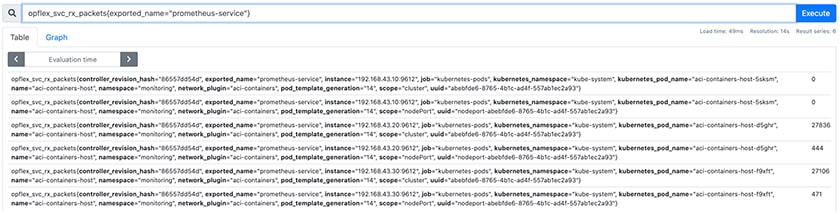 |
| Step 4 |
The following are a few graphs created in Grafana using the exported OpFlex metrics: https://github.com/noironetworks/opflex/tree/judith/agent-ovs/grafana |
 Feedback