Important.
Results generated by AI. Before using results, verify accuracy and completeness.
Copy
Overview
Learn how to check the current Firewall Threat Defense software version and decide whether to reimage the Secure Firewall 1210/20 to your target release before you begin configuration.
We recommend that you install your target version before you configure the firewall. Alternatively, you can perform an upgrade after you are up and running, but upgrading, which preserves your configuration, may take longer than using this procedure.
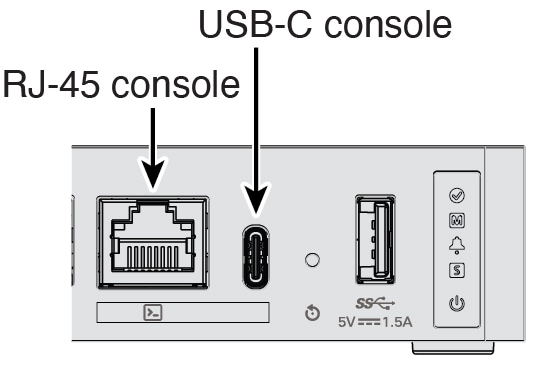
Connect to the console port using either port type.
Figure 1. Console Port
2.
At the FXOS CLI, show the running version.
scope ssa
show app-instance
Example:
Firepower# scope ssa
Firepower /ssa # show app-instance

Application Name Slot ID Admin State Operational State Running Version Startup Version Cluster Oper State
---------------- ------- ----------- ----------------- --------------- --------------- ------------------
ftd              1       Enabled     Online            7.6.0.65        7.6.0.65        Not Applicable
3.
If you want to install a new version, perform these steps.
By default, the Management interface uses DHCP. If you need to set a static IP address for the Management interface, enter the following commands.
scope fabric-interconnect a
set out-of-band static ipipnetmasknetmaskgwgateway