Supported Gateway Use Cases
Firewall Threat Defense Virtual
Cisco Secure Firewall Threat Defense virtual brings next-generation firewall functionality to virtualized environments, enabling consistent security policies to follow workloads across your physical, virtual, and cloud environments.
You can provision a tenant in Security Cloud Control to onboard and manage your Firewall Threat Defense virtual device and navigate between Multicloud Defense and Cloud-delivered Firewall Management Center.
Guidelines for deploying Firewall Threat Defense Virtual Gateway
By deploying Firewall Threat Defense virtual gateway using Multicloud Defense, you gain advanced network security and management features that are not available in standard Internet Service Provider gateways. You can also protect your network when you deploy an Firewall Threat Defense virtual gateway using Multicloud Defense.
Because this is a multiproduct task, you must navigate between both Multicloud Defense and Cloud-delivered Firewall Management Center to complete the steps. Multicloud Defense deploys and registers the Firewall Threat Defense virtual device including interfaces, gateway configuration, NAT rules, platform settings, whereas you edit your access policy, rules, and objects in your Cloud-delivered Firewall Management Center account.
Use these guidelines when you create a Firewall Threat Defense virtual that is managed by Cloud-delivered Firewall Management Center:
-
When you create a Service VPC and apply a gateway to your Firewall Threat Defense virtual environment, Multicloud Defense automatically creates a subnet and a corresponding security group for the secondary interface.
-
Based on your requirements, deploy an ideal number of Firewall Threat Defense virtual gateways in the Cloud-delivered Firewall Management Center tier within a tenant, for optimal efficiency. During upgrades, additional capacity is temporarily required to bring up new instances before the earlier instances can be decommissioned.
-
For Azure deployments, the default SSH username for Firewall Threat Defense virtual is centos, and access is authenticated using the SSH key that is provisioned during the gateway deployment.
Alternatively, you can use Azure Serial Console to log in to Firewall Threat Defense virtual using the admin username and the password provided to you during gateway deployment.
-
In AWS, for East–West traffic inspection, in the access control policy, use VNI for both the source security zone and destination security zone. Because this is U-turn traffic, the source and destination security zones are the same.
-
In AWS, for egress traffic, in the access control policy configure the VNI zone as the source security zone and the Outside zone as the destination security zone.
-
In Azure, for East-West traffic inspection, in the access control policy configure the Inside zone as the source security zone and destination security zone. Because this is U-turn traffic, the source and the destination security zone are the same.
-
In Azure, for egress traffic, in the access control policy configure the Inside zone as the source security zone and the Outside zone as the destination security zone.
Configurations by Multicloud Defense
This section describes the cdFMC objects and policies that Cisco Multicloud Defense automatically creates in your cdFMC instance during FTDv gateway deployment.
Multicloud Defense automatically creates all the following objects in cdFMC when you create and enable an FTDv gateway. You do not need to pre-create these — Multicloud Defense handles them during deployment.
Policies (per gateway)
|
Policy |
Name |
Description |
|---|---|---|
|
Access Policy |
|
Default action: Block. You add your own access rules to this policy. Multicloud Defense does not delete this policy when the gateway is removed—your rules are preserved. |
|
NAT Policy |
|
For Egress gateways, Multicloud Defense adds an Auto NAT masquerade rule. For Ingress gateways, you add your own Manual NAT rules. |
|
Platform Settings Policy |
|
Configures the health probe HTTP listener. Do not modify this policy. |
Device Group (per gateway)
-
Multicloud Defense creates a Device Group named after your gateway.
-
All FTDv instances for that gateway are automatically added to this group.
-
Policies are assigned at the Device Group level, so they apply uniformly to all instances.
Security Zones (shared across all gateways)
These zones are shared tenant-wide in cdFMC and are created once:
|
Zone |
When Created |
|---|---|
|
|
Always |
|
|
Always |
|
|
AWS gateways with Egress or East-West security type only |
Network Objects (shared)
|
Object |
Value |
Cloud |
|---|---|---|
|
|
|
All |
|
|
|
Azure only |
|
|
Google health probe CIDRs ( |
GCP only |
Network Objects (per gateway)
|
Object |
What it represents |
|---|---|
|
|
Inside subnet gateway IP (per Availability Zone) |
|
|
Outside subnet gateway IP (per Availability Zone) |
|
|
Network group used for u-turn routing (Egress/East-West) |
|
|
AWS only—services VPC CIDR blocks (used for health probe routing) |
Configurations (Per FTDv Instance)
When each FTDv instance registers with cdFMC and is available online, Multicloud Defense automatically:
-
Assigns physical interfaces to the correct security zones (
ciscomcd-inside,ciscomcd-outside). -
Configures static routes for health probe return traffic and default routing.
-
Deploys all assigned policies (access, NAT, platform settings) to the instance.
For AWS Egress / East-West gateways, Multicloud Defense also configures GENEVE (GWLB) encapsulation—VTEP and VNI interface—automatically.
For GCP gateways, Multicloud Defense creates a loopback interface and VRF per instance to terminate load balancer health probes.
User Configurations
Ingress Gateways—Manual NAT Rules
Multicloud Defense does not create Manual NAT rules for ingress gateways. You must create these in cdFMC:
-
Add Manual NAT rules to
<gatewayName>-NATPolicyspecifying the destination ports you want to forward. -
Multicloud Defense reads these rules after each deployment and automatically provisions the corresponding NLB listener ports on AWS.
-
A maximum of 40 listener ports can be configured. Exceeding this limit will trigger an alert and block the NLB update.
Access Policy Rules
Multicloud Defense creates the Access Policy with a default Block action. Add your own Allow rules for the traffic you want to permit. Multicloud Defense will not modify or delete rules you add.
Optional: Provide Your Own Access Policy
If you prefer to use an existing Access Policy, you can provide its cdFMC UID when creating the gateway (FmcAccessPolicyUid). Multicloud Defense will verify the policy exists and use it instead of creating a new one.
Security Type Behavior
|
Security Type |
Auto NAT Rule |
Outside Interface |
AWS VNI/VTEP |
NLB Port Sync |
|---|---|---|---|---|
|
Ingress |
No |
Yes |
No |
Yes—reads your Manual NAT rules |
|
Egress |
Yes (masquerade) |
Yes |
Yes (AWS only) |
No |
|
East-West |
No |
No |
Yes (AWS only) |
No |
|
Ingress + Egress |
Yes (masquerade) |
Yes |
Yes (AWS only) |
Yes |
Cloud Behavior
|
Feature |
AWS |
Azure |
GCP |
|---|---|---|---|
|
VNI/VTEP (GENEVE for GWLB) |
Yes (Egress/E-W) |
No |
No |
|
Health probe source |
Services VPC CIDRs |
|
Google health probe ranges |
|
Loopback interface per instance |
No |
No |
Yes |
|
VRF per instance |
No |
No |
Yes |
When you delete a gateway:
-
The NAT Policy, Platform Settings Policy, and Device Group are deleted by MCD.
-
The Access Policy is intentionally not deleted—your access rules are preserved.
-
Shared objects (
ciscomcd-inside,ciscomcd-outside,ciscomcd-Any, and so on) are not deleted—they are reused by other gateways.
Naming Convention
All objects use the gateway name as a prefix: <gatewayName>-<suffix>. Names that exceed cdFMC's character limit are automatically shortened with a hash suffix to remain unique.
Prerequisites for deploying Firewall Threat Defense Virtual Gateway
-
You must provision a tenant on Security Cloud Control. For more information, refer to Create a Security Cloud Control Tenant section.
-
You must have an active Cloud-delivered Firewall Management Center account.
-
You must have an active Multicloud Defense account.
Limitations for deploying Firewall Threat Defense Virtual Gateway
Review these limitations when you create a Firewall Threat Defense virtual gateway that is managed by Cloud-delivered Firewall Management Center:
-
You cannot deploy Firewall Threat Defense virtual gateways in cluster mode.
-
VPN (Site-to-site and Remote Access) are not supported.
-
Only the centralized model is supported.
-
You must create a new Service VPC. VPCs created before this feature was introduced do not support this functionality. New VPCs support both Multicloud Defense gateways and Firewall Threat Defense virtual gateways.
-
To use Cisco Smart Licensing, you must purchase a license through your Cisco seller or partner.
-
Perform software upgrades through the Multicloud Defense dashboard.
-
Firewall Threat Defense virtual configuration changes made to the Firewall Threat Defense virtual gateway must be done through the Multicloud Defense dashboard. You must only edit security policies for the devices deployed, from Multicloud Defense. Do not perform any changes directly in Cloud-Delivered Firewall Management Center. It must be used only to manage access control policies and NAT policies.
-
Changes to the access control policy (such as adding and removing security rules) must be done through Cloud-delivered Firewall Management Center.
-
At this time, Jumbo frames are not supported.
Licensing requirements for deploying Firewall Threat Defense Virtual Gateway
The Multicloud Defense Gateway supports Multicloud Defense licensing, Smart Licensing, and Pay-As-You-Go (PAYG) Licensing.
Multicloud Defense Licensing is subscription-based access to software delivered via the cloud, with benefits such as ease of access, scalability, and regular updates. Multicloud Defense licensing is typically subscription-based with a recurring fee that often includes maintenance, updates, and support as part of the package. Most Multicloud Defense licensing models offer scalability, enabling your organization to easily adjust the number of users or features based on current needs. Because this licensing model is based in the cloud, you can access the latest features and updates immediately. For more information, refer to the Cisco Multicloud Defense Ordering Guide.
Smart Licensing is more suited for utilizing existing licenses for cost savings in specific deployment scenarios. Opting for a smart license allows your organization to use pre-purchased licenses with their cloud or hybrid deployments, leveraging licenses that are already owned by the organization to be more cost effective. Smart licensing is often used for specific deployment types, such as cloud or hybrid scenarios, allowing organizations to migrate existing workloads without acquiring new licenses.
Pay-As-You-Go (PAYG) Licensing is a usage-based model which enables you to use the license on demand. This licensing model is available only on AWS.
When creating your gateway for your Firewall Threat Defense virtual you have the opportunity to select one of these three options, depending on your resources.
 Note |
Once you deploy a gateway with an Firewall Threat Defense virtual device, you cannot change the licensing model. You can change the performance tier of the licensing model you selected. If you change the licensing model, you will need to deploy a new gateway. |
The different types of licenses are:
-
Base licensing - Enables basic firewall and networking functionality, such as stateful firewalling, routing and NAT features. This is a standard foundational license that is mandatory for all deployments.
-
Carrier Licensing - Enables the inspection of protocols such as GPRS, M3UA, Stream Control Transmission and so on. For more information, refer to Carrier License.
-
Threat Licensing (Threat Protection) - Provides access to Intrusion Prevention System (IPS) features, enabling threat detection and prevention. It also includes signature-based detection for known vulnerabilities and threats.
-
Malware Licensing (Malware Defense) - Enables advanced malware protection through Cisco Advanced Malware Protection (AMP) and includes file trajectory, sandboxing, and retrospective malware detection capabilities.
-
URL Filtering Licensing - Allows URL filtering to control and monitor web traffic and provides access to Cisco’s global threat intelligence for web categorization.
To accompany these license types, there is tiered licensing intended to align performance and throughput that can potentially assist in cost optimization and scalability:
-
FTDv5: Up to 100 Mbps. This is only supported in Azure and GCP.
-
FTDv10: Up to 1 gigabit per second (Gbps). This is only supported in Azure and GCP.
-
FTDv20: Up to 3 Gbps
-
FTDv30: Up to 5 Gbps
-
FTDv50: Up to 10 Gbps
-
FTDv100: Up to 16 Gbps
Create and deploy a Firewall Threat Defense Virtual Gateway
Follow this set of procedures to successfully create and deploy the Firewall Threat Defense virtual gateway:
Auto scaling in Firewall Threat Defense Virtual
Auto scaling helps ensure that applications have the necessary resources to maintain performance while optimizing cost efficiency.
Note that auto scaling in Firewall Threat Defense virtual gateways is not the same as auto scaling in Multicloud Defense Gateway. For more information, refer to Gateway Auto-scaling in Multicloud Defense Gateway Components for native auto scaling abilities. The information provided here addresses how auto-scaling impacts Firewall Threat Defense virtual gateways.
-
Monitored Metrics - To ensure auto scaling is performed appropriately and timely for your specific environment, the metrics relating to system memory, Snort CPU, and data plane are monitored.
-
Scale Out - If any of the metrics register thresholds that are above the accepted threshold, the environment scales up or out to accommodate the load or resources associated with the instances to handle traffic spikes. This triggered event is for the availability zone and not the designated region.
Note
Scaling out your environment increases deployment time.
-
Scale In - If any of the metrics register below the allowed thresholds, the environment scales down or in to to ensure efficiency and reduce cost. This triggered event is for the availability zone and not the designated region.
Multicloud Defense Egress Gateways
Egress/East-West
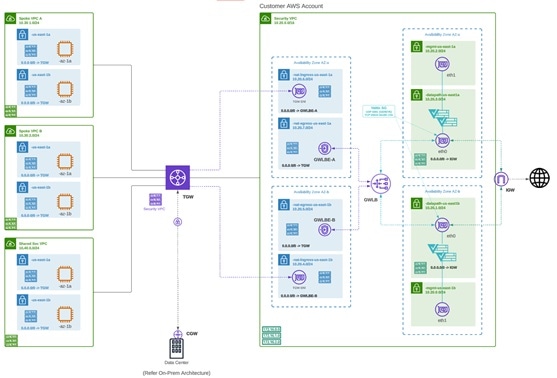
Deploying an Egress/East-West gateway to protect traffic leaving their public cloud networks. The egress gateway functions as a transparent forward proxy, performing full decryption and embedding advanced security features like intrusion prevention, antimalware, data loss prevention, and full-path URL filtering. Optionally, it can also operate in a forwarding mode, where it doesn't proxy or decrypt traffic but still applies security functionalities like malicious IP blocking and FQDN filtering.
The diagram is an example of an AWS account with an egress gateway in a centralized mode:
NAT Gateways in Egress
Note |
At this time, Multicloud Defense supports native gateways in an egress deployment for AWS and Azure ony. |
Network Address Translation (NAT) gateways are gateways designed to originate from within your cloud service provider. Egress traffic appears from a single IP address, or at least one per availability zone. By building a gateway and hosting it from within your cloud environment you can potentially increase efficiency and reduce costs. Note that if the association between the VPC or VNet in Multicloud Defense and the gateway in your cloud service provider fails, Multicloud Defense system logs capture the instance for troubleshooting.
These are the configurations that are supported:
-
Azure supports one subnet.
-
You must have at least one public IP address configured in your NAT gateway.
Note |
Multicloud Defense Egress Gateway and Cisco FTDv, when orchestrated by Multicloud Defense, can perform NAT using AWS Elastic IP (Public IP) addresses associated with their instances. These Public IPs may change during events such as redeployment, upgrade, or autoscaling. To ensure all outbound traffic from your AWS environment translates to specific, static IP addresses, an AWS NAT Gateway (NGW) is required. |
The diagram is an example of an Azure account with an egress gateway in a centralized mode:

AWS CloudWAN
At this time, Multicloud Defense supports the inclusion of AWS' CloudWAN in egress gateways. CloudWAN is an intent-driven managed wide area network (WAN) service that unifies your data center, branch, and AWS networks. While it is possible to create a global network by interconnecting multiple Transit Gateways across regions, CloudWAN offers built-in automation, segmentation, and configuration management features specifically designed for building and operating global networks based on your core network policy.
This option provides enhanced features such as automated VPC attachments, integrated performance monitoring, and centralized configuration, all managed within AWS Network Manager. This enables you to centrally manage and visualize your CloudWAN core network and Transit Gateway networks across AWS accounts, regions, and on-premises locations.
Key Benefits:
-
Simplified Network Management: AWS CloudWAN provides a centralized dashboard through AWS Network Manager for managing network configurations, policies, and monitoring traffic. This greatly reduces the complexity of dealing with multiple, disparate networking solutions and offers a unified view of the network.
-
Scalability: It enables customers to easily scale their network as their business grows. As organizations expand their cloud presence and global footprint, CloudWAN can accommodate the increased demand without requiring significant manual reconfiguration
-
Optimized Performance: By leveraging AWS’s global infrastructure, CloudWAN ensures high performance and low latency connectivity across various geographic locations, improving application performance and user experience.
CloudWAN Simplification:
-
Centralized Policy Management: The core network policy, written in a declarative language, defines segments, AWS region routing, and how attachments should map to segments. With a single network policy, customers can manage their entire network’s routing and security policies, reducing the need for manual configurations and minimizing errors.
-
Automated Operations: CloudWAN automates many network management tasks, such as route propagation and policy enforcement, freeing up IT teams to focus on more strategic initiatives.
-
Seamless Integration: It integrates with other AWS services and third-party solutions, enabling customers to build a cohesive and comprehensive network infrastructure with minimal friction.
-
Enhanced Visualization: AWS Network Manager provides several dashboard visualizations, including world maps pinpointing network resources, monitoring with CloudWatch events, real-time event tracking, and topological diagrams of your network. This makes it easier to manage and monitor all aspects of your global network.
Security service insertion refers to the practice of integrating security services directly into the network path. Here are the benefits of implementing this with Multicloud Defense:
-
Enhanced Security Posture: By inserting security services into the network, traffic can be inspected, monitored, and filtered in real-time, ensuring that threats are detected and mitigated before they can impact critical resources.
-
Consistent Security Policies: Security service insertion ensures that consistent security policies are applied across the entire network, regardless of the underlying infrastructure or geographic location. This uniformity simplifies compliance and governance.
-
Improved Visibility and Control: Integrating security services provides enhanced visibility into network traffic and potential threats. Administrators can leverage advanced analytics and monitoring tools to gain deeper insights and more effectively manage security risks.
-
Reduced Latency and Complexity: By embedding security functions into the network path rather than routing traffic through separate security appliances, latency is minimized, and network complexity is reduced, leading to better performance and simpler network architecture.
-
Flexibility and Scalability: Security service insertion with Multicloud Defense enables organizations to dynamically scale their security measures in response to changing network conditions and emerging threats, ensuring robust protection at all times.
-
Centralized Security: Consolidates security resources, reducing management burden and saving on infrastructure costs.
-
Simplified Routing: Easily steer network traffic to security appliances without complex routing configurations or third-party automation tools.
-
Multi-Region Security Inspection: Simplifies multi-region deployments, allowing intra-region and inter-region traffic to pass through security infrastructure without complex configurations.
By leveraging AWS CloudWAN and Multicloud Defense for security service insertion, customers can achieve a high-performing, secure, and easily manageable network infrastructure that supports their business growth and operational resilience. Multicloud Defense allows users to create a security services VPC, attach it to an existing CloudWAN, create a Network Functions Group (NFG), and secure spoke segments by updating routing—all in an automated manner.

How to Create a Service VPC with AWS CloudWAN
To successfully create a service VPC with AWS CloudWAN, follow these steps:
-
Create Service VPCs: Establish service VPCs in multiple CNEs with required gateways.
-
Create Network Function Groups (NFGs).
-
Attach Service VPCs as NFGs: Use attachment policy rules to attach service VPCs.
-
Attach Workload VPCs: Attach VPCs to respective segments using attachment policy rules.
-
Update Routing: Modify policies and Workload VPCs to update the routing.
-
Update Core Network Policies: Apply and execute the required changes in the Core Network policies.
Consider the following limitations before you create a service VPC with AWS CloudWAN:
-
NAT gateways are mandatory for service VPCs.
-
Dual-Hop and Edge Selection is currently not supported.
-
Due to a limitation in AWS CloudWAN limitation that does not support SNAT-enabled traffic for forwarding, traffic drops for policy rulesets configured with SNAT. We strongly recommend you disable SNAT in your Multicloud Defense policy ruleset.
-
To add an additional service VPCs in different regions (CNE) use one of the two options:
-
Manual execution and application of policies are needed to update the routing for the new NFG attachment.
-
Manually update the routing tables of new service VPC datapath subnets with workload VPC routes through the Core Network.
-
Multicloud Defense Ingress Gateways
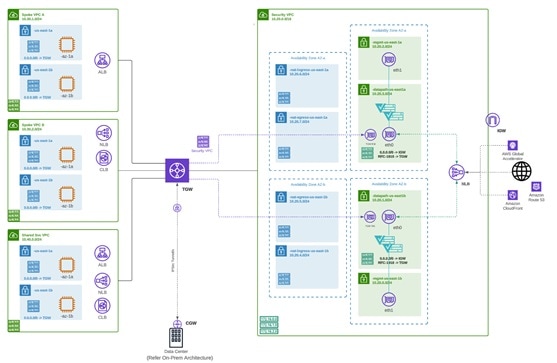
Deploying an Ingress gateway protects our public-facing applications. The Ingress gateway acts as a reverse proxy that carries out full decryption and applies advanced security functionalities such as intrusion prevention, antimalware, web application firewall (WAF), and full-path URL filtering.
The diagram is an example of an AWS account with an ingress gateway in a centralized mode.
Multicloud Defense East-West Gateways
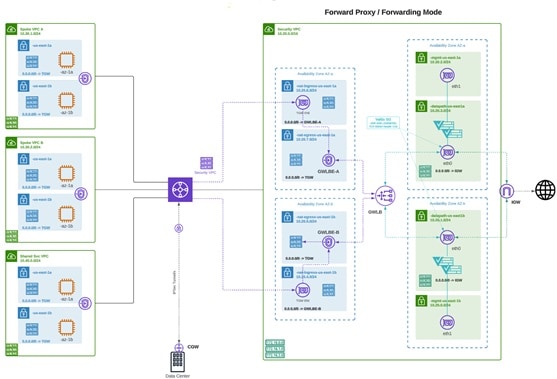
An Egress/East-West gateway deployment implements East-West L4 segmentation between subnets or VPCs/VNets within their public cloud environments. The gateway functions in a forwarding mode with L4 firewall rules, allowing or denying traffic based on set parameters, with optional logging enabled.
The diagram shows an example of an AWS account with an east-west gateway in a centralized mode:
Multicloud Defense Distributed Gateways
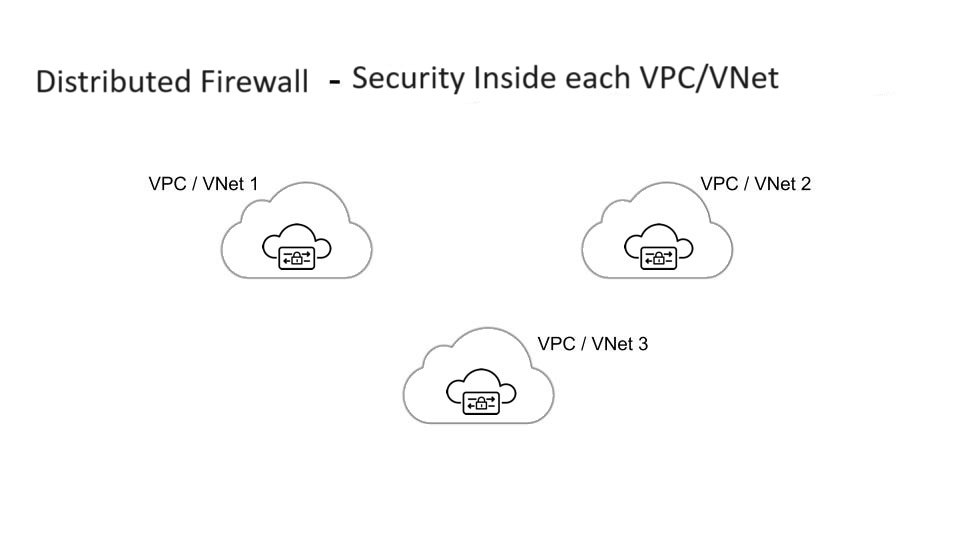
You have applications running in multiple VPC/VNets. Deploy a Multicloud Defense Gateway in each of the VPCs/VNets.
Gateways Deployed in Centralized / Hub Mode
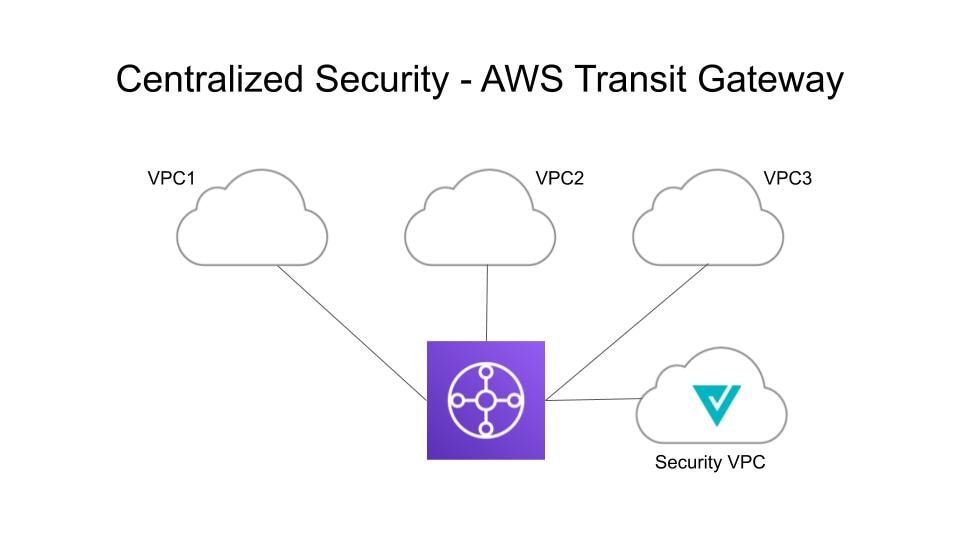
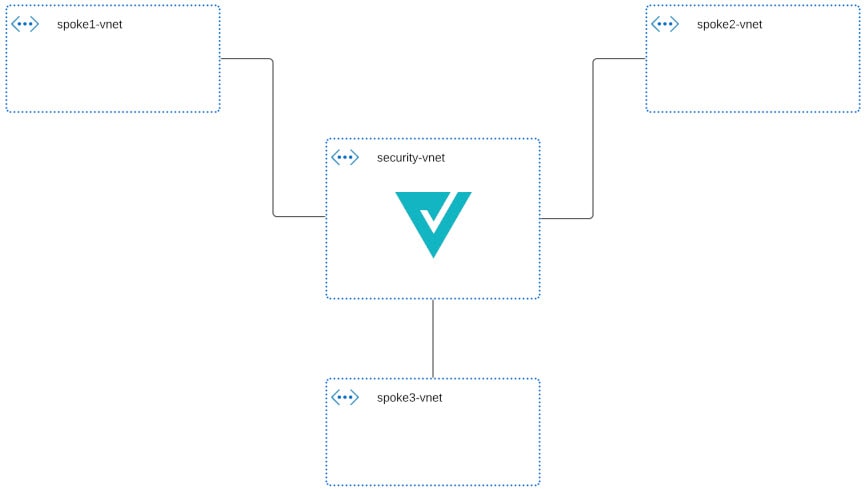
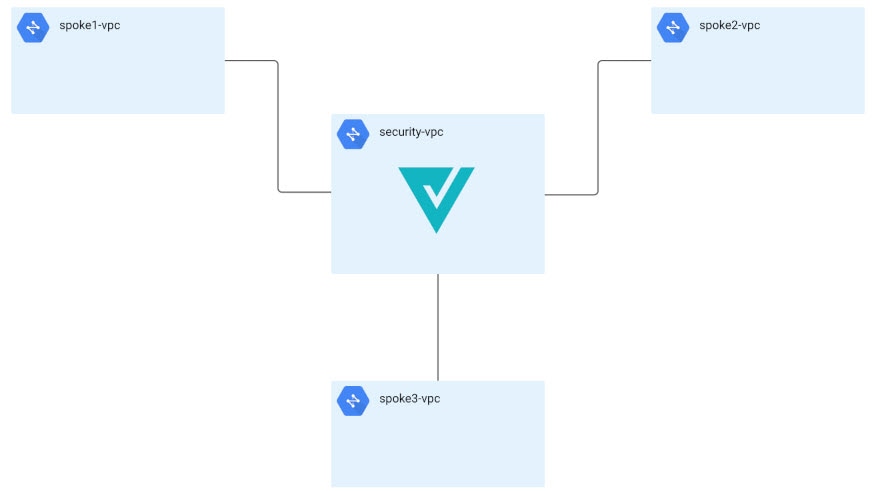
You have applications running in multiple VPCs/VNet. You would like to secure all the applications through a centralized security service VPCs or VNets. This model deploys the Multicloud Defense Gateway in a service VPC. You attach all the application VPCs (Spoke VPCs) and the Service VPC to the AWS Transit Gateway or VNet and VPC peering in Azure and GCP. Multicloud Defense provides an option to orchestrate the AWS Transit Gateway, Service VPC and the Spoke VPC Attachments. This is the recommended solution for ease of deployment, removing the complexity of multiple route tables and Transit Gateway attachments.
Advanced Gateway Configuration: Use Your Own Load Balancer
You can use a load balancer that is native to either AWS or Azure when creating a Multicloud Defense Gateway. Because AWS and Azure are different platforms, they do not use the same word for "load balancer" but the functionality mentioned below is identical in performance. Continue reading the appropriate information for the cloud service provider you currently have.
To configure your Multicloud Defense Gateway to use your own load balancer, see Add a Gateway.
Note |
Note that both of these configurations support ingress gateway deployments only. |
AWS Global Accelerator
Multicloud Defense can integrate with a set of one or more AWS global accelerators to use as an ingress point to load balance traffic across the Multicloud Defense Gateway instances. This is similar to the AWS network load balancer that is created and managed by Multicloud Defense when an ingress gateway is deployed, but offers an alternative ingress point for the ingress gateway to protect applications and workloads.
Accelerator manages the global accelerators' listener endpoint group to ensure the endpoint group has the active set of gateway instances. Client IP addresses are preserved as they pass through the global accelerator to the Multicloud Defense ingress gateway.
In order to integrate Multicloud Defense with a global accelerator, you must first create the global accelerator within AWS, defined a desired listener and created an empty endpoint group (or an endpoint group that contains the existing Multicloud Defense ingress gateway instances). Once the AWS resources exist, then configure the Multicloud Defense ingress gateway to integrate with the global accelerator.
For any additional configuration information, see the Amazon AWS documentation.
Azure Load Balancer
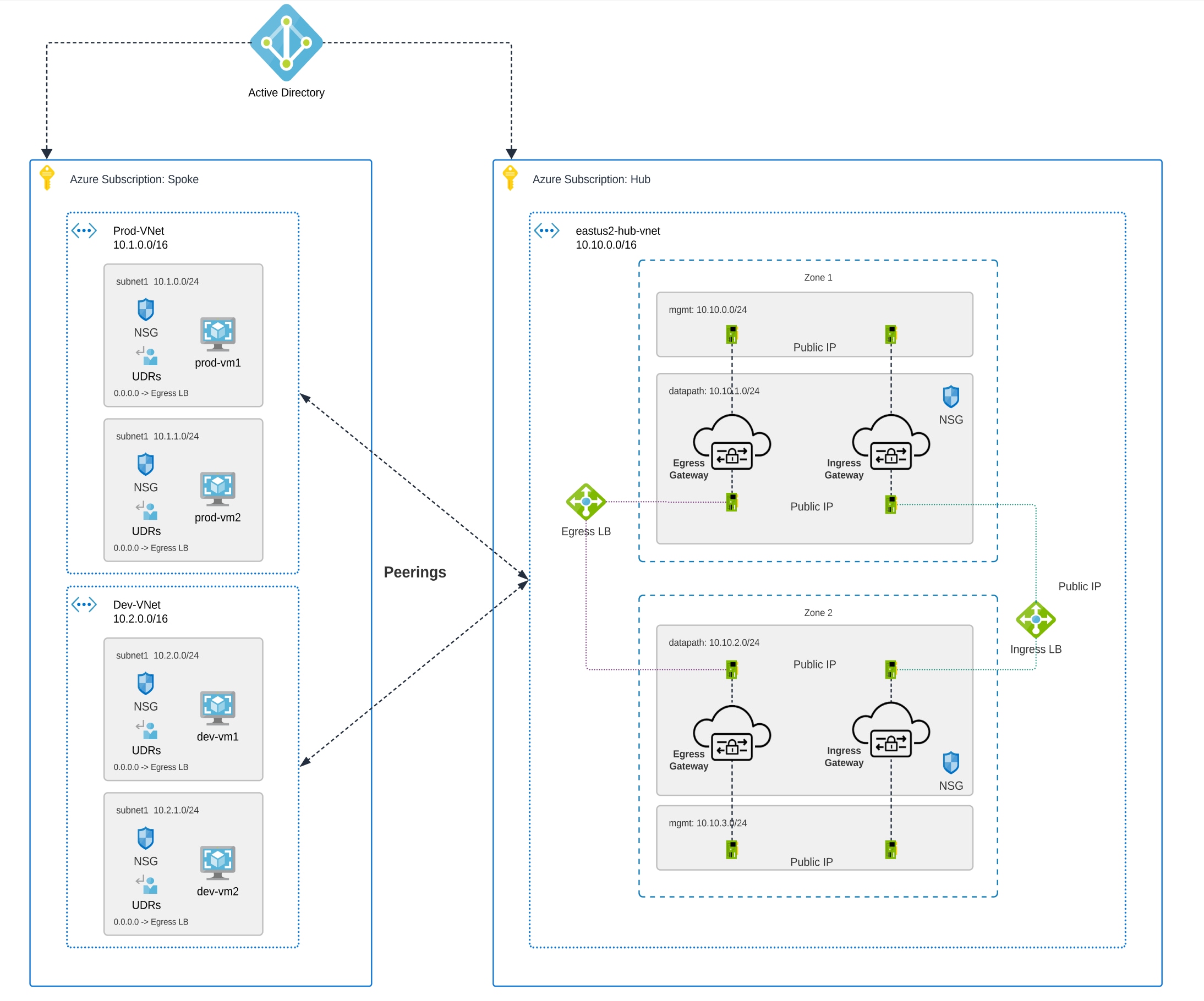
If you have an Azure cloud service provider, you can now use your own load balancer from Azure as part of your Multicloud Defense Gateway. The Azure load balancer funnels and processes traffic from multiple proxy servers to a system-provided backend pool that contains at least one cluster of Multicloud Defense Gateway instances. This scenario is ideal if you want to create a security policy for multiple proxy servers that handle non-HTTP traffic.
You must create a Multicloud Defense Gateway that defers to the Azure load balancer to be able to use this capability. Consider the following prerequisites and limitations:
-
You must have your Azure load balancer already configured.
-
For the load balancer to work, you must enable the floating IP for your load balancer rules.
-
We strongly recommend creating and configuring a backend pool in Azure for your custom load balancer. The backend pool does not have to contain any resources at this time and can be modified later.
-
If you opt to configure your Azure load balancer with a resource group, the Azure resource group and the Multicloud Defense Gateway's resource group must be configured for the same region.
-
If you choose to configure your Azure load balancer with a resource group, note that the load balancer resource group and the Multicloud Defense Gateway resource group do not have to be the same.
-
You can configure a health probe for your Azure load balancer but is not required.
-
The Multicloud Defense Gateway's virtual network and the Azure load balancer's virtual network should be the same.
-
The Multicloud Defense Gateway's datapth subnet and the Azure load balancer's subnet should be the same.
-
You must attach your gateway to a VPC that has at least one availaibilty zone.
For any information on how to create, modify, or complete an Azure load balancer, see Microsoft Azure documentation.
Azure UDP Fragmentation
While it is recommended to avoid fragmentation in general, there may be scenarios where fragmentation does occur and the Azure load balancer drops packets.
To enable support for fragmentation, contact Cisco Support.
 Feedback