Usage of Proxies in Building Rules For Policies
Is this document for you?
This document is intended for customers, security architects, and administrators who want to build rules for policies in Multicloud Defense. If you need to understand how to select and use proxies effectively to write security rules and policies, this document will help you navigate the concepts, scenarios, and related workflows.
Types of proxies
There are two types of proxies used in Multicloud Defense.
-
Forward Proxy: A client is in your environment and initiates a connection to the server. This is an egress or east-west scenario. This proxy is positioned between the client and the server. This proxy is used for inspecting any outbound traffic. The are different types of forward proxies used in Multicloud Defense which are explained later in this section.
-
Reverse Proxy: A client is outside your environment (in the Internet) and the server is within your environment, and you are protecting your server. This proxy is positioned in between your servers and the client, and is proxying the client requests to your backend servers. This proxy is used for inspecting any inbound traffic.
Forward proxies are further categorized into many types:
-
Application Proxy (Layer 7): This proxy type handles HTTP/HTTPS/WebSocket traffic. It is specific to Layer 7 applications. It can inspect HTTP headers and content. The primary types of application proxies are:
-
WebSocket Forward Proxy – Handles WebSocket connections that are bi-directional communication channels such as gaming, chats, collaboration applications. Offers security for real-time applications.
-
HTTP Forward Proxy – Handles HTTP and HTTPS traffic. Suitable for web browsing and offers features such as filtering, caching, and anonymity.
-
-
TLS Proxy: This proxy is used for TLS activation where this proxy is used to negotiate TLS.
-
TCP Proxy (Layer 4): This proxy type handles only TCP/UDP traffic, forwards data without inspecting application content.
Guideline for usage of proxies in building rules
The general guideline is to use proxies when you need to decrypt the traffic. It helps investigate for signature matches, deep packet inspection and more.
Use cases for proxies in building rules for policies
Primarily, if you have more information on the traffic that you need to protect, it makes it easier to know which proxy to use. Here is a list of use cases for ideal usage of proxies along with reasons for use.
|
Use case |
Proxy role |
Proxy type |
Reason |
|---|---|---|---|
|
HTTP/HTTPS traffic (web browsing, APIs) |
Forward Proxy |
Application Proxy (L7) |
Enables deep inspection, URL filtering, and advanced security features for outbound web traffic. |
|
WebSocket (bi-directional communication - chat, gaming, collaboration) |
Forward Proxy |
Application Proxy (L7) |
Handles WebSocket handshake. Low latency, data exchange. Enables security, anonymity and content filtering. |
|
TLS (corporate networks - detect malware, DDoS attacks, control website access and more) |
Forward Proxy |
Forward Proxy |
Handles TLS handshake. Protects by inspecting encrypted traffic for security threats and protects using network policies. |
|
Inbound web traffic to internal servers |
Reverse Proxy |
Application Proxy (L7) |
Protects internal servers by inspecting and controlling inbound HTTP/HTTPS traffic. |
|
Non-HTTP TCP/UDP traffic (database, mail) |
Forward Proxy |
TCP |
Provides efficient Layer 4 inspection for non-HTTP protocols without full application-layer parsing. |
|
Internal service-to-service communication |
Forward Proxy |
TCP |
Low latency, high throughput inspection for internal TCP/UDP traffic. |
|
Advanced security policy requiring deep packet inspection |
Forward Proxy |
Application Proxy (L7) |
Needed for granular security controls, threat detection, and protocol validation. |
|
Simple L4 policy for allowing or blocking ports |
Forward Proxy |
TCP |
Lightweight policy enforcement based on ports and IPs without deep inspection. |
Workflow for usage of proxies in building rules for policies
This workflow helps you identify the proxies to use, whether it is for inbound traffic or outbound traffic. Based on the traffic, you can determine the proxies that you need to choose to build your rules for policies.
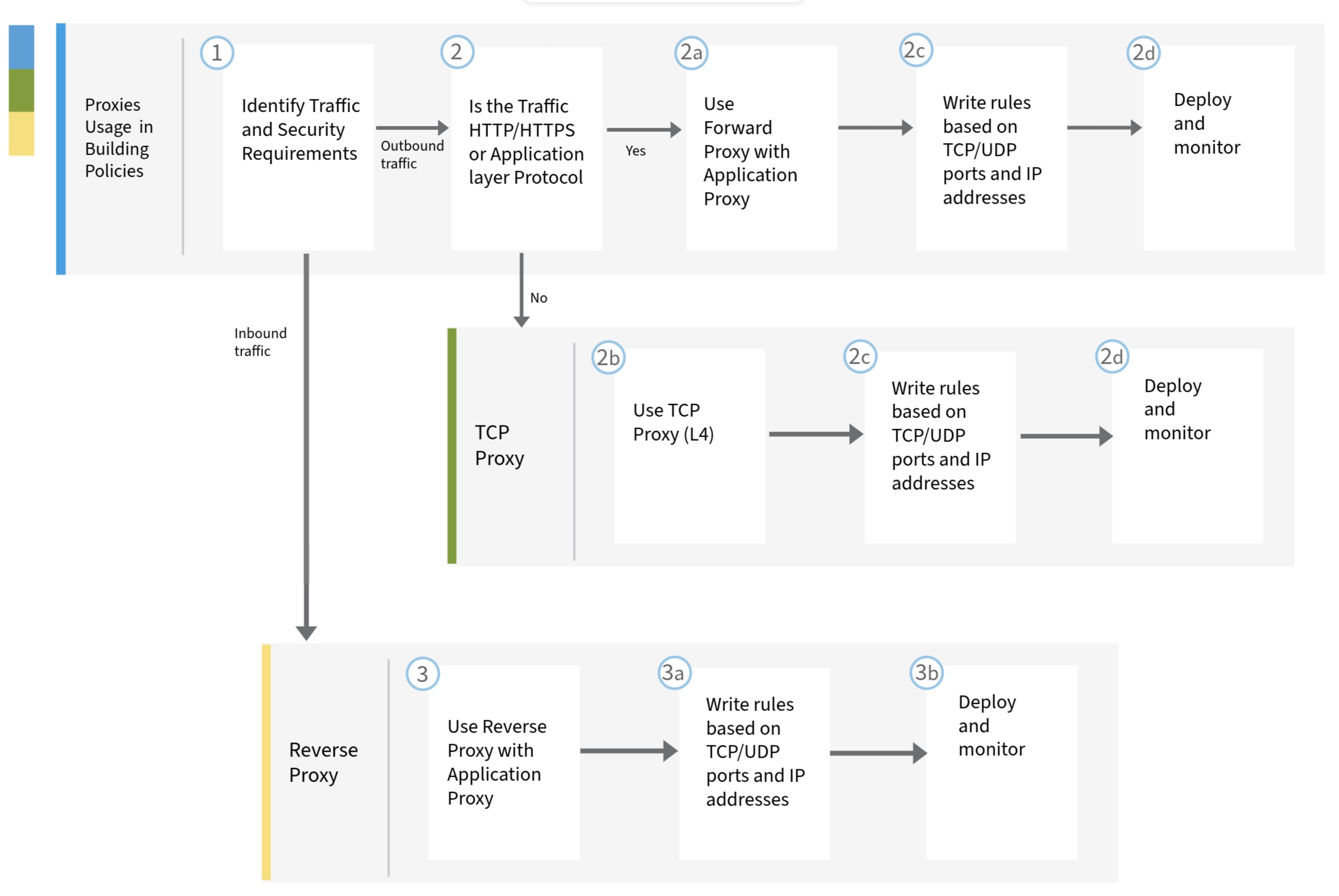
Configure proxies for building rules for policies
Configure and set up your proxies to build policies.
Procedure
|
Step 1 |
Identify your traffic and security requirements. |
|
Step 2 |
Identify whether is traffic is inbound or outbound. |
|
Step 3 |
Write rules based on TCP/UDP ports and IP addresses. |
|
Step 4 |
Deploy the configuration and monitor the traffic. |
Troubleshooting for proxies in building rules for policies
Summary
Here are some common issues and ways to address them:
-
If the traffic is not inspected as expected, verify that the proxy type selection matches the traffic type.
-
Check the rule order and specificity to avoid conflicts.
-
Confirm that advanced security profiles are attached only to supported proxy types.
-
Review logs for errors or dropped packets that can indicate misconfiguration.
For support, contact Cisco Technical Assistance Center.
Additional resources for usage of proxies in building rules for policies
To know more about proxies and how you can use them in Multicloud Defense, here are a list of references:
 Feedback