Smart Licensing Using Policy

Overview of Smart Licensing Using Policy

Smart Licensing Using Policy is supported on Cisco Wireless Gateway for LoRaWAN Release 2.2 and later, for the subscription of Common Packet Forwarder (CPF).

Smart Licensing Using Policy is an enhanced version of Smart Licensing, with the overarching objective of providing a licensing solution that does not interrupt the operations of your network, rather, one that enables a compliance relationship to account for the hardware and software licenses you purchase and use. Smart Licensing Using Policy provides a seamless experience with the various aspects of licensing.

  • Purchase licenses: Purchase licenses through the existing channels and use the Cisco Smart Software Manager (CSSM) portal to view product instances and licenses.


    Note


    To simplify your implementation of Smart Licensing Using Policy, provide your Smart Account and Virtual Account information when placing an order for new hardware or software. This allows Cisco to install applicable policies and authorization codes (terms explained in the Concepts section below), at the time of manufacturing.


  • Use: All licenses on your devices are unenforced. This means that you do not have to complete any licensing-specific operations, such as registering or generating keys before you start using the software and the licenses that are tied to it. License usage is recorded on your device with timestamps and the required workflows can be completed at a later date.

  • Report license usage to CSSM: Multiple options are available for license usage reporting. You can use the Cisco Smart Licensing Utility (CSLU), or report usage information directly to CSSM. For air-gapped networks, a provision for offline reporting where you download usage information and upload it to CSSM, is also available. The usage report is in plain text XML format.

  • Reconcile: For situations where delta billing applies (purchased versus consumed).

The primary benefits of this enhanced licensing model are:

  • Seamless day-0 operations

    After a license is ordered, no preliminary steps, such as registration or generation of keys etc., are required unless you use an export-controlled or enforced license.

  • Visibility and manageability

    Tools, telemetry and product tagging, to know what is in-use.

  • Flexible, time series reporting to remain compliant

    Easy reporting options are available, whether you are directly or indirectly connected to Cisco Smart Software Manager (CSSM), or in an air-gapped network.

Smart Account

To use Smart Licensing, you must first set up a Cisco Smart Account at Cisco Software Central.

A Smart Account provides a single location for all Smart-enabled products and entitlements. It helps speed procurement, deployment, and maintenance of Cisco Software. When creating a Smart Account, you must have the authority to represent the requesting organization. After submitting, the request goes through a brief approval process.

Virtual Account

A Virtual Account exists as a sub-account withing the Smart Account. Virtual Accounts are a customer-defined structure based on organizational layout, business function, geography or any defined hierarchy. They are created and maintained by the Smart Account administrator.
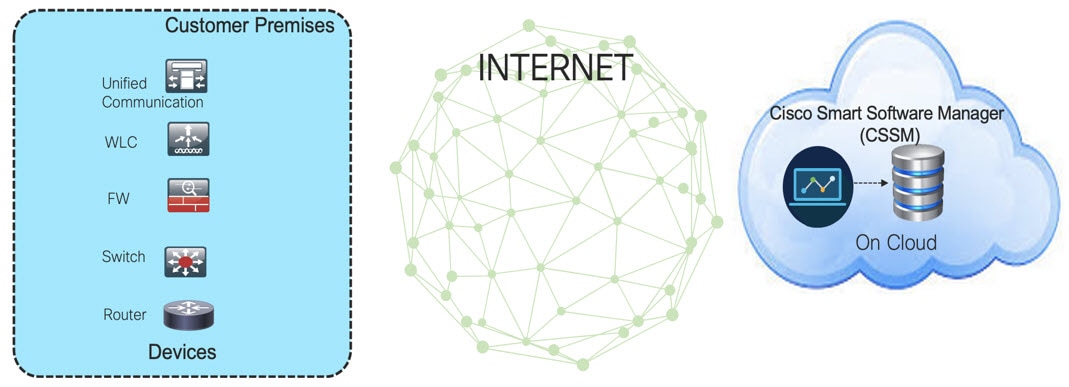
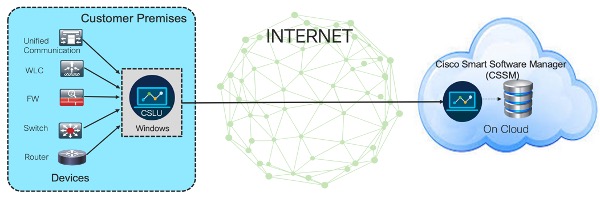
Architecture

This section explains the various components that can be part of your implementation of Smart Licensing Using Policy.

Product Instance

A product instance is a single instance of a Cisco product, identified by a Unique Device Identifier (UDI).

A product instance records and reports license usage (RUM reports), and provides alerts and system messages about overdue reports, communication failures, etc. The RUM reports and usage data are also stored securely in the product instance.

Cisco Smart Software Manager (CSSM)

CSSM is a portal that enables you to manage all your Cisco software licenses from a centralized location. CSSM helps you manage current requirements and review usage trends to plan for future license requirements.

You can access CSSM at https://software.cisco.com. Under the License tab, click the Smart Software Licensing link.

In CSSM you can:

  • Create, manage, or view virtual accounts.

  • Create and manage Product Instance Registration Tokens.

  • Transfer licenses between virtual accounts or view licenses.

  • Transfer, remove, or view product instances.

  • Run reports against your virtual accounts.

  • Modify your email notification settings.

  • View overall account information.

Prior to using CSSM, please view a short video about how to use the portal found here:

https://www.cisco.com/c/en/us/buy/smart-accounts/software-manager.html

Click on the View Video button.

Cisco Smart Licensing Utility (CSLU)

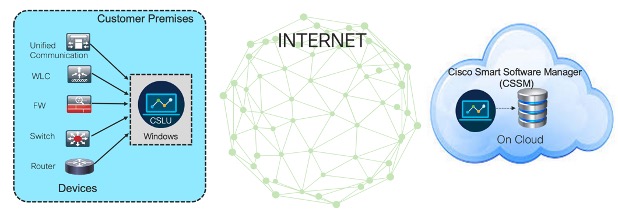
CSLU is a Windows-based reporting utility that provides aggregate licensing work-flows. This utility performs the following key functions:

  • Provides the options relating to how work-flows are triggered. The work-flows can be triggered by CSLU or by the product instance.

  • Collects usage reports from the product instance and upload these usage reports to the corresponding smart account or virtual account – online, or offline, using files. Similarly, the RUM report ACK is collected online, or offline, and provided back to the product instance.

  • Sends authorization code requests to CSSM and receives authorization codes from CSSM.

CSLU can be part of your implementation in the following ways:

  • Install the windows application, to use CSLU as a standalone tool and connect it to CSSM.

  • Install the windows application, to use CSLU as a standalone tool and not connect it to CSSM. With this option, the required usage information is downloaded to a file and then uploaded to CSSM. This is suited to air-gapped networks.

Concepts

This section explains the key concepts of Smart Licensing Using Policy.

License Enforcement Types

A given license belongs to one of three enforcement types. The enforcement type indicates if the license requires authorization before use, or not.

  • Unenforced or Not Enforced

    Unenforced licenses do not require authorization before use in air-gapped networks, or registration, in connected networks. The terms of use for such licenses are as per the end user license agreement (EULA).

  • Enforced

    Licenses that belong to this enforcement type require authorization before use. The required authorization is in the form of an authorization code, which must be installed in the corresponding product instance.

    An example of an enforced license is the Media Redundancy Protocol (MRP) Client license, which is available on Industrial Ethernet Switches.

  • Export-Controlled

    Licences that belong to this enforcement type are export-restricted by U.S. trade-control laws and these licenses require authorization before use. The required authorization code must be installed in the corresponding product instance for these licenses as well. Cisco may pre-install export-controlled licenses when ordered with hardware purchase.

    An example of an export-controlled license is the High Speed Encryption (HSECK9), which is available on certain Cisco Routers.

License Duration

This refers to the duration or term for which a purchased license is valid. A given license may belong to any one of the enforcement types mentioned above and be valid for the following durations:

  • Perpetual: There is no expiration date for such a license.

  • Subscription: The license is valid only until a certain date.

Authorization Code

The Smart Licensing Authorization Code (SLAC) allows activation and continued use of a license that is export-controlled or enforced.

If you are upgrading from an earlier licensing model to Smart Licensing Using Policy, you may have a Specific License Reservation (SLR) with its own authorization code. The SLR authorization code is supported after upgrade to Smart Licensing Using Policy.

Policy

A policy provides the product instance with these reporting instructions:

  • License usage report acknowledgement requirement (Reporting ACK required): The license usage report is known as a RUM Report and the acknowledgement is referred to as an ACK (See RUM Report and Report Acknowledgement). This is a yes or no value which specifies if the report for this product instance requires CSSM acknowledgement or not. The default policy is always set to “yes”.

  • First report requirement (days): The first report must be sent within the duration specified here.

  • Reporting frequency (days): The subsequent report must be sent within the duration specified here.

  • Report on change (days): In case of a change in license usage, a report must be sent within the duration specified here.

Understanding Policy Selection

CSSM determines the policy that is applied to a product instance. Only one policy is in use at a given point in time. The policy and its values are based on a number of factors, including the licenses being used.

Cisco default is the default policy that is always available in the product instance. If no other policy is applied, the product instance applies this default policy. The table below shows the Cisco default policy values.

While you cannot configure a policy, you can request for a customized one, by contacting the Cisco Global Licensing Operations team. Go to Support Case Manager. Click OPEN NEW CASE > Select Software Licensing. The licensing team will contact you to start the process or for any additional information. Customized policies are also made available through your Smart account in CSSM.


Note


To know which policy is applied (the policy in-use) and its reporting requirements, enter the show license all command in privileged EXEC mode.


Table 1. Policy: Cisco default
Policy: Cisco default Default Policy Values

Export (Perpetual/Subscription)

Note


Applied only to licenses with enforcement type "Export-Controlled".

Reporting ACK required: Yes

First report requirement (days): 90

Reporting frequency (days): 90

Report on change (days): 90

Enforced (Perpetual/Subscription)

Note


Applied only to licenses with enforcement type "Enforced".

Reporting ACK required: Yes

First report requirement (days): 90

Reporting frequency (days): 90

Report on change (days): 90

Unenforced/Non-Export Perpetual1

Reporting ACK required: Yes

First report requirement (days): 365

Reporting frequency (days): 0

Report on change (days): 90

Unenforced/Non-Export Subscription

Reporting ACK required: Yes

First report requirement (days): 90

Reporting frequency (days): 90

Report on change (days): 90

1 For Unenforced/Non-Export Perpetual: the default policy’s first report requirement (within 365 days) applies only if you have purchased hardware or software from a distributor or partner.

RUM Report and Report Acknowledgement

A Resource Utilization Measurement report (RUM report) is a license usage report, which the product instance generates, to fulfil reporting requirements as specified by the policy.

An acknowledgement (ACK) is a response from CSSM and provides information about the status of a RUM report.

The policy that is applied to a product instance determines the following reporting requirements:

  • Whether a RUM report is sent to CSSM and the maximum number of days provided to meet this requirement.

  • Whether the RUM report requires an acknowledgement (ACK) from CSSM.

  • The maximum number of days provided to report a change in license consumption.

A RUM report may be accompanied by other requests, such as a trust code request, or a SLAC request. So in addition to the RUM report IDs that have been received, an ACK from CSSM may include authorization codes, trust codes, and policy files as well.

Trust Code

A UDI-tied public key with which the product instance signs a RUM report. This prevents tampering and ensures data authenticity.

Supported Topologies

This section describes the various ways in which you can implement Smart Licensing Using Policy. Cisco Wireless Gateway for LoRaWAN supports the following topologies:

  • Full Offline Access

    In this topology, devices do not have connectivity to CSSM (software.cisco.com). You must copy and paste information between Cisco products and CSSM to manually check in and out licenses.

    To implement this topology, see Workflow for Topology: Full Offline Access.

  • CSLU (Cisco Smart Licensing Utility) mode

    CSLU mode has two different kind of CSLU modes depending on the topology between the CSLU and CSSM.

    • CSLU has access to CSSM

      In this topology the devices are connected to CSLU controller. There is connectivity between CSLU and CSSM (Cisco Smart Software Manager – software.cisco.com). Cisco products send usage information to a locally installed CSLU. There is online transmission between CSLU and CSSM to check-in and check-out licenses and data.

      To implement this topology, see Workflow for Topology: CSLU Has Access to CSSM.

    • CSLU has No Access to CSSM.

      In this topology the devices are connected to CSLU. There is no connectivity between CSLU and CSSM (Cisco Smart Software Manager – software.cisco.com). Cisco products send usage information to a locally installed CSLU. You need to copy and paste information between CSLU and CSSM to manually check-in and check-out licenses.

      To implement this topology, see Workflow for Topology: CSLU Has No Access to CSSM.

Workflow for Topology: Full Offline Access

This procedure requires a manual exchange of required information between the router and CSSM.

Procedure


Step 1

Set license transport method to “off”.

In configuration mode, perform the following:

Example:

Gateway#configure terminal
Gateway(config)#license smart transport off

Step 2

Start license service through enabling common-packet-forwarder.

In configuration mode, perform the following:

Example:

Gateway(config)#common-packet-forwarder profile
Gateway(config-cpf-profile)#ipaddr A.B.C.D port X
Gateway(config-cpf-profile)#cpf enable

Step 3

Generate a license usage (RUM reports) file from the device and export the license usage file to your host laptop/PC.

Enter the license smart save usage command in privileged EXEC mode.

Example:

Gateway#license smart save usage all file flash:report

Step 4

Copy the usage report from IXM using the SCP command in privileged EXEC mode.

Example:

Gateway#scp local flash:report user1 171.69.181.77 /ws/user1/report

Step 5

Import the license usage file to CSSM on Cloud.

  1. Log in to the CSSM Web UI at https://software.cisco.com, using the username and password provided by Cisco.

  2. Select the Smart Account (upper left-hand corner of the screen) that will receive the report.

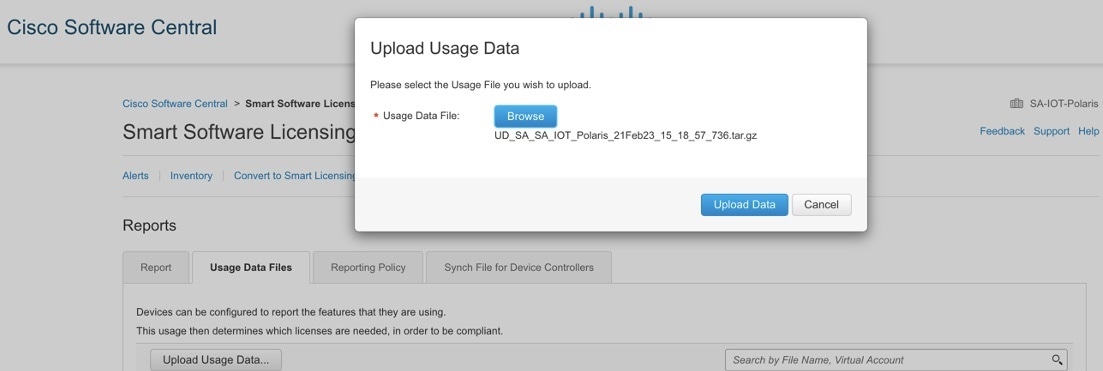
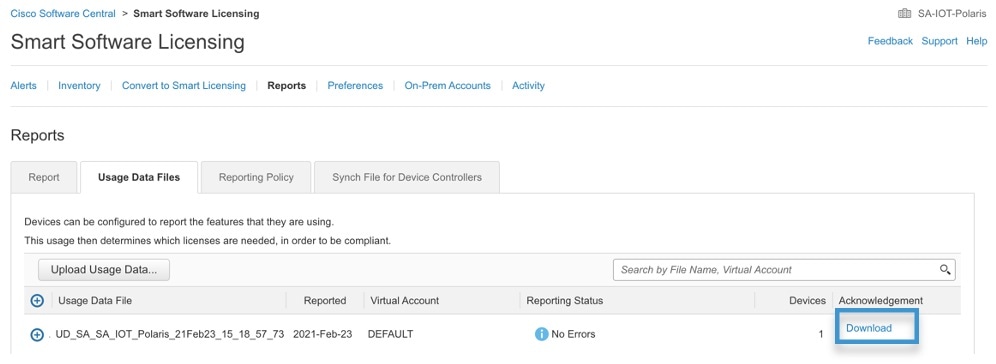
  3. Select Smart Software Licensing Reports Usage Data Files .

  4. The Upload Usage Data window appears. Click Browse , and navigate to where the file is. Click on Upload Data .

  5. From the Select Virtual Accounts pop-up, select the Virtual Account that will receive the uploaded file. The file is uploaded to Cisco and is listed in the Usage Data Files table in the Reports screen showing the File Name, time is was Reported, which Virtual Account it was uploaded to, the Reporting Status, Number of Product Instances reported, and the Acknowledgement status.

  6. In the Acknowledgement column, click Download to save the .txt ACK file for the report you uploaded. Wait for the ACK to appear in the Acknowledgement column.

  7. Check under the Product Instances tab to verify your device is listed.

Step 6

Download the ACK file, using the SCP command in privileged EXEC mode.

Example:

Gateway#scp remote user 171.69.181.77 /ws/ACK_report flash:ACK_report

Step 7

Import the ACK file from CSSM to your device, using the license smart import file command in privileged EXEC mode.

Example:

Gateway#license smart import file flash: ACK_report

Step 8

Verify the Product Instance has imported the data. Use the following command to display license authorization, policy and reporting information for the product instance.

Example:

Gateway#show license usage

Step 9

Verify the license is in use.

Example:

Gateway#show license summary

Workflow for Topology: CSLU Has Access to CSSM

Tasks for Product Instance-Initiated Communication:

  • Ensure network neachability (SSH).

  • Check NTP status is in sync.

  • Ensure the transport type is set to cslu (default).

    Device(config)#license smart transport cslu
  • Specify the CSLU information to be used.

    Configure a specific URL for CSLU by using the following CLI:

    Device(config)#license smart url cslu http://<HOST or IP>:<port-num>/cslu/v1/pi
    • HOST or IP – Hostname / IP address of the windows (where CSLU is installed)

    • port-num – use 8180 or 8182.

  • Verify the license policy is successfully installed by running the CLI command and verifying the time/date stamp.

    Gateway#show common-packet-forwarder status
    Enabled : Yes
    Running : Yes
    NS Registration : Successful
    License Status: Reported - Yes, Acknowledged - Yes
    
    Gateway#show license status
    Utility:
      Status: DISABLED
    
    Smart Licensing Using Policy:
      Status: ENABLED
    
    Data Privacy:
      Sending Hostname: yes
        Callhome hostname privacy: DISABLED
        Smart Licensing hostname privacy: DISABLED
      Version privacy: DISABLED
    
    Transport:
      Type: cslu
      Cslu address: http://172.27.164.116:8182/cslu/v1/pi
      Proxy:
        Not Configured
    
    Policy:
      Policy in use: Installed On Feb 23 2021 02:14:41 UTC
      Policy name: Test Policy
      Reporting ACK required: no (Customer Policy)
      Unenforced/Non-Export Perpetual Attributes:
        First report requirement (days): 94 (Customer Policy)
        Reporting frequency (days): 100 (Customer Policy)
        Report on change (days): 100 (Customer Policy)
      Unenforced/Non-Export Subscription Attributes:
        First report requirement (days): 120 (Customer Policy)
        Reporting frequency (days): 100 (Customer Policy)
        Report on change (days): 100 (Customer Policy)
      Enforced (Perpetual/Subscription) License Attributes:
        First report requirement (days): 0 (CISCO default)
        Reporting frequency (days): 204 (Customer Policy)
        Report on change (days): 100 (Customer Policy)
      Export (Perpetual/Subscription) License Attributes:
        First report requirement (days): 0 (CISCO default)
        Reporting frequency (days): 100 (Customer Policy)
        Report on change (days): 100 (Customer Policy)
    
    Miscellaneous:
      Custom Id: <empty>
    
    Usage Reporting:
      Last ACK received: Feb 23 2021 02:14:41 UTC
      Next ACK deadline: <none>
      Reporting push interval: 0 (no reporting)
      Next ACK push check: <none>
      Next report push: <none>
      Last report push: Feb 23 2021 02:10:41 UTC
      Last report file write: <none>
    
    Trust Code Installed: <none>
    Gateway#

Sample configuration

Gateway#configure terminal
Gateway(config)#interface FastEthernet 0/1
Gateway(config-if)#ip address 172.27.170.104 255.255.255.128
Gateway(config-if)#exit
Gateway(config)#ip default-gateway 172.27.170.1
Gateway(config)#
Gateway(config)#exit
*Feb 20 02:37:17: Configured from console by console
Gateway#
Gateway#configure terminal
Gateway(config)#crypto key generate rsa
Gateway(config)#ip ssh admin-access
Gateway(config)#exit
*Feb 20 02:37:31: Configured from console by console

Gateway#
Gateway(config)#configure terminal
Gateway(config)#common-packet-forwarder profile
Gateway(config-cpf-profile)#ipaddr 172.27.166.121 port 6070
Gateway(config-cpf-profile)#cpf enable
By typing 'y' below, I agree that to abide to SMART LICENSING subscription royalty agreement with Cisco on this unit
Do you agree the above statement? [y/n]y
common-packet-forwarder started successfully

Gateway(config-cpf-profile)#exit
Gateway(config)#exit
Gateway#
Gateway#configure terminal
Gateway(config)#license smart transport cslu
Gateway(config)#license smart url cslu http://172.27.164.116:8182/cslu/v1/pi
Gateway(config)#exit
%SMART_LIC-6-POLICY_INSTALL_SUCCESS:A new licensing policy was successfully installed

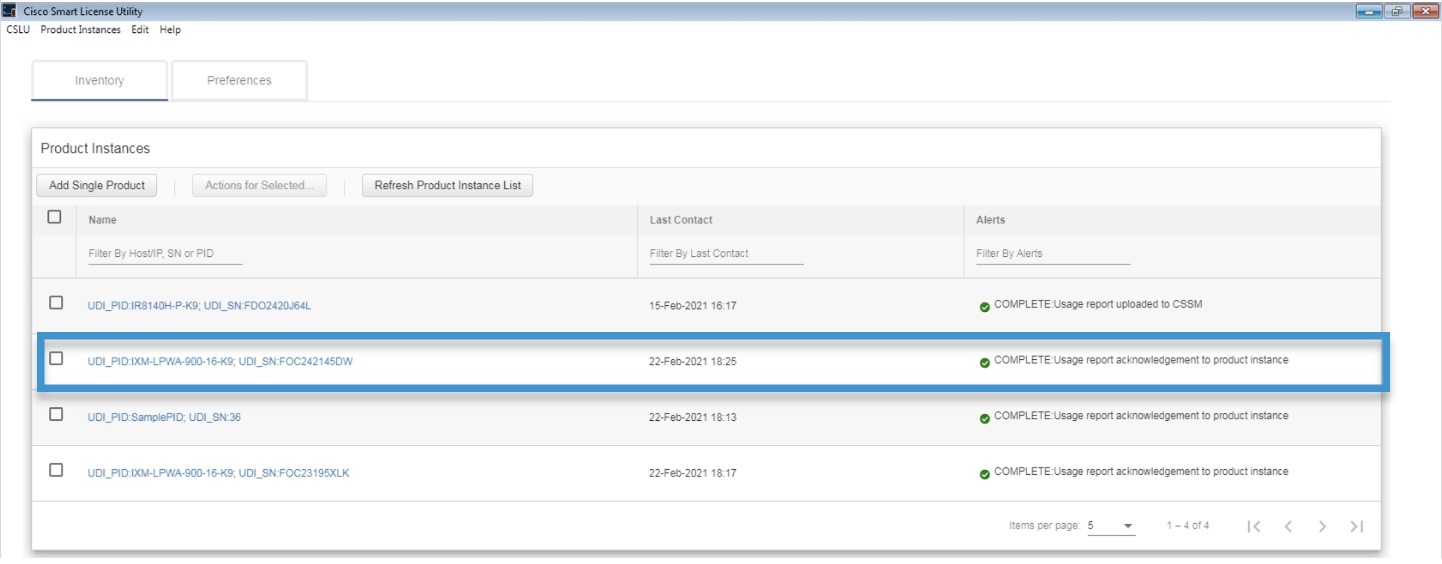
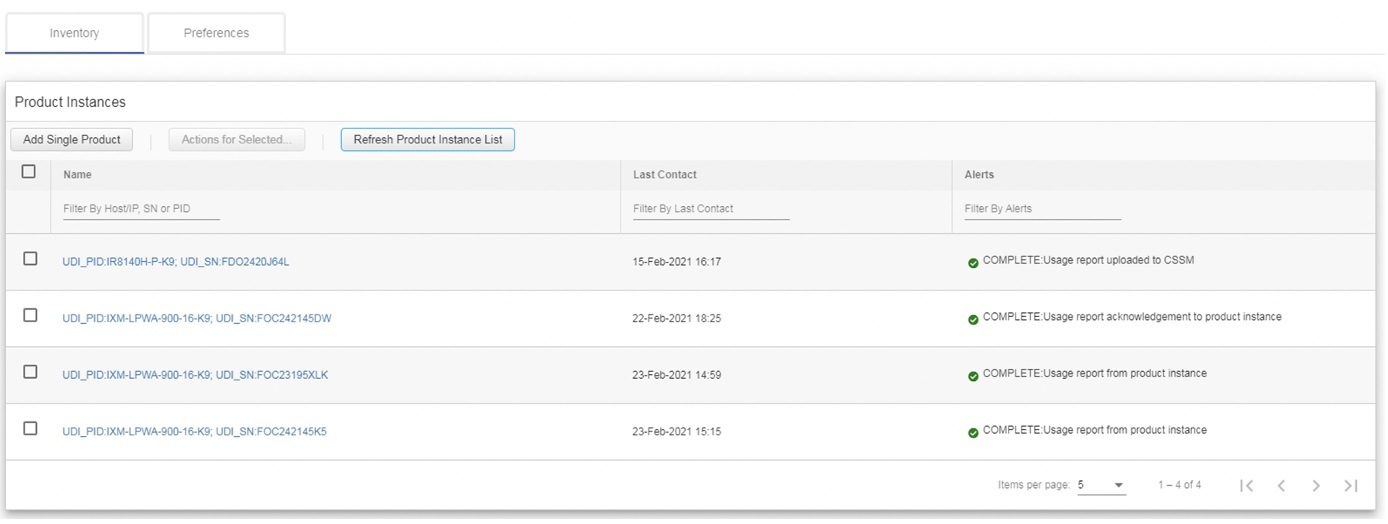
Check the status of the device on CSLU as shown below:

Figure 1. Verify the status of the device on CSLU

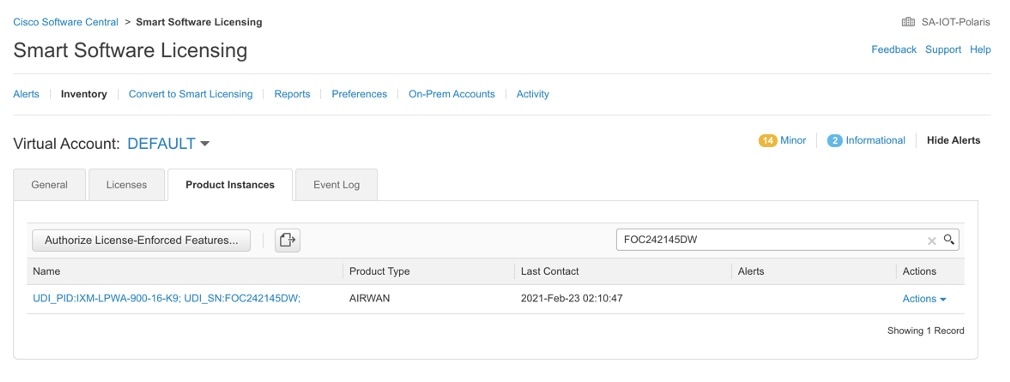
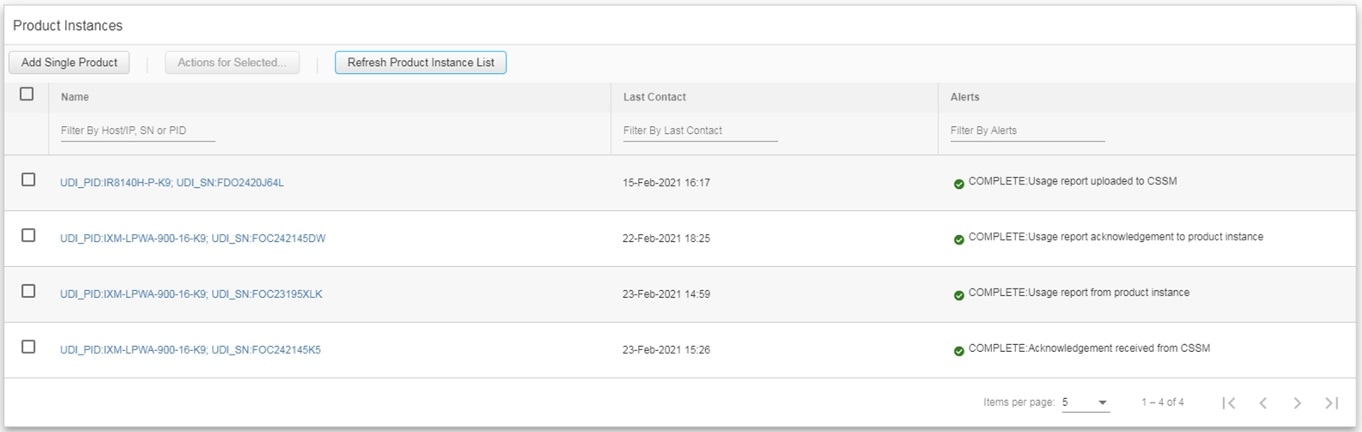
Check updated information on CSSM as shown below:

Figure 2. Verify updated information on CSSM

Workflow for Topology: CSLU Has No Access to CSSM

In this topology, the devices are connected to CSLU. There is no connectivity between CSLU and CSSM (Cisco Smart Software Manager – software.cisco.com). Cisco products send usage information to a locally installed CSLU. You need to copy and paste information between CSLU and CSSM to manually check-in and check-out licenses.

Procedure


Step 1

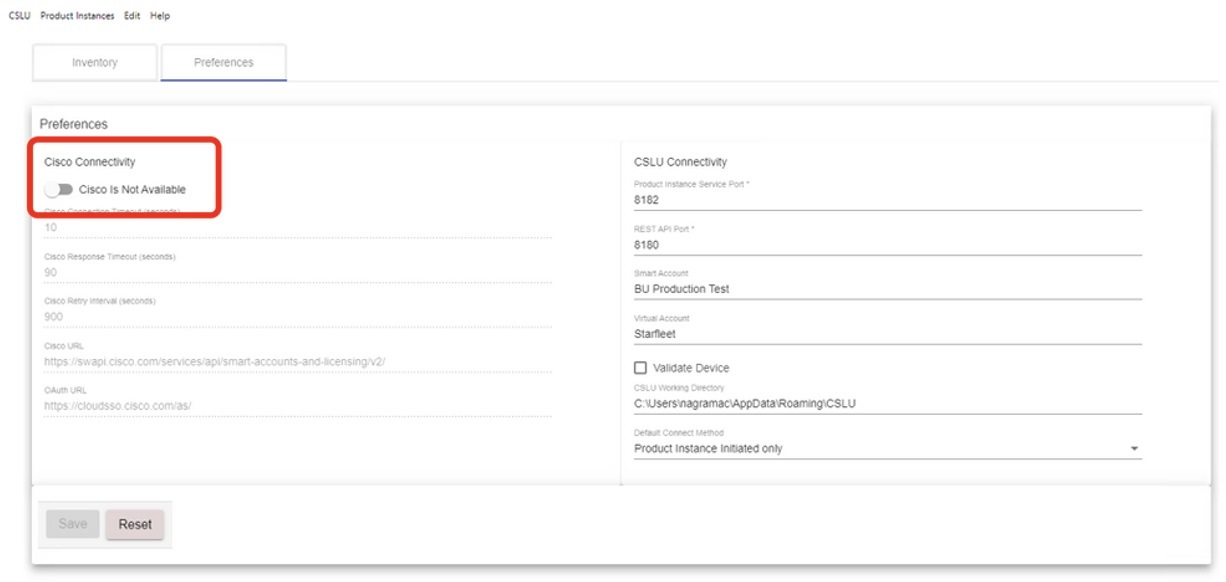
In the CSLU Preferences tab, click the Cisco Connectivity toggle switch to off. The field switches to “Cisco Is Not Available”.

Step 2

Download tar file from CSLU.

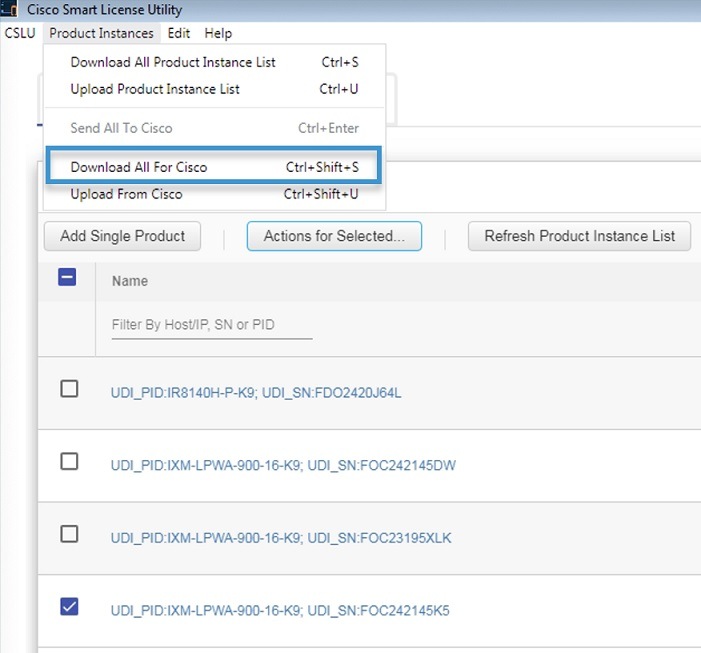
Step 3

Select the PID and choose Download All for Cisco from CSLU

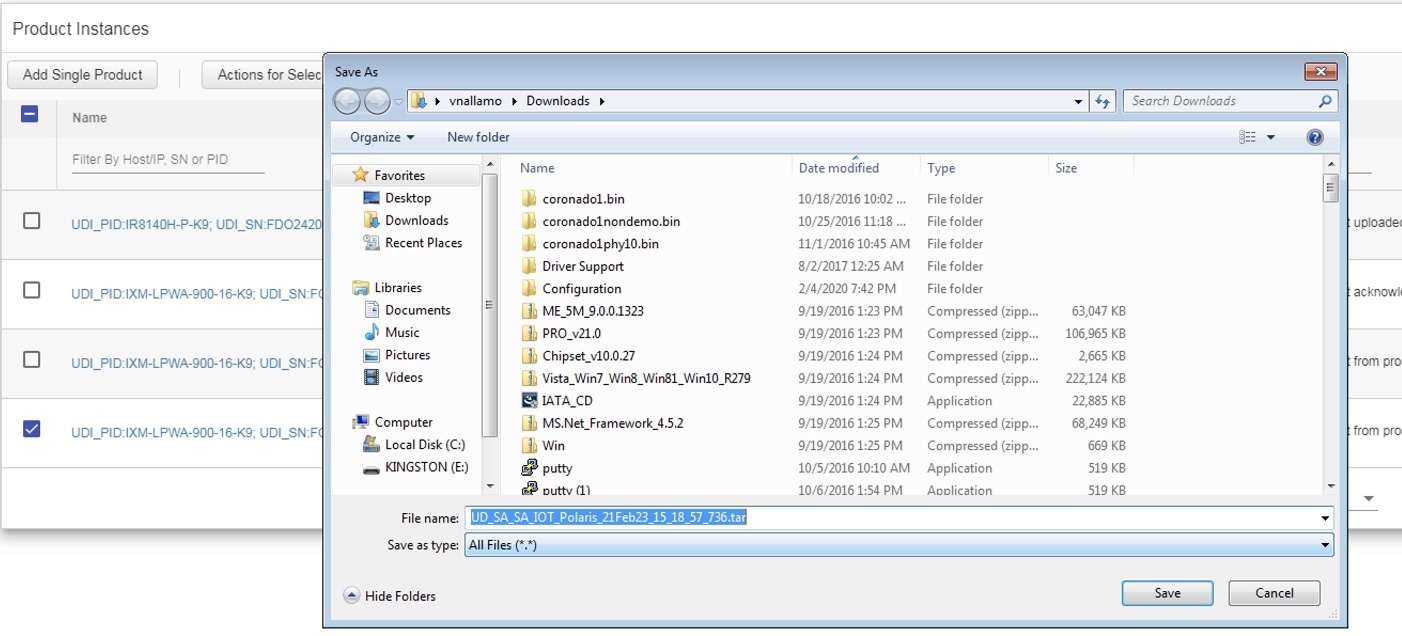
Step 4

Save the file from CSLU.

Step 5

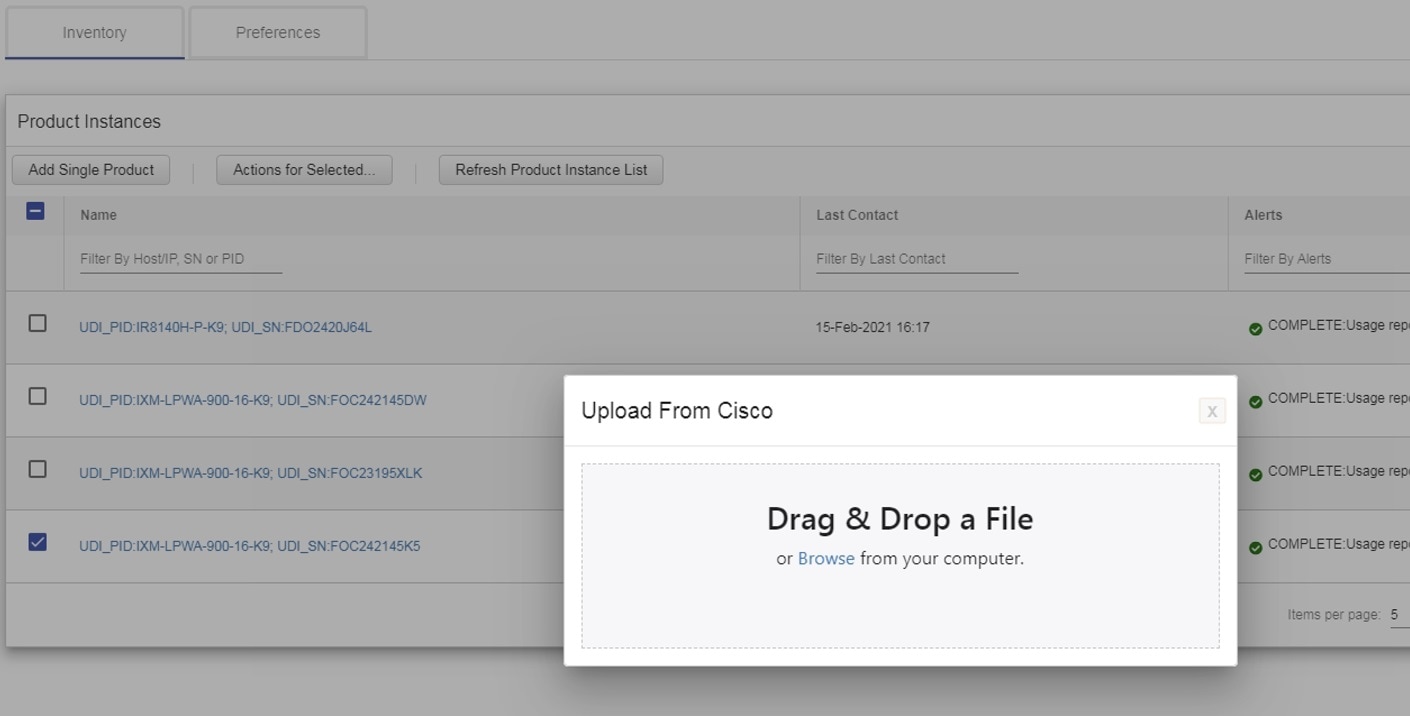
Upload the tar file downloaded from CSLU to CSSM.

Step 6

Check the status on CSSM and download the file from CSSM.

Step 7

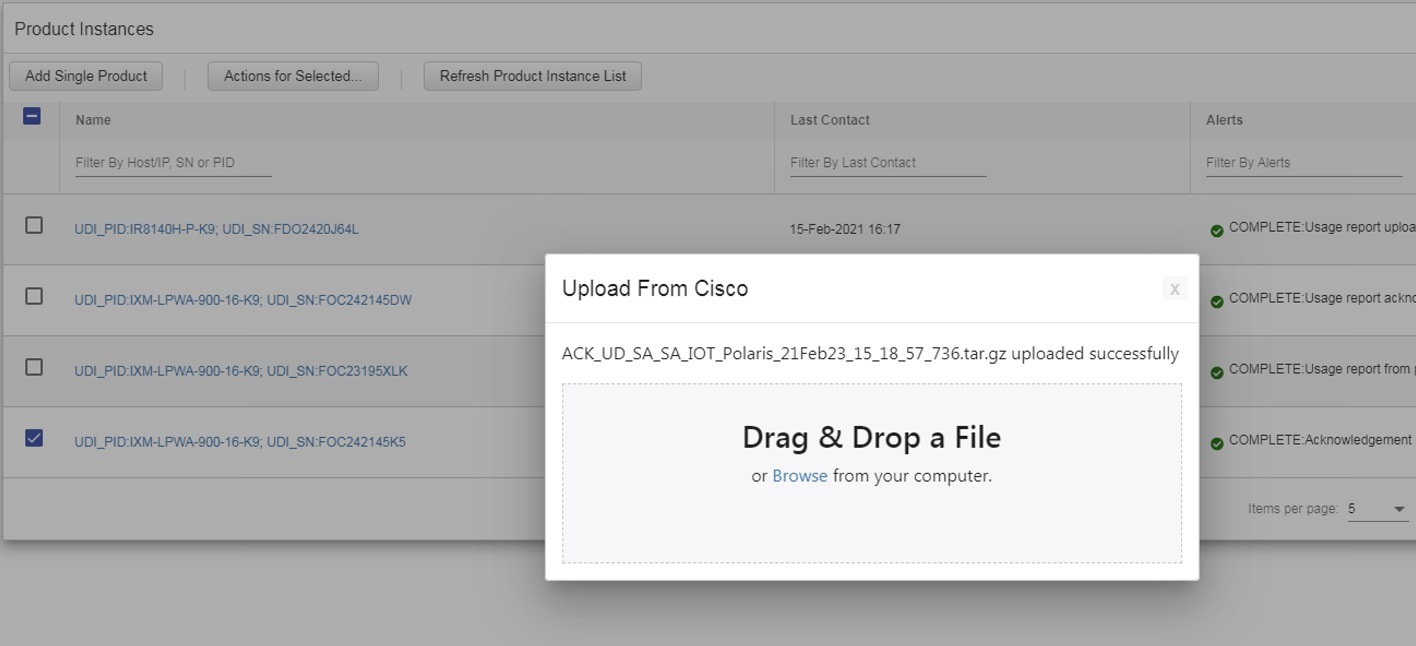
Upload the file downloaded file from CSSM on the CSLU.

Step 8

Upload the specified tar file.

Step 9

Verify the status on CSLU.

Gateway#show license usage

License Authorization:
  Status: Not Applicable

LORAWAN_CPF (LORAWAN_CPF):
  Description: LORAWAN_CPF
  Count: 1
  Version: v01
  Status: IN USE
  Export status: NOT RESTRICTED
  Feature Name: LORAWAN_CPF
  Feature Description: LORAWAN_CPF
  Enforcement type: NOT ENFORCED
  License type: Invalid
Gateway#show license status

Utility:
  Status: DISABLED

Smart Licensing Using Policy:
  Status: ENABLED

Data Privacy:
  Sending Hostname: yes
    Callhome hostname privacy: DISABLED
    Smart Licensing hostname privacy: DISABLED
  Version privacy: DISABLED

Transport:
  Type: cslu
  Cslu address: http://172.27.164.116:8182/cslu/v1/pi
  Proxy:
    Not Configured

Policy:
  Policy in use: Installed On Feb 24 2021 00:04:10 UTC
  Policy name: Test Policy
  Reporting ACK required: no (Customer Policy)
  Unenforced/Non-Export Perpetual Attributes:
    First report requirement (days): 94 (Customer Policy)
    Reporting frequency (days): 100 (Customer Policy)
    Report on change (days): 100 (Customer Policy)
  Unenforced/Non-Export Subscription Attributes:
    First report requirement (days): 120 (Customer Policy)
    Reporting frequency (days): 100 (Customer Policy)
    Report on change (days): 100 (Customer Policy)
  Enforced (Perpetual/Subscription) License Attributes:
    First report requirement (days): 0 (CISCO default)
    Reporting frequency (days): 204 (Customer Policy)
    Report on change (days): 100 (Customer Policy)
  Export (Perpetual/Subscription) License Attributes:
    First report requirement (days): 0 (CISCO default)
    Reporting frequency (days): 100 (Customer Policy)
    Report on change (days): 100 (Customer Policy)

Miscellaneous:
  Custom Id: <empty>

Usage Reporting:
  Last ACK received: Feb 24 2021 00:04:10 UTC
  Next ACK deadline: <none>
  Reporting push interval: 0 (no reporting)
  Next ACK push check: <none>
  Next report push: <none>
  Last report push: Feb 23 2021 23:04:11 UTC
  Last report file write: <none>

Trust Code Installed: <none>
Gateway#

Removing the Product Instance from CSSM

Procedure


Step 1

Log in to the CSSM Web UI at https://software.cisco.com and click Smart Software Licensing . Log in using the username and password provided by Cisco.

Step 2

Click the Inventory tab.

Step 3

From the Virtual Account drop-down list, choose your virtual account.

Step 4

Click the Product Instances tab. The list of product instances that are available is displayed.

Step 5

Locate the required product instance from the product instances list. Optionally, you can enter a name or product type string in the search tab to locate the product instance.

Step 6

Click the required product instance to expand the same. The Overview window is displayed.

Step 7

From the Actions drop-down list, choose Remove . The Remove Product Instance window is displayed.

Step 8

In the Reservation Return Code field, enter the return code.

Step 9

Click Remove Product Instance . The license is returned to the license pool.