- Preface
- New and Changed Feature Information in Cisco IOS XR Release 5.1.x
- Implementing Access Lists and Prefix Lists
- Configuring ARP
- Implementing Cisco Express Forwarding
- Implementing the Dynamic Host Configuration Protocol
- Implementing Host Services and Applications
- Implementing HSRP
- Implementing LPTS
- Implementing Network Stack IPv4 and IPv6
- Configuring Transports
- Implementing VRRP
- Implementing Video Monitoring
- Index
- Prerequisites for Configuring DHCP Relay Agent
- Information About DHCP Relay Agent
- Secure ARP
- How to Configure and Enable DHCP Relay Agent
- Configuring a DHCP Proxy Profile
- DHCPv4 Server
- DHCPv4 Client
- DHCPv6 Relay Agent Notification for Prefix Delegation
- Enabling Secure ARP
- Configuration Examples for the DHCP Relay Agent
- Implementing DHCP Snooping
Implementing the Dynamic Host Configuration Protocol
This module describes the concepts and tasks you will use to configure Dynamic Host Configuration Protocol (DHCP).
 Note | For a complete description of the DHCP commands listed in this module, refer to the Cisco ASR 9000 Series Aggregation Services Router IP Addresses and Services Command Reference publication. To locate documentation of other commands that appear in this chapter, use the command reference master index, or search online. |
Feature History for Implementing the Dynamic Host Configuration Protocol
|
Release |
Modification |
|---|---|
|
Release 3.7.2 |
This feature was introduced . |
- Prerequisites for Configuring DHCP Relay Agent
- Information About DHCP Relay Agent
- Secure ARP
- How to Configure and Enable DHCP Relay Agent
- Configuring a DHCP Proxy Profile
- DHCPv4 Server
- DHCPv4 Client
- DHCPv6 Relay Agent Notification for Prefix Delegation
- Enabling Secure ARP
- Configuration Examples for the DHCP Relay Agent
- Implementing DHCP Snooping
- DHCPv6 Proxy Binding Table Reload Persistency
- DHCP Session MAC Throttle
- Additional References
Prerequisites for Configuring DHCP Relay Agent
The following prerequisites are required to configure a DHCP relay agent:
-
You must be in a user group associated with a task group that includes the proper task IDs. The command reference guides include the task IDs required for each command. If you suspect user group assignment is preventing you from using a command, contact your AAA administrator for assistance.
-
A configured and running DHCP client and DHCP server
-
Connectivity between the relay agent and DHCP server
Information About DHCP Relay Agent
A DHCP relay agent is a host that forwards DHCP packets between clients and servers that do not reside on a shared physical subnet. Relay agent forwarding is distinct from the normal forwarding of an IP router where IP datagrams are switched between networks transparently.
DHCP clients use User Datagram Protocol (UDP) broadcasts to send DHCPDISCOVER messages when they lack information about the network to which they belong.
If a client is on a network segment that does not include a server, a relay agent is needed on that network segment to ensure that DHCP packets reach the servers on another network segment. UDP broadcast packets are not forwarded, because most routers are not configured to forward broadcast traffic. You can configure a DHCP relay agent to forward DHCP packets to a remote server by configuring a DHCP relay profile and configure one or more helper addresses in it. You can assign the profile to an interface or a VRF.
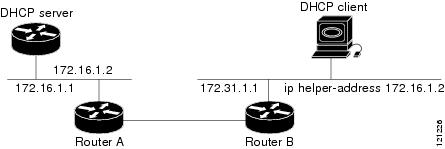
Figure 1 demonstrates the process. The DHCP client broadcasts a request for an IP address and additional configuration parameters on its local LAN. Acting as a DHCP relay agent, Router B picks up the broadcast, changes the destination address to the DHCP server's address and sends the message out on another interface. The relay agent inserts the IP address of the interface, on which the DHCP client’s packets are received, into the gateway address (giaddr) field of the DHCP packet, which enables the DHCP server to determine which subnet should receive the offer and identify the appropriate IP address range. The relay agent unicasts the messages to the server address, in this case 172.16.1.2 (which is specified by the helper address in the relay profile).
Secure ARP
In standalone DHCP sessions, the DHCP server adds an ARP entry when it assigns an IP address to a client. However, in IP subscriber sessions, DHCP server does not add an ARP entry. Although ARP establishes correspondences between network addresses, an untrusted device can spoof IP an address not assigned to it posing a security threat for IP subscriber sessions. You can enable the secure ARP feature and allow DHCP to add an ARP cache entry when DHCP assigns an IP address to a client. Secure ARP is disabled by default.
How to Configure and Enable DHCP Relay Agent
This section contains the following tasks:
- Configuring and Enabling the DHCP Relay Agent
- Enabling DHCP Relay Agent on an Interface
- Disabling DHCP Relay on an Interface
- Enabling DHCP Relay on a VRF
- Configuring the Relay Agent Information Feature
- Configuring Relay Agent Giaddr Policy
Configuring and Enabling the DHCP Relay Agent
This task describes how to configure and enable DHCP relay agent.
1.
configure
2.
dhcp ipv4
3.
commit
DETAILED STEPS
| Command or Action | Purpose |
|---|
Configuring a DHCP Relay Profile
This task describes how to configure and enable the DHCP relay agent.
1.
configure
2.
dhcp
ipv4
3.
profile
profile-name
relay
4.
helper-address
[vrf
vrf-
name ]
address
5.
commit
DETAILED STEPS
Enabling DHCP Relay Agent on an Interface
This task describes how to enable the Cisco IOS XR DHCP relay agent on an interface.
Note | On Cisco IOS XR software, the DHCP relay agent is disabled by default. |
1.
configure
2.
dhcp
ipv4
3.
interface
type
name
relay profile
profile-name
4.
commit
DETAILED STEPS
Disabling DHCP Relay on an Interface
This task describes how to disable the DHCP relay on an interface by assigning the none profile to the interface.
1.
configure
2.
dhcp
ipv4
3.
interface
type
name
none
4.
commit
DETAILED STEPS
Enabling DHCP Relay on a VRF
This task describes how to enable DHCP relay on a VRF.
1.
configure
2.
dhcp ipv4
3.
vrf
vrf-name
relay profile
profile-name
4.
commit
DETAILED STEPS
| Command or Action | Purpose |
|---|
Configuring the Relay Agent Information Feature
This task describes how to configure the DHCP relay agent information option processing capabilities.
A DHCP relay agent may receive a message from another DHCP relay agent that already contains relay information. By default, the relay information from the previous relay agent is replaced (using the replace option).
1.
configure
2.
dhcp ipv4
3.
profile
profile-name
relay
4.
relay information option
5.
relay information check
6.
relay information policy {drop |
keep}
7.
relay information option allow-untrusted
8.
commit
DETAILED STEPS
Configuring Relay Agent Giaddr Policy
This task describes how to configure the DHCP relay agent’s processing capabilities for received BOOTREQUEST packets that already contain a nonzero giaddr attribute.
1.
configure
2.
dhcp
ipv4
3.
profile
relay
4.
giaddr
policy {replace |
drop}
5.
commit
DETAILED STEPS
| Command or Action | Purpose | |
|---|---|---|
| Step 1 |
configure
| |
| Step 2 |
dhcp
ipv4
Example:
RP/0/RSP0/CPU0:router(config)# dhcp ipv4
|
Enables the DHCP IPv4 configuration submode. |
| Step 3 |
profile
relay
Example:
RP/0/RSP0/CPU0:router(config-dhcpv4)# profile client relay
|
Enables profile relay submode. |
| Step 4 |
giaddr
policy {replace |
drop}
Example:
RP/0/RSP0/CPU0:router(config-dhcpv4-relay-profile)# giaddr policy drop
|
Specifies the giaddr policy.
By default, the DHCP relay agent keeps the existing giaddr value. |
| Step 5 |
commit
|
Configuring a DHCP Proxy Profile
The DHCP proxy performs all the functions of a relay and also provides some additional functions. The DHCP proxy conceals DHCP server details from DHCP clients. The DHCP proxy modifies the DHCP replies such that the client considers the proxy to be the server. In this state, the client interacts with the proxy as if it is the DHCP server.
This task describes how to configure and enable the DHCP proxy profile.
1.
configure
2.
dhcp
ipv4
3.
profile
profile-name
proxy
4.
helper-address
[vrf
vrf-
name ]
address [
giaddr
gateway-address
]
5.
commit
DETAILED STEPS
| Command or Action | Purpose | |
|---|---|---|
| Step 1 |
configure
| |
| Step 2 |
dhcp
ipv4
Example:
RP/0/RSP0/CPU0:router(config)# dhcp ipv4
|
Enters DHCP IPv4 configuration submode . |
| Step 3 |
profile
profile-name
proxy
Example:
RP/0/RSP0/CPU0:router(config-dhcpv4)# profile client proxy
|
Enters DHCP IPv4 profile proxy submode. |
| Step 4 |
helper-address
[vrf
vrf-
name ]
address [
giaddr
gateway-address
]
Example: RP/0/RSP0/CPU0:router(config-dhcpv4-proxy-profile)# helper-address vrf1 10.10.1.1 |
Forwards UDP broadcasts, including BOOTP and DHCP.
|
| Step 5 |
commit
|
DHCPv4 Server
DHCP server accepts address assignment requests and renewals and assigns the IP addresses from predefined groups of addresses contained within Distributed Address Pools (DAPS). DHCP server can also be configured to supply additional information to the requesting client such as the IP address of the DNS server, the default router, and other configuration parameters. DHCP server can accept broadcasts from locally attached LAN segments or from DHCP requests that have been forwarded by other DHCP relay agents within the network.
The DHCP proxy performs all the functions of a relay and also provides some additional functions. The DHCP proxy conceals DHCP server details from DHCP clients. The DHCP proxy modifies the DHCP replies such that the client considers the proxy to be the server. In this state, the client interacts with the proxy as if it is the DHCP server.
The pool is configured under server-profile-mode and server-profile-class-sub-mode. The class-based pool selection is always given priority over profile pool selection.
- Configuring DHCPv4 Server Profile
- Configuring Multiple Classes with a Pool
- Configuring a server profile DAPS with class match option
- Configuring Server Profile without daps pool match option
- Configuring an address pool for each ISP on DAPS
Configuring DHCPv4 Server Profile
Perform this task to configure the DHCPv4 Server.
1.
configure
2.
dhcp ipv4
3.
profile
profile-name
server
4.
bootfile
boot-file-name
5.
broadcast-flag policy
unicast-always
6.
class
class-name
7.
exit
8.
default-router
address1
address2 ... address8
9.
lease
{infinite
|days minutes seconds
}
10.
limit lease
{per-circuit-id
|per-interface|per-remote-id
}
value
11.
netbios-name server
address1
address2 ... address8
12.
netbios-node-type
{number
|b-node|h-node
|m-node
|p-node
}
13.
option
option-code
{ascii
string
|hex
string
|ip
address}
14.
pool
pool-name
15.
requested-ip-address-check disable
16.
commit
DETAILED STEPS
| Command or Action | Purpose | |
|---|---|---|
| Step 1 |
configure
| |
| Step 2 | dhcp ipv4
Example: RP/0/RSP0/CPU0:router(config) # dhcp ipv4 RP/0/RSP0/CPU0:router(config-dhcpv4)# |
Enables DHCP for IPv4 and enters DHCP IPv4 configuration mode. |
| Step 3 | profile
profile-name
server
Example: RP/0/RSP0/CPU0:router(config-dhcpv4 )# profile TEST server RP/0/RSP0/CPU0:router(config-dhcpv4-server-profile)# |
Enters the server profile configuration mode. |
| Step 4 | bootfile
boot-file-name
Example:
RP/0/RSP0/CPU0:router(config-dhcpv4-server-profile)# bootfile b1
|
Configures the boot file. |
| Step 5 | broadcast-flag policy
unicast-always
Example:
RP/0/RSP0/CPU0:router(config-dhcpv4-server-profile)# broadcast-flag policy unicast-always
|
Configures the broadcast-flag policy to unicast-always. |
| Step 6 | class
class-name
Example: RP/0/RSP0/CPU0:router(config-dhcpv4-server-profile)# class Class_A RP/0/RSP0/CPU0:router(config-dhcpv4-server-profile-class) |
Creates and enters server profile class configuration submode. |
| Step 7 | exit
Example: RP/0/RSP0/CPU0:router(config-dhcpv4-server-profile-class)# exit RP/0/RSP0/CPU0:router(config-dhcpv4-server-profile)# |
Exits the server profile class submode. |
| Step 8 | default-router
address1
address2 ... address8
Example:
RP/0/RSP0/CPU0:router(config-dhcpv4-server-profile)# default-router 10.20.1.2
|
Configures the name of the default-router or the IP address. |
| Step 9 | lease
{infinite
|days minutes seconds
}
Example:
RP/0/RSP0/CPU0:router(config-dhcpv4-server-profile)# lease infinite
|
Configures the lease for an IP address assigned from the pool. |
| Step 10 | limit lease
{per-circuit-id
|per-interface|per-remote-id
}
value
Example:
RP/0/RSP0/CPU0:router(config-dhcpv4-server-profile)# limit lease per-circuit-id 23
|
Configures the limit on a lease per-circuit-id, per-interface, or per-remote-id. |
| Step 11 | netbios-name server
address1
address2 ... address8
Example:
RP/0/RSP0/CPU0:router(config-dhcpv4-server-profile)# netbios-name-server 10.20.3.5
|
Configures the NetBIOS name servers. |
| Step 12 | netbios-node-type
{number
|b-node|h-node
|m-node
|p-node
}
Example:
RP/0/RSP0/CPU0:router(config-dhcpv4-server-profile)# netbios-node-type p-node
|
Configures the type of NetBIOS node. |
| Step 13 | option
option-code
{ascii
string
|hex
string
|ip
address}
Example:
RP/0/RSP0/CPU0:router(config-dhcpv4-server-profile)# option 23 ip 10.20.34.56
|
Configures the DHCP option code. |
| Step 14 | pool
pool-name
Example:
RP/0/RSP0/CPU0:router(config-dhcpv4-server-profile)# pool pool1
|
Configures the Distributed Address Pool Service (DAPS) pool name. |
| Step 15 | requested-ip-address-check disable
Example:
RP/0/RSP0/CPU0:router(config-dhcpv4-server-profile)# requested-ip-address-check disable
|
Validates a requested IP address. |
| Step 16 |
commit
|
Configuring Multiple Classes with a Pool
Perform this task to configure multiple classes with a pool.
1.
configure
2.
dhcp ipv4
3.
profile
profile-name
server
4.
pool
pool-name
5.
class
class-name
6.
pool
pool_name
7.
match option
option [
sub-option
sub-option] [
ascii
asciiString |
hex
hexString ]
8.
exit
9.
class
class-name
10.
pool
pool_name
11.
match vrf
vrf-name
12.
commit
DETAILED STEPS
| Command or Action | Purpose | |
|---|---|---|
| Step 1 |
configure
| |
| Step 2 | dhcp ipv4
Example: RP/0/RSP0/CPU0:router(config) # dhcp ipv4 RP/0/RSP0/CPU0:router(config-dhcpv4)# |
Enables DHCP for IPv4 and enters DHCP IPv4 configuration mode. |
| Step 3 | profile
profile-name
server
Example: RP/0/RSP0/CPU0:router(config-dhcpv4 )# profile TEST server RP/0/RSP0/CPU0:router(config-dhcpv4-server-profile)# |
Enters the server profile configuration mode. |
| Step 4 | pool
pool-name
Example: RP/0/RSP0/CPU0:router(config-dhcpv4-server-profile)# pool POOL_TEST RP/0/RSP0/CPU0:router(config-dhcpv4-server-profile)# |
Configures the Distributed Address Pool Service(DAPS) pool name. |
| Step 5 | class
class-name
Example: RP/0/RSP0/CPU0:router(config-dhcpv4-server-profile)# class Class_A RP/0/RSP0/CPU0:router(config-dhcpv4-server-class)# |
Creates and enters the server profile class. |
| Step 6 | pool
pool_name
Example: RP/0/RSP0/CPU0:router(config-dhcpv4-server-class)# pool pool_A RP/0/RSP0/CPU0:router(config-dhcpv4-server-class)# |
Configures the pool name. |
| Step 7 | match option
option [
sub-option
sub-option] [
ascii
asciiString |
hex
hexString ]
Example: RP/0/RSP0/CPU0:router(config-dhcpv4-server-class)# match option 60 hex abcd RP/0/RSP0/CPU0:router(config-dhcpv4-server-class)# |
The DHCP server selects a pool from a class by matching options in the received DISCOVER packet with the match option. If none of the classes match, then pools configured under the profile mode are selected. The DHCP server requests DAPS to allocate an address from that pool. |
| Step 8 | exit
Example: RP/0/RSP0/CPU0:router(config-dhcpv4-server-class)# exit RP/0/RSP0/CPU0:router(config-dhcpv4-server-profile)# |
Exits the server profile class submode. |
| Step 9 | class
class-name
Example: RP/0/RSP0/CPU0:router(config-dhcpv4-server-profile)# class Class_B RP/0/RSP0/CPU0:router(config-dhcpv4-server-class)# |
Creates and enters the server profile class. |
| Step 10 | pool
pool_name
Example: RP/0/RSP0/CPU0:router(config-dhcpv4-server-class)# pool pool_B RP/0/RSP0/CPU0:router(config-dhcpv4-server-class)# |
Configures the pool name. |
| Step 11 | match vrf
vrf-name
Example: RP/0/RSP0/CPU0:router(config-dhcpv4-server-class)# match vrf VRF1 RP/0/RSP0/CPU0:router(config-dhcpv4-server-class)# |
The DHCP server selects a pool from a class by matching the options in the received DISCOVER packet with the match command. If none of the classes match, then pools configured under the profile mode are selected. The DHCP server requests DAPS to allocate an address from that pool. |
| Step 12 |
commit
|
Configuring a server profile DAPS with class match option
Perform this task to configure a server profile DAPS with class match option.
1.
configure
2.
dhcp ipv4
3.
profile profile-name server
4.
pool pool-name
5.
class class-name
6.
poolpool_name
7.
match option option [ sub-option sub-option] [ ascii asciiString | hex hexString ]
8.
exit
9.
exit
10.
profile profile-name server
11.
dns-server address1 address2 ... address8
12.
pool pool_name
13.
class class-name
14.
poolpool_name
15.
match option option [ sub-option sub-option] [ ascii asciiString | hex hexString ]
16.
exit
17.
exit
18.
commit
DETAILED STEPS
| Command or Action | Purpose | |
|---|---|---|
| Step 1 |
configure
| |
| Step 2 | dhcp ipv4 Example: RP/0/RSP0/CPU0:router(config) # dhcp ipv4 RP/0/RSP0/CPU0:router(config-dhcpv4)# | Enables DHCP for IPv4 and enters DHCP IPv4 configuration mode. |
| Step 3 | profile profile-name server Example: RP/0/RSP0/CPU0:router(config-dhcpv4 )# profile ISP1 server RP/0/RSP0/CPU0:router(config-dhcpv4-server-profile)# | Enters the server profile configuration mode. |
| Step 4 | pool pool-name Example: RP/0/RSP0/CPU0:router(config-dhcpv4-server-profile)# pool ISP1_POOL RP/0/RSP0/CPU0:router(config-dhcpv4-server-profile)# | Configures the Distributed Address Pool Service(DAPS) pool name. |
| Step 5 | class class-name Example: RP/0/RSP0/CPU0:router(config-dhcpv4-server-profile)# class ISP1_CLASS RP/0/RSP0/CPU0:router(config-dhcpv4-server-class)# | Creates and enters the server profile class. |
| Step 6 | poolpool_name Example: RP/0/RSP0/CPU0:router(config-dhcpv4-server-class)# pool ISP1_CLASS_POOL RP/0/RSP0/CPU0:router(config-dhcpv4-server-class)# | Configures the pool name. |
| Step 7 | match option option [ sub-option sub-option] [ ascii asciiString | hex hexString ] Example: RP/0/RSP0/CPU0:router(config-dhcpv4-server-class)# match option 60 hex PXEClient_1 RP/0/RSP0/CPU0:router(config-dhcpv4-server-class)# | The DHCP server selects a pool from a class by matching the options in the received DISCOVER packet with the match option. If none of the classes match, then pools configured under the profile mode will be selected. The DHCP server requests the DAPS to allocate an address from that pool. |
| Step 8 | exit Example: RP/0/RSP0/CPU0:router(config-dhcpv4-server-class)# exit RP/0/RSP0/CPU0:router(config-dhcpv4-server-prfile)# | Exits the server profile class sub mode. |
| Step 9 | exit Example: RP/0/RSP0/CPU0:router(config-dhcpv4-server-profile)# exit RP/0/RSP0/CPU0:router(config-dhcpv4)# | Exits the server profile sub mode. |
| Step 10 | profile profile-name server Example: RP/0/RSP0/CPU0:router(config-dhcpv4 )# profile ISP2 server RP/0/RSP0/CPU0:router(config-dhcpv4-server-profile)# | Enters the server profile configuration mode. |
| Step 11 | dns-server address1 address2 ... address8 Example: RP/0/RSP0/CPU0:router(config-dhcpv4-server-profile)# dns-server 10.20.3.4 RP/0/RSP0/CPU0:router(config-dhcpv4-server-class)# | Configures the name of the DNS server or the IP address |
| Step 12 | pool pool_name Example: RP/0/RSP0/CPU0:router(config-dhcpv4-server-class)# pool ISP2_POOL RP/0/RSP0/CPU0:router(config-dhcpv4-server-class)# | Configures the pool name. |
| Step 13 | class class-name Example: RP/0/RSP0/CPU0:router(config-dhcpv4-server-profile)# class ISP2_CLASS RP/0/RSP0/CPU0:router(config-dhcpv4-server-class)# | Creates and enters the server profile class. |
| Step 14 | poolpool_name Example: RP/0/RSP0/CPU0:router(config-dhcpv4-server-class)# pool ISP2_CLASS_POOL RP/0/RSP0/CPU0:router(config-dhcpv4-server-class)# | Configures the pool name. |
| Step 15 | match option option [ sub-option sub-option] [ ascii asciiString | hex hexString ] Example: RP/0/RSP0/CPU0:router(config-dhcpv4-server-class)# match option 60 hex PXEClient_2 RP/0/RSP0/CPU0:router(config-dhcpv4-server-class)# | The DHCP server selects a pool from a class by matching the options in the received DISCOVER packet with the match option. If none of the classes match, then pools configured under the profile mode will be selected. The DHCP server requests the DAPS to allocate an address from that pool. |
| Step 16 | exit Example: RP/0/RSP0/CPU0:router(config-dhcpv4-server-class)# exit RP/0/RSP0/CPU0:router(config-dhcpv4-server-profile)# | Exits the server profile class sub mode. |
| Step 17 | exit Example: RP/0/RSP0/CPU0:router(config-dhcpv4-server-profile)# exit RP/0/RSP0/CPU0:router(config-dhcpv4)# | Exits the server profile sub mode. |
| Step 18 |
commit
|
Configuring Server Profile without daps pool match option
Perform this task to configure a server profile without daps pool match option.
1.
configure
2.
dhcp ipv4
3.
profile profile-name server
4.
dns-server address1 address2 ... address8
5.
exit
6.
profile profile-name server
7.
dns-server address1 address2 ... address8
8.
exit
9.
commit
DETAILED STEPS
| Command or Action | Purpose | |
|---|---|---|
| Step 1 |
configure
| |
| Step 2 | dhcp ipv4 Example: RP/0/RSP0/CPU0:router(config) # dhcp ipv4 RP/0/RSP0/CPU0:router(config-dhcpv4)# | Enables DHCP for IPv4 and enters DHCP IPv4 configuration mode. |
| Step 3 | profile profile-name server Example: RP/0/RSP0/CPU0:router(config-dhcpv4 )# profile ISP1 server RP/0/RSP0/CPU0:router(config-dhcpv4-server-profile)# | Enters the server profile configuration mode. |
| Step 4 | dns-server address1 address2 ... address8 Example: RP/0/RSP0/CPU0:router(config-dhcpv4-server-profile)# dns-server ISP1.com RP/0/RSP0/CPU0:router(config-dhcpv4-server-profile)# | Configures the name of the DNS server or IP address. |
| Step 5 | exit Example: RP/0/RSP0/CPU0:router(config-dhcpv4-server-profile)# exit RP/0/RSP0/CPU0:router(config-dhcpv4)# | Exits the server profile sub mode. |
| Step 6 | profile profile-name server Example: RP/0/RSP0/CPU0:router(config-dhcpv4 )# profile ISP2 server RP/0/RSP0/CPU0:router(config-dhcpv4-server-profile)# | Enters the server profile configuration mode. |
| Step 7 | dns-server address1 address2 ... address8 Example: RP/0/RSP0/CPU0:router(config-dhcpv4-server-profile)# dns-server ISP2.com RP/0/RSP0/CPU0:router(config-dhcpv4-server-profile)# | Configures the name of the DNS server or IP address. |
| Step 8 | exit Example: RP/0/RSP0/CPU0:router(config-dhcpv4-server-profile)# exit RP/0/RSP0/CPU0:router(config-dhcpv4)# | Exits the server profile sub mode. |
| Step 9 |
commit
|
Configuring an address pool for each ISP on DAPS
Perform this task to configure an address pool for each ISP on Distributed Address Pool Service(DAPS).
1.
configure
2.
pool vrf [ all | vrf-name] { ipv4 | ipv6 } pool-name
3.
network address
4.
exit
5.
pool vrf [ all | vrf-name] { ipv4 | ipv6 } pool-name
6.
network address
7.
exit
8.
commit
DETAILED STEPS
| Command or Action | Purpose | |
|---|---|---|
| Step 1 |
configure
| |
| Step 2 | pool vrf [ all | vrf-name] { ipv4 | ipv6 } pool-name Example: RP/0/RSP0/CPU0:router(config) # pool vrf ISP_1 ipv4 ISP1_POOL RP/0/RSP0/CPU0:router(config-pool-ipv4)# | Configures an IPv4 pool for the specifed VRF or all vrfs. |
| Step 3 | network address Example: RP/0/RSP0/CPU0:router(config-pool-ipv4)# network 10.10.10.0 RP/0/RSP0/CPU0:router(config-pool-ipv4)# | Specifies network for allocation. |
| Step 4 | exit Example: RP/0/RSP0/CPU0:router(config-pool-ipv4)# exit RP/0/RSP0/CPU0:router(config)# | Exits the pool ipv4 configuration submode. |
| Step 5 | pool vrf [ all | vrf-name] { ipv4 | ipv6 } pool-name Example: RP/0/RSP0/CPU0:router(config) # pool vrf ISP_2 ipv4 ISP2_POOL RP/0/RSP0/CPU0:router(config-pool-ipv4)# | Configures an IPv4 pool for the specifed VRF or all vrfs. |
| Step 6 | network address Example: RP/0/RSP0/CPU0:router(config-pool-ipv4)# network 20.20.20.0 RP/0/RSP0/CPU0:router(config-pool-ipv4)# | Specifies network for allocation. |
| Step 7 | exit Example: RP/0/RSP0/CPU0:router(config-pool-ipv4)# exit RP/0/RSP0/CPU0:router(config)# | Exits the pool ipv4 configuration submode. |
| Step 8 |
commit
|
DHCPv4 Client
The Dynamic Host Configuration Protocol (DHCP) client functionality enables the router interfaces to dynamically acquire the IPv4 address using DHCP.
DHCP is built on a client-server model, where designated DHCP server hosts allocate network addresses, and deliver configuration parameters to dynamically configured hosts.
A relay agent is required if the client and server are not on the same Layer 2 network. The relay agent usually runs on the router, and is required because the client device does not know its own IP address initially. The agent sends out a Layer 2 broadcast to find a server that has this information. The router relays these broadcasts to the DHCP server, and forwards the responses back to the correct Layer 2 address so that the correct device gets the correct configuration information.
DHCP has the ability to allocate IP addresses only for a configurable period of time, called the lease period. If the client is required to retain this IP address for a longer period beyond the lease period, the lease period must be renewed before the IP address expires. The client renews the lease based on configuration that was sent from the server. The client unicasts a REQUEST message using the IP address of the server. When a server receives the REQUEST message and responds with an ACK message. The lease period of the client is extended by the lease time configured in the ACK message.
Restrictions and Limitations
Enabling DHCP Client on an Interface
The DHCP client can be enabled at an interface level. The DHCP component receives a notification when DHCP is enabled or disabled on an interface.
1.
configure
2.
interface
MgmtEth
rack/slot/CPU0/port
3.
interface
<interface_name> ipv4 address dhcp
DETAILED STEPS
| Command or Action | Purpose | |
|---|---|---|
| Step 1 |
configure
| |
| Step 2 |
interface
MgmtEth
rack/slot/CPU0/port
Example: RP/0/RSP0/CPU0:router(config)#interface mgmtEth 0/0/CPU0/0
|
Enters interface configuration mode. |
| Step 3 | interface
<interface_name> ipv4 address dhcp
Example:
RP/0/RSP0/CPU0:router(config)# interface mgmtEth 0/0/CPU0/0 ipv4 address dhcp
Example: dhcp Enable IPv4 DHCP client | Configure DHCP on the interface. |
RP/0/0/CPU0:ios(config)#interface mgmtEth 0/0/CPU0/0 ipv4 address ?
A.B.C.D/prefix  IPv4 address/prefix or IPv4 address and Mask
dhcp Enable IPv4 DHCP client
DHCPv6 Relay Agent Notification for Prefix Delegation
DHCPv6 relay agent notification for prefix delegation allows the router working as a DHCPv6 relay agent to find prefix delegation options by reviewing the contents of a DHCPv6 RELAY-REPLY packet that is being relayed by the relay agent to the client. When the relay agent finds the prefix delegation option, the relay agent extracts the information about the prefix being delegated and inserts an IPv6 subscriber route matching the prefix delegation information onto the relay agent. Future packets destined to that prefix via relay are forwarded based on the information contained in the prefix delegation. The IPv6 subscriber route remains in the routing table until the prefix delegation lease time expires or the relay agent receives a release packet from the client releasing the prefix delegation.
The relay agent automatically does the subscriber route management.
The IPv6 routes are added when the relay agent relays a RELAY-REPLY packet, and the IPv6 routes are deleted when the prefix delegation lease time expires or the relay agent receives a release message. An IPv6 subscriber route in the routing table of the relay agent can be updated when the prefix delegation lease time is extended.
This feature leaves an IPv6 route on the routing table of the relay agent. This registered IPv6 address allows unicast reverse packet forwarding (uRPF) to work by allowing the router doing the reverse lookup to confirm that the IPv6 address on the relay agent is not malformed or spoofed. The IPv6 route in the routing table of the relay agent can be redistributed to other routing protocols to advertise the subnets to other nodes. When the client sends a DHCP_DECLINE message, the routes are removed.
Configuring DHCPv6 Stateful Relay Agent for Prefix Delegation
Perform this task to configure Dynamic Host Configuration Protocol (DHCP) IPv6 relay agent notification for prefix delegation.
1.
configure
2.
dhcp ipv6
3.
profile profile-name proxy
4.
helper-address ipv6-address interface type interface-path-id
5.
exit
6.
interface type interface-path-id proxy
7.
profile profile-name
8.
commit
DETAILED STEPS
| Command or Action | Purpose | |
|---|---|---|
| Step 1 |
configure
| |
| Step 2 | dhcp ipv6 Example: RP/0/RSP0/CPU0:router(config) # dhcp ipv6 RP/0/RSP0/CPU0:router(config-dhcpv6)# | Enables DHCP for IPv6 and enters DHCP IPv6 configuration mode. |
| Step 3 | profile profile-name proxy Example: RP/0/RSP0/CPU0:router(config-dhcpv6)# profile downstream proxy RP/0/RSP0/CPU0:router(config-dhcpv6-profile)# | Enters the proxy profile configuration mode. |
| Step 4 | helper-address ipv6-address interface type interface-path-id Example: RP/0/RSP0/CPU0:router(config-dhcpv6-profile)# helper-address 2001:db8::1 GigabitEthernet 0/1/0/1 RP/0/RSP0/CPU0:router(config-dhcpv6-profile) | Configure the DHCP IPv6 relay agent. |
| Step 5 | exit Example: RP/0/RSP0/CPU0:router(config-dhcpv6-profile)# exit RP/0/RSP0/CPU0:router(config-dhcpv6)# | Exits from the profile configuration mode. |
| Step 6 | interface type interface-path-id proxy Example: RP/0/RSP0/CPU0:router(config-dhcpv6)# interface GigabitEthernet 0/1/0/0 proxy RP/0/RSP0/CPU0:router(config-dhcpv6-if)# | Enables IPv6 DHCP on an interface and acts as an IPv6 DHCP stateful relay agent. |
| Step 7 | profile profile-name Example: RP/0/RSP0/CPU0:router(config-dhcpv6-if)# profile downstream RP/0/RSP0/CPU0:router(config-dhcpv6-if)# | Enters the profile configuration mode. |
| Step 8 |
commit
|
Enabling Secure ARP
Secure ARP is disabled by default; this task describes how to enable secure ARP.
1.
configure
2.
dhcp
ipv4
3.
Do one of the
following:
4.
secure-arp
5.
commit
DETAILED STEPS
| Command or Action | Purpose | |
|---|---|---|
| Step 1 |
configure
| |
| Step 2 |
dhcp
ipv4
Example:
RP/0/RSP0/CPU0:router(config)# dhcp ipv4
|
Enters DHCP IPv4 configuration mode. |
| Step 3 | Do one of the
following:
Example:
RP/0/RSP0/CPU0:router(config-dhcpv4)# profile profile1 server
|
Enters DHCP IPv4 profile proxy or server submode. |
| Step 4 |
secure-arp
Example:
RP/0/RSP0/CPU0:router(config-dhcpv4-server-profile)# secure-arp
|
Enables secure ARP. |
| Step 5 |
commit
|
Configuration Examples for the DHCP Relay Agent
This section provides the following configuration examples:
- DHCP Relay Profile: Example
- DHCP Relay on an Interface: Example
- DHCP Relay on a VRF: Example
- Relay Agent Information Option Support: Example
- Relay Agent Giaddr Policy: Example
DHCP Relay Profile: Example
The following example shows how to configure the Cisco IOS XR relay profile:
dhcp ipv4
 profile client relay
  helper-address vrf foo 10.10.1.1
 !
! ...
DHCP Relay on an Interface: Example
The following example shows how to enable the DHCP relay agent on an interface:
dhcp ipv4
 interface GigabitEthernet 0/1/1/0 relay profile client
!
DHCP Relay on a VRF: Example
The following example shows how to enable the DHCP relay agent on a VRF:
dhcp ipv4
 vrf default relay profile client
!
Relay Agent Information Option Support: Example
The following example shows how to enable the relay agent and the insertion and removal of the DHCP relay information option:
dhcp ipv4
 profile client relay
relay information option

 !
!
Relay Agent Giaddr Policy: Example
The following example shows how to configure relay agent giaddr policy:
dhcp ipv4
 profile client relay
  giaddr policy drop
 !
!
Implementing DHCP Snooping
- Prerequisites for Configuring DHCP Snooping
- Information about DHCP Snooping
- How to Configure DHCP Snooping
- Configuration Examples for DHCP Snooping
Prerequisites for Configuring DHCP Snooping
The following prerequisites are required example shows how to configure DHCP IPv4 snooping relay agent broadcast flag policy:
-
You must be in a user group associated with a task group that includes the proper task IDs. The command reference guides include the task IDs required for each command. If you suspect user group assignment is preventing you from using a command, contact your AAA administrator for assistance.
-
A Cisco ASR 9000 Series Router running Cisco IOS XR software.
-
A configured and running DHCP client and DHCP server.
Information about DHCP Snooping
DHCP Snooping features are focused on the edge of the aggregation network. Security features are applied at the first point of entry for subscribers. Relay agent information option information is used to identify the subscriber’s line, which is either the DSL line to the subscriber’s home or the first port in the aggregation network.
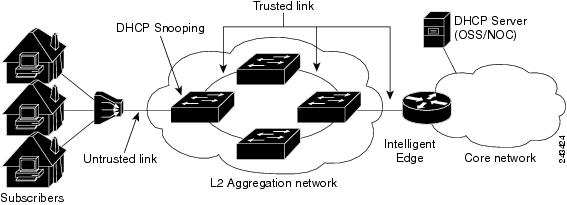
The central concept for DHCP snooping is that of trusted and untrusted links. A trusted link is one providing secure access for traffic on that link. On an untrusted link, subscriber identity and subscriber traffic cannot be determined. DHCP snooping runs on untrusted links to provide subscriber identity. Figure 1 shows an aggregation network. The link from the DSLAM to the aggregation network is untrusted and is the point of presence for DHCP snooping. The links connecting the switches in the aggregation network and the link from the aggregation network to the intelligent edge is considered trusted.
- Trusted and Untrusted Ports
- DHCP Snooping in a Bridge Domain
- Assigning Profiles to a Bridge Domain
- Relay Information Options
Trusted and Untrusted Ports
On trusted ports, DHCP BOOTREQUEST packets are forwarded by DHCP snooping. The client’s address lease is not tracked and the client is not bound to the port. DHCP BOOTREPLY packets are forwarded.
When the first DHCP BOOTREQUEST packet from a client is received on an untrusted port, DHCP snooping binds the client to the bridge port and tracks the clients’s address lease. When that address lease expires, the client is deleted from the database and is unbound from the bridge port. Packets from this client received on this bridge port are processed and forwarded as long as the binding exists. Packets that are received on another bridge port from this client are dropped while the binding exists. DHCP snooping only forwards DHCP BOOTREPLY packets for this client on the bridge port that the client is bound to. DHCP BOOTREPLY packets that are received on untrusted ports are not forwarded.
DHCP Snooping in a Bridge Domain
To enable DHCP snooping in a bridge domain, there must be at least two profiles, a trusted profile and an untrusted profile. The untrusted profile is assigned to the client-facing ports, and the trusted profile is assigned to the server-facing ports. In most cases, there are many client facing ports and few server-facing ports. The simplest example is two ports, a client-facing port and a server-facing port, with an untrusted profile explicitly assigned to the client-facing port and a trusted profile assigned to the server-facing port.
Assigning Profiles to a Bridge Domain
Because there are normally many client-facing ports and a small number of server-facing ports, the operator assigns the untrusted profile to the bridge domain. This configuration effectively assigns an untrusted profile to every port in the bridge domain. This action saves the operator from explicitly assigning the untrusted profile to all of the client-facing ports. Because there also must be server-facing ports that have trusted DHCP snooping profiles, in order for DHCP snooping to function properly, this untrusted DHCP snooping profile assignment is overridden to server-facing ports by specifically configuring trusted DHCP snooping profiles on the server-facing ports. For ports in the bridge domain that do not require DHCP snooping, all should have the none profile assigned to them to disable DHCP snooping on those ports.
Relay Information Options
You can configure a DHCP snooping profile to insert the relay information option (option 82) into DHCP client packets only when it is assigned to a client port. The relay information option allow-untrusted command addresses what to do with DHCP client packets when there is a null giaddr and a relay-information option already in the client packet when it is received. This is a different condition than a DHCP snooping trusted/untrusted port. The relay information option allow-untrusted command determines how the DHCP snooping application handles untrusted relay information options.
How to Configure DHCP Snooping
This section contains the following tasks:
- Enabling DHCP Snooping in a Bridge Domain
- Disabling DHCP Snooping on a Specific Bridge Port
- Using the Relay Information Option
Enabling DHCP Snooping in a Bridge Domain
The following configuration creates two ports, a client-facing port and a server-facing port. In Step 1 through Step 8, an untrusted DHCP snooping profile is assigned to the client bridge port and trusted DHCP snooping profile is assigned to the server bridge port. In Step 9 through Step 18, an untrusted DHCP snooping profile is assigned to the bridge domain and trusted DHCP snooping profiles are assigned to server bridge ports.
1.
configure
2.
dhcp ipv4
3.
profile
untrusted-profile-name
snoop
4.
exit
5.
dhcp ipv4
6.
profile
profile-name
snoop
7.
trusted
8.
exit
9.
l2vpn
10.
bridge group group-name
11.
bridge-domain bridge-domain-name
12.
interface type interface-path-id
13.
dhcp ipv4 snoop profile untrusted-profile-name
14.
interface type interface-path-id
15.
dhcp ipv4 snoop profile trusted-profile-name
16.
exit
17.
exit
18.
commit
DETAILED STEPS
| Command or Action | Purpose | |
|---|---|---|
| Step 1 |
configure
| |
| Step 2 |
dhcp ipv4
Example:
RP/0/RSP0/CPU0:router(config)# dhcp ipv4
|
Enters DHCP IPv4 profile configuration submode. |
| Step 3 |
profile
untrusted-profile-name
snoop
Example:
RP/0/RSP0/CPU0:router(config-dhcpv4)# profile untrustedClientProfile snoop
|
Configures an untrusted DHCP snooping profile for the client port. |
| Step 4 |
exit
Example:
RP/0/RSP0/CPU0:router(config-dhcpv4)# exit
|
Exits DHCP IPv4 profile configuration mode. |
| Step 5 |
dhcp ipv4
Example:
RP/0/RSP0/CPU0:router(config)# dhcp ipv4
|
Enables DHCP for IPv4 and enters DHCP IPv4 profile configuration mode. |
| Step 6 |
profile
profile-name
snoop
Example:
RP/0/RSP0/CPU0:router(config-dhcpv4)# profile trustedServerProfile snoop
|
Configures a trusted DHCP snooping profile for the server port. |
| Step 7 |
trusted
Example:
RP/0/RSP0/CPU0:router(config-dhcv4)# trusted
|
Configures a DHCP snoop profile to be trusted. |
| Step 8 |
exit
Example:
RP/0/RSP0/CPU0:router(config-dhcv4)# exit
|
Exits DHCP IPv4 profile configuration mode. |
| Step 9 |
l2vpn
Example:
RP/0/RSP0/CPU0:router(config)# l2vpn
|
Enters l2vpn configuration mode. |
| Step 10 |
bridge group group-name
Example:
RP/0/RSP0/CPU0:router(config-l2vpn)# bridge group ccc
|
Creates a bridge group to contain bridge domains and enters l2vpn bridge group configuration submode. |
| Step 11 |
bridge-domain bridge-domain-name
Example:
RP/0/RSP0/CPU0:router(config-l2vpn-bg)# bridge-domain ddd
|
Establishes a bridge domain. |
| Step 12 |
interface type interface-path-id
Example:
RP/0/RSP0/CPU0:router(config-l2vpn-bg-bd)# interface gigabitethernet 0/1/0/0
|
Identifies an interface. |
| Step 13 |
dhcp ipv4 snoop profile untrusted-profile-name
Example:
RP/0/RSP0/CPU0:router(config-l2vpn-bg-bd-ac)# dhcp ipv4 snoop profile untrustedClientProfile
|
Attaches an untrusted DHCP snoop profile to the bridge port. |
| Step 14 |
interface type interface-path-id
Example:
RP/0/RSP0/CPU0:router(config-l2vpn-bg-bd-ac)# gigabitethernet 0/1/0/1
|
Identifies an interface. |
| Step 15 |
dhcp ipv4 snoop profile trusted-profile-name
Example:
RP/0/RSP0/CPU0:router(config-l2vpn-bg-bd-ac)# dhcp ipv4 snoop profile trustedServerProfile
|
Attaches a trusted DHCP snoop profile to the bridge port. |
| Step 16 |
exit
Example:
RP/0/RSP0/CPU0:router(config-l2vpn-bg-bd-ac)# exit
|
Exits the l2vpn bridge group bridge-domain interface configuration submode. |
| Step 17 |
exit
Example:
RP/0/RSP0/CPU0:router(config-l2vpn-bg-bd)# exit
|
Exits the l2vpn bridge group bridge-domain configuration submode. |
| Step 18 |
commit
|
Disabling DHCP Snooping on a Specific Bridge Port
The following configuration enables DHCP to snoop packets on all bridge ports in the bridge domain ISP1 except for bridge port GigabitEthernet 0/1/0/1 and GigabitEthernet 0/1/0/2. DHCP snooping is disabled on bridge port GigabitEthernet 0/1/0/1. Bridge port GigabitEthernet 0/1/0/2 is the trusted port that connects to the server. In this example, no additional features are enabled, so only DHCP snooping is running.
1.
configure
2.
l2vpn
3.
bridge group group-name
4.
bridge-domain bridge-domain-name
5.
dhcp ipv4 snoop profile profile-name
6.
interface type interface-path-id
7.
dhcp ipv4 none
8.
interface type interface-path-id
9.
dhcp ipv4 snoop profile profile-name
10.
exit
11.
exit
12.
commit
DETAILED STEPS
| Command or Action | Purpose | |
|---|---|---|
| Step 1 |
configure
| |
| Step 2 |
l2vpn
Example:
RP/0/RSP0/CPU0:router(config)# l2vpn
|
Enters l2vpn configuration submode. |
| Step 3 |
bridge group group-name
Example:
RP/0/RSP0/CPU0:router(config-l2vpn)# bridge group GRP1
|
Creates a bridge group to contain bridge domains and enters l2vpn bridge group configuration submode. |
| Step 4 |
bridge-domain bridge-domain-name
Example:
RP/0/RSP0/CPU0:router(config-l2vpn-bg)# bridge-domain ISP1
|
Establishes a bridge domain and enters l2vpn bridge group bridge-domain configuration submode. |
| Step 5 |
dhcp ipv4 snoop profile profile-name
Example:
RP/0/RSP0/CPU0:router(config-l2vpn-bg-bd)# dhcp ipv4 snoop profile untrustedClientProfile
|
Attaches the untrusted DHCP snooping profile to the bridge domain. |
| Step 6 |
interface type interface-path-id
Example:
RP/0/RSP0/CPU0:router(config-l2vpn-bg-bd)# interface gigabitethernet 0/1/0/1
|
Identifies an interface and enters l2vpn bridge group bridge-domain interface configuration submode. |
| Step 7 |
dhcp ipv4 none
Example:
RP/0/RSP0/CPU0:router(config-l2vpn-bg-bd-if)# dhcp ipv4 none
|
Disables DHCP snooping on the port. |
| Step 8 |
interface type interface-path-id
Example:
RP/0/RSP0/CPU0:router(config-l2vpn-bg-bd)# interface gigabitethernet 0/1/0/2
|
Identifies an interface and enters l2vpn bridge group bridge-domain interface configuration submode. |
| Step 9 |
dhcp ipv4 snoop profile profile-name
Example:
RP/0/RSP0/CPU0:router(config-l2vpn-bg-bd)# dhcp ipv4 snoop profile trustedServerProfile
|
Attaches the trusted DHCP snooping profile to a port. |
| Step 10 |
exit
Example:
RP/0/RSP0/CPU0:router(config-l2vpn-bd-bg)# exit
|
Exits l2vpn bridge-domain bridge group interface configuration submode. |
| Step 11 |
exit
Example:
RP/0/RSP0/CPU0:router(config-l2vpn-bg)# exit
|
Exits l2vpn bridge-domain submode. |
| Step 12 |
commit
|
Using the Relay Information Option
This task shows how to use the relay information commands to insert the relay information option (option 82) into DHCP client packets and forward DHCP packets with untrusted relay information options.
1.
configure
2.
dhcp ipv4
3.
profile
profile-name
snoop
4.
relay information option
5.
relay information option allow-untrusted
6.
commit
DETAILED STEPS
| Command or Action | Purpose | |
|---|---|---|
| Step 1 |
configure
| |
| Step 2 |
dhcp ipv4
Example:
RP/0/RSP0/CPU0:router(config)# dhcp ipv4
|
Enters DHCP IPv4 profile configuration submode. |
| Step 3 |
profile
profile-name
snoop
Example:
RP/0/RSP0/CPU0:router(config-dhcpv4)# profile untrustedClientProfile snoop
|
Configures an untrusted DHCP snooping profile for the client port. |
| Step 4 |
relay information option
Example:
RP/0/RSP0/CPU0:router(config-dhcpv4-snoop-profile)# relay information option
|
Enables the system to insert the DHCP relay information option field in forwarded BOOTREQUEST messages to a DHCP server. |
| Step 5 |
relay information option allow-untrusted
Example:
RP/0/RSP0/CPU0:router(config-dhcpv4-snoop-profile)# relay information option allow-untrusted
|
Configures DHCP IPv4 relay not to discard BOOTREQUEST packets that have an existing relay information option and the giaddr set to zero. |
| Step 6 |
commit
|
Configuration Examples for DHCP Snooping
This section provides the following configuration examples:
- Assigning a DHCP Profile to a Bridge Domain: Example
- Disabling DHCP Snooping on a Specific Bridge Port: Example
- Configuring a DHCP Profile for Trusted Bridge Ports: Example
- Configuring an Untrusted Profile on a Bridge Domain: Example
- Configuring a Trusted Bridge Port: Example
Assigning a DHCP Profile to a Bridge Domain: Example
The following example shows how to enable DHCP snooping in a bridge domain:
l2vpn
 bridge group GRP1
  bridge-domain ISP1
   dhcp ipv4 profile untrustedClientProfile snoop
Disabling DHCP Snooping on a Specific Bridge Port: Example
The following example shows how to disable DHCP snooping on a specific bridge port:
interface gigabitethernet 0/1/0/1
 dhcp ipv4 none
Configuring a DHCP Profile for Trusted Bridge Ports: Example
The following example shows how to configure a DHCP profile for trusted bridge ports:
dhcp ipv4 profile trustedServerProfile snoop
 trusted
Configuring an Untrusted Profile on a Bridge Domain: Example
The following example shows how to attach a profile to a bridge domain and disable snooping on a bridge port.
l2vpn
 bridge group GRP1
  bridge-domain ISP1
   dhcp ipv4 profile untrustedClientProfile snoop
    interface gigabitethernet 0/1/0/1
     dhcp ipv4 none
Configuring a Trusted Bridge Port: Example
The following example shows ow to assign a trusted DHCP snooping profile to a bridge port:
l2vpn
 bridge group GRP1
  bridge-domain ISP1
   interface gigabitethernet 0/1/0/2
    dhcp ipv4 profile trustedServerProfile snoop
DHCPv6 Proxy Binding Table Reload Persistency
The Cisco IOS-XR Dynamic Host Configuration Protocol (DHCP) application is responsible for maintaining the DHCP binding state for the DHCP leases allocated to clients by the DHCP application. These binding states are learned by the DHCP application (proxy/relay/snooping). DHCP clients expect to maintain a DHCP lease regardless of the events that occur to the DHCP application.
Configuring DHCPv6 Proxy Binding Database Write to System Persistent Memory
Perform this task to configure the DHCPv6 binding database write to the system persistent memory. This helps to recover the DHCPv6 binding table after a system reload. The file names used for a full persistent file write are dhcpv6_srpb_{nodeid}_odd and dhcpv6_srpb_{nodeid}_even. The nodeid is the actual node ID of the node where the file is written. The incremental file is named the same way as the full file, with a _inc appended to it.
1.
configure
2.
dhcp ipv6
3. database [proxy] [ full-write-interval full-write-interval] [incremental-write-interval incremental-write-interval]
4.
commit
DETAILED STEPS
| Command or Action | Purpose | |
|---|---|---|
| Step 1 |
configure Example:
RP/0/RSP0/CPU0:router# configure
|
Enters global configuration mode. |
| Step 2 | dhcp ipv6 Example:
RP/0/RSP0/CPU0:router(config)# dhcp ipv6
| Configures DHCP for IPv6 and enters the DHCPv6 configuration mode. |
| Step 3 | database [proxy] [ full-write-interval full-write-interval] [incremental-write-interval incremental-write-interval] Example:
RP/0/RSP0/CPU0:router(config-dhcpv6)# database proxy full-write-interval 20 incremental-write-interval 10
|
Configures the DHCPv6 binding table write to the system persistent memory and specifies the time interval at which the full write and incremental file write are to be performed. The range, in minutes, for full-write-interval and incremental-write-interval is from 0 to 1440. The default value is 10 for full-write-interval and 1 for incremental-write-interval. The DHCP mode should be set as proxy. |
| Step 4 |
commit
|
Configuring DHCP binding database write to system persistent memory: Example
 configure
 dhcp ipv6
 database proxy full-write-interval 15 incremental-write-interval 5
 !
end
DHCP Session MAC Throttle
The ASR9K router supports the DHCP session MAC throttle feature. This feature limits the number of DHCP client requests reaching the ASR9K, based on the MAC address of the DHCP clients. This feature is supported for the DHCPv4 proxy, the DHCPv4 server, and the DHCPV6 proxy. The feature prevents a DHCP client from sending multiple DISCOVER packets to the ASR9K router, within short periods of time. This, in turn, prevents that client from impacting the session establishment of other DHCP clients.
A unique throttle entry is created in the system for each unique MAC address received on any interface where the profile is attached.
To configure the DHCP session MAC throttle feature, use the sessions mac throttle command in the respective DHCP profile configuration mode.
Configuring DHCP Session MAC Throttle: Example
dhcp ipv4
 profile p1 server
  sessions mac throttle 300 60 40
 !
 interface GigabitEthernet0/0/0/0 server profile p1
!
Additional References
The following sections provide references related to implementing the Cisco IOS XR DHCP relay agent and DHCP snooping features.
Related Documents
|
Related Topic |
Document Title |
|---|---|
|
Cisco IOS XR DHCP commands |
DHCP Commands module in the Cisco ASR 9000 Series Aggregation Services Router IP Addresses and Services Command Reference |
|
Getting started material |
Cisco ASR 9000 Series Aggregation Services Router Getting Started Guide |
|
Information about user groups and task IDs |
Configuring AAA Services module in the Cisco ASR 9000 Series Aggregation Services Router System Security Configuration Guide |
Standards
|
Standards |
Title |
|---|---|
|
No new or modified standards are supported by this feature, and support for existing standards has not been modified by this feature. |
— |
MIBs
|
MIBs |
MIBs Link |
|---|---|
| — |
To locate and download MIBs, use the Cisco MIB Locator found at the following URL and choose a platform under the Cisco Access Products menu: http://cisco.com/public/sw-center/netmgmt/cmtk/mibs.shtml |
RFCs
|
RFC |
Title |
|---|---|
|
RFC 2131 |
Dynamic Host Configuration Protocol |
Technical Assistance
|
Description |
Link |
|---|---|
|
The Cisco Technical Support website contains thousands of pages of searchable technical content, including links to products, technologies, solutions, technical tips, and tools. Registered Cisco.com users can log in from this page to access even more content. |
 Feedback