- Preface
- New and Changed Feature Information in Cisco IOS XR Release 5.1.x
- Implementing Access Lists and Prefix Lists
- Configuring ARP
- Implementing Cisco Express Forwarding
- Implementing the Dynamic Host Configuration Protocol
- Implementing Host Services and Applications
- Implementing HSRP
- Implementing LPTS
- Implementing Network Stack IPv4 and IPv6
- Configuring Transports
- Implementing VRRP
- Implementing Video Monitoring
- Index
Cisco ASR 9000 Series Aggregation Services Router IP Addresses and Services Configuration Guide, Release 5.1.x
Bias-Free Language
The documentation set for this product strives to use bias-free language. For the purposes of this documentation set, bias-free is defined as language that does not imply discrimination based on age, disability, gender, racial identity, ethnic identity, sexual orientation, socioeconomic status, and intersectionality. Exceptions may be present in the documentation due to language that is hardcoded in the user interfaces of the product software, language used based on RFP documentation, or language that is used by a referenced third-party product. Learn more about how Cisco is using Inclusive Language.
- Updated:
- July 16, 2014
Chapter: Implementing HSRP
- Prerequisites for Implementing HSRP
- Restrictions for Implementing HSRP
- Information About Implementing HSRP
- How to Implement HSRP
- Enabling HSRP
- Enabling HSRP for IPv6
- Configuring HSRP Group Attributes
- Configuring the HSRP Activation Delay
- Enabling HSRP Support for ICMP Redirect Messages
- Multiple Group Optimization (MGO) for HSRP
- Configuring a Primary Virtual IPv4 Address
- Configuring a Secondary Virtual IPv4 Address
- Configuring a slave follow
- Configuring a slave primary virtual IPv4 address
- Configuring a Secondary Virtual IPv4 address for the Slave Group
- Configuring a slave virtual mac address
- Configuring an HSRP Session Name
- BFD for HSRP
Implementing HSRP
The Hot Standby Router Protocol (HSRP) is an IP routing redundancy protocol designed to allow for transparent failover at the first-hop IP router. HSRP provides high network availability, because it routes IP traffic from hosts on networks without relying on the availability of any single router. HSRP is used in a group of routers for selecting an active router and a standby router. (An active router is the router of choice for routing packets; a standby router is a router that takes over the routing duties when an active router fails, or when preset conditions are met.)
Feature History for Implementing HSRP
|
Release 3.7.2 |
This feature was introduced. |
|
Release 3.9.0 |
Support was added for the following features: |
|
Release 4.2.0 |
Multiple Group Optimization (MGO) for HSRP feature was added. |
|
Release 4.2.1 |
Enhanced object tracking for HSRP and IP Static feature was added. |
 Note | GLBP is not supported on ASR9k. |
- Prerequisites for Implementing HSRP
- Restrictions for Implementing HSRP
- Information About Implementing HSRP
- How to Implement HSRP
- BFD for HSRP
- Enhanced Object Tracking for HSRP and IP Static
- Hot Restartability for HSRP
- Configuration Examples for HSRP Implementation on Software
- Additional References
Prerequisites for Implementing HSRP
Restrictions for Implementing HSRP
HSRP is supported on Ethernet interfaces, Ethernet sub-interfaces and Ethernet link bundles.
Note | HSRP version 2 authentication is not supported from release 4.3.x onwards. |
Information About Implementing HSRP
To implement HSRP on Cisco IOS XR software software, you need to understand the following concepts:
HSRP Overview
HSRP is useful for hosts that do not support a router discovery protocol (such as Internet Control Message Protocol [ICMP] Router Discovery Protocol [IRDP]) and cannot switch to a new router when their selected router reloads or loses power. Because existing TCP sessions can survive the failover, this protocol also provides a more transparent recovery for hosts that dynamically choose a next hop for routing IP traffic.
When HSRP is configured on a network segment, it provides a virtual MAC address and an IP address that is shared among a group of routers running HSRP. The address of this HSRP group is referred to as the virtual IP address. One of these devices is selected by the protocol to be the active router. The active router receives and routes packets destined for the MAC address of the group. For n routers running HSRP, n + 1 IP and MAC addresses are assigned.
HSRP detects when the designated active router fails, at which point a selected standby router assumes control of the MAC and IP addresses of the HSRP group. A new standby router is also selected at that time.
Devices that are running HSRP send and receive multicast User Datagram Protocol (UDP) based hello packets to detect router failure and to designate active and standby routers.
HSRP Groups
An HSRP group consists of two or more routers running HSRP that are configured to provide hot standby services for one another. HSRP uses a priority scheme to determine which HSRP-configured router is to be the default active router. To configure a router as the active router, you assign it a priority that is higher than the priority of all the other HSRP-configured routers. The default priority is 100, so if you configure just one router to have a higher priority, that router will be the default active router.
HSRP works by the exchange of multicast messages that advertise priority among the HSRP group. When the active router fails to send a hello message within a configurable period of time, the standby router with the highest priority becomes the active router. The transition of packet-forwarding functions between routers is completely transparent to all hosts on the network.
Figure 1 shows routers configured as members of a single HSRP group.
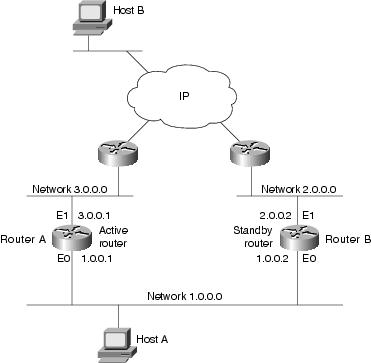
All hosts on the network are configured to use the IP address of the virtual router (in this case, 1.0.0.3) as the default gateway.
A single router interface can also be configured to belong to more than one HSRP group. Figure 2shows routers configured as members of multiple HSRP groups.
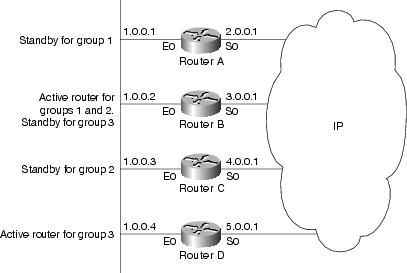
In Figure 2, the Ethernet interface 0 of Router A belongs to group 1. Ethernet interface 0 of Router B belongs to groups 1, 2, and 3. The Ethernet interface 0 of Router C belongs to group 2, and the Ethernet interface 0 of Router D belongs to group 3. When you establish groups, you might want to align them along departmental organizations. In this case, group 1 might support the Engineering Department, group 2 might support the Manufacturing Department, and group 3 might support the Finance Department.
Router B is configured as the active router for groups 1 and 2 and as the standby router for group 3. Router D is configured as the active router for group 3. If Router D fails for any reason, Router B assumes the packet-transfer functions of Router D and maintains the ability of users in the Finance Department to access data on other subnets.
Note | A different virtual MAC address (VMAC) is required for each sub interface. VMAC is determined from the group ID. Therefore, a unique group ID is required for each sub interface configured, unless the VMAC is configured explicitly. |
Note | We recommend that you disable Spanning Tree Protocol (STP) on switch ports to which the virtual routers are connected. Enable RSTP or rapid-PVST on the switch interfaces if the switch supports these protocols. |
HSRP and ARP
When a router in an HSRP group goes active, it sends a number of ARP responses containing its virtual IP address and the virtual MAC address. These ARP responses help switches and learning bridges update their port-to-MAC maps. These ARP responses also provide routers configured to use the burned-in address of the interface as its virtual MAC address (instead of the preassigned MAC address or the functional address) with a means to update the ARP entries for the virtual IP address. Unlike the gratuitous ARP responses sent to identify the interface IP address when an interface comes up, the HSRP router ARP response packet carries the virtual MAC address in the packet header. The ARP data fields for IP address and media address contain the virtual IP and virtual MAC addresses.
Preemption
The HSRP preemption feature enables the router with highest priority to immediately become the active router. Priority is determined first by the priority value that you configure, and then by the IP address. In each case, a higher value is of greater priority.
When a higher-priority router preempts a lower-priority router, it sends a coup message. When a lower-priority active router receives a coup message or hello message from a higher-priority active router, it changes to the speak state and sends a resign message.
ICMP Redirect Messages
Internet Control Message Protocol (ICMP) is a network layer Internet protocol that provides message packets to report errors and other information relevant to IP processing. ICMP provides many diagnostic functions and can send and redirect error packets to the host. When running HSRP, it is important to prevent hosts from discovering the interface (or real) MAC addresses of routers in the HSRP group. If a host is redirected by ICMP to the real MAC address of a router, and that router later fails, then packets from the host are lost.
ICMP redirect messages are automatically enabled on interfaces configured with HSRP. This functionality works by filtering outgoing ICMP redirect messages through HSRP, where the next-hop IP address may be changed to an HSRP virtual IP address.
To support ICMP redirects, redirect messages are filtered through HSRP, where the next-hop IP address is changed to an HSRP virtual address. When HSRP redirects are turned on, ICMP interfaces with HSRP do this filtering. HSRP keeps track of all HSRP routers by sending advertisements and maintaining a real IP address to virtual IP address mapping to perform the redirect filtering.
How to Implement HSRP
This section contains instructions for the following tasks:
- Enabling HSRP
- Enabling HSRP for IPv6
- Configuring HSRP Group Attributes
- Configuring the HSRP Activation Delay
- Enabling HSRP Support for ICMP Redirect Messages
- Multiple Group Optimization (MGO) for HSRP
- Configuring a Primary Virtual IPv4 Address
- Configuring a Secondary Virtual IPv4 Address
- Configuring a slave follow
- Configuring a slave primary virtual IPv4 address
- Configuring a Secondary Virtual IPv4 address for the Slave Group
- Configuring a slave virtual mac address
- Configuring an HSRP Session Name
Enabling HSRP
The hsrp ipv4 command activates HSRP on the configured interface. If an IP address is specified, that address is used as the designated address for the Hot Standby group. If no IP address is specified, the virtual address is learned from the active router. For HSRP to elect a designated router, at least one router in the Hot Standby group must have been configured with, or learned, the designated address. Configuring the designated address on the active router always overrides a designated address that is currently in use.
1.
configure
2.
router
hsrp
3.
interface type interface-path-id
4.
address-family ipv4
5.
hsrp
group-number
version
version-no
6.
address
{
learn |
address [secondary] }
7.
commit
DETAILED STEPS
Enabling HSRP for IPv6
Use the following steps to enable HSRP for IPv6.
1.
configure
2.
router
hsrp
3.
interface
type
interface-path-id
4.
address-family ipv6
5.
hsrp
group-number
6.
address
linklocal {autoconfig |
ipv6-address}
7.
address
global
ipv6-address
8.
commit
DETAILED STEPS
| Command or Action | Purpose | |||
|---|---|---|---|---|
| Step 1 |
configure
| |||
| Step 2 |
router
hsrp
Example:
RP/0/RSP0/CPU0:router(config)# router hsrp
|
Enables HSRP configuration mode. | ||
| Step 3 |
interface
type
interface-path-id
Example: RP/0/RSP0/CPU0:router(config-hsrp)# interface TenGigE 0/2/0/1 |
Enables HSRP interface configuration mode on a specific interface. | ||
| Step 4 |
address-family ipv6
Example:
RP/0/RSP0/CPU0:router(config-hsrp-if)# address-family ipv6
|
Enables HSRP address-family configuration mode on a specific interface. | ||
| Step 5 |
hsrp
group-number
Example:
RP/0/RSP0/CPU0:router(config-hsrp-ipv4)# hsrp 1
|
Enables HSRP group submode.
| ||
| Step 6 |
address
linklocal {autoconfig |
ipv6-address}
Example:
RP/0/RSP0/CPU0:router(config-hsrp-gp)# address linklocal autoconfig
|
Activates HSRP on the configured interface and assigns a linklocal IPv6 address.
| ||
| Step 7 |
address
global
ipv6-address
Example:
RP/0/RSP0/CPU0:router(config-hsrp-gp)# address global 2001:DB8:A:B::1
|
Activates HSRP on the configured interface and assigns a global IPv6 address.
| ||
| Step 8 |
commit
|
Configuring HSRP Group Attributes
To configure other Hot Standby group attributes that affect how the local router participates in HSRP, use the following procedure in interface configuration mode as needed:
1.
configure
2.
router
hsrp
3.
interface
type interface-path-id
4.
hsrp
use-bia
5.
address-family ipv4
6.
hsrp
group-number
version
version-no
7.
priority
priority
8.
track
type
instance [priority-decrement]
9.
preempt [delay
seconds]
10.
authentication
string
11.
mac-address
address
12.
commit
DETAILED STEPS
| Command or Action | Purpose | |||
|---|---|---|---|---|
| Step 1 |
configure
| |||
| Step 2 |
router
hsrp
Example:
RP/0/RSP0/CPU0:router(config)# router hsrp
|
Enables HSRP configuration mode. | ||
| Step 3 |
interface
type interface-path-id
Example: RP/0/RSP0/CPU0:router(config-hsrp)# interface TenGigE 0/2/0/1 |
Enables HSRP interface configuration mode on a specific interface. | ||
| Step 4 |
hsrp
use-bia
Example:
RP/0/RSP0/CPU0:router(config-hsrp-if)# hsrp use-bia
|
(Optional) Configures the HSRP to use the burned-in address of the interface as its virtual MAC address, instead of the preassigned MAC address or the functional address. | ||
| Step 5 |
address-family ipv4
Example:
RP/0/RSP0/CPU0:router(config-hsrp-if)# address-family ipv4
|
Enables HSRP address-family configuration mode on a specific interface. | ||
| Step 6 |
hsrp
group-number
version
version-no
Example:
RP/0/RSP0/CPU0:router(config-hsrp-ipv4)# hsrp 1 version 1
|
Enables HSRP group submode.
| ||
| Step 7 |
priority
priority
Example:
RP/0/RSP0/CPU0:router(config-hsrp-gp)# priority 100
|
(Optional) Configures HSRP priority.
| ||
| Step 8 |
track
type
instance [priority-decrement]
Example: RP/0/RSP0/CPU0:router(config-hsrp-gp)# track TenGigE 0/3/0/1 |
(Optional) Configures an interface so that the Hot Standby priority changes on the basis of the availability of other interfaces.
| ||
| Step 9 |
preempt [delay
seconds]
Example:
RP/0/RSP0/CPU0:router(config-hsrp-gp)# preempt
|
(Optional) Configures HSRP preemption and preemption delay.
| ||
| Step 10 |
authentication
string
Example:
RP/0/RSP0/CPU0:router(config-hsrp-gp)# authentication company1
|
(Optional) Configures an authentication string for the Hot Standby Router Protocol (HSRP).
| ||
| Step 11 |
mac-address
address
Example:
RP/0/RSP0/CPU0:router(config-hsrp-if)# mac-address 4000.1000.1060
|
(Optional) Specifies a virtual MAC address for the HSRP.
| ||
| Step 12 |
commit
|
Configuring the HSRP Activation Delay
The activation delay for HSRP is designed to delay the startup of the state machine when an interface comes up. This give the network time to settle and avoids unnecessary state changes early after the link comes up.
1.
configure
2.
router
hsrp
3.
interface
type
interface-path-id
4.
hsrp
delay [minimum
seconds ] [reload
seconds]
5.
address-family ipv4
6.
hsrp
group-number
version
version-no
7.
address
{
learn |
address [secondary] }
8.
commit
DETAILED STEPS
| Command or Action | Purpose | |||
|---|---|---|---|---|
| Step 1 |
configure
| |||
| Step 2 |
router
hsrp
Example:
RP/0/RSP0/CPU0:router(config)# router hsrp
|
Enables HSRP configuration mode. | ||
| Step 3 |
interface
type
interface-path-id
Example: RP/0/RSP0/CPU0:router(config-hsrp)# interface TenGigE 0/2/0/1 |
Enables HSRP interface configuration mode on a specific interface. | ||
| Step 4 |
hsrp
delay [minimum
seconds ] [reload
seconds]
Example:
RP/0/RSP0/CPU0:router(config-hsrp-if)#hsrp delay minimum 2 reload 10
|
Delays the startup of the state machine when an interface comes up, so that the network has time to settle and there are no unnecessary state changes early after the link comes up. The reload delay is the delay applied after the first interface up event. The minimum delay is the delay that is applied after any subsequent interface up event (if the interface flaps). | ||
| Step 5 |
address-family ipv4
Example:
RP/0/RSP0/CPU0:router(config-hsrp-if)# address-family ipv4
|
Enables HSRP address-family configuration mode on a specific interface. | ||
| Step 6 |
hsrp
group-number
version
version-no
Example:
RP/0/RSP0/CPU0:router(config-hsrp-ipv4)# hsrp 1 version 1
|
Enables HSRP group submode.
| ||
| Step 7 |
address
{
learn |
address [secondary] }
Example:
RP/0/RSP0/CPU0:router(config-hsrp-gp)# address learn
|
Activates HSRP on the configured interface.
| ||
| Step 8 |
commit
|
Enabling HSRP Support for ICMP Redirect Messages
By default, HSRP filtering of ICMP redirect messages is enabled on routers running HSRP.
To configure the reenabling of this feature on your router if it is disabled, use the hsrp redirects command in interface configuration mode.
1.
configure
2.
router
hsrp
3.
interface
type
interface-path-id
4.
hsrp
redirects
disable
5.
address-family ipv4
6.
hsrp
group-number
version
version-no
7.
address
{
learn |
address [secondary] }
8.
commit
DETAILED STEPS
| Command or Action | Purpose | |||
|---|---|---|---|---|
| Step 1 |
configure
| |||
| Step 2 |
router
hsrp
Example:
RP/0/RSP0/CPU0:router(config)# router hsrp
|
Enables HSRP configuration mode. | ||
| Step 3 |
interface
type
interface-path-id
Example: RP/0/RSP0/CPU0:router(config-hsrp)# interface TenGigE 0/2/0/1 |
Enables HSRP interface configuration mode on a specific interface. | ||
| Step 4 |
hsrp
redirects
disable
Example:
RP/0/RSP0/CPU0:router(config-hsrp-if)# hsrp redirects
|
Configures Internet Control Message Protocol (ICMP) redirect messages to be sent when the Hot Standby Router Protocol (HSRP) is configured on an interface.
| ||
| Step 5 |
address-family ipv4
Example:
RP/0/RSP0/CPU0:router(config-hsrp-if)# address-family ipv4
|
Enables HSRP address-family configuration mode on a specific interface. | ||
| Step 6 |
hsrp
group-number
version
version-no
Example:
RP/0/RSP0/CPU0:router(config-hsrp-ipv4)# hsrp 1 version 1
|
Enables HSRP group submode.
| ||
| Step 7 |
address
{
learn |
address [secondary] }
Example:
RP/0/RSP0/CPU0:router(config-hsrp-gp)# address learn
|
Activates HSRP on the configured interface.
| ||
| Step 8 |
commit
|
Multiple Group Optimization (MGO) for HSRP
Multiple Group Optimization provides a solution for reducing control traffic in a deployment consisting of many subinterfaces. By running the HSRP control traffic for just one of the sessions, the control traffic is reduced for the subinterfaces with identical redundancy requirements. All other sessions are slaves of this primary session, and inherit their states from it.
Customizing HSRP
Customizing the behavior of HSRP is optional. Be aware that as soon as you enable a HSRP group, that group is in operation.
1.
configure
2.
router
hsrp
3.
interface
type
interface-path-id
4.
address-family ipv4
5.
hsrp
group-no
version
version-no
6.
name
name
7.
address
{
learn
|
address}
8.
address
address
secondary
9.
authentication
string
10.
bfd
fast-detect
11.
mac-address
address
12.
hsrp
group-no
slave
13.
follow
mgo-session-name
14.
address
ip-address
15.
commit
DETAILED STEPS
| Command or Action | Purpose | |||
|---|---|---|---|---|
| Step 1 |
configure
| |||
| Step 2 |
router
hsrp
Example:
RP/0/RSP0/CPU0:router(config)# router hsrp
|
Enables HSRP configuration mode. | ||
| Step 3 |
interface
type
interface-path-id
Example: RP/0/RSP0/CPU0:router(config-hsrp)# interface TenGigE 0/2/0/1 |
Enables HSRP interface configuration mode on a specific interface. | ||
| Step 4 |
address-family ipv4
Example:
RP/0/RSP0/CPU0:router(config-hsrp-if)# address-family ipv4
|
Enables HSRP address-family configuration mode on a specific interface. | ||
| Step 5 |
hsrp
group-no
version
version-no
Example:
RP/0/RSP0/CPU0:router(config-hsrp-ipv4)# hsrp 1 version 2
|
Enables HSRP group configuration mode on a specific interface.
| ||
| Step 6 |
name
name
Example:
RP/0/RSP0/CPU0:router(config-hsrp-gp)# name s1
|
Configures an HSRP session name. | ||
| Step 7 |
address
{
learn
|
address}
Example:
RP/0/RSP0/CPU0:router(config-hsrp-gp)# address learn
|
Enables hot standby protocol for IP. | ||
| Step 8 |
address
address
secondary
Example:
RP/0/RSP0/CPU0:router(config-hsrp-gp)# address 10.20.30.1 secondary
|
Configures the secondary virtual IPv4 address for a router. | ||
| Step 9 |
authentication
string
Example:
RP/0/RSP0/CPU0:router(config-hsrp-gp)# authentication company1
|
Configures an authentication string for the Hot Standby Router Protocol (HSRP). | ||
| Step 10 |
bfd
fast-detect
Example:
RP/0/RSP0/CPU0:router(config-hsrp-gp)# bfd fast-detect
|
Enables bidirectional forwarding(BFD) fast-detection on a HSRP interface. | ||
| Step 11 |
mac-address
address
Example:
RP/0/RSP0/CPU0:router(config-hsrp-gp)# mac-address 4000.1000.1060
|
Specifies a virtual MAC address for the Hot Standby Router Protocol (HSRP). | ||
| Step 12 |
hsrp
group-no
slave
Example:
RP/0/RSP0/CPU0:router(config-hsrp-gp)# hsrp 2 slave
|
Enables HSRP slave configuration mode on a specific interface. | ||
| Step 13 |
follow
mgo-session-name
Example:
RP/0/RSP0/CPU0:router(config-hsrp-slave)# follow s1
|
Instructs the slave group to inherit its state from a specified group. | ||
| Step 14 |
address
ip-address
Example:
RP/0/RSP0/CPU0:router(config-hsrp-slave)# address 10.3.2.2
|
Configures the primary virtual IPv4 address for the slave group. | ||
| Step 15 |
commit
|
Configuring a Primary Virtual IPv4 Address
To enable hot standby protocol for IP, use the address (hsrp) command in the HSRP group submode.
1.
configure
2.
router
hsrp
3.
interface
type
interface-path-id
4.
address-family ipv4
5.
hsrp
group-noversion
version-no
6.
address
{
learn
|
address}
7.
commit
DETAILED STEPS
| Command or Action | Purpose | |||
|---|---|---|---|---|
| Step 1 |
configure
| |||
| Step 2 |
router
hsrp
Example:
RP/0/RSP0/CPU0:router(config)# router hsrp
|
Enables HSRP configuration mode. | ||
| Step 3 |
interface
type
interface-path-id
Example: RP/0/RSP0/CPU0:router(config-hsrp)# interface TenGigE 0/2/0/1 |
Enables HSRP interface configuration mode on a specific interface. | ||
| Step 4 |
address-family ipv4
Example:
RP/0/RSP0/CPU0:router(config-hsrp-if)# address-family ipv4
|
Enables HSRP address-family configuration mode on a specific interface. | ||
| Step 5 |
hsrp
group-noversion
version-no
Example:
RP/0/RSP0/CPU0:router(config-hsrp-ipv4)# hsrp 1 version 2
|
Enables HSRP group configuration mode on a specific interface.
| ||
| Step 6 |
address
{
learn
|
address}
Example:
RP/0/RSP0/CPU0:router(config-hsrp-ipv4)# address learn
|
Enables hot standby protocol for IP. | ||
| Step 7 |
commit
|
Configuring a Secondary Virtual IPv4 Address
To configure the secondary virtual IPv4 address for a router, use the address secondary command in the Hot Standby Router Protocol (HSRP) virtual router submode.
1.
configure
2.
router
hsrp
3.
interface
type
interface-path-id
4.
address-family ipv4
5.
hsrp
group-noversion
version-no
6.
address
address
secondary
7.
commit
DETAILED STEPS
| Command or Action | Purpose | |||
|---|---|---|---|---|
| Step 1 |
configure
| |||
| Step 2 |
router
hsrp
Example:
RP/0/RSP0/CPU0:router(config)# router hsrp
|
Enables HSRP configuration mode. | ||
| Step 3 |
interface
type
interface-path-id
Example: RP/0/RSP0/CPU0:router(config-hsrp)# interface TenGigE 0/2/0/1 |
Enables HSRP interface configuration mode on a specific interface. | ||
| Step 4 |
address-family ipv4
Example:
RP/0/RSP0/CPU0:router(config-hsrp-if)# address-family ipv4
|
Enables HSRP address-family configuration mode on a specific interface. | ||
| Step 5 |
hsrp
group-noversion
version-no
Example:
RP/0/RSP0/CPU0:router(config-hsrp-ipv4)# hsrp 1 version 2
|
Enables HSRP group configuration mode on a specific interface.
| ||
| Step 6 |
address
address
secondary
Example:
RP/0/RSP0/CPU0:router(config-hsrp-ipv4)# address 10.20.30.1 secondary
|
Configures the secondary virtual IPv4 address for a router. | ||
| Step 7 |
commit
|
Configuring a slave follow
1.
configure
2.
router
hsrp
3.
interface
type
interface-path-id
4.
address-family ipv4
5.
hsrp
group-no
slave
6.
follow
mgo-session-name
7.
commit
DETAILED STEPS
| Command or Action | Purpose | |
|---|---|---|
| Step 1 |
configure
| |
| Step 2 |
router
hsrp
Example:
RP/0/RSP0/CPU0:router(config)# router hsrp
|
Enables HSRP configuration mode. |
| Step 3 |
interface
type
interface-path-id
Example: RP/0/RSP0/CPU0:router(config-hsrp)# interface TenGigE 0/2/0/1 |
Enables HSRP interface configuration mode on a specific interface. |
| Step 4 |
address-family ipv4
Example:
RP/0/RSP0/CPU0:router(config-hsrp-if)# address-family ipv4
|
Enables HSRP address-family configuration mode on a specific interface. |
| Step 5 |
hsrp
group-no
slave
Example:
RP/0/RSP0/CPU0:router(config-hsrp-ipv4)# hsrp 2 slave
|
Enables HSRP slave configuration mode on a specific interface. |
| Step 6 |
follow
mgo-session-name
Example:
RP/0/RSP0/CPU0:router(config-hsrp-slave)# follow m1
|
Instructs the slave group to inherit its state from a specified group. |
| Step 7 |
commit
|
Configuring a slave primary virtual IPv4 address
To configure the primary virtual IPv4 address for the slave group, use the slave primary virtual IPv4 address command in the HSRP slave submode.
1.
configure
2.
router
hsrp
3.
interface
type
interface-path-id
4.
address-family ipv4
5.
hsrp
group-no
slave
6.
address
ip-address
7.
commit
DETAILED STEPS
| Command or Action | Purpose | |
|---|---|---|
| Step 1 |
configure
| |
| Step 2 |
router
hsrp
Example:
RP/0/RSP0/CPU0:router(config)# router hsrp
|
Enables HSRP configuration mode. |
| Step 3 |
interface
type
interface-path-id
Example: RP/0/RSP0/CPU0:router(config-hsrp)# interface TenGigE 0/2/0/1 |
Enables HSRP interface configuration mode on a specific interface. |
| Step 4 |
address-family ipv4
Example:
RP/0/RSP0/CPU0:router(config-hsrp-if)# address-family ipv4
|
Enables HSRP address-family configuration mode on a specific interface. |
| Step 5 |
hsrp
group-no
slave
Example:
RP/0/RSP0/CPU0:router(config-hsrp-ipv4)# hsrp 2 slave
|
Enables HSRP slave configuration mode on a specific interface. |
| Step 6 |
address
ip-address
Example:
RP/0/RSP0/CPU0:router(config-hsrp-slave)# address 10.2.3.2
|
Configures the primary virtual IPv4 address for the slave group. |
| Step 7 |
commit
|
Configuring a Secondary Virtual IPv4 address for the Slave Group
Perform this task to configure the secondary virtual IPv4 address for the slave group.
1.
configure
2.
router
hsrp
3.
interface
type
interface-path-id
4.
address-family ipv4
5.
hsrp
group-no
slave
6.
address
address
secondary
7.
commit
DETAILED STEPS
| Command or Action | Purpose | |
|---|---|---|
| Step 1 |
configure
| |
| Step 2 |
router
hsrp
Example:
RP/0/RSP0/CPU0:router(config)# router hsrp
|
Enables HSRP configuration mode. |
| Step 3 |
interface
type
interface-path-id
Example: RP/0/RSP0/CPU0:router(config-hsrp)# interface TenGigE 0/2/0/1 |
Enables HSRP interface configuration mode on a specific interface. |
| Step 4 |
address-family ipv4
Example:
RP/0/RSP0/CPU0:router(config-hsrp-if)# address-family ipv4
|
Enables HSRP address-family configuration mode on a specific interface. |
| Step 5 |
hsrp
group-no
slave
Example:
RP/0/RSP0/CPU0:router(config-hsrp-address-family)# hsrp 2 slave
|
Enables HSRP slave configuration mode on a specific interface. |
| Step 6 |
address
address
secondary
Example:
RP/0/RSP0/CPU0:router(config-hsrp-slave)# address 10.20.30.1 secondary
|
Configures the secondary virtual IPv4 address for a router. |
| Step 7 |
commit
|
Configuring a slave virtual mac address
To configure the virtual MAC address for the slave group, use the slave virtual mac address command in the HSRP slave submode.
1.
configure
2.
router
hsrp
3.
interface
type
interface-path-id
4.
address-family ipv4
5.
hsrp
group-no
slave
6.
mac-address
address
7.
commit
DETAILED STEPS
| Command or Action | Purpose | |
|---|---|---|
| Step 1 |
configure
| |
| Step 2 |
router
hsrp
Example:
RP/0/RSP0/CPU0:router(config)# router hsrp
|
Enables HSRP configuration mode. |
| Step 3 |
interface
type
interface-path-id
Example: RP/0/RSP0/CPU0:router(config-hsrp)# interface TenGigE 0/2/0/1 |
Enables HSRP interface configuration mode on a specific interface. |
| Step 4 |
address-family ipv4
Example:
RP/0/RSP0/CPU0:router(config-hsrp-if)# address-family ipv4
|
Enables HSRP address-family configuration mode on a specific interface. |
| Step 5 |
hsrp
group-no
slave
Example:
RP/0/RSP0/CPU0:router(config-hsrp-ipv4)# hsrp 2 slave
|
Enables HSRP slave configuration mode on a specific interface. |
| Step 6 |
mac-address
address
Example:
RP/0/RSP0/CPU0:router(config-hsrp-slave)# mac-address 10.20.30
|
Configures the virtual MAC address for the slave group. |
| Step 7 |
commit
|
Configuring an HSRP Session Name
To configure an HSRP session name, use the session name command in the HSRP group submode.
1.
configure
2.
router
hsrp
3.
interface
type
interface-path-id
4.
address-family ipv4
5.
hsrp
group-noversion
version-no
6.
name
name
7.
commit
DETAILED STEPS
| Command or Action | Purpose | |||
|---|---|---|---|---|
| Step 1 |
configure
| |||
| Step 2 |
router
hsrp
Example:
RP/0/RSP0/CPU0:router(config)# router hsrp
|
Enables HSRP configuration mode. | ||
| Step 3 |
interface
type
interface-path-id
Example: RP/0/RSP0/CPU0:router(config-hsrp)# interface TenGigE 0/2/0/1 |
Enables HSRP interface configuration mode on a specific interface. | ||
| Step 4 |
address-family ipv4
Example:
RP/0/RSP0/CPU0:router(config-hsrp-if)# address-family ipv4
|
Enables HSRP address-family configuration mode on a specific interface. | ||
| Step 5 |
hsrp
group-noversion
version-no
Example:
RP/0/RSP0/CPU0:router(config-hsrp-ipv4)# hsrp 1 version 2
|
Enables HSRP group configuration mode on a specific interface.
| ||
| Step 6 |
name
name
Example:
RP/0/RSP0/CPU0:router(config-hsrp-ipv4)# name s1
|
Configures an HSRP session name. | ||
| Step 7 |
commit
|
BFD for HSRP
Bidirectional Forwarding Detection (BFD) is a network protocol used to detect faults between two forwarding engines. BFD sessions can operate in one of the two modes, namely, asynchronous mode or demand mode. In asynchronous mode, both endpoints periodically send hello packets to each other. If a number of those packets are not received, the session is considered down. In demand mode, it is not mandatory to exchange hello packets; either of the hosts can send hello messages, if needed. Cisco supports the BFD asynchronous mode.
Advantages of BFD
-
BFD provides failure detection in less than one second.
-
BFD supports all types of encapsulation.
-
BFD is not tied to any particular routing protocol, supports almost all routing protocols.
BFD Process
HSRP uses BFD to detect link failure and facilitate fast failover times without excessive control packet overhead.
The HSRP process creates BFD sessions as required. When a BFD session goes down, each Standby group monitoring the session transitions to Active state.
HSRP does not participate in any state elections for 10 seconds after a transition to Active state triggered by a BFD session going down.
Configuring BFD
For HSRP, configuration is applied under the existing HSRP-interface sub-mode, with BFD fast failure configurable per HSRP group and the timers (minimum-interface and multiplier) configurable per interface. BFD fast failure detection is disabled by default.
Enabling BFD
1.
configure
2.
router
hsrp
3.
interface
type
interface-path-id
4.
address-family ipv4
5.
hsrp
[group number]
version
version-no
bfd
fast-detect
[peer
ipv4
ipv4-address
interface-type
interface-path-id]
6.
commit
DETAILED STEPS
| Command or Action | Purpose | |||
|---|---|---|---|---|
| Step 1 |
configure
| |||
| Step 2 |
router
hsrp
Example:
RP/0/RSP0/CPU0:router(config)# router hsrp
|
Enables HSRP configuration mode. | ||
| Step 3 |
interface
type
interface-path-id
Example: RP/0/RSP0/CPU0:router(config-hsrp)# interface TenGigE 0/2/0/1 |
Enables HSRP interface configuration mode on a specific interface. | ||
| Step 4 |
address-family ipv4
Example:
RP/0/RSP0/CPU0:router(config-hsrp-if)# address-family ipv4
|
Enables HSRP address-family configuration mode on a specific interface. | ||
| Step 5 |
hsrp
[group number]
version
version-no
bfd
fast-detect
[peer
ipv4
ipv4-address
interface-type
interface-path-id]
Example: RP/0/RSP0/CPU0:router(config-hsrp-ipv4)# hsrp 1 version 2 bfd fast-detect peer ipv4 10.3.5.2 TenGigE 0/3/4/2 |
Enables fast detection on a specific interface.
| ||
| Step 6 |
commit
|
Modifying BFD timers (minimum interval)
Minimum interval determines the frequency of sending BFD packets to BFD peers (in milliseconds). The default minimum interval is 15ms.
1.
configure
2.
router
hsrp
3.
interface
type
interface-path-id
4.
hsrp bfd
minimum-interval
interval
5.
address-family ipv4
6.
commit
DETAILED STEPS
| Command or Action | Purpose | |
|---|---|---|
| Step 1 |
configure
| |
| Step 2 |
router
hsrp
Example:
RP/0/RSP0/CPU0:router(config)# router hsrp
|
Enables HSRP configuration mode. |
| Step 3 |
interface
type
interface-path-id
Example: RP/0/RSP0/CPU0:router(config-hsrp)# interface TenGigE 0/2/0/1 |
Enables HSRP interface configuration mode on a specific interface. |
| Step 4 |
hsrp bfd
minimum-interval
interval
Example:
RP/0/RSP0/CPU0:router(config-hsrp-if)# hsrp bfd minimum-interval 20
|
Sets the minimum interval to the specified period. The interval is in milliseconds; range is 15 to 30000 milliseconds. |
| Step 5 |
address-family ipv4
Example:
RP/0/RSP0/CPU0:router(config-hsrp-if)# address-family ipv4
|
Enables HSRP address-family configuration mode on a specific interface. |
| Step 6 |
commit
|
Modifying BFD timers (multiplier)
Multiplier is the number of consecutive BFD packets which must be missed from a BFD peer before declaring that peer unavailable. The default multiplier is 3.
1.
configure
2.
router
hsrp
3.
interface
type
interface-path-id
4.
hsrp bfd
multiplier
multiplier
5.
address-family ipv4
6.
commit
DETAILED STEPS
| Command or Action | Purpose | |
|---|---|---|
| Step 1 |
configure
| |
| Step 2 |
router
hsrp
Example:
RP/0/RSP0/CPU0:router(config)# router hsrp
|
Enables HSRP configuration mode. |
| Step 3 |
interface
type
interface-path-id
Example: RP/0/RSP0/CPU0:router(config-hsrp)# interface TenGigE 0/2/0/1 |
Enables HSRP interface configuration mode on a specific interface. |
| Step 4 |
hsrp bfd
multiplier
multiplier
Example:
RP/0/RSP0/CPU0:router(config-hsrp-if)# hsrp bfd multiplier 30
|
Sets the multiplier to the value. Range is 2 to 50. |
| Step 5 |
address-family ipv4
Example:
RP/0/RSP0/CPU0:router(config-hsrp-if)# address-family ipv4
|
Enables HSRP address-family configuration mode on a specific interface. |
| Step 6 |
commit
|
Enhanced Object Tracking for HSRP and IP Static
A failure between the active router and the core network cannot be detected using standard HSRP failure detection mechanisms. Object tracking is used to detect such failures. When such a failure occurs, the active router applies a priority decrement to its HSRP session. If this causes its priority to fall below that of the standby router, it will detect this from the HSRP control traffic, and then use this as a trigger to preempt and take over the active role.
Cisco IOS XR software supports up to 512 tracked objects.
The enhanced object tracking for HSRP and IP Static feature provides first-hop redundancy as well as default gateway selection based on IP Service Level Agreement (IPSLA).
See the Cisco ASR 9000 Series Aggregation Services Router Routing Configuration Guide, for more information about enhanced object tracking for static routes.
Configuring object tracking for HSRP
To enable tracking of the named object with the specified decrement, use the following configuration in the HSRP group sub mode.
1.
configure
2.
router
hsrp
3.
interface type interface-path-id
4.
address-family ipv4
5.
hsrp
group-number
version
version-no
6.
track
object
name
[priority-decrement]
7.
commit
DETAILED STEPS
| Command or Action | Purpose | |||
|---|---|---|---|---|
| Step 1 |
configure
| |||
| Step 2 |
router
hsrp
Example:
RP/0/RSP0/CPU0:router(config)# router hsrp
|
Enables HSRP configuration mode. | ||
| Step 3 |
interface type interface-path-id
Example: RP/0/RSP0/CPU0:router(config-hsrp)# interface TenGigE 0/2/0/1 |
Enables HSRP interface configuration mode on a specific interface. | ||
| Step 4 |
address-family ipv4
Example:
RP/0/RSP0/CPU0:router(config-hsrp-if)# address-family ipv4
|
Enables HSRP address-family configuration mode on a specific interface. | ||
| Step 5 |
hsrp
group-number
version
version-no
Example:
RP/0/RSP0/CPU0:router(config-hsrp-ipv4)# hsrp 1 version 1
|
Enables HSRP group submode.
| ||
| Step 6 |
track
object
name
[priority-decrement]
Example:
RP/0/RSP0/CPU0:router(config-hsrp-gp)# track object t1 2
|
Enable tracking of the named object with the specified decrement. | ||
| Step 7 |
commit
|
Hot Restartability for HSRP
In the event of failure of a HSRP process in one active group, forced failovers in peer HSRP active router groups should be prevented. Hot restartability supports warm RP failover without incurring forced failovers to peer HSRP routers for active groups.
Configuration Examples for HSRP Implementation on Software
This section provides the following HSRP configuration examples:
Configuring an HSRP Group: Example
The following is an example of enabling HSRP on an interface and configuring HSRP group attributes:
configure
router hsrp
interface TenGigE 0/2/0/1
address-family ipv4
hsrp 1
name s1
address 10.0.0.5
timers 100 200
preempt delay 500
priority 20
track TenGigE 0/2/0/2
authentication company0
use-bia
commit
hsrp 2 slave
follow s1
address 10.3.2.2
commit
Configuring a Router for Multiple HSRP Groups: Example
The following is an example of configuring a router for multiple HSRP groups:
configure
router hsrp
interface TenGigE 0/2/0/3
address family ipv4
hsrp 1
address 1.0.0.5
priority 20
preempt
authentication sclara
hsrp 2
address 1.0.0.6
priority 110
preempt
authentication mtview
hsrp 3
address 1.0.0.7
preempt
authentication svale
commit
Additional References
Related Documents
The following sections provide references related to HSRP
|
Related Topic |
Document Title |
|---|---|
|
QoS commands: complete command syntax, command modes, command history, defaults, usage guidelines, and examples |
Quality of Service Commands on Cisco ASR 9000 Series Aggregation Services Router Modular Quality of Service Command Reference |
|
Class-based traffic shaping, traffic policing, low-latency queuing, and Modified Deficit Round Robin (MDRR) |
Configuring Modular Quality of Service Congestion Management on Cisco ASR 9000 Series Aggregation Services Router Modular Quality of Service Configuration Guide |
|
WRED, RED, and tail drop |
Configuring Modular QoS Congestion Avoidance on Cisco ASR 9000 Series Aggregation Services Router Modular Quality of Service Configuration Guide |
|
HSRP commands |
HSRP Commands on Cisco ASR 9000 Series Aggregation Services Router IP Addresses and Services Command Reference |
|
master command reference |
Cisco ASR 9000 Series Aggregation Services Router Commands Master List |
|
getting started material |
Cisco ASR 9000 Series Aggregation Services Router Getting Started Guide |
|
Information about user groups and task IDs |
Configuring AAA Services on Cisco ASR 9000 Series Aggregation Services Router System Security Configuration Guide |
Standards and RFCs
| Standard/RFC | Title |
|---|---|
|
No new or modified standards are supported by this feature, and support for existing standards has not been modified by this feature. |
— |
MIBs
| MIB | MIBs Link |
|---|---|
|
To locate and download MIBs for selected platforms, Cisco IOS releases, and feature sets, use Cisco MIB Locator found at the following URL: |
Technical Assistance
| Description | Link |
|---|---|
|
The Cisco Support website provides extensive online resources, including documentation and tools for troubleshooting and resolving technical issues with Cisco products and technologies. To receive security and technical information about your products, you can subscribe to various services, such as the Product Alert Tool (accessed from Field Notices), the Cisco Technical Services Newsletter, and Really Simple Syndication (RSS) Feeds. Access to most tools on the Cisco Support website requires a Cisco.com user ID and password. |
 Feedback