Smart Licensing

This chapter describes the smart licensing configuration on Cisco NCS 1020.

Understanding Smart Licensing

Smart Licensing is a cloud-based, software license management solution that enables you to automate time-consuming, manual licensing tasks. The solution allows you to easily track the status of your license and software usage trends.

Smart Licensing helps you simplify three core functions:

  • Purchasing: The software that you have installed in your network can be registered, without Product Activation Keys (PAKs).

  • Management: You can automatically track activations against your license entitlements. Also, there is no need to install the license file on every node. You can create license pools (logical grouping of licenses) to reflect your organization structure. Smart Licensing offers you Cisco Smart Software Manager, a centralized portal that enables you to manage all your Cisco software licenses from one centralized website.

  • Reporting: Through the portal, Smart Licensing offers an integrated view of the licenses you have purchased and what has been deployed in your network. You can use this data to make better purchasing decisions, based on your consumption.

Smart Licensing Features

  • Your device initiates a call home and requests the licenses it needs.

  • Pooled licenses - Licenses are company account-specific, and can be used with any compatible device in your company. You can activate or deactivate different types of licenses on the device without actually installing a license file on the device.

  • Licenses are stored securely on Cisco servers.

  • Licenses can be moved between product instances without license transfer. This greatly simplifies the reassignment of a software license as part of the Return Material Authorization (RMA) process.

  • It provides a complete view of all the Smart Software Licenses used in the network using a consolidated usage report of software licenses and devices in one easy-to-use portal.

Cisco Smart Account

Cisco Smart Account is an account where all products enabled for Smart Licensing are deposited. Cisco Smart Account allows you to manage and activate your licenses to devices, monitor license use, and track Cisco license purchases. Through transparent access, you have a real-time view into your Smart Licensing products. IT administrators can manage licenses and account users within your organization's Smart Account through the Smart Software Manager.

When creating a Smart Account, you must have the authority to represent the requesting organization. After you submit the request, it goes through a brief approval process. Access http://software.cisco.com to learn about, set up, or manage Smart Accounts.

Cisco Smart Software Manager enables you to manage all your Cisco Smart software licenses from one centralized website. With Cisco Smart Software Manager, you organize and view your licenses in groups called virtual accounts (collections of licenses and product instances). Use the Cisco Smart Software Manager to do the following tasks:

  • Create, manage, or view virtual accounts.

  • Create and manage Product Instance ID Tokens.

  • Transfer licenses between virtual accounts or view licenses.

  • Transfer, remove, or view product instances.

  • Run reports against your virtual accounts.

  • Modify your email notification settings.

  • View overall account information.

Virtual Accounts

A Virtual Account exists as a subaccount tithing the Smart Account. Virtual Accounts are a customer-defined structure based on organizational layout, business function, geography, or any defined hierarchy. They are created and maintained by the Smart Account administrator. Smart Licencing allows you to create multiple license pools or virtual accounts within the Smart Software Manager portal. Using the Virtual Accounts option that you can aggregate licenses into discrete bundles that are associated with a cost center so that one section of an organization cannot use the licenses of another section of the organization. For example, if you segregate your company into different geographic regions, you can create a virtual account for each region to hold the licenses and product instances for that region.

All new licenses and product instances are placed in the default virtual account in the Smart Software Manager, unless you specify a different one during the order process. After you access the default account, you may choose to transfer them to any other account, provided you have the required access permissions.

Use the Smart Software Manager portal to create license pools or transfer licenses.

Product Instance ID Tokens

ID tokens are stored in the Product Instance ID Token Table that is associated with your enterprise account. ID tokens can be valid 1–365 days.

Product Instances

A product instance is an individual device with a unique device identifier (UDI) that is registered using a product instance ID token (or ID token). You can register any number of instances of a product with a single ID token. Each product instance can have one or more licenses residing in the same virtual account. Product instances must periodically connect to the Cisco Smart Software Manager servers during a specific renewal period. If you remove the product instance, its licenses are released and made available within the virtual account.

Smart Licensing Work Flow

The following figure depicts a working model of smart licensing.
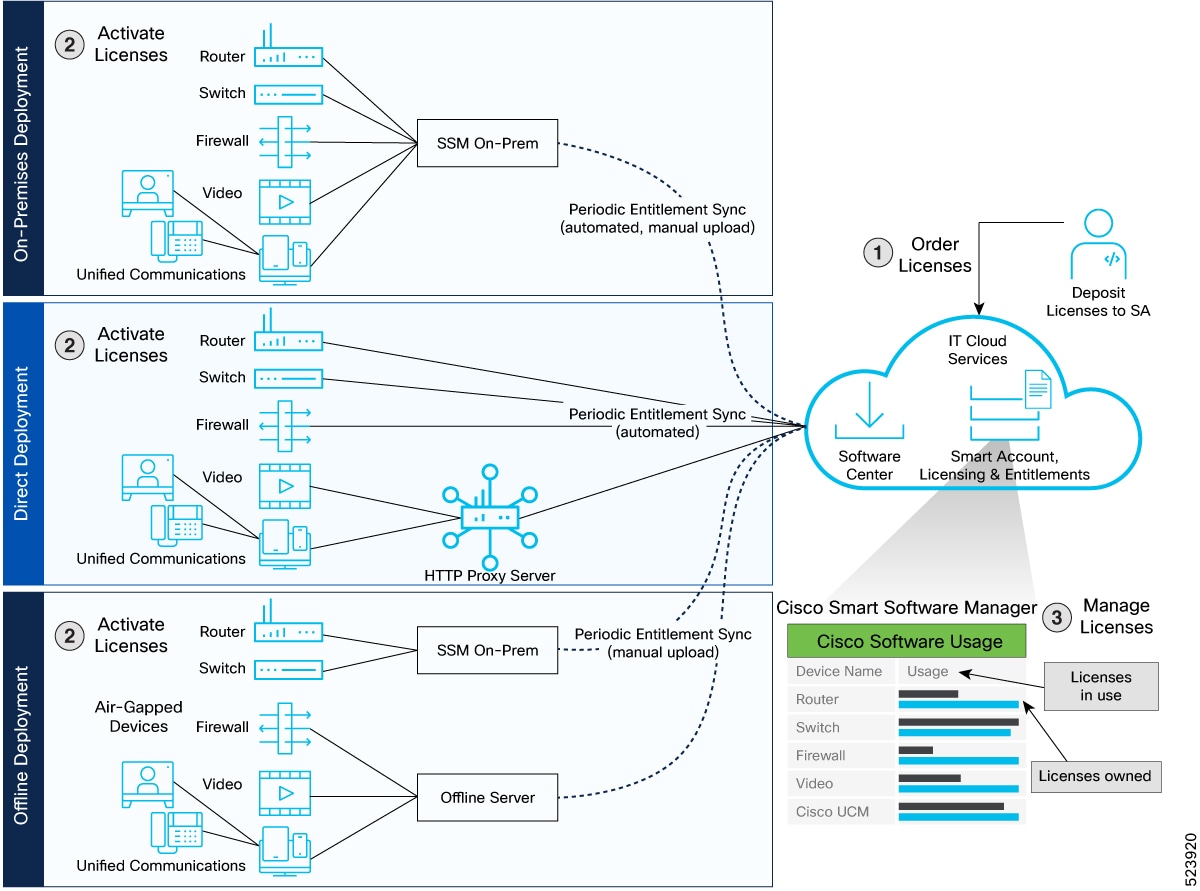
Figure 1. Smart Licensing Work Flow

Available license entitlements for NCS 1020

Cisco NCS 1020 supports the Vortex model for smart licensing software. The available license entitlements are categorized as Essential and Advantage. Each category is designed to enable specific features and hardware support.

This is the list of license types and their applicability.

  • ILA Essentials: One license per ILA card (maximum one license).

  • OLT Essentials: One license per WSS port, per OLT card (maximum 32 licenses). For example, if on an WSS port, multiple cross connections are present, one essential license is consumed, and if multiple add/drop connections are present across multiple WSS ports, that number of ESS licenses are consumed.

  • ILA Advantage: One license per ILA card. This license enables omnidirectional cross connections or OTDR access features (maximum one license).

  • OLT Advantage: One license per WSS port, per OLT card. This type enables OTDR access, Connection Verification feature, Nyquist channel or omnidirectional cross connects (maximum 32 licenses).

  • CCMD Essentials: One license per CCMD card (maximum one license).

Licensing behavior with Nyquist channels

When Nyquist channels are enabled, each cross connection created on a port consumes one Essentials license and one Advantage license.

License entitlement display names and descriptions

The table lists the license entitlements as displayed in Cisco Smart Software Manager (CSSM) and their descriptions:

Table 1. NCS 1020 license entitlements

Display Name in CSSM Server

Description

NCS1010_ADV_ILA_RTU

NCS 1010 ILA Advantage Right-to-Use (RTU)

NCS1010_ADV_ILA_SIA

NCS 1010 ILA Advantage Software Innovation Access (SIA)

NCS1010_ADV_OLT_RTU

NCS 1010 OLT Advantage RTU (per port)

NCS1010_ADV_OLT_SIA

NCS 1010 OLT Advantage SIA (per port)

NCS1010_ESS_ILA_RTU

NCS 1010 ILA Essentials RTU

NCS1010_ESS_ILA_SIA

NCS 1010 ILA Essentials SIA

NCS1010_ESS_OLT_RTU

NCS 1010 OLT Essentials RTU (per port)

NCS1010_ESS_OLT_SIA

NCS 1010 OLT Essentials SIA (per port)

NCS1010_CCMD_CDMS_SIA NCS 1010 CCMD Essentials SIA
NCS1010_CCMD_CDMS_RTU NCS 1010 CCMD Essentials RTU

Create an ID token

To create a new token using Cisco Smart Software Manager, perform the following tasks:

Procedure


Step 1

Log in to the Cisco Smart Software Manager.

https://software.cisco.com/software/csws/ws/platform/home#SmartLicensing-Inventory

Step 2

Click the Inventory tab, and select your virtual account from the Virtual Account drop-down list.

Step 3

Click the General tab, and click New Token.

The Create ID Token window is displayed.

Step 4

Enter the token description. Specify the number of days the token must be active.

Step 5

Check the Allow export-controlled functionality on the products registered with this token check box.

Step 6

Click Create ID Token.

Step 7

Copy the token and register NCS1020 with the same token ID.

An example of the token ID: YzY2ZjYyNjktY2NlOS00NTc4LWIxNTAtMjZkNmNiNzMxMTY1LTE2NjAzNjQ3 %0ANzY4Njl8ZVJSckxKN2pFV2tIeHVoMUkxbGxTazFDVm9kc1B5MGlHQmlFWUJi%0Ac3VNRT0%3D%0A


Available Smart Licensing transport modes

The Smart Licensing software management solution supports four transport modes for license communication and reporting. The default transport mode is Cisco Smart Licensing Utility (CSLU), but you can configure other modes as needed.

The available transport modes are:

  • Call-Home: Uses Cisco's Call-Home infrastructure to communicate license usage and status to Cisco Smart Software Manager (SSM).

  • Smart transport: Establishes a secure, direct connection between the device and SSM over the internet.

  • Cisco Smart Licensing Utility (CSLU): Allows communication with SSM through a local CSLU server, acting as an intermediary between devices and SSM.

  • Offline: Enables manual transfer of license usage information via files instead of automated network connectivity.

Configure call home mode

Enable call home mode, configure domain name server and CRL options, set smart license transport to call home, and establish licensing trust on the device.

The Call Home mode will be deprecated in a future release.

Before you begin

Procedure


Step 1

Enable call home service and configure the call home profile.

Example:

RP/0/RP0/CPU0:ios#call-home
RP/0/RP0/CPU0:ios(config-call-home)#service active
RP/0/RP0/CPU0:ios(config-call-home)#contact smart-licensing
RP/0/RP0/CPU0:ios(config-call-home)#profile CiscoTAC-1
RP/0/RP0/CPU0:ios(config-call-home-profile)#active
RP/0/RP0/CPU0:ios(config-call-home-profile)#destination address http https://tools.cisco.com/its/service/oddce/services/DDCEService
RP/0/RP0/CPU0:ios(config-call-home-profile)#reporting smart-call-home-data
RP/0/RP0/CPU0:ios(config-call-home-profile)#reporting smart-licensing-data
RP/0/RP0/CPU0:ios(config-call-home-profile)#destination transport-method email disable
RP/0/RP0/CPU0:ios(config-call-home-profile)#destination transport-method http
RP/0/RP0/CPU0:ios(config-call-home-profile)#commit
RP/0/RP0/CPU0:ios(config-call-home-profile)#end

Step 2

Configure the domain name and DNS server.

Example:

RP/0/RP0/CPU0:ios#config
RP/0/RP0/CPU0:ios(config)#domain name cisco.com
RP/0/RP0/CPU0:ios(config)#domain name-server 64.102.6.247
RP/0/RP0/CPU0:ios(config)#commit
RP/0/RP0/CPU0:ios(config)#end

Step 3

Configure the Certificate Revocation List (CRL) trustpoint.

Example:


RP/0/RP0/CPU0:ios#config
RP/0/RP0/CPU0:ios(config)#crypto ca trustpoint Trustpool crl optional
RP/0/RP0/CPU0:ios(config)#commit
RP/0/RP0/CPU0:ios(config)#end

Step 4

Set smart license transport to use call home.

Example:


RP/0/RP0/CPU0:ios#config
RP/0/RP0/CPU0:ios(config)#License smart transport callhome
RP/0/RP0/CPU0:ios(config)#commit
RP/0/RP0/CPU0:ios(config)#end

Step 5

Establish license trust using your ID token.

Example:

license smart trust idtoken Zesdf3243u48329fdfhsfhsfkjs1233j4h1j1j4j41n

Step 6

Synchronize smart license tokens.

Example:

license smart sync all

Step 7

Verify your call home and license configuration.

Example:

RP/0/RP0/CPU0:ios#show license all
Transport:  Type: Callhome

Your device is now configured for call home operation and smart licensing, with the specified DNS and CRL settings. The license transport uses call home, and trust is established.

Configure smart transport license registration

Use this procedure to configure smart transport that can be used as an alternative option to Call Home, to connect to the CSSM.

Procedure


Step 1

Configure the smart proxy and hostname .

Example:

RP/0/RP0/CPU0:ios#config
RP/0/RP0/CPU0:ios(config)#license smart proxy port 80
RP/0/RP0/CPU0:ios(config)#license smart proxy hostname proxy.esl.cisco.com
RP/0/RP0/CPU0:ios(config)#commit
RP/0/RP0/CPU0:ios(config)#end 

Step 2

Enable Certificate Revocation List (CRL) configuration.

Example:


RP/0/RP0/CPU0:ios#config
RP/0/RP0/CPU0:ios(config)#crypto ca trustpoint Trustpool crl optional
RP/0/RP0/CPU0:ios(config)#commit
RP/0/RP0/CPU0:ios(config)#end

Step 3

Enable Call Home using smart transport .

Example:


RP/0/RP0/CPU0:ios#config
RP/0/RP0/CPU0:ios(config)#License smart transport smart
RP/0/RP0/CPU0:ios(config)#commit
RP/0/RP0/CPU0:ios(config)#end

Step 4

Verify the smart transport configuration.

Example:

RP/0/RP0/CPU0:ios#show license all
Transport:
  Type: Smart
  URL: https://smartreceiver.cisco.com/licservice/license
  Proxy:
    Address: proxy.esl.cisco.com
    Port: 80
    Username: <empty>
    Password: <empty>
  VRF:
    Not Supported

Step 5

Establish trust using your Smart Account ID token.

Example:

license smart trust idtoken Zesdf3243u48329fdfhsfhsfkjs1233j4h1j1j4j41n

Step 6

Sync the token and licenses with CSSM.

Example:

license smart sync all

Smart transport is configured for license registration, device trust is established with CSSM, and license information is successfully synchronized. Your Cisco NCS 1020 is now registered and ready for smart license management.

Configure CSLU

You can configure CSLU as one of the transport modes, CSLU is the default mode for software licensing policy. To configure CSLU in Cisco NCS 1020, perform the following steps:

Procedure


Step 1

Use this sample configuration to configure the CSLU URL.

Example:

RP/0/RP0/CPU0:ios#config
RP/0/RP0/CPU0:ios(config)#license smart url cslu http://10.127.60.58:8182/cslu/v1/pi
RP/0/RP0/CPU0:ios(config)#commit
RP/0/RP0/CPU0:ios(config)#end

Step 2

Use this sample configuration to enable CRL Configuration.

Example:


RP/0/RP0/CPU0:ios#config
RP/0/RP0/CPU0:ios(config)#crypto ca trustpoint Trustpool crl optional
RP/0/RP0/CPU0:ios(config)#commit
RP/0/RP0/CPU0:ios(config)#end

Step 3

Use this sample configuration to enable CSLU.

Example:


RP/0/RP0/CPU0:ios#config
RP/0/RP0/CPU0:ios(config)#License smart transport cslu
RP/0/RP0/CPU0:ios(config)#commit
RP/0/RP0/CPU0:ios(config)#end
Verify whether CSLU is Configured.
RP/0/RP0/CPU0:ios#show license all
Transport:
  Type: cslu
  Cslu address: http://10.127.60.58:8182/cslu/v1/pi
  Proxy:
    Not Configured
  VRF:
    Not Supported

Step 4

Use this sample configuration to establish trust using id-token.

Example:

license smart trust idtoken Zesdf3243u48329fdfhsfhsfkjs1233j4h1j1j4j41n

Step 5

Use this sample configuration to sync the token with the licenses.

Example:

license smart sync all

Configure Offline

You can configure Offline as one of the options. To configure Offline in Cisco NCS 1020, perform the following steps:

Procedure


Step 1

Use this sample configuration to disable transport.

Example:


RP/0/RP0/CPU0:ios#config
RP/0/RP0/CPU0:ios(config)#License smart transport off
RP/0/RP0/CPU0:ios(config)#commit
RP/0/RP0/CPU0:ios(config)#end

Step 2

Use this sample configuration to save the report.

Example:

RP/0/RP0/CPU0:ios#license smart save usage unreported /misc1/disk1/usage.txt

Step 3

Use this sample configuration to import the acknowledgment report.

Example:

RP/0/RP0/CPU0:ios#license smart import /misc/disk1/ACK_usage.txt

Reserve Specific Licenses for NCS 1020

Specific License Reservation (SLR) lets you reserve a license for your product instance from the CSSM. To reserve specific licenses for NCS 1020, perform the following steps:

Procedure


Step 1

Generate the request code using thelicense smart mfg reservation request local command.

Example:

RP/0/RP0/CPU0:iso#license smart mfg reservation request local 
Thu Jul 19 13:33:47.241 UTC

Enter this request code in the Cisco Smart Software Manager portal:
DB-ZNCS1020:FCB2717B142-BBTQDthRu-1A

Step 2

Use the generated code and generate the authorization code through Cisco Smart Software Manager.

Step 3

Enter the run command to launch the iso XR Linux bash shell.

Example:

RP/0/RP0/CPU0:iso#run

RP/0/RP0/CPU0:Jul 19 13:35:20.236: run_cmd[67213]: %INFRA-INFRA_MSG.5-RUN_LOGIN : User Cisco logged into shell from con0/RP0/CP0

Step 4

Create a file using the vim file name command.

Example:

[node0_RP0_CPU0:~]$vim smart1

Step 5

Copy the authorization code in the file and type :wq to save and exit the file.

Step 6

Use the exit command to exit the shell.

Example:

[node0_RP0_CPU0:~]$exit
logout
RP/0/RP0/CPU0:Jul 19 13:45:21.146 UTC run-cmd[67213] %INFRA_MSG-5-LOGOUT : User cisco logged out of shell from con0/RP0/CPU0

Step 7

Install the authorization code using the license smart mfg reservation install file command.

Example:

RP/0/RP0/CPU0:iso#license smart mfg reservation install file /disk0:/smart1
Thu Jul 19 13:46:22.877 UTC
Last Confirmation code 8572aa81

Note


You can verify the number of reservations in the Cisco smart software manger portal and can view the product instance name changed to a UDI.

Step 8

Verify the udi using the show license udi command.

Example:

RP/0/RP0/CPU0:iso#show license udi
Thu Jul 19 13:43:19.731 UTC
UDI: PID:NCS1020-SA,SN:FCB2546B08T

Step 9

Verify the license reservation using the command show license status.

Example:

RP/0/RP0/CPU0:P2A_DT_08#show license status 
Thu Jul 19 15:45:27.137 UTC

Smart Licensing is ENABLED

Utility:
  Status: DISABLED
License Reservation is ENABLED

Data Privacy:
  Sending Hostname: yes
    Callhome hostname privacy: DISABLED
    Smart Licensing hostname privacy: DISABLED
  Version privacy: DISABLED

Transport:
  Type: Transport Off


License Authorization: 
  Status: AUTHORIZED - RESERVED on Jul 19 2022 15:21:24 UTC
          
Export Authorization Key:
  Features Authorized:
    <none>

Miscellaneous:
  Custom Id: <empty>

License consumption use cases

In NCS 1020, advanced licenses are consumed based on the features configured.

  • For an OLT card, the number of advanced licenses consumed equals the number of essential licenses present when certain advanced features are enabled.

  • For an ILA card, only one advanced license is consumed regardless of the number of essential licenses present, when advanced features are enabled.

Examples of license consumption use cases:

License consumption when tone rate is configured for connection verification

When you configure tone rate for connection verification, license consumption is determined by the device type. The examples below show how the license summary output changes when the tone rate configuration is present or removed.

This sample shows the configuration of tone rate for connection verification.

RP/0/RP0/CPU0:ios(config)#controller ots 0/0/0/3
RP/0/RP0/CPU0:ios(config-Ots)#tone-rate 25
RP/0/RP0/CPU0:ios(config-Ots)#tone-frequency 191.175  
RP/0/RP0/CPU0:ios(config-Ots)#tone-pattern abcd1234
RP/0/RP0/CPU0:ios(config-Ots)#commit

This sample displays the license summary output after configuring the tone rate. In addition to the essential licenses, there are the same number of advantage licenses consumed as essential licenses.

RP/0/RP0/CPU0:ios#show lic platform summary 
Thu Aug 28 14:16:21.188 IST
Collection: LAST: Thu Aug 28 2025 14:15:23 IST
            NEXT: Thu Aug 28 2025 14:16:23 IST
Reporting:  LAST: Thu Aug 28 2025 14:15:23 IST
            NEXT: Thu Aug 28 2025 14:16:23 IST
SIA Status: In Compliance
                                                                   Count
Feature/Area     Entitlement                                     Last Next
============ =================================================== ==== ====
FCM 1        NCS1010 - Essentials Tier - Optical Line Terminal R    3    0
FCM 1        NCS1010 - Essentials Subscription - Optical Line Te    3    0
FCM 1        NCS1010 - Advantage Tier - Optical Line Terminal RT    3    0
FCM 1        NCS1010 - Advantage Subscription - Optical Line Ter    3    0

This sample displays the license summary after the tone rate configuration is removed. Only essential licenses are consumed when the tone rate is removed.

RP/0/RP0/CPU0:ios#show lic plat sum
Thu Aug 28 15:00:41.565 IST
Collection: LAST: Thu Aug 28 2025 15:00:22 IST
            NEXT: Thu Aug 28 2025 15:01:22 IST
Reporting:  LAST: Thu Aug 28 2025 15:00:22 IST
            NEXT: Thu Aug 28 2025 15:01:22 IST
SIA Status: In Compliance
                                                                   Count
Feature/Area     Entitlement                                     Last Next
============ =================================================== ==== ====
FCM 1        NCS1010 - Essentials Tier - Optical Line Terminal R    3    0
FCM 1        NCS1010 - Essentials Subscription - Optical Line Te    3    0

License consumption for overlapping Nyquist channels

When Nyquist channels are configured for omnidirectional cross-connection, both an Essentials license and an Advantage license are consumed for every overlapping Nyquist channel, one of each per channel.

Sample configuring the overlapping Nyquist channel.

RP/0/RP0/CPU0:ios#config
RP/0/RP0/CPU0:ios(config)#hw-module location 0/0/NXR0 terminal-ampli grid-mode flex
RP/0/RP0/CPU0:ios(config-hwmod-olt-flexi)#channel-id 191 centre-freq 192.3625 width 50
RP/0/RP0/CPU0:ios(config-hwmod-olt-flexi)#channel-id 192 centre-freq 192.4125 width 55
RP/0/RP0/CPU0:ios(config-hwmod-olt-flexi)#channel-id 193 centre-freq 192.4625 width 50
RP/0/RP0/CPU0:ios(config-hwmod-olt-flexi)#commit

This sample displays the overlapping channels highlighted.

RP/0/RP0/CPU0:ios#show hw-module location 0/0/nXR0 terminal-ampli
Thu Aug 21 17:42:52.551 IST

Legend:
NXC      - Channel not cross-connected
ACTIVE - Channel cross-connected to data port
ASE        - Channel filled with ASE
FAILED - Data channel failed, pending transition to ASE
PENDING_ACTIVATION - Data Channel pending transition to ACTIVE/FAIL

Location:             0/0/NXR0

Status:               Provisioned

ASE Total Power:      15.70 dBm

Flex Grid Info

Channel Number      Centre Frequency(THz)       Channel Width(GHz)    Channel Status    Overlapping Channels
1                   193.100000                  75.000                ACTIVE              - ,   -
2                   193.900000                  75.000                ACTIVE              - ,   -
3                   195.000000                  75.000                ACTIVE              - ,   -
4                   194.400000                  75.000                ACTIVE              - ,   -
5                   196.100000                  75.000                ACTIVE              - ,   -
6                   195.950000                  75.000                ACTIVE              - ,   -
7                   195.600000                  75.000                ACTIVE              - ,   -
8                   195.450000                  75.000                ACTIVE              - ,   -
191                 192.362500                  50.000                NXC                 - , 192
192                 192.412500                  55.000                NXC                191 , 193
193                 192.462500                  50.000                NXC                192 ,   -

This sample displays the license summary output after configuring the Nyquist channels. In addition to the essential licenses, an equal number of advantage licenses are consumed.

P/0/RP0/CPU0:ios#show lic platform summary                               
Thu Aug 21 17:45:11.120 IST
Collection: LAST: Thu Aug 21 2025 17:44:33 IST
            NEXT: Thu Aug 21 2025 17:45:33 IST
Reporting:  LAST: Thu Aug 21 2025 17:44:33 IST
            NEXT: Thu Aug 21 2025 17:45:33 IST
**********************************IMPORTANT************************************
SIA Status: Out of Compliance(Remaining Grace Period: 87 days, 23 hours)
            Number of SIA license(s) used is more than available. 
            SW Upgrade will still be allowed as Grace Period is remaining
*******************************************************************************
                                                                   Count
Feature/Area     Entitlement                                     Last Next
============ =================================================== ==== ====
FCM 1        NCS1010 - Essentials Tier - Optical Line Terminal R    8    0
FCM 1        NCS1010 - Essentials Subscription - Optical Line Te    8    0
FCM 1        NCS1010 - Advantage Tier - Optical Line Terminal RT    8    0
FCM 1        NCS1010 - Advantage Subscription - Optical Line Ter    8    0
FCM 1        Essentials Subscription - CCMD - SIA                   1    0
FCM 1        Essential Tier- CCMD RTU                               1    0

License consumption for OTDR scan data

When an OTDR scan status changes to Data Ready, the system determines license consumption based on device type. For each completed scan, the same number of Advantage licenses are consumed as Essential licenses.

This output shows a typical result when OTDR scan data status indicates “Data Ready".

RP/0/RP0/CPU0:P2B_DT_02_PTP0#show controllers ots 0/0/0/0 otdr-info tx 
Tue Aug 26 16:06:56.896 IST
        Scan Direction: TX
        Scan Status: Data Ready
        Total Measured Loss: 0.000000 dB
        Total Measured Length: 9.640000 m
        Optical Return Loss: 23.0 dB
        SOR file: /harddisk:/otdr/P2B_DT_02_PTP0_OTDR_Ots0_0_0_0_TX_20250826-160640.sor
        Total Events detected: 2
        Scan Timestamp: Tue Aug 26 16:06:40 2025 UTC
        Event Type Legend:  NR:Non-Reflective  R:Reflective  FE:Fiber-End  ER:Excess-Reflection EA:Excess-Attenuation

        Event#      |  Detected Event(s)       |  Location(m)     |  Accuracy(m)     |  Magnitude(dB)   |  Attenuation/km(dB)
        1           |  R FE                    |  9.6400          |  2.00            |  -25.81          |  0.00            

        2           |  NR FE                   |  9.6400          |  2.00            |  0.00            |  0.00            
          

This output displays the license summary. The summary shows the consumption for Essentials and Advantage licenses.

 RP/0/RP0/CPU0:P2B_DT_02_PTP0#show lic platform sum
Tue Aug 26 16:11:14.273 IST
Collection: LAST: Tue Aug 26 2025 16:10:43 IST
            NEXT: Tue Aug 26 2025 16:11:43 IST
Reporting:  LAST: Tue Aug 26 2025 16:10:43 IST
            NEXT: Tue Aug 26 2025 16:11:43 IST
SIA Status: In Compliance
                                                                   Count
Feature/Area     Entitlement                                     Last Next
============ =================================================== ==== ====
FCM 1        NCS1010 - Essentials Tier - Optical Line Terminal R    3    0
FCM 1        NCS1010 - Essentials Subscription - Optical Line Te    3    0
FCM 1        NCS1010 - Advantage Tier - Optical Line Terminal RT    3    0
FCM 1        NCS1010 - Advantage Subscription - Optical Line Ter    3    0

These are sample outputs where the OTDR scan is stopped.

RP/0/RP0/CPU0:ios#otdr-stop controller ots 0/0/0/0 tx 
Thu Aug 28 14:05:44.405 IST
OTS OTDR Scan Stopped at TX
RP/0/RP0/CPU0:ios#RP/0/RP0/CPU0:Aug 28 14:05:45.218 IST: osa_driver[271]: %PLATFORM-OSA-6-OTDR_SCAN_STATUS_INFO : OTDR scan status changed: Ots0/0/0/0 direction: TX status: Otdr Scan Stopped scan mode: Auto 
P/0/RP0/CPU0:ios#show controller ots 0/0/0/0 otdr-info tx
Thu Aug 28 14:08:09.117 IST
        Scan Direction: TX
        Scan Status: Stopped 
        Total Measured Loss: 0.000000 dB
        Total Measured Length: 9.640000 m
        Optical Return Loss: 23.0 dB
        SOR file: /harddisk:/otdr/P2B_DT_02_PTP0_OTDR_Ots0_0_0_0_TX_20250826-160640.sor
        Total Events detected: 2
        Scan Timestamp: Tue Aug 26 16:06:40 2025 UTC
        Event Type Legend:  NR:Non-Reflective  R:Reflective  FE:Fiber-End  ER:Excess-Reflection EA:Excess-Attenuation

        Event# |  Detected Event(s)  |  Location(m)     |  Accuracy(m)     |  Magnitude(dB)   |  Attenuation/km(dB)
        1      |  R FE               |  9.6400          |  2.00            |  -25.81          |  0.00            

        2      |  NR FE              |  9.6400          |  2.00            |  0.00            |  0.00            
      

his output displays the license summary. Only Essentials licenses are consumed, as shown in the summary.

 RP/0/RP0/CPU0:ios#show lic plat sum
Thu Aug 28 14:08:28.524 IST
Collection: LAST: Thu Aug 28 2025 14:08:22 IST
            NEXT: Thu Aug 28 2025 14:09:22 IST
Reporting:  LAST: Thu Aug 28 2025 14:08:22 IST
            NEXT: Thu Aug 28 2025 14:09:22 IST
SIA Status: In Compliance
                                                                   Count
Feature/Area     Entitlement                                     Last Next
============ =================================================== ==== ====
FCM 1        NCS1010 - Essentials Tier - Optical Line Terminal R    3    0
FCM 1        NCS1010 - Essentials Subscription - Optical Line Te    3    0