OpenConfig support for EDFA2 card

Table 1. Feature History

Feature Name

Release Information

Feature Description

OpenConfig support for OSC TX power regulation

Cisco IOS XR Release 26.2.1

You can now regulate OSC TX power on NCS 1014 EDFA2 OSC controllers using the OpenConfig transport line common model. New leaves in the osc-regulation container support GNMI get, edit-config, commit-replace, and replace operations under the Cisco optical port augmentation.

gNOI OTDR Expert Mode Control

Cisco IOS XR Release 26.2.1

You can now pass supported OTDR expert mode parameters in a gNOI OTDR scan request to control scan behavior. If expert parameters are included, the scan runs in expert mode; otherwise, it defaults to auto mode without changing configured settings.

Link turnup without OSC signal on NCS1K14-EDFA2 card

Cisco IOS XR Release 26.2.1

The amplifier APC control loop can now regulate amplifier output using the configured rx-expected-span-loss value when the OSC is unavailable.

This helps amplifier output track the expected loss profile during initial link turnup before real span-loss measurement is possible.

OpenConfig model enhancement:

The openconfig-optical-amplifier module has been updated with the addition of two new leaves: last-correction-span-loss and last-correction-span-loss-timestamp. Additionally, the existing span-loss leaves have been renamed to last-span-loss-input and last-span-loss-input-timestamp to ensure alignment with native parameter definitions.

OC Wavelength Router APC and target-psd Support for NCS1K14-EDFA2 card

Cisco IOS XR Release 26.2.1

This enhancement augments the openconfig-wavelength-router.yang model to include controller-level and per-channel APC parameters and support target-psd configuration and monitoring.

This support ensures parity between OpenConfig models and native CLI; enables precise configuration and monitoring of optical power levels.

OC Amplifier APC Configuration for NCS1K14-EDFA2 card

Cisco IOS XR Release 26.2.1

This enhancement extends the configure-optical-amplifier.yang model to include Line TX and RX direction APC regulation parameters.

These new leaves are added under config and state support in the configure-optical-amplifier.yang model to support Amplifier APC functionality:

  • span-pause

  • block-reasons

  • state

  • last-correction-span-loss

  • last-correction-span-loss-timestamp

  • last-span-loss-input

  • last-span-loss-input-timestamp

  • span-loss-input-correction-threshold

The enhancement provides visibility and control over amplifier power regulation loops through OpenConfig.

MOLS2.0 Signal Span Loss Control Enhancement

Cisco IOS XR Release 25.4.1

The enhanced signal span loss control enables you to set the expected and threshold values for managing RX signal span loss.

The enhancement enables the line system to:

  • monitor the change in RX signal span loss value,

  • compare the current and expected RX signal span loss values,

  • check if the span loss difference is within the set threshold values, and

  • raise the relevant alarms, if the span loss difference is more than the threshold values.

New CLI parameters added for span-loss attribute on the LINE OTS controller are:

  • rx-expected-span-loss

  • rx-exp-rel-thr-deg <10…420>

  • rx-exp-rel-thr-fail <10...420>

To enable the expected RX signal span loss:

rx-expected-span-loss

To disable the expected RX signal span loss:

no span-loss rx-expected-span-loss

Modified YANG models are:

  • Native YANG Model - Cisco-IOS-XR-olc-cfg.yang

  • Open Config model - openconfig-transport-line-common.yang

New alarms are introduced:

  • OLC_SPAN_LOSS_FM_RX_SIGNAL_DEGRADE - Rx signal span loss degraded

  • OLC_SPAN_LOSS_FM_RX_SIGNAL_FAIL - Rx signal span loss failed

Enhanced Channel Automatic Power Control (APC) support on EDFA2 Card

Cisco IOS XR Release 25.4.1

This feature introduces enhanced channel control and management on the EDFA2 card, enhancing configuration and management capabilities. It allows users to configure the expected input power at full channel load as a single, unified parameter, streamlining previous legacy BST1 configurations with new CLI commands. These commands automatically configure BST1 gain and facilitate the raising or clearing of two new alarms per channel for improved monitoring.

Additionally, this feature enables users to control the initial setup of channels, amplifiers, and thresholds required for Metro Open Line System (MOLS) deployment.

New Alarms introduced:

  • OLC_APC_FM_CHANNEL_LOW_INPUT_POWER

  • OLC_APC_FM_CHANNEL_HIGH_INPUT_POWER

New CLI commands introduced:

  • channel-minimum-input-psd

  • expected-total-input-power

  • channel-rx-power-low-rel-thr

  • channel-rx-power-high-rel-thr

You can configure these commands using the OpenConfig model. The transport line common model is augmented to support channel configuration on the EDFA2 card.

OC UDC support on EDFA2 card

Cisco IOS XR Release 25.4.1

This feature introduces UDC capability, allowing UDC traffic on the EDFA2 card using OpenConfig models. The NCS 1014 supports PTP ports, which can be converted to UDC ports for carrying UDC traffic.

These pluggables are supported:

  • ONS-SI-GE-LX

  • GLC-TE

Enhancement in OC support for EDFA2 card

Cisco IOS XR Release 25.3.1

The EDFA2 card OC model offers enhanced management and monitoring capabilities through the following updates to the transport line common model and the introduction of a new YANG model:

  • Thresholds leaves: Configuration and state support for OTS ports, OSC-4, Optics OSC, and Coherent Probe ports.

  • Admin-state leaves:

    Configuration and state support for OTS ports, OSC-4, Optics OSC, and Coherent Probe ports.
  • Supervisory-channels leaves: Power monitoring support for the OSC-4 port.

  • New YANG model:

    Support for the openconfig-terminal-device.yang model, enabling Coherent Probe configuration.

Enhancement in OC support for EDFA2 card

Cisco IOS XR Release 25.2.1

The EDFA2 card now supports these OpenConfig models for retrieving operational and real-time telemetry data.

  • openconfig-channel-monitor.yang

  • openconfig-transport-line-common.yang

In addition to the previously supported operational and telemetry data retrieval, these models now support configuration on the EDFA2 cards.

  • openconfig-optical-amplifier.yang

  • openconfig-optical-attenuator.yang

  • openconfig-wavelength-router.yang

OC support for EDFA2 card

Cisco IOS XR Release 25.1.1

The Open Configuration (OC) support is introduced for the EDFA2 card and the OTDR pluggable. This enables you to retrieve the operational data and real-time telemetry data using these data models:

  • openconfig-optical-amplifier.yang

  • openconfig-optical-attenuator.yang

  • openconfig-wavelength-router.yang

  • openconfig/gnoi/OTDR.proto

EDFA2 card

The EDFA2 line card is an optical amplifier for the NCS1014 Chassis. It functions as a DWDM optical terminal and includes a C-band bidirectional amplifier with channel power control capabilities. This card supports Optical Supervisory Channel (OSC) and Optical Time Domain Reflectometer (OTDR) functionalities.

The card comprises an optical module, pluggable cages for OTDR and OSC, and a DWDM trunk interface. It features integrated management for alarms, performance monitoring, and optical power level control.

Supported OpenConfig Yang models

The NCS1K14-EDFA2 card supports these OpenConfig models:


Note


In Release 25.1.1, only MDT is supported, and EDT is not supported. Additionally, only operational data is supported.


Table 2. Supported OC models

Release

Model

Feature

R25.1.1

openconfig-optical-amplifier.yang

State of the optical amplifier.

openconfig-optical-attenuator.yang

State of the optical attenuator.

openconfig-wavelength-router.yang

State of the media channels and optical interfaces.

openconfig/gnoi/OTDR.proto

Initiating forced OTDR scan.

R25.2.1

openconfig-channel-monitor.yang

State of the optical channel monitor.

openconfig-transport-line-common.yang

State of the optical transport line system.

R25.3.1

openconfig-terminal-device.yang

Logical and Optical Channels – Datapath and OperData.

Supported functions for OpenConfig models

This table highlights the functions supported by the OpenConfig models in releases 25.x.x and 26.x.x..

Table 3. Supported functions for OpenConfig models

OC model

Operational data support

Configuration support

EDT support

configure-optical-amplifier.yang

R25.1.1

R25.2.1

openconfig-optical-attenuator.yang

R25.1.1

R25.2.1

openconfig-wavelength-router.yang

R25.1.1

R25.2.1

R25.2.1

openconfig/gnoi/OTDR.proto

R25.1.1

openconfig-channel-monitor.yang

R25.2.1

openconfig-transport-line-common.yang

R25.2.1

R25.3.1

openconfig-terminal-device.yang

R25.3.1

R25.3.1

R25.3.1

Naming conventions

This section describes the naming conventions used in the OpenConfig models supported by the NCS1K14-EDFA2 card.

OpenConfig amplifier model

Figure 1. Optical diagram of NCS1K14-EDFA2 card representing amplifiers

In this optical block diagram, amplifiers are categorized as follows:

  • BST1: Represented as an ingress amplifier.

  • BST2: Represented as an egress amplifier.

  • PRE amplifier parameters: Represented as egress amplifiers.

The naming convention for amplifiers is structured as follows:

R/S-AMP-<AMP-TYPE>P

Where:

  • R stands for Rack.

  • S stands for Slot.

  • AMP is the suffix used to denote an amplifier.

  • AMP-TYPE indicates the type of amplifier.

  • P stands for Port ID.

Examples:

  • R/S-AMP-EGRESS0

  • R/S-AMP-EGRESS1

  • R/S-AMP-INGRESS1

OpenConfig attenuator model

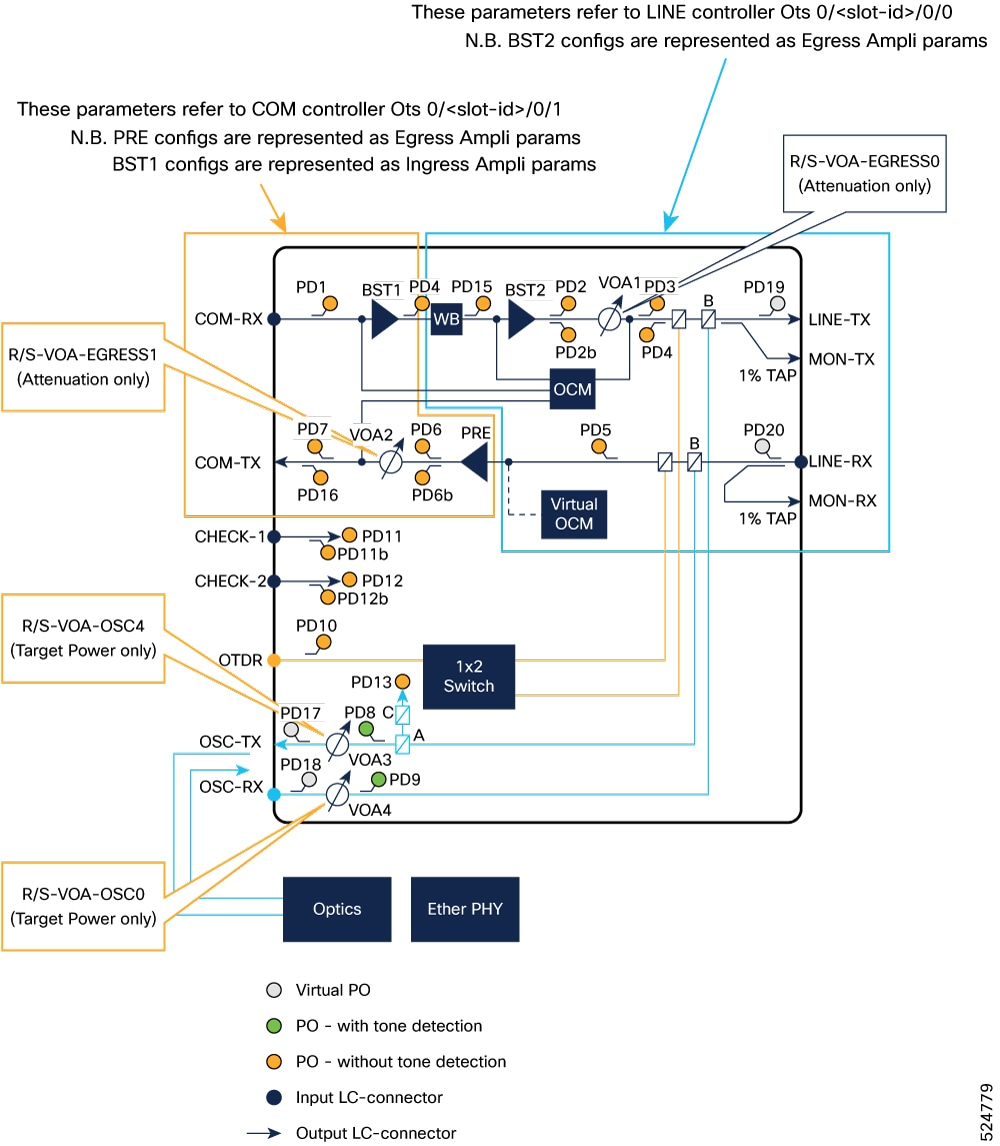
Figure 2. Optical diagram of NCS1K14-EDFA2 card representing attenuators

The naming convention for the attenuator model is as follows:

  • R/S-VOA-EGRESS0

  • R/S-VOA-EGRESS1

  • R/S-VOA-OSC0

  • R/S-VOA-OSC4

Where:

  • R stands for Rack.

  • S stands for Slot.

  • VOA indicates a Variable Optical Attenuator.

  • The suffix specifies the type and port number, such as EGRESS or OSC.

OpenConfig wavelength model

Openconfig supplies a 3-byte value called the ‘index’. This value is interpreted as follows:

  • First Byte: Represents the channel identifier, which can range from 1 to 97.

  • Second and Third Bytes: Indicate the rack and slot numbers.

Example:

If Openconfig provides an ‘index’ value of "100":

  • Channel Identifier: 1

  • Node Location Name: 0/0/NXR0 on the native side

This means the channel identifier is 1, and because the rack and slot are fixed at 0, the location name is formatted as "0/0/NXR0".

OpenConfig channel monitor model

The naming convention for the channel monitor:

  • R/S-CHMON-RX-0

  • R/S-CHMON-TX-0

  • R/S-CHMON-RX-1

  • R/S-CHMON-TX-1

OpenConfig transport line common model

As safety ports are already modeled in the inventory, the transport line common model will utilize the same ots R/S/I/P representation.

From release 25.4.1, the transport line common model supports Enhanced Channel APC and span loss control through augmented leaves.

OpenConfig UDC naming convention

The OC component [name] contains PTP ports like 0/RP0/CPU-PTP0 and 0/RP0/CPU-PTP1. The OC property [name] can be set to the value UDC-ATTACH-0.

Structure of Yang models supported on NCS1K14-EDFA2

This structure describes the leave structure of YANG models supported on NCS1K14-EDFA2 card:


Note


The leaves that are in bold are augmented.


Supported leaves for OpenConfig amplifier model

Starting with Release 26.2.1, the OC amplifier model supports these enhancements.

  • A a new leaf named last-correction-span-loss is incorporated into the configure-optical-amplifier.yang model within the ampli-apc-regulation container, directly mapping to the native "Last Correction Span-loss" parameter. Furthermore, existing span-loss-related leaves will be renamed to align with their native parameter definitions, enhancing clarity and consistency between native and OpenConfig representations.

  • The configure-optical-amplifier.yang model is extended to include comprehensive APC regulation data. By incorporating parameters previously available only via the native CLI, the augmented model provides real-time visibility into amplifier regulation status, including control loop states, span loss measurements, and correction thresholds. This enhancement allows for better operational oversight of optical amplifiers within an OpenConfig-managed network.


optical-amplifier
└── amplifiers
    └── amplifier* [name]
        ├── name                                      -> ../config/name
        │
        ├── config
        │   ├── name?                                 string
        │   ├── type?                                 identityref (Hardcoded to EDFA)
        │   ├── target-gain?                          decimal64
        │   ├── target-gain-tilt?                     decimal64
        │   ├── gain-range?                           identityref
        │   ├── amp-mode?                             identityref
        │   ├── enabled?                              boolean
        │   └── fiber-type-profile?                   identityref
        │
        └── state
            ├── name?                                 string
            ├── type?                                 identityref
            ├── target-gain?                          decimal64
            ├── target-gain-tilt?                     decimal64
            ├── gain-range?                           identityref
            ├── amp-mode?                             identityref
            ├── enabled?                              boolean
            ├── fiber-type-profile?                   identityref
            ├── component?                            -> /oc-platform:components/component/name
            │
            ├── actual-gain
            │   ├── instant?                          decimal64
            │   ├── avg?                              decimal64
            │   ├── min?                              decimal64
            │   ├── max?                              decimal64
            │   ├── interval?                         oc-types:stat-interval
            │   ├── min-time?                         oc-types:timeticks64
            │   └── max-time?                         oc-types:timeticks64
            │
            ├── actual-gain-tilt
            │   ├── instant?                          decimal64
            │   ├── avg?                              decimal64
            │   ├── min?                              decimal64
            │   ├── max?                              decimal64
            │   ├── interval?                         oc-types:stat-interval
            │   ├── min-time?                         oc-types:timeticks64
            │   └── max-time?                         oc-types:timeticks64
            │
            ├── input-power-c-band
            │   ├── instant?                          decimal64
            │   ├── avg?                              decimal64
            │   ├── min?                              decimal64
            │   ├── max?                              decimal64
            │   ├── interval?                         oc-types:stat-interval
            │   ├── min-time?                         oc-types:timeticks64
            │   └── max-time?                         oc-types:timeticks64
            │
            ├── output-power-c-band
            │   ├── instant?                          decimal64
            │
            ├── optical-return-loss
            │   ├── instant?                          decimal64
            │   ├── avg?                              decimal64
            │   ├── min?                              decimal64
            │   ├── max?                              decimal64
            │   ├── interval?                         oc-types:stat-interval
            │   ├── min-time?                         oc-types:timeticks64
            │   └── max-time?                         oc-types:timeticks64
            │
            ├── oc-opt-amp-ext:cisco
            │   └── oc-opt-amp-ext:ampli-apc-regulation
            │       ├── config
            │       │   └── oc-opt-amp-ext:span-pause?               boolean
            │       │
            │       └── state
            │           ├── oc-opt-amp-ext:span-pause?               boolean
            │           ├── oc-opt-amp-ext:status?                   enumeration
            │           ├── oc-opt-amp-ext:block-reasons?            string
            │           ├── oc-opt-amp-ext:internal-state?           string
            │           ├── oc-opt-amp-ext:gain-range?               string
            │           ├── last-correction-span-loss?               decimal64
            │           ├── oc-opt-amp-ext:last-correction-spanloss-timestamp?
            │           │                                             oc-yang:date-and-time
            │           ├── oc-opt-amp-ext:last-span-loss-input?     decimal64
            │           ├── oc-opt-amp-ext:last-spanloss-input-timestamp?
            │           │                                             oc-yang:date-and-time
            │           ├── oc-opt-amp-ext:span-loss-input-correction-threshold?
            │           │                                             decimal64
            │           │
            │           ├── egress-ampli-input-power
            │           │   ├── min?                                 decimal64
            │           │   ├── max?                                 decimal64
            │           │   ├── configurational?                     decimal64
            │           │   └── operational?                         decimal64
            │           │
            │           ├── egress-ampli-output-power
            │           │   ├── min?                                 decimal64
            │           │   ├── max?                                 decimal64
            │           │   ├── configurational?                     decimal64
            │           │   └── operational?                         decimal64
            │           │
            │           ├── egress-ampli-gain
            │           │   ├── min?                                 decimal64
            │           │   ├── max?                                 decimal64
            │           │   ├── configurational?                     decimal64
            │           │   └── operational?                         decimal64
            │           │
            │           └── tx-voa-attenuation
            │               ├── min?                                 decimal64
            │               ├── max?                                 decimal64
            │               ├── configurational?                     decimal64
            │               └── operational?                         decimal64
            │
            └── supervisory-channels
                └── supervisory-channel* [interface]
                    ├── interface                      -> ../config/interface
                    │
                    ├── config
                    │   └── interface?                 oc-if:base-interface-ref
                    │
                    └── state
                        ├── interface?                 oc-if:base-interface-ref
                        │
                        ├── input-power                -> Rx power
                        │   ├── instant?               decimal64
                        │   ├── avg?                   decimal64
                        │   ├── min?                   decimal64
                        │   ├── max?                   decimal64
                        │   ├── interval?              oc-types:stat-interval
                        │   ├── min-time?              oc-types:timeticks64
                        │   └── max-time?              oc-types:timeticks64
                        │
                        └── output-power               -> Tx power
                            ├── instant?               decimal64
                            ├── avg?                   decimal64
                            ├── min?                   decimal64
                            ├── max?                   decimal64
                            ├── interval?              oc-types:stat-interval
                            ├── min-time?              oc-types:timeticks64
                            └── max-time?              oc-types:timeticks64


Supported leaves for OpenConfig Wavelength router model

From R26.2.1 the OpenConfig Wavelength Router model is extended to include support for APC parameters. By mapping these parameters to the OpenConfig model, you can monitor and configure both controller-level and per-channel APC settings, ensuring that the OpenConfig data model provides the same level of granular visibility as the native show olc channel-apc CLI command.

Table 4. New leaves supported with OC

Controller level APC leaves to be supported

Per-channel level APC leaves to be supported

internal-status

status

block-reasons

spectrum-slice-ranges

input-gain

input-psd

input-gain-range

input-power

input-gain-range-min-max

output-psd

last-correction-timestamp

output-power

psd-correction-tolerance

psd-discrepancy

expected-total-input-power

attenuation

channel-min-input-psd

expected-total-input-power

regulation-pause

channel-min-input-psd

+--rw wavelength-router
+--rw media-channels
| +--rw channel* [index]
| +--rw index -> ../config/index
| +--rw config
| | +--rw index? uint32
| | +--rw lower-frequency? oc-opt-types:frequency-type
| | +--rw upper-frequency? oc-opt-types:frequency-type
| | +--rw admin-status? oc-opt-types:admin-state-type
| +--ro state
| | +--ro index? uint32
| | +--ro lower-frequency? oc-opt-types:frequency-type
| | +--ro upper-frequency? oc-opt-types:frequency-type
| | +--ro admin-status? oc-opt-types:admin-state-type
| | +--ro oper-status? enumeration
| +--rw source
| | +--rw config
| | | +--rw port-name? -> /oc-platform:components/component/name
| | +--ro state
| | +--ro port-name? -> /oc-platform:components/component/name
| +--rw dest
| | +--rw config
| | | +--rw port-name? -> /oc-platform:components/component/name
| | +--ro state
| | +--ro port-name? -> /oc-platform:components/component/name
| +--rw oc-wave-ext:cisco
| +--rw oc-wave-ext:regulation-info
| +--ro state
| +--ro oc-wave-ext:status? string
| +--ro oc-wave-ext:spectrum-slices-range? string
| +--ro oc-wave-ext:input-psd? decimal64
| +--ro oc-wave-ext:input-power? decimal64
| +--ro oc-wave-ext:output-psd? decimal64
| +--ro oc-wave-ext:output-power? decimal64
| +--ro oc-wave-ext:psd-discrepancy? decimal64
| +--ro oc-wave-ext:attenuation? decimal64
| +--ro oc-wave-ext:exp-channel-input-power? decimal64
| +--ro oc-wave-ext:min-channel-input-power? decimal64
|
+--rw port-spectrum-power-profiles
+--rw port* [name]
+--rw name -> ../config/name
+--rw config
| +--rw name? -> /oc-platform:components/component/name
+--ro state
| +--ro name? -> /oc-platform:components/component/name
+--rw oc-wave-ext:extended
| +--rw config
| | +--rw oc-wave-ext:regulation-enable? boolean
| | +--rw oc-wave-ext:regulation-pause? boolean
| +--ro state
| | +--ro oc-wave-ext:regulation-enable? boolean
| | +--ro oc-wave-ext:regulation-pause? boolean
| +--rw oc-wave-ext:regulation-info
| +--rw config
| | +--rw oc-wave-ext:target-psd? decimal64
| +--ro state
| +--ro oc-wave-ext:target-psd? decimal64
| +--ro oc-wave-ext:internal-status? string
| +--ro oc-wave-ext:block-reasons? string
| +--ro oc-wave-ext:input-gain? decimal64
| +--ro oc-wave-ext:input-gain-range? string
| +--ro oc-wave-ext:input-gain-range-min-max? string
| +--ro oc-wave-ext:last-correction-timestamp? string
| +--ro oc-wave-ext:psd-correction-tolerance? decimal64
| +--ro oc-wave-ext:expected-total-input-power? boolean
| +--ro oc-wave-ext:channel-min-input-psd? boolean
+--rw spectrum-power-profile
+--rw distribution* [lower-frequency upper-frequency]
+--rw lower-frequency -> ../config/lower-frequency
+--rw upper-frequency -> ../config/upper-frequency
+--rw config
| +--rw lower-frequency? oc-opt-types:frequency-type
| +--rw upper-frequency? oc-opt-types:frequency-type
| +--rw target-power? decimal64
+--ro state
+--ro lower-frequency? oc-opt-types:frequency-type
+--ro upper-frequency? oc-opt-types:frequency-type
+--ro target-power? decimal64

OSC TX power regulation through OpenConfig transport line common model augmentation

From R26.2.1, the OpenConfig transport line common model is extended to support OSC TX power regulation on NCS 1014 EDFA2 OSC controllers. These leaves support NETCONF/GNMI get, edit-config, commit-replace, and replace operations.

The osc-regulation container is available under the Cisco augmentation for optical ports in the openconfig-transport-line-common model.

module: openconfig-transport-line-common
  augment /oc-platform:components/oc-platform:component/oc-platform:port: >>
    +--rw optical-port
       +--rw config
       |  +--rw admin-state?   oc-opt-types:admin-state-type
       +--ro state
       +--rw cisco
          +--rw osc-regulation
             +--rw config
             |  +--rw span-mode?                    boolean
             |  +--rw span-pause?                   boolean
             +--ro state
                +--ro span-mode?                    boolean
                +--ro span-pause?                   boolean
                +--ro status?                       enumeration
                +--ro blocking-reason?              string
                +--ro last-span-loss-input?         decimal64
                +--ro last-span-loss-input-time?    date-and-time
                +--ro last-correction-time?         date-and-time

Note


The model supports configuration operations for span-mode and span-pause. The remaining leaves report operational state.


This table describes the OpenConfig leaves that configure OSC TX power regulation and report regulation state data for NCS 1014 EDFA2 OSC controllers.

Table 5. OpenConfig leaves for OSC TX power regulation

Leaf

Access

Description

span-mode

Configuration and state

Enables or reports OSC TX power regulation in span mode.

span-pause

Configuration and state

Pauses or reports the pause state of OSC TX power regulation.

status

State

Reports the OSC TX power regulation status.

blocking-reason

State

Reports why OSC TX power regulation is blocked.

last-span-loss-input

State

Reports the last span-loss value used by OSC TX power regulation.

last-span-loss-input-time

State

Reports the time when the last span-loss input was received.

last-correction-time

State

Reports the last time the OSC TX target power changed.

Sample configurations

This section presents sample configurations and telemetry outputs for the OC models supported on the EDFA2 card.

OSC TX Power Regulation State Through OpenConfig Telemetry

This sample shows the OpenConfig paths and values that you can use to configure and monitor OSC TX power regulation. Replace <component-name> with the OSC component name from OpenConfig inventory.

{
  "source": "10.127.126.176:57400",
  "subscription-name": "default-1778649116",
  "timestamp": 1778649117659770801,
  "time": "2026-05-13T10:41:57.659770801+05:30",
  "prefix": "openconfig:/",
  "updates": [
    {
      "Path": "components/component[name=Osc0/3/0/0]",
      "values": {
        "components/component": {
          "port": {
            "optical-port": {
              "Cisco-IOS-XR-openconfig-transport-line-common-ext:cisco": {
                "osc-regulation": {
                  "state": {
                    "last-correction-time": "2026-05-07 21:29:59",
                    "last-span-loss-input": "10.65",
                    "last-span-loss-input-time": "2026-05-12 22:15:32",
                    "span-mode": true,
                    "span-pause": false,
                    "status": "IDLE"
                  }
                }
              }
            }
          }
        }
      }
    }
  ]
}

OpenConfig attenuator model

This is a sample to configure and get operational data using the OC-Attenuator model:

{
    "openconfig-optical-attenuator:optical-attenuator": {
       "attenuators": {
           "attenuator": [
               {
                   "name":"0/0-VOA-EGRESS0",
"state":{
                   }
              }

{
    "openconfig-optical-attenuator:optical-attenuator": {
       "attenuators": {
           "attenuator": [
               {
                   "name":"0/0-VOA-OSC0",
                   "state":{
                   }
               }

OpenConfig amplifier model

This is a sample to configure and get operational data using the OC-Amplifier model:

 <get>
<filter>
<optical-amplifier xmlns="http://openconfig.net/yang/optical-amplfier">
<amplifiers/>
 <supervisory-channels/>
</optical-amplifier>
</filter>
</get>
<edit-config>
<target>
<candidate/>
 </target>
<config>
<optical-amplifier xmlns="http://openconfig.net/yang/optical-amplfier">
   <amplifiers>
    <amplifier>
     <name>0/0-AMP-EGRESS0</name>
     <config>
      <name>0/0-AMP-EGRESS0</name>
      <amp-mode>CONSTANT_GAIN</amp-mode>
      <type>EDFA</type>
<fiber-type-profile>SSMF</fiber-type-profile>
      <target-gain>16.00</target-gain>
      <target-gain-tilt>0.00</target-gain-tilt>
      </config>
  <cisco xmlns="http://cisco.com/ns/yang/Cisco-IOS-XR-openconfig-optical-amplifier-ext">
      <extended>
       <config>
        <regulation-enabled>true</regulation-enabled>
       </config>
      </extended>
     </cisco>
    </amplifier>
   </amplifiers>
  </optical-amplifier>
</config>
</edit-config>

OpenConfig wavelength model

This is a sample to configure and get operational data using the OC-Wavelength model:

"openconfig-wavelength-router:wavelength-router": {
  "port-spectrum-power-profiles": {
   "port": [
    {
     "name": "Ots0/0/0/0",
     "Cisco-IOS-XR-openconfig-wavelength-router-ext:extended": {
      "state": {
       "regulation-enable": false
      }
     },
     "state": {
      "name": "Ots0/0/0{
/0"
    
  },
  "media-channels": {
   "channel": [
    {
     "index": 100,
     "state": {
      "index": 100,
      "lower-frequency": "193950000",
      "upper-frequency": "194050000",
      "admin-status": "enabled",
      "oper-status": "up"
     }

Wavelength router model

This is a sample to configure and get operational data for frequency convention in spectrum-power-profile and distribution for wavelength router model:

<edit-config>
<target><candidate/></target>
<config>
    <wavelength-router xmlns="http://openconfig.net/yang/wavelength-router">
      <port-spectrum-power-profiles>
        <port>
          <name>Ots0/0/0/0</name>
            <config>
              <name>Ots0/0/0/0</name>
            </config>
          <spectrum-power-profile>
            <distribution>
              <lower-frequency>191200000</lower-frequency>
              <upper-frequency>196175000</upper-frequency>
<config>
                <lower-frequency>191200000</lower-frequency>
                <upper-frequency>196175000</upper-frequency>
                <target-power xmlns:nc="urn:ietf:params:xml:ns:netconf:base:1.0" nc:operation="create">-1.25</target-power>
              </config>
            </distribution>
          </spectrum-power-profile>
        </port>
      </port-spectrum-power-profiles>
    </wavelength-router>
</config>
</edit-config>
Request:
<get>
  <filter type="subtree">
    <wavelength-router xmlns="http://openconfig.net/yang/wavelength-router">
      <port-spectrum-power-profiles>
        <port>
          <name>Ots0/0/0/0</name>
          <spectrum-power-profile>
          </spectrum-power-profile>
        </port>
      </port-spectrum-power-profiles>
    </wavelength-router>
  </filter>
</get>
Response:
<?xml version="1.0"?>
<rpc-reply message-id="d78bc8c8-4e99-431b-9a8c-cab3d87e25cc" xmlns="urn:ietf:params:xml:ns:netconf:base:1.0">
 <data>
  <wavelength-router xmlns="http://openconfig.net/yang/wavelength-router">
   <port-spectrum-power-profiles>
    <port>
     <name>Ots0/0/0/0</name>
     <spectrum-power-profile>
      <distribution>
       <lower-frequency>191200000</lower-frequency>
       <upper-frequency>196175000</upper-frequency>
       <state>
        <target-power>-1.20</target-power>
        <upper-frequency>196175000</upper-frequency>
        <lower-frequency>191200000</lower-frequency>
       </state>
       <config>
        <target-power>-1.25</target-power>
        <upper-frequency>196175000</upper-frequency>
        <lower-frequency>191200000</lower-frequency>
       </config>
      </distribution>
     </spectrum-power-profile>
    </port>
   </port-spectrum-power-profiles>
  </wavelength-router>
 </data>
</rpc-reply>

OpenConfig channel monitor model

This is a sample to get operational data using the OC-Channel monitor model:

{
  "openconfig-channel-monitor:channel-monitors": {
                "channel-monitor": [
                        {
                "name": "0/0-CHMON-RX-0",
                "channels":
                {
                    "channel":{}
               }
{
  "openconfig-channel-monitor:channel-monitors": {
                "channel-monitor": [
                        {
                "name": "0/0-CHMON-TX-0",
                "channels":
                {
                    "channel":{}
                }

This is a sample output to get data for single channel:


get data xpath:
/channel-monitors/channel-monitor/channels/channel[lower-frequency=191400000][upper-frequency=191406250]/state

Response:
[
  {
    "source": "10.127.126.174:57400",
    "timestamp": 1749368365802571706,
    "time": "2025-06-08T13:09:25.802571706+05:30",
    "updates": [
      {
        "Path": "openconfig:channel-monitors/channel-monitor[name=0/0-CHMON-RX-0]/channels/channel[lower-frequency=191400000][upper-frequency=191406250]/state",
        "values": {
          "channel-monitors/channel-monitor/channels/channel/state": {
            "lower-frequency": "191400000",
            "upper-frequency": "191406250"
          }
        }
      },
      {
        "Path": "openconfig:channel-monitors/channel-monitor[name=0/0-CHMON-TX-0]/channels/channel[lower-frequency=191400000][upper-frequency=191406250]/state",
        "values": {
          "channel-monitors/channel-monitor/channels/channel/state": {
            "lower-frequency": "191400000",
            "power": "-31.30",
            "upper-frequency": "191406250"
          }
        }
      },
      {
        "Path": "openconfig:channel-monitors/channel-monitor[name=0/0-CHMON-RX-1]/channels/channel[lower-frequency=191400000][upper-frequency=191406250]/state",
        "values": {
          "channel-monitors/channel-monitor/channels/channel/state": {
            "lower-frequency": "191400000",
            "power": "0.00",
            "upper-frequency": "191406250"
          }
        }
      },
      {
        "Path": "openconfig:channel-monitors/channel-monitor[name=0/0-CHMON-TX-1]/channels/channel[lower-frequency=191400000][upper-frequency=191406250]/state",
        "values": {
          "channel-monitors/channel-monitor/channels/channel/state": {
            "lower-frequency": "191400000",
            "power": "-26.60",
            "upper-frequency": "191406250"
          ]

OpenConfig transport line common model

This is a sample output for EDFA2 line interface:


{
    "source": "10.127.126.174:57400",
    "timestamp": 1749368046243415426,
    "time": "2025-06-08T13:04:06.243415426+05:30",
    "updates": [
      {
        "Path": "openconfig:components/component[name=Ots0/0/0/0]/port/optical-port/state",
        "values": {
          "components/component/port/optical-port/state": {
            "admin-state": "enabled",
            "input-power": {
              "instant": "-9.65"
                  }
      }

Sample output for Release 25.3.1:


[
  {
    "source": "10.127.126.176:57400",
    "timestamp": 1756891018884482368,
    "time": "2025-09-03T14:46:58.884482368+05:30",
    "updates": [
      {
        "Path": "openconfig:components/component[name=Ots0/3/0/0]/port/optical-port",
        "values": {
          "components/component/port/optical-port": {
            "Cisco-IOS-XR-openconfig-transport-line-common-ext:cisco": {
              "thresholds": {
                "state": {
                  "input-signal-power-lower": "-47.00",
                  "output-signal-power-lower": "-7.00"
                }
              }
            },
            "state": {
              "admin-state": "enabled",
              "input-power": {
                "avg": "-10.10",
                "instant": "-10.09",
                "interval": "10000000000",
                "max": "-10.09",
                "max-time": "1756891000907584499",
                "min": "-10.11",
                "min-time": "1756891000907584499"
              },
              "output-power": {
                "avg": "5.46",
                "instant": "5.46",
                "interval": "10000000000",
                "max": "5.46",
                "max-time": "1756891000907584499",
                "min": "5.45",
                "min-time": "1756891000907584499"
              }
            }
          }
        }
      },
      {
        "Path": "openconfig:components/component[name=Ots0/3/0/1]/port/optical-port",
        "values": {
          "components/component/port/optical-port": {
            "Cisco-IOS-XR-openconfig-transport-line-common-ext:cisco": {
              "thresholds": {
                "state": {
                  "input-channel-power-delta-lower": "-3.00",
                  "input-channel-power-delta-upper": "3.00",
                  "input-signal-power-lower": "-30.00",
                  "output-signal-power-lower": "-7.00"
                }
              }
            },
            "state": {
              "admin-state": "enabled",
              "input-power": {
                "avg": "-4.46",
                "instant": "-4.46",
                "interval": "10000000000",
                "max": "-4.46",
                "max-time": "1756891000907599978",
                "min": "-4.46",
                "min-time": "1756891000907599978"
              },
              "output-power": {
                "avg": "8.41",
                "instant": "8.43",
                "interval": "10000000000",
                "max": "8.42",
                "max-time": "1756891000907599978",
                "min": "8.39",
                "min-time": "1756891003905812683"
              
      },
      {
        "Path": "openconfig:components/component[name=Ots0/3/0/2]/port/optical-port",
        "values": {
          "components/component/port/optical-port": {
            "Cisco-IOS-XR-openconfig-transport-line-common-ext:cisco": {
              "thresholds": {
                "state": {
                  "input-signal-power-lower": "-40.00"
                }
              }
            },
            "state": {
              "admin-state": "enabled",
              "input-power": {
                "avg": "-17.03",
                "instant": "-16.99",
                "interval": "10000000000",
                "max": "-17.00",
                "max-time": "1756891000907615778",
                "min": "-17.05",
                "min-time": "1756891001905617411"
              
      },
      {
        "Path": "openconfig:components/component[name=Ots0/3/0/3]/port/optical-port",
        "values": {
          "components/component/port/optical-port": {
            "Cisco-IOS-XR-openconfig-transport-line-common-ext:cisco": {
              "thresholds": {
                "state": {
                  "input-signal-power-lower": "-40.00"
                }
              }
            },
            "state": {
              "admin-state": "enabled",
              "input-power": {
                "avg": "-20.98",
                "instant": "-20.95",
                "interval": "10000000000",
                "max": "-20.98",
                "max-time": "1756891000907630336",
                "min": "-21.01",
                "min-time": "1756891000907630336"
              
      },
      {
        "Path": "openconfig:components/component[name=Osc0/3/0/4]/port/optical-port",
        "values": {
          "components/component/port/optical-port": {
            "Cisco-IOS-XR-openconfig-transport-line-common-ext:cisco": {
              "thresholds": {
                "state": {
                  "input-signal-power-lower": "-17.00",
                  "output-signal-power-lower": "-42.00"
                }
              }
            },
            "state": {
              "admin-state": "enabled",
              "input-power": {
                "avg": "4.19",
                "instant": "4.19",
                "interval": "10000000000",
                "max": "4.19",
                "max-time": "1756891000907569297",
                "min": "4.19",
                "min-time": "1756891000907569297"
              },
              "output-power": {
                "avg": "-17.24",
                "instant": "-17.24",
                "interval": "10000000000",
                "max": "-17.24",
                "max-time": "1756891000907569297",
                "min": "-17.26",
                "min-time": "1756891001905566687"
              
      },
      {
        "Path": "openconfig:components/component[name=Optics0/3/0/5]/port/optical-port",
        "values": {
          "components/component/port/optical-port": {
            "Cisco-IOS-XR-openconfig-transport-line-common-ext:cisco": {
              "thresholds": {
                "state": {
                  "input-signal-power-lower": "-30.00",
                  "input-signal-power-upper": "5.00",
                  "output-signal-power-lower": "0.00",
                  "output-signal-power-upper": "8.00"
                }
              }
            },
            "state": {
              "admin-state": "enabled",
              "input-power": {
                "avg": "-19.00",
                "instant": "-18.99",
                "interval": "10000000000",
                "max": "-19.00",
                "max-time": "1756891000907645382",
                "min": "-19.03",
                "min-time": "1756891000907645382"
              },
              "output-power": {
                "avg": "4.65",
                "instant": "4.64",
                "interval": "10000000000",
                "max": "4.66",
                "max-time": "1756891003905863164",
                "min": "4.64",
                "min-time": "1756891001905650733"
              }
                  },
      {
        "Path": "openconfig:components/component[name=Optics0/3/0/7]/port/optical-port",
        "values": {
          "components/component/port/optical-port": {
            "Cisco-IOS-XR-openconfig-transport-line-common-ext:cisco": {
              "thresholds": {
                "state": {
                  "input-signal-power-lower": "-30.00",
                  "input-signal-power-upper": "3.00",
                  "output-signal-power-lower": "-16.00",
                  "output-signal-power-upper": "0.00"
                }
              }
            },
            "state": {
              "admin-state": "enabled",
              "input-power": {
                "avg": "-7.71",
                "interval": "10000000000",
                "max": "-7.67",
                "max-time": "1756891000907490205",
                "min": "-7.76",
                "min-time": "1756891000907490205"
              },
              "output-power": {
                "avg": "-2.17",
                "interval": "10000000000",
                "max": "-2.16",
                "max-time": "1756891000907490205",
                "min": "-2.19",
                "min-time": "1756891009905462714"
              }
           ]
] 
OpenConfig parameters for span loss control

The highlighted lines are the parameters for the span loss controller.

OC configuration for span loss control

This example highlights the parameters to configure expected span loss.


Note


  • rx-expected-span-loss—enables span loss base line. This field is mandatory.

  • rx-span-loss-deg-rel-thr—sets RX span loss degrade threshold. The default is 3.0 dB.

  • rx-span-loss-fail-rel-thr—sets RX span loss fail threshold. The default is 5.0 dB.

If you don't set the rx-span-loss-deg-rel-thr and rx-span-loss-fail-rel-thr values, the system takes the default values. If you want to set non-default values for rx-span-loss-deg-rel-thr and rx-span-loss-fail-rel-thr , then edit the configuration as in this example.


Example
{   
   "openconfig-platform:components": {
      "component": [
        {
          "config": {
            "name": "Ots0/1/0/0"
          },
          "name": "Ots0/1/0/0",
          "port": {
            "openconfig-transport-line-common:optical-port": {
              "Cisco-IOS-XR-openconfig-transport-line-common-ext:cisco": {
                "thresholds": {
                  "config": {
                    "rx-expected-span-loss": "23.00",
                    "rx-span-loss-deg-rel-thr": "3.00",
                    "rx-span-loss-fail-rel-thr": "5.00"
                  }
                }
              }
            }
          }
        }
      ]
    }
}
OC Xpath request to get configuration and state data for span loss base line
Xpath
Xpath:components/component[name=Ots0/3/0/0]/port/optical-port  EDFA2 card on Slot 03 for line port 0
Example
[
  {
    "source": "10.127.126.176:57400",
    "timestamp": 1764919500851171600,
    "time": "2025-12-05T12:55:00.8511716+05:30",
    "updates": [
      {
        "Path": "openconfig:components/component[name=Ots0/3/0/0]/port/optical-port",
        "values": {
          "components/component/port/optical-port": {
            "Cisco-IOS-XR-openconfig-transport-line-common-ext:cisco": {
              "span-loss": {
                "state": {
                  "rx-calibration-baseline-span-loss": "11.15", ----rx-signal-span-loss at the time of expected Span loss set on the system
                  "rx-signal-span-loss": "11.17“ --- actual Rx-signal-Span Loss
                }
              },
              "thresholds": {
                "config": {
                  "rx-expected-span-loss": "11.10“ --- Configure expected rx-signal Span loss on the system
                },
                "state": {
                  "input-signal-power-lower": "-47.00",
                  "output-signal-power-lower": "-7.00",
                  "rx-expected-span-loss": "11.10",  --- State Rx-Signal Span Loss
                  "rx-span-loss-deg-rel-thr": "3.00", --- default thresholds for rx-span loss degrade
                  "rx-span-loss-fail-rel-thr": "5.00“   --- default fail threshold for rx-signal span loss
                }
              }
            },
OpenConfig span loss alarms

The OpenConfig module for span loss control supports these alarms.

OpenConfig span loss degrade alarm

This output highlights the alarm name and its ID type.

 {
        "Path": "openconfig:system/alarms/alarm[id=XR/HW_OTS/33#MODULE/TRC/1:PORT/OTS/0]",
        "values": {
          "system/alarms/alarm": {
            "id": "XR/HW_OTS/33#MODULE/TRC/1:PORT/OTS/0",
            "state": {
              "id": "XR/HW_OTS/33#MODULE/TRC/1:PORT/OTS/0",
              "resource": "Ots0/1/0/0",
              "severity": "openconfig-alarm-types:MINOR",
              "text": "Rx signal span loss degraded",
              "time-created": "1764922397",
              "type-id": "openconfig-alarm-types:MBLINE_SPAN_LOSS_DEG"
            }
          }
        }
      }
OpenConfig span loss fail alarm

This output highlights the alarm name and its ID type.

{
        "Path": "openconfig:system/alarms/alarm[id=XR/HW_OTS/34#MODULE/TRC/1:PORT/OTS/0]",
        "values": {
          "system/alarms/alarm": {
            "id": "XR/HW_OTS/34#MODULE/TRC/1:PORT/OTS/0",
            "state": {
              "id": "XR/HW_OTS/34#MODULE/TRC/1:PORT/OTS/0",
              "resource": "Ots0/1/0/0",
              "severity": "openconfig-alarm-types:MAJOR",
              "text": "Rx signal span loss failed",
              "time-created": "1764922557",
              "type-id": "openconfig-alarm-types:MBLINE_SPAN_LOSS_FAIL"
            }
          }
        }
 }
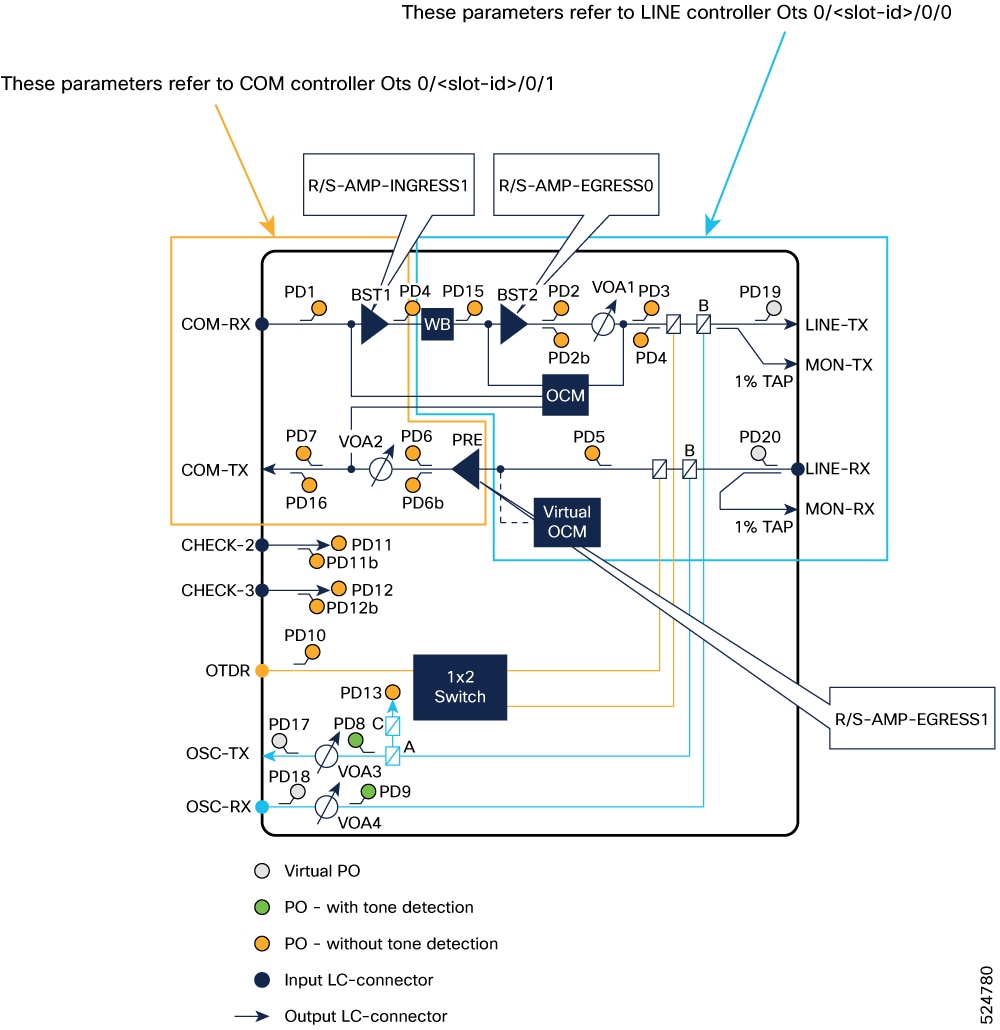
Table 6. Default threshold value for Ots and Osc controller
Controller Leaf Threshold value
OtsR/S/I/0 input-signal-power-lower -47 dBM
output-signal-power-lower -7 dBM
OtsR/S/I/1 input-signal-power-lower -30 dBM
output-signal-power-lower -7 dBM
OtsR/S/I/2 input-signal-power-lower -40 dBM
OtsR/S/I/3 input-signal-power-lower -40 dBM
OscR/S/I/4 input-signal-power-lower -17 dBM
output-signal-power-lower -42 dBM
Table 7. Default threshold value for Optics Interface of OSC and Coherent Probe port
Controllers Leaf Threshold value
OSC Optics

OpticsR/S/I/5

input-signal-power-lower -30.00 dBM
input-signal-power-upper 5.00 dBM
output-signal-power-lower 0.00 dBM
output-signal-power-upper 8.00 dBM
Coherent Probe Optics

OpticsR/S/I/7

input-signal-power-lower -30.00 dBM
input-signal-power-upper 3.00 dBM
output-signal-power-lower -16.00 dBM
output-signal-power-upper 0.00 dBM

OpenConfig terminal device model

From Release 25.3.1, OpenConfig terminal device model is supported. This is a sample output for Coherent probe configuration:


{
  "openconfig-terminal-device:terminal-device": {
    "logical-channels": {
      "channel": [
        {
          "index": 30000,
          "config": {
            "loopback-mode": "NONE",
            "logical-channel-type": "openconfig-transport-types:PROT_ETHERNET",
            "trib-protocol": "openconfig-transport-types:PROT_100GE",
            "rate-class": "openconfig-transport-types:TRIB_RATE_100G",
            "admin-state": "ENABLED",
            "description": "ETH Logical Channel",
            "index": 30000
          },
          "logical-channel-assignments": {
            "assignment": [
              {
                "index": 1,
                "config": {
                  "allocation": 100,
                  "logical-channel": 30001,
                  "assignment-type": "LOGICAL_CHANNEL",
                  "description": "ETH to Coherent assignment",
                  "index": 1
                }
              
        {
          "index": 30001,
          "config": {
            "loopback-mode": "NONE",
            "logical-channel-type": "openconfig-transport-types:PROT_OTN",
            "admin-state": "ENABLED",
            "description": "Coherent Logical Channel",
            "index": 30001
          },
          "logical-channel-assignments": {
            "assignment": [
              {
                "index": 1,
                "config": {
                  "allocation": 100,
                  "assignment-type": "OPTICAL_CHANNEL",
                  "optical-channel": "OpticalChannel0/1/0/7",
                  "description": "Coherent to optical assignment",
                  "index": 1
                
  }
} 

UDC configuration query

The configuration query should apply settings to the component [name] for 0/RP0/CPU0, as well as for any instances of 0/RP0/CPU0 whose names include 'PTP' (such as 0/RP0/CPU-PTP0 and 0/RP0/CPU-PTP1).

This is a sample to configure and get operational data for UDC.

Sample Netconf query

<edit-config>
<target>
  <candidate/>
</target>
<config>
  <components xmlns="http://openconfig.net/yang/platform">
    <component>
      <name>0/RP0/CPU0</name>
      <config>
        <name>0/RP0/CPU0</name>
      </config>
    </component>
    <component>
      <name>0/RP0/CPU0-PTP0</name>
      <config>
        <name>0/RP0/CPU0-PTP0</name>
      </config>
      <properties>
        <property>
          <name>UDC-ATTACH-0</name>
          <config>
            <name>UDC-ATTACH-0</name>
            <value>GigabitEthernet0/0/0/5</value>
          </config>
        </property>
      </properties>
    </component>
  </components>
</config>
</edit-config>
Sample OC Config rpc
  "openconfig-platform:components": {
    "component": [
      {
        "name": "0/RP0/CPU0",
        "config": {
          "name": "0/RP0/CPU0"
        }
      },
      {
        "name": "0/RP0/CPU0-PTP0",
        "config": {
            "name": "0/RP0/CPU0-PTP0"
        },
        "properties": {
          "property": {
            "name": "UDC-ATTACH-0",
            "config": {
              "name": "UDC-ATTACH-0",
              "value": "GigabitEthernet0/3/0/5"
            }
          }
        }
      }
    ]
  }
OpenConfig xpath to retrieve specific state data
openconfig-platform:/components/component[name=0/RP0/CPU0-PTP1]/properties/property[name=UDC-ATTACH-0]
This is a sample output.
[
  {
    "source": "10.127.126.176:57400",
    "timestamp": 1765515166176355802,
    "time": "2025-12-12T10:22:46.176355802+05:30",
    "updates": [
      {
        "Path": "openconfig:components/component[name=0/RP0/CPU0-PTP1]/properties/property[name=UDC-ATTACH-0]",
        "values": {
          "components/component/properties/property": {
            "config": {
              "name": "UDC-ATTACH-0",
              "value": "GigabitEthernet0/3/0/5"
            },
            "name": "UDC-ATTACH-0",
            "state": {
              "name": "UDC-ATTACH-0",
              "value": "GigabitEthernet0/3/0/5"
            }
          }
        }
      }
    ]
  }
]

OTDR gNOI protocols

An OTDR gNOI protocol is a network management protocol that

  • enables remote initiation and monitoring of Optical Time Domain Reflectometer (OTDR) scans,

  • reports scan results and manages error handling during a scan, and

  • provides standardized messaging between optical network devices and management systems.

Table 8. Feature History

Feature Name

Release Information

Feature Description

gNOI otdr.proto enhancements

Cisco IOS XR Release 25.4.1

The gNOI otdr.proto has these enhancements:

  • Displays total measured loss and total measured length in OTDR results, in addition to existing measurements.

  • Allows assignment of unique names to SOR files for easier identification.

  • Organizes SOR files from auto and manual OTDR scans into separate folders to distinguish between file types.

  • Provides an option to disable Auto Negotiation, which is set to false by default, directly from the gNOI proto.

In Release 25.1.1, OTDR gNOI supports only manual initiation of OTDR scans.

For further details on the protocol definition, refer to the gnoi otdr proto definition..

These enhancements aim to improve the functionality and usability of the gNOI otdr.proto in Release 25.4.1.

  • Total measured loss and total measured length are provided alongside existing measurements, enhancing the data available for analysis.

  • Unique names are assigned to SOR files based on user-assigned names. This approach aids in file identification and retrieval and makes it easier to manage and locate specific files.

  • Manual and auto SOR files are organized into separate folders. This organization facilitates easier access and management of these files.

  • The gNOI proto includes an option to disable Auto Negotiation, which is set to false by default.

The OTDR label must adhere to these limitations: Only dot, hyphen, and underscore characters are permitted. The maximum file name length is 255 characters, and the maximum label length is 55 characters.

OTDR proto fields and corresponding status mappings

This table lists the responses received for the OTDR proto and the corresponding OTDR status as displayed in the CLI and Cisco-IOS-XR-controller-ots-oper.yang model:

OTDR proto fields

Corresponding OTDR status of OTDR in CLI and native yang model

Error codes corresponding to OTDR initiation

InitiateError_HARDWARE_FAILURE

OTDR_SCAN_STATUS_COMM_FAILED

OTDR_SCAN_STATUS_ERROR

InitiateError_ALREADY_IN_PROGRESS

OPTICS_CERR_OTDR_SCAN_ALREADY_IN_PROGRESS

InitiateError_UNSPECIFIED

OPTICS_CERR_OTDR_SCAN_NOT_SUPPORTED

OPTICS_CERR_OTDR_MODULE_NOT_DISCOVERED_OR_EINVAL_ERRORS

OPTICS_CERR_OTDR_PLUGGABLE_NOT_PRESENT

OPTICS_CERR_OTDR_PATCH_CONNECTION_MISSING

OPTICS_CERR_OTDR_LOCKED_BY_ANOTHER_ENTITY

OTDR_SCAN_STATUS_STOPPED

OTDR_SCAN_STATUS_ERROR

OTDR_SCAN_STATUS_TIMEOUT

OTDR_SCAN_STATUS_OTDR_LOCAL_RES_NOT_AVAILABLE

OTDR_SCAN_STATUS_SPAN_RES_FAILED

OTDR_SCAN_STATUS_SCAN_NOT_ALLOWED

OTDR_SCAN_STATUS_SCAN_UNKNOWN

Status corresponding to OTDR progression

InitiateProgress_PENDING

OTDR_SCAN_STATUS_WAITING_SPAN_RESERVATION

InitiateProgress_RUNNING

OTDR_SCAN_STATUS_MEASURING

OTDR_SCAN_STATUS_DATA_PROCESSING

InitiateProgress_COMPLETE

OTDR_SCAN_STATUS_DATA_READY

OTDR measurements

total_loss_db

Total Measured Loss

total_length_m

Total Measured Length

optical_return_loss_db

optical_return_loss

local_path

Sor file

discovered_fiber_type

not supported

average_loss_db_km

not supported

Events

distance_m

location

loss_db

In case of non-reflective event, loss_db is equivalent to magnitude

Reflection_db

In case reflective event, reflection_db is equivalent to magnitude

OTDR expert mode parameters

From R26.2.1, gNOI clients can include supported expert mode parameters in the OTDR scan request. If the request includes acquisition_time_s, pulse_width_ns, or range_m, the scan runs in expert mode. If the request does not include any supported expert mode parameter, the scan runs in auto mode. The system uses the values from the gNOI request for the parameters that are included. For expert parameters that are not included in the request, the system uses the configured values from sysDB.

This table lists the gNOI OTDR expert mode parameters and their corresponding native parameters.

Table 9. OTDR expert mode parameter details

gNOI request field

Native expert parameter

Description

Range

Default

acquisition_time_s

scan-duration

Specifies the time, in seconds, for which the OTDR trace runs continuously to collect data.

1 to 360 seconds

180 seconds

pulse_width_ns

pulse-width

Specifies the pulse width, in nanoseconds, used during the OTDR scan.

23 to 20000 ns

20000 ns

range_m

capture-end

Specifies the maximum fiber distance range for the OTDR scan.

0 to 119000 m

119000 m


Note


The wavelength_mhz, fiber_type, and sampling_resolution_m fields in OTDRConfiguration are not supported by the native implementation for this feature.


gNOI OTDR expert mode syntax

This table provides the gNOI OTDR client syntax for running expert scans with all supported expert parameters or with one expert parameter at a time.

Table 10. Expert mode syntax

Example

gNOI OTDR client syntax

All expert parameters

./otdr-client -ip <ip-address> -port 57400 -username <username> -password <password> -component_path "/components/component[name=Ots0/1/0/0-Rx]" -acquisition_time 100 -pulse_width 20000 -range 119000 -tls -ca_cert <certificate-path> -label "All_Expert_Parameter_Set" -json -disable_auto_negotiation=False

Pulse width only

./otdr-client -ip <ip-address> -port 57400 -username <username> -password <password> -component_path "/components/component[name=Ots0/1/0/0-Rx]" -pulse_width 20000 -tls -ca_cert <certificate-path> -label "OTDR_Pulse_Width_Alone_20000ns" -json -disable_auto_negotiation=False

Range only

./otdr-client -ip <ip-address> -port 57400 -username <username> -password <password> -component_path "/components/component[name=Ots0/1/0/0-Tx]" -range 120000 -tls -ca_cert <certificate-path> -label "Range_Alone_120KM" -json -disable_auto_negotiation=False

Acquisition time only

./otdr-client -ip <ip-address> -port 57400 -username <username> -password <password> -component_path "/components/component[name=Ots0/1/0/0-Tx]" -acquisition_time 180 -tls -ca_cert <certificate-path> -label "Scan_Duration_Alone_180s" -json -disable_auto_negotiation=False

Note


The capture-start parameter remains a configured expert mode parameter and is not passed in the gNOI scan request. This feature is supported only on NCS 1014 with ONS-QSFP-OTDR pluggable modules. If the expert parameter action is invoked on NCS 1010 or NCS 1020, the gNOI response reports InitiateError_UNSPECIFIED and the corresponding native error is OPTICS_CERR_OTDR_SCAN_NOT_SUPPORTED.


OTDR expert mode recommended pulse width configuration mapping

This table lists the pulse width values to use for OTDR expert scans based on the fiber distance zone.

Table 11. OTDR expert mode pulse width by zone

Zone

Distance

Pulse width

Zone 1

Up to 2 km

23 ns

Zone 2

Up to 20 km

200 ns

Zone 3

Up to 120 km

20000 ns

gNOI OTDR expert scan example with all parameters

This example shows the gNOI OTDR client output when an expert scan runs with all supported expert parameters.
[root@ncs1k-tools OTDR]# ./otdr-client -ip 10.127.126.177 -port 57400 -username tac_user -password cisc0123 -component_path "/components/component[name=Ots0/1/0/0-Rx]" -acquisition_time 100 -pulse_width 20000  -range 119000 -tls -ca_cert /ws/srkirank-bgl/BH/gnoi/177.pem -label "All_Expert_Parameter_Set" -disable_auto_negotiation=False
2026/05/21 15:20:21 Initiating OTDR Scan Request:
02:04s - OTDR COMPLETE  [##################################################]

2026/05/21 15:22:29 OTDR Trace Results:

Local Path: /harddisk:/otdr/All_Expert_Parameter_Set_mols_177_OTDR_Ots0_1_0_0_RX_20260521-152027.sor

Total Loss (dB):               10.18
Total Length (m):              51477.4688
Optical Return Loss (dB):      20.00
Average Fiber Loss (dB/km):    0.00
Discovered Fiber Type:         FTP_UNKNOWN

Events:
Event#         Distance(m)    Loss(dB)       Reflection(dB)
1              51477.47       0.00           -10.09
2              51477.47       10.07          0.00

gNOI OTDR expert scan with pulse width

This example shows the gNOI OTDR client output when an expert scan runs with the Zone 3 pulse width value of 20000 ns.
[root@ncs1k-tools OTDR]# ./otdr-client -ip 10.127.126.177 -port 57400 -username tac_user -password cisc0123 -component_path "/components/component[name=Ots0/1/0/0-Rx]" -pulse_width 20000 -tls -ca_cert /ws/srkirank-bgl/BH/gnoi/177.pem -label "OTDR_Pulse_Width_Alone_20000ns"  -disable_auto_negotiation=False
2026/05/21 15:27:08 Initiating OTDR Scan Request:

03:25s - OTDR COMPLETE  [##################################################]


2026/05/21 15:30:39 OTDR Trace Results:

Local Path: /harddisk:/otdr/OTDR_Pulse_Width_Alone_20000ns_mols_177_OTDR_Ots0_1_0_0_RX_20260521-152716.sor

Total Loss (dB):               10.28
Total Length (m):              51343.3594
Optical Return Loss (dB):      20.00
Average Fiber Loss (dB/km):    0.00
Discovered Fiber Type:         FTP_UNKNOWN

Events:
Event#         Distance(m)    Loss(dB)       Reflection(dB)
1              51343.36       0.00           -10.62
2              51343.36       7.98           0.00

Sample output of gNOI OTDR clients

This section provides various sample outputs and error messages generated by gNOI OTDR client scan operations.

The gNOI OTDR scan was run with the default disable_auto_negotiation set to false and the label configured.

/auto/mgbl/utils/OTDR/otdr-client -ip 10.58.230.221 -port 57400 -username ncs1014 -password lablab -component_path "openconfig:/components/component[name=Ots0/3/0/0-Tx]"  -label "test1234._-"  -disable_auto_negotiation=false

2025/09/16 10:41:01 Initiating OTDR Scan Request:

02:40s - OTDR COMPLETE  [##################################################]  


2025/09/16 10:43:42 OTDR Trace Results:

Local Path: /harddisk:/otdr/test1234._-_kepler-230-221_OTDR_Ots0_3_0_0_TX_20250916-050400.sor

Total Loss (dB):               6.58
Total Length (m):              21190.8203
Optical Return Loss (dB):      28.00
Average Fiber Loss (dB/km):    0.00
Discovered Fiber Type:         FTP_UNKNOWN

Events:
Event#         Distance(m)    Loss(dB)       Reflection(dB) 
1                   11.02             0.00             -30.61         
2                   11.02            2.72                0.00           
3                   21190.82      0.00               -32.13         
4                  21190.82       10.00              0.00 

The gNOI OTDR scan was run with disable_auto_negotiation set to true and the label configured.

gNOI OTDR Scan run with  disabe_auto_negotiation as true and Label set:

bgl-ads-2160:~ > /auto/mgbl/utils/OTDR/otdr-client -ip 10.58.230.221 -port 57400 -username ncs1014 -password lablab -component_path "openconfig:/components/component[name=Ots0/3/0/0-Tx]"  -label "test1234._-"  -disable_auto_negotiation=true
2025/09/16 11:00:04 Initiating OTDR Scan Request:

02:40s - OTDR COMPLETE  [##################################################]  


2025/09/16 11:02:45 OTDR Trace Results:

Local Path: /harddisk:/otdr/test1234._-_kepler-230-221_OTDR_Ots0_3_0_0_TX_20250916-052302.sor

Total Loss (dB):               6.68
Total Length (m):              21203.9395
Optical Return Loss (dB):      30.00
Average Fiber Loss (dB/km):    0.00
Discovered Fiber Type:         FTP_UNKNOWN

Events:
Event#         Distance(m)    Loss(dB)       Reflection(dB) 
1                   10.69              0.00           -32.31         
2                   10.69              2.80             0.00           
3                   21203.94        0.00           -31.96         
4                   21203.94       10.00            0.00 

The following error message appears when an OC OTDR scan is run while an FE side OTDR scan is already in progress in the same direction.

bgl-ads-2160:~ > /auto/mgbl/utils/OTDR/otdr-client -ip 10.58.230.221 -port 57400 -username ncs1014 -password lablab -component_path "openconfig:/components/component[name=Ots0/3/0/0-Tx]"  -label "test1234._-"  -disable_auto_negotiation=false

2025/09/16 10:52:07 Initiating OTDR Scan Request:

00:00s - OTDR ERRORED   [                                                  ]  


2025/09/16 10:52:08 Error: UNSPECIFIED : 'optics' detected the 'warning' condition 'OTDR Scan cannot be started as it is locked by Another Entity/Application.'
bgl-ads-2160:~ >