System Setup and Software Installation Guide for Cisco NCS 1014, IOS XR Releases 24.1.x and 24.2.x
Bias-Free Language
The documentation set for this product strives to use bias-free language. For the purposes of this documentation set, bias-free is defined as language that does not imply discrimination based on age, disability, gender, racial identity, ethnic identity, sexual orientation, socioeconomic status, and intersectionality. Exceptions may be present in the documentation due to language that is hardcoded in the user interfaces of the product software, language used based on RFP documentation, or language that is used by a referenced third-party product. Learn more about how Cisco is using Inclusive Language.
Smart Licensing is a cloud-based, software license management solution that enables you to automate time-consuming, manual
licensing tasks. The solution allows you to easily track the status of your license and software usage trends.
Smart Licensing helps you simplify three core functions:
Purchasing: The software that you have installed in your network can be registered, without Product Activation Keys (PAKs).
Management: You can automatically track activations against your license entitlements. Also, there is no need to install the license
file on every node. You can create license pools (logical grouping of licenses) to reflect your organization structure. Smart
Licensing offers you Cisco Smart Software Manager, a centralized portal that enables you to manage all your Cisco software
licenses from one centralized website.
Reporting: Through the portal, Smart Licensing offers an integrated view of the licenses you have purchased and what has been deployed
in your network. You can use this data to make better purchasing decisions, based on your consumption.
Smart Licensing Features
Your device initiates a call home and requests the licenses it needs.
Pooled licenses - Licenses are company account-specific, and can be used with any compatible device in your company. You
can activate or deactivate different types of licenses on the device without actually installing a license file on the device.
Licenses are stored securely on Cisco servers.
Licenses can be moved between product instances without license transfer. This greatly simplifies the reassignment of a software
license as part of the Return Material Authorization (RMA) process.
It provides a complete view of all the Smart Software Licenses used in the network using a consolidated usage report of software
licenses and devices in one easy-to-use portal.
Cisco Smart Account
Cisco Smart Account is an account where all products enabled for Smart Licensing are deposited. Cisco Smart Account allows
you to manage and activate your licenses to devices, monitor license use, and track Cisco license purchases. Through transparent
access, you have a real-time view into your Smart Licensing products. IT administrators can manage licenses and account users
within your organization's Smart Account through the Smart Software Manager.
When creating a Smart Account, you must have the authority to represent the requesting organization. After you submit the
request, it goes through a brief approval process. Access http://software.cisco.com to learn about, set up, or manage Smart Accounts.
Cisco Smart Software Manager enables you to manage all your Cisco Smart software licenses from one centralized website. With
Cisco Smart Software Manager, you organize and view your licenses in groups called virtual accounts (collections of licenses
and product instances). Use the Cisco Smart Software Manager to do the following tasks:
Create, manage, or view virtual accounts.
Create and manage Product Instance ID Tokens.
Transfer licenses between virtual accounts or view licenses.
Transfer, remove, or view product instances.
Run reports against your virtual accounts.
Modify your email notification settings.
View overall account information.
Virtual Accounts
A Virtual Account exists as a subaccount tithing the Smart Account. Virtual Accounts are a customer-defined structure based
on organizational layout, business function, geography, or any defined hierarchy. They are created and maintained by the Smart
Account administrator. Smart Licencing allows you to create multiple license pools or virtual accounts within the Smart Software
Manager portal. Using the Virtual Accounts option that you can aggregate licenses into discrete bundles that are associated
with a cost center so that one section of an organization cannot use the licenses of another section of the organization.
For example, if you segregate your company into different geographic regions, you can create a virtual account for each region
to hold the licenses and product instances for that region.
All new licenses and product instances are placed in the default virtual account in the Smart Software Manager, unless you
specify a different one during the order process. After you access the default account, you may choose to transfer them to
any other account, provided you have the required access permissions.
Use the Smart Software Manager portal to create license pools or transfer licenses.
Product Instance ID Tokens
ID tokens are stored in the Product Instance ID Token Table that is associated with your enterprise account. ID tokens can
be valid 1–365 days.
Product Instances
A product instance is an individual device with a unique device identifier (UDI) that is registered using a product instance
ID token (or ID token). You can register any number of instances of a product with a single ID token. Each product instance
can have one or more licenses residing in the same virtual account. Product instances must periodically connect to the Cisco
Smart Software Manager servers during a specific renewal period. If you remove the product instance, its licenses are released
and made available within the virtual account.
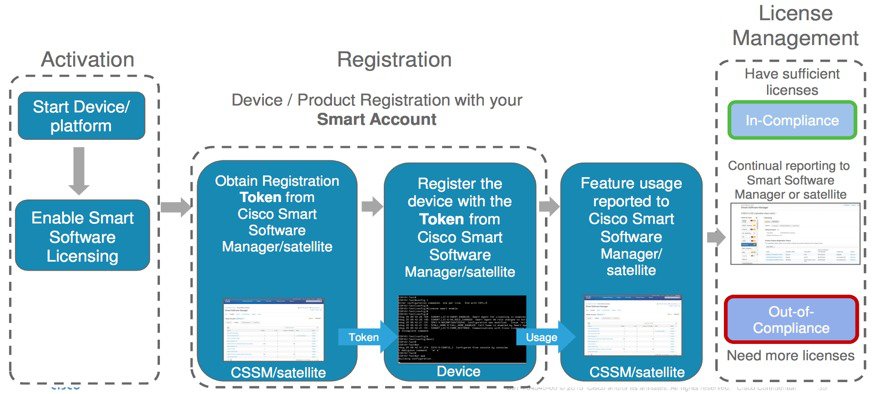
Smart Licensing Work Flow
The following figure depicts a working model of smart licensing that involves a three-step procedure.
Figure 1. Smart Licensing Work Flow
Setting up Smart Licensing: You can place the order for Smart Licensing, to manage licenses on the Cisco.com portal. You agree to the terms and conditions
governing the use and access of Smart Licensing in the Smart Software Manager portal.
Enabling and Use Smart Licensing: Smart Licensing is enabled by default. You can use either of the following options to communicate:
Smart Call Home: The Smart Call Home feature is automatically configured when Smart Licensing is enabled. Smart Call Home is used by Smart
Licensing as a medium for communication with the Cisco license service. Call Home feature allows Cisco products to periodically
call-home and perform an audit and reconciliation of your software usage information. This information helps Cisco efficiently
track your install base, keep them up and running, and effectively pursue service and support contract renewals. For more
information on Smart Call Home feature, see http://www.cisco.com/c/dam/en/us/td/docs/switches/lan/smart_call_home/SCH_Deployment_Guide.pdf.
Manage and Report Licenses: You can manage and view reports about your overall software usage in the Smart Software Manager portal. Compliance reporting
describes the types of Smart Licensing reports.
Limitations of Smart Licesing
These are the issues that affect smart licensing status updates after line card reloads or swaps.
After a line card reload or a complete line card swap, the trunk license consumption status does not update immediately.
The system requires the next scheduled synchronization interval to accurately reflect the current license usage status.
During this interval, the displayed license usage may temporarily be inaccurate.
Create an ID Token
To create a new token using Cisco Smart Software Manager, perform the following tasks:
Click the Inventory tab, and select your virtual account from the Virtual Account drop-down list.
Step 3
Click the General tab, and click New Token.
The Create ID Token window is displayed.
Step 4
Enter the token description. Specify the number of days the token must be active.
Step 5
Check the Allow export-controlled functionality on the products registered with this token check box.
Step 6
Click Create ID Token.
Step 7
Copy the token and register NCS1014 with the same token ID.
An example of the token ID: YzY2ZjYyNjktY2NlOS00NTc4LWIxNTAtMjZkNmNiNzMxMTY1LTE2NjAzNjQ3 %0ANzY4Njl8ZVJSckxKN2pFV2tIeHVoMUkxbGxTazFDVm9kc1B5MGlHQmlFWUJi%0Ac3VNRT0%3D%0A
Configure Smart Licensing
To configure smart licensing in Cisco NCS 1014, perform the following steps:
Procedure
Step 1
Configure the domain name server for the smart license server.
Example:
RP/0/RP0/CPU0:ios#configure
Sat Dec 15 15:25:14.385 IST
RP/0/RP0/CPU0:ios(config)#domain name-server 209.165.200.228
Step 2
Set up the CiscoTAC-1 profile and destination address for Smart Call Home, using the following commands:
FQDN must be either Cisco Smart Software Manager FQDN (tools.cisco.com) or Smart Licensing satellite server FQDN. You must
configure the DNS server before setting-up the call-home destination address as FQDN. Use the domain name-server {DNS server IP} command to configure the DNS server on the device.
CiscoTAC-1 profile is the default profile for smart licensing and it must not be deleted.
Step 3
Configure the crypto ca Trust point profile, if CRL distribution point is not defined in the Satellite server certificate
or if the device is not able to reach the host mentioned in the CRL distribution point.
Example:
RP/0/RP0/CPU0:ios(config)#crypto ca trustpoint Trustpool crl optional
Step 4
Create and copy the token ID using Cisco Smart Software Manager.
In the privileged EXEC mode, register the token ID in Cisco NCS 1014, using the following command:
license smart idtoken token-ID
The generation may fail if the token is invalid or there is communication failure between the device and the portal. If there
is a communication failure, there is a wait time of 24 hours before the device attempts to register again. To force the generate,
use the license smart idtokentoken-ID force command.
ID certificates are renewed automatically after six months. In case, the renewal fails, the product instance goes into unidentified
state. You can manually renew the ID certificate using the license smart renew id command.
Smart Licensing Transport Mode
Table 1. Feature History
Feature Name
Release Information
Description
Smart Licensing Transport Mode.
Cisco IOS XR Release 24.1.1
Smart Licensing software management solution allows you to choose the transport mode between the Client device and Cisco Smart
Software Manager (CSSM) to sync Smart License usage and to install the trust certificates.
In addition to the existing Call-Home mode, Cisco Smart Licensing Utility (CSLU), Smart Transport, and Offline modes are now
available.
With release 24.1.1, the Smart Licensing software management solution enables you to choose from one of the three transport
modes, Cisco Smart Licensing Utility(CSLU), Smart Transport or Offline modes. This is in addition to the existing Call-Home
mode.
The default transport mode for the 24.1.1 release is CSLU, but you can change the mode to Call-Home, Smart Transport or Offline
mode.
The following transport modes are available for you to choose now:
CSLU
Call-Home
Smart
Offline
Configuring the Transport Mode
CSLU: With Release 24.1.1 CSLU is the default license transport mode, use the following configuration to set the communication
transport mode to CSLU:
Call-Home: To use the Call-Home transport mode, use the following configuration:
configure
license smart transport callhome
callhome
service active
contact-email-addr username@example.com
profile CiscoTAC-1
destination transport-method http
Router(config-call-home-profile)# destination address http
https://tools.cisco.com/its/service/oddce/services/DDCEService
active
no destination transport-method email
commit
Smart Transport: To use the Smart Transport communication mode, use the following configuration:
configure
license smart transport smart
license smart transport url https://smartreceiver.cisco.com/licservice/license
commit
Offline: To use the Offline communication mode you have to turn off the Smart Transport, use the following configuration to turn
off Smart Transport:
configure
license smart transport off
commit
Configure Smart Transport
You can use the smart transport as an alternative option to Call Home, to connect to the CSSM. To configure smart transport
in Cisco NCS 1014, perform the following steps:
Procedure
Step 1
Configure smart transport:
Example:
 RP/0/RP0/CPU0:ios#license smart transport smart
 RP/0/RP0/CPU0:ios#commit
Use the process restart option only when you change between Call Home and Smart Transport options. It is not required when
you configure Smart Transport at the time of fresh bring-up.
Specific License Reservation (SLR) lets you reserve a license for your product instance from the CSSM. To reserve specific
licenses for NCS 1014, perform the following steps:
Procedure
Step 1
Generate the request code using the license smart reservation request local command.
Example:
RP/0/RP0/CPU0:iso#license smart reservation request local
Thu Jul 19 13:33:47.241 UTC

Enter this request code in the Cisco Smart Software Manager portal:
CB-ZNCS1014-SA:FCB2546B08T-BBTQDthRu-BA
Enter the run command to launch the iso XR Linux bash shell.
Example:
RP/0/RP0/CPU0:iso#run

RP/0/RP0/CPU0:Jul 19 13:35:20.236: run_cmd[67213]: %INFRA-INFRA_MSG.5-RUN_LOGIN : User Cisco logged into shell from con0/RP0/CP0
Step 4
Create a file using the vimfile name command.
Example:
[node0_RP0_CPU0:~]$vim smart1
Step 5
Copy the authorization code in the file and type :wq to save and exit the file.
Step 6
Use the exit command to exit the shell.
Example:
[node0_RP0_CPU0:~]$exit
logout
RP/0/RP0/CPU0:Jul 19 13:45:21.146 UTC run-cmd[67213] %INFRA_MSG-5-LOGOUT : User cisco logged out of shell from con0/RP0/CPU0
Step 7
Install the authorization code using the license smart reservation install file command.
Example:
RP/0/RP0/CPU0:iso#license smart reservation install file /disk0:/smart1
Thu Jul 19 13:46:22.877 UTC
Last Confirmation code 8572aa81
Note
You can verify the number of reservations in the Cisco smart software manger portal and can view the product instance name
changed to a UDI.
Step 8
Verify the udi using the show license udi command.
Example:
RP/0/RP0/CPU0:iso#show license udi
Thu Jul 19 13:43:19.731 UTC
UDI: PID:NCS1014-SA,SN:FCB2546B08T
Step 9
Verify the license reservation using the command show license status.
Example:
RP/0/RP0/CPU0:P2A_DT_08#show license status
Thu Jul 19 15:45:27.137 UTC

Smart Licensing is ENABLED

Utility:
  Status: DISABLED
License Reservation is ENABLED

Data Privacy:
  Sending Hostname: yes
    Callhome hostname privacy: DISABLED
    Smart Licensing hostname privacy: DISABLED
  Version privacy: DISABLED

Transport:
  Type: Transport Off


License Authorization:
  Status: AUTHORIZED - RESERVED on Jul 19 2022 15:21:24 UTC

Export Authorization Key:
  Features Authorized:
    <none>

Miscellaneous:
  Custom Id: <empty>
Reserve Licenses Using Cisco Smart Software Manager
To reserve the required number of licenses using the Cisco Smart Software Manager, perform the following steps:
Click the Inventory tab. From the Virtual Account drop-down list, select your smart account.
Step 3
Click Licenses and click License Reservation.
The Smart License Reservation wizard is displayed.
Step 4
In the Enter Request Page tab, paste the reservation code that you had generated from NCS 1014 in the Reservation Request Code area and click Next.
Step 5
In the Select Licenses tab, click the Reserve a specific License radio button.
The list of surplus licenses available in your virtual account is displayed.
Step 6
Enter the number of licenses that you want to reserve for the required license, in the Quantity to Reserve field, and click Next.
Step 7
In the Review and Confirm tab, click Generate Authorization Code.
Step 8
Click Download as File to download the authorization code and use the code to make the reservation.
Reuse Licenses Using SLR Deactivation Method
You can release some of the purchased licenses belonging to a common license pool, and reuse the same to upgrade new devices
that are added into your network, for a temporary period. Later on, you must purchase the licenses for the new devices.
Procedure
Step 1
Enable Flexible Consumption Model (FCM) (if not enabled)
Generate the request code using the license smart reservation request local command.
Example:
RP/0/RP0/CPU0:ios(config)#license smart reservation request local
Fri Jul  1 07:11:56.541 UTC
Enter this request code in the Cisco Smart Software Manager portal:
CC-ZNCS1014-SA:FCB2530B11E-BBTQDthRu-BE
While reserving licenses in CSSM, under the Select Licenses tab, enter the number of licenses only for the RTU licenses, and leave the number of licenses as 0 for SIA licenses.
Step 4
Enter the run command to launch the iso XR Linux bash shell.
Example:
RP/0/RP0/CPU0:iso#run

RP/0/RP0/CPU0:Jul 1 7:35:20.281: run_cmd[67213]: %INFRA-INFRA_MSG.5-RUN_LOGIN : User Cisco logged into shell from con0/RP0/CP0
Step 5
Create a file using the vimfile name command.
Example:
[node0_RP0_CPU0:~]$vim smart1
Step 6
Copy the authorization code in the file and type :wq to save and exit the file.
Step 7
Use the exit command to exit the shell.
Example:
[node0_RP0_CPU0:~]$exit
logout
RP/0/RP0/CPU0:Jul 1 7:45:21.146 UTC run-cmd[67213] %INFRA_MSG-5-LOGOUT : User cisco logged out of shell from con0/RP0/CPU0
Step 8
Install the authorization code using the license smart reservation install file command.
Example:
RP/0/RP0/CPU0:iso#license smart reservation install file /disk0:/smart1
Thu Jul 19 13:46:22.877 UTC
Reservation install file successful
Last Confirmation code 8572aa81
Note
You can verify the number of reservations in the Cisco smart software manger portal.
Step 9
Verify the license reservation using the command show license platform summary.
Example:
RP/0/RP0/CPU0:test#show license platform summary
Fri Jul  1 07:24:07.016 UTC
Collection: LAST: Fri Jul 01 2022 07:48:34 UTC
            NEXT: Fri Jul 01 2022 07:48:34 UTC
Reporting:  LAST: Fri Jul 01 2022 07:48:34 UTC
            NEXT: Fri Jul 01 2022 07:48:34 UTC
SIA Status: Node is in deactivated state
Step 10
After the node is deactivated and the licenses are freed on the CSSM server, use those licenses to perform software upgrade
on another node for a temporary period.
Verify Smart Licensing Configuration
After enabling Smart Licensing, you can use the show commands to verify the default Smart Licensing configuration. If any issue is detected, take corrective action before making
further configurations.
show license all
show license trace all
show license status
show license summary
show license tech
Show license udi
show license usage
show license platform detail
show license platform summary
show license platform trace
Show license platform trace all
show tech-support smartlic
show call-home detail
show call-home trace all
show tech-support call-home
The following table defines the available license authorization status in Cisco NCS 1014:
Table 2. License Authorization Status
License Authorization Status
Description
Unconfigured
Smart Software Licensing is not configured.
Unidentified
Smart Software Licensing is enabled but is not registered.
Registered
Device registration is completed and an ID certificate is received that is used for future communication with the Cisco licensing
authority.
Authorized
Registration is completed with a valid Smart Account and license consumption has begun. This indicates compliance.
Out of Compliance
Consumption exceeds available licenses in the Smart Account.
Authorization Expired
The device is unable to communicate with the Cisco Smart Software Manager for an extended period. This state occurs after
90 days of expiry. The device attempts to contact the CSSM every hour to renew the authorization until the registration period
expires.
Example1:
The following example shows the sample output of the show license all command.
RP/0/RP0/CPU0:iso#show license all
Fri Jul 15 05:32:02.678 UTC

Smart Licensing Status
======================

Smart Licensing is ENABLED

Registration:
  Status: REGISTERED
  Smart Account: InternalTestDemoAccount8.cisco.com
  Virtual Account: NCS1014-PROD
  Export-Controlled Functionality: ALLOWED
  Initial Registration: SUCCEEDED on Jul 15 2022 04:58:24 UTC
  Last Renewal Attempt: None
  Next Renewal Attempt: Jan 11 2023 04:58:23 UTC
  Registration Expires: Jul 15 2023 04:53:20 UTC

License Authorization:
  Status: AUTHORIZED on Jul 15 2022 04:58:40 UTC
  Last Communication Attempt: SUCCEEDED on Jul 15 2022 04:58:40 UTC
  Next Communication Attempt: Aug 14 2022 04:58:40 UTC
  Communication Deadline: Oct 13 2022 04:53:41 UTC

Export Authorization Key:
  Features Authorized:
    <none>

Utility:
  Status: DISABLED

Data Privacy:
  Sending Hostname: yes
    Callhome hostname privacy: DISABLED
    Smart Licensing hostname privacy: DISABLED
  Version privacy: DISABLED

Transport:
  Type: Callhome

Miscellaneous:
  Custom Id: <empty>

License Usage
=============

NCS1014 - Essentials - OLT RTU (NCS1014_ESS_OLT_RTU):
  Description: NCS1014 - Essentials Tier - Optical Line Terminal RTU (Per Port)
  Count: 2
  Version: 1.0
  Status: AUTHORIZED
  Export status: NOT RESTRICTED

NCS1014 - Essentials - OLT SIA (NCS1014_ESS_OLT_SIA):
  Description: NCS1014 - Essentials Subscription - Optical Line Terminal - SIA
               (Per Port)
  Count: 2
  Version: 1.0
  Status: AUTHORIZED
  Export status: NOT RESTRICTED

Product Information
===================
UDI: PID:NCS1014-SA,SN:FCB2546B08T

Agent Version
=============
Smart Agent for Licensing: 5.4.16_rel/63

Reservation Info
================
License reservation: DISABLED
Example 2:
The following example shows the sample output of the show license platform detail command.
RP/0/RP0/CPU0:iso#show license platform detail
Fri Jul 15 06:56:41.353 UTC
Collection: LAST: Fri Jul 15 2022 06:56:14 UTC
            NEXT: Fri Jul 15 2022 06:58:14 UTC
Reporting:  LAST: Fri Jul 15 2022 06:56:14 UTC
            NEXT: Fri Jul 15 2022 06:58:14 UTC
SIA Status: In Compliance
Parameters: Collection interval:           2 minute(s)
            Reporting  interval:           2 minute(s)
            Throughput gauge:        1000000 Kbps

=================================================
Feature/Area 'FCM'
   Name:  FCM
   Status:   ACTIVE
   Flags:


   [ 1] Name:  NCS1014 - Essentials Tier - In-Line Amplifier RTU
        Entitlement Tag: regid.2022-05.com.cisco.NCS1014_ESS_ILA_RTU,1.0_9b4322b1-bff3-4ddf-944c-16ec9aaab1cc
        Count: Last reported:    0
               Next report:      0
   [ 2] Name:  NCS1014 - Essentials Subscription - In-Line Amplifier - SIA
        Entitlement Tag: regid.2022-05.com.cisco.NCS1014_ESS_ILA_SIA,1.0_67243ac7-1a7c-41e4-a160-f13df80fd0e4
        Count: Last reported:    0
               Next report:      0
   [ 3] Name:  NCS1014 - Essentials Tier - Optical Line Terminal RTU (Per Port)
        Entitlement Tag: regid.2022-05.com.cisco.NCS1014_ESS_OLT_RTU,1.0_e4309530-2085-40e6-9aa6-5f3137ff49b2
        Count: Last reported:    3
               Next report:      0
   [ 4] Name:  NCS1014 - Essentials Subscription - Optical Line Terminal - SIA (Per Port)
        Entitlement Tag: regid.2022-05.com.cisco.NCS1014_ESS_OLT_SIA,1.0_b3c976c1-e509-474f-8cac-b9db62f28f2b
        Count: Last reported:    3
               Next report:      0
   [ 5] Name:  NCS1014 - Advantage Tier- In-Line Amplifier RTU
        Entitlement Tag: regid.2022-05.com.cisco.NCS1014_ADV_ILA_RTU,1.0_cf1746b7-def4-4c0e-ab90-de30614507d8
        Count: Last reported:    0
               Next report:      0
   [ 6] Name:  NCS1014 - Advantage Subscription - In-Line Amplifier - SIA
        Entitlement Tag: regid.2022-05.com.cisco.NCS1014_ADV_ILA_SIA,1.0_ea769b05-9363-47dd-9991-2122c37479eb
        Count: Last reported:    0
               Next report:      0
   [ 7] Name:  NCS1014 - Advantage Tier - Optical Line Terminal RTU (Per Port)
        Entitlement Tag: regid.2022-05.com.cisco.NCS1014_ADV_OLT_RTU,1.0_7a6ce8f3-3336-4ce2-8803-431227dabfff
        Count: Last reported:    0
               Next report:      0
   [ 8] Name:  NCS1014 - Advantage Subscription - Optical Line Terminal - SIA (Per Port)
        Entitlement Tag: regid.2022-05.com.cisco.NCS1014_ADV_OLT_SIA,1.0_5f283f1c-143e-4c6e-9af7-73e088fb77a5
        Count: Last reported:    0
               Next report:      0
Example 3:
The following example shows the sample output of the show license status command.
RP/0/RP0/CPU0:iso#show license status
Fri Jul 15 08:17:14.004 UTC

Smart Licensing is ENABLED

Utility:
  Status: DISABLED

Data Privacy:
  Sending Hostname: yes
    Callhome hostname privacy: DISABLED
    Smart Licensing hostname privacy: DISABLED
  Version privacy: DISABLED

Transport:
  Type: Callhome

Registration:
  Status: REGISTERED
  Smart Account: InternalTestDemoAccount8.cisco.com
  Virtual Account: NCS1014-PROD
  Export-Controlled Functionality: ALLOWED
  Initial Registration: SUCCEEDED on Jul 15 2022 04:58:24 UTC
  Last Renewal Attempt: None
  Next Renewal Attempt: Jan 11 2023 04:58:24 UTC
  Registration Expires: Jul 15 2023 04:53:21 UTC

License Authorization:
  Status: OUT OF COMPLIANCE on Jul 15 2022 07:01:00 UTC
  Last Communication Attempt: SUCCEEDED on Jul 15 2022 07:06:52 UTC
  Next Communication Attempt: Jul 15 2022 19:06:51 UTC
  Communication Deadline: Oct 13 2022 07:01:52 UTC

Export Authorization Key:
  Features Authorized:
    <none>

Miscellaneous:
  Custom Id: <empty>
Example 4:
The following example shows the sample output of the show license platform summary command.
RP/0/RP0/CPU0:iso#show license platform summary
Tue Jul 19 14:09:06.919 UTC
Collection: LAST: Tue Jul 19 2022 14:08:07 UTC
            NEXT: Tue Jul 19 2022 14:10:07 UTC
Reporting:  LAST: Tue Jul 19 2022 14:08:07 UTC
            NEXT: Tue Jul 19 2022 14:10:07 UTC
**********************************IMPORTANT************************************
SIA Status: Out of Compliance(Remaining Grace Period: 90 days, 0 hours)
            SIA license(s) status is Not Authorized.
            SW Upgrade will still be allowed as SIA Grace Period is remaining
*******************************************************************************
                                                                   Count
Feature/Area     Entitlement                                     Last Next
============ =================================================== ==== ====
FCM          NCS1014 - Essentials Tier - Optical Line Terminal R    3    0
FCM          NCS1014 - Essentials Subscription - Optical Line Te    3    0
FCM          NCS1014 - Advantage Tier - Optical Line Terminal RT    3    0
FCM          NCS1014 - Advantage Subscription - Optical Line Ter    3    0
Example 5:
The following example shows the sample output of the show license summary command.
RP/0/RP0/CPU0:iso#show license usage
Fri Jul 15 08:17:40.048 UTC

License Authorization:
  Status: OUT OF COMPLIANCE on Jul 15 2022 07:01:00 UTC

NCS1014 - Essentials - OLT RTU (NCS1014_ESS_OLT_RTU):
  Description: NCS1014 - Essentials Tier - Optical Line Terminal RTU (Per Port)
  Count: 32
  Version: 1.0
  Status: OUT OF COMPLIANCE
  Export status: NOT RESTRICTED

NCS1014 - Essentials - OLT SIA (NCS1014_ESS_OLT_SIA):
  Description: NCS1014 - Essentials Subscription - Optical Line Terminal - SIA
               (Per Port)
  Count: 32
  Version: 1.0
  Status: OUT OF COMPLIANCE
  Export status: NOT RESTRICTED
Example 6:
The following example shows the sample output of the show license usage command.
RP/0/RP0/CPU0:iso#show license usage
Fri Jul 15 08:17:40.048 UTC

License Authorization:
  Status: OUT OF COMPLIANCE on Jul 15 2022 07:01:00 UTC

NCS1014 - Essentials - OLT RTU (NCS1014_ESS_OLT_RTU):
  Description: NCS1014 - Essentials Tier - Optical Line Terminal RTU (Per Port)
  Count: 32
  Version: 1.0
  Status: OUT OF COMPLIANCE
  Export status: NOT RESTRICTED

NCS1014 - Essentials - OLT SIA (NCS1014_ESS_OLT_SIA):
  Description: NCS1014 - Essentials Subscription - Optical Line Terminal - SIA
               (Per Port)
  Count: 32
  Version: 1.0
  Status: OUT OF COMPLIANCE
  Export status: NOT RESTRICTED
 Feedback