Smart Licensing

Smart Licensing

Smart Licensing is a cloud-based licensing solution that simplifies the licensing experience across the enterprise by making it easier to purchase, deploy, track, and renew Cisco software through a single, simple user interface.

  • Provides visibility into license ownership and consumption.

  • Allows you to track the status of your license and software usage trends.

  • Helps you simplify three core functions: purchasing, management, and reporting.

Core functions of Smart Licensing

Smart Licensing helps you simplify the following core functions.

  • Purchasing: The software that you have installed in your network can be registered, without Product Activation Keys (PAKs).

  • Management: You can automatically track activations against your license entitlements. Also, there is no need to install the license file on every node. You can create license pools (logical grouping of licenses) to reflect your organization structure. Smart Licensing offers you Cisco Smart Software Manager, a centralized portal that enables you to manage all your Cisco software licenses from one centralized website.

  • Reporting: Through the portal, Smart Licensing offers an integrated view of the licenses you have purchased and what has been deployed in your network. You can use this data to make better purchasing decisions, based on your consumption.

Smart Licensing features

Smart Licensing provides the following features.

  • Your device initiates a call home and requests the licenses it needs.

  • Pooled licences - Licences are company account-specific, and can be used with any compatible device in your company. You can activate or deactivate different types of licenses on the device without actually installing a license file on the device.

  • Licenses are stored securely on Cisco servers.

  • Licenses can be moved between product instances without license transfer. This greatly simplifies the reassignment of a software license as part of the Return Material Authorization (RMA) process.

  • It provides a complete view of all the Smart Software Licenses used in the network using a consolidated usage report of software licenses and devices in one easy-to-use portal.

Cisco Smart Account

NCS 1004 integrates with Cisco Smart Accounts to simplify license management.

Smart Accounts provide a centralized, organized, and simple-to-use solution for managing Cisco software licenses across an entire organization. They act as a container that holds all Cisco software assets, allowing customers to view, store, manage, and move these assets as needed. Smart Accounts enable full visibility into license entitlements and usage, helping optimize software management. Smart Accounts support license pooling, portability, and provide compliance reporting.

When creating a Smart Account, you must have the authority to represent the requesting organization. After you submit the request, it goes through a brief approval process. Access http://software.cisco.com to learn about, set up, or manage Smart Accounts.

Cisco Smart Software Manager

Cisco Smart Software Manager enables you to manage all your Cisco Smart software licenses from one centralized website. With Cisco Smart Software Manager, you organize and view your licenses in groups called virtual accounts (collections of licenses and product instances). Use the Cisco Smart Software Manager to do the following tasks:

  • Create, manage, or view virtual accounts.

  • Create and manage Product Instance Registration Tokens.

  • Transfer licenses between virtual accounts or view licenses.

  • Transfer, remove, or view product instances.

  • Run reports against your virtual accounts.

  • Modify your email notification settings.

  • View overall account information.

Virtual Accounts

Virtual Accounts are customizable subaccounts within a Smart Account used to organize and optimize Cisco licenses. They can be structured to reflect business units, product types, or geographic locations, allowing better planning and utilization of assets. They are created and maintained by the Smart Account administrator. Smart Licencing allows you to create multiple license pools or virtual accounts within the Smart Software Manager portal. Using the Virtual Accounts option that you can aggregate licenses into discrete bundles that are associated with a cost center so that one section of an organization cannot use the licenses of another section of the organization. For example, if you segregate your company into different geographic regions, you can create a virtual account for each region to hold the licenses and product instances for that region.

All new licenses and product instances are placed in the default virtual account in the Smart Software Manager, unless you specify a different one during the order process. After you access the default account, you may choose to transfer them to any other account, provided you have the required access permissions.

Use the Smart Software Manager portal to create license pools or transfer licenses.

Product Instance Registration Tokens

A product requires a registration token until you have registered the product. On successful registration, the device receives an identity certificate. This certificate is saved and automatically used for all future communications with Cisco. Registration tokens are stored in the Product Instance Registration Token Table that is associated with your enterprise account. Registration tokens can be valid 1–365 days.

Product Instances

A product instance is an individual device with a unique device identifier (UDI) that is registered using a product instance registration token (or registration token). You can register any number of instances of a product with a single registration token. Each product instance can have one or more licenses residing in the same virtual account. Product instances must periodically connect to the Cisco Smart Software Manager servers during a specific renewal period. If you remove the product instance, its licenses are released and made available within the virtual account.

Smart Licensing workflow

The following figure depicts a working model of smart licensing that involves a three-step procedure.
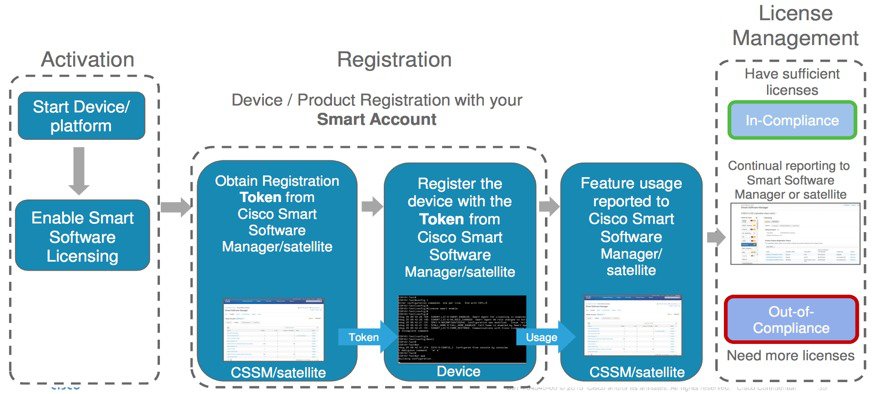
Figure 1. Smart Licensing Work Flow


  1. Setting up Smart Licensing: You can place the order for Smart Licensing, to manage licenses on the Cisco.com portal. You agree to the terms and conditions governing the use and access of Smart Licensing in the Smart Software Manager portal.

  2. Enabling and Use Smart Licensing: Smart Licensing is enabled by default. You can use either of the following options to communicate:

    • Smart Call Home: The Smart Call Home feature is automatically configured when Smart Licensing is enabled. Smart Call Home is used by Smart Licensing as a medium for communication with the Cisco license service. Call Home feature allows Cisco products to periodically call-home and perform an audit and reconciliation of your software usage information. This information helps Cisco efficiently track your install base, keep them up and running, and effectively pursue service and support contract renewals. For more information on Smart Call Home feature, see http://www.cisco.com/c/dam/en/us/td/docs/switches/lan/smart_call_home/SCH_Deployment_Guide.pdf.

    • Smart Software Manager Satellite: is a component of Cisco Smart Licensing and works with Cisco Smart Software Manager (SSM). It helps customers intelligently manage product licenses, providing near real-time visibility and reporting of the Cisco licenses they purchase and consume.

      For customers who do not want to manage their installed base using a direct Internet connection, the Smart Software Manager satellite is installed on the customer premises and provides a subset of Cisco SSM functionality. After you download the satellite application, deploy it, and register it to Cisco SSM, you can perform the following functions locally:

      • Activate or register a license

      • Get visibility to your company's licenses

      • Transfer licenses between company entities

      Periodically, the satellite must synchronize with Cisco SSM to reflect the latest license entitlements.

      For more information about the Smart Software Manager satellite, see http://www.cisco.com/c/en/us/buy/smart-accounts/software-manager-satellite.html.

  3. Manage and Report Licenses: You can manage and view reports about your overall software usage in the Smart Software Manager portal. Compliance reporting describes the types of Smart Licensing reports.

Smart licensing benefits for Cisco NCS 1004

Smart Licensing for Cisco NCS 1004 offers several important advantages. These benefits streamline license management, enhance operational flexibility, and improve visibility of software assets across Cisco NCS 1004 deployments.

  • License pooling: Licenses can be pooled and reused across the entire organization, enabling flexibility across organizational boundaries.

  • No lock-out on over-consumption: Configurations can be performed even if license usage exceeds the purchased limit. When this occurs, out-of-compliance notifications are issued, allowing continued operations while prompting the user to buy additional licenses as needed.

  • Asset management visibility: Smart Licensing provides detailed information for software asset management, which helps organizations plan and track their license usage.

Smart Licensing in Cisco NCS 1004

Cisco NCS 1004 supports a set of line card product IDs (PIDs), each with specific licensing characteristics that determine whether smart licensing applies and how the licenses are charged.

  • NCS1K4-1.2T-K9—High-cost PID. You can use this line card without any explicit licensing.

  • NCS1K4-1.2T-L-K9—Licensed PID for 1.2T line card and the licenses are charged per port.

  • NCS1K4-QXP-L-K9—Licensed PID for QXP line card.

  • NCS1K4-QXP-K9—Non-licensed PID for QXP line card.

You can use either one or a combination of both types of the 1.2T line card in the NCS 1004.

Software entitlements of Cisco NCS 1004

This reference enables you to identify the smart licensing entitlement for each Cisco NCS 1004 software feature and understand the per-port charging model so that you can plan license procurement.

Software entitlement is a system that consists of a license manager on Cisco NCS 1004. The license manager manages licenses for various software and hardware features. The license manager parses and authenticates the license before accepting it. The following table lists the features and its corresponding entitlements that can be enabled on Cisco NCS 1004 using licenses:

Table 1. Software Entitlements of Cisco NCS 1004

Feature

Software Entitlement

NCS1K4 Smart License-one QSFP28 client

S-NCS1K4-LIC-100G=

NCS1K4 Smart License - one QSFP28 client with encryption

S-NCS1K4-LIC-100X=

The licenses are charged per port basis and dependent on the number of trunk ports and client ports that you configure. The license count for the configuration of 4 x 100GE client ports or lesser is zero. For configurations greater than 4 x 100GE client ports, the license count is incremented by one for every 100GE client port configured at the slice level. The license count for the trunk port is incremented based on the BPS & optics configuration.

Configure smart licensing

Enable smart license management on your Cisco NCS 1004 by connecting the device to Cisco Smart Licensing services.

Smart licensing automates license activation and compliance, helping you centrally manage device licenses.

To configure smart licensing in Cisco NCS 1004, perform these tasks:

Procedure


Step 1

Configure the domain name server for the smart license server.

Example:

RP/0/RP0/CPU0:ios#configure 
Sat Dec 15 15:25:14.385 IST
RP/0/RP0/CPU0:ios(config)#domain name-server 198.51.100.247

Step 2

Setup the CiscoTAC-1 profile and destination address for Smart Call Home, using these commands:

call-home

service active

contact smart-licensing

profile CiscoTAC-1

active

destination address http {http|https}://{FQDN}/its/service/oddce/services/DDCEService

destination transport-method http

Note


The destination address must be the fully qualified domain name (FQDN) of the Cisco Smart Software Manager (tools.cisco.com) or your Smart Licensing satellite server. Configure the DNS server before setting up the call-home destination. The CiscoTAC-1 profile is the default for smart licensing and must not be deleted.

Example:

RP/0/RP0/CPU0:ios#configure 
Sat Dec 15 15:25:14.385 IST
RP/0/RP0/CPU0:ios(config)#domain name-server 198.51.100.247
RP/0/RP0/CPU0:ios(config)#call-home
 RP/0/RP0/CPU0:ios(config)#service active
 RP/0/RP0/CPU0:ios(config)#contact smart-licensing
 RP/0/RP0/CPU0:ios(config)#profile CiscoTAC-1
 RP/0/RP0/CPU0:ios(config)#active
 RP/0/RP0/CPU0:ios(config)#destination address http https://tools.cisco.com/its/service/oddce/services/DDCEService
 RP/0/RP0/CPU0:ios(config)#destination transport-method http

]

Step 3

Configure the crypto ca Trust point profile, if CRL distribution point is not defined in the Satellite server certificate or if the device is not able to reach the host mentioned in the CRL distribution point.

Example:

RP/0/RP0/CPU0:ios(config)#crypto ca trustpoint Trustpool crl optional

Step 4

Create and copy the registration token ID using Cisco Smart Software Manager.

For more details about creating a token, see Create a token.

Step 5

Use the license smart register idtoken token-ID in the privileged EXEC mode, to register the token ID in Cisco NCS 1004.

If registration fails due to communication issues, wait 24 hours for the device to retry or force the registration using the license smart register idtoken token-ID force command.

If the device is removed from inventory, redeployed, or returned to Cisco using Return Merchandise Authorization (RMA), cancel registration and remove entitlements, using the license smart deregister command to cancel the registration on your device. All smart licensing entitlements and certificates on the platform are removed.

ID certificates are renewed automatically after six months. In case, the renewal fails, the product instance goes into unidentified state. You can manually renew the ID certificate using the license smart renew id command.

Authorization periods are renewed by the Smart Licensing system every 30 days. As long as the license is in an 'Authorized' or 'Out-of-Compliance' (OOC), the authorization period is renewed. Use the license smart renew auth command to make an on-demand manual update of your registration. Thus, instead of waiting 30 days for the next registration renewal cycle, you can issue this command to instantly find out the status of your license.

After 90 days, the authorization period expires and the status of the associated licenses display "AUTH EXPIRED". Use the license smart renew auth command to retry the authorization period renewal. If the retry is successful, a new authorization period begins.


The Cisco NCS 1004 is registered with Cisco Smart Licensing, license entitlements are tracked automatically, and compliance is maintained.

Create a token

To create a new token using Cisco Smart Software Manager, perform the following tasks:

Procedure


Step 1

Log in to the Cisco Smart Software Manager.

URL: https://software.cisco.com/#SmartLicensing-Inventory

Step 2

Select the appropriate Virtual Account.

Step 3

From the General tab, choose New Token. Create Registration Token dialog box appears.

Step 4

Follow the dialog to provide a name, duration, and export compliance applicability before accepting the terms and responsibilities.

Step 5

Click Create Token.


Verify smart licensing configuration

This reference enables you to verify smart licensing configuration on Cisco NCS 1004 by listing the supported show commands, describing each license authorization status, and providing sample command outputs for confirmation.

After enabling smart licensing, you can use the show commands to verify the default smart licensing configuration. If any issue is detected, take corrective action before making further configurations.

  • show license all

  • show license trace all

  • show license status

  • show license summary

  • show license tech

  • show license udi

  • show license usage

  • show license platform detail

  • show license platform summary

  • show license platform trace

  • show license platform trace all

  • show tech-support smartlic

  • show call-home detail

  • show call-home trace all

  • show tech-support call-home

This table defines the available license authorization status in Cisco NCS 1004:

Table 2. License Authorization Status

License Authorization Status

Description

Unconfigured

Smart Software Licensing is not configured.

Unidentified

Smart Software Licensing is enabled but is not registered.

Registered

Device registration is completed and an ID certificate is received that is used for future communication with the Cisco licensing authority.

Authorized

Registration is completed with a valid Smart Account and license consumption has begun. This indicates compliance.

Out of Compliance

Consumption exceeds available licenses in the Smart Account.

Authorization Expired

The device is unable to communicate with the Cisco Smart Software Manager for an extended period. This state occurs after 90 days of expiry. The device attempts to contact the CSSM every hour to renew the authorization until the registration period expires.

Example 1: show license all

The following example shows the sample output of the show license all command.


RP/0/RP0/CPU0:ios#show license all
Mon Feb 11 15:58:44.047 IST

Smart Licensing Status
======================

Smart Licensing is ENABLED

Registration:
  Status: REGISTERED
  Smart Account: BU Production Test
  Virtual Account: NCS1000
  Initial Registration: SUCCEEDED on Mon Feb 11 2019 15:51:10 IST
  Last Renewal Attempt: None
  Next Renewal Attempt: Sat Aug 10 2019 15:52:10 IST
  Registration Expires: Tue Feb 11 2020 15:46:59 IST

License Authorization: 
  Status: AUTHORIZED on Mon Feb 11 2019 15:53:40 IST
  Last Communication Attempt: SUCCEEDED on Mon Feb 11 2019 15:53:40 IST
  Next Communication Attempt: Wed Mar 13 2019 15:53:39 IST
  Communication Deadline: Sun May 12 2019 15:47:29 IST

License Usage
==============

NCS1K4 smart license - one QSFP28 client (S-NCS1K4-LIC-100G=):
  Description: NCS1K4 smart license - one QSFP28 client
  Count: 8
  Version: 1.0
  Status: AUTHORIZED

NCS1K4 smart license - one QSFP28 client with encryption (S-NCS1K4-LIC-100X=):
  Description: NCS1K4 smart license - one QSFP28 client with encryption
  Count: 8
  Version: 1.0
  Status: AUTHORIZED

Product Information
===================
UDI: SN:CAT2231B18Y,UUID:default-sdr

Agent Version
=============
Smart Agent for Licensing: 2.2.0_rel/48

Example 2: show license platform detail

The following example shows the sample output of the show license platform detail command.


RP/0/RP0/CPU0:ios#show license platform detail
Mon Feb 11 15:59:55.422 IST
Current state:    REGISTERED

Collection: LAST: Mon Feb 11 2019 15:57:53 IST
            NEXT: Mon Feb 11 2019 16:57:53 IST
Reporting:  LAST: Mon Feb 11 2019 15:57:53 IST
            NEXT: Tue Feb 12 2019 15:57:53 IST

Parameters: Collection interval:          60 minute(s)
            Reporting  interval:        1440 minute(s)
            Throughput gauge:        1000000 Kbps

=================================================
Feature/Area 'system'
   Name:  System
   Status:   ACTIVE
   Flags: CONFIG

   [ 1] Name:  NCS1K4 smart license - one QSFP28 client
        Entitlement Tag: regid.2018-05.com.cisco.S-NCS1K4-LIC-100G=,1.0_03df009f-5ac5-48da-af50-4279ddea5e24
        Count: Last reported:    8
               Next report:      0
   [ 2] Name:  NCS1K4 smart license - one QSFP28 client with encryption
        Entitlement Tag: regid.2018-05.com.cisco.S-NCS1K4-LIC-100X=,1.0_3938b0c5-f635-4426-9f0f-936d930cea9e
        Count: Last reported:    8
               Next report:      0

Example 3: show license status

The following example shows the sample output of the show license status command.


RP/0/RP0/CPU0:ios#show license status
Mon Feb 11 16:02:24.499 IST

Smart Licensing is ENABLED
  Initial Registration: SUCCEEDED on Mon Feb 11 2019 15:51:10 IST
  Last Renewal Attempt: None
  Next Renewal Attempt: Sat Aug 10 2019 15:52:10 IST
  Registration Expires: Tue Feb 11 2020 15:46:59 IST

License Authorization:
  Status: AUTHORIZED on Mon Feb 11 2019 15:53:40 IST
  Last Communication Attempt: SUCCEEDED on Mon Feb 11 2019 15:53:40 IST
  Next Communication Attempt: Wed Mar 13 2019 15:53:39 IST
  Communication Deadline: Sun May 12 2019 15:47:29 IST

Example 4: show license usage

The following example shows the sample output of the show license usage command.

RP/0/RP0/CPU0:ios#show license usage
Mon Feb 11 15:59:29.817 IST

License Authorization:
  Status: AUTHORIZED on Mon Feb 11 2019 15:53:40 IST

NCS1K4 smart license - one QSFP28 client (S-NCS1K4-LIC-100G=):
  Description: NCS1K4 smart license - one QSFP28 client
  Count: 8
  Version: 1.0
  Status: AUTHORIZED

NCS1K4 smart license - one QSFP28 client with encryption (S-NCS1K4-LIC-100X=):
  Description: NCS1K4 smart license - one QSFP28 client with encryption
 Count: 8
  Version: 1.0
  Status: AUTHORIZED

Example 5: show license udi

The following example shows the sample output of the show license udi command.


RP/0/RP0/CPU0:ios#show license udiMon Feb 11 16:02:46.733 IST

Product Information
===================
UDI: SN:CAT2231B18Y,UUID:default-sdr

Register a smart license on Cisco NCS 1004

Enable smart license functionality on Cisco NCS 1004 and maintain licensing compliance via Cisco Smart Software Manager (CSSM).

Use this process to register a smart license for your Cisco NCS 1004 device, address synchronization issues between the device and CSSM, and perform license renewal and deregistration when needed.

Procedure


Step 1

Register the license using the license smart register idtoken <idtoken> command:

RP/0/RP0/CPU:ios#license smart register idtoken <idtoken>

Step 2

Access the Cisco Smart Software Manager portal, https://software.cisco.com/software/csws/ws/platform/home#module/SmartLicensing.

Step 3

Remove the existing product instance in CSSM:

  1. Click Inventory.

  2. Click Product Instances.

  3. Select the node instance.

  4. Click Actions, and then Remove.

Step 4

Renew the authorization period on the device.

RP/0/RP0/CPU0:ios#license smart renew auth
RP/0/RP0/CPU0:ios#show logging | i "Data and signature"
Thu May 27 09:57:02.237 UTC
RP/0/RP0/CPU0:May 27 09:54:57.783 UTC: smartlicserver[311]: 
LICENSE-SMART_LIC-3-AUTH_RENEW_FAILED : Authorization renewal with the Cisco Smart Software Manager (CSSM) : 
Error received from Smart Software Manager: Data and signature do not match  for udi PID:8812,SN:FOX2202WIVM 

Note


The error message in the output of the show logging command is expected and is due to loss of synchronization between the CSSM server and the device after removing the product instance directly from the CSSM server.

Step 5

Deregister the device from CSSM.

RP/0/RP0/CPU0:ios#license smart deregister
RP/0/RP0/CPU0:ios#show logging | i DEREG
Thu May 27 14:48:58.170 UTC
RP/0/RP0/CPU0:May 27 09:58:58.464 UTC: smartlicserver[311]: 
%LICENSE-SMART_LIC-3-AGENT_DEREG_FAILED : Smart Agent for Licensing DeRegistration with Cisco Smart Software Manager (CSSM) failed: 
Agent received a failure status in a response message. Please check the Agent log file for the detailed message. 

Note


The error message in the output of the show logging command is expected.


The Cisco NCS 1004 device is registered, synchronized, and deregistered as needed with CSSM. Expected error messages confirm the resolution of device and CSSM synchronization issues.