Cisco NCS 1002 Overview

This chapter provides an overview of Cisco NCS 1002.

Cisco NCS 1002 Overview

Cisco NCS 1002 is a 2Tbps muxponder that addresses the growing bandwidth needs of data center DWDM applications. It provides dense, low power (<80W per 100G), and cost optimized DWDM transport for 10G, 40G, and 100G clients. The trunk ports can operate at 100G, 200G, and 250G traffic. The muxponder is 2 RU. NCS 1002 is ROHS6 compliant.

NCS 1002 has four independent slices. Each slice contains five QSFP+/QFSP28 client optical ports and two CFP2 DWDM trunk ports. Each slice delivers up to 500 Gbps traffic.
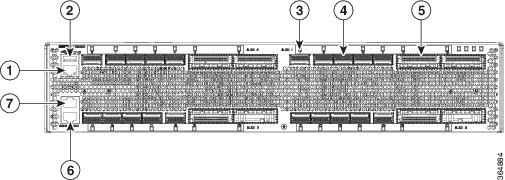
Figure 1. Cisco NCS 1002 Front View
Cisco NCS 1002 Front View

1

ETH0: RJ45 Ethernet management port.

2

USB 2.0 management port.

3

LEDs for the client and trunk ports

4

20 QSFP+/QSFP28 client optical ports

5

8 CFP2 DWDM trunk ports

6

RJ45 console ports for System Admin.

7

RJ45 console ports for IOS XR.

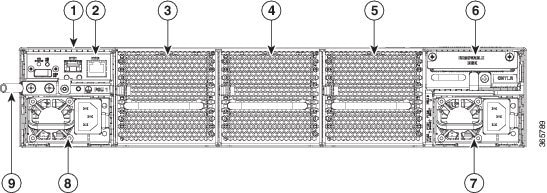
Figure 2. Cisco NCS 1002 Rear View

Cisco NCS 1002 Rear View

1

ETH1 SFP, ETH2 RJ45, OIR LED. You can connect an SFP to this management port.

2

ETH2 RJ45 Ethernet port. The unit containing the RJ45 and SFP ports is not field-replaceable.

3

FT0

4

FT1

5

FT2

6

CPU and Solid State Disk (SSD)

7

1800W AC or DC redundant power supply module (PSU 0)

8

1800W AC or DC redundant power supply module (PSU 1)

9

Grounding lug

In case of single PSU, the other PSU slot must be inserted with the PSU filler module to guarantee safety and system cooling compliance.

Physical Characteristics

  • Width: 17.4 in (44.19 cm)

  • Depth: 23.5 in (59.69 cm)

  • Height: 3.45 in (8.76 cm)

  • Weight without power supply unit: 40.52 lb (18.38 kg)

    Weight with two power supply units: 45.59 lb (20.68 kg)

  • Weight of AC: 2.65 lb (1.2 kg)

  • Weight of Fan: 1.77 lb (0.8 kg)

  • Weight of SSD: 0.9 lb (0.4 kg)

  • Weight of CPU: 3.3 lb (1.5 kg)

Safety Labels

Cisco NCS 1000 Series chassis is classified as Hazard Level 1M as per IEC 60825-2 and Laser Class 1M as per IEC 60825-1, since it includes pluggable optical modules Class 1 or Class 1M.

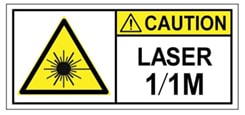
The Class 1/1M Laser Product label is shown in the following figure:

Figure 3. Class 1/1M Laser Product Label
Class 1/1M Laser Product Label

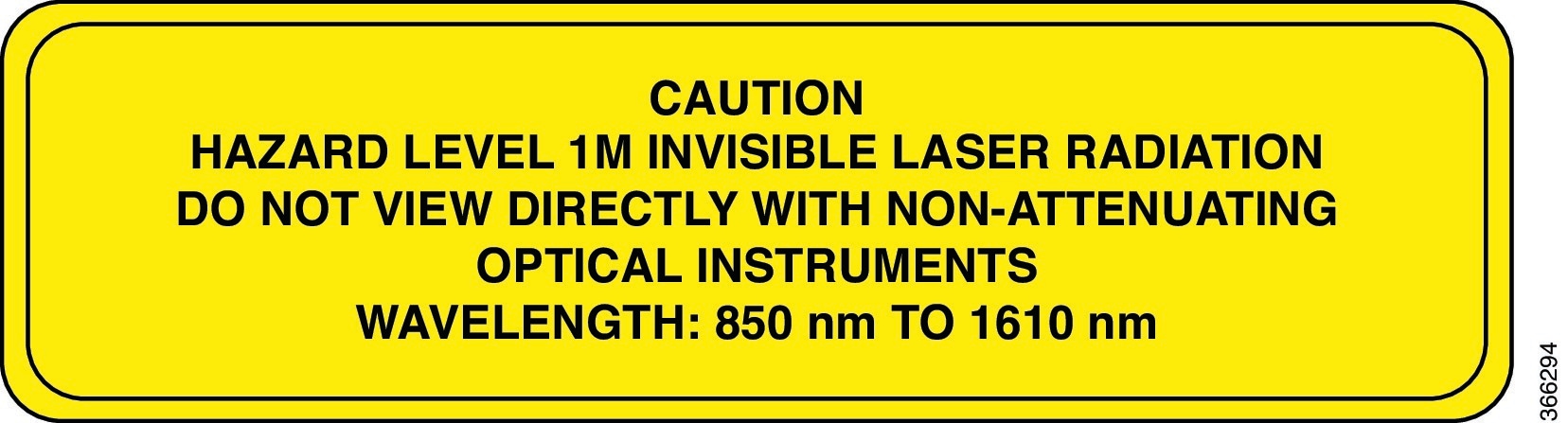
This section explains the significance of the safety labels attached to the NCS 1002 chassis.

You must understand all warning labels before working on the chassis.

Figure 4. Class 1M Laser Product Label


Safety Precaution for Module Installation and Removal

Ensure to observe the following safety precautions when you are working with the chassis modules.

Invisible laser radiations present. Statement 1016.

Invisible laser radiation may be emitted from disconnected fibers or connectors. Do not stare into beams or view directly with optical instruments. Statement 1051.

Figure 5. Class 1/1M Laser Product Label

Safety Precaution for Laser Radiation

Cisco NCS 1000 Series chassis is classified as Hazard Level 1M as per IEC 60825-2 and Laser Class 1M as per IEC 60825-1, since it includes pluggable optical modules Class 1 or Class 1M.

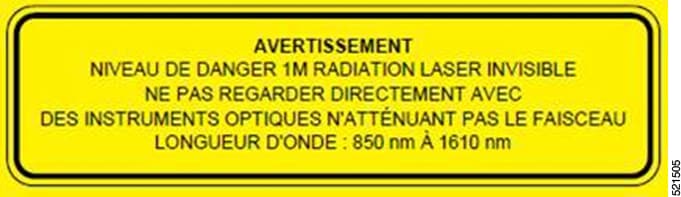
Figure 6. Class 1M Laser Product Label


SFP+ Support

Each slice contains five QSFP+ client optical ports and two CFP2 DWDM trunk ports. From R6.5.1, the SFP+ optical modules can be inserted in the QSFP+ client ports (where break out is supported) using the QSA-SFP adapter. This allows the 10G QSFP+ ports to carry traffic on a single lane (Lane 1). All the features applicable to 10G client mode are supported when a QSA with 10G SFP is used.

In a slice configured in 10G client mode, both the SFP and QSFP modules can be combined. This means the same slice can operate with both 4*10G optics and 10G QSA-SFP optics.

Product IDs

The following table describes the product IDs of the components.

Product ID

Description

NCS1002-K9(=)

NCS 1002

NCS1K-2KW-AC=

2KW AC power supply unit

NCS1K-2KW-AC-CBL=

AC IEC C15 to NEMA L6-20P cable

NCS1K-2KW-DC=

2KW DC power supply unit

NCS1K-2KW-DC-CBL=

NCS1000 DC cable with connector

NCS1K-FAN=

Fan

NCS1K-SSD=

SSD

NCS1K-CNTLR=

Controller

It is recommended to perform OIR of the client pluggable on the same port with at least two seconds interval.

Supported Pluggables

The following pluggables are supported on NCS 1002.

Product ID

Description

ONS-CFP2-WDM

100G QPSK/200G 16-QAM WDM CFP2 pluggable

QSFP-4X10G-LR-S

QSFP: 4X10G, LR, 10km, SMF

QSFP-40G-SR-BD

40GBASE-SR-BiDi, duplex MMF

QSFP-40G-LR4

40GBASE-LR4, 1310 nm, SMF

QSFP-100G-CWDM4-S

100GE CWDM4, coarse wavelength division multiplex, 1271nm/1291nm/1311nm/1331nm. SMF, S-Class

QSFP28-100G-SR4

QSFP28-100G-LR4

QSFP-100G-LR4-S=

100GBASE-LR4, 1310nm SMF, S-Class

QSFP28-100G-SR4-S

100GBASE-SR4, 4 lanes parallel, 850nm, MMF, S-Class

QSFP-100G-AOC

100GBASE QSFP Active Optical Cables

QSFP-40G-CSR4=

QSFP 4x10GBASE-SR Transceiver Module, MPO, 300M

QSFP-40G-SR4=

40GBASE-SR4 QSFP Transceiver Module with MPO Connector

QSFP28-SM-SR

Cisco 100G QSFP28 SM-SR Pluggable Optics Module

QSFP-100G-AOC3M, QSFP-100G-AOC5M, and QSFP-100G-AOC10M

Cisco 100G QSFP28 AOC Pluggable Optics Module

ONS-CFP2-WDM-1KL

100G QPSK/200G 16-QAM WDM CFP2 Pluggable

ONS-CFP2-WDM-1KE

100G QPSK/200G 16-QAM WDM CFP2 Pluggable

CVR-QSFP-SFP10G

QSFP to SFP Adapter

SFP-10G-LR

Cisco 10G SFP LR Pluggable Optics Module

SFP-10G-ER

Cisco 10G SFP ER Pluggable Optics Module

LQ210CR-CPA1

Non-Cisco QSFP28 100G CWDM4 Pluggable Optics Module

QSFP-100G-SM-SR

QSFP28-100G-CWDM4

QSFP-100G-FR-S

Cisco 100GE QSFP28 FR Pluggable Optics Module, 2 km over SMF

LEDs in Cisco NCS 1002

LED

State

Description

Status

Green

The unit is operating correctly.

Yellow

The unit has one or more errors detected.

Off

Power is not applied to the unit.

Attention

Blue

The unit needs attention.

Off

The unit does not need attention.

Port

Green

The link is up (including internal loopback).

Yellow

The link is down, active alarms are present on this port, or a hardware failure has occurred.

Off

The port is not provisioned by the software, the optics module is missing, or the port does not have power.

PEM and FAN

Green

The unit is operating correctly.

Red

The unit has one or more errors detected.

Off

Power is not applied to the unit.

OIR

Off

The control card is not present or not properly inserted.

Amber Blinking

The software is not operating correctly as the CPU card may not be inserted correctly.

Amber Solid

The control card, BIOS, and software are functional. R6.0.0 and R6.0.1 do not support Amber Solid.

Installation Checklist

Table 1. Overview of Installation Steps

Step

See

Read the safety guidelines

Safety Guidelines

Unpack and verify NCS 1002

Unpack and Verify Cisco NCS 1002

Determine the type of rack to install NCS 1002

ANSI or ETSI

Choose the appropriate bracket to mount NCS 1002

Mount Brackets on NCS 1002 for ANSI or ETSI Rack

Install NCS 1002 onto the rack

Install NCS 1002 on a Rack

Ground NCS 1002

Ground NCS 1002

Connect the AC power cord

Connect AC Power to NCS 1002

Connect the DC power cord

Connect DC Power to NCS 1002