Monitoring VNF Using D-MONA

The ESC Monitoring and Action (MONA) monitors VNFs that are deployed by ESC. To maintain accuracy, it executes actions, such as ping, custom_scripts, and so on at specific intervals.

Onboarding D-MONA

The following prerequisites must be fulfilled before deploying D-MONA:

Prerequisites

  • Ensure Connectivity exists between ESC and the D-MONA.

  • Ensure connectivity exists between the D-MONA and the deployed VNFs.

  • Only ESC Active/Active deployment is supported by the D-MONA.

The D-MONA must be deployed. Upon successful deployment, D-MONA is monitored by the local MONA running on the ESC VM.

Deploying D-MONA

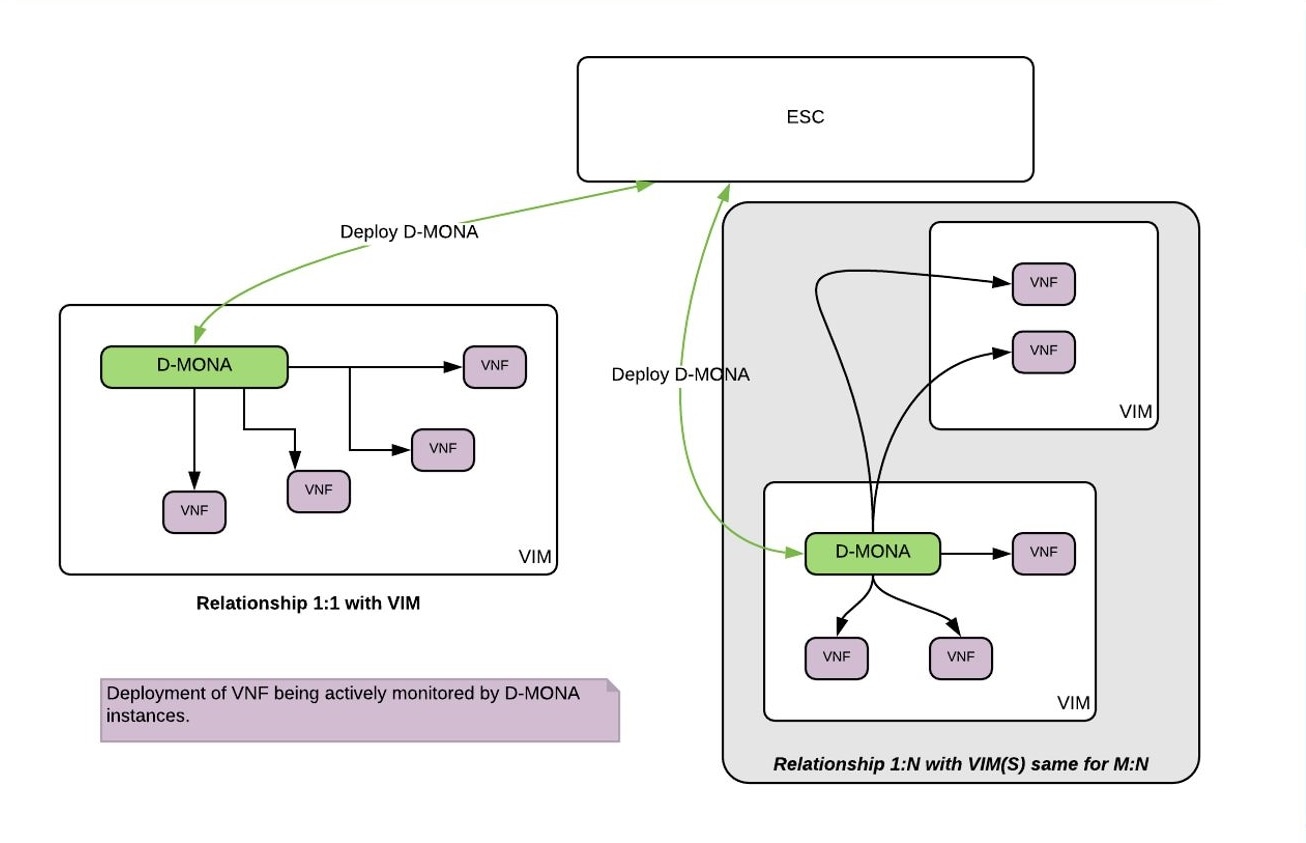
ESC supports 1:1 D-MONA deployment for a VIM. A single D-MONA instance monitors VNF on a single VIM.

For using D-MONA in your infrastructure, you must:

  1. Deploy the D-MONA with the monitoring infrastructure.

  2. Deploy the VNFs using the D-MONA for the monitoring of their respective liveness.

Figure 1. D-MONA Deployment Types

If you are not using D-MONA for monitoring, see Monitoring Virtual Network Functions section.

Configuring D-MONA

The D-MONA reusing the ESC 5.0 image. You can view 2 types of runtime behavior, one where you can view the full behavior expected from a typical ESC deployment, whereas, and the other one depicts the capabilities provided by D-MONA.

The D-MONA runtime behavior are controlled by the day-0 configuration that are provided to the VM at deployment time. For more information on day zero configuration, see the D-MONA Day Zero Configuration section.

D-MONA Day Zero Configuration

The following example shows D-MONA SSH VM access configuration:

<configuration>
	<dst>--user-data</dst>
	<file>file:///opt/cisco/esc/esc-config/dmona/iser-data.template</file>
	<variable>
		<name>vm_credentials</name>
		<val>REPLACED_WITH_GENERATED_PWD</val>
	</variable>
</configuration>

The vm_credentials passes the encrypted password to admin for SSH access to the D-MONA.

The following example shows the D-MONA ESC certificate configuration:

<configuration>
	<dst>/opt/cisco/esc/moan/dmona.crt</dst>
	<data>$DMONA_CERT</data> 
</configuration>

The following example shows the D-MONA application user data configuration:

<configuration>
<dst/opt/cisco/esc/mona/config/application-dmona.properties</dst>
	<file>file:///opt/cisco/esc/esc-config/dmona/application-dmona.template</file> 
	<variable>
		<name>monitoring.agent</name>
		<val>true</val>
	</variable>
	<variable>
		<name>monitoring.agent.vim.mapping</name>
		<val>true</val>
	</variable>
	<!—Used to enable Basic Authentication for communication with the D-MONA Application.->
	<variable>
		<name>security_basic_enabled</name>
		<val>true</val>
	</variable>
	<variable>
		<name>security_user_name</name>
		<val>REPLACED_WITH_USER_NAME</val>
	</variable>
	<variable>
		<name>security_user_password</name>
		<val>REPLACED_WITH_USER_PASSWORD</val>
	</variable>

</configuration>
Deploying VNFs using D-Mona for Monitoring

For deploying the VNFs using D-MONA for monitoring, you must have the D-MONA with the monitoring.agent.vim.mapping day-0 variable set to true within the same vim_connector. Only when the ESC detects the D-MONA, the monitoring of the VNF is assigned to that D-MONA, otherwise the local MONA handles the monitoring as per all the previous ESC releases.

The following example shows the D-MONA ESC deployment descriptor:

<esc_datamodel xmlns="http://www.cisco.com/esc/esc">
    <tenants>
        <tenant>
            <name>sample</name>
            <deployments>
                <deployment>
                    <name>sample-dmona-dep</name>
                    <vm_group>
                        <name>g1</name>
                        <!-- Image version you want to use for dmona deployment. Image must already exist in VIM -->
                        <image>ESC-5_0_0_<latest></image>
                        <flavor>m1.large</flavor>
                        <bootup_time>600</bootup_time>
                        <recovery_wait_time>0</recovery_wait_time>
                        <interfaces>
                            <interface>
                                <nicid>0</nicid>
                                <network>esc-net</network>
                            </interface>
                        </interfaces>
                        <kpi_data>
                            <kpi>
                                <event_name>VM_ALIVE</event_name>
                                <metric_value>1</metric_value>
                                <metric_cond>GT</metric_cond>
                                <metric_type>UINT32</metric_type>
                                <metric_collector>
                                    <type>HTTPGET</type>
                                    <nicid>0</nicid>
                                    <poll_frequency>3</poll_frequency>
                                    <polling_unit>seconds</polling_unit>
                                    <continuous_alarm>false</continuous_alarm>
                                    <properties>
                                        <property>
                                            <name>protocol</name>
                                            <value>https</value>
                                        </property>
                                        <property>
                                            <name>port</name>
                                            <value>8443</value>
                                        </property>
                                        <property>
                                            <name>path</name>
                                            <value>mona/v1/health/status</value>
                                        </property>
                                    </properties>
                                </metric_collector>
                            </kpi>
                        </kpi_data>
                        <rules>
                            <admin_rules>
                                <rule>
                                    <event_name>VM_ALIVE</event_name>
                                    <action>ALWAYS log</action>
                                    <action>TRUE servicebooted.sh</action>
                                    <action>FALSE recover autohealing</action>
                                </rule>
                            </admin_rules>
                        </rules>
                        <config_data>
                            <!-- day 0 configuration -->
                            <configuration>
                                <dst>--user-data</dst>
                                <file>file:///opt/cisco/esc/esc-config/dmona/user-data.template</file>
                                    <variable>
                                        <name>vm_credentials</name>
                                        <val><REPLACE_WITH_GENERATED_PWD></val>
                                        <!--password field will look something like the following-->
                                        <!-- <val>$6$rounds=656000$pswsUsR7Iz9NIfA4$7E1sEGV8rhDieNDhc824lYwL3cQ8Rsgp9Nds.OZBe9rG/DE56YWk0kDZoB.DsjATrj9pcBnAe.rSOpWll2r0N/</val>-->
                                    </variable>
                            </configuration>
                            <configuration>
                                <dst>/opt/cisco/esc/mona/dmona.crt</dst>
                                <data>$DMONA_CERT</data>
                            </configuration>
                            <configuration>
                                <dst>/opt/cisco/esc/mona/config/application-dmona.properties</dst>
                                <file>file:///opt/cisco/esc/esc-config/dmona/application-dmona.template</file>
                                <variable>
                                    <name>monitoring.agent</name>
                                    <val>true</val>
                                </variable>
                                <!-- property for one to one mapping-->
                                <variable>
                                    <name>monitoring.agent.vim.mapping</name>
                                    <val>true</val>
                                </variable>
                                <!-- property to enable basic auth in dmona. Not to be confused with basic auth for esc -->
                                <variable>
                                    <name>security_basic_enabled</name>
                                    <val>true</val>
                                </variable>
                                <variable>
                                    <name>security_user_name</name>
                                    <val>dmona</val>
                                </variable>
                                <variable>
                                    <name>security_user_password</name>
                                    <val>defaultUser</val>
                                </variable>                                 
                            </configuration>
                        </config_data>
                    </vm_group>
                </deployment>
            </deployments>
        </tenant>
    </tenants>
</esc_datamodel>

Recovering the D-MONA

You can recover the D-MONA completely. During the recovery process, monitoring VNFs by D-MONA is not possible. Only on successful completion of D-MONA recovery, the VNFs monitoring state is automatically refreshed by reprogramming each VNF monitoring rule.

Retrieving D-MONA Logs

Access the D-MONA with the vm_credentials password that was provided as part of the D-MONA day-0 configuration.

To retrieve the D-MONA logs, use the following command:

MethodType:
GET
MONA EndPoint:
https://ip-address:8443/mona/v1/files/getLogs
HTTPSRequestHeaders: 
--remote-name --remote-header-name --write-out "Downloaded %{filename_effective} file" --silent -k -u <username>:<password>

Where ip-address is the IP Address of the targeted D-MONA and username, password are the username and password provided as day-0 configuration at deployment of the D-MONA.

For complete list of all ESC logs, see ESC Logs section in the ESC Administration Guide.

For ETSI-related information, see Monitoring VNF Using D-MONA chapter in the Cisco Elastic Services Controller ETSI NFV MANO User Guide.