Cisco 8000 Hardware Emulator Datasheet
Available Languages
Bias-Free Language
The documentation set for this product strives to use bias-free language. For the purposes of this documentation set, bias-free is defined as language that does not imply discrimination based on age, disability, gender, racial identity, ethnic identity, sexual orientation, socioeconomic status, and intersectionality. Exceptions may be present in the documentation due to language that is hardcoded in the user interfaces of the product software, language used based on RFP documentation, or language that is used by a referenced third-party product. Learn more about how Cisco is using Inclusive Language.
- US/Canada 800-553-2447
- Worldwide Support Phone Numbers
- All Tools
 Feedback
 Feedback
Contents
Benefits
Key benefit for customers:
● Early access to virtual hardware for testing and integration
● Integration with network emulation environments
● Integration into CI/CD development pipelines
● Evaluation of next generation IOS-XR.
Currently Supported Platforms:
Fixed and centralized chassis:
● 8201
● 8201-32FH
● 8202
● 8202-32FH-M
● 8212-48FH-M
● 8223-64EF-M
● 8101-32H
● 8102-64H
● 8111-32EH
8808 and 8804 modular chassis with different linecards:
● 88-LC1-36EH
● 88-LC1-5Y8H-EM
● 8K-MPA-4H
● 86-MPA-14H2FH-M
● 8K-MPA-16H
● 8K-MPA-16Z2D
● 8K-MPA-4D
● 8711-32FH-M
● 8800-RP
● 88-LC0-36FH-M
● 88-LC0-36FH
● 8800-LC-48H
● 8808-FC
● 88-LC0-34H14FH
Note 1: Additional emulated platforms will be released coinciding with the introduction of new 8000 routing hardware.
The 8000e product line leverages type 2 hardware accelerated hypervisor technology and benefits from running on BareMetal servers. Being a hardware emulator, the 8000e is a distinct software product and is independent of the guest operating system.
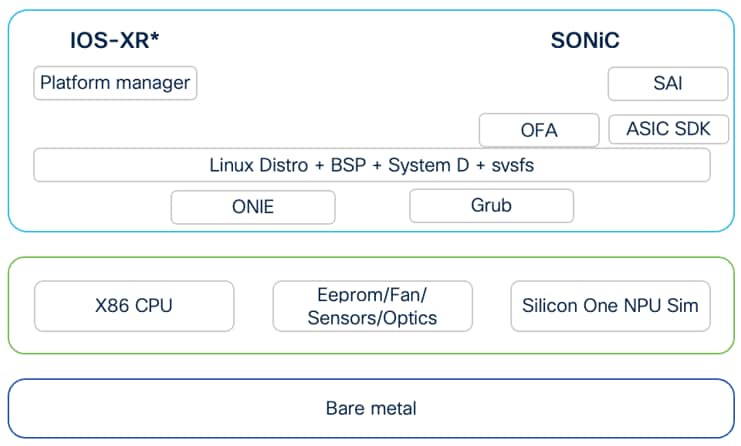
While single board/CPU platforms can be represented with an instance of the hypervisor, modular chassis such as the 8808 require multiple instances. For this reason, the computational requirement for a populated modular chassis grows with the number route processors, Line cards, and Fabric cards simulated in the system. This also implies the use of a custom orchestrator for network topologies.
The software package comes with complete toolset required to create and run topologies of emulated routers. Using our solution, users can orchestrate different 8000 platform emulators, other virtual routers, traffic generators. The topology specification in YAML notation. The toolset includes a python library to manage the simulation lifecycle.
Alternatively, users are enabled to build docker wrapped versions of each platform. With this approach the 8000 routers can be integrated into any orchestration system that supports docker virtual routers, such Cisco Modeling Labs, ContainerLab, GNS3, or EVE-NG.
Deployment options are:
| Deployment |
Base System |
OS |
What is provided |
Note |
| Linux Server installation |
64+ vcpu |
Ubuntu22
|
Linux packages + install scripts |
Recommended configuration is 128 VCPUs and 512G+ memory to support later topologies |
| Docker env |
6 VCPU per board + 20G memory |
Ubuntu22+ or Redhat8+ with docker support |
Tools to build Docker instance |
Same server recommendation as above. |
| AWS |
Bare metal instance |
Ubuntu22 |
Automation scripts to create AMI images |
|
Note 1: Resource requirements cover ability to run single instances in nested virtualization mode.
| Emulator |
Operating System |
VCPU |
Memory |
Disk |
Comment |
| Fixed Chassis |
IOS-XR |
4+ |
20-32G |
30G+ |
|
| Modular Chassis |
IOS-XR |
4+/board |
20-32G/board |
30G+/board |
|
| Fixed Chassis |
SONIC |
6+ |
12G+ |
30G+ |
|
While 8000 emulators attempt to model the hardware router, there are limitations:
| Feature |
Emulator limitation |
| Traffic shaping and rate limiting |
Functionality is limited and does not match hardware. |
| Data Throughput |
Dataplane throughput is in the thousands of packets a second and cannot handle line rate traffic. |
| Counters |
Some hardware counters are not supported by the emulator. |