Installation, Maintenance, and Upgrade

Installing a Transceiver Module


Caution


The metal surface of a transceiver can become hot when it is powered by the host. Caution must be taken when touching the surface during services.


Warning


  • This device contains laser. Using other than as described in the installation guide, repair, or disassembly may cause damage, which could result in hazardous exposure to infrared laser emissions that are not visible.

  • Never stare into open optical ports.

  • To prevent damage to a transceiver and to any connected cables, disconnect all cables before installing or removing a module.

  • Prior to installing a transceiver, power capabilities of the cage must be verified with the appliance vendor.


Note


  • A transceiver is a hot-pluggable device. There is no need to power down the host appliance when installing or removing a module.

  • Do not remove the dust cap from the transceiver until directed to do so in the following procedure. In addition, always keep the dust caps on the fiber-optic cable connectors until ready to make a connection.


A bail latch secures the transceiver module in a port socket.
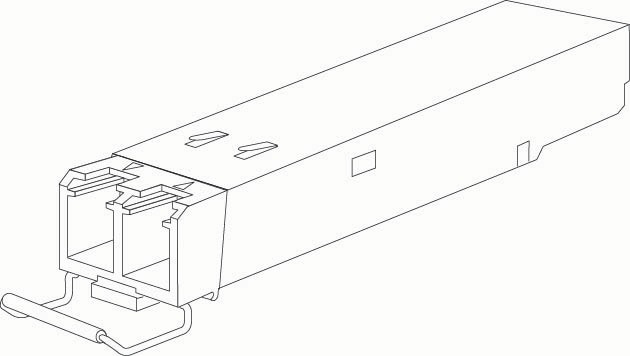
Figure 1. SFP Module with a Bail Clasp Latch

To install an optical transceiver module into a transceiver cage, follow these steps:

Procedure


Step 1

Ensure that the bail latch is closed.

Step 2

Verifying that the transceiver cage notch and hinge are along the same edge, insert the module into the transceiver cage until the module latches into place. The module is fully seated when you hear a click.
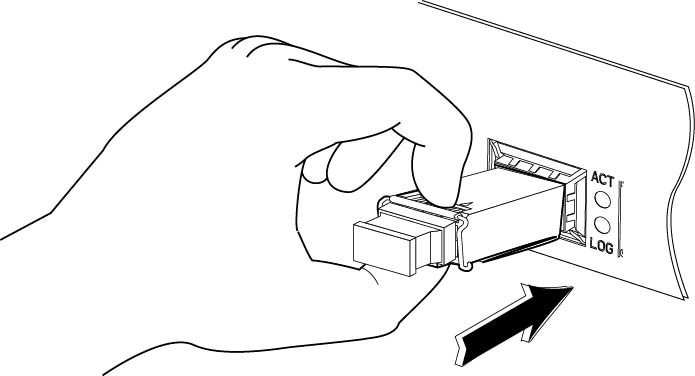
Figure 2. Inserting a Transceiver Module

Step 3

At one end of the fiber-optic cable, remove the dust caps from the connectors. Save the dust caps for future use.

Step 4

Inspect and clean the now uncovered fiber-optic end faces of the connectors.

Step 5

Remove the dust cap from the transceiver module. Save the dust cap for future use.

Step 6

Connect the connectors of the fiber-optic cable to the transceiver module.


Removing a Transceiver Module

To remove an optical transceiver module from a transceiver cage, follow these steps:

Procedure


Step 1

Disconnect the cable connector from the transceiver module.

Step 2

Reinstall the dust cap onto each cable connector.

Step 3

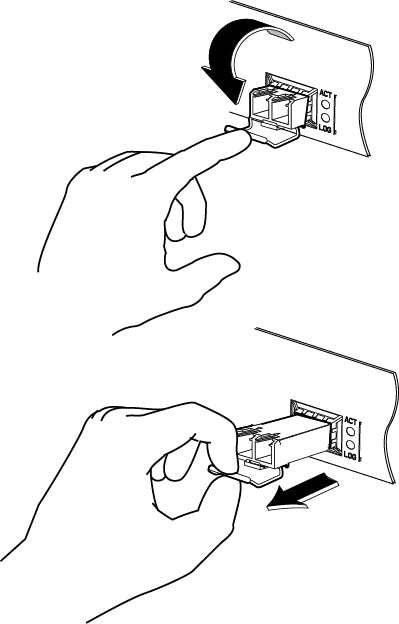
Open the bail latch by rotating it 90 degrees, grasp the transceiver module, and then carefully pull the module from the cage.

Figure 3. Removing a Transceiver Module

Step 4

Close the bail latch.

Step 5

Reinstall the dust cap into the transceiver module.