Replacing Power Supplies
The server can have one or two Titanium 80PLUS rated power supplies. When two power supplies are installed they are redundant as 1+1 by default, but they also support cold redundancy mode. Cold redundancy (CR) suspends power delivery on one or more power supplies and forces the remainder of the load to be supplied by the active PSU(s). As a result, total power efficiency is improved by best utilizing the PSU efficiency when compared to load characteristics.
-
See also Power Specifications for more information about the power supplies.
This section includes procedures for replacing AC and DC power supply units. See Replacing AC Power Supplies.
Replacing AC Power Supplies
 Note |
If you have ordered a server with power supply redundancy (two power supplies), you do not have to power off the server to replace a power supply because they are redundant as 1+1. |
Note |
Do not mix power supply types or wattages in the server. Both power supplies must be identical. |
Procedure
|
Step 1 |
Remove the power supply that you are replacing or a blank panel from an empty bay: |
||
|
Step 2 |
Install a new power supply:

|
Replacing DC Power Supplies
Note |
This procedure is for replacing DC power supplies in a server that already has DC power supplies installed. If you are installing DC power supplies to the server for the first time, see Installing DC Power Supplies (First Time Installation). |
 Warning |
A readily accessible two-poled disconnect device must be incorporated in the fixed wiring. Statement 1022 |
Warning |
This product requires short-circuit (overcurrent) protection, to be provided as part of the building installation. Install only in accordance with national and local wiring regulations. Statement 1045 |
Warning |
Installation of the equipment must comply with local and national electrical codes. Statement 1074 |
Note |
If you are replacing DC power supplies in a server with power supply redundancy (two power supplies), you do not have to power off the server to replace a power supply because they are redundant as 1+1. |
Note |
Do not mix power supply types or wattages in the server. Both power supplies must be identical. |
Procedure
|
Step 1 |
Remove the DC power supply that you are replacing or a blank panel from an empty bay: |
||||||||
|
Step 2 |
Install a new DC power supply:
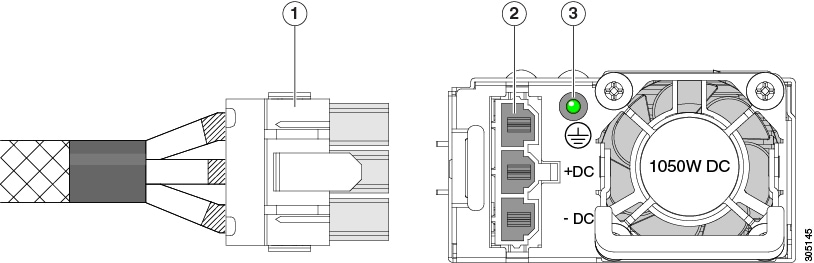
|
Installing DC Power Supplies (First Time Installation)
Note |
This procedure is for installing DC power supplies to the server for the first time. If you are replacing DC power supplies in a server that already has DC power supplies installed, see Replacing DC Power Supplies. |
Warning |
A readily accessible two-poled disconnect device must be incorporated in the fixed wiring. Statement 1022 |
Warning |
This product requires short-circuit (overcurrent) protection, to be provided as part of the building installation. Install only in accordance with national and local wiring regulations. Statement 1045 |
Warning |
Installation of the equipment must comply with local and national electrical codes. Statement 1074 |
Note |
Do not mix power supply types or wattages in the server. Both power supplies must be identical. |
 Caution |
As instructed in the first step of this wiring procedure, turn off the DC power source from your facility’s circuit breaker to avoid electric shock hazard. |
Procedure
|
Step 1 |
Turn off the DC power source from your facility’s circuit breaker to avoid electric shock hazard.
|
||||||||
|
Step 2 |
Wire the non-terminated end of the cable to your facility’s DC power input source. |
||||||||
|
Step 3 |
Connect the terminated end of the cable to the socket on the power supply. The connector is keyed so that the wires align for correct polarity and ground. |
||||||||
|
Step 4 |
Return DC power from your facility’s circuit breaker. |
||||||||
|
Step 5 |
Press the Power button to boot the server to main power mode.
|
||||||||
|
Step 6 |
See Installation Grounding, page 3-66 for information about additional chassis grounding. |
Grounding for DC Power Supplies
AC power supplies have internal grounding and so no additional grounding is required when the supported AC power cords are used.
When using a DC power supply, additional grounding of the server chassis to the earth ground of the rack is available. Two screw holes for use with your dual-hole grounding lug and grounding wire are supplied on the chassis rear panel.
Note |
The grounding points on the chassis are sized for 10-32 screws. You must provide your own screws, grounding lug, and grounding wire. The grounding lug must be dual-hole lug that fits 10-32 screws. The grounding cable that you provide must be 14 AWG (2 mm), minimum 60° C wire, or as permitted by the local code. |
 Feedback