Geo Redundancy Requirements

This chapter contains the following topics:

Crosswork Cluster Requirements

Geo redundancy solution requires double the number of VMs required for a regular Crosswork Cluster installation. For more information, see Installation Prerequisites for VMware vCenter.

Important Notes

  • To ensure synchronization between the clusters, the network connection between the data centers should be set up with a minimum bandwidth of 5 Gbps and a latency of less than 100 milliseconds.

  • While preparing an inventory file, you must include details of cluster constituents along with connectivity information.

  • Set up the DNS server for your setup. The DNS server should resolve the unified multicluster FQDN domain (for example, *.cw.cisco) you want to use and be reachable from both the clusters, Crosswork Data Gateway, NSO, and SR-PCE. For more information on the DNS setup procedure, see the Cisco Prime Network Registrar Caching and Authoritative DNS User Guide.

  • The DNS server should forward any outside domains to the external DNS servers.

  • In case of dual stack deployments, Crosswork cluster and Crosswork Data Gateway deployments should be configured in dual stack mode, with the geo FQDN pointing to the dual stack IP addresses.

  • You should sequentially bring up the active and standby clusters using the existing installer mechanism. Ensure you use the previously identified DNS server during the installation of the Crosswork cluster, Crosswork Data Gateway, and NSO. It is recommended to have multiple DNS servers, with one in each data center.

  • Applications should be installed only after enabling geo redundancy and completing the initial on-demand synchronization. Begin by installing applications on the active cluster, followed by the standby cluster.

  • Other configuration information (such as devices, providers, or destinations) must be onboarded only on the active cluster and will be synchronized between the clusters as part of the activation process.

  • The NSO in HA mode requires provider connectivity onboarding via an L3 VIP or FQDN in the Crosswork Network Controller.

  • Before enabling geo-redundancy mode, you are recommended to make a backup of the active and standby cluster.


Warning


Once the geo-redundancy mode is set up, it cannot be undone because the certificates are regenerated using common root CA. To revert to non-geo redundancy mode, you must restore the backup made before enabling the geo redundancy mode.


Port Requirements

As a general best practice, any unused ports should be disabled. To identify all open listening ports after installing and activating the applications, log in as a Linux CLI admin user on any Crosswork cluster VM and run the netstat -aln command:


Note


All IP addresses (including Virtual IP addresses) between Crosswork Cluster, Crosswork applications, and Crosswork Data Gateway must be reachable (to be pinged to/from) between each other.


Figure 1. Communication flow between Crosswork and different components

The key processes involved in the replication and accessibility between the sites:

  • The Crosswork VM intercluster checks are performed, with replication occurring over the eth0 management links between the two sites.

  • The NSO replication occurs over the management links between both sites.

  • The Crosswork Data Gateway on each site must be accessible to both the devices and the active CW cluster from either site.

  • Replication for the Crosswork cluster is a periodic process.

  • NSO replication is synchronous.

  • The Crosswork Network Controller NBI is accessible through its DNS FQDN.

The TCP/UDP port numbers must be allowed through any external firewall or access control list (ACL) deployed by the data center administrator. Depending on the NIC deployment, these ports may be applicable to only one or both NICs.

Table 1. Two NICs Crosswork communication with Crosswork Data Gateway: Comparison of traffic types across sites

Traffic Type

Ports Used

Site 1 (Active)

Site 2 (Standby)

The eth0 interfaces on both the Active and Standby Crosswork devices exchange bidirectional traffic with each other.

30651 and 30652

Crosswork eth0 (Management)

Crosswork eth0 (Management)

The eth0 interface on Crosswork Data Gateway (Active and Standby) and eth0 on Crosswork (Active) exchange bidirectional traffic with each other.

The ports are used for these purposes:

  1. 30607: REST API calls to download the collector images, system resource, and custom resource bundle.

  2. 30607: Sending the Crosswork Data Gateway vitals to Crosswork.

  3. 30608: Handling the gRPC communication to send Crosswork Data Gateway’s heartbeat.

Crosswork Data Gateway eth0 (Management)

Crosswork Data Gateway eth0 (Management)

The eth1 interface on Crosswork Data Gateway (Active) and eth1 Crosswork (Active) exchange bidirectional traffic with each other.

The ports are used for these purposes:

  1. 30607: Handling the gRPC communication with Crosswork's Magellan service.

  2. 30993, 30994, and 30995: Kafka ports used to distribute data across Crosswork's Kafka or gRPC destinations.

Crosswork Data Gateway eth1

(Northbound Data)

Crosswork Data Gateway eth1

(Northbound and Southbound Data)

The eth1 interface on Crosswork Data Gateway (Active) and device exchange bidirectional traffic with each other.

The ports are used for these purposes:

  1. 1062: SNMP trap.

  2. 9514, 9898, and 6514: Syslog UDP, TCP, and TLS.

Crosswork Data Gateway eth1

(Northbound Data)

Crosswork Data Gateway eth1

(Northbound and Southbound Data)

Table 2. Two NICs Crosswork communication with three NICs Crosswork Data Gateway: Comparison of traffic types across sites

Traffic Type

Ports Used

Site 1 (Active)

Site 2 (Standby)

The eth0 interfaces on both the Active and Standby Crosswork devices exchange bidirectional traffic with each other.

30651 and 30652

Crosswork eth0

Crosswork eth0

The eth0 interface on Crosswork Data Gateway (Active and Standby) and eth0 on Crosswork (Active) exchange bidirectional traffic with each other.

The ports are used for these purposes:

  1. 30607: REST API calls to download the collector images, system resource, and custom resource bundle.

  2. 30607: Sending the Crosswork Data Gateway vitals to Crosswork.

  3. 30608: Handling the gRPC communication to send Crosswork Data Gateway’s heartbeat.

Crosswork Data Gateway eth0 (Management)

Crosswork Data Gateway eth0 (Management)

The eth1 interface on Crosswork Data Gateway (Active) and eth1 Crosswork (Active) exchange bidirectional traffic with each other.

The ports are used for these purposes:

  1. 30607: Handling the gRPC communication with Crosswork's Magellan service.

  2. 30993, 30994, and 30995: Kafka ports that are used to distribute data across Crosswork's Kafka or gRPC destinations.

Crosswork Data Gateway eth1

(Northbound Data)

Crosswork Data Gateway eth1

(Northbound Data)

The eth2 interface on Crosswork Data Gateway (Active) and device exchange bidirectional traffic with each other.

The ports are used for these purposes:

  1. 1062: SNMP trap.

  2. 9514, 9898, and 6514: Syslog UDP, TCP, and TLS.

Crosswork Data Gateway eth2

(Southbound Data)

Crosswork Data Gateway eth2

(Southbound Data)

Unified Endpoint Requirements

  • Unified endpoint hides multiple instances in high availability for various components.

  • DNS allows endpoints to be referred via Fully Qualified Domain Name (FQDN), which should point to the active instance IP.

  • Domain zone provisioning is needed where Crosswork components have IP addresses mapped to FQDN.

  • The DNS authoritative server must have an A or AAAA entry for the IP address from you for the domain zone dedicated to Crosswork components.

Data Store Roles

Following roles are applicable for both Geo HA or non-Geo HA deployments when Postgres or Timeseries data stores are operational:

  • Leader: should be in running status.

  • Replica: indicates a regular standby.

  • Sync Standby: similar to standby replica, but applicable when synchronous mode is ON in postgresql.conf.

For robot-postgres, when synchronous mode is ON, the replica is assigned the Sync Standby role. For cw-timeseries-db, when synchronous mode is OFF, the replica retains the Replica role. The state will be streaming on the respective replica to indicate that local replication is occurring correctly within the PG cluster.

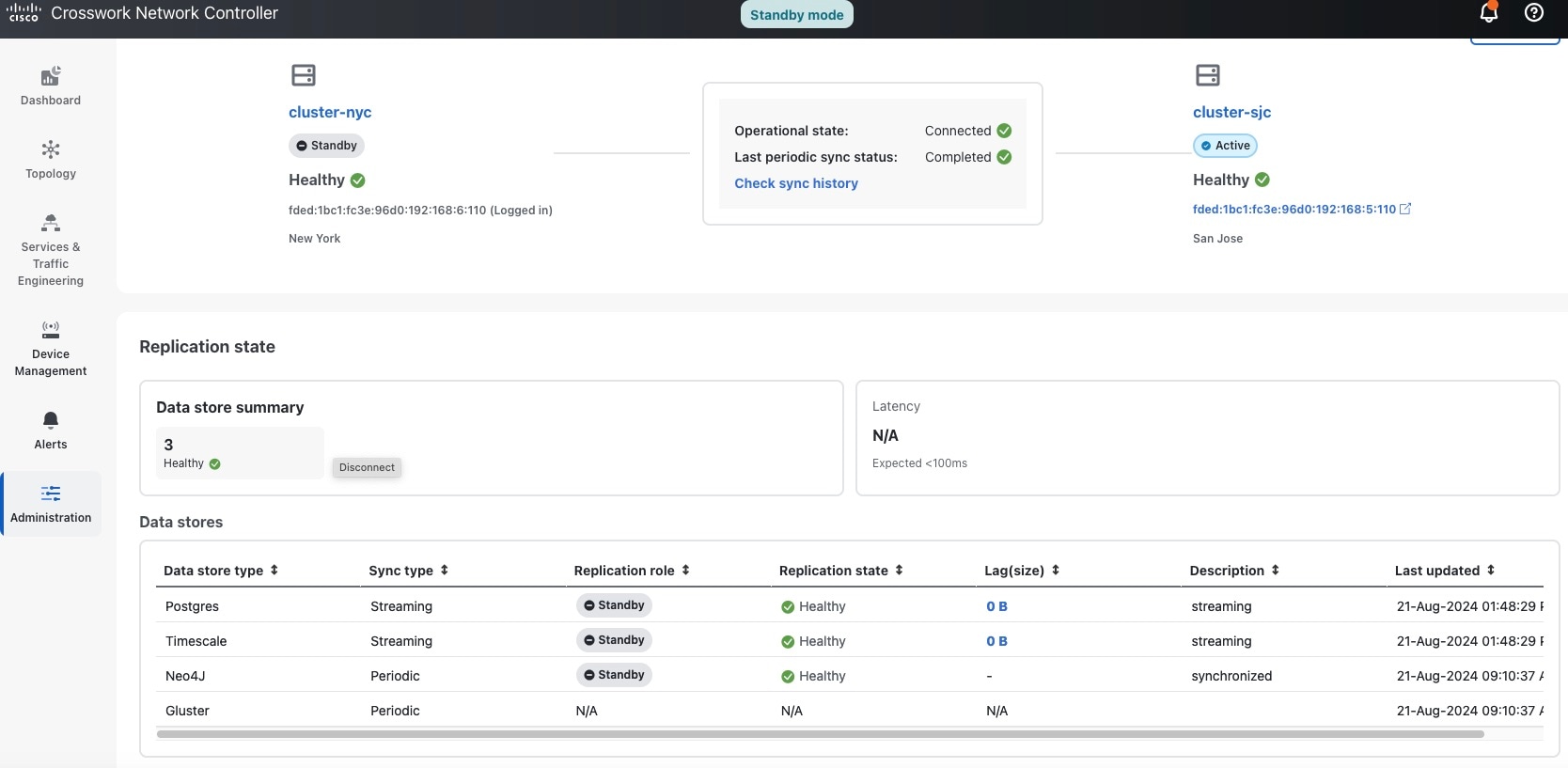
Additionally, in Geo HA deployments, when Cross Cluster replication is enabled and the standby cluster is streaming from a remote active cluster, its leader will assume the Standby Leader role, and the status will be streaming.

Sync operation

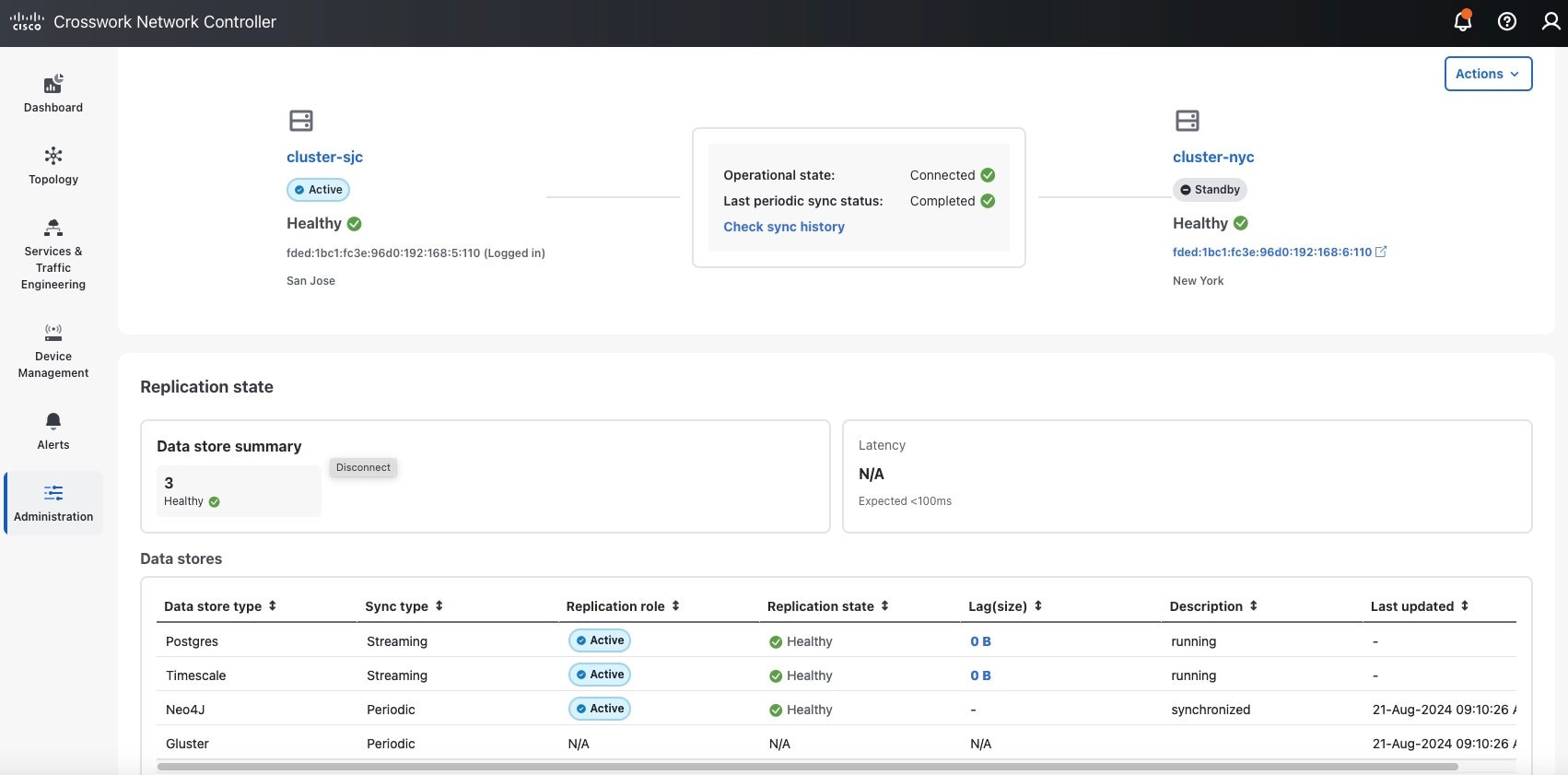
One of the initial steps in a synchronization operation cycle involves setting up asynchronous data replication for local Postgres and Timescale data stores. The system first verifies the health status of the data store. It then aligns the Cross Cluster state and data store state to ensure consistency (for example, if the service cw-timeseries-db-0 is already active for Timescale DB, the system will assign the ACTIVE_REPLICATION_ROLE to the Timescale data store). After setting the role for the active side, the system will replicate this process for the standby side. Once asynchronous replication is complete, the system initiates backup and restore operations (e.g., for the Neo4J data store). These operations can also be monitored in the Backup and restore jobs window.

During a sync, the data stores in active and standby clusters have some expected roles. After the sync, the data store roles are verified to confirm a successful sync. The active cluster should contain one Leader with running status. See the example below of the Postgres and Timescale data stores on an active cluster.

Figure 2. Roles in an active cluster during sync

Similarly, the standby cluster should contain one Standby Leader with streaming status. See the example below of the Postgres and Timescale data stores on a standby cluster.

Figure 3. Roles in a standby cluster during sync