
Inventory
Inventory in Cisco Cloud Control provides centralized visibility into the IT infrastructure for your organization. It helps you monitor security, lifecycle status, and compliance across managed assets.
Inventory capabilities
Inventory simplifies management by eliminating the need for manual API key management and complex individual configurations. It includes these capabilities:
-
Common data collector: A unified service that streamlines ingestion and removes the need for manual DevOps intervention or the creation of separate Kafka topics for new integrations.
-
AI-powered search: Use AI to find devices to review in more detail.
-
Pull- and push-based ingestion: The system keeps inventory data fresh and accurate by periodically querying integrated products (pull-based) or receiving updates sent by supported products (push-based).
-
Role-based access control (RBAC): Inventory visibility is governed by your access permissions. You see only the assets for which you have the appropriate organizational or account-level permissions.
-
Data retention: Assets are automatically removed from the system after 3 days of reporting inactivity.
-
Data syncing: How often data syncs depends on the integrated product:
-
Every 5 minutes: Cisco ISE (through Identity), Cisco Nexus Hyperfabric, and Cisco Nexus Dashboard.
-
Every 60 minutes: Cisco Meraki, Security Cloud Control, Cisco Secure Access, Collaboration Control Hub, ThousandEyes, Catalyst Center, and Catalyst SD-WAN Manager.
-
Active issues and affected assets
Use Inventory to identify active issues that need attention, review network health and asset mix, and find affected assets.
Review issues in Insights
Follow these steps to review issues in Insights.
-
Select
 and choose Inventory.
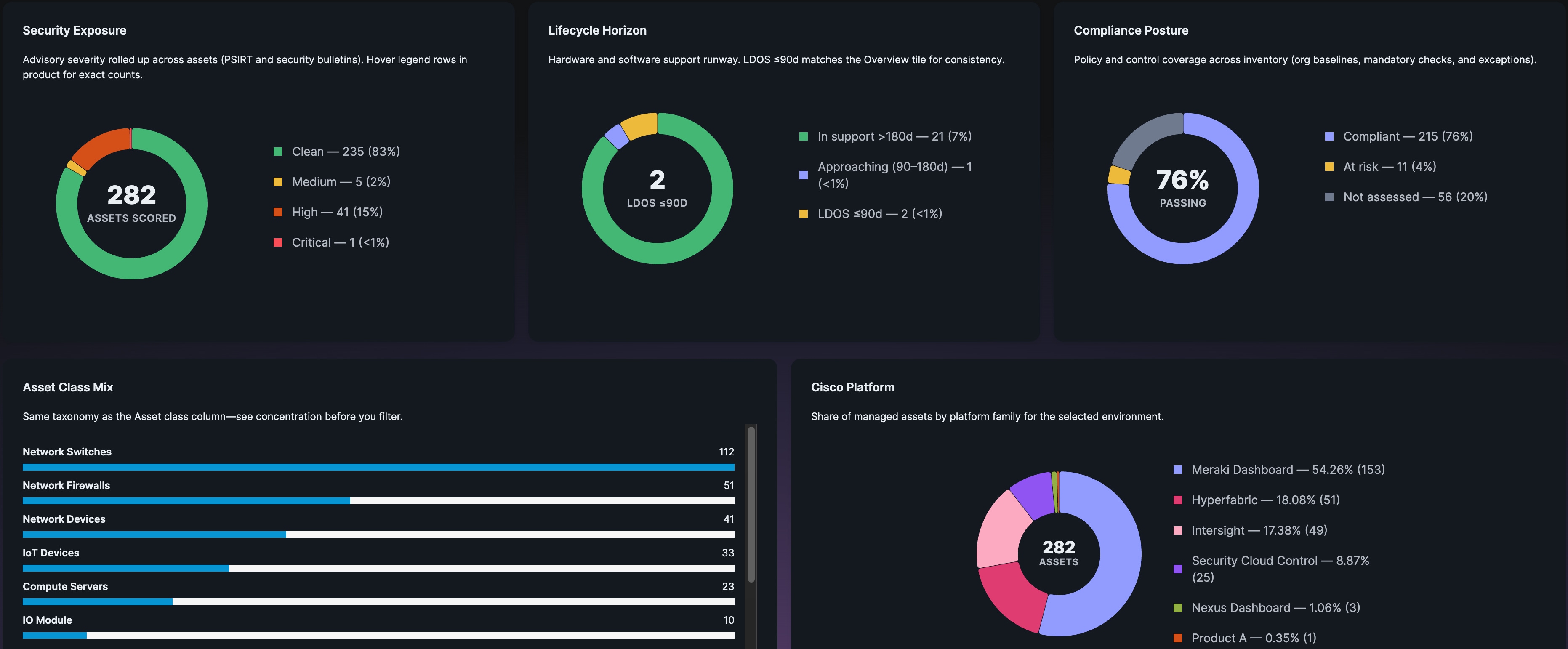
By default, Insights is displayed when you open Inventory. Insights provides a high-level summary of your network health and asset mix. It includes charts for this information:
-
Security and compliance metrics: Visualize your security exposure, lifecycle status (support runway), and overall compliance posture.
-
Asset class and platform distribution: Provide a breakdown of your infrastructure by asset type and platform.
-
-
From Status Type, select one or more options, such as Critical and Warning, to filter the insights based on your criteria.
-
Select the insight headline or Show devices to view more details about that insight.

For example, select Active Network Anomalies Need Investigation to view the list of assets affected by that insight.
Review AI Insights
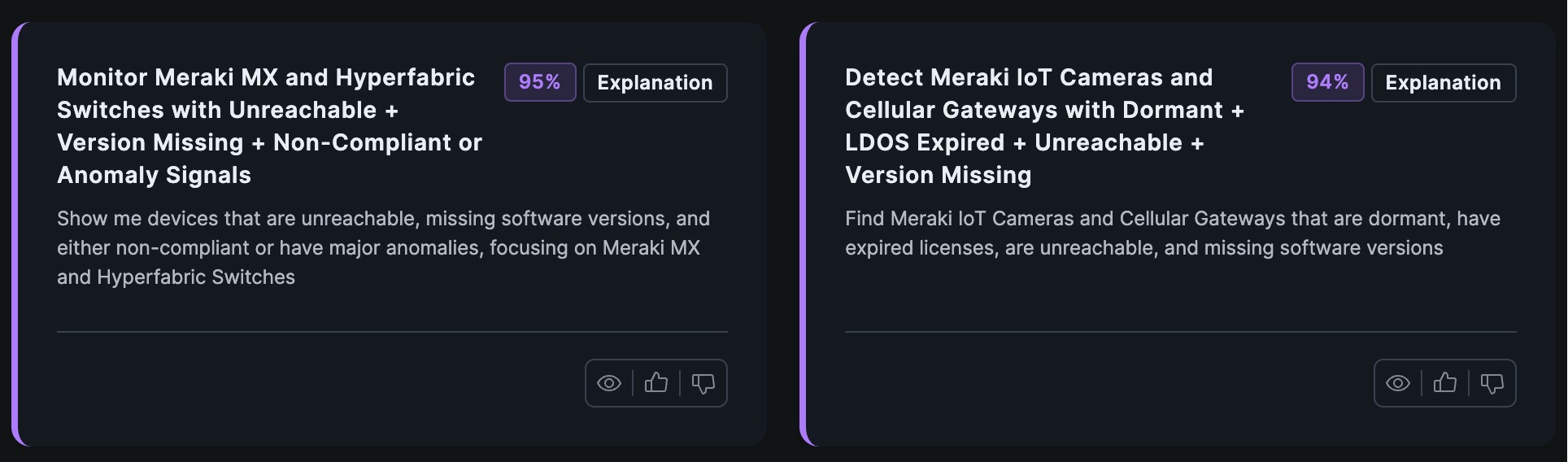
AI Insights provide suggestions from Cisco Cloud Control to help you identify and mitigate issues, such as unreachable devices.
Follow these steps to review the AI Insights in Insights.
-
Select
and choose Inventory. -
From Status Type, select AI Insights.
Insights displays only AI Insights.
-
For an insight, select Ask assistant to open the AI assistant and start investigating that insight.
-
Select View <number> more insights to review all the insights.
Review affected assets
After you review a high-level picture of your network in Insights, use Assets to identify managed assets affected by an issue. After you determine which devices need attention, work with your team to make the necessary corrections.
Follow these steps to review affected assets in Assets.
-
Select
and choose Inventory. -
Select Assets
 .
.
-
Find affected assets by using one of these methods:
-
Select a suggested search, such as Show assets with critical PSIRTS.
-
Use Search to find an asset.
-
From Select a saved search, select a previously saved search.
-
Select Filters and configure the filter criteria.
-
Select
 to configure the information that Assets displays.

To use the current search criteria again, select Save search.
-
-
Review the asset information, such as the asset name and reachability.
-
Select Actions and then do one of these actions:
-
Refresh Assets: Refresh the asset information.
-
Generate report: Save and download the asset information as a CSV file.
You can download up to 10,000 assets.
-
Review issues for an asset
You can review the active issues for an asset and determine whether the asset needs attention without leaving Assets.
Follow these steps to review the issues for an asset.
-
Select
and choose Inventory. -
Select Assets
. -
Select an asset to view details about that asset.
-
Under Issues, review the issues associated with that asset.
-
Issues displays issues for only the selected asset.
-
Issues displays the same active issues that display on the Cisco Cloud Control home page. This data is retrieved in real time.
-
-
Select View All to review all issues associated with that asset.
For the list of issues, you can:
-
Use Search to find issues by keyword.
-
Use the severity filter and select All, Critical, or Low to filter the issues by severity.
-
View connected assets
Use Topology Preview to view network connections for an asset before you troubleshoot an issue or make a change.
You can view a connection only when you have permission to view both endpoints. If your access is limited, the preview might not show all connected assets.
Follow these steps to view connected assets.
-
Select
and choose Inventory. -
Select Assets
. -
Select an asset.
-
Select Topology Preview.
-
Review connections up to two hops from the selected asset.
-
View connection details between two assets:
-
Select a link connecting two assets.
-
Select one of the listed links.
-
From the list of connections, select a connection to view details such as link status and type.
-
-
After you review the connection details, return to the asset details and select one of these options:
-
View in Topology: View the full topology.
-
View in <product name> Open the managed asset in the integrated product.
-
AI-powered search
AI-powered search helps you search inventory with natural-language queries and returns results ranked by context and meaning. This helps organizations reduce "model fatigue," where IT teams must remember specific field names, complex search syntax, and data structures across different product families.
AI-powered search supported products and limitations
Review these details before you use AI-powered search:
-
Supported products: Cisco Meraki, Security Cloud Control, Nexus Dashboard through Intersight, Nexus Hyperfabric, Catalyst Center, ThousandEyes, Collaboration Control Hub, Cisco ISE, Catalyst SD-WAN Manager, and Cisco Secure Access.
-
Limitations:
-
AI-powered search does not support logical
ORoperations. -
AI-powered search is supported only for queries longer than three words.
-
-
Performance: Expected response time is 1 to 3 seconds.
AI-powered search layers
The search platform combines three intelligence layers:
-
Query intelligence: Extracts structured filters from conversational queries, understands product taxonomy, handles relative time, and maps business terms to technical fields. For example, it interprets "switches" as the Network Switch asset class and handles phrases such as "last week".
-
Hybrid search: Finds assets using a combination of:
-
Keyword Search: Exact matching, such as serial numbers and IP addresses.
-
Semantic Search: Conceptual understanding, such as exploratory questions.
-
Smart Combination: Automatic balancing of keyword and semantic search.
-
-
Contextual ranking: Uses relevance scoring to ensure the most pertinent assets appear first and provides transparency through multiple match types.
Search modes
The system automatically selects the best approach for your query using one of these search modes:
-
Hybrid Mode (Default): Best for almost all queries. Combines keyword matching with semantic understanding.
-
Keyword Mode: Best for exact terms such as serial numbers or IP addresses.
-
Semantic Mode: Best for conceptual exploration, such as "devices that might cause problems."
AI-powered search best practices
Follow these best practices when you use AI-powered search:
-
Use natural, conversational language.
-
Expand queries to provide semantic context.
-
Combine multiple criteria in one query.
AI-powered search use cases
AI-powered search supports queries such as:
-
Exploratory questions: "Which devices might need attention?"
AI-powered search interprets this query as a combination of vulnerabilities, anomalies, and end-of-support dates.
-
Business language queries: "Show me risky Catalyst switches in our San Francisco data center."
-
Time-relative searches: "Assets not updated in the last 7 days."
-
Compliance and risk: "Non-compliant devices with more than five high-severity security issues."
-
Product lifecycle planning: "Switches reaching end-of-support in the next 90 days."