Introduction
This document describes configuration for a Point to Multipoint deployment using an AP that supports URWB and is associated with a Catalyst 9800 Series WLC. A single central node connects to multiple remote nodes. This is common in scenarios such as wireless backhaul for several field devices or edge networks connecting to a central hub.
Background Information
A single central node connects to multiple remote nodes. This is common in scenarios such as wireless backhaul for several field devices or edge networks connecting to a central hub.
Acronyms
- Point-to-Multipoint (PMP)
- Access Point (AP)
- Ultra-Reliable Wireless Backhaul (URWB)
- Wireless LAN Controller (WLC)
Components Used
The configuration involves two different types of hardware components:
- 3x Cisco Catalyst IW9167
- C9800-40
The information in this document was created from the devices in a specific lab environment. All devices used in this document started with a cleared (default) configuration. If your network is live, ensure that you understand the potential impact of any command.
Refer to Old & New terminologies from here
URWB Point-to-Multipoint Network Topology Using Catalyst 9800 Controller CLI
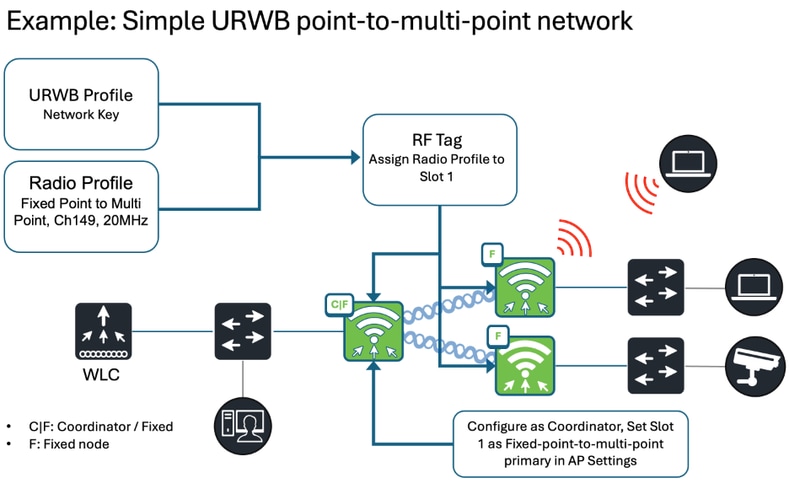
URWB Point-to-Multipoint Configuration from the Catalyst 9800 Controller
At a high level, three steps are required for deployment:
1. Access Points (APs) that support URWB must be associated with the Catalyst 9800 WLC.
2. Apply the necessary configuration to the Access Points.
3. Deploy the Access Points in the network.
Configuring URWB Network Profile
(Configure -> URWB Network Profile)
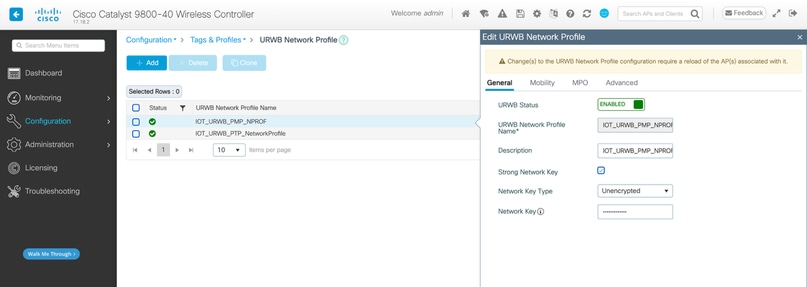
wireless profile urwb IOT_URWB_PMP_NPROF
 description IOT_URWB_PMP_NPROF
 strong-network-key
 network-key key 0 iotURWBpmp123
 no shutdown
Configuring Radio Profile
(Configuration -> Tags and Profiles -> Radio -> Radio Tab)
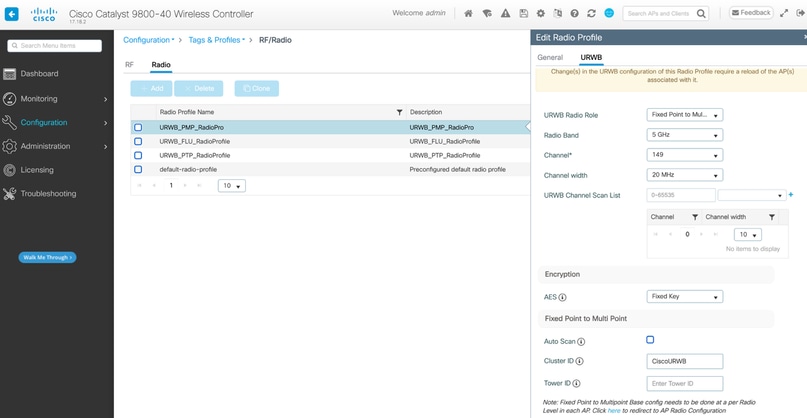
wireless profile radio URWB_PMP_RadioPro
 description URWB_PMP_RadioPro
 urwb channel 5Ghz 149
 urwb role point-to-multi-point
Configuring RF tag
(Configuration -> Tags and Profiles -> Tags -> RF Tab)
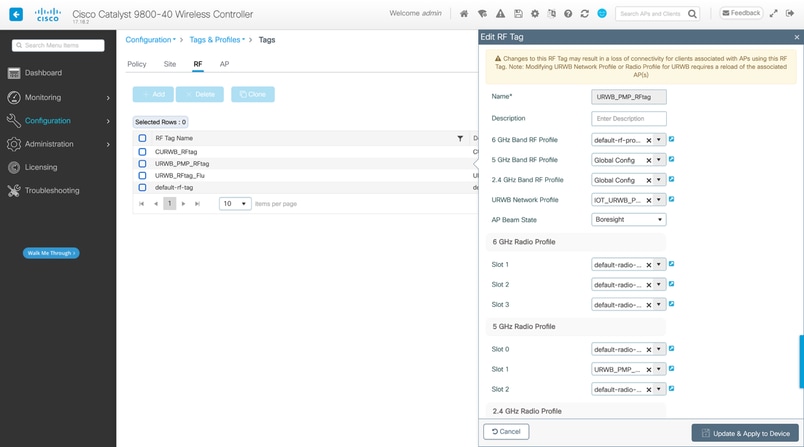
wireless tag rf URWB_PMP_RFtag
 dot11 5ghz slot1 radio-profile URWB_PMP_RadioPro
 urwb-profile IOT_URWB_PMP_NPROF
Configuring Access Points
(Configuration -> Wireless -> Access Point)
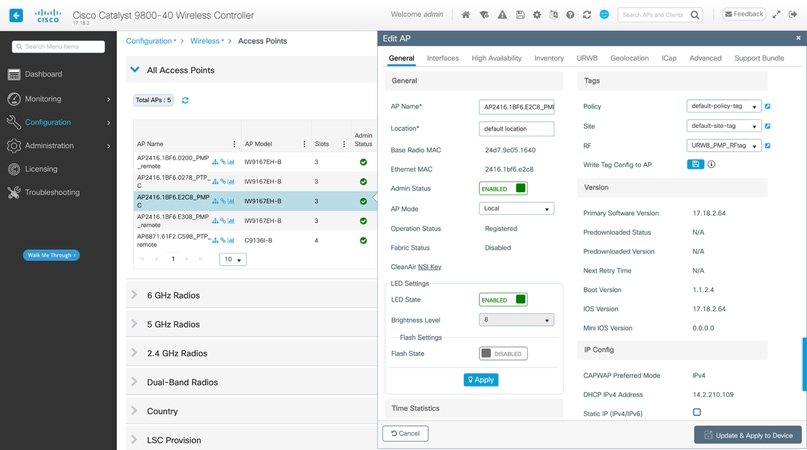
ap 2416.1bf6.0200
 rf-tag URWB_PMP_RFtag
ap 2416.1bf6.e2c8
 rf-tag URWB_PMP_RFtag
ap 2416.1bf6.e308
 rf-tag URWB_PMP_RFtag
Configuring the coordinator
(Configuration -> Wireless -> Access Point. -> URWB)
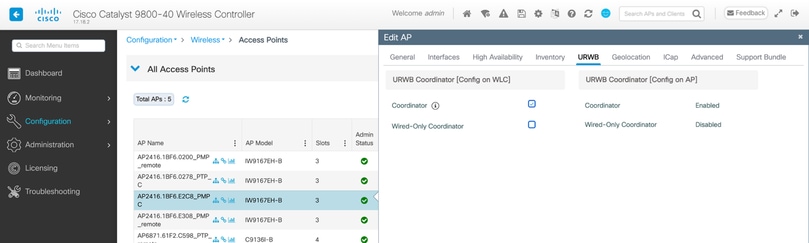
ap name <ap-name> urwb mode coordinator
Final Steps
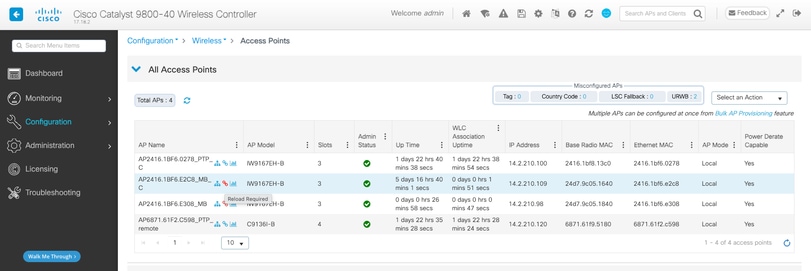
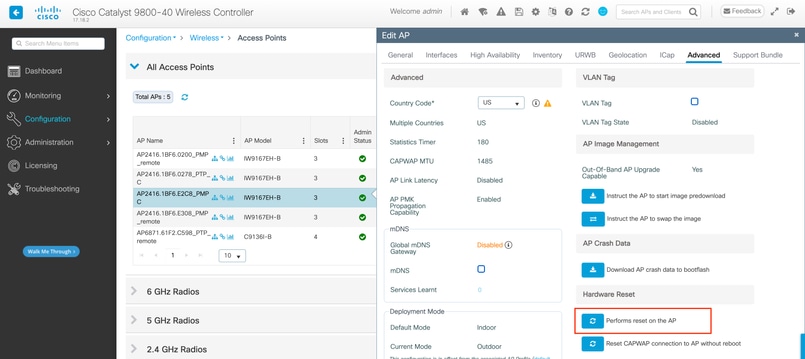
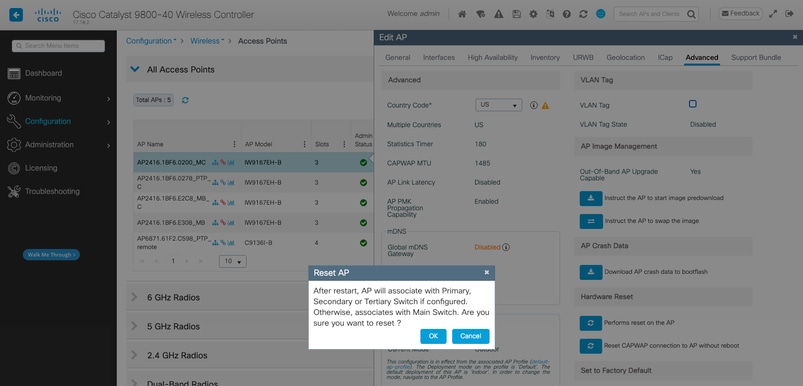
After configuring all settings, save the configuration and apply the changes. If the AP does not reset automatically, it can still require a reset for the changes to take effect. The AP table indicates if the AP requires a reload. If needed, it can be reloaded from the C9800. Once the Access Points (APs) reboot and the radios are back online, you can check the RSSI from the Antenna Alignment page and monitor live connectivity from the URWB Network Topology page.
Troubleshooting and Monitoring the URWB network
(Monitoring -> Wireless -> URWB)
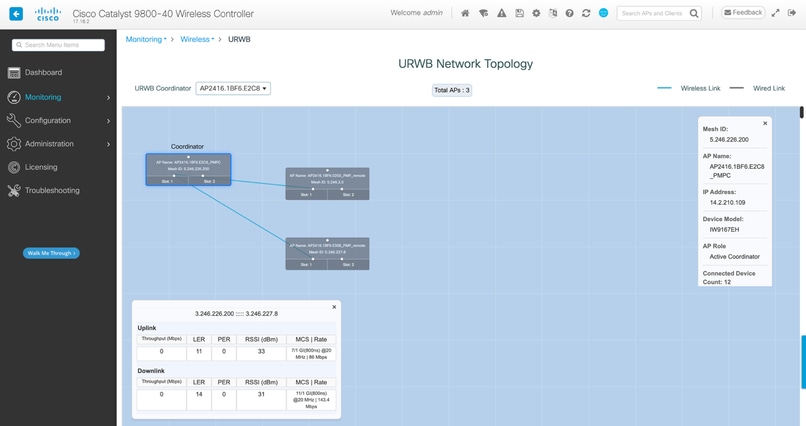
URWB Network Topology allows to check the different network key parameters index values of UPLINK and DOWNLINK. that is,. LER (Link Error Rate), PER (Packet Error Rate), RSSI (Signal Strength), throughput, and so on..
Physical Issues
- Ensure the use of CURWB-supported antennas, correctly connected to radios within recommended guidelines, and oriented in the proper direction.
- Maintain a direct line of sight for radios.
High Channel Utilization
- Mitigate interference through strategic RF planning.
- RF channels need to be scanned, and then a channel must be selected based on the results.
Throughput Issues
Throughput problems can result from several factors:
- Strong signal strength is vital for optimal throughput; weaker signals reduce modulation rates and throughput. Aim for a signal strength between -45 dBm and -70 dBm.
- High channel utilization can also have a severe impact on throughput.
Latency Issues
Latency issues, particularly in sensitive applications, can stem from:
- Inadequate signal strength.
- Interference affecting frequency performance.
Debugs on the WLC
URWB exec debug:
set platform software trace wncd chassis active R0 urwb-exec debug
URWB config debug:
Set platform software trace wncd chassis active R0 urwb-config debug
URWB database debug
Set platform software trace wncd chassis active R0 urwb-db debug
CLI commands on the AP
Show urwb modeconfig
Show urwb mpls config
Show urwb dot11Radio <> config
Show urwb mesh route status
Show urwb eng-stats

 Feedback