Introduction
This document describes configuration for a P2P deployment using an AP that supports URWB and is associated with a Catalyst 9800 Series WLC.
Background Information
Acronyms and Initialisms
Point-to-Point (P2P)
Access Point (AP)
Ultra-Reliable Wireless Backhaul (URWB)
Wireless LAN Controller (WLC)
New Terms with URWB in Catalyst 9800
For users familiar with standalone URWB deployments, these terms have been introduced or redefined for URWB on the Catalyst 9800 WLC, starting with software version 17.18.1:
|
Standalone URWB Term
|
9800 URWB Term
|
|
Mesh End
|
Coordinator
|
|
Quadro
|
URWB Network Topology
|
|
Overlay Only
|
Autotap loop avoidance (process)
|
|
Radio (FM) / Access Point (IW)
|
Access Point
|
|
Fixed (radio mode)
|
Fixed
|
|
Fluidmax (radio mode)
|
Fixed Point to Multi Point
|
|
Fluidmax Primary/Master
|
Fixed Point to Multi Point
|
|
Fluidmax Secondary/Slave
|
Fixed Point to Multi Point
|
|
Fluidity (radio mode)
|
Mobility (fluidity Role)
|
|
Infrastructure (Fluidity Unit Role)
|
Mobility Base (Fluidity Role)
|
|
Vehicle (Fluidity Unit Role)
|
Mobility Client
|
|
Vehicle to Vehicle
|
Mobility Client-to-Client Handoff
|
|
Infrastructure (Wireless Relay)
|
Base Relay
|
|
Passphrase
|
Network Key
|
Supported Topologies
URWB supports these deployment topologies:
- Fixed Mesh: In this topology, multiple nodes are interconnected, enabling data to be routed dynamically through the most efficient path. This is ideal for large industrial sites or campuses requiring redundancy and self-healing capabilities.
- Point-to-Multipoint (P2MP): A single central node connects to multiple remote nodes. This is common in scenarios such as wireless backhaul for several field devices or edge networks connecting to a central hub.
- Mobility: This topology supports connectivity for moving assets like vehicles or robots. It is essential for use cases requiring continuous, low-latency communication while in motion.
URWB Point-to-Point Configuration from the Catalyst 9800 Controller CLI
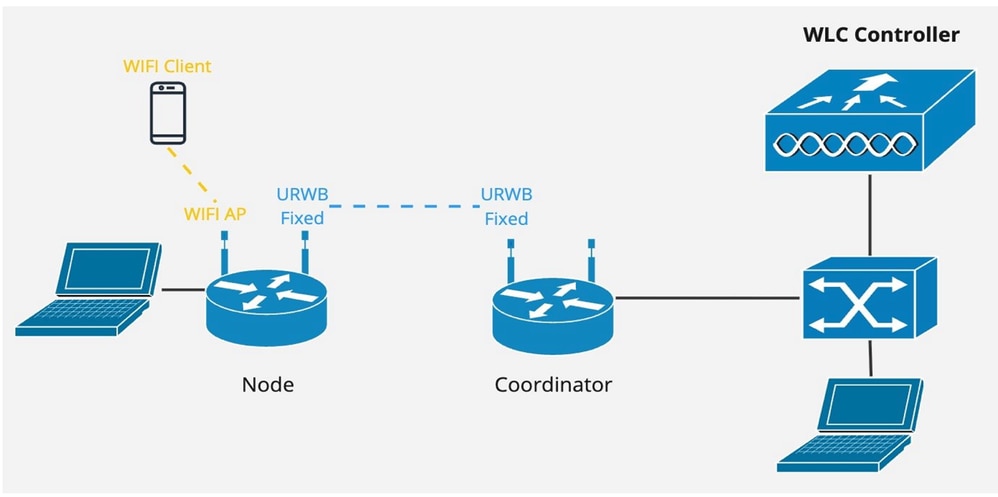
At a high level, three steps are required for deployment:
- An Access Point (AP) supporting URWB must be associated with the Catalyst 9800 WLC.
- Apply the necessary configuration to the Access Points.
- Deploy the Access Points in the network.
The AP requires these tags to be applied:
- Policy Tag: Associates the required WLAN and wireless policy profile. This tag is used for radio slots providing wireless service to clients (if the configuration needs both CAPWAP & URWB on the same AP)
Example Policy Tag Configuration:
wlan lab_p2p 100 lab_p2p

      radio policy dot11 5ghz

      security wpa psk set-key ascii 0 hello4578965412

      no security wpa akm dot1x

      security wpa akm psk

      no shutdown


wireless profile policy lab_policy
      no shutdown


wireless tag policy policy_tag_lab

      wlan lab_p2p policy lab_policy
- Site Tag: Associates the required AP profile.
Example Site Tag Configuration:
wireless country US

ap profile lab-ap-profile

 country US

 description "Lab AP profile"

 mgmtuser username admin password 0 WWiot321! secret 0 WWiot321!

 ssh

wireless tag site default-site-tag

 ap-profile lab-ap-profile
- RF Tag: Associates the required URWB profile and radio profile.
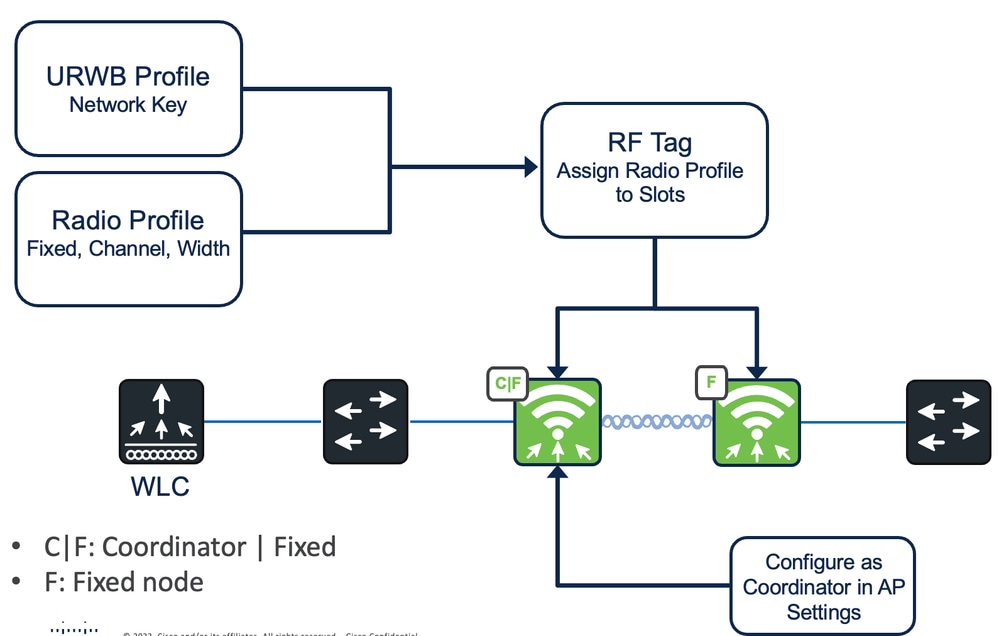
Example URWB Profile Configuration:
wireless profile urwb p2p_test

 network-key key 0 Hello123456789

 no shutdown

Example Radio Profile Configuration:

wireless profile radio urwb_test

 urwb channel 5Ghz 60

 urwb cwidth 40MHz

 urwb role fixed

RF Tag Configuration (This associates both the URWB and the radio profile):

wireless tag rf curwb_rf_tag

 dot11 5ghz slot1 radio-profile urwb_test

 dot11 5ghz slot2 radio-profile urwb_test

 urwb-profile p2p_test
Note: In this example, both 5GHz radio slots have the URWB profile attached. If the deployment requires, URWB and CAPWAP for Wireless, the profiles must be configured and applied accordingly.
Finally, these tags must be applied to the APs:
ap 2416.1bf6.e308

 rf-tag curwb_rf_tag

 site-tag default-site-tag

 policy-tag policy_tag_lab
Coordinator AP
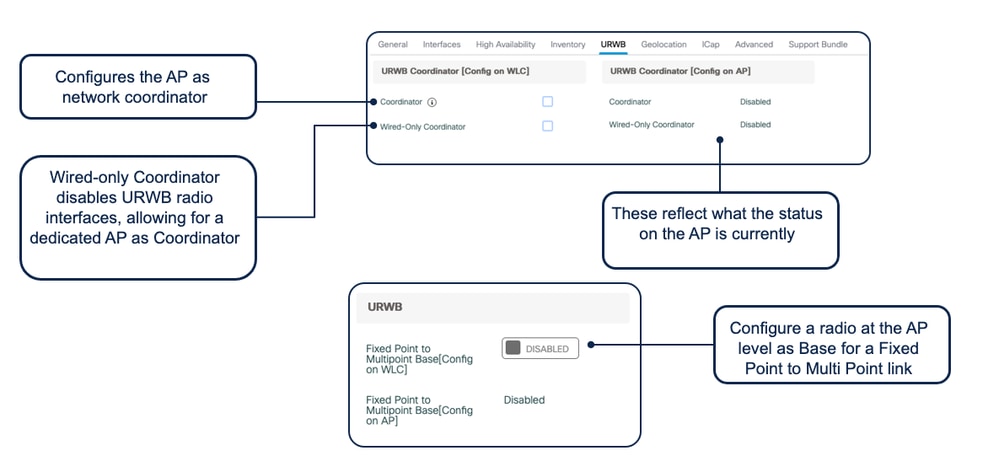
In a Point-to-Point (P2P) deployment, the AP connected to the wired network segment must be configured as the Coordinator. The Coordinator (also known as a Mesh End) AP is responsible for collecting and sending URWB network statistics to the controller. This configuration is applied using this command:
ap name <ap-name> urwb mode coordinator
This command assigns the Coordinator role to the specified AP. Coordinator APs serve as the entry or exit points for traffic flowing to or from the wired infrastructure. A reboot of the AP is required for the configurations to synchronize and take effect.
From the GUI (under the AP)
CLI commands on the WLC
show ap name <ap-name> urwb info

show ap name <ap-name> dot11 5ghz slot <0|1|2> urwb detail
Debugs on the WLC
URWB exec debug:

Set platform software trace wncd chassis active R0 urwb-exec debug

URWB config debug:

Set platform software trace wncd chassis active R0 urwb-config debug

URWB database debug

Set platform software trace wncd chassis active R0 urwb-db debug
CLI commands on the AP:
Show urwb modeconfig

Show urwb mpls config

Show urwb dot11Radio <> config

Show urwb mesh route status

Show urwb eng-stats

 Feedback