Introduction
This document describes the concept, implementation, and benefits of the FAR Buffering Limit feature available in Cisco CUPS product.
Prerequisites
Requirements
Cisco recommends that you have knowledge of these topics:
- Long Term Evolution (LTE) Mobility
- Control Plane and User Plane Functions (CUPS) Architecture
Components Used
This document is not restricted to specific software and hardware versions.
The information in this document was created from the devices in a specific lab environment. All of the devices used in this document started with a cleared (default) configuration. If your network is live, ensure that you understand the potential impact of any command.
Environment
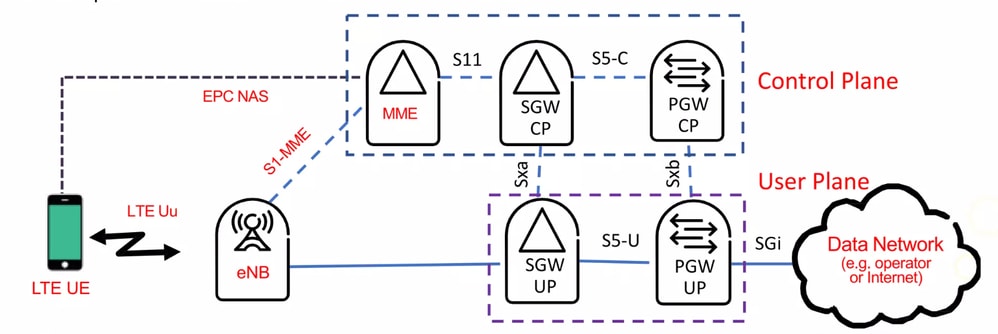 Environment
Basic Concept of FAR
The Forwarding Action Rule (FAR) dictates the action the User Plane function (Serving Gateway (SGW)-U or PDN Gateway (PGW)-U) must take for packets that match a corresponding Packet Detection Rule (PDR). The possible actions specified in a FAR include:
- Forward the packet to a specified destination (for example; the internet/Packet Data Network (PDN) or the eNodeB)
- Drop the packet
- Duplicate the packet (used in Lawful Interception or for traffic mirroring purposes)
- Buffer the packet, in which case an associated buffering action rule can specify parameters for buffering and notifying the Control Plane function
Essentially, the FAR enables the Control Plane to remotely and dynamically manage User Plane traffic flow and policy enforcement, which is key to the flexibility and scalability benefits of the CUPS architecture.
Background Information
When an User Equipment (UE) goes to idle state, Mobility Management Entity (MME) sends a Release Access Bearer Request to SGW-C in order to release all S1-U bearers for the UE. At the same time SGW-C informs the SGW-U to drop all downlink packets and update bearer states to idle while the User Plane function starts buffering Downlink Data to a certain limit by default.
After all user planes respond, the control plane updates the subscriber context and informs the MME that the bearers have been released. This procedure ensures that all the necessary consumed resources are freed during subscriber Inactivity. This mechanism helps efficiently manage UE state transitions and resource utilization in the network.
Problem Description
In a normal scenario, whenever an UE goes to idle state, User Plane function starts buffering Downlink Data. By default on CUPS platform upto five packets are buffered per FAR. Upon receipt of the first Downlink Data packet on the SGW-U, SGW-C sends a Downlink Data Notification (DDN) request to MME in order to start paging the UE to check its availability to accept the Downlink (DL) traffic. On paging success, MME sends a Modify Bearer Request to SGW-C which informs the SGW-U to de-buffer data packets already in its queue and start forwarding DL packets as before.
In case due to some reason if MME is unable to page UE or MME could not get a paging success response from UE before this five packet buffer limit threshold on the SGW-U is reached, you can see an increase in DDN buffer overflow drop packets in the Downlink direction. This can result in potential degradation of mobile data service quality for end users, possibly affecting overall network performance and user experience.
DDN Success Scenario Call Flow
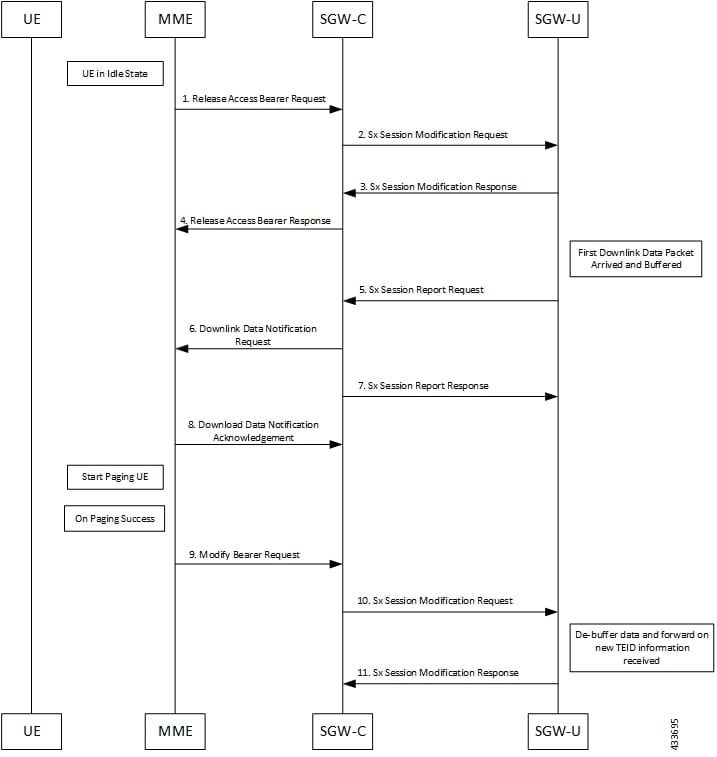 DDN Success Scenario Call Flow
- MME sends Release Access Bearer request to SGW-C in order to release downlink remote Tunnel Endpoint Identifiers (TEIDs) of all the bearers for that UE.
- On arrival of Release Access Bearer request, SGW-C informs the same to SGW-U by updating FAR with apply action as buffer in Sx Modification Request for all the PDNs.
- SGW-U sends Sx Modification response after applying buffering in SGW-U for corresponding PDN.
- SGW-C sends Release Access Bearer response to MME.
- First Downlink data arriving in SGW-U triggers Sx Report Request (with report type as Downlink Data Report) towards SGW-C.
- On arrival of Sx Report Request message, the SGW-C initiates DDN request message towards MME.
- SGW-C sends Sx Report Response message towards SGW-U.
- If MME is able to send a paging request towards UE, it sets the cause as 'Request Accepted' in DDN Acknowledgment Message and sends it to SGW-C.
- On successful paging, MME sends a Modify Bearer request to the S-GW with eNodeB TEIDs that sets up the S1-U connection at the SGW.
- SGW-C sends Sx Modification Request with updated FAR for new TEID information to SGW-U. SGW-U can now forward all the buffered data to UE through eNodeB.
- SGW-U sends Sx Modification response to SGW-C.
DDN Failure Scenario Call Flow
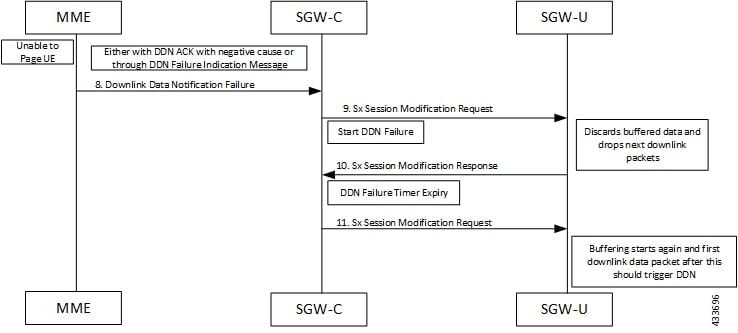 DDN Failure Scenario Call Flow
- MME sends Release Access Bearer request to SGW-C in order to release downlink remote TEIDs of all the bearers for that UE.
- On arrival of Release Access Bearer request, SGW-C informs the same to SGW-U by updating FAR with Apply Action as buffer in Sx Modification Request for all the PDNs.
- SGW-U sends Sx Modification response after applying buffering in SGW-U for corresponding PDN.
- SGW-C sends Release Access Bearer response to MME.
- First Downlink data arriving in SGW-U triggers Sx Report Request (with report type as Downlink Data Report) towards SGW-C.
- On arrival of Sx Report Request message, the SGW-C initiates DDN request message towards MME.
- SGW-C sends Sx Report Response message towards SGW-U.
- If MME is unable to page UE then it can reject DDN Request with relevant cause.
or
If MME accepts DDN Request, it later sends DDN Failure indication in order to indicate SGW-C that the UE did not respond to paging.
- SGW-C received DDN failure and hence in order to stop sending next DDN immediately, SGW-C starts DDN Failure Timer. SGW-C sends Sx Modification Request with Drop Buffered (DROBU) flag in order to discard buffered packets and Apply Action as 'drop' in order to drop the subsequent packets.
- SGW-U sends Sx Modification Response to SGW-C.
- On DDN Failure Timer Expiry, SGW-C initiates Sx Modification with Apply Action as buffer in order to start buffering again.
- Further steps are continued from Step 3. in the DDN Success Scenario call flow.
Solution Overview
The number of packets buffered per FAR on the User Plane is configurable on the Cisco CUPS Control plane. Thereby, you can overcome this five packet buffer limit through a CLI buffering-limit far-max-packets <num> available under the Active Charging Service (ACS) subsystem. Operator can decide on any value in the range from 1 to 128 in order to control the FAR buffer limit depending on their call model to optimize Quality of Service (QoS) and reduce packet drops thereby enhancing UE experience and improving overall network performance.
Configuration
local]hostname# configure

[local]hostname(config)# active-charging service ecs

[local]hostname(config-acs)# buffering-limit far-max-packets <num>

[local]hostname(config-acs)# end

[local]hostname#

[local]hostname# push config-to-up all
Verification
show user-plane-service statistics drop-counter
	Packet Drop Data Statistics:
	-----------------------------------------------
	NAT packets processing failure:
	    NAT on demand handling:                 0
	    IP allocation is in progress:           0
	    ICMP Packet translation:                0
	    Invalid Callid:                         0
	    Invalid Header:                         0
	    ICMP Payload Parse Failure:             0
	FIREWALL packets processing failure:
	    Policy not found:                       0
	No Matching GX rule found:                  32362
	Flow apply action:
	    Discard:                                0
	    Readdress Failure:                      0
	    Redirect-URL:                           0
	Packet exceeds the MTU size:                1007742185
	Failure in processing FAR Buffer packets:   21
	FAR Apply Action Drop:                      28792512
	Traffic Steering Failure:                   0
	QER Gate Status Closed:                     0
	Content-filtering Discard Action:           0
	IP Header Validation Failed:                6020295
	ADF level failure:
	    UL TEID/QFI key mismatch:               0
	    DL TFT mismatch:                        0
	    DL QFI mismatch:                        0
	URL Blacklisting Discard Action:            0
	DDN buffer overflow drop packets:           11
	APN AMBR Packets Drop:                      5
	ITC Packets Drop:                           263040006
	ACL Drop:                                   31149173
	CC Dropped Packets:                         1513522
	FastPath Misc Drops:
	    Overload Protection:                    0
	    Invalid Client:                         0
	    Stream ID 0:                            0
	    Invalid Stream ID:                      145
	OHR Mismatch Packet Drops:                  7091753
Compare 'DDN buffer overflow drop packets' counter with default buffering-limit far-max-packets value (which is five) as against another value higher than five with the same Call-Model flavor and duration. You must see a decrease in this counter when value is higher than five.
Related Information
 Feedback