Console Cables on Cisco Access Points - Technical Note
Available Languages
Contents
Introduction
Cisco access points officially support console cables that are at most one meter long and are terminated in Data Terminal Equipment (DTE). Furthermore, the RS-232 standard specifies a cable of at most 15 meters at 9600 bps. However, for diagnostic and maintenance reasons, some customers may choose to operate with much longer cables permanently installed. This note documents some known problems with such installations and offers steps for mitigation.
Support for Console Cables on Access Points
Per official documentation, Cisco supports console cables that are at most one meter long and that are terminated at a DTE. For example, the CW9177 Hardware Installation Guide says:
We recommend that you use a console cable that is one meter or less in length.
Note The AP may face issues while booting if you use an unterminated console cable (not plugged into any device or terminal) or a console cable that is more than one meter in length.
Problems Seen with Longer/Unterminated Console Cables
With a longer console cable connected, especially if unterminated, the AP may unexpectedly reboot. Furthermore, the AP may become stuck during the boot process after a reboot or power cycle, unable fully to boot into service. One or more power cycles may be necessary to return the AP to service.
Fix for Bootup Problem – Cisco bug ID CSCwv52872 
The problem with an AP getting stuck during the boot process is addressed via Cisco bug ID CSCwv52872 , which is fixed in the following releases: 17.15.7, 17.18.5, 26.1.3, 26.2.1, 27.1.1.
Mitigating Problems Caused by Long, Unterminated Console Cables
Cisco does not support cables that are connected to an AP console port that are unterminated or are longer than one meter. The mitigation efforts given below can reduce the amount of noise that unsupported cables will introduce to the console port; if problems are still seen, you should disconnect the unsupported cables.
Reduce Console Speed to 9600 bps
Beginning in 17.12.1, Cisco access points’ console ports default to 115200 bps; prior to this release, the default was 9600 bps. This change was implemented via Cisco bug ID CSCwe88390 , in order to speed up AP boot time. As the console port is much more susceptible to noise at the higher bit rate, an AP with a long console cable permanently connected should be set to 9600 bps. This can be done on the AP CLI with the following command:
ap#config boot baudrate 9600
In 26.1.1 and above, this can be configured in the AP join profile on the 9800:
- In the CLI:
9800(config)#ap profile <PROFILENAME>
9800(config-ap-profile)#console speed 9600 - In the GUI:
Configuration > Tags & Profiles > AP Join > Management > Device > Console Speed
Terminate the Cable
A long console cable’s susceptibility to noise will be mitigated to some extent by terminating the cable, at the far end from the AP console port, in a DTE. For example, rather than terminating the cable in an open port in a patch panel, plug the remote end into a port in a Cisco Secure Console Server.
An alternative to plugging the far end of the cable into a DTE port, is to strap the TxD signal to one ground wire, and the RxD signal to the other ground wire – i.e. from the perspective of the console RJ45’s pin assignments, 3 to 4 and 6 to 5. If using TIA 568B (as is most prevalent), you would strap white/green (TxD) to blue, and green (RxD) to white/blue. See the Technical Background section below.
Connect the TxD and RxD Signals to Separate Cable Pairs
In a Cisco-standard RJ45 console port, the TxD (Transmit Data) and RxD (Receive Data) signals are on pins 3 and 6 respectively. If connected to an unshielded twisted pair (UTP) cable, these signals should be cabled to separate pairs.
The TIA/EIA 568A and 568B cabling standards, used for LAN cabling, put RJ45 pins 3 and 6 into the same cable pair. This is a worst-case design for carrying RS-232 signaling, as it causes severe near-end crosstalk, resulting in the console port receiving noise. With a floating cable only 15 feet in length, an oscilloscope shows this strong crosstalk:
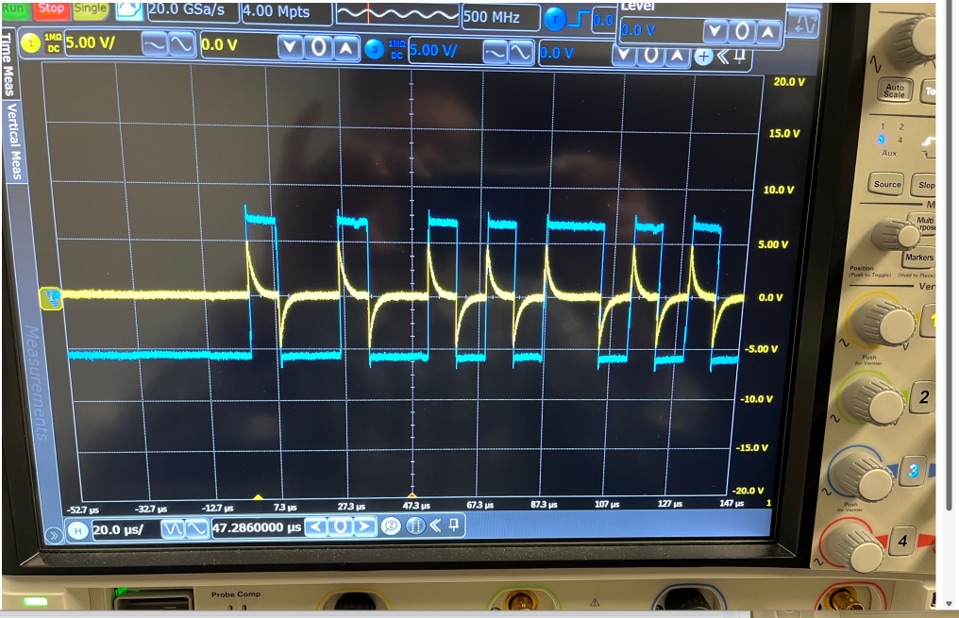
The cyan signal is the TxD signal from the console port; the yellow is the reflected crosstalk received on the RxD lead.
A better design for connecting an RS-232 port to a UTP cable places the TxD and RxD signals on separate pairs, each paired with a ground signal. See for example the Yost wiring standard, as documented by Lammert Bies.
Technical Background
Pinouts
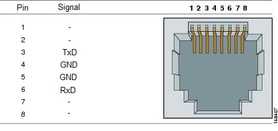
The Cisco-standard RS-232 (EIA/TIA-232) console interface, as has been implemented in routers, switches and access points since the 1990s, uses only the TxD (Transmit Data – i.e. data transmitted by the console port), RxD (Receive Data) and Signal Ground leads, as shown below:
When plugging a standard LAN plug (TIA 568A or 568B) into the console port, the TxD (pin 3) and RxD (pin 4) signals are placed upon the same twisted pair:
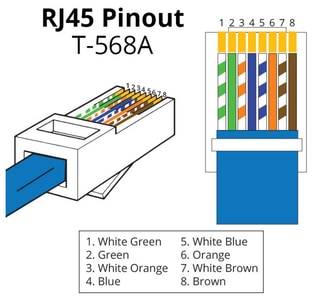
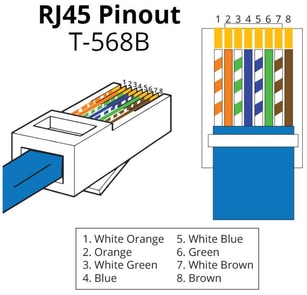
You can see that, with 568A, RJ45 3 and 6 are on the orange pair, and, with 568B, they’re on the green pair. This maximizes the crosstalk interference! A much better design puts TxD (console port pin 3) in the same pair with pin 4 (ground), and RxD (pin 6) in the same pair with pin 5. This twists the signal leads with their own ground.
EIA/TIA-232 Speed and Distance Limitations
The table below gives the EIA/TIA-232 speed and distance limitations. In practice, one can often get away with longer distances, but these are the supported limits, as Cisco has documented for decades.
| Data Rate (Baud) |
Distance (Feet) |
Distance (Meters) |
| 2400 |
200 |
60 |
| 4800 |
100 |
30 |
| 9600 |
50 |
15 |
| 19200 |
50 |
15 |
| 38400 |
50 |
15 |
| 57600 |
25 |
7.6 |
| 115200 |
12 |
3.7 |
(Reference: CAB-232 MT/FC EIA/TIA-232 Serial Cable Specifications)
Revision History
| Revision | Publish Date | Comments |
|---|---|---|
1.0 |
17-Nov-2026
|
Initial Release |

 Feedback
Contact Cisco
- Open a Support Case

- (Requires a Cisco Service Contract)
This Document Applies to These Products
- 6300 Series Embedded Services Access Points
- Aironet 1540 Series
- Aironet 1560 Series
- Aironet 1815 Series Access Points
- Aironet 1830 Series Access Points
- Aironet 1840 Series Access Points
- Aironet 1850 Series Access Points
- Aironet 2800 Series Access Points
- Aironet 3800 Series Access Points
- Aironet 4800 Access Points
- Catalyst 9100 Access Points
- Catalyst 9105AX Series Access Points
- Catalyst 9115AX Series Access Points
- Catalyst 9117AX Series Access Points
- Catalyst 9120AX Series Access Points
- Catalyst 9124AX Series
- Catalyst 9130AX Series Access Points
- Catalyst 9136 Series Access Points
- Catalyst 9162 Series Access Points
- Catalyst 9163 Series Access Points
- Catalyst 9164 Series Access Points
- Catalyst 9166 Series Access Points
- Catalyst IW6300 Heavy Duty Series Access Points
- Catalyst IW9165 Heavy Duty Series
- Catalyst IW9165 Rugged Series
- Catalyst IW9167 Heavy Duty Series
- Industrial Wireless 3700 Series
- Wireless 9171 Series Access Points
- Wireless 9172 Series Access Points
- Wireless 9174 Series Access Points
- Wireless 9176 Series Access Points
- Wireless 9178 Series Access Points
- Wireless 9179 Series Access Points