Introduction
This document describes how to troubleshoot the error “A User with the specified extension already exists in the Partition” in Cisco Unity Connection.
Prerequisites
Requirements
Cisco recommends that you have knowledge of these topics:
- Cisco Unity Connection (CUC)
- Cisco Unified Communications Manager (CUCM)
Components Used
- Cisco Unity Connection 15su2
- Cisco Unified Communications Manager 15su2
The information in this document was created from the devices in a specific lab environment. All of the devices used in this document started with a cleared (default) configuration. If your network is live, ensure that you understand the potential impact of any command.
Background Information
This error commonly appears when users are imported from CUCM.
The message indicates that another user already uses the same extension as the user you want to import. This issue does not apply only to the primary extension; it can also relate to an alternate extension assigned to another user. In this case, the search filter must be changed to display the correct information.
Troubleshoot
Step 1. Identify the affected extension in the error log file.
Thursday, February 12, 2026 5:32:40 PM CST ERROR importing user (webextest) with extension = 104 : A User with the specified extension already exists in the Partition.
Step 2. Navigate to Users > Users
Step 3. Modify the search limits parameters to:
- Limit search to “Partition”.
- Where Name Is “Select the intended partition”.
- Select the “Display Primary and Alternate Extensions in Selected Partition” option.
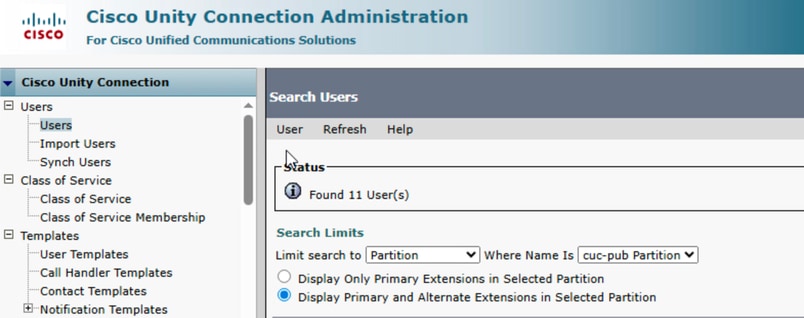
Step 4. Find the user configured with the identified extension:
- Find Users where “Extension”.
- begins with the “identified extension”.

Step 5. The filter now returns the user configured with the identified extension.
Step 6. In case of alternate extension, navigate to the user configuration > Edit > Alternate Extension
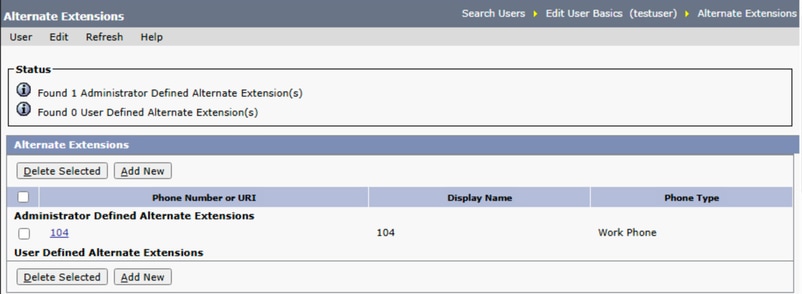
Step 7. Once identified the user, modify the configuration as needed.

 Feedback