Troubleshoot Upgrade Failure in Unity Connection 15 Due to Missing AVX CPU Instructions
Available Languages
Introduction
This document describes how to troubleshoot dblinit-plugin generic Error on the Cisco Unity Connection upgrade from 15su2 to 15su4 on the Subscriber.
Prerequisites
Requirements
Cisco recommends that you have knowledge of these topics:
- Cisco Unity Connection (CUC)
- CLI Platform
- Virtualization Environment
Components Used
The information in this document is based on these software and hardware versions:
-
Unity Connection cluster with Publisher and Subscriber nodes
-
Source version: Unity Connection 15.0.1(SU2)
-
Target version: Unity Connection 15.0.1(SU4)
-
VMware virtualized environment
-
Publisher node upgrade completed successfully
-
Subscriber node upgrade failure at post-install phase
The information in this document was created from the devices in a specific lab environment. All of the devices used in this document started with a cleared (default) configuration. If your network is live, ensure that you understand the potential impact of any command.
Problem
Unity Connection upgrade from 15.0.1(SU2) to 15.0.1(SU4) fails on the subscriber node with a generic error message. The publisher node upgrades successfully, but the subscriber upgrade fails at the Informix DBMS post-install phase. When it is reviewed the upgrade status, this error is displayed:
admin:utils system upgrade status

An error has occured but no messages on the upgrade failure are available . Please review the install logs for additional details.

Upgrade status: Failed
  Upgrade file: UCSInstall_CUC_15.0.1.14900-45.sha512.iso
   Upgrade log: install_log_2026-07-31.20.52.39.log
The install logs reveal specific errors at the Informix DBMS post-install phase, with the key failure which occurs when the ee_edition.jar process returns error code 134. Replication errors can also be observed at the troubleshoot of the issue.
07/31/2026 20:28:44 component_install|(CAPTURE) Fri Jul 31 20:28:44 2026 dblinit-plugin.run ERROR: ERROR: "Error executing [['sh', '-c', 'source /usr/local/cm/db/informix/local/ids.env ;/usr/local/thirdparty/java/j2sdk/bin/java -jar /usr/local/cm/db/informix/ee_edition.jar -DUSER_INSTALL_DIR=/usr/local/cm/db/informix -DLICENSE_ACCEPTED=TRUE -i silent']] returned [134]"|<LVL::Debug>
Root Cause Analysis:
The upgrade failure is caused by VMware EVC mode or CPU compatibility masking preventing AVX CPU instructions from being exposed to the Unity Connection subscriber VM. Unity Connection 15.0.1(SU3) and later versions introduced a newer JENT entropy package that requires AVX CPU instructions during the Informix DBMS post-install phase.
The specific failure occurs when the ee_edition.jar process attempts to execute during the database initialization and returns error code 134, indicating the required CPU instructions are not available. This is a known issue affecting CUCM, CUC, and CER upgrades to 15SU3 and later when AVX instructions are not properly exposed to the virtual machine.
This is also documented on Cisco bug ID CSCwr26988.
Solution
This issue is resolved when the AVX CPU instructions are properly exposed to the subscriber VM. The failure occurs because Unity Connection 15.0.1(SU3) and later versions require AVX CPU instructions for the newer JENT entropy package used at the Informix DBMS installation.
Step 1: Verify AVX CPU Instructions Availability
Check if AVX instructions are visible inside the failed subscriber VM. Review the Hardware Specs.
show hardware
Look for AVX support in the CPU features list. If AVX is not present, proceed to the VMware configuration verification steps.
Step 2: Review VMware EVC Configuration
In the vSphere Client, perform this verification:
Navigate to ESXi host or cluster > Configure > VMware EVC
Verify the configured EVC mode. Intel "Westmere" generation and older do not support AVX exposure. The EVC mode must be set to a generation that supports the AVX (Sandy Bridge or newer one that depends on hardware generation).
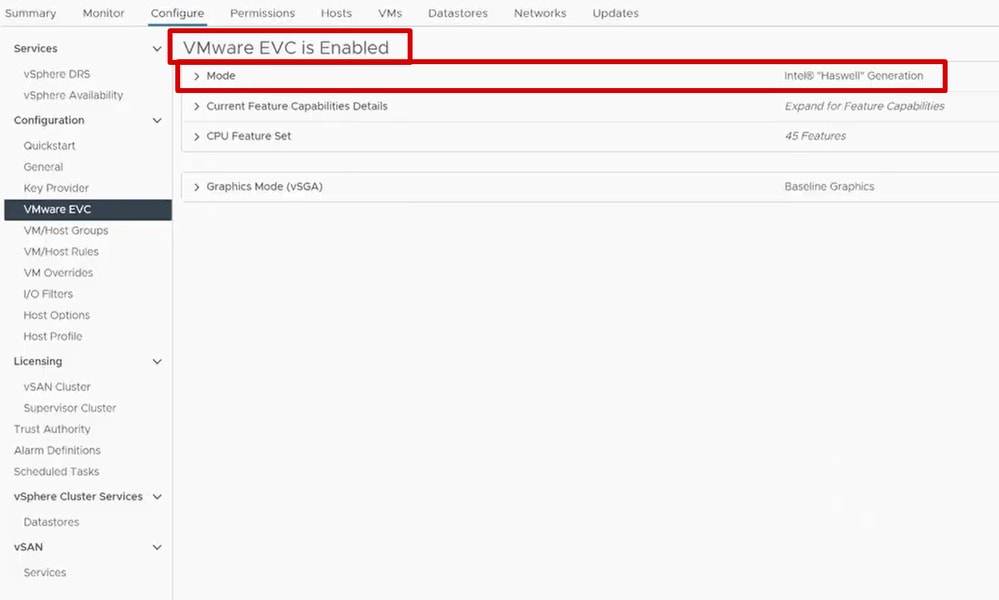 VMWare EVC is Enabled with Mode Intel Haswell
Step 3: Verify VM Hardware Compatibility
Check the VM configuration settings:
-
VM hardware compatibility level
-
Confirm CPU compatibility masking is not configured on the VM
-
Verify that publisher and subscriber are not hosted on different ESXi clusters or hosts with incompatible EVC settings
Step 4: Correct AVX Exposure
After the correction of the EVC mode or CPU presentation settings:
-
Power cycle the subscriber VM completely
-
Recheck the hardware/CPU output to confirm AVX is now visible
-
Verify AVX instructions are properly exposed via CLI with the show hardware command
Step 5: Retry the Subscriber Upgrade
Once AVX is confirmed present in the VM:
-
Ensure cluster replication is healthy between nodes
-
Start a fresh upgrade attempt on the subscriber node
-
Monitor the upgrade process through the install logs
Note: Since the previous upgrade attempt invalidated the inactive partition, the retry must be started fresh rather than resumed.
Revision History
| Revision | Publish Date | Comments |
|---|---|---|
1.0 |
04-Aug-2026
|
Initial Release |

 Feedback
Contact Cisco
- Open a Support Case

- (Requires a Cisco Service Contract)